B10RD - CD Player BLAUPUNKT - Free user manual and instructions
Find the device manual for free B10RD BLAUPUNKT in PDF.


| Product Type | CD/MP3 Boombox with Cassette Player |
| Brand | Blaupunkt |
| Model | B10RD |
| Power Supply (AC) | 230-240V ~ 50 Hz |
| Power Supply (DC) | 12V, 8 x C size batteries (not included) |
| Power Consumption | 13W |
| Standby Power Consumption | <1W |
| FM Frequency Range | 88-108 MHz |
| Supported Disc Formats | CD, CD-R, MP3 |
| Programmable Tracks (CD) | Up to 20 |
| Programmable Tracks (MP3) | Up to 99 |
| Playback Modes | Repeat 1, Repeat Album, Repeat All, Random, Normal |
| Radio Bands | FM (stereo and mono), AM |
| Antenna | Built-in FM wire antenna |
| Cassette Player | Playback only, auto-stop |
| Auto Standby (ERP2) | After 5 minutes of no audio input |
| Maximum Operating Temperature | 35°C |
| Cleaning | Wipe with dry cloth; unplug before cleaning |
| Safety Compliance | CE, RoHS |
| Manufacturer | Blaupunkt Competence Center Audio, M3 Electronic GmbH, Germany |
Frequently Asked Questions - B10RD BLAUPUNKT
User questions about B10RD BLAUPUNKT
0 question about this device. Answer the ones you know or ask your own.
Ask a new question about this device
Download the instructions for your CD Player in PDF format for free! Find your manual B10RD - BLAUPUNKT and take your electronic device back in hand. On this page are published all the documents necessary for the use of your device. B10RD by BLAUPUNKT.
USER MANUAL B10RD BLAUPUNKT
CD/MP3 Boombox with Cassette Player

B 10e

www.blaupunkt.com
Bedienungsanleitung
Instruction Manual

BLAUPUNKT
Inhaltsverzeichnis

TO PREVENT FIRE OR SHOCK HAZARD DO NOT EXPOSE THIS APPLIANCE TO RAIN OR MOISTURE


LIGHTNING FLASH WITH ARROWHEADSYMBOL-
within an equilateral triangle, is intended to alert the user to the presence of uninsulated dangerous voltage within the products enclosure that may be of sufficient magnitude to constitute a risk of electric shock to persons.
EXCLAMATION POINT-
POINT-within an equilateral triangle, is used to indicate that a specific component shall be replaced only by the component specified in that documentation for safety reason.
To achieve the utmost in enjoyment and performance, and in order to become familiar with its features, please read this manual carefully before attempting to operate this product, this will assure you years of trouble free performance and listening pleasure.
Important Notes
· This safety and operating instruction should be retained for future reference.
- The apparatus should not be exposed to dripping or splashing or placed in a humid atmosphere such as a bathroom.
- Do not install the product in the following areas:
o Places exposed to direct sunlight or close to radiators
o On top of other stereo equipment that radiate too much heat
o Blocking ventilation or in a dusty area
o Areas where there is constant vibration
o Humid or moist places.
- Do not place near candles or other naked flames
- Operate the product only as instructed in this manual
- Before turning on the power for the first time, make sure the power adaptor is properly connected.
For safety reasons, do not remove any covers or attempt to gain access to the inside of the product. Refer any servicing to qualified personnel.
Do not attempt to remove any screws, or open the casing of the unit; there are no user serviceable parts inside, refer all servicing to qualified service personnel.
CE Conformity
Model number: B 10e
Description: CD/MP3 Boombox with Cassette Player
Brand name: Blaupunkt
Responsible party: M3 Electronic GmbH
Gutenbergstrasse 5, D-65830 Kriftel. Germany
Hereby, Blaupunkt Competence Center Audio M3 Electronic GmbH, declares that this Class 1 equipment is in compliance with the essential requirement and other relevant provisions of Directive 1999/5/EC.
Letter of conformity can be obtained from info@m3-electronic.de.
Safety Instructions
-
Read Instructions - All the safety and operating instructions must be read before the product is operated.
-
Retain Instructions - The safety and operating instructions should be kept product for future reference.
-
Heed warnings - All warnings on the product and in the operating instructions should be adhered to.
-
Follow instructions - All operating and users' instructions should be followed.
-
Installation - Install in accordance with the manufacturer's instructions.
-
Power sources - This product should be operated only from the type of power source indicated by the marking adjacent to the power cord entry. If you are not sure of the type of power supply to your home, consult your product dealer or local power company.
-
Grounding or polarization - the product is not required to be grounded. Ensure the plug is fully inserted into the wall outlet or extension cord receptacle to prevent blade or pin exposure. Some versions of the product are equipped with a power cord fitted with a polarized alternating line plug (a plug having one blade wide than the other). This plug will fit onto the power outlet only one way. This is a safety feature. If you are unable to insert the plug fully into the outlet, try reversing the plug. If the plug should still fail to fit, contact your electrician to replace your obsolete outlet. Do not defeat the safety purpose of the polarized plug. When using an extension power-supply cord or a power-supply cord other than that supplied with the appliance, it should be fitted with the appropriate molded plugs and carry safety approval appropriate to the country of use.
-
Power cord protection - Power-supply cords should be routed so that they are not likely to be walked on, kinked or pinched by items placed on or against them, paying particular attention to cords from plugs, receptacles and the point where they exit from the product.
-
Overloading - Do not overload wall outlets, extension cords, or multiple sockets, as this can result in a risk of fire or electric shock.
-
Ventilation - The product must be properly ventilated. Do not place the product on a bed, sofa, or other similar surface. Do not cover the product with any items such as tablecloths, newspapers, etc.
-
Heat - The product should be situated away from heat sources such as radiators, heat registers, stoves, or other products, including amplifiers that produce heat. No naked flame sources, such as lighted candles, should be placed on the apparatus.
-
Water and moisture - To reduce the risk of fire or electric shock, do not expose the product to train, dripping, splashing or excessive moisture such as in a sauna or bathroom. Do not use this product near waterfor example, near a bathtub, washbowl, kitchen sink, laundry tub, in a wet basement, or near a swimming pool and the like.
-
Object and Liquid Entry - Never push objects of any kind into this product through openings, as they may touch dangerous voltage points or short-circuit parts that could result in a fire or electric shock. Never spill liquid of any kind on the product. Do not place any object containing liquid on top of the product.
-
Cleaning - Unplug the product from the wall outlet before cleaning. The cabinet of the subwoofer may be cleaned by dusting with a dry cloth. If you wish to use an aerosol cleaning spray, do not spray directly on the cabinet; spray onto the cloth. Be careful not to damage the drive units.
-
Attachments - Do not use attachments not recommended by the product manufactures, as they may cause hazards.
-
Accessories - Do not place this product on an unstable cart, stand, tripod, bracket or table. The product may fall, causing serious injury to a child or adult, and serious damage to the product. Use only with a cart, stand, tripod, bracket or table recommended by the manufacturer or sold with the product. Any mounting of the product should follow the manufacturer's instructions and should use a mounting accessory recommended by the manufacturer.
-
Moving the product - A product and cart combination should be moved with care. Quick stops, excessive force and uneven surfaces may cause the product and cart combination to overturn.
-
Unused periods - The power cord of the appliance should be unplugged from the outlet during lightning storms or when the apparatus is left unused for a long period of time.
-
Servicing - Do not attempt to service this product yourself, as opening or removing covers may expose you to dangerous voltage or other hazards. Refer all servicing to qualified service personnel.
-
Please remove the power plug form the main power source or wall power source when not in use. When plugged in to a power source, the system is in standby mode, so the power is not entirely cut off.
-
Replacement parts - When replacement parts are required, ensure the service technician has used replacement parts specified by the manufacturer or have the same characteristics as the original part. Unauthorized substitutions may result in fire, electric shock or other hazards.
-
Mains fuses - For continued protection against fire hazard, use fuses only of the correct type and rating. The correct fuse specification for each voltage range is marked on the product.
-
Do not turn up the volume while listening to a section with very low level inputs or no audio signals. If you do, the speaker may be damaged when a peak level section is suddenly played.
-
The only means of completely disconnecting the product from the power supply is by removing the power cord from the wall outlet or the product. The wall outlet or the power cord entry to the product must remain freely accessible at all times while the product is in use.
- Try to install the product near a wall socket or extension cord and shall be easily accessible.
- The highest environmental temperature suitable for this product is 35°C.
- ESD hints - The product maybe reset or not reset to operation of control due to electrostatic discharge, just switch off and reconnect again.
ERP2 - (Energy related products) note
This product complies with the European Commission on Ecodesign Directive and its implementing Regulations - Energy related products. After 5 minutes without any audio input, the system will automatically enter standby mode. The function of unit will resume after the normal operation according to the manual.
Warning: Danger of radiation

These labels tell you that the unit contains a laser component. Opening the CD compartment lid and defeating the safety interlocks will expose the user to radiation from the laser beam. Do not stare into the laser while it is operating.
Before operation
Notes: Concerning compact discs.
Since dirty, damaged or warped discs may damage the appliance, care should be taken of the followings items:
a. Usable compact discs. Use only compact disc with the mark shown below. b. CD compact disc only with digital audio signals.

Electrical information
Mains Supply: The mains operating voltage of this unit is marked on a rating plate on the back of the unit.
The means of disconnecting this appliance from the mains supply is the mains plug. This should be unobstructed and readily operable at all times.
Power sources
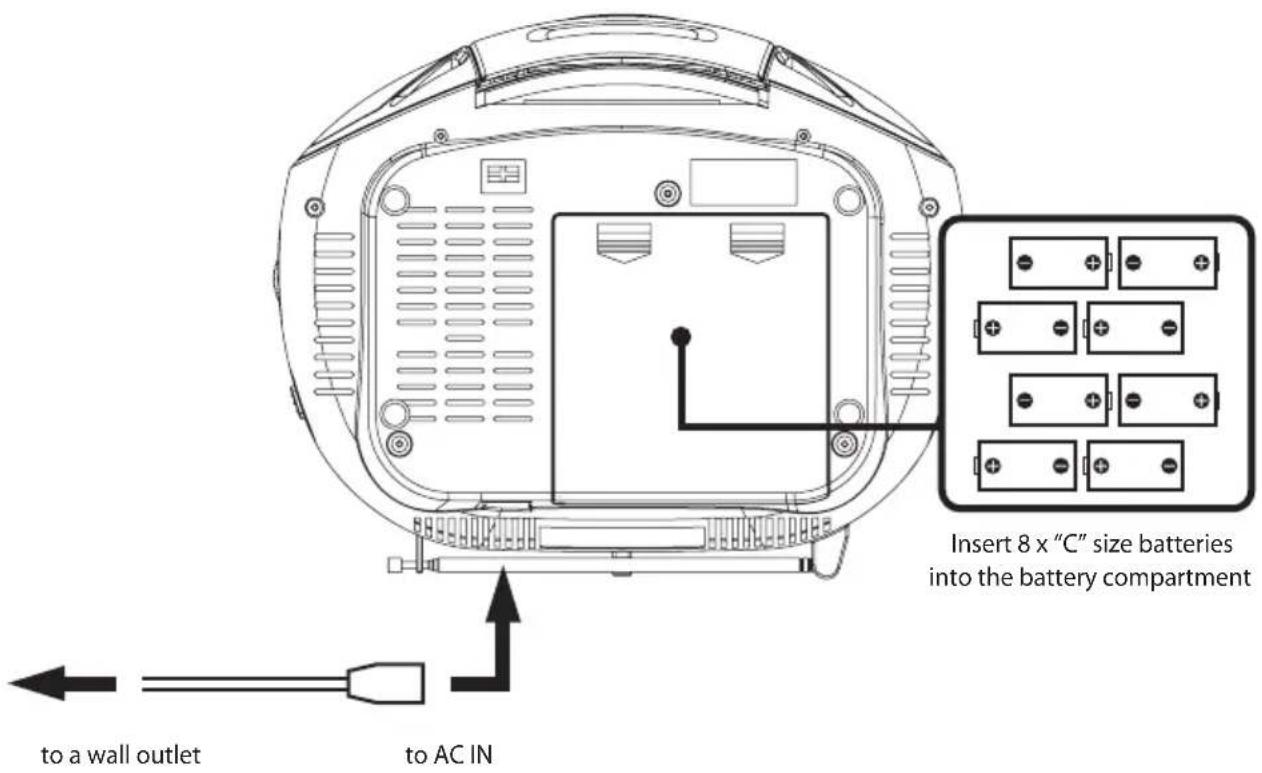
AC power
You can power your portable system by plugging the detachable AC power cord into the AC inlet at the back of the unit and into a wall AC power outlet. Check that the rated voltage of your appliance matches your local voltage. Make sure that the AC power cord is fully inserted into the appliance.
Battery power
Insert 8 x "C" size batteries into the battery compartment. Be sure that the batteries are inserted correctly to avoid damage to the appliance. Always remove the batteries when appliance will not be used for a long period of time, as this will cause leakage to the batteries and subsequently damage to your set.
Notes:
- Use batteries of the same type. Never use different types of batteries together.
- To use the appliance with batteries, disconnect the AC power cord from it.
Location of control


Radio operation
General operation
- Set the "FUNCTION" selector to "RADIO" mode.
- Select desired band by using the "BAND" selector.
- Adjust radio frequency to your desired station by using the "TUNING" control.
- Adjust the "VOLUME" control to the desired level.
FM / FM-Stereo reception
- Set the "BAND" selector to FM mode for MONO reception.
- Set the "BAND" selector to FM ST. mode for FM STEREO reception.
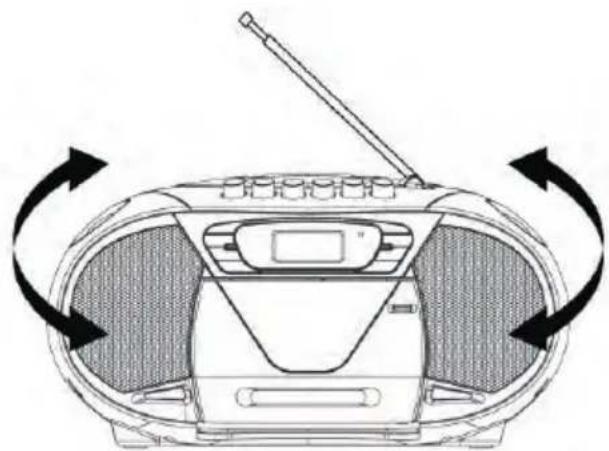
For better reception
- Reorient the antenna for better reception.
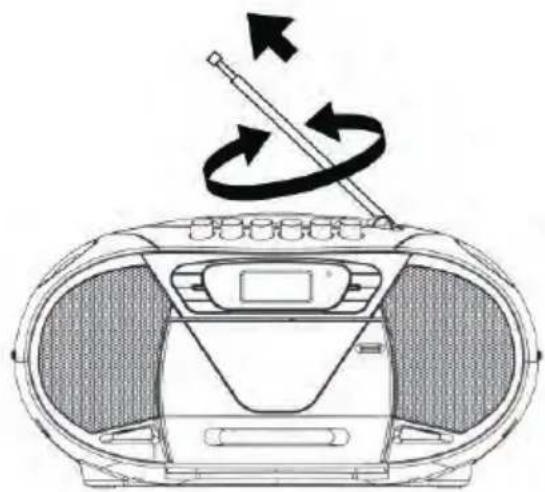
- Reorient the appliance to get better AM reception.
Tape operation
General operation
| PAUSE II | Press to stop playing tape operation temporarily. Press again to resume tape operation. |
| STOP ■/ EJECT ▲ | Press to stop tape operations. Press again to open the cassette door after the tape spools stop turning. |
| FAST FORWARD ◀◀ & REWIND ▶▶ | Press to start rapid tape winding either forward or reverse direction. |
| PLAY▶ | Press to start playing tape. |
PLAYBACK
- Set the "FUNCTION" selector to "TAPE" mode.
- Press the "STOP / EJECT" button to open the cassette door and insert your tape.
- Close the cassette door.
- Press the "PLAY" button to start playing tape.
- Adjust the "VOLUME" control to the desired level.
- Press the "PAUSE" button when you want to stop playing tape operation temporarily.
- Press the "STOP / EJECT" button when finished.
CD/MP3 operation
General operation
| PLAY / PAUSE ▶II | Press to start playing CD / MP3 disc.Press again to stop playing CD / MP3 operation temporarily.Press again to resume playback. |
| SKIP+ ▶▶& SKIP - ◀◀ | Press to go to the next track or back to the previous track.Press and hold while playing until you find the point of the sound. |
| STOP ■ | Press to stop all CD / MP3 operation. |
PLAYBACK
- Set the "FUNCTION" selector to "CD / MP3" mode.
- Open the CD door and place a CD / MP3 disc with the label up on the CD compartment.
- Close the CD door.
- Focus search is performed if disc is inside. Total number of tracks is read and appears on the display.
- Playback will start automatically from the first track.
- Adjust the "VOLUME" control to the desired level.
- Press the "PLAY / PAUSE" button again when you want to stop playback temporarily.
- Press the "STOP" button when finished.
CD/MP3 operation
Program
Up to 20 tracks fo CD disc, 99 tracks of MP3 disc can be programmed for disc play in any order.
Be sure to press the "STOP" button before use.
- Press the "MODE" button, the display will show "P01" and flash.
- Select desired track by using the "SKIP +" or "SKIP -" button. (You may select a desired album by pressing the "ALBUM" button).
- Press the "MODE" button again to confirm desired track into the program memory.
- Repeat step 2 and 3 to enter additional tracks into the program memory.
- When all the desired tracks have been programmed, press the "PLAY / PAUSE" button to play the disc in the order you have programmed.
- Press the "STOP" button twice to terminate programmed playback.
Mode
Press the "MODE" button before or during playing CD / MP3 disc, each press switches the mode function as follows:
1 - REPEAT 1
2 - REPEAT ALBUM (*MP3 ONLY)
3 - REPEAT ALL
4 - RANDOM
5 - NORMAL PLAYBACK
![graph TD A["REP"] -->|REPEAT 1| B["REP ALBUM"] B -->|REPEAT ALBUM| C["REP ALL"] C -->|REPEAT ALL| D["NORMAL PLAYBACK"] D --> E["RAND"] E --> F["RANDOM"] F --> D](/content/2026/05/1027464/images/f581589cd645b471c9ddc1dfee001bde2670f04af22e9457aaf3e563450f0daa.jpg)
Specifications
Power supply: AC 230-240V\~50 Hz
Backup battery: DC =12V 8 x "C" SIZE BATTERIES
FM Frequency Range: 88-108MHz
Power consumption: 13W
Power consumption in standby mode: < 1W

This symbol on the product or in the instructions means that your electrical and electronic equipment should be disposed at the end of its life separately from your household waste. There are separate collection systems for recycling in the EU.
For more information, please contact the local authority or your retailer where you purchased the product.
© All rights reserved by Blaupunkt Competence Center Audio M3 Electronic GmbH. This material may be reproduced, copied or distributed for personal use only.

BLAUPUNKT
Competence Center Audio
M3 Electronic GmbH
Gutenbergstrasse 5
D-65830 Kriftel - Germany
www.blaupunkt.com
Service Hotline Deutschland (Germany): Tel. 0180 55 88 66 4
All rights reserved. All brand names are registered
trademarks of their respective owners. Specifications are
subject to change without prior notice.


- INHALTSVERZEICHNIS
- LIGHTNING FLASH WITH ARROWHEADSYMBOL
- EXCLAMATION POINT
- IMPORTANT NOTES
- CE CONFORMITY
- SAFETY INSTRUCTIONS
- ERP2 - (ENERGY RELATED PRODUCTS) NOTE
- WARNING: DANGER OF RADIATION
- BEFORE OPERATION
- NOTES: CONCERNING COMPACT DISCS
- ELECTRICAL INFORMATION
- POWER SOURCES
- AC POWER
- BATTERY POWER
- NOTES
- RADIO OPERATION
- GENERAL OPERATION
- FM / FM-STEREO RECEPTION
- FOR BETTER RECEPTION
- TAPE OPERATION
- PLAYBACK
- CD/MP3 OPERATION
- PROGRAM
- MODE
- SPECIFICATIONS
- BLAUPUNKT
Brand : BLAUPUNKT
Model : B10RD
Category : CD Player