Ping - CD Player Opera-Consonance - Free user manual and instructions
Find the device manual for free Ping Opera-Consonance in PDF.


User questions about Ping Opera-Consonance
0 question about this device. Answer the ones you know or ask your own.
Ask a new question about this device
Download the instructions for your CD Player in PDF format for free! Find your manual Ping - Opera-Consonance and take your electronic device back in hand. On this page are published all the documents necessary for the use of your device. Ping by Opera-Consonance.
USER MANUAL Ping Opera-Consonance
Highend music player
USER GUIDE
Congratulations on your new Consonance!
Every Consonance product is based on a simple philosophy:
The audio reproduction instrument shall reproduce the original musical sound, purely and naturally.
It shall use Opera audio design reflecting natural music reproduction and styling to fit in with any interior.
The products shall be easy to operate and shall be manufactured according to the best quality principles.
All Consonance products are created with acoustical instruments in a concert situation as point of reference.
The music is reproduced exactly like the original and is limited only by the quality of the recording.
Our aim is to give you the best possible music experience!
CONTENTS
Sound Advice page 2
General use page 2
Remote Control page 4
Use & Placement page 5
Cleaning
page
5
Technical specifications page 6
Note & Warning page 6
Warranty
page
7
SOUND ADVICE
Consonance PING music system is easy to connect and operate and requires no prior technical knowledge. However, to get the most out of the system's superior sound and music quality, we have provided a brief description of the connections and use of the system in order to provide a total music experience.
We recommend keeping this user guide for future reference.
GENERAL USE
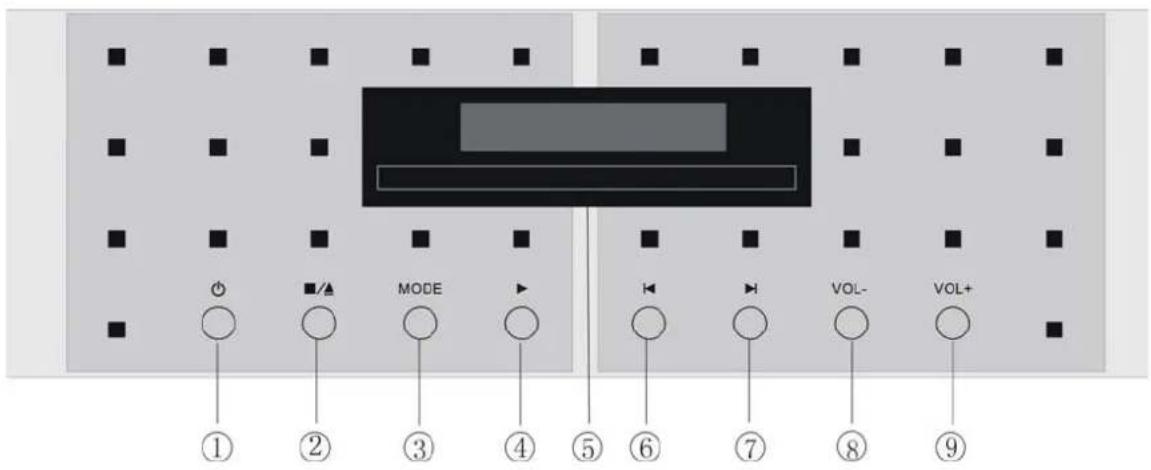
As an all-in-one music system, PING consist of CD-player section, amplifier section, FM/AM tuner section and USB input section, it has got total 8 buttons on the front panel with more than 8 functions in using.
text_image
① ② ③ ④ ⑤ ⑥ ⑦ ⑧ ⑨ MODE VOL- VOL+MODE selection
Keep pushing MODE button on the left hand side of the front panel ③ call the 4 modes selecting, they are factory set with CD, INPUT, USB, TUNER orderly. Pushing CH+ or CH- button on the remote control makes the same function.
1. CD-player section
Power on / off
Ping is switched on by pushing the ⏻ button on the left hand side of the front panel①. A flashing "-- --" in the display indicates that power has been switched on. By pushing the same button one more time the power is switched off. (Same function ⏻ button on the remote control)
Stop / open & close
Pushing ▪/▲ button on the left hand side of the front panel②stop playing CD disc. Pushing ■ button on the remote control calls the same stop function; Pushing ▪/▲ button on the left hand side of the front panel will open CD tray loader, and CD disc can be placed on CD tray loader⑤. To close CD tray loader push the same button one more time. The CD tray loader can also be closed by pushing the tray loader gently inwards. Pushing ▲ button on the remote control calls the same open/close function.
Play & Pause
Pushing ▶ button on the left hand side of the front panel④start playing CD disc. If ▶ button is pushed when a track is playing, pause mode active and indicated with flashing track and time on the screen, one more push will start playing again from the same position on the CD track.(Same function button ▶ on the remote control)
Previous track
Pushing ◀ button on the right hand side of the front panel⑥makes Ping jump to the beginning of the track that is playing. Each time this ◀ button is pushed the playing track will move backwards one more track and will automatically start playing from the beginning of the selected track.(Same function ◀ button on the remote control)
Next track
Pushing the ▶ button on the right hand side of the front panel⑦makes Ping jump to the next track on the CD disc. Each time this ▶ button is pushed the playing track will move forwards one more track, and will automatically start playing from the beginning of the selected track. (Same function ▶ button on the remote control)
2. Amplifier section
VOL-
Pushing VOL- button on the right hand side⑧ calls the volume down, pushing button - ▲ + on the remote control calls the same function.
VOL+
Pushing VOL+ button on the right hand side⑨ calls the volume up, pushing button - ▲ + on the remote control calls the same function.
MODE
Besides CD and Tuner modes, keep pushing MODE button will find INPUT for RCA connection of extra hi-fi source, TUNER and USB for USB connection of computer based music. Pushing button CH+ or CH- on the remote control calls the same function.
3. FM/AM tuner section
Backwards scanning
Pushing button in Tuner mode starts manual searching signals and stations backwards, lower frequencies direction, same function for button on the remote. Each pushing order 0.1MHz bandwidth tuning in FM mode, or 9kHz bandwidth tuning in AM mode. Keep pushing same button calls frequencies continually scanned backwards.
Forwards scanning
Pushing ▶ button in Tuner mode starts manual searching signals and stations forwards, higher frequencies direction, same function for ⊕ button on the remote control. Each pushing order 0.1MHz bandwidth tuning in FM mode, or 9kHz bandwidth tuning in AM mode. Keep pushing same button calls frequencies continually scanned forwards.
Memory clear
To clear the memory of preset stations simply press the ⏻ button and ▲/■ button on the left hand side of the front panel at the same time while the Ping is power off.
CONSONANCE REMOTE CONTROL
Consonance PING can be controlled by remote control. Like other Hi-End products, the number of buttons on the remote is kept to a minimum. The remote control uses two 1.5-volt LR03 AAA batteries.
ADDITIONAL FUNCTIONS available on the remote control
Searching fast forward is selected by holding down the ▶ button on the remote control. The search speed will start slow and will increase to high after some seconds.
Searching fast backwards is selected by holding down the ← button on the remote control. The search speed will start slow and will increase to high after some seconds.
To repeat the complete CD, press the <> button once, "r ALL" will be displayed on the screen. To repeat the track playing, press the <> button twice, "r ONE" will be displayed for two seconds on the screen. To cancel repeat, press the <> button third.
The stations memory button 📄 on the remote control enables 9 specific radio station frequencies to be assigned to the memory. When a station is received and tuned with sufficient accuracy, the first left number indicator on the screen will flash to show "numbers of station". To assign a station to a preset, simply pushing one time the 📄 button on the remote control. Pushing two times the 📄 button on the remote control will store radio stations to the memory. Further store action will replace stations

text_image
CH+ CH- FS(FM/AM)consonance
starting from station No.1 automatically when the 9 stations memory is full. To change the set number of memory stations, pushing one time the ☐ button on the remote control, the first left number indicator on the screen will flash. Then changing the number by pushing the ▶ button or ◀ button on the remote control till the desired number appear on the screen, then pushing the ☐ button one more time simply.
Pushing the ⚙ button on the remote control, the MUTE blue LED light at the right corner on the screen indicates reducing the amplifier volume to zero. A second press restores the volume.
To dim the display, pushing the ⚙ button. Display will dim from bright to dead on the screen.
Stereo and Mono output selecting switch only for FM tuner mode.
FS(FM/AM)
Pushing FS(FM/AM) button to switch FM or AM in Tuner mode while pushing the same button to switch the sampling 44.1/88.2kHz in CD mode.
Back panel of Ping
text_image
SPEAKER OUTPUT POWER AC 230V 50Hz TSA AC 115V 60Hz T10A Ping CLASS1 LASER PRODUCT CAMOUNT Risk of electronic sound On not open ANT INPUT (AUX) CAMOUNT AM USB INPUT SPEAKER OUTPUT RIGHT HIGH END MUSIC PLAYER MADE BY OPERA AUDIO CHINA LEFTF
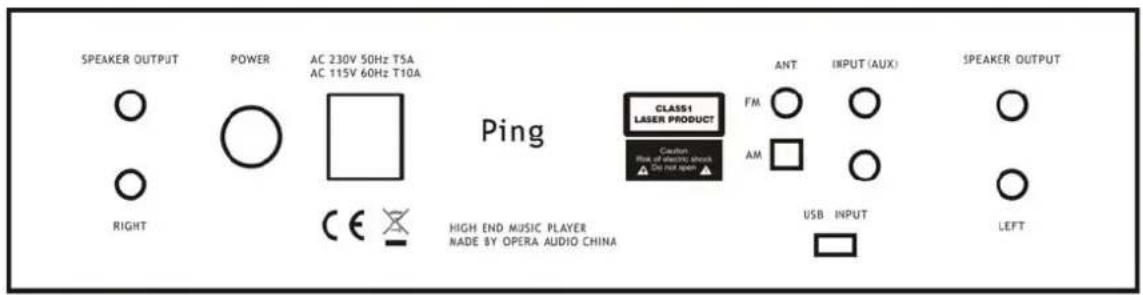
rom left to right the connectors are :
Right speaker output
general power on/off switch
AC Power connection 240V / 230V / 220V / 115V / 100V AC dependent on country.
FM&AM antenna inputs right/left, AUX input (RCA and USB)
Left speaker output.
FM antenna equipped with standard Ping.
AM antenna equipped with standard Ping.

natural_image
Simple line drawing of a rectangular object connected to a circle (no text or symbols)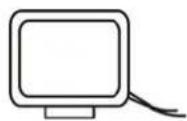
USE & PLACEMENT
Consonance PING should be placed on a flat, hard surface for proper isolation against vibrations. A certain space is required for air circulation above and below Ping. It must never be placed on a carpet or similar surface that obstructs air circulation through the component. Nor must it be covered while in use or placed on a narrow shelf or in another confined space. Ping performs best after being switched on for about 30 minutes.
CLEANING
The top cover is made of cherry wood, while the front panel and side panels are made of brushed / blasted and anodized aluminum. Fingerprints or stains on the front panel, knobs or top cover can be removed with a cloth moistened with warm water.
We wish you good luck in setting up and connecting your new all-in-one music system and hope that it will give you many years of joyful natural sounding music experiences!
TECHNICAL SPECIFICATIONS
Mains Supply: 230V / 50Hz or 115V / 60 Hz.
Amplifier section:
Power output : 100W + 100W at 8 Ohms
Minimum load : 4 ohms speakers can be connected
CH Sources : one remote controllable inputs switched by gold plated relays
Frequency response : Less than +/- 0.1 dB deviation 20Hz-80kHz
Phase response : Less than 2 degrees deviation 20Hz-80kHz
Signal-to-noise ratio: More than 95dB
Crosstalk : Less than -100dB
Distortion: Less than 0.015% at 80W 8 0hms
Remote Control : RC-5 compatible IR system 36kHz modulation
CD-player section :
DAC resolution : 16bit TDA1543
Frequency response : Less than +/- 0.5 dB deviation 20Hz-20kHz
Phase response : Less than 5 degrees deviation 20Hz-20kHz
Signal-to-noise ratio : More than 100dB
Crosstalk: Less than -100dB
Distortion (RCA) : Less than 0.12 %
FM tuner section:
Tuning range: VHF/FM 87.5-108MHz
Sensitivity: (INF)10dB uV/m
Signal/Noise Ratio: 55dB
AM tuner section:
Tuning range: VHF/AM 522 - 1620 kHz
Sensitivity: (INF)60dB uV/m
Signal/Noise Ratio: 45 dB
USB section:
Fully compliant with USB1.1 specification
THD+N:0. 006%(at self-powered)
Dynamic range: 98 dB
NOTE & WARNING
Consonance products should only be opened and / or serviced by certified Consonance technicians.
The device contains electronic components that can cause severe electric shock. Work performed on
Consonance products by unqualified personnel can cause serious damage and personal injury.
Opening of the product by non-authorized personnel will void the guarantee.
The products must not be exposed to rain or moisture.
Warranty
Opera audio guarantees each product manufactured by us to be free from defects in materials and workmanship under normal use. Our obligation under this warranty is limited to making good at our factory any part or parts thereof which shall, within 1 year after delivery to the original purchaser, be returned to us with transportation charges prepaid, and which an examination shall disclose to have been thus defective; this warranty being expressly in lieu of all other warranties expressed or implied and of all other obligations or liabilities on our part. This warranty shall not apply to any Opera audio product which shall have been repaired or altered outside of our factory in any way so as to affect its stability, nor which has been subject to misuse, negligence or accident. Warranties of the vacuum tubes are by the respective manufacturers, usually 90 days.
Please mail or e-mail the Registration Card to the address as follows:
The Opera Audio Co., Ltd.
No.2 JianXianQiaoLu
ChaoYang District
Beijing, China
Tel: 86 10 64377091
Fax: 86 10 64377465
support@opera-consonance.com
www.opera-consonance.com

Registration Card
Name
Address
City
State
Zip
Telephone
Model
Serial Number
Purchase Date
Dealer