SL 1224 USB - Blender Wharfedale - Free user manual and instructions
Find the device manual for free SL 1224 USB Wharfedale in PDF.


| Product Type | Blender |
| Brand | Wharfedale |
| Model | SL 1224 USB |
| Power Supply | AC 220-240V, 50/60Hz |
| Rated Power | 600 W |
| Capacity | 1.5 L |
| Speed Settings | 2 speeds + pulse |
| Blade Material | Stainless steel |
| Jug Material | Glass |
| Dimensions (W x D x H) | 200 x 180 x 400 mm |
| Weight | 2.5 kg |
| Cord Length | 1.0 m |
| Safety Features | Non-slip feet, overload protection, locking lid |
| Cleaning | Removable jug, blade assembly washable; wipe motor base with damp cloth |
| Spare Parts | Replacement jug, lid, blade assembly available |
| Reparability | Disassembly for motor and switch repair possible; contact service center |
Frequently Asked Questions - SL 1224 USB Wharfedale
User questions about SL 1224 USB Wharfedale
0 question about this device. Answer the ones you know or ask your own.
Ask a new question about this device
Download the instructions for your Blender in PDF format for free! Find your manual SL 1224 USB - Wharfedale and take your electronic device back in hand. On this page are published all the documents necessary for the use of your device. SL 1224 USB by Wharfedale.
USER MANUAL SL 1224 USB Wharfedale
SL Series Mixing Consoles
natural_image
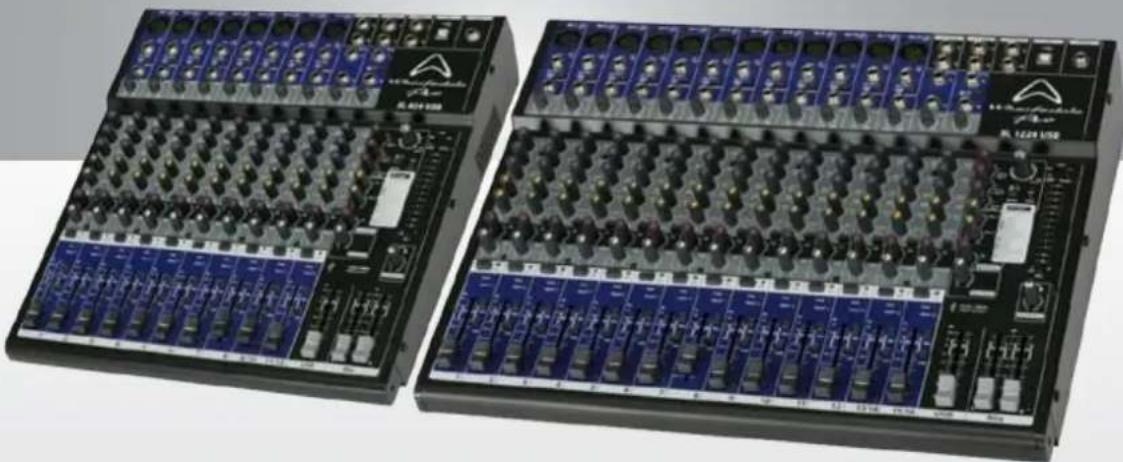
Two industrial audio workstation units with multiple channels and buttons, no visible text or labels on the equipment bodies.SL824USB & SL1224USB Studio/Live Mixer
OPERATING MANUAL AND USER GUIDE
TABLE OF CONTENTS
Important Warnings & Safety Information ....2
Introduction......4
About The SL Series....4
Features 4
Mono Channels 5
Stereo Channels....6
FX and Aux Section....7
Front Panel Inputs and Outputs....7
Master Section......8
Rear Panel Inputs and Outputs 8
USB Interface 9
Wiring Diagram....10
Dimensional Drawings....11
Block Diagram....12
Specifications ....13
Warranty 14
IMPORTANT WARNINGS & SAFETY INSTRUCTIONS
- Read these instructions
- Follow all instructions
- Keep these instructions
- Heed all warnings
- Do not use this apparatus near water
- Clean only with dry cloth.
- Do not block any ventilation openings. Install in accordance with the manufacturer's instructions.
- Do not install near any heat sources such as radiators, heat registers, stoves, or other apparatus (including amplifiers) that produce heat.
- Do not defeat the safety purpose of the polarised or grounding plug. A polarised plug has two blades with one wider than the other. A grounding plug has two blades and a third grounding prong. The wide blade or the third prong is provided for your safety. If the provided plug does not fit into your outlet, consult an electrician for replacement of the obsolete outlet.
- Protect the power cord from being walked on or pinched particularly at the plugs, convenience receptacles, and at the point where they exit from the apparatus.
- Only use attachments/accessories specified by the manufacturer.
- Use only with a cart, stand, tripod, bracket, or table specified by the manufacturer, or sold with the apparatus. When a cart or rack is used, use caution when moving the cart and apparatus combination to avoid injury from tip-over.

- Unplug the apparatus during lightning storms or when unused for long periods of time.
- Refer all servicing to qualified personnel. Servicing is required when the apparatus has been damaged in any way including but not limited to power supply cord or plug damage, liquid ingress, foreign objects in the chassis, exposure to rain/moisture or impact damage. In addition, the unit must be serviced when you experience any abnormal operation.
- CAUTION: These servicing instructions are for use by qualified service personnel only. To reduce the risk of electric shock, do not attempt to perform any servicing other than that contained in the operating instructions unless you are qualified to do so. In addition opening the casing will result in your warranty becoming null and void.
- Do not install this apparatus in a confined space such as a book case or similar unit. Good ventilation should be maintained around the apparatus and any vents, air-inlets or fans should not be obstructed by objects such as paper, table-cloths, curtains etc.
- WARNING: To reduce the risk of fire or electric shock, do not expose the apparatus to rain or moisture. The apparatus should not be exposed to dripping or splashing and objects filled with liquids, such as vases, should not be placed on the apparatus.
- WARNING: The mains plug/appliance coupler is used as a disconnect device, the disconnect device shall remain readily operable.

CAUTION!
RISK OF ELECTRIC SHOCK DO NOT OPEN

ATTENTION: RISQUE DE CHOC ELECTRIQUE-NE PAS OUVRIR
-
- This lightning flash with arrowhead symbol within an equilateral triangle is intended to alert the user to the presence of non-insulated "dangerous voltage" within the product's enclosure that may be of sufficient magnitude to constitute a risk of electric shock.
-
Warning: To reduce the risk of electric shock, do not remove the cover (or back) as there are no user-serviceable parts inside. Refer servicing to qualified personnel.
-
The exclamation point within an equilateral triangle is intended to alert the user to the presence of important operating and maintenance instructions in the literature accompanying the appliance.
-
(Protective earthing terminal) The apparatus should be connected to a mains socket outlet with a protective earthing connection.
-
Correct Disposal of this product. This marking indicates that this product should not be disposed with other household wastes throughout the EU. To prevent possible harm to the environment or human health from uncontrolled waste disposal, recycle it responsibly to promote the sustainable reuse of material resources. To return your used device, please use local return and collection systems or contact the retailer where the product was purchased. They can take this product for safe environmentally friendly recycling.
INTRODUCTION
Congratulations on the purchase of your SL Series mixer. SL Series mixers are the result of many years of experience in the use, design and manufacture of professional audio products. We take great pride in engineering and building every Wharfedale Pro product and wish to thank you for entrusting us with your sound.
From the time Gilbert Briggs built his first loudspeaker in 1932, to the present day, Wharfedale have maintained the same standard of quality in components, workmanship and performance.
Please take the time to read this manual completely in order to ensure that you get the most from your SL Series mixer.
ABOUT THE SL SERIES
Designed to cater for a wide range of mid format mixing duties, SL Series mixers include many features suited to live sound and home studio applications.
All SL models feature a high quality class-compliant 2-input, 2-output 16-bit/48KHz USB interface matched to a flexible record bus and dedicated return channel, creating a system that is great for live and home recording.
An ultra musical 3-band EQ is available on all channels, with an additional high pass filter on the mono channels. A built in FX processor with 16 presets gives you unlimited creative potential and is supplemented by a dedicated FX send and 2 auxiliaries.
FEATURES
♦ 8 mono channels on the SL824USB and 12 mono channels on the SL1224USB
◆ 2 Stereo channels (1 switchable stereo line/USB return channel)
◆ 2in/2out full duplex 16-bit 48KHz USB interface
♦ Dedicated USB recording bus
♦ Studio grade phantom powered microphone pre-amps
♦ Ultra musical 3 band EQ with high pass filters
◆ Built-in digital FX with dedicated send
◆ 2 auxiliary sends
♦ Stereo Aux return with level control
♦ Pan and balance controls
♦ PFL for all channels
- Control room and headphone outputs
♦ Master outputs with XLR and TRS connectors
MONO CHANNELS

- Balanced XLR input for connecting microphones
- Balanced/Unbalanced TRS input for line level sources
- HPF with 80Hz cutoff point
- TRS insert point for processors or for use as a direct output
- Gain control for calibrating sources and applying correct gain structure
- High EQ centred at 12KHz
- Mid EQ centred at 1KHz
- Low EQ centred at 80Hz
- Pre-fader auxiliary send for monitor mixes or effects
- Switchable pre/post-fader auxiliary send for monitor mixes or effects
- Pre/Post switching for Aux 2
- Sends to the internal FX engine
- Used to spatially place the channel within the stereo field
- (Pre Fade Listen) allows you to set the channel gain and monitor the channel in isolation through the control room or headphone outputs
- Indicates that PFL is engaged
- Shows when clipping is occurring
- Shows when signal is present
- Sends the channel to the main mix bus
- Sends the channel to the USB recording bus
- Sets the amount of signal sent to the main or USB bus
STEREO CHANNELS

- Balanced/Unbalanced TRS input for the left channel or mono line level sources
- Switches between USB and line level source
- Balanced/Unbalanced TRS input for the right channel of stereo line level sources
- Gain control for calibrating sources and applying correct gain structure
- High EQ centred at 12KHz
- Mid EQ centred at 1KHz
- Low EQ centred at 80Hz
- Pre-fader auxiliary send for monitor mixes or effects
- Switchable pre/post-fader auxiliary send for monitor mixes or effects
- Pre/Post switching for Aux 2
- Sends to the internal FX engine
- Used to spatially place the channel within the stereo field
- (Pre Fade Listen) allows you to set the channel gain and monitor the channel in isolation through the control room or headphone outputs
- Indicates that PFL is engaged
- Shows when clipping is occurring
- Shows when signal is present
- Sends the channel to the main mix bus
- Sends the channel to the USB recording bus
- Sets the amount of signal sent to the main or USB bus
FX AND AUX SECTION
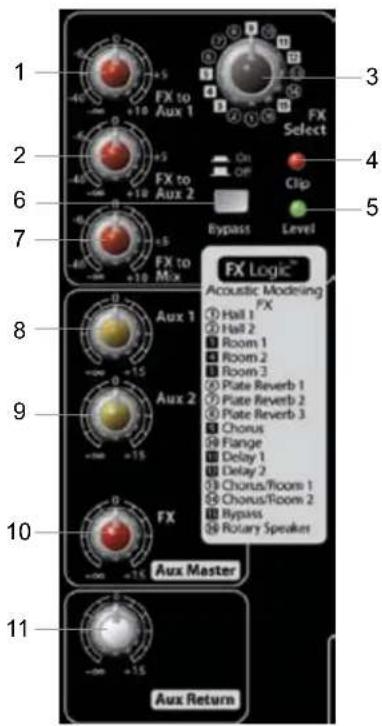
- Sends the FX output to the Auxiliary bus 1 so that FX can be heard in monitor mixes
- Sends the FX output to the Auxiliary bus 2 so that FX can be heard in monitor mixes
- Selects the effect algorithm as listed below the control
- Shows when the FX bus is overloaded
- Shows when the FX bus is receiving signal
- Turns the FX processor on or off
- Sends the output of the FX processor to the main mix bus
- Controls the overall level of the Aux 1 bus
- Controls the overall level of the Aux 2 bus
- Controls the overall level of the FX bus
- Controls the level of the Aux Return input
FRONT PANEL INPUTS AND OUTPUTS
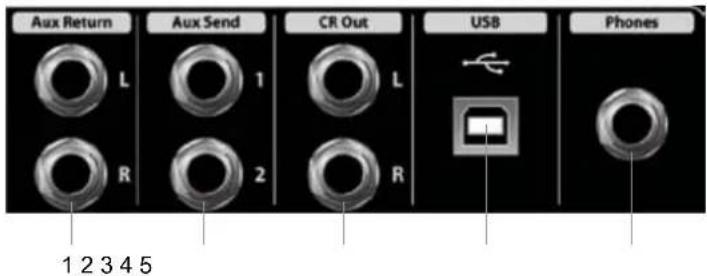
- Used to connect the output of an external effect processor that is fed by an Aux bus. As it has an independent level control it can be used as an additional line level utility input.
- Aux send 1 & 2 outputs the signal sent to each respective bus. These can be used to feed processors or monitors.
- Used for control room monitoring, connect directly to your power amplifier or active speakers
- Connects to your computer for full duplex class-compliant recording and playback
- For connecting headphones
MASTER SECTION
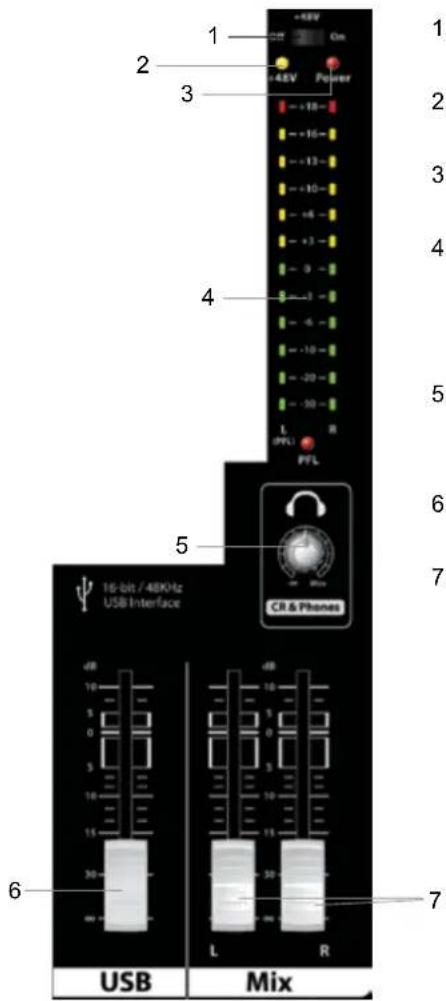
- Switches the +48v phantom power on or off
- Indicates +48v phantom power activity
- Indicates AC power supply
- Shows the level present at the master bus, when PFL is engaged shows the level of the selected channels (left side of metering only)
- Controls the level of the control room and headphone outputs
- Controls the master level of the USB recording bus
- Controls the master level of the main mix bus
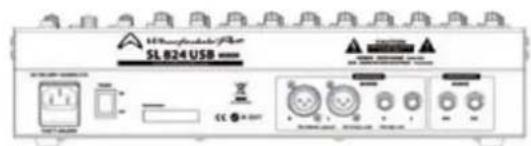
REAR PANEL INPUTS AND OUTPUTS

- IEC receptacle for AC power supply
- Toggles the power on or off
- Balanced XLR main outputs
- Balanced/unbalanced TRS main outputs
- A utility output from the USB bus, enables the USB bus to feed an external recorder.
USB INTERFACE
The USB connector enables computers with USB connectivity to interface directly with the SL Series mixer for full duplex recording and playback. In recent years the introduction of USB connectivity has ushered a new appreciation of the capabilities of computer audio, helping to fuse both digital and analogue and open up endless possibilities for the recording musician.
The internal AD (Analogue to Digital) and DA (Digital to Analogue) converters are 16-bit/48KHz enabling recording and playback above CD quality, ensuring that recordings that you make with an SL Series Mixer have outstanding quality.
The SL Series are fully class compliant and requires no drivers when used with modern operating systems. Mac OSX, Windows XP, Vista and 7 will require no additional driver software.
Windows XP Installation
Simply choose the device in the following location: Start/Settings/Control Panel/Sounds and Audio Devices/Audio
Mac OSX Installation
Simply select as an input and output device using the "Audio MIDI Setup" page, you can find this easily using the spotlight function.
WIRING DIAGRAM
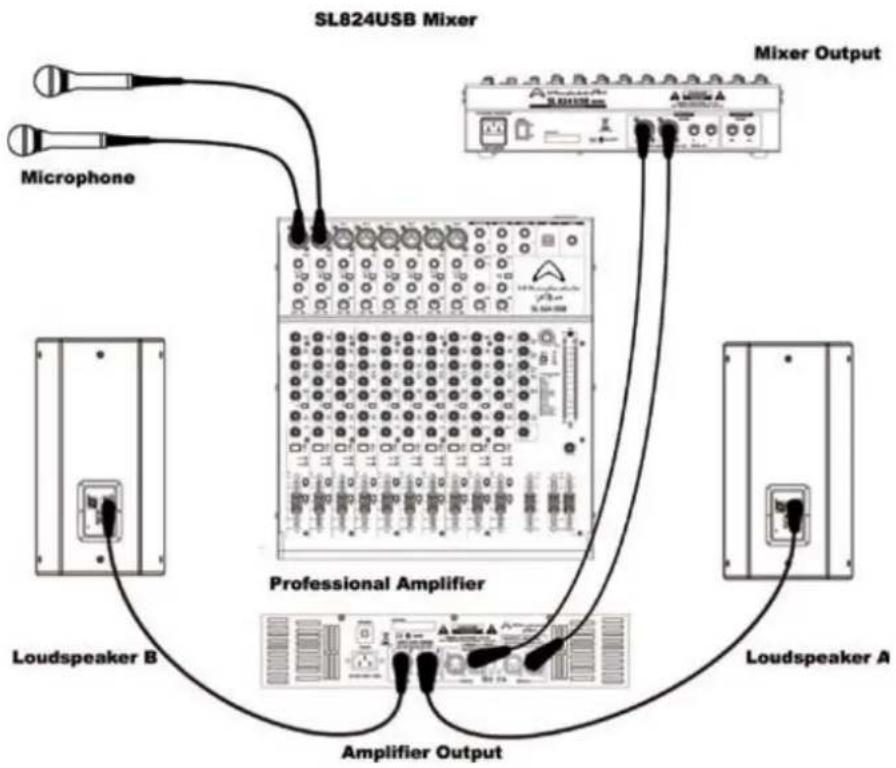
flowchart
graph TD
    A["Microphone"] --> B["SL824USB Mixer"]
    C["Loudspeaker A"] --> D["Professional Amplifier"]
    E["Loudspeaker B"] --> D
    F["Mixer Output"] --> B
    G["Amplifier Output"] --> D
    B --> H["Switch 10"]
    B --> I["Switch 11"]
    B --> J["Switch 12"]
    B --> K["Switch 13"]
    B --> L["Switch 14"]
    B --> M["Switch 15"]
    B --> N["Switch 16"]
    B --> O["Switch 17"]
    B --> P["Switch 18"]
    B --> Q["Switch 19"]
    B --> R["Switch 20"]
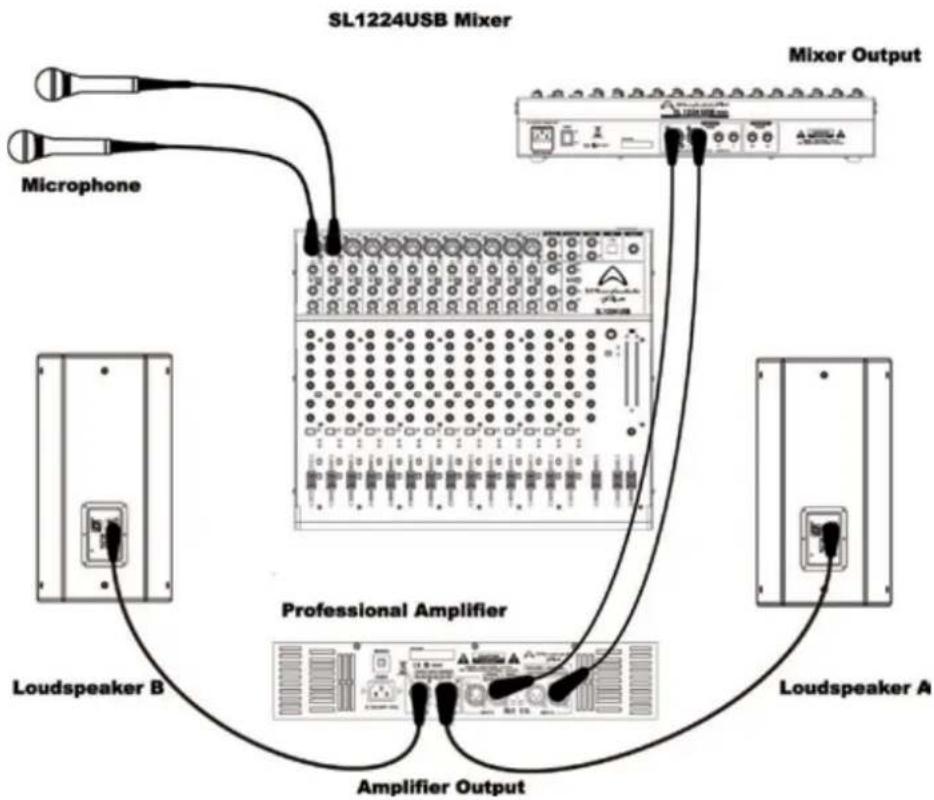
flowchart
graph TD
    A["Microphone"] --> B["SL1224USB Mixer"]
    B --> C["Mixer Output"]
    D["Loudspeaker A"] --> E["Professional Amplifier"]
    E --> F["Amplifier Output"]
    G["Loudspeaker B"] --> E
    H["Ground"] --> B
    style A fill:#f9f,stroke:#333
    style B fill:#ccf,stroke:#333
    style C fill:#cfc,stroke:#333
    style D fill:#fcc,stroke:#333
    style E fill:#cff,stroke:#333
    style F fill:#ffc,stroke:#333
    style G fill:#fcc,stroke:#333
    style H fill:#fcc,stroke:#333
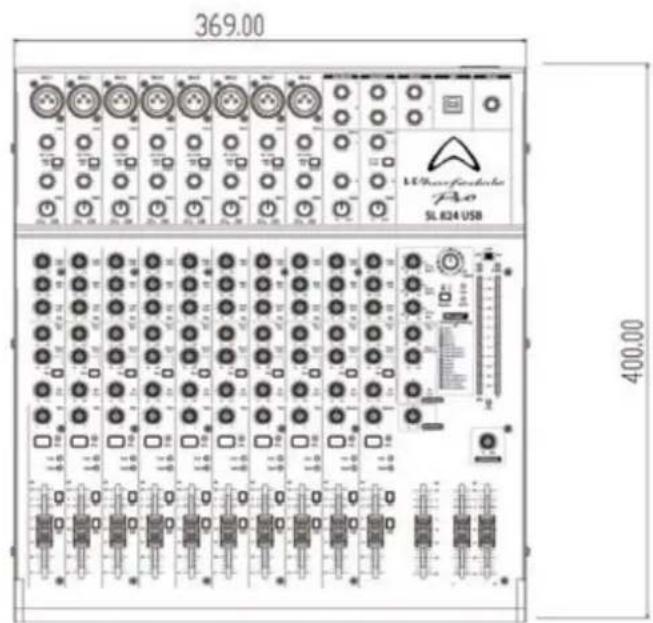
DIMENSIONAL DRAWINGS
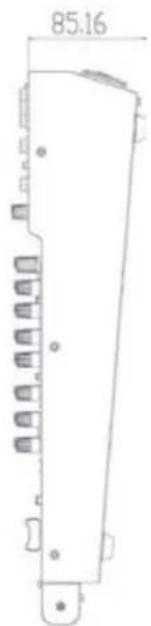
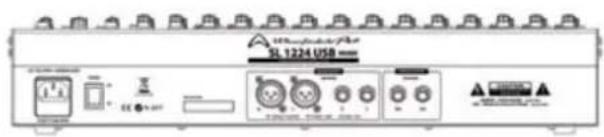
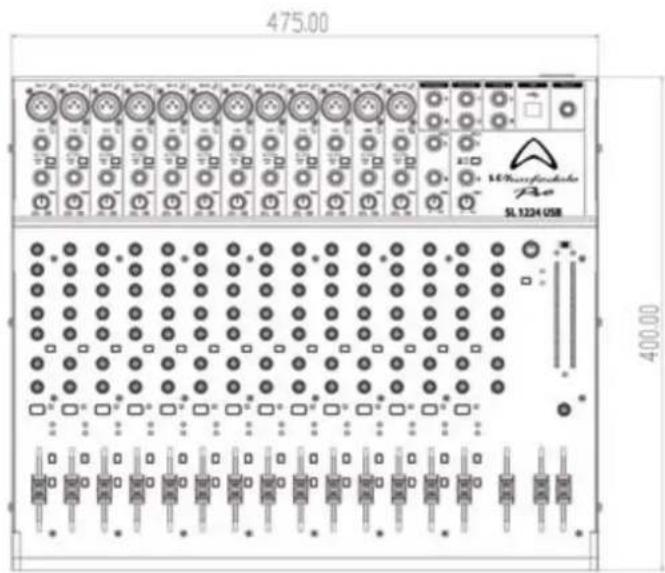
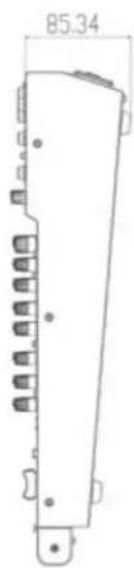
BLOCK DIAGRAM
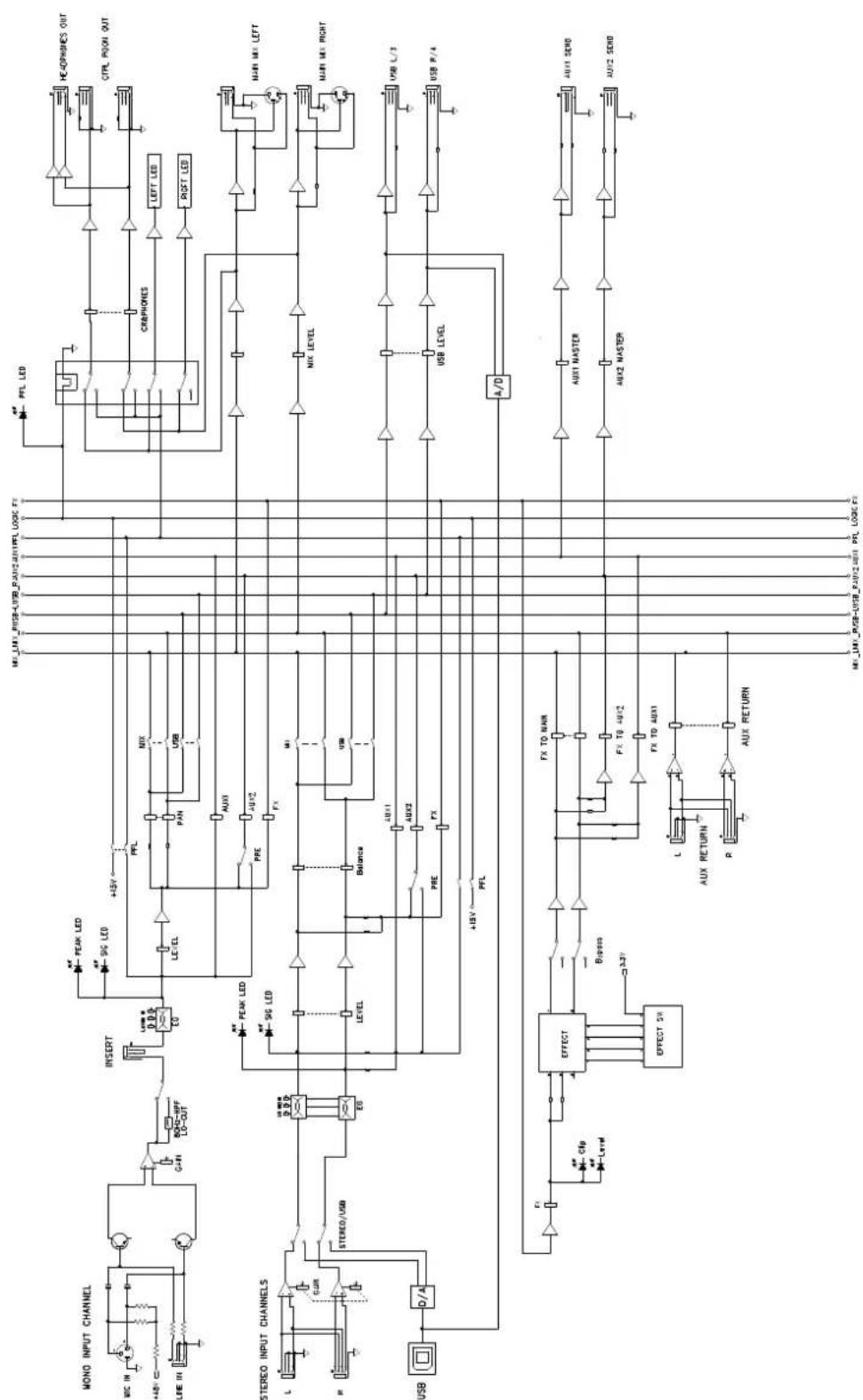
flowchart
graph TD
    subgraph MONO_INPUT_CHANNEL
        A["WC IN"] --> B["+45V"]
        C["LHE IN"] --> D["Ground"]
        B --> E["RESET"]
        D --> E
        E --> F["LEVER 0.0.0"]
        F --> G["PEAK LED"]
        G --> H["+15V"]
        H --> I["PFL"]
        I --> J["NIX"]
        J --> K["PAN"]
        K --> L["USB"]
        L --> M["AUX1"]
        M --> N["AUX2"]
        N --> O["FX"]
        O --> P["LEVEL"]
        P --> Q["PEAK LED"]
        Q --> R["+15V"]
        R --> S["PFL"]
        S --> T["NIX"]
        T --> U["MUX LEVEL"]
        U --> V["USB LEVEL"]
        V --> W["A/D"]
    end

    subgraph STEREO_INPUT_CHANNELS
        X["L"] --> Y["SWR"]
        Z["R"] --> AA["STEREO/USB"]
        AB["USB"] --> AC["D/A"]
    end

    subgraph EFFECT
        AD["Effect SW"] --> AE["Effect"]
        AE --> AF["Bipass"]
        AF --> AG["3.3V"]
        AG --> AH["FX TO MAIN"]
        AH --> AI["FX TO 40V2"]
        AI --> AJ["FX TO 40V1"]
        AJ --> AK["AUX RETURN"]
        AK --> AL["P"]
        AL --> AM["AUX RETURN"]
    end

    subgraph MAIN Mix LEFT
        AN["HEADphones OUT"] --> AO["CTRL POON OUT"]
        AP["LEFT LED"] --> AQ["RIGHT LED"]
    end

    subgraph MAIN Mix RIGHT
        AR["MAIN LED"] --> AS["USB L/3"]
        AT["USB P/4"] --> AU["USB R/4"]
    end

    subgraph AUX1 MASTER
        AV["AUX1 MASTER"] --> AW["AUX2 MASTER"]
        AX["AUX2 MASTER"] --> AY["AUX2 MASTER"]
    end

    subgraph AUX1 SEND
        AZ["AUX1 SEND"] --> BA["AUX2 SEND"]
    end

    style MONO_INPUT_CHANNEL fill:#f9f,stroke:#333
    style STEREO_INPUT_CHANNELS fill:#ccf,stroke:#333
    style EFFECT fill:#cfc,stroke:#333
    style MAIN Mix LEFT fill:#fff,stroke:#333
    style MAIN Mix RIGHT fill:#fff,stroke:#333
    style AUX1 MASTER fill:#fcc,stroke:#333
    style AUX2 MASTER fill:#fcc,stroke:#333
SPECIFICATIONS
| 0dBu=0.775Vrms | SL824USB |
| Maximum Balanced OutputLevel (1%T.H.D. at 1KHz) | Main XLR Balanced Out +26.5dBu ±1dBuMain 1⁄4" Jack Balanced Out +26.5dBu ±1dBu |
| Maximum UnbalancedOutput Level (1%T.H.D. at 1KHz) | Main XLR Unbalanced Out +21dBu ±1dBuMain 1⁄4" Jack Unbalanced Out +21dBu ±1dBuHeadphone Output 150mw ±5mw @ 32Ω |
| THD+N | <0.025% @ + 14dBu ±0.5dBu |
| Frequency Response | 20Hz~20kHz ±2dB |
| Hum and Noise 20Hz-20KHz(150R)S/NFFT | -127dBu ±5dBu Mic Pre Equivalent Input Noise-85dBu ±5dBu Residual Noise78dB ±5dB @ Fader Max-62dBv ±5dBv @ Gain Fader Max |
| CMRR | 62dB ±5dB @ 1KHz |
| Maximum Input Level | Mic +4dBu ±1dBuChannel Line +21dBu ±1dBuStereo Line +21dBu ±1dBuAUX Return In +21dBu ±1dBu |
| Impedances | Mic: Balanced 6KΩ, Unbalanced 3KΩ ±200ohmsLine: Balanced 44KΩ, Unbalanced 22KΩ ±2KΩAUX Return: Balanced 20KΩ, Unbalanced 10KΩ ±2KΩAll Other Unbalanced outputs: 100Ω, Balanced Outputs: 50Ω |
| Mono Input Channel Gain | 50dB Variable MIC (0~-50dB) Line (-20dB~ +30dB) |
| Input Channel EQ | High (±10dB) ±1.5dB 12kHz ShelvingMid (±10dB) ±1.5dB 1kHz ShelvingLow (±10dB) ±1.5dB 80Hz Shelving |
| Effect Out | 16x Effects: (1)Hall1 (2)Hall2 (3)Room1 (4)Room2 (5)Room3(6)Platereverb1 (7)Platereverb2 (8)Platereverb3 (9)Chorus(10)Flange (11)Delay1 (12)Delay2 (13)Chorus/Room1 (14)Chorus/Room2 (15)Bypass (16)Rotaryspeaker |
| Level Meter | 12 Segment LED x2 (Output of +4dBu = 0dB) Main L/R |
| AC Power options | AC100V-240V~ 50/60Hz |
| Dimensions (H x W x D) | 80mm x 400mm x 369mm |
| Weight | 5.2kg |
| 0dBu=0.775Vrms | SL1224USB |
| Maximum Balanced OutputLevel (1%T.H.D. at 1KHz) | Main XLR Balanced Out +26.5dBu ±1dBuMain 1⁄4" Jack Balanced Out +26.5dBu ±1dBu |
| Maximum UnbalancedOutput Level (1%T.H.D. at 1KHz) | Main XLR Unbalanced Out +21dBu ±1dBuMain 1⁄4" Jack Unbalanced Out +21dBu ±1dBuHeadphone Output 150mw ±5mw @ 32ohms |
| THD+N | <0.025% @ + 14dBu ±0.5dBu |
| Frequency Response | 20Hz~20kHz ±2dB |
| Hum and Noise 20Hz-20KHz(150R)S/NFFT | -127dBu ±5dBu Mic Pre Equivalent Input Noise-85dBu ±5dBu Residual Noise78dB ±5dB @ Fader Max-62dBv ±5dBv @ Gain Fader Max |
| CMRR | 62dB ±5dB @ 1KHz |
| Maximum Input Level | Mic +4dBu ±1dBuChannel Line +21dBu ±1dBuStereo Line +21dBu ±1dBuAUX Return In +21dBu ±1dBu |
| Impedances | Mic: Balanced 6KΩ, Unbalanced 3KΩ ±200ΩLine: Balanced 44KΩ, Unbalanced 22KΩ ±2KΩAUX Return: Balanced 20KΩ, Unbalanced 10KΩ ±2KΩAll Other Unbalanced Outputs: 100Ω, Balanced Outputs: 50ohms |
| Mono Input Channel Gain | 50dB Variable MIC (0~ -50dB) Line (-20dB~ +30dB) |
| Input Channel EQ | High (±10dB) ±1.5dB 12kHz ShelvingMid (±10dB) ±1.5dB 1kHz ShelvingLow (±10dB) ±1.5dB 80Hz Shelving |
| Effect Out | 16x Effects: (1)Hall1 (2)Hall2 (3)Room1 (4)Room2 (5)Room3(6)Platereverb1 (7)Platereverb2 (8)Platereverb3 (9)Chorus(10)Flange (11)Delay1 (12)Delay2 (13)Chorus/Room1 (14)Chorus/Room2 (15)Bypass (16)Rotaryspeaker |
| Level Meter | 12 Segment LEDx2 (Output of +4dBu = 0dBu) Main L/R |
| AC Power options | AC100V-240V~ 50/60Hz |
| Dimensions(H x W x D) | 80mm x 400mm x 475mm |
| Weight | 6.85kg |
WHARFEDALE PRO LIMITED WARRANTY
Wharfedale Pro SL Series products are warranted of manufacturing or material defects for a period of one year from the original date of purchase. In the event of malfunction, contact your authorized Wharfedale Pro dealer or distributor for information.
*Be aware that warranty details may differ from country to country. Contact your dealers or distributor for information. These terms do not infringe your statutory rights.

Wharfedale Professional
IAG House, 13/14 Glebe Road, Huntingdon, Cambridgeshire, PE29 7DL, UK
www.wharfedalepro.com
Wharfedale Professional reserves the right to alter or improve specifications without notice.
All rights reserved © 2010 Wharfedale Pro. Wharfedale Pro is a member of the IAG Group.