
AccuVault 1U - Server Tandberg Data - Free user manual and instructions
Find the device manual for free AccuVault 1U Tandberg Data in PDF.


| Product Type | Rackmount Backup Server |
| Brand | Tandberg Data |
| Model | AccuVault 1U |
| Form Factor | 1U Rackmount |
| Dimensions (H x W x D) | 1.75 in x 19 in x 25.5 in (44 mm x 483 mm x 648 mm) |
| Weight | 18 kg (39.7 lbs) |
| Power Supply | Internal, 350W |
| Input Voltage | 100-240 VAC, 50/60 Hz |
| Power Consumption | 350W Max |
| Storage Type | LTO Tape Drive |
| Tape Drive | LTO-4 or LTO-5 (depending on variant) |
| Backup Capacity | Up to 1.5 TB native (LTO-4) or 3 TB native (LTO-5) |
| Interface | 1x Gigabit Ethernet, 1x SCSI (for tape) |
| Operating Temperature | 10°C to 35°C (50°F to 95°F) |
| Storage Temperature | -40°C to 65°C (-40°F to 149°F) |
| Humidity | 20% to 80% non-condensing |
| Included Cables | Power cord, Ethernet cable, SCSI cable |
| Mounting Kit | Rackmount rails included |
| Warranty | 1 year parts and labor |
Frequently Asked Questions - AccuVault 1U Tandberg Data
User questions about AccuVault 1U Tandberg Data
0 question about this device. Answer the ones you know or ask your own.
Ask a new question about this device
Download the instructions for your Server in PDF format for free! Find your manual AccuVault 1U - Tandberg Data and take your electronic device back in hand. On this page are published all the documents necessary for the use of your device. AccuVault 1U by Tandberg Data.
USER MANUAL AccuVault 1U Tandberg Data
Securing your Information

natural_image
Two blue-toned globe illustrations showing continents and oceans, no text or symbols present.Product Manual
AccuVault™ 1U-4TB/1U-8TB with AccuGuard™ Enterprise
Part Number 1019662 Rev. A September 2010
| COPYRIGHT | Copyright 2010 by Tandberg Data. All rights reserved. This item and the information contained herein are the property of Tandberg Data. No part of this document may be reproduced, transmitted, transcribed, stored in a retrieval system, or translated into any language or computer language in any form or by any means, electronic, mechanical, magnetic, optical, chemical, manual, or otherwise, without the express written permission of Tandberg Data. |
| DISCLAIMER | Tandberg Data makes no representation or warranties with respect to the contents of this document and specifically disclaims any implied warranties of merchantability or fitness for any particular purpose. Further, Tandberg Data reserves the right to revise this publication without obligation of Tandberg Data to notify any person or organization of such revision or changes. |
| TRADEMARKNOTICES | Tandberg Data StorageLibrary, StorageLoader, SecureService, DPS1000 Series, DPS 2000, VXA, SLR, RDX QuikStor, AccuVault, and AccuGuard are trademarks of Tandberg Data. RDX is a registered trademark of ProStor Systems. All other product names are trademarks or registered trademarks of their respective owners. |
| PART NUMBER | 1019662 Revision A |
| Revision HISTORY | Revision Date Description |
A September 2010 Initial release.
Note: The most current information about this product is available at Tandberg Data's web site (www.tandbergdata.com).
PRODUCT WARRANTY CAUTION
The AccuVault 1U-4TB or 1U-8TB by Tandberg Data Corporation is warranted to be free from defects in materials, parts, and workmanship and will conform to the current product specification upon delivery. For the specific details of your warranty, refer to your sales contract or contact the company from which the library was purchased.
The warranty for the appliance shall not apply to failures caused by:
▶ Physical abuse or use not consistent with the operating instructions or product specifications.
Repair or modification by any one other than Tandberg Data's personnel or agent in a manner differing from the maintenance instructions provided by Tandberg Data.
Removal of the Tandberg Data identification label(s).
▶ Physical abuse due to improper packaging of returned unit.
Note: Refer to the end user license agreement (see Appendix C) for additional product warranty information regarding Windows Storage Server 2008.
If problems with the AccuVault 1U occur, contact your maintenance organization; do not void the product warranty by allowing untrained or unauthorized personnel to attempt repairs.

Caution
Returning the AccuVault 1U in unauthorized packaging may damage the unit and void the warranty. If you are returning the unit for repair, package it in its original packaging (or in replacement packaging obtained from your vendor.)
CONTACTING TANDBERG DATA CORPORATION
Visit the Support section of the Tandberg Data web site (http://www.tandbergdata.com) for information on contacting Technical Support.
NOTES
Contents
About This Manual....vii
1 Product Overview ...... 1
AccuVault 1U System Components....2
AccuGuard Enterprise Software Features. 3
AccuGuard Enterprise User Interface Overview 6
Best Practices .... 10
2 Installation and Setup 15
Software System Requirements....16
Recommended Network Infrastructure....16
Installation Overview 17
Step 1 — Unpack the AccuVault 1U....17
Step 2 — Connect Network and Power Cables. ..... 18
Step 3 — Configure Windows Storage Server Settings.....18
Step 4 — Connect to the AccuVault 1U via Remote Desktop ..... 24
Step 5 — Verify System Configuration on Remote Clients. ..... 25
Step 6 — Run the AccuGuard Enterprise software .....27
Step 7 — Add Remote Computers .....29
Step 8 — Create a Data Protection Plan .... 31
Step 9 — Create a Local Protection Plan (optional). . . . . . . . . . . . . . . . . . . . 34
3 Remote Computers 39
Adding Remote Computers....40
4 Store Management.... 41
Adding Storage....42
Using Existing Storage....45
Removing Storage....45
Creating Store Tasks 46
Describing Store Actions....54
Using Store Properties 55
5 Protection Plans 57
Creating Protection Plans....58
Scheduling Protection Plans 63
Running, Editing, and Removing a Plan 64
Viewing Protection Plan Results 68
6 Archived Data.... 71
Finding a Protection Plan Archive Time 72
Exploring and Restoring Folders and Files 72
Restoring Exchange Storage Groups 76
Restoring SQL Server Databases....77
A Troubleshooting....79
Log Files....79
Remote Computer Connection Issues. 81
B Specifications 85
Physical Specifications 86
Software Specifications 86
Power Specifications 86
Environmental Specifications 87
C Warranty and EULA Information 89
Product Limited Warranty 90
End User License Agreement — Basic 93
End User License Agreement — Workgroup (1U-8TB only) ..... 97
Index 101
ABOUT THIS MANUAL
This manual describes how to set up and operate the AccuVault 1U-4TB or 1U-8TB and how to use AccuGuard Enterprise software to protect your data.
NOTICE—This manual may contain some preliminary information that may change without notice.
WHERE TO LOOK FOR INFORMATION
Installation and software setup
Read Chapter 1 for an overview of the AccuVault 1U's features and components.
Read Chapter 2 for information on how to install and setup the AccuVault 1U.
Using AccuGuard Enterprise software
When you are ready to back up your data:
Read Chapter 3 for information on adding remote backup clients.
Read Chapter 4 to learn about AccuGuard store management.
Read Chapter 5 for information on managing protection plans.
Read Chapter 6 for information on how to access and restore archived data.
Supplemental Information
Read Appendix A for troubleshooting information.
Read Appendix B for product specifications.
Read Appendix C for product warranty and end user license agreement (EULA) information.
RELATED PUBLICATIONS
For additional information about the AccuVault 1U, refer to the following publications, which are available at www.tandbergdata.com.
AccuVault 1U 1U-4TB or 1U-8TB with AccuGuard Quick Start Guide, part number 1019252
AccuVault Knowledge Base articles available online at www.tandbergdata.com
NOTES
1
PRODUCT OVERVIEW
The Tandberg Data AccuVault 1U is a centrally-managed, LAN-attached, disk-based appliance that provides an affordable, all-in-one data protection solution for small-to-medium businesses with limited IT resources.
The AccuVault 1U runs Windows Storage Server 2008 and comes installed with AccuGuard Enterprise data protection software.
With the AccuVault 1U-4TB, you can protect up to 20 servers and/or workstations with high-availability features, such as RAID-5, four hot-swappable 1 TB drives, redundant power, and dual Gigabit Ethernet connectivity.
With the AccuVault 1U-8TB, you can protect up to 40 servers and/or workstations with the same high-availability features as the 1U-4TB, with the addition of four hot-swappable 2TB drives.
This chapter provides an overview of the AccuVault 1U's hardware and software features and includes the following sections:
AccuVault 1U system components
AccuGuard Enterprise software features
AccuGuard Enterprise user interface overview
Best practices
AccuVAULT 1U SYSTEM COMPONENTS
The following illustration shows the front and back panel components of the AccuVault 1U.

1 DVD drive 8 Mouse connector (green)
2 1TB or 2 TB drives depending on model
9 Keyboard connector (purple)
3 Unit Identifier (UID) button
10 USB 2.0 ports (2 each)
4 LED indicators for UID/temperature, network ports, hard drives, and power
11 Serial Connector
5 Reset button
12 VGA connector
6 Power button
13 Gigabit Ethernet port
7 Power connector (2 each)
14 Unit Identifier (UID) button
ACCUGUARD ENTERPRISE SOFTWARE FEATURES
AccuGuard Enterprise is designed for use with hard-disk storage. Built on innovative deduplication technology, it virtually eliminates redundant data because unique data is stored only once. The effective storage capacity of the disk is significantly increased, making backup to disk fast, easy, and affordable.
Some key features of this software are:
Unique data stored only once (data deduplication)
Archived data always available on disk
Data recovery is easy and instantaneous
Fast backups
Easy to use interface
Using protection plans, you can easily select the data you wish to protect. Each backup contains all of the files in the selected data set as they exist at the time of the protection plan run. There are no cumbersome incremental or differential backups to deal with.
At any time you can view all of the files you have backed up or archived.
During regular use, you will work with three main features in AccuGuard Enterprise:
Protection Plans
Archived Data Viewing
Archived Data Restoring
PROTECTION PLANS
A protection plan defines which data is to be archived, which store to save it in, and when the plan runs. A protection plan keeps track of all the selected items and, after its initial run, will store only new and changed information. At the same time, each plan run creates a full recovery point.
There are three types of protection plans:
| Protection Plan Type | Description |
| Files and Folders The | Files and Folders protection plan protects selected files and folders. |
| SQL Databases The | SQL Server protection plan lets you protect Microsoft SQL Server databases. (Only available if Microsoft SQL Server is installed on the computer being protected) |
| Exchange Storage Groups | The Exchange protection plan lets you protect Microsoft Exchange Storage Groups. (Only available if Microsoft Exchange is installed on the computer being protected) |
EXCLUDED FILES
AccuGuard Enterprise will not archive these Windows file types:
Temporary Internet files
Temp folder
Digital Rights Management folder
Recycle Bin
Power Management files, such as files governing Hibernation
▶ Memory Page file
System Volume Information files, System Restore files, Automated System Restore (ASR) files
ARCHIVED DATA
With the exception of purged data, your backup storage contains all versions of your stored files. The software detects, at a sub-file level, data that has changed between backups and stores only the unique data necessary to protect the versions of the files it encounters. It can reconstruct and restore all versions of files that have been protected.
The AccuGuard user interface makes it easy to find each version of a file so you can quickly restore the latest version of the file or a previous version of the file. See Exploring and Restoring Folders and Files on page 72 for more information.
RESTORE DATA
Restoring data is quick and easy.
To find and restore your data, use any of the following methods:
Use the search bar and enter whole filenames, partial filenames, or wild card entries such as *.doc.
Explore a protection plan to view folders and files as they existed at a specific time.
Restore the entire contents of a protection plan run.
See Exploring and Restoring Folders and Files page 72 for more information.
ACCUGUARD ENTERPRISE USER INTERFACE OVERVIEW
This section provides a general overview of the AccuGuard Enterprise.
AccuGuard Enterprise interface uses a standard Microsoft Management Console (MMC) three-pane view.
The left pane, or console tree, provides a hierarchical view of the whole system. By selecting the Archive Manager folder at the top of the console tree, you can manage areas that affect the overall system, such as managing license keys and checking for product updates.
Each folder type in the console tree has specific actions defined. Actions can be initiated from the Actions (right-hand) console pane, the Action drop-down menu on the top menu bar, or by right-clicking the folder you wish to perform the action on.
The center console pane is the status or results pane. This is where you see information related to the currently selected folder in the console tree. When actions are available for items in the center pane, they will be available in the actions pane as a sub-group of actions.
When AccuGuard Enterprise is initially started, Archive Manager will be the only folder shown in the console tree, and you will be prompted to activate your software. After activation the console tree can be expanded to show Archive Manager (top level), with Stores, Local Plans, and Remote Computers underneath.
ARCHIVE MANAGER
The top-level category in the console tree is called Archive Manager. Actions defined for Archive Manager affect the overall system.
Select the About action to view product version information. From here you can also gather product logs and history information; useful when working with product support personnel.
Select the Check for Updates action to see if any product updates are available. If so, you will be given the opportunity to download and install them. Prior to updating, you should close any open Archive Manager dialogs.
Select the Properties action to manage license keys, checkup reporting, and ViewStor settings.
STORES
A store is a storage location targeted by local and remote protection plans for keeping archived data (common content) and associated cataloging information. After a store is created, it will appear in the Stores folder.
From the Stores folder, you can see and manage storage that has been prepared for the software. Information such as the storage name, size of the storage, status (Available or Offline), and the drive designation of the disk are displayed in the status (center) pane.
Part of creating a store is preparing the storage. As part of the store preparation process, the software automatically creates the following folders:
| Store Sub-Folders Description | |
| Archives Archives contain time-stamped catalog entries (restore points) grouped by plan name. | |
| Quarantined Items Stores can be verified for referential and data integrity. Any data found to be corrupt is moved to this folder. The store will attempt to self-heal on a subsequent plan run by putting a good version of the quarantined item into the store. | |
| Recycle Bin When an item is expired, its catalog entry is kept in this folder until the item is purged from the system. |
When a protection plan runs for the first time, an archive is created in the store that is targeted by the plan. This archive appears in the left pane console tree as a sub-folder of the Archives folder of the store, and it is given the same name as the protection plan. A recovery point is also created for exploring and restoring this point in time. Each subsequent run of the plan adds another recovery point to the archive.
Actions available for an archive include:
| Archive Action Description | |
| Restore | To view recovery points, select the archive and then click its Restore action. Days containing recovery points are highlighted in bold font in the calendar. Select the recovery point you want to restore, and the Restore button at the bottom right of the screen will become active. Click Restore and a restore dialog box appears. Refer to Chapter 6 on page 71 for more information. If the recovery point was from a Files and Folders protection plan, the Explore button will also become active, and you can explore and restore files. |
| Search | In addition to using theRestoreaction to explore and restore recovery points, you can search an archive by clicking itsSearchaction. Refer to Using the Search Bar on page 72 for more information. |
| Properties | From thePropertiesaction, you can define expiration settings for the archive that override the expiration settings of the parent store. See Store Expiration onpage 52for information about expiring data from a store. |
LOCAL PLANS
The Local Plans folder contains protection plans configured for protecting local data (versus data on remote computers). From here you can create and manage plans to protect local data.
Actions available for Local Plans include:
| Local Plan Action Description | |
| Protection Plans | Select the Protection Plans action to show all local protection plans for the AccuVault 1U. From this view, each local plan can be manually run, reconfigured, scheduled, and deleted. |
| History You can see | the history for all local plans by selecting the History action. Each time a plan runs or is restored, an entry is added to the history list. By selecting an entry from the list, you can click the View Log link in the Result Details area to view the run log. |
| Restore | To view local plan recovery points, select the Local Plans folder, and click the Restore action. Days containing recovery points are highlighted in bold font in the calendar. Select the recovery point you want to restore, and the Restore button at the bottom right of the screen becomes active. Click Restore and a restore dialog box appears. Refer to Chapter 6 on page 71 for more information. If the recovery point was from a Files and Folders protection plan, the Explore button will also become active. |
| Search | In addition to using the Restore action to explore and restore local plan recovery points, you can search for files archived by local plans by clicking the Search action. Refer to Using the Search Bar on page 72 for more information. |
| Export Plan History | You can export protection plan histories into an Excel spreadsheet (.xls) format. |
| Event Viewer / View Log | To aid in troubleshooting, this software records its activity in log files and writes significant events to the Windows Application Event Log. See Log Files on page 79 for more information. Clicking the Event Viewer action for local plans opens the Windows Event Viewer for the AccuVault 1U. Click the View Log action for local plans to see the commands that have run for local plans and store tasks. |
REMOTE COMPUTERS
The Remote Computers folder contains the remote computers (clients) section of the console tree. This folder has an All Computers group underneath for adding your remote computers to the software.
At the top level, actions for Remote Computers include:
| Remote Computer Action | Description |
| Add Group For organizational purposes, you can group your remote computers together under a meaningful heading, or group name. For instance, any remote computers you add to the All Computers folder are listed in the All Computers group. To streamline organization, you could create a specific group for all computers in the sales department. To create a new group, click Add Group and enter a name. Any computer you add to your custom group is automatically added to the All Computers group. Conversely, any computer you remove from your custom group is not automatically removed from the All Computers group. The computer is not completely removed until you remove it from the All Computers group. | |
| View Log | Click the View Log action for remote computers to see the commands that have run for remote computer plans. See Log Files on page 79 for more information. |
Actions available for remote computers in the sub-folder Remote Computers section include:
| Remote Computer Action | Description |
| Protection Plans | Select the Protection Plans action to show all protection plans for the selected remote computer. From this view, each plan can be manually run, reconfigured, scheduled, and deleted. |
| History You can see the history for all plans for a remote computer by selecting the History action. Each time a plan runs or is restored, an entry is added to the history list. To view the run log for a given plan, select an entry from the history list. Next, click the View Log link located in the Result Details area. The run log for the selected entry appears. See also, Viewing Protection Plan Results on page 68. | |
| Restore All protection plan recovery points for a remote computer can be seen by selecting the remote computer, and then clicking the Restore action. Days that contain recovery points are highlighted in bold font in the calendar. To restore a recovery point, select it from the list. Click the Restore button in the lower-right area of the screen. A restore dialog box appears. Refer to Chapter 6 on page 71 for more information. If the recovery point was from a Files and Folders protection plan, you can also click the Explore button to restore files. | |
| Search | In addition to using Restore to find and restore archived files, you can search for files archived by remote computer protection plans by clicking the Search action. Refer to Using the Search Bar on page 72 for more information. |
| Export Plan History You can export protection plan histories into an Excel spreadsheet (.xls) format. | |
| Event Viewer To aid in troubleshooting, this software records its activity in log files and writes significant events to the Windows Application Event Log. Clicking the Event Viewer action for a remote computer opens the Windows Event Viewer for the remote computer. | |
BEST PRACTICES
This section provides suggestions that will help you obtain the best experience with your AccuVault 1U system.
Getting the most from AccuGuard Enterprise
Managing User Accounts
Running a Baseline Protection Plan
Backing up and Restoring Configuration Settings
GETTING THE MOST FROM ACCUGUARD ENTERPRISE
As mentioned previously, AccuGuard Enterprise uses an advanced technology called data deduplication or capacity optimization. This technology reduces standard business data by as much as a twentieth of the original size of the data during backup to disk. It achieves this level of optimization by removing all redundant data from the files being archived and storing only the unique data over time while allowing virtually instant point-in-time restore of the data. Additionally, the software enhances data reduction by performing LZ data compression.
Dynamic files and fixed files
Files on a computer may be classified generally as either fixed or dynamic. Fixed files are files whose content is created and never, or rarely, changes. Files such as video, music, images (pictures), and the like are examples of fixed content files. Files such as word processing documents, spreadsheets, presentations, projects, and the like are examples of dynamic content files because they may be opened and edited.
As noted above, this software reduces the size of your backups dramatically. This dramatic reduction occurs because during each plan run, the software finds the changed bytes and metadata of each file and stores only those changes to the disk. Therefore, by creating a protection plan that targets the largest number of dynamic files that are most likely to change over time, you will enable the software to achieve the greatest data reduction.
Backup scenarios
This software offers you the flexibility to create backup processes that fit your needs.
You can choose exactly which folders to back up, and you can run protection plans as often as needed, even more than once per day.
The software allows you to designate specific storage for specific protection plans.
When determining how you want to store your data by using this software, it may help to think about what files you might need to recover most often, or which files are most important, and schedule the protection plans that protect those files to run most often.
MANAGING USER ACCOUNTS
Windows denies or grants access to its resources by means of user accounts. When running this software in a domain, create a domain user account solely for use by this software. Add the account to the Domain Admin Group, thereby allowing the account access to required resources. Specify this account from the Create Protection Plan (or store task) wizard schedule page, or in the Run as field of the scheduled task of each protection plan.
If the AccuVault 1U or the remote computer is in a workgroup, not a domain, then a matching user account and password must be created for the AccuVault 1U and each remote computer. This user account must be a member of the local Administrators group. Log on to the AccuVault 1U with this account. When creating remote computer protection plans, specify the account for the remote computer in the Run as field of the scheduled task. This configuration will allow credentials to pass through to the other computer for access to necessary resources.
Note: Do not use administrator accounts with blank passwords.
RUNNING A BASELINE PROTECTION PLAN
Follow these guidelines when you run a protection plan for the first time:
- Add the remote backup clients in AccuGuard Enterprise (see page 29).
- Create a protection plan for each remote computer (see page 31).
- Schedule the initial protection plan for each remote computer to run one-time. Run each plan at separate times, so that at any given time, you only have one plan running.
By following these guidelines, you will have created a baseline protection plan for each remote computer. Once the initial protection plans have completed, you can schedule multiple protection plans to run simultaneously.
BACKING UP AND RESTORING CONFIGURATION SETTINGS
Backing Up (Export)
An off-site copy of your configuration settings should be saved to protect against site-wide disasters. In addition to your original installation media and your purchased license keys (if applicable), you should save the following:
Installation directory
< installation directory> \Remote\Configurations directory
Storage
You should create copies of your storage locations by using store copy tasks. See Store Copy for more information.
RESTORING (IMPORT)
To restore your configuration settings:
- Re-install the software. Go to the Support section of the Tandberg Data web site for software download information.
- Replace the evaluation license keys with your saved license keys.
- Replace the files and folders with the ones from your backup. You should close AccuGuard prior to performing this step.
- Reconnect using the Use Existing option on the Storage Name screen of the Add Store Wizard.
- If applicable, reconfigure store expiration and verification task schedules by opening the property page of each store and selecting the appropriate tabs.
- If applicable, reconfigure local protection plan schedules by selecting the Edit Scheduled Task action of each plan.
- If applicable, reconfigure the checkup report schedule by opening the AccuGuard property page and selecting the Checkup Report tab.
- Restart your computer for the settings to take effect.
NOTES
2
INSTALLATION AND SETUP
This chapter provides information on how to install and configure the AccuVault 1U and to create data protection plans for your network.
This chapter contains the following sections:
Software System Requirements
Recommended Network Infrastructure
Installation Overview
SOFTWARE SYSTEM REQUIREMENTS
The following table lists the minimum system requirements for the remote clients that will be backed up by the AccuVault 1U:
| AccuGuard Enterprise Protected Clients | |
| Operating System Windows XP Professional, Windows Vista, Windows 7 Professional, Windows Server 2003, Windows Server 2003 R2, and Windows Server 2008 R2 | |
| Processor Single Core 1 | .0 GHz CPU |
| Memory 250 MB RAM | |
| Network Interface 100 | MB Network Interface Card with TCP/IP support |
RECOMMENDED NETWORK INFRASTRUCTURE
It is recommended that your network is configured with the following:
DHCP
Microsoft Active Directory
If you do not plan to use DHCP, you must obtain the following network information before you install your AccuVault 1U:
A valid, static IP address for the AccuVault 1U
Subnet mask
Gateway address
DNS Server
INSTALLATION OVERVIEW
Here is an overview of the procedures provided in this chapter. You must complete the steps below to install and configure the AccuVault 1U and to create data protection plans for your network.
| Installation Step go to... | |
| 1 – Unpack the AccuVault 1U page 17 | |
| 2 – Attach network and power cables page 18 | |
| 3 – Configure Windows Storage Server settings page 18 | |
| 4 – Connect to the AccuVault 1U via remote desktop page 24 | |
| 5 – Verify system configuration on remote clients | page 25 |
| 6 – Run AccuGuard Enterprise software page 27 | |
| 7 – Add remote backup clients page 29 | |
| 8 – Create one or more data protection plans | page 31 |
| 9 – Create a local protection plan (optional) | page 34 |
STEP 1 — UNPACK THE ACCUVAULT 1U
Follow these guidelines when you unpack the hardware:
- Keep the packing materials and box in case you need to ship the unit later.
- Locate an appropriate area for the AccuVault 1U that has clearance for adequate ventilation, minimal dust, and an appropriate power source.
-
Follow the rackmount instructions provided in the accessory kit to install the unit in a rack.
-
Connect a monitor, mouse, and keyboard to the AccuVault 1U. This step is needed to obtain and, if necessary, configure the AccuVault 1U network information (IP address, netmask, and gateway).
-
Verify that the following items are included in the accessory kit:
Ethernet cable (2 each)
Power cords – two each for North America and Europe
Rackmount inner rails (2 each)
Rackmount outer rails (2 sets)
Mounting ears (3 sets)
▶ Cage nuts and bolts (4 each)
Screw pack
Appliance bezel
Bezel lock keys
AccuGuard Enterprise license activation card
Rackmount instructions, part number 1019660
STEP 2 — CONNECT NETWORK AND POWER CABLES
- Connect the two AccuVault 1U ethernet network ports to ethernet network ports on a switch, hub, or router.
Note: Two ethernet ports are recommended for efficient data throughput. - Connect the two power cords that are appropriate for your region to the AccuVault 1U.
Note: Two power cords are required for redundant power. - Turn the power on by pushing the red power button that is located on the front of the AccuVault 1U.
- Attach the appliance bezel to the front of unit and use the supplied key to lock it in place, if desired.
STEP 3 — CONFIGURE WINDOWS STORAGE SERVER SETTINGS
Configure the following Windows Storage Server settings from the Tandberg Data AccuVault 1U initial tasks window:
Set time zone.
Configure networking. The AccuVault 1U system automatically assigns network information if your network uses DHCP. If your network does not use DHCP, you must assign the IP address, subnet mask, and gateway to the AccuVault 1U system.
Change the AccuVault 1U computer name. You must change the computer name before creating any data protection plans. The plans use the computer name as a link when archiving data.
Add the AccuVault 1U to the same network domain where the remote computer clients reside. (Remote computer clients refers to the systems that you intend to back up with the AccuGuard Enterprise software.)
Download and install any available critical Windows updates.
▶ Set Regional and Language options from the Windows Control Panel (if necessary).
Note: All other links listed in the initial tasks screen are provided for your convenience. They are not required to run the AccuGuard Enterprise software.
SETTING THE TIME ZONE
To set the time zone to your region:
- Click Set time zone from the AccuVault 1U initial tasks window.

- Click the appropriate buttons to reset the date and time zone for your region. Click [OK] when you are finished.
CONFIGURING NETWORK INFORMATION
The AccuVault 1U system automatically assigns network information if your network uses DHCP. If your network does not use DHCP, you must assign the IP address, subnet mask, and gateway to the AccuVault 1U system.
To manually configure network information:
-
Click the Configure Network link in the initial tasks window. There are two Local Area Connections for each network connection to the AccuVault 1U.
-
Right-click on the first Local Area Connection and select Properties.

The following dialog box opens.

- Select Internet Protocol Version 4 in the dialog box and click [Properties].
The following dialog box opens.

- Select the "Use the following address" radio button.
- Enter the IP address, subnet mask. and gateway. Also add the DNS server address. Click [OK].
- Follow the same steps to configure the second Local Area Connection address.
CHANGING THE ACCUVAULT 1U COMPUTER NAME
When you create a data protection plan, the AccuGuard Enterprise software refers to the AccuVault 1U full computer name when transferring data between the remote protected clients and the AccuVault 1U. For this reason, you must change the full computer name to a name that uniquely identifies it within your network. For example, if you have more than one AccuVault 1U-series appliance on your network, you would need to provide names that uniquely identify each appliance, such as “AccuVault unit 1” and “AccuVault unit 2.”
| ! Important | You must change the computer name before creating any data protection plans. The plans use the AccuVault 1U computer name as a link when archiving data. |
To change the full computer name:
- Click Provide computer name and domain from the AccuVault 1U initial task screen.

- Click [Change].
The Computer Name/Domain Change dialog box opens.
- Type a name that uniquely identifies the AccuVault 1U on your network. Click [OK].
A dialog box opens alerting you that you must restart the server to apply changes.
- Click [OK] to restart the server.
Note: Do not add the domain at this time. Restart the server after adding the computer name, then return to the dialog box to add the domain.
ADDING THE ACCUVAULT 1U TO THE DOMAIN
You must add the AccuVault 1U to the same network domain where your remote computer clients reside. (Remote computer clients refers to the systems that you intend to back up with the AccuGuard software.)
To add the AccuVault 1U to your network domain:
- Click Provide computer name and domain from the AccuVault 1U initial tasks window.

- Click [Change].
The Computer Name/Domain Change dialog box opens.
- Select the Domain radio button and type the network domain name.
! Important
The remote computers that you intend to back up with the AccuVault 1U must be members of the same domain.
A dialog box opens alerting you that you must restart the server to apply changes.
- Click [OK] to restart the server.
SETTING THE REGION AND LANGUAGE
To set the region and language:
-
Go to Start → Control Panel → Region and Languages (or may be Regional and Language Options).
-
Make your desired changes to regional and language settings. Click [OK].
STEP 4 — CONNECT TO THE ACCUVAULT 1U VIA REMOTE DESKTOP
You can connect to the AccuVault 1U unit remotely using a computer that is on the same network as the AccuVault 1U.
Note: As an alternate method, you can directly connect a monitor, keyboard, and mouse to the AccuVault 1U.
To connect remotely to the AccuVault 1U:
- From a Windows computer that is on the same network as the AccuVault 1U, open Remote Desktop Connection.

-
In the Computer field, type one of the IP addresses for the AccuVault 1U.
-
Click [Connect].
Note: If the AccuVault 1U IP address was automatically assigned by the network, you can obtain it using the following method: Open the Windows Command Prompt on the AccuVault 1U system. Type ipconfig. Press Enter.
- Type the following administrator password: Admin!
Note: The administrator password is case sensitive and must be at least 6 alphanumeric characters, plus incorporate at least one additional special character, such as an exclamation or question mark.
- Click [OK].
- Click [Yes] to connect to the AccuVault 1U.
The Tandberg Data AccuVault 1U Initial Tasks screen and the Navigator Console open.

STEP 5 — VERIFY SYSTEM CONFIGURATION ON REMOTE CLIENTS
Verify that the following Windows system configurations are enabled as described in the tables below. You must verify these system configuration settings for every remote computer client that you intend to back up with the AccuGuard software.
Table 2-1 Windows Services
| Windows ServiceStatus Set to Started/Automatic | XP Vista 7 Windows Server 2003, 2008 | |||||
| SQL Server | Exchange Server | File Server | ||||
| COM+ Event System Yes Yes Yes Yes | Yes Yes | |||||
| DCOM Server Process Launcher | Yes | Yes | Yes | Yes | Yes | Yes |
| Remote Procedure Call (RPC) | Yes | Yes Yes | Yes Yes | Yes Yes | ||
| Remote Registry | Yes | Yes | Yes | Yes | Yes | Yes |
Table 2-2 User Rights Assignment
| User account has permission to | XP Vista 7 Windows Server 2003, 2008 | |||||
| SQL Server | Exchange Server | File Server | ||||
| Log on locally | Yes | N/A | N/A | N/A | N/A | N/A |
| Log on as a batch job | Yes | Yes | Yes | Yes | Yes | Yes |
| Log on as a service | Yes | Yes | Yes | Yes | Yes | Yes |
Table 2-3 Security Options
| Network Access Security Option | XP Vista 7 Windows Server 2003, 2008 | |||||
| SQL Server | Exchange Server | File Server | ||||
| “Network Access: Do not allow storage of passwords and credentials for network authentication” is set to disabled. | Yes Yes | Yes | Yes Yes | Yes | Yes | |
Table 2-4 Firewall Setting Exceptions
| Firewall Setting Exceptions | XP Vista 7 Windows Server 2003, 2008 | |||||
| SQL Server | Exchange Server | File Server | ||||
| File and print sharing Yes Yes Yes Yes Yes | ||||||
| Remote administration exception added from command line. Type the following exception from the CMD window: (Start → Run → type CMD → press Enter) "netsh firewall set service type= REMOTEADMIN mode= ENABLE scope= ALL profile= ALL" | Yes Yes Yes ?? | ? | ||||
| UDP 137,138,TCP 139, 445 | Yes | Yes | Yes | N/A | N/A | N/A |
| Simple file sharing turned off on folders that need to be backed up | Yes | N/A | N/A | N/A | N/A | N/A |
| UDP 1433, 1434 | N/A | N/A | N/A | Yes | N/A | N/A |
STEP 6 — RUN THE ACCUGUARD ENTERPRISE SOFTWARE
To run AccuGuard Enterprise, complete the steps in the following three sections:
Obtain license keys
Launch software
Activate license keys
OBTAIN LICENSE KEYS
There are two license keys you must obtain and activate before you can use the AccuGuard software:
The Enterprise key
The Enterprise Remote Computers key
To obtain the AccuGuard license keys:
- Go to http://www.tandbergdata.com/login.
- The Tandberg Data AccuGuard software activation screen opens.
- Type your contact and company information.
- At the bottom of the screen, type the promo code and activation code that are printed on your AccuGuard license activation card. This activation card was included in your accessory kit box that shipped with the AccuVault 1U.

5.Click [Submit].
Your license keys will be emailed to the address you specified in the contact information of the AccuGuard software activation screen.
LAUNCH ACCUGUARD SOFTWARE
To launch the AccuGuard Enterprise software:
- Click Start AccuGuard Data Protection Software located in the bottom-left corner of the AccuVault 1U initial tasks window.

- If software updates are available, the Enterprise Update wizard opens to update the software. Click [Download] to start the process.
Note: You can also verify you have the most current version of the software by clicking Check for Updates... in the right pane of the AccuGuard Enterprise interface.
ACTIVATE LICENSE KEYS
Once any software updates have completed, the following dialog box opens in the AccuGuard Enterprise interface:

- Click [Yes].
The following dialog box opens.

- Click [Add]. The License Key dialog box opens. Type the Enterprise license key that you received via email. Click [OK].
A dialog box opens asking you if you want to activate the software now.
5.Click [Yes].
The AccuGuard software activation dialog box opens.
- Select the Internet radio button to activate the software via the Internet. Click [Activate].
Note: If you do not have Internet access, select the Telephone radio button and contact Tandberg Data technical support for an activation PIN.
-
Click [OK] to confirm.
-
Repeat the above steps to activate the Enterprise Remote Computers license key.
STEP 7 — ADD REMOTE COMPUTERS
A remote computer refers to any client (desktop, server, SQL Server, Exchange Server) that has data backed up by the AccuGuard Enterprise software.
To add a remote computer:
- Expand Remote Computers in the left-hand, tree pane. Click All Computers from the left pane. Click "Add Computer..." from the right-hand pane.
The following screen opens:
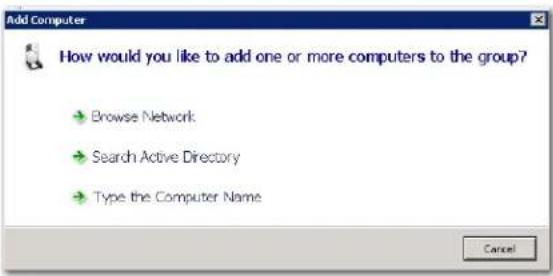
- Select one of the methods listed (browse network, search active directory, or type computer name) to add a computer.
The following screen shows an example of the Browse Network method.
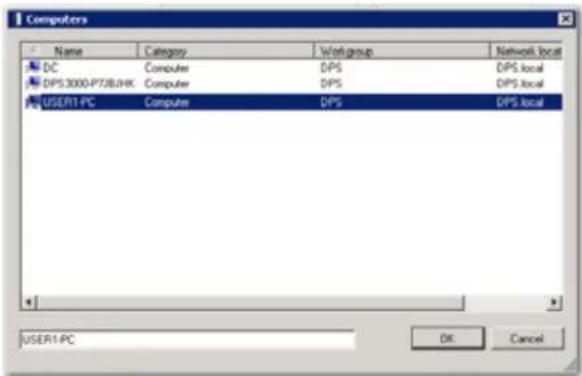
-
Click [OK] to add the computer.
-
Repeat the process to add more remote computers.
STEP 8 — CREATE A DATA PROTECTION PLAN
Creating a data protection plan for a remote computer is a two-part process. This section describes the following:
Adding a store
Creating a data protection plan
ADDING A STORE
A store is a virtual storage location that contains archived, deduplicated data and its associated cataloging information. A single store can be targeted by one or more protection plans.
Note: AccuGuard ships with a preconfigured store that you can use to get started. If you use the preconfigured store, you can skip this section and go to Creating a data protection plan.
To add a store:
- Choose one of the following methods to open the Add Store Wizard dialog:
Right-click on Stores in the left, hierarchical-tree pane.
Right-click on Stores from the center pane.
Click Stores from either the left or center pane. Then, click Add a Store... from the right pane.
The Add Store Wizard dialog opens.
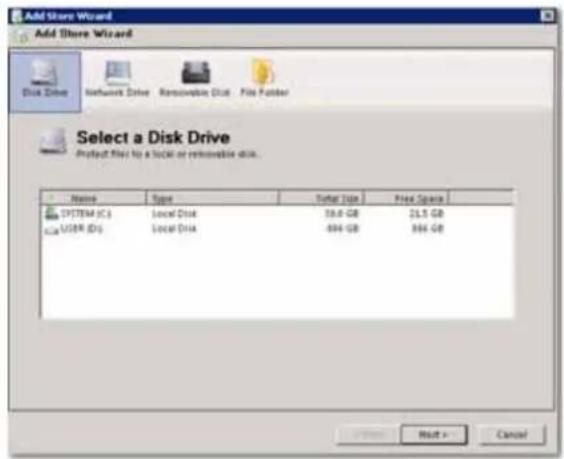
- Select the User (D:) disk. Click [Next].
- Type a name for the store. Click [Next].
The Shared File dialog opens.
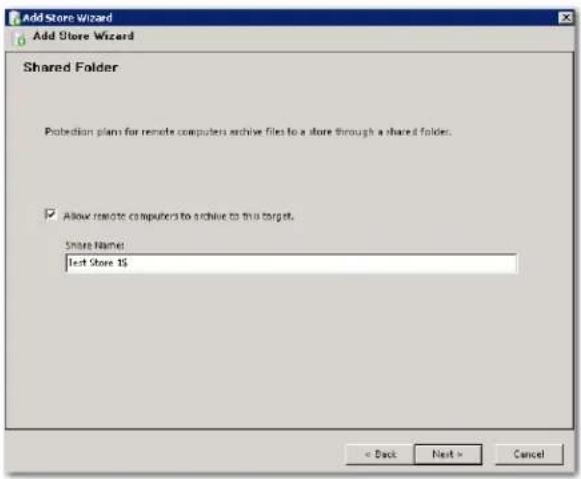
- Click [Next].
Note: Make sure the checkbox "Allow remote computers to archive to this target" is selected. Otherwise, the store will not be available to the remote computer when you create a data protection plan.
- Click [Prepare|Now] to prepare the store for data archival. Click [Next].
6.Click [Finish].
CREATING A PROTECTION PLAN
Once you have added a remote computer and a store, you can create a protection plan.
To create a data protection plan:
- Click on the remote computer name from the left pane. Click Create a Protection Plan... from the right pane.
The following screen opens:

- Select one of the following: Files and Folders, SQL Databases, or Exchange Data.
Note: The AccuGuard software detects whether the remote computer runs SQL Server or Microsoft Exchange. The options to select SQL Databases or Exchange Data only apply if the remote computer has SQL or Exchange installed.
- Click [Add] from the Enter Folders to Protect dialog box. (These instructions assume you selected Files and Folders. If you selected SQL Databases or Exchange Data, the instructions are similar.)
The Browse for Folder dialog opens.

-
Select the folders that you want to include in the protection plan. Click [OK].
-
Click [Next] from the Enter Folders to Protect dialog box.
The following Select a Store dialog opens.

-
Select the store where the data for the protection plan will be archived. Click [Next].
-
Select the "Override default temporary file location" checkbox and browse for a temporary folder location. If you leave the checkbox unchecked, the software will use the system drive as the default location. Click [Next].
-
Type a plan name. Click [Next].
The following Scheduled Task dialog box opens.

- Choose a schedule plan. Click [Next].
10.Click [Finish].
- Enter the user account password. Click [OK].
Note: If you changed the user who has permission to run the scheduled protection plan in the previous Scheduled Task dialog, enter that user account password. If you did not change the user, enter the administrator password for the remote computer.
STEP 9 — CREATE A LOCAL PROTECTION PLAN (OPTIONAL)
You can create a local data protection plan for the AccuVault RDX server's system C:\drive. Creating a local plan allows you to restore all of your system configuration settings if necessary. The process for creating a local plan is similar to creating a data protection plan for a remote computer.
To create a local data protection plan:
-
Add a store (see page 31), or use the pre-configured store that is available with the AccuGuard software.
-
Click on Local Plans from the left pane. Click Create a Protection Plan... from the right pane.
The following screen opens:
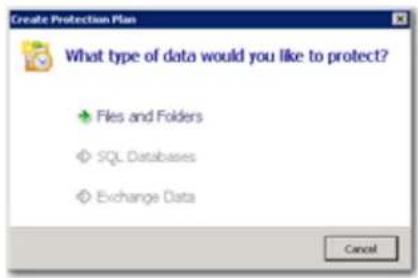
- Select one of the following: Files and Folders, SQL Databases, or Exchange Data.
Note: The AccuGuard software detects whether the remote computer runs SQL Server or Microsoft Exchange. The options to select SQL Databases or Exchange Data only apply if the remote computer has SQL or Exchange installed.
- Click [Add] from the Enter Folders to Protect dialog box. (These instructions assume you selected Files and Folders. If you selected SQL Databases or Exchange Data, the instructions are similar.)
The Browse for Folder dialog opens.

- Select the System (C:) folders that you want to include in the local protection plan. Click [OK].
- Click [Next] from the Enter Folders to Protect dialog box.
- Select the store where the data for the protection plan will be archived. Click [Next].
- Type a plan name. Click [Next].
The following Scheduled Task dialog box opens.

- Choose a schedule plan. Click [Next].
10.Click [Finish]. - Enter the user account password. Click [OK].
Note: If you changed the user who has permission to run the scheduled protection plan in the previous Scheduled Task dialog, enter that user account password. If you did not change the user, enter the administrator password for the AccuVault 1U.
3
REMOTE COMPUTERS
A remote computer, in terms of this product, refers to a computer protected by this software that is not the AccuVault 1U server.
The Remote Computers folder contains the remote computers (clients) section of the console tree. This folder has an All Computers group underneath for adding your remote computers to the software.
Actions for Remote Computers include:
Add Group.
For organizational purposes, you can group your remote computers together under a meaningful heading, or group name. For instance, any remote computers you add to the All Computers folder are listed in the All Computers group. To streamline organization, you could create a specific group for all computers in the sales department. To create a new group, click Add Group and enter a name. Any computer you add to your custom group is automatically added to the All Computers group. Conversely, any computer you remove from your custom group is not automatically removed from the All Computers group. The computer is not completely removed until you remove it from the All Computers group.
View Log.
Click the View Log action for remote computers to see the commands that have run for remote computer plans. See Log Files on page 79 for more information.
Actions available for remote computers in the Remote Computers section include:
Protection Plans.
Select the Protection Plans action to show all protection plans for the selected remote computer. From this view, each plan can be manually run, reconfigured, scheduled, and deleted.
History.
You can see the history for all plans for a remote computer by selecting the History action. Each time a plan runs or is restored, an entry is added to the history list. To view the run log for a given plan, select an entry from the history list. Next, click the View Log link located in the Result Details area. The run log for the selected entry appears. See also, Viewing Protection Plan Results on page 68.
Restore.
All protection plan recovery points for a remote computer can be seen by selecting the remote computer, and then clicking the Restore action. Days that contain recovery points are highlighted in bold font in the calendar. To restore a recovery point, select it from the list. Click the Restore button in the lower-right area of the screen. A restore dialog box appears. Refer to Restoring Your Data for more information. If the recovery point was from a Files and Folders protection plan, you can also click the Explore button to restore files.
Search.
In addition to using Restore to find and restore archived files, you can search for files archived by remote computer protection plans by clicking the Search action. Refer to Using the Search Bar on page 72 for more information.
Export Plan History.
You can export a protection plan history to an Excel spreadsheet (.xls) format.
Event Viewer.
To aid in troubleshooting, this software records its activity in log files and writes significant events to the Windows Application Event Log. Clicking the Event Viewer action for a remote computer opens the Windows Event Viewer for the remote computer.
ADDING REMOTE COMPUTERS
Note: For best results, you should use the same domain administrator account to schedule plans for your remote computers as for administering your AccuVault 1U server.
To add a remote computer, select the desired computer group for your computer, then select its Add Computer action. This will open a screen where you can specify the computer by either browsing the network (not supported on Windows XP or Windows 2003), searching the Active Directory if applicable, or typing in the computer name.
4
STORE MANAGEMENT
A store is a storage location targeted by local and remote protection plans for keeping archived data (common content) and associated cataloging information. After a store is created, it will appear in the Stores folder.
From the Stores folder, you can see and manage storage that has been prepared for the software. Information such as the storage name, size of the storage, status (Available or Offline), and the drive designation of the disk are displayed in the status (center) pane.
Part of creating a store is preparing the storage. As part of the store preparation process, the software automatically creates the following folders:
Archives - Archives contain time-stamped catalog entries (restore points) grouped by plan name.
Quarantined Items - Stores can be verified for referential and data integrity. Any data found to be corrupt is moved to this folder. The store will attempt to self-heal on a subsequent plan run by putting a good version of the quarantined item into the store.
▶ Recycle Bin - When an item is expired, its catalog entry is kept in this folder until the item is purged from the system.
The Stores folder shows the current availability of archive storage and its physical free space.
After adding a store, the status in the center console pane of the AccuGuard interface shows the new store and its status. To change the settings for a store, highlight the store and click Properties.
The Status column shows the availability status of the storage media. If the status is Available, then this media is available for use. An Offline status means that the media is currently not available.
The Capacity column displays the native capacity of the storage.
The Free Space column displays the native free space of the storage.
After highlighting a store in the tree pane, you can display its Details, Usage History, Store Tasks, and Task History by clicking on the appropriate action in the Actions pane.
This chapter contains the following sections:
Adding Storage
Using Existing Storage
Removing Storage
Creating Store Tasks
▶ Describing Store Actions
Using Store Properties
ADDING STORAGE
A new installation of the software will not have any storage assigned to it. Highlight the Stores folder in the console tree and click the Add a Store action to start the Add Store Wizard.
There are four categories of storage to choose from:
Disk Drive Storage
Removable Disk Storage
▶ File Folder Storage
DISK DRIVE STORAGE
Choose Disk Drive if you want to create a store on a locally-attached hard disk. This option creates a store at the root of the disk that you select in the Add Store Wizard. Choose a disk, then click the Next button.
If there are stores already at the root of this disk (perhaps from a previous installation of this software), you can reattach by choosing the Use existing option and selecting a store from the drop-down list. See Use Existing Store for more information. If no stores exist at the root of the disk, this option will be disabled.
To create a new store, choose Add new and enter a descriptive name for your new store. After the store has been created, this name is displayed in the left-hand tree pane under the Stores folder.
In most cases, click Next on the Shared Folder screen to accept the default settings. If you don't want to make this store available to remote computer protection plans, uncheck the box, then click Next.
If this is an existing store, the Prepare Store screen will have a Reconnect button. Otherwise, it will have a Prepare now button. Preparing a store creates the file and folder structure used by the software to store and track your protected data.
Note: If the option is shown, the Use NTFS-only media layout (only for backward compatibility) checkbox should normally be left unchecked. (This option is only needed if the store will be the target of a store copy task and the source store is a legacy store that only supported NTFS-formatted disks.)
Click the Prepare now (or Reconnect) button. When the prepare or reconnect process is complete, the progress indicator will show Preparation Complete and the Next button will be enabled. Click Next to continue to the Store Added screen.
The Store Added screen shows a high-level summary of the store configuration. Notice the Storage location value is
REMOVABLE DISK STORAGE
Choose Removable Disk if you want to use a removable disk drive. This option creates a store at the root of the drive that you select on the Add Storage screen. Choose a removable disk drive, then click OK.
If there are stores already on this disk (perhaps from a previous installation of this software), you can reattach by choosing the Use existing option and selecting a storage location from the drop-down list. See Use Existing Store for more information. If no storage locations exist on the drive, this option will be disabled.
To create a new store, choose Add new and enter a descriptive name for your new store. After the store has been created, this name is displayed in the left-hand tree pane under the Stores folder.
In most cases, click Next on the Shared Folder screen to accept the default settings. If you don't want to make this store available to remote computer protection plans, uncheck the box, then click Next.
If this is an existing store, the Prepare Store screen will have a Reconnect button. Otherwise, it will have a Prepare now button. Preparing a store creates the file and folder structure used by the software to store and track your protected data.
Note: If the option is shown, the Use NTFS-only media layout (only for backward compatibility) checkbox should normally be left unchecked. (This option is only needed if this store will be the target of a store copy task and the source store is a legacy store that only supported NTFS-formatted disks.)
Click the Prepare now (or Reconnect) button. When the prepare or reconnect process is complete, the progress indicator will show Preparation Complete, and the Next button is enabled. Click Next to continue to the Store Added screen.
The Store Added screen shows a high-level summary of the store configuration. Notice the Storage location value is < drive letter>:\ObjectStore{ ...}. This is a hidden system folder. The name that you entered is used in the AccuGuard interface. After clicking Finish, the new store is added to the Stores folder and can be used by protection plans.
FILE FOLDER STORAGE
Note: This option is provided primarily for legacy purposes. In earlier versions of the software, stores were normally created at the folder level. Choosing this option allows you to reconnect to those stores.
Choose File Folder if you want to create or reconnect to a store in a folder on a locally-attached disk drive. Select the folder via the link Click here to select a folder. If this is a new store, you will be prompted to give it a name. Enter a descriptive name for your new store. After the store has been created, this name is displayed in the left-hand tree pane under the Stores folder. Click Next to continue with the Add Store Wizard.
In most cases, click Next on the Shared Folder screen to accept the default settings. If you don't want to make this store available to remote computer protection plans, uncheck the box, then click Next.
If the folder is an existing store (perhaps from a previous installation of the software), the Prepare Store screen will have a Reconnect button. Otherwise, it will have a Prepare now button. Preparing a store creates the file and folder structure used by the software to store and track your protected data.
Note: If the option is shown, the Use NTFS-only media layout (only for backward compatibility) checkbox should normally be left unchecked. (This option is only needed when reconnecting to legacy stores that only supported NTFS-formatted disks.)
Click the Prepare now (or Reconnect) button. When the prepare or reconnect process is complete, the progress indicator will show Preparation Complete, and the Next button is enabled. Click Next to continue to the Store Added screen.
The Store Added screen shows a high-level summary of the store configuration. After clicking Finish, the new store is added to the Stores folder and can be used by protection plans.
USING EXISTING STORAGE
You can reattach a store to this software if it had been removed with the Keep the data on the media for future use option. You can also add existing stores from another system in the same manner.
To use an existing store, first click the Add a Store action, then choose the physical storage containing the store you wish to use.
The software will detect that there are stores already on the physical storage and will enable the Use existing option. Choose Use existing and select a store from the drop-down list. If no stores exist on the storage media, this option will be disabled.
After clicking the OK button, the store appears under the Stores folder and archived data in this store may now be explored and restored; however, you cannot add any new data.
REMOVING STORAGE
You can remove stores from this software. You might remove a store if you want to set the storage aside for just restoring data. This action helps reduce the number of stores you are viewing in the store status panel to just the current ones being used by your protection plans. Note that removing storage is an optional procedure. The storage can be used for restoring data, or used by protection plans for storing data (assuming it is not full) by adding it back to the software via the Add a Store action.
To remove a store, choose the store you wish to remove from the software, then click its Remove Store action to open the Remove Store dialog.
Note: You cannot remove a store that is being used by protection plans or is used by a store copy task from other stores.
You must decide whether or not to delete the data on the media used by protection plans.
KEEP THE DATA ON THE MEDIA FOR FUTURE USE
When storage is removed from the software, the stored data is not removed or deleted. However, you will be unable to restore or search for files in the removed store. If you want to use the storage again to archive protection plans or restore files, you must perform the Add a Store action. See Using Existing Storage in the above section for more information.
When Cancel is clicked, the Remove Store dialog box closes, and the software will take no action.
When Continue is clicked, the software removes the storage. The following actions will take place:
The selected store is removed from the Stores folder in the console tree.
All recovery points for protection plans associated with the storage are removed from the Explore page.
PERMANENTLY DELETE THE DATA ON MEDIA
When storage is permanently deleted from the software, the stored data is destroyed. You can reuse the media for new storage, but you will not be able to access any old data.
When Cancel is clicked the Remove Store dialog will close and the software will take no action.
When Continue is clicked, the software will ask for confirmation.
Click No to return to the Remove Store dialog without removing the storage. Click Yes to remove the storage. The following actions will take place:
The selected store is removed from the Stores folder in the console tree.
All recovery points for protection plans associated with the storage are removed from the Explore page.
Data is completely destroyed for the selected store.
CREATING STORE TASKS
Store tasks are tasks that operate at the store level. You can create tasks for copying stores, verifying data in a store, expiring data in a store, and purging expired data from a store.
Refer to the following sections for more information:
Store Copy
Store Verify
Store Expiration
Store Purge
STORE COPY
Store copy tasks allow you to copy the contents of one store to another. You can copy stores within the same AccuVault 1U system, or you can copy stores to or from another AccuVault 1U system.
Before you create a store copy task, both stores, source and destination, must exist.
The store copy task is associated with the store it is created from. This store can be the source store or the destination store. Initially it will be the source store, but this can be changed before the task is actually created.
When copying stores to or from different AccuVault 1U systems, keep in mind that performance is generally better when pulling data rather than pushing it. In other words, reading across-the-wire and writing locally is generally faster than reading locally and writing across-the-wire.
Note:
The source and target stores must be of the same type. For example, if you want to copy an older legacy store that uses NTFS alternate data streams, you would need a target store of the same type. In this case, the store needs to have the Use NTFS-only media layout (only for backward compatibility) option selected when it is created. This is not an issue if you've only had newer (4.x) versions of this software and, consequently, the Use NTFS-only media layout (only for backward compatibility) option may not be available in your software.
CREATING A STORE COPY TASK
Assuming both stores exist, select the store from the AccuGuard Enterprise console tree that you want the store copy task to be associated with and then click the Create Store Task action. This action opens the Create Store Copy Task wizard with the selected store shown in the Source Store window of the Create Store Copy Task screen. Other stores configured for this AccuVault 1U server are listed in the Destination Store window. Click the Browse button to select a store on another AccuVault 1U.
You can reverse the source and destination lists by clicking the double-ended arrow button. You would do this if you wanted the store listed in the Source Store window to actually be the destination store.
Select your destination store from the Destination Store window. Contents of the highlighted store in the Source Store window are copied to the highlighted store in the Destination Store window. Click Next to continue.
If there is more than one archive in this store (for example, more than one protection plan is writing to this store), you can copy all archives or a subset of archives. Click Next to continue.
On the Configure Recovery Points to Copy screen, you can choose to copy all recovery points or copy only the most recent recovery point. Make your choice, then click Next to continue.
Enter a meaningful name for this task on the Copy Task Name screen, then click Next to continue to the Schedule Copy Task screen.
You can schedule this task to run automatically or click Next to accept the No Schedule default. The task runs as the currently-logged-on user unless you change the Run as account information on the Task tab of the task scheduler.
Review the store copy task settings shown on the Completing the Add Store Copy Task Wizard screen. If you need to make changes, navigate back via the Back button. When you are satisfied with the settings, click the Finish button. You will be prompted for the password of the account specified to run the plan. After you enter the password, the task is created, the Create Store Copy Task wizard closes, and the new task appears in the store tasks results of the store where the task was created.
Three common usage scenarios for the Store Copy task
| Store Copy Usage Scenario Description | |
| Copy local drive store to store on removable storage | A good backup plan often includes taking the backup media to an off-site location. You could set up a store copy task to run, for instance, once a week, and only copy the most recent recovery point from each archive, thereby allowing for many weekly backups on removable disk or USB storage. |
| Copy a store from one AccuVault 1U to another AccuVault 1U. | As mentioned above, performance is better when pulling data rather than pushing it. For best performance, you should create the store copy task on the AccuVault 1U that you are copying the data to. When creating the task, click the double-ended arrow on the Create Store Copy Task screen to make the local store the Destination Store. Click the Browse button to select a store on another AccuVault 1U for the Source Store |
| Seeding a store from a remote site. This software employs source-based deduplication, in which data processing is distributed across a network of servers and only the deduplicated data is moved across a LAN or WAN to a store. If a large amount of deduplicated data has to travel across a slow WAN link during the baseline run of a system in a remote office, the baseline run time may be unacceptably long due to the bandwidth bottleneck. Once the baseline run has completed, however, subsequent runs will skip items already in the store and only process new and changed data. Only the deduplicated versions of active data moves across the WAN and into the store, greatly reducing the backup window and making protection of remote systems across the WAN feasible. To facilitate the baseline run of a system in a remote office, the deduplicated data may be saved to a removable storage device plugged directly into the remote system, and then shipped to the location of the AccuVault 1U for synchronization, thus seeding the store for future runs. | |
Seeding a store from a remote site
Follow these steps for seeding a store from a remote site:
- Configure storage at the remote site for the plan to use.
Attach a removable storage device to the remote computer that you want to protect. If USB connected, make sure the server supports at least USB 2.0. It will appear in the Computer window with a local drive letter, for example, H:. Share the root of the drive and allow Full NTFS permissions to the Domain Admin Group. You can configure a NAS device with a share instead, so long as the share is accessible to AccuGuard Enterprise.
- Add a store to the share at the remote site.
In AccuGuard Enterprise, click the Stores folder and choose the Add a Store action. In the Add Store Wizard, select Network Drive, click the link to map a network drive (or add a network location). Map a drive to the share on the removable storage device, choosing a drive letter for the mapped drive and entering the UNC path to the share, e.g. (
- Add a protection plan for the remote computer.
In AccuGuard Enterprise, expand the Remote Computers folder, select the All Computers group, right-click and select Add Computer. Add the remote computer by machine name or IP address. (Note: Exchange and SQL require the machine name.) Click on the newly-added computer. In the Actions pane, select Create Protection Plan. Step through the protection plan wizard. Give the plan its permanent name. The plan name will not change. Add the desired folder selections, and select to use the store created in step two.
-
Run the plan one time. The baseline is generated and stored.
-
Run the plan at least two more times so items in the store are verified.
-
Set the plan to run to the permanent store.
Once the store copy task completes, in AccuGuard Enterprise, under Remote Computers, All Computers, select the remote computer. The plan appears in the center pane. Highlight the plan. In the Actions pane, select Plan Settings. On the Settings tab, click the Change button. Choose the permanent (seeded) store from the list of available stores. Click OK. Click OK again.
-
Remove the USB device properly with the Safely Remove Hardware icon in the system tray. This action will flush buffers prior to removal. Ship the USB device and connect to the AccuVault 1U.
-
From the AccuGuard Enterprise list of stores, remove the store on the removable media, since it has an incorrect device path now.
In AccuGuard Enterprise, select the store. In the Actions pane, select Remove Store. Accept the default to keep the data on the media for future use. Click Continue.
- Reconnect AccuGuard Enterprise to the store.
In AccuGuard Enterprise, select Stores. In the Actions pane, select Add a Store. If the store is located at the root of a removable USB device, in the Add Store Wizard, select Disk Drive, then select the drive letter of the USB device. Click Next. In the Storage Name window, select the Use existing radio button. The field becomes active, and you can then select the store on the USB device. Click OK. Click Next, then click the Reconnect button, then click Finish. If the store is located in a folder on the USB device, do not select Disk Drive, select File Folder and click the link to select a folder. Browse to the folder on the USB device that contains the store, then finish reconnecting to the store. If the store resides on a NAS share, in the Add Store Wizard select Network Drive, browse to the folder that contains the store, then finish reconnecting to the store.
- Create a store copy task to synchronize the store on the removable device with a permanent store. (If you have not created the permanent store yet, do so now.)
In AccuGuard Enterprise, select the store on the removable media. In the Actions pane, select Create Store Task. In the dialog box that opens, choose Create Store Copy Task. Select the source and destination stores. The source store is the store on the removable media. Select the destination store from the list of available stores. The destination store is the permanent store that the plan will use in the future. Click Next. Keep the default selection to copy all archives. Click Next. Choose the default selection to copy all recovery points. Click Next. Accept the default name for the store copy task and enter proper credentials for the task to use when it runs.
- Run the store copy task.
In AccuGuard Enterprise, with the store on the removable media selected, click Store Tasks in the Actions pane. In the center pane, highlight the store copy task. Right-click the store copy task and select Run.
-
Run the plan to the new store. Configure a schedule for the plan, if desired.
-
You may remove the store on the removable RDX cartridge via the AccuGuard Enterprise interface once you are satisfied the new configuration is working properly.
In AccuGuard Enterprise, select the store on the removable device. In the Actions pane, select Remove Store. Accept the default to keep the data on the media for future use or delete the contents permanently. Make sure you are deleting the correct store or permanent protection plan data loss may result. Click Continue.
STORE VERIFY
To maintain store integrity, the software can verify the contents of a store and identify corrupt files sometimes caused by disk corruptions. If a corrupt file is found, it is moved to the store Quarantined Items folder. A quarantined item is no longer available from the store, but if the data is available on primary storage, it will automatically be replaced (repaired) in the store during the next protection plan run. Each item listed in the Quarantined Items folder has either a red flag indicating that the item has not yet been repaired, or a green check indicating that the item has successfully been repaired. Items with green checks can be deleted safely from the Quarantined Items folder.
Note: Do not attempt to manually repair quarantined items. Contact Technical Support for assistance.
Verification can be accomplished in two ways, with full verification or by sampling. Full verification performs an intensive scan of the entire store, whereas sample verification only verifies a portion of the store. With sample verification, the entire store is verified after 256 runs of the verification process.
To create a store verify task, highlight the store in the Stores folder and then select the Create Store Task action. In the Create Store Task screen, choose Create Store Verify Task to open the Create Store Verify Task wizard. Enter a name that describes the purpose for this verify task. Click Next. Choose whether to verify the entire store contents or to perform random sample verification with each run of the task. Click Next. Configure a schedule for automatically running the task, if desired. Click Next. Review the settings, then click Finish to create the task, enter a password for running the task and exit the Create Store Verify Task wizard.
You can manually run the task from the console at any time by selecting the store in the Stores folder, then selecting the verify task in the center pane and selecting Run in the Actions pane.
STORE EXPIRATION
By default, all data is retained indefinitely in a store. A store expiration task lets you set the number of days that data is retained in a store and how often to expire the data. Only one store expiration task is allowed per store.
Once the task is created, you can edit the retention settings from the store Properties action. To change the retention settings, select the store in the Stores folder of the AccuGuard Enterprise tree console, then click the Properties action to open the Properties page. Click the Expiration tab to edit the expiration settings.
The expiration process looks at each archive within the store to determine what is eligible for expiration and moves those point-in-time catalogs (restore points) to the store Recycle Bin. The expired restore points are longer exposed, but their data is still in the store.
Note: As a safety precaution, the most recent ten restore points in an Archive will not expire even though they may meet the expiration criteria. You can change this setting from the Edit Settings action, but the minimum value allowed is one. To remove all restore points from an archive, you must delete the archive.
Expired items can be removed (purged) from the recycle bin with a store purge task.
To create a store expiration task, select the store from the Stores folder in the left-hand console tree, then click Create Store Task from the Actions pane. Choose Create Store Expiration Task on the Create Store Task screen, then enter a meaningful name for the expiration task. Next, optionally set up a schedule for automatically running the task. Note: Regardless of schedule, you can always run the task manually at any time. Finally, review the task settings, then click Finish to create the task and exit the Create Store Expiration Task wizard. You will be prompted for the password of the account specified to run the plan.
STORE PURGE
Expired items can be removed (purged) from the Recycle Bin with a store purge task. Purging also scans the entire store for data no longer referenced. Unreferenced data is then deleted and the integrity of the store is verified before the purge process is completed.
To create a store purge task, select the store from the Stores folder in the left-hand console tree and then click Create Store Task from the Actions pane. Choose Create Store Purge Task on the Create Store Task screen, then enter a name for the purge task. Next, set up a schedule for automatically running the task, if desired. Note: Regardless of schedule you can always run the task manually at any time. Finally, review the task settings, then click Finish to create the task and exit the Create Store Purge Task wizard. You will be prompted for the password of the account specified to run the plan.
See Store Expiration on page 52 for more information.
DESCRIBING STORE ACTIONS
When a store is highlighted in the Stores folder of the console tree, the actions available include:
Details.
Choose the Details action to view details of the store, such as its physical location, status, capacity, free space, and share name.
Usage History.
The Usage History action lists tasks that have been run against the store. Statistics such as start and stop times and results are shown for each task.
Below the task list is a graph depicting the Free Space Trend for the store. The graph line begins at the left by showing the space available when the store was created. Then as the line moves to the right, it typically indicates a drop in free space available as protection plans are run to the store.
Assuming only one large data set (one protection plan) is archived to the store several times, the line drops for the first run of the protection plan, indicating space used for the baseline run (typically a 2:1 data reduction). The line then flattens out to a gradual downward slope, indicating storage of only the changed, deduplicated data.
Store Tasks.
This view shows all Store Tasks that have been created for the store. You can readily see last run status, schedule, and last run time for each task.
Actions for the currently-selected task in the list are shown as sub-actions in the Actions pane. These actions allow you to edit the task settings and schedule, run the task manually, and delete the task.
Task History.
Selecting Task History brings up a list showing each time a store task was run. As with Usage History, start and stop times and results are shown for each store task run. Unlike Usage History, you can select a run time from the list and then click the View Log link at the bottom to view the run log.
Create Store Task.
See Store Tasks on page 46 for more information.
USING STORE PROPERTIES
From a store property page, you can control data retention settings, sharing, and bandwidth throttling.
The following table describes store properties.
| Store Properties | Description |
| Expiration The default setting is to retain archived data indefinitely. This setting can be overridden from the Expiration tab of the store property page by changing the selected radio button from Infinite Retention to Number of days to keep recovery points. Choose the number of days you want to retain archived data and optionally change the Minimum number of recovery points to keep value. The default setting is to keep ten recovery points regardless of age. You can increase or decrease this setting, but the software will always keep at least one recovery point.The store expiration settings will have no effect until a Create Store Expiration Task is created and run, at which time the software scans the store for recovery points older than the retention days setting. Recovery points older than the retention days setting, excluding the minimum number to keep, are moved to the Recycle Bin of the store. A catalog for a recovery point remains in the recycle bin until it is either restored back to the original archive via the Restore action or it is deleted by running the store purge task. Note: individual archives have their own properties page where you can override the store expiration settings. | |
| Sharing Protection plans for remote computers archive the files to a store through a shared folder. You can edit the share settings and create additional shares from the Sharing tab on the store property page. If there is more than one share for the store, you can select which one a remote computer protection plan uses when you are creating the plan on the Select a Store page of the protection plan wizard. Existing remote computer protection plans can be changed to use a different share by clicking the Plan Settings action and then clicking the Change button of the Settings tab. | |
| Bandwidth | You can control bandwidth utilization from the Bandwidth tab on the store property page. To enable and configure bandwidth throttling for a remote computer, click Add, then enter the computer name or IP address of the remote computer you wish to control. In the Bandwidth Throttling window, check Enable bandwidth throttling, then adjust the speed and date and time settings as desired.Click Apply to save your settings, then click Add to add another computer, or just click OK to save your settings and close the store property page. |
NOTES
5
PROTECTION PLANS
Protection plans specify which data to protect and where to keep the protected data (which store to use). You can optionally set up a schedule to automatically run the plan.
This chapter contains the following sections:
Creating Protection Plans
▶ Scheduling Protection Plans
Running, Editing, and Removing a Plan
Viewing Protection Plan Results
CREATING PROTECTION PLANS
AccuGuard Enterprise allows you to create and save protection plans to archive your data on storage prepared for the software. A protection plan is made up of a plan type, selections relevant to the type, the store to use, and a schedule specifying when the plan runs. Local plans are protection plans that run on the local server and protect local data. Remote protection plans are plans that run on, and protect data on, remote computers (clients), where the protected data is deduplicated prior to being sent to the store for archiving.
Note: Prior to creating a protection plan, you will need to create a store for keeping your archived data. See Storage for more information.
To create a protection plan, open Archive Manager. Select either the Local Plans folder or a remote computer, depending on where the data resides that you want to protect. Click the Create Protection Plan action and choose a plan type (Files and Folders, Exchange Storage Groups, or SQL Databases) to start the protection plan wizard.
You must provide the following information to complete the protection plan wizard:
The folders, Exchange Storage Groups, or SQL Server databases to protect.
Which store to use.
A name for the plan.
A scheduling option and the administrator account credentials needed to run the plan.
When a protection plan is highlighted in the results (center) pane of the interface, the Actions pane will contain actions applicable to that plan. From the Actions pane, you can run a plan, view its results, view the history of a plan, and modify a plan.
See Run, Edit, Remove a Plan for information about using protection plans.
See the following sections for more information about creating protection plans:
Adding a Files and Folders Protection Plan
Adding an Exchange Protection Plan
Adding a SQL Server Protection Plan
ADDING A FILES AND FOLDERS PROTECTION PLAN
Note: Prior to creating a protection plan, you will need to create a store for keeping your archived data. See Chapter 4 on page 41 for more information.
To create a protection plan for files and folders, select Create Protection Plan from either the Local Plans folder or from a remote computer located within the Remote Computers folder. Next, choose Files and Folders to begin the protection plan wizard for protecting files and folders.
Note: The Files and Folders plan type is not recommended to protect Exchange and SQL. Instead, choose the Exchange Storage Groups or SQL Databases plan types.
The first step in creating a Files and Folders protection plan is to specify the folders that you want protected. Click the Add button on the Enter Folders to Protect screen and then use the Windows Explorer-like controls to expand the disks and folders that you want to protect. Click OK to protect the selected disk/folder and sub-folders. Click Add again to add another path to be protected by this plan. Repeat as desired.
Note: Once you've created a plan you can refine your selection down to the file level if desired via the Plan Settings action. You can also specify exclusions within the selected data. For instance, you might want to exclude all files with a .exe file extension. Excluding certain file types, such as images, audio, and video files, can significantly reduce the amount of data that is stored on your target storage device, and speed up execution of your protection plan. See Editing Protection Plans on page 65 for more information.
Click Next on the Enter Folders to Protect screen to continue with the Add Files and Folders Protection Plan wizard. This step takes you to the Select a Store screen where you select a store; the target location for your archived data. Highlight the desired store, then click Next to continue to the Temporary Files screen.
On the Temporary Files screen, you can override the default temporary files folder location. The path specified is local to the server running the plan. The temporary files folder is the location used to build and stage objects before transfer to the store. By default the folder is located at C:\Documents and Settings\< current user account>\Local Settings\Temp on the server being protected. The software requires enough free disk space in the temporary files folder to process the single largest file being protected. The path specified is local to the server running the plan. Specify a folder on a drive other than the C: drive if enough disk space exists on an alternate drive. If there is not enough free disk space, you should use the \store\ variable to specify a temp directory within the store the plan targets. Click Next to continue to the Enter Plan Name screen.
Give your plan a descriptive name, then click Next to continue to the Scheduled Task screen where you can set up a schedule to automatically run the plan. You can also specify a different user account for running the plan. See Scheduling Protection Plans for more information. Click Next to go to the final screen where you can review the settings. Click the Back button to change settings, or click Finish to close the protection plan wizard and create the plan. You will be prompted for the password of the account specified to run the plan.
See Running, Editing, and Removing a Plan on page 64 for information about using protection plans.
ADDING AN EXCHANGE PROTECTION PLAN
The software detects Microsoft Exchange 2003 or Exchange 2007 on the computer you are protecting. If either product is installed, the protection plan type, Exchange Storage Groups, is enabled.
An Exchange Storage Groups protection plan protects all of the required Exchange Storage Group files for each storage group selected. The software queries Exchange for their location; there is no need to specify folders for protection. Each plan run truncates all eligible log files.
To create a protection plan for Exchange, select Create Protection Plan from either the Local Plans folder or from a remote computer located within the Remote Computers folder. Next, choose Exchange Storage Groups to begin the Add Exchange Protection Plan wizard.
The first screen, Select Storage Groups, lists the available Exchange Storage Groups. Check the box for each storage group you wish to protect, then click Next to continue to the Select a Store screen.
Highlight the store where you want the protected data to reside. A store in this context refers to the storage area within the AccuVault RDX, and not Exchange. Click Next to continue to the Temporary Files screen.
On the Temporary Files screen, you can override the default Temporary Files folder location. The path specified is local to the server running the plan. The temporary files folder is the location used to build and stage objects before transfer to the store. By default the folder is located at C:\Documents and Settings\< current user account>\Local Settings\Temp on the server being protected. The software requires enough free disk space in the Temporary Files folder to process the single largest file being protected. Specify a drive other than the C: drive if enough disk space exists on an alternate drive. If there is not enough free disk space, enter the \store\ variable to specify a temp directory within the store the plan targets. As Exchange databases can often exceed the size of a boot volume, it is highly recommended you adjust this setting. Click Next to continue to the Enter Plan Name screen.
Give your plan a descriptive name, then click Next to continue to the Scheduled Task screen where you can set up a schedule to automatically run the plan. You can also specify a different user account to run the plan. See Scheduling Protection Plans for more information. Click Next to go to the final screen where you can review the settings. Click the Back button to change settings, or click Finish to close the Add Exchange Protection Plan wizard and create the plan. You will be prompted for the password of the account specified to run the plan.
See Running, Editing, and Removing a Plan on page 64 for information about using protection plans
Note: This software uses Microsoft Exchange VSS Writer to create a snapshot of Microsoft Exchange Storage Groups. Verify Microsoft Exchange VSS Writer is present on the Microsoft Exchange Server by running VSSADMIN LIST WRITERS at a command prompt on the server being protected.
ADDING A SQL SERVER PROTECTION PLAN
The software detects Microsoft SQL Server 2005 or Microsoft SQL Server 2008 on the computer you are protecting. If either product is installed, the protection plan type, SQL Databases, is enabled.
A SQL Databases protection plan specifies which SQL Server databases to protect and where to keep the protected data. At the launch of the protection plan, the software queries SQL for the required database and log file locations; there is no need to set up specific folders for protection. During the Add SQL Server Protection Plan wizard, you can specify whether the transaction logs on databases configured in the Full recovery model will be truncated at the end of a protection plan run. The truncation of logs will not shrink the size of a transaction log file, but instead clear space within the transaction log file for the creation of new log records.
To create a protection plan for SQL, select Create Protection Plan from either the Local Plans folder or from a remote computer located within the Remote Computers folder, then choose SQL Databases to begin the Add SQL Server Protection Plan wizard.
The wizard will display a list of all databases grouped by their instance names, as well as each database operational state and recovery model. Place a checkmark next to each database you wish to protect. To have the software truncate the database transaction logs, thereby allowing SQL to continue logging without growing the transaction log file size, place a checkmark in the checkbox Truncate logs with full backups. Note: The Truncate logs with full backups switch is ignored on protected databases configured for the Simple recovery model. Click Next to continue to the Select a Store screen.
Highlight the store where you want the protected data to reside, then click Next to continue to the Temporary Files screen.
On the Temporary Files screen, you can override the default Temporary Files folder location. The path specified is local to the server running the plan. The temporary files folder is the location used to build and stage objects before transfer to the store. By default the folder is located at C:\Documents and Settings\< current user account>\Local Settings\Temp on the server being protected. The software requires enough free disk space in the Temporary Files folder to process the single largest file being protected. Specify a drive other than the C: drive if enough disk space exists on an alternate drive. If there is not enough free disk space, enter the \store\ variable to specify a temp directory within the store the plan targets. As SQL databases can exceed the size of a boot volume, it is highly recommended you adjust this setting. Click Next to continue to the Enter Plan Name screen.
Give your plan a descriptive name, then click Next to continue to the Scheduled Task screen where you can set up a schedule to automatically run the plan. You can also specify a different user account to run the plan. See Scheduling Protection Plans in the following section for more information. Click Next to go to the final screen where you can review the settings. Click the Back button to change settings, or click Finish to close the Add SQL Server Protection Plan wizard and create the plan. You will be prompted for the password of the account specified to run the plan.
Note: This software uses Microsoft SQL VSS Writer to create a snapshot of SQL. Verify Microsoft SQL VSS Writer is present on the SQL server by running VSSADMIN LIST WRITERS at a command prompt on the server being protected. In addition, the SQL server you are protecting requires Microsoft CLR Types and Microsoft SQL Management Objects for SQL 2008. If not present, these components are installed automatically the first time a SQL protection plan runs.
SCHEDULING PROTECTION PLANS
Protection plans run on the computer as Windows Scheduled Tasks. When the Edit Schedule action for a plan is clicked, the standard Windows Task Scheduler is opened with some pre-filled settings for the plan.
The Edit Schedule action allows you to run a protection plan as an alternate user. That is, a user account that is different from the user which is currently logged in to the computer where the software is installed.
The Edit Schedule action also allows you to create a schedule to automatically run your protection plan.
| Schedule Action Settings | Description |
| Run As | From the Task tab of the Windows Task Scheduler, you can change the account information required for running the plan. By default, the Run as account is the user account of the currently logged in user.Enter the user account you want to be effective when the plan runs and enter the password for that user account.When using this option, the Run only if logged on scheduling option is normally left unchecked.You might change Run as account information for a task if it needs access to network mapped drives that are available under a different user account than the one currently logged on. In a Windows domain, use an account with Domain Admin Group membership.See Managing User Accounts on page 12 for more information. |
| Schedule | Click the New button on the Schedule tab to edit the various scheduling fields.Use the Show multiple schedules option to set up multiple run times for the protection plan. You can create a single schedule for a plan that covers multiple days, times, and frequency of plan executions.The field Schedule Task specifies how often the scheduled task (your protection plan) runs. Options are:▸ Daily▸ Weekly▸ Monthly▸ Once▸ At System Startup▸ At Logon▸ When IdleThe field Start Time specifies the starting time of the protection plan if the plan is scheduled for Daily, Weekly, Monthly, or only Once.The field Schedule Task Daily (or Weekly) specifies how often, in days or weeks, the plan runs. |
| Advanced Schedule Options | An additional set of options to create enhanced schedules is available by clicking the Advanced button of the Schedule tab.The Start Date field allows you to choose the starting day for the plan to run.The End Date field allows you to choose the date that the plan will stop running. This field is optional and does not need to be set.The Repeat task field allows you to set a plan to run repeatedly at the interval specified in the Every fields. |
RUNNING, EDITING, AND REMOVING A PLAN
This section contains the following information:
Running Protection Plans
Editing Protection Plans
Removing Protection Plans
RUNNING PROTECTION PLANS
After creating a protection plan, the plan name and scheduling behavior that you specified is displayed in the Archive Manager.
You can configure protection plans to run either as unscheduled or scheduled. An unscheduled plan can only be executed by clicking its Run action. A scheduled plan can be executed by waiting for the scheduled day and time to start the plan, or by clicking its Run action.
EDITING PROTECTION PLANS
You can edit a protection plan at any time; however, if the plan is running at that time, your changes will not take effect until the next time the plan runs. To edit a plan, click its Plan Settings action.
To change the store that the plan uses for archiving, click the Change button on the Settings tab and select from the list of available stores.
The default volume for the temporary files folder is usually the system drive; however, it is recommended you use a folder on a volume other than the system drive for temporary file storage. You can specify a different temporary file location from the Temporary Files tab of the protection plan Properties page.
Click the Apply button at any time to save changes made so far. Click the OK button to save any changes and return to the protection plan page. Click the Cancel button to return to the protection plan page without saving any changes.
The following table describes settings you can change specific to plan type.
| Protection Plan Settings | Description |
| Files and Folders | From thePlan Settingspage of a Files and Folders protection plan, you can:change the store that the plan uses for archivingadd more folders/files to be protectedremove folders/files to be protectedexclude certain folders/filesexclude predefined file typeschange the temporary file storage locationTo change which folders and files are protected by the plan, choose the plan settingsFolders tab, then clickAddto addIncludeorExcluderules. Exclude rules always override include rules. For instance, if you include *.tmp and also exclude *.tmp, all .tmp files will be excluded. See Excluding File Types for information about excluding predefined file types from a Files and Folders protection plan. |
| Exchange Storage Groups | From thePlan Settingspage of an Exchange protection plan, you can:change the store that the plan uses for archivingselect/deselect Exchange Storage Groups to be protectedchange the temporary file storage location |
| SQL Server Database | From thePlan Settingspage of an SQL Server protection plan, you can:change the store that the plan uses for archivingselect/deselect SQL databases to be protectedselect/deselect log truncation per databasechange the temporary file storage locationNote:The Truncate logs with full backups switch is ignored on protected databases configured for the simple recovery model. |
Excluding File Types
Your computer contains many types of files. The types of files may range from simple text files to word processing, spreadsheet, picture, project, music, video, and so on.
When a protection plan runs for the first time, the software performs data compression and data deduplication on all the files specified by the protection plan and builds an index so that the current and subsequent plan runs will achieve the best data reduction possible.
Some file formats do not compress well. The contents of these files are static, that is, the files themselves probably will not change. Examples of these kinds of files are music and audio files, video files, photographs and images (pictures, etc.), and compressed files. This software will protect all of these files and ensure that these files are only archived once (assuming the file does not change), but these files could take up a significant amount of space on your storage disk. If you have collections of music, video, or photos that are multiple gigabytes in size, you may want to protect these files by using a second store on a second disk and use your primary storage for your important business type data.
While editing a protection plan from its Plan Settings page, you can easily exclude file types from your plan. In the Folders tab click the Exclude file types button to display a list of predefined file types that can be excluded. There are several categories of file types that you can exclude from a protection plan. To expand these categories, click the plus sign. Select the file types you want to exclude by checking the appropriate boxes. The Folders tab then updates with the file types that are excluded.
Changing a Protection Plan Schedule
You can change a protection plan run schedule by clicking on its Edit Schedule action. See Scheduling Protection Plans for information about scheduling protection plans.
REMOVING PROTECTION PLANS
A protection plan can be removed by clicking its Delete Plan action.
After clicking Delete Plan, you will be asked to confirm the action. From the confirmation dialog box, you can choose to delete the associated configuration file (this is checked by default) and the associated archive (this is not checked by default).
If you do not delete the associated archive, you can still restore data by clicking the Restore action of the archive under its parent store in the Stores folder. If you delete the associated archive, it will be moved to the Recycle Bin of the store with a timestamp added to its name indicating when it was deleted. The archive remains in the recycle bin until deleted by the Delete action or the store purge task. While the deleted archive is in the recycle bin, you can open it and restore individual archive point-in-time catalogs back to the archive by clicking the Restore action. After a point-in-time catalog is restored from the recycle bin, it can be explored and its contents restored as if it had never been deleted.
VIEWING PROTECTION PLAN RESULTS
To quickly determine the results of a protection plan run, look at the plan Status line when the run is complete. After a plan run, the Status line displays one of the following states: OK, Cancelled, Error, or Warnings.
To see Result Details, click on the History action, then select the plan run result for which you are interested in viewing. Each plan run result has a Result, Start and Finish time to help you identify which result you may want to view. The Result Details view displays both text and a graph which includes:
The data reduction ratio for this run of the plan.
How many files were protected by the plan.
How many new and changed files were encountered since the last run of the plan.
The amount of data processed by the plan.
The amount of data that was changed since the last run of the plan.
The amount of data that was stored on the backup disk.
On the first plan run, the New files count equals the Files protected count, and the number of Changed files is zero. Also, in this case the Total changed bytes count equals the Total processed bytes count. The green color in the graph depicts the amount of data that is stored on the backup disk during this plan run. The yellow color in the graph depicts the amount of data that the software has reduced or factored during this plan run.
When the View Log link is opened, you will see a log file containing more detail.
The log file includes statistics that require a couple of definitions:
- "Data reduction" - the ratio of "New and changed" data to the "Total stored" (total amount of data written to the disk for this run of the plan).
"CCF Ratio" - the ratio of the "Protected data" (all of the data protected by the plan) to the "Total stored" (total amount of data written to the disk for this run of the plan).
Looking at the Result Details for a plan that has run after some changes have taken place in the data and the plan has been run again, you will see the amount of Total processed data stays about the same. The software scans all of the files selected in the plan but identifies data that is new or changed.
The graph depicts the amount of unchanged data in blue and with the label Unchanged. The new and changed data, which the software reduced or Factored, is shown again in yellow, and the amount of data actually Stored to the disk is shown again in green.
NOTES
6
ARCHIVED DATA
You can restore data from an archive, Local Plans folder, or protection plans configured for a remote computer by selecting the Restore action.
This chapter contains the following sections for help with restoring your data:
Finding a Protection Plan Archive Time
Exploring and Restoring Folders and Files
Restoring Exchange Storage Groups
Restoring SQL Server Databases
FINDING A PROTECTION PLAN ARCHIVE TIME
When you click on the protection plan (or archive) Restore action, a calendar showing the current day of the current month opens. Dates of the month that are in bold font are days when the protection plan has been run. Clicking on one of those dates will show the archive times that are available for that day.
The Status column shows Available or Offline. The Status Available means that the archive time can be viewed and explored or restored because the storage containing that archive time is currently online and available. The Status Offline means that the storage containing that time is not available.
EXPLORING AND RESTORING FOLDERS AND FILES
You can restore your entire protection plan or even restore single files using a drag-and-drop (or copy-and-paste) method. With the Search action, you can type part of the filename into the search bar, and the software will begin to list matches for the filename. Press Enter on the keyboard or click the magnifying glass icon to the right of the text box to see the first 1,000 matches to your search. You can also search by wildcard entries, such as *.txt.
USING THE SEARCH BAR
The search function is a quick and easy way to find any of the files archived with this software. You can search for a filename by typing part of the filename in the search bar or by typing in a wildcard. The search function looks for all files that this software has ever archived. Therefore, a disk does not need to be present when performing a search.
Entering a filename - searching for one file
It is not necessary to remember an entire filename when you search by filename. You can simply enter the first three characters, and the software will display filenames that match.
For example, knowing that you might have some files beginning with the word "microsoft", you can type in "mic", and the software will display filenames beginning with "mic". Scroll up and down and click on a filename, or click on the search icon at the right of the text box.
When you find the file you are looking for in the drop-down of the search, click on the file. The filename appears in the text box. Complete your file search by clicking the search icon at the right of the text box or by pressing Enter on the keyboard.
Entering a filename - searching for multiple files
You can search for multiple files by typing the beginning of a filename into the search bar. When the software begins finding matches, click the search icon at the right of the text box, and the software will display the first 1,000 matches. To see less than 1,000 matches, narrow the search parameters.
You can also perform a search for multiple files by entering characters along with a wildcard parameter. For example, you can search for word processing files by entering "*.doc" or search for spreadsheet files by entering "*.xls", and so on. You can narrow the search, using our "microsoft" example above, by entering "mic*.ppt", so that only filenames starting with "mic" and having the extension ".ppt" will be searched.
INTERPRETING THE SEARCH RESULTS
When you enter a search parameter in the search bar, the software displays the:
name of the file
containing folder of the file
number of versions of the file
When you enter a wildcard-type search, the software shows all files matching the search criteria. For instance, entering "apps9*.doc" lists all filenames beginning with "apps9" and ending with ".doc". The folder where each file resided when archived is shown under From folder and the number of versions, or copies, of the file is shown under the Versions column.
When you click the plus sign to expand a particular filename, the display changes to show the date and time of each file and which backup disk contains the file. If more than one version of a file exists, each version will be listed with its date and time shown in the Versions column. You can restore any version.
RESTORING FROM THE SEARCH RESULTS
You can restore a single file from the search results by right-clicking on the file and choosing Save As. You will be presented with a Save As dialog and you can then choose the folder to save your restored file.
When you choose Save As, the standard Windows Save As dialog opens. Note: Windows Vista may display a dialog window requesting the user ID and password that you used to log in to the computer.
Note: The software displays only the 10 most recent versions of a file. If there are more than 10 versions available, Show All Versions will be enabled to allow showing all versions.
You can restore your file to any folder you choose. If you attempt to restore the file over the same file, that is, restore to the same folder where the file still resides, you will be prompted that you are overwriting the file and asked if you want to continue.
EXPLORE A PLAN
You can explore data from an archive, Local Plans folder, or protection plans configured for a remote computer by selecting the Restore action, selecting an archive time that is listed as Available in the Status column, and then clicking Explore at the bottom of the page. A Windows Explorer view of the archive recovery point appears.
Click on the folder in the window just like you would in any Windows Explorer view and see your individual files.
You can open any of the files by double-clicking on the file and using the appropriate application to view the file. When viewing a file, the file will be opened as a read-only file. You can restore a file by using the copy-and-paste or drag-and-drop method, or by right-clicking a file or folder and selecting Restore from the menu.
If you select Restore, see Step 2 of Restoring Files and Folders on page 75.
DRAG AND DROP RESTORE
You can restore a single file or groups of files using the same standard drag-and-drop or copy-and-paste methods that you use when transferring your files within Microsoft Windows Explorer.
Restoring a file begins with finding the protection plan archive time you want to explore. Refer to Finding a Protection Plan Archive Time.
Click on an archive time and the Explore and Restore buttons will become active.
Click Explore and in a few moments the Windows Explorer view will open. You can now navigate the data you archived.
You can restore by using your mouse to drag files to a folder location, or even just to your desktop. You can also restore by right-clicking the files and clicking Copy in the menu, then open the folder where you want to copy the files and right-click Paste.
RESTORING FILES AND FOLDERS
- Find the protection plan archive time.
In addition to restoring an individual file or a group of files, the software can restore an entire archive at a given point-in-time. Generally, you only need to restore an entire archive in the case of moving files, accidental deletion, restoring a system after a disk change or crash, etc.
The process of restoring an entire archive begins with finding the archive time for the plan you want to restore. Refer to Finding a Protection Plan Archive Time.
Select the archive time you want to restore and the Explore and Restore buttons in the lower-right portion of the screen become active. Click Restore, and a Point in Time Restore dialog box appears.
- Choose how to restore.
There are two basic questions to answer when restoring a Files and Folders protection plan:
What location, or folder, should I choose to restore my files?
Should I replace existing files?
Restore Location:
Original location - Your files can be restored to their original folder from which they were archived. This is the default operation. If the folder which contained the files at the time the files were archived no longer exists the software will create the folder.
Alternate location - You can restore your files to an alternate folder, that is, a folder different from the one(s) from which you archived the files. This option will preserve the folder structure of the archived data. That is, all folders and subfolders that existed when the protection plan archived the data will appear in the alternate folder you choose.
To restore to an alternate folder, click the Restore files to drop-down feature and click Alternate Location. When this action is done, the text next to Alternate location becomes active and is displayed as a blue link.
When the link Click here to select an alternate folder is clicked, a dialog window opens where you can choose a folder to restore the files.
Restore Options:
There are three options to choose from when replacing the files.
Choose Missing files if you do not want the restore operation to copy over files that are already in the restore location. This option only restores files that are not present in the folder where you have chosen to restore the files. You might choose this option to only copy files you believe are missing from a folder. If you have chosen to restore the archive to an alternate folder, then it is possible that all files will be restored since the alternate folder may not contain any of the files in the archive.
Choose Missing files and files that are older if you want the restore operation to restore files that no longer exist in the folder (missing) and to replace older files in the restore location with newer files from your archive. You might choose this option to replace a current file on your hard disk with the most recent version of the file from your archive. If you have chosen to restore the archive to an alternate folder, then it is possible that all files will be restored since the alternate folder might not contain any of the files in the archive.
Choose Missing files and files that are different if you want the restore operation to restore files that no longer exist in the folder (missing) and to replace files in the restore location regardless of whether the archived files are newer or older. You might choose this option if you are rebuilding a particular area of your hard disk.
After choosing the options, click Restore, and the software will begin to restore the files. After the restore is complete you can view the log file for the restore by clicking View Log. A record of the restore will also appear in the results page under the corresponding protection plan name. You can view the record of the restore by clicking the History action. In the Action column, will be the word Restore and the date and time of the restore.
RESTORING EXCHANGE STORAGE GROUPS
An Exchange protection plan backs up Microsoft Exchange databases and log files for each Microsoft Exchange Storage Group selected. After the plan runs, eligible logs are truncated. This page discusses the process of restoring and recovering Exchange 2003 and Exchange 2007 databases.
The software protects Microsoft Exchange using the Microsoft Exchange Writer for VSS included with newer versions of Windows. When a Microsoft Exchange Storage Group is backed up by the software, the VSS Writer is invoked and the files that compose the databases, log files, and ancillary meta files are backed up in an open state (while the mailbox stores are mounted). Email transactions and new log files are deferred in memory while the existing files are backed up. Because databases are protected in an open, or victimized state, recovery steps are necessary before restored databases can be remounted in Exchange.
When restoring one or more Microsoft Exchange Storage Groups from an Exchange protection plan, all files composing the Microsoft Exchange Storage Group are restored to an alternate location of your choosing. The software never restores the database files back to their original location, due to the potential of corrupting running mailbox databases. After restoring all files from your protection plan, you must run an Exchange recover command using the Microsoft utility ESEUtil.exe, included with Exchange, before the individual databases can be used again by Exchange. You may replace an existing damaged Exchange database, or simply recover data from a mailbox by mounting the database in an Exchange Recovery Storage Group.
The process of restoring a protection plan begins with finding the archive time for the plan you want to restore in AccuGuard.
Select the archive time you want to restore and the Restore button in the lower-right portion of the screen becomes active. Click Restore and a Storage Group Restore dialog box appears. Choose a volume or directory with enough space to save all log files and all databases for the Microsoft Exchange Storage Group. It is not possible to explore an archive containing protected Exchange data.
To use the restored database files with Exchange, they must be recovered and reattached to the Exchange Server. For information on recovering and attaching databases to an Exchange Server, refer to the following links:
http://technet.microsoft.com/en-us/library/aa998848(EXCHG.80).aspx
http://support.microsoft.com/default.aspx/kb/824126
http://technet.microsoft.com/en-us/library/aa996168(EXCHG.65).aspx
RESTORING SQL SERVER DATABASES
A SQL Server protection plan backs up all required files for each SQL Server database selected. This page discusses the process of restoring and recovering SQL Server databases.
In addition to restoring an individual database or a group of databases, the software can restore the entire protection plan. Generally, you only need to restore an entire protection plan in the case of accidental deletion, or restoring a system after a disk change or crash.
This software protects Microsoft SQL databases using the Microsoft SQL VSS Writer included with newer versions of Windows. When a database is backed up by the software, the VSS Writer is invoked and the files that compose the database are backed up in an open state (while databases are mounted). New transactions are deferred in memory while the existing database and Transaction Log files are backed up. The databases are left in an open state in the store targeted by the protection plan.
The software does not allow you to restore the database files to the original location. You must always choose an alternate location for restoration. The software never restores the database files back to their original location due to the potential of corrupting running databases. After restoring, you will need to reattach the database to the SQL Server. Whether the goal is to replace an existing damaged database, or simply to recover data from a table or tables, will determine if you should move the restored files to the original location of the database files, or leave them in their restored location. Never overwrite your original database files. Rename them and later delete them when your recovery is complete.
The process of restoring a protection plan begins with finding the archive time in AccuGuard for the plan you want to restore. Select the archive time you want to restore and the Restore button in the lower-right portion of the screen becomes active. Click Restore and a Database Restore dialog box appears. It is not possible to explore a database archive.
After restoring, you simply need to reattach the database files to the SQL Server instance. Refer to the following link for information on attaching databases to SQL Server instances:
http://msdn.microsoft.com/en-us/library/ms190209.aspx
NOTES
A
TROUBLESHOOTING
To aid in troubleshooting, AccuGuard records its activity in log files and writes significant events to the Windows Application Event Log. See the Log Files section below for more information.
See Remote Computer Connection Issues on page 81 for help with adding protection plans to remote computers.
LOG FILES
Two types of logs are used by AccuGuard Enterprise, internal component logs and protection plan logs.
Note: By default only summary information is written to a protection plan log file. You can change the configuration Log Level setting for a protection plan to record more or less information.
| Log Type Description | |
| Internal component logs | These logs are specific to internal components of the software and are located in the installation directory as. log.Two of these logs, aiq.log and aiqRemote.log, can be viewed from within AccuGuard Enterprise. The aiq log contains information pertaining to local plan execution. The aiqRemote log contains information pertaining to remote computer plan execution. To view the aiq log, select Local Plans, then choose its View Log action. To view the aiqRemote log, select Remote Computers, then choose its View Log action. |
| Plan logs Each time a plan is run, its results are appended to a log file:. The most recent logging information can be found at the end of the file. By default only summary information is logged, but you can change the configuration Log Level setting to record more or less information.If a plan fails or completes with warnings, you should check its log file for details. For this reason,LogLevel= none is not recommended.To view a protection plan log file, select the History action, then click the View Log link in the Result Details section. | |
The following statistics are written to the log file for each run of a folder and files protection plan:
| Log Statistic Description | |
| Total transfer time | The amount of time it took to write the updated archive information to the store. |
| Directories processed | The total number of directories processed by the protection plan. |
| Protected items The | the total number and size (in bytes) of files processed by the current run of the protection plan. |
| Protected data The | total amount of data protected by the plan. |
| New files The num | ber of new files since the last run of the protection plan. |
| Changed files The | number of files that changed since the last run of the protection plan. |
| New and changed | The amount (and percentage) of protected data that changed since the last run of the protection plan. |
| Factored | The amount of data that was reduced in size by Adaptive Content Factoring. |
| Total stored | The amount of data written to the Store for this run of the protection plan. |
| Data reduction | The ratio of the total amount of new and changed data ("New and changed") to the total amount of data written to the Store ("Total stored") by the current run of the protection plan. |
| CCF ratio | The ratio of all the data protected by the plan ("Protected data") to the total amount for data written to the Store ("Total stored") for this run of the protection plan. |
| Common content | The amount (and percentage) of common data subject to data deduplication. |
| Elapsed time | The amount of time for the entire archive operation, including the total transfer time. |
REMOTE COMPUTER CONNECTION ISSUES
This section addresses the following scenario:
In AccuGuard Enterprise, you add a remote computer that is a member of the domain. You are logged on to the AccuVault 1U with an account that has permission to connect to the remote computer from the network. After the remote computer is added, you click it and wait for communication to be established. Eventually, a yellow triangle appears in the remote computer icon. An error briefly appears at the bottom of the AccuGuard interface stating that the network path is not found, or the RPC Server is unavailable. (Note: To view the error again, right-click the computer and refresh.) You do not receive an option in the Actions pane to create a protection plan.
Most likely causes:
Windows Remote Registry service is not running. The Remote Registry service startup type should be set to Automatic and the service should be started. This service is needed to remotely administer the system.
Windows firewall may be preventing communication with the AccuVault 1U.
▶ Other services needed for remote administration of the remote computer may not be running or have proper permissions.
To verify that the Remote Registry service startup type is set to Automatic and the service is running, follow these steps:
- Click Start (or the Start icon), right-click My Computer (or Computer), and select Manage.
- When Computer Management opens, select and expand the Services section.
- Scroll to the Remote Registry service and observe its status (should be Started) and Startup Type (should be Automatic). If necessary, double-click the Remote Registry service and set startup type to Automatic. Click the Start button.
- Try to establish communication with the remote computer from AccuGuard Enterprise again. Right-click the remote computer and select Refresh. If the Create Protection Plan action appears in the Actions pane, start the Create Protection Plan wizard. Otherwise, continue below.
Verify that the firewall is not preventing remote administration of the computer by allowing exceptions.
-
On the remote computer, click Start, Control Panel.
-
Add the following exceptions to the firewall. Note: Some of these may not be listed for your firewall because this list was compiled from several different Windows operating systems. If the exception is listed on your computer, then add it as an exception to the firewall. If it is not listed, just continue to the next exception in the list below.
▶ File and printer sharing
Remote Administration
Windows Management Instrumentation (WMI)
Core Networking
Note: These may be set at the group policy level. For example, in Group Policy Management, select the desired group policy, right-click and select Edit. Navigate to Computer Configuration\Administrative Templates\Network\Network Connections\Windows Firewall\Domain Profile. Enable Allow remote administration exception for localsubnet. Do the same for Allow file and printer sharing exception. After the policy updates, close and open AccuGuard Enterprise and attempt to connect again. You can force group policy update with the gupdate command on both the domain controller and the remote computer. You may manually set the exceptions from the remote computer, as well. File and printer sharing is available on the exceptions tab of the firewall settings, unless disabled in group policy. At a command prompt on the remote computer, an administrator may set the remote administration exception with:
Netsh firewall set service type=remoteadmin mode=enable scope=all profile=all.
- Try to establish communication with the remote computer from AccuGuard Enterprise again. Right-click the remote computer and select Refresh. If the Create Protection Plan action does not appear in the Actions pane, continue with the next step.
- AccuGuard uses the credentials of the currently-logged-on account to connect to the remote computer. So, make sure you are logged on with a domain admin account, and that the remote computer is in the domain.
- If still having trouble, you may need to check local group policy settings on the remote computer for log on locally, log on as batch job, and log on as a service.
- On the remote computer, verify the following services are started: Remote Procedure Call, Remote registry, and COM. Click Start, Run, and type services.msc and click OK. Search for the services and verify they are started.
Test the WMI remote connection with WMI Tester. On the AccuVault 1U system, click Start, Run, then type WBEMTEST and try to connect to the remote computer by UNC path to the namespace, e.g. \
NOTES
B
SPECIFICATIONS
This appendix provides the following information about the AccuVault 1U:
| To view this information... go to... | |
| Physical specifications page 86 | |
| Software specifications page 86 | |
| Power specifications page 86 | |
| Environmental specifications page 87 |
PHYSICAL SPECIFICATIONS
| Dimensions (D x W x H) 650 mm | x 437 mm x 43 mm(25.6 x 17.2 x 1.7 inches) |
| Weight 19.1 kg (42 lbs.) | |
| Processor Intel Celeron E1500 2.20 GHz | |
| Memory 2 GB DDRII RAM | |
| HDD Capacity/Usable Capacity | 4 TB (4 x 1TB)/2.5 TB ^a 8 TB (4 x 2 TB)/5.2 TB ^b |
| HDD Configuration 4 x hot-swappable, RAID 5 | |
| LAN port 2 x Gigabit RJ-45 Ethernet port | |
| USB ports 2 x USB 2.0 (back panel) | |
a for model DPS 3120
b for model DPS 3140
SOFTWARE SPECIFICATIONS
| Operating System Windows Storage Server 2008 | |
| File System NTFS | |
| Recommended Network Configuration | Domain |
| Supported Remote Client OS Wind | Windows XP Professional, Windows Vista, Windows 7 Professional, Windows Server 2003, Windows Server 2003 R2, and Windows Server 2008 R2 |
| Remote Client Licenses/Maximum | 5/20^a and 20/40^b |
a for model DPS 3120
b for model DPS 3140
POWER SPECIFICATIONS
| AC Input Voltage and Rated Input Current | 100-127 VAC 1,6A and 200-240 VAC 1,0A |
| Rated Input Frequency 50/60 Hz |
ENVIRONMENTAL SPECIFICATIONS
| Operating Temperature 10° to 35°C (50° to 95°F) | |
| Non-operating Temperature -40° | to 70°C (-40° to 158°F) |
| Operating Humidity 8% to 90% | |
NOTES
C
WARRANTY AND EULA INFORMATION
This appendix provides the following warranty and license agreement information about the AccuVault 1U:
Product Limited Warranty
End User License Agreement (EULA) Basic
▶ End User License Agreement (EULA) Workgroup (AccuVault 1U-8TB only)
PRODUCT LIMITED WARRANTY
Tandberg Data Corporation (“Tandberg Data”) warrants to the original End User (“Purchaser”) that this computer product purchased from Tandberg Data or an authorized Tandberg Data dealer (“Product”) is free from manufacturing defects in material and workmanship for the applicable warranty period set forth below and as stated in the Product Specification, from the date of shipment to Tandberg Data’s authorized dealer. In order to receive warranty services, contact the appropriate Tandberg Data location shown at the following web address, www.tandbergdata.com. Do not return Product to place of purchase. Product returns must reference a Tandberg Data Return Material Authorization Number (“RMA #”) and any Product received by Tandberg Data without an RMA# will be refused and returned to Purchaser. Purchaser will need to provide the following information:
Date hardware was purchased
Hardware type
Serial number of hardware
▶ Company name and address; name, email address and telephone number; name of reseller where hardware was purchased
Description of the problem with as much detail as possible
Computer type, Operating System, Backup Application used
Purchaser may be required to perform certain diagnostic tests on Product prior to Tandberg Data issuing an RMA # . Tandberg Data, at its discretion, may use new, refurbished, or reconditioned replacement parts to perform any warranty repair or replacement of Products. Tandberg Data also reserves the option to replace the entire Product with a comparable Product or refund the then-current purchase price of the Product. Tandberg Data Products or parts that are replaced or repaired under this warranty are warranted for the remaining unexpired portion of the original warranty period. This constitutes Purchaser's sole and exclusive remedy in the event of a defect. Warranty registration must be completed and verified prior to any warranty claims.
This limited warranty covers defects encountered in the normal use of the Product during the warranty period and does not apply under the following conditions: Product is damaged due to physical abuse, mishandling, accident, negligence or failure to follow operating instructions; Product is modified by Purchaser in any manner other than that for which it was intended or otherwise approved by Tandberg Data, including, but not limited to tempestizing, ruggedizing, and/or militarizing the Product; damage or defects caused by the use of unauthorized parts or by unauthorized service; the Product has been subject to unsuitable operating or physical conditions outside those recommended in Product specifications as provided by Tandberg Data; Product has its serial numbers altered or removed; or Product is damaged due to improper packaging of the warranty return to the Tandberg Data dealer or Tandberg Data.
With respect to items manufactured or supplied by a third party which are sold by Tandberg Data, you shall be the beneficiary of the manufacturer's warranty, if any, SUBJECT TO THE LIMITATIONS STATED THEREIN. Copies of such manufacture's warranties will be made available upon request. TANDBERG DATA DISCLAIMS AND EXCLUDES ALL WARRANTIES WITH RESPECT TO SUCH ITEMS.
EXCEPT FOR THE EXPRESS WARRANTY STATED ABOVE, TANDBERG DATA MAKES NO OTHER WARRANTIES, WHETHER EXPRESS OR IMPLIED, WITH RESPECT TO THIS TANDBERG DATA PRODUCT. ALL IMPLIED WARRANTIES, INCLUDING THOSE OF MERCHANTABILITY AND FITNESS FOR A PARTICULAR PURPOSE ARE EXPRESSLY DISCLAIMED.
TANDBERG DATA DOES NOT WARRANT THAT PRODUCT WILL MEET ALL OF PURCHASER'S REQUIREMENTS OR THAT OPERATION OF PRODUCTS WILL BE UNINTERRUPTED OR ERROR FREE.
Tandberg Data shall have no liability or responsibility to Purchaser or any other person for any loss or damage or any special, incidental or consequential damages caused or alleged to be caused directly or indirectly by Product or those items supplied or sold by Tandberg Data hereunder, including, but not limited to, any interruption of service, loss of data, loss of customer goodwill, loss of business, anticipatory profits or consequential damages resulting from the use or operation of the Product.
In no event shall Tandberg Data be liable for loss of profits or any indirect, special, incidental, or consequential damages arising out of any breach of this warranty or in any manner arising out of or connected with the sale or anticipated use of the product. In no event shall Tandberg Data be liable for any damages whatsoever in excess of the purchase price of the Product. This warranty gives you specific legal rights, and you may also have other rights that vary from state to state. Some states do not allow the exclusion or limitation of incidental or consequential damages, so the above limitation or exclusion may not apply to you. Go to www.tandbergdata.com for current limited warranty terms and conditions.
ON SITE SERVICE (OSS)
OSS is provided for the first year at no charge in some regions. Go to the Support section of the Tandberg Data web site (www.tandbergdata.com) for current OSS and Technical Support terms and conditions. Technical Support is provided in an effort to keep Product in, or return Product to, good working order. Tandberg Data shall, at its option, repair or replace Product, including spare parts. OSS does not assure uninterrupted operation of Customer's Product or guarantee that Product can be returned to good working order. OSS includes the replacement of defective parts. Unless specified otherwise, OSS shall be performed during normal business hours of 8:00 a.m. to 5:00 local time, excluding Tandberg Data holidays. OSS does not cover accessories or consumable parts and supplies, missing parts, or those items identified by the manufacturer as being Customer's responsibility, nor does it cover Product installation, relocation services, systems engineering services, programming, reinstallation of Customer's operating system or application software, firmware or code updates, or operational procedures of any sort. Customer shall provide Tandberg Data with full and free access to Product to allow Tandberg Data to perform OSS.
Tandberg Data requires a credit card number prior to shipping an OSS unit. You must agree to ship the original unit back to Tandberg Data, using the OSS packaging which includes the return ship label, within 10 calendar days from the time you receive your replacement. If Tandberg Data does not receive your original unit within 10 days we will charge your credit card for the OSS unit at the retail purchase price.
ADVANCED EXCHANGE SERVICE OPTION
The ADVanced EXchange (ADEX) Service is available in many regions at no charge during the first year of the warranty period for customers needing a replacement unit at the time they receive a Return Material Authorization (RMA) number from Tandberg Data Service Support. See the Support section of the Tandberg Data web site (www.tandbergdata.com) for more details.
With the ADVanced EXchange Service option, Tandberg Data will ship a completely reconditioned replacement unit (same configuration as customer's purchased unit) to the customer before receiving the defective unit back from the customer. This ADEX unit will become the customer's unit; Tandberg Data will not return the original unit to the customer. The remaining warranty on the original unit will apply to the ADEX unit.
The ADEX unit will usually ship within 48 hours, subject to availability. Although Tandberg Data will ship the ADEX unit to you by best way, Tandberg Data cannot guarantee the arrival of the ADEX unit on the following business day. Tandberg Data can provide waybill numbers so you can work with the carrier on any delivery problems. All deliveries shall be F.O.B. Tandberg Data's shipping point.
Tandberg Data requires a credit card number prior to shipping an ADEX unit. You must agree to ship the original unit back to Tandberg Data, using the ADEX packaging which includes the return ship label, within 10 calendar days from the time you receive your replacement. If Tandberg Data does not receive your original unit within 10 days we will charge your credit card for the ADEX unit at the retail purchase price.
The ADEX Service Option is available in North America, Australia, and Europe and applies to Tandberg Data-branded products purchased from authorized Tandberg Data resellers only.
To take advantage of the ADVanced EXchange Service Option you need only ask for the ADEX option when speaking to the Service Support representative while processing your RMA.
For more information about Tandberg Data Service, visit the Support section of the Tandberg Data web site (www.tandbergdata.com).
END USER LICENSE AGREEMENT — BASIC
MICROSOFT SOFTWARE LICENSE TERMS
WINDOWS STORAGE SERVER 2008 BASIC
These license terms are an agreement between you and Tandberg Data. Please read them. They apply to the software included on this server. The software also includes any separate media on which you received the software.
The software on this device includes software licensed from Microsoft Corporation or its affiliate.
The terms also apply to any Microsoft
- updates,
•supplements,
- Internet-based services, and
●support services
for this software, unless other terms accompany those items. If so, those terms apply. If you obtain updates or supplements directly from Microsoft, then Microsoft, and not Tandberg Data, licenses those to you.
This software does not transmit personally identifiable information from your server to Microsoft Corporation computer systems without your consent.
By using the software, you accept these terms. If you do not accept them, do not use the software. Instead, contact Tandberg Data to determine its return policy for a refund or credit.
As described below, using some features also operates as your consent to the transmission of certain standard computer information for Internet-based services.
If you comply with these license terms, you have the rights below.
- USE RIGHTS .
a.Server Software ____. Server software provides functions or services on this server. You may access, boot from, display and run the primary operating copy of the server software only on this server. You may reinstall the server software on this server. You may not use the server software, or its components, on another server.
b.Device Software____. Device software allows a device (other than this server) to access or use the server software. You may install and use the device software on any number of devices.
c. Processor Rights ____. You may use the server software with not more than 1 processor at any one time, unless a higher number of allowed processors is indicated on the Certificate of Authenticity for the software.
2. ADDITIONAL LICENSING REQUIREMENTS AND/OR USE RIGHTS
a. Specific Use. Tandberg Data designed this server for a specific use. You may only use the software for that use.
You may not use the software to support additional software programs or functions, other than utilities or similar software used solely for administration, performance enhancement, preventative maintenance, or to provide complimentary data storage functionality for this server.
b. Software Use Limits ____. You are not licensed to use any of the following functions of the server software:
i. Any use of the server software as a domain controller or any other use of DCPromo.exe.
ii. Network Infrastructure Service not use any functions of the server software necessary to support a server network infrastructure. For example, you may not use Routing and Remote Access Service (RRAS), Domain Name System (DNS), or Windows Internet Name Service (WINS). You may, however, use the Dynamic Host Configuration Protocol (DHCP) server function and any network infrastructure client functions, such as DNS or DHCP clients.
iii. Terminal ServiceThis function enables devices to use server software, or other software used with the server software to provide similar services. Terminal Services may be used only to the extent required to manage the server Software in Remote Administration Mode.
iv. Network Load Balancing Services.
v. Any use of the following features or functions:
•Active Directory Lightweight Services
•Active Directory Certificate Services
•Active Directory Domain Services
•Active Directory Federation Services
•Active Directory Rights Management Services
•Application Server
•DNS Server
•Hyper-V
•Network Policy and Access Services
•UDDI Services
●Windows Deployment Services
•Network File System (NFS)
•Distributed File System Replication (DFS-Replication)
-File Server Resource Manager
•iSCSI Target
c. Limitation on Functions Supported by the Software____. Tandberg Data licenses you to use the server software to support only the base functions as provided and installed on this server. You are not licensed to use the server to run or support
i. enterprise database software (such as Microsoft SQL Server), except non-enterprise engines such as Microsoft SQL Server 2005 Express Edition. The server software also may run or support enterprise database engines (including Microsoft SQL Server) that are integrated in and used only to support the server software as part of the specific use for which Tandberg Data designed this server,
ii. enterprise resource planning (ERP) software,
iii. messaging or enterprise mail,
iv. Microsoft Exchange or Microsoft SharePoint Portal Server,
v. team collaboration software, and/or
vi. web-based time management applications that address appointment, meeting and other calendar items.
vii. quota management software
viii. file replication
ix. more than
•20 Server Message Block (SMB) connections
- 2 network interface cards
-4 disk drives
- 2 concurrent printing devices
These limitations do not restrict use of the server for data management (such as providing storage and backup functions) for the software identified above.
e. No CALs Required ____. Devices that access or use functions of server software licensed under these license terms do not require a client access license (CAL). Obtaining a CAL for any Microsoft product does not grant you rights to use functions of the server software not licensed under these license terms.
- SCOPE OF LICENSE ____. The software is licensed, not sold. This agreement only gives you some rights to use the software. Tandberg Data and Microsoft reserve all other rights. Unless applicable law gives you more rights despite this limitation, you may use the software only as expressly permitted in this agreement. In doing so, you must comply with any technical limitations in the software that allow you to use it only in certain ways. For more information, see the software documentation or contact Tandberg Data. Except and only to the extent permitted by applicable law despite these limitations, you may not:
• work around any technical limitations in the software;
• reverse engineer, decompile or disassemble the software;
• make more copies of the software than specified in this agreement;
• publish the software for others to copy;
• rent, lease or lend the software; or
• use the software for commercial software hosting services.
Except as expressly provided in this agreement, rights to access the software on this server do not give you any right to implement Microsoft patents or other Microsoft intellectual property in software or devices that access this server.
You may use remote access technologies in the software such as Remote Desktop to access the software remotely from another device. You are responsible for obtaining any licenses required for use of these protocols to access other software.
- DAT A STORAGE TECHNOLOGY. The server software includes data storage technology called Windows Internal Database.
Components of the server software use this technology to store data. You may not otherwise use or access this technology under this agreement.
- INTERNET-BASED SERVICES . Microsoft provides Internet-based services with the software. Microsoft may change or cancel them at any time.
a. Consent for Internet-Based Services ____. The software features described below connect to Microsoft or service provider computer systems over the Internet. In some cases, you will not receive a separate notice when they connect. You may switch off these features or not use them. For more information about these features, visit http://go.microsoft.com/fwlink/?linkid=34493. By using these features, you consent to the transmission of this information. Microsoft does not use the information to identify or contact you.
b. Computer Information. The following features use Internet protocols, which send to the appropriate systems computer information, such as your Internet protocol address, the type of operating system, browser and name and version of the
software you are using, and the language code of the device where you installed the software. Microsoft uses this information to make the Internet-based services available to you.
- Windows Update Feature ____. You may connect new hardware to the device when you run the software. Your device may not have the drivers needed to communicate with that hardware. If so, the update feature of the software can obtain the correct driver from Microsoft and run it on your device. You can switch off this update feature.
- Digital Certificates ____. The software uses digital certificates. These digital certificates confirm the identity of Internet users sending X.509 standard encrypted information. The software retrieves certificates and updates certificate revocation lists. These security features operate only when you use the Internet.
- Auto Root Update ____. The Auto Root Update feature updates the list of trusted certificate authorities. You can switch off the Auto Root Update feature.
- Windows Media Digital Rights Management ____. Content owners use Windows Media digital rights management technology (WMDRM) to protect their intellectual property, including copyrights. This software and third party software use WMDRM to play and copy WMDRM-protected content. If the software fails to protect the content, content owners may ask Microsoft to revoke the software's ability to use WMDRM to play or copy protected content. Revocation does not affect other content. When you download licenses for protected content, you agree that Microsoft may include a revocation list with the licenses. Content owners may require you to upgrade WMDRM to access their content. Microsoft software that includes WMDRM will ask for your consent prior to the upgrade. If you decline an upgrade, you will not be able to access content that requires the upgrade. You may switch off WMDRM features that access the Internet. When these features are off, you can still play content for which you have a valid license.
- Malicious Software Removal/Clean On Upgrade ____. Before installation of the software, the software will check and remove certain malicious software listed at http://www.support.microsoft.com/?kbid=890830 ("Malware") from your device. When the software checks your device for Malware, a report will be sent to Microsoft about any Malware detected or errors that occurred while the software was checking for Malware. No information that can be used to identify you is included in the report. You may disable the software's Malware reporting functionality by following the instructions found at http://www.support.microsoft.com/?kbid=890830.
- Network Connectivity Status Icon ____. This feature determines whether a system is connected to a network by either passive monitoring of network traffic or active DNS or HTTP queries. The query only transfers standard TCP/IP or DNS information for routing purposes. You can switch off the active query feature through a registry setting.
- Windows Time Service ____. This service synchronizes with time.windows.com once a week to provide your computer with the correct time. You can turn this feature off or choose your preferred time source within the Date and Time Control Panel applet. The connection uses standard NTP protocol.
c. Use of Information____. Microsoft may use the computer information, error reports, and Malware reports to improve our software and services. We may also share it with others, such as hardware and software vendors. They may use the information to improve how their products run with Microsoft software.
d. Misuse of Internet-based Services. You may not use these services in any way that could harm them or impair anyone else's use of them. You may not use the services to try to gain unauthorized access to any service, data, account or network by any means.
-
BENCHMARK TESTING . The software includes one or more components of the .NET Framework (".NET Components"). You may conduct internal benchmark testing of those components. You may disclose the results of any benchmark test of those components, provided that you comply with the conditions set forth at http://go.microsoft.com/fwlink/?LinkID=66406. Notwithstanding any other agreement you may have with Microsoft, if you disclose such benchmark test results, Microsoft shall have the right to disclose the results of benchmark tests it conducts of your products that compete with the applicable .NET Component, provided it complies with the same conditions set forth at http://go.microsoft.com/fwlink/?LinkID=66406.
-
ALTERNATIVE VERSIONS_. The software may include more than one version, such as 32-bit and 64-bit. You may use the version licensed under this agreement.
-
NOTICES ABOUT THE MPEG-4 VISUAL STANDARD. The software may include MPEG-4 visual decoding technology. This technology is a format for data compression of video information. MPEG LA, L.L.C. requires this notice:
USE OF THIS PRODUCT IN ANY MANNER THAT COMPLIES WITH THE MPEG-4 VISUAL STANDARD IS PROHIBITED, EXCEPT FOR USE DIRECTLY RELATED TO (A) DATA OR INFORMATION (i) GENERATED BY AND OBTAINED WITHOUT CHARGE FROM A CONSUMER NOT THEREBY ENGAGED IN A BUSINESS ENTERPRISE, AND (ii) FOR PERSONAL USE ONLY; AND (B) OTHER USES SPECIFICALLY AND SEPARATELY LICENSED BY MPEG LA, L.L.C.
If you have questions about the MPEG-4 visual standard, please contact MPEG LA, L.L.C., 250 Steele Street, Suite 300, Denver, CO 80206; www.mpegla.com.
- NOTICE ABOUT THE VC-1 VISUAL STANDARD ____. This software may include VC-1 visual decoding technology. MPEG LA, L.L.C. requires this notice:
THIS PRODUCT IS LICENSED UNDER THE VC-1 PATENT PORTFOLIO LICENSES FOR THE PERSONAL AND NON-COMMERCIAL USE OF A CONSUMER TO (A) ENCODE VIDEO IN COMPLIANCE WITH THE VC-1 STANDARD ("VC-1 VIDEO") OR (B) DECODE VC-1 VIDEO THAT WAS ENCODED BY A CONSUMER ENGAGED IN A PERSONAL AND NON-COMMERCIAL ACTIVITY AND/OR WAS OBTAINED FROM A VIDEO PROVIDER LICENSED TO PROVIDE VC-1 VIDEO. NO LICENSE IS GRANTED OR SHALL BE IMPLIED FOR ANY OTHER USE.
If you have questions about the VC-1 visual standard, please contact MPEG LA, L.L.C., 250 Steele Street, Suite 300, Denver, Colorado 80206; http://www.mpegla.com.
- SECONDARY BOOT AND RECOVERY COPIES OF THE SOFTWARE .
a. Secondary Boot Copy. If a secondary boot copy of the server software is installed on the server, you may access, boot from, display and run it solely in the event of a failure, malfunction, or corruption of the primary operating copy of the server software, and only until the primary operating copy has been repaired or reinstalled. You are not licensed to boot from and use both the primary operating copy and the secondary boot copy of the server software at the same time.
b. Recovery Còpu may use recovery copy solely to repair or reinstall the server software on the server.
APPROVED ADDITIONAL TEXT IF EMBEDDED SYSTEM IS AUTHORIZED TO BE LEASED UNDER THE OEM LICENSE AGREEMENT:
-
LEASED HARDWARE ____. If you lease the server from Tandberg Data, the following additional terms shall apply: (i) you may not transfer the software to another user as part of the transfer of the server, whether or not a permanent transfer of the software with the server is otherwise allowed in these license terms; (ii) your rights to any software upgrades shall be determined by the lease you signed for the server; and (iii) you may not use the software after your lease terminates, unless you purchase the server from Tandberg Data.
-
NO RENTAL . You may not rent, lease, lend, or provide commercial hosting services with the software.
-
PRODUCT SUPPORT . Contact Tandberg Data for support options. Refer to the support number provided with the device.
-
BACKUP COPY . You may make one backup copy of the software. You may use it only to reinstall the software on the device.
-
PROOF OF LICENSE. If you acquired the software on the device, or on a disc or other media, a genuine Certificate of Authenticity label with a genuine copy of the software identifies licensed software. To be valid, this label must be affixed to the device, or included on or in Tandberg Data's software packaging. If you receive the label separately, it is not valid. You should keep the label on the device or packaging to prove that you are licensed to use the software. To identify genuine Microsoft software, see http://www.howtotell.com.
-
TRANSFER TO A THIRD PARTY ____. You may transfer the software only with the device, the Certificate of Authenticity label, and these license terms directly to a third party. Before the transfer, that party must agree that these license terms apply to the transfer and use of the software. You may not retain any copies of the software including the backup copy.
-
NOT FAULT TOLERANT. The software is not fault tolerant. Tandberg Data installed the software on the device and is responsible for how it operates on the device.
-
RESTRICTED USE The Microsoft software was designed for systems that do not require fail-safe performance. You may not use the Microsoft software in any device or system in which a malfunction of the software would result in foreseeable risk of injury or death to any person. This includes operation of nuclear facilities, aircraft navigation or communication systems and air traffic control.
-
NO WARRANTIES FOR THE SOFTWARE ____. The software is provided "as is". You bear all risks of using it. Microsoft gives no express warranties, guarantees or conditions. Any warranties you receive regarding the device or the software do not originate from, and are not binding on, Microsoft or its affiliates. When allowed by your local laws, Tandberg Data and Microsoft exclude implied warranties of merchantability, fitness for a particular purpose and non-infringement.
-
LIABILITY LIMITATIONS ____. You can recover from Microsoft and its affiliates only direct damages up to two hundred fifty U.S. Dollars (U.S. \$250.00), or equivalent in local currency. You cannot recover any other damages, including consequential, lost profits, special, indirect or incidental damages.
This limitation applies to:
- anything related to the software, services, content (including code) on third party internet sites, or third party programs, and
-
claims for breach of contract, breach of warranty, guarantee or condition, strict liability, negligence, or other tort to the extent permitted by applicable law.
It also applies even if Microsoft should have been aware of the possibility of the damages. The above limitation may not apply to you because your country may not allow the exclusion or limitation of incidental, consequential or other damages. -
EXPORT RESTRICTIONS ____. The software is subject to United States export laws and regulations. You must comply with all domestic and international export laws and regulations that apply to the software. These laws include restrictions on destinations, end users and end use. For additional information, see www.microsoft.com/exporting.
END USER LICENSE AGREEMENT — WORKGROUP (APPLIES TO 1U-8TB ONLY)
MICROSOFT SOFTWARE LICENSE TERMS
WINDOWS STORAGE SERVER 2008 WORKGROUP
These license terms are an agreement between you and Tandberg Data. Please read them. They apply to the software included on this server. The software also includes any separate media on which you received the software.
The software on this device includes software licensed from Microsoft Corporation or its affiliate.
The terms also apply to any Microsoft
- updates,
•supplements,
- Internet-based services, and
●support services
for this software, unless other terms accompany those items. If so, those terms apply. If you obtain updates or supplements directly from Microsoft, then Microsoft, and not Tandberg Data, licenses those to you.
This software does not transmit personally identifiable information from your server to Microsoft Corporation computer systems without your consent.
By using the software, you accept these terms. If you do not accept them, do not use the software. Instead, contact Tandberg Data to determine its return policy for a refund or credit.
As described below, using some features also operates as your consent to the transmission of certain standard computer information for Internet-based services.
If you comply with these license terms, you have the rights below.
- USE RIGHTS .
a. Server Software. Server software provides functions or services on this server. You may access, boot from, display and run the primary operating copy of the server software only on this server. You may reinstall the server software on this server. You may not use the server software, or its components, on another server.
b.Device Software____. Device software allows a device (other than this server) to access or use the server software. You may install and use the device software on any number of devices.
c. Processor Rights ____. You may use the server software with not more than 1 processor at any one time, unless a higher number of allowed processors is indicated on the Certificate of Authenticity for the software.
- ADDITIONAL LICENSING REQUIREMENTS AND/OR USE RIGHTS .
a. Specific Use . Tandberg Data designed this server for a specific use. You may only use the software for that use.
You may not use the software to support additional software programs or functions, other than utilities or similar software used solely for administration, performance enhancement, preventative maintenance, or to provide complimentary data storage functionality for this server.
b. Software Use Limits ____. You are not licensed to use any of the following functions of the server software:
i. Any use of the server software as a domain controller or any other use of DCPromo.exe.
ii. Network Infrastructure Services ____. You may not use any functions of the server software necessary to support a server network infrastructure. For example, you may not use Routing and Remote Access Service (RRAS), Domain Name System (DNS), or Windows Internet Name Service (WINS). You may, however, use the Dynamic Host Configuration Protocol (DHCP) server function and any network infrastructure client functions, such as DNS or DHCP clients.
iii. Terminal ServiceThis function enables devices to use server software, or other software used with the server software to provide similar services. Terminal Services may be used only to the extent required to manage the server Software in Remote Administration Mode.
iv. Network Load Balancing Services.
v. Any use of the following features or functions:
•Active Directory Certificate Services
•Active Directory Federation Services
•Active Directory Rights Management Services
- Application Server
•DNS Server
•Hyper-V
•Network Policy and Access Services
•UDDI Services
●Windows Deployment Services
c. Limitation on Functions Supported by the Software ____. Tandberg Data licenses you to use the server software to support only the base functions as provided and installed on this server. You are not licensed to use the server to run or support
i. enterprise database software (such as Microsoft SQL Server), except non-enterprise engines such as Microsoft SQL Server 2005 Express Edition. The server software also may run or support enterprise database engines (including Microsoft SQL Server) that are integrated in and used only to support the server software as part of the specific use for which Tandberg Data designed this server,
ii. enterprise resource planning (ERP) software,
iii. messaging or enterprise mail,
iv. Microsoft Exchange or Microsoft SharePoint Portal Server,
v. team collaboration software, and/or
vi. web-based time management applications that address appointment, meeting and other calendar items.
vii. more than
•50 Server Message Block (SMB) connections
•2 network interface cards
- 4 disk drives
These limitations do not restrict use of the server for data management (such as providing storage and backup functions) for the software identified above.
e. No CALs Required ____. Devices that access or use functions of server software licensed under these license terms do not require a client access license (CAL). Obtaining a CAL for any Microsoft product does not grant you rights to use functions of the server software not licensed under these license terms.
- SCOPE OF LICENSE . The software is licensed, not sold. This agreement only gives you some rights to use the software.
Tandberg Data and Microsoft reserve all other rights. Unless applicable law gives you more rights despite this limitation, you may use the software only as expressly permitted in this agreement. In doing so, you must comply with any technical limitations in the software that allow you to use it only in certain ways. For more information, see the software documentation or contact Tandberg Data. Except and only to the extent permitted by applicable law despite these limitations, you may not:
• work around any technical limitations in the software;
- reverse engineer, decompile or disassemble the software;
• make more copies of the software than specified in this agreement;
• publish the software for others to copy;
- rent, lease or lend the software; or
- use the software for commercial software hosting services.
Except as expressly provided in this agreement, rights to access the software on this server do not give you any right to implement Microsoft patents or other Microsoft intellectual property in software or devices that access this server.
You may use remote access technologies in the software such as Remote Desktop to access the software remotely from another device. You are responsible for obtaining any licenses required for use of these protocols to access other software.
-
DATA STORAGE TECHNOLOGY. The server software includes data storage technology called Windows Internal Database. Components of the server software use this technology to store data. You may not otherwise use or access this technology under this agreement.
-
INTERNET-BASED SERVICES . Microsoft provides Internet-based services with the software. Microsoft may change or cancel them at any time.
a. Consent for Internet-Based Services ____. The software features described below connect to Microsoft or service provider computer systems over the Internet. In some cases, you will not receive a separate notice when they connect. You may switch off these features or not use them. For more information about these features, visit http://go.microsoft.com/fwlink/?linkid=34493. By using these features, you consent to the transmission of this information. Microsoft does not use the information to identify or contact you.
b. Computer Information ____. The following features use Internet protocols, which send to the appropriate systems computer information, such as your Internet protocol address, the type of operating system, browser and name and version of the software you are using, and the language code of the device where you installed the software. Microsoft uses this information to make the Internet-based services available to you.
- Windows Update Feature ____. You may connect new hardware to the device when you run the software. Your device may not have the drivers needed to communicate with that hardware. If so, the update feature of the
software can obtain the correct driver from Microsoft and run it on your device. You can switch off this update feature.
- Digital Certificates ____. The software uses digital certificates. These digital certificates confirm the identity of Internet users sending X.509 standard encrypted information. The software retrieves certificates and updates certificate revocation lists. These security features operate only when you use the Internet.
- Auto Root Update ____. The Auto Root Update feature updates the list of trusted certificate authorities. You can switch off the Auto Root Update feature.
- Windows Media Digital Rights Management ____. Content owners use Windows Media digital rights management technology (WMDRM) to protect their intellectual property, including copyrights. This software and third party software use WMDRM to play and copy WMDRM-protected content. If the software fails to protect the content, content owners may ask Microsoft to revoke the software's ability to use WMDRM to play or copy protected content. Revocation does not affect other content. When you download licenses for protected content, you agree that Microsoft may include a revocation list with the licenses. Content owners may require you to upgrade WMDRM to access their content. Microsoft software that includes WMDRM will ask for your consent prior to the upgrade. If you decline an upgrade, you will not be able to access content that requires the upgrade. You may switch off WMDRM features that access the Internet. When these features are off, you can still play content for which you have a valid license.
- Malicious Software Removal/Clean On Upgrade ____. Before installation of the software, the software will check and remove certain malicious software listed at http://www.support.microsoft.com/?kbid=890830 ("Malware") from your device. When the software checks your device for Malware, a report will be sent to Microsoft about any Malware detected or errors that occurred while the software was checking for Malware. No information that can be used to identify you is included in the report. You may disable the software's Malware reporting functionality by following the instructions found at http://www.support.microsoft.com/?kbid=890830.
- Network Connectivity Status Icon ____. This feature determines whether a system is connected to a network by either passive monitoring of network traffic or active DNS or HTTP queries. The query only transfers standard TCP/IP or DNS information for routing purposes. You can switch off the active query feature through a registry setting.
- Windows Time Service ____. This service synchronizes with time.windows.com once a week to provide your computer with the correct time. You can turn this feature off or choose your preferred time source within the Date and Time Control Panel applet. The connection uses standard NTP protocol.
c. Use of Microsoft may use the computer information, error reports, and Malware reports to improve our software and services. We may also share it with others, such as hardware and software vendors. They may use the information to improve how their products run with Microsoft software.
d. Misuse of Internet-based Services. You may not use these services in any way that could harm them or impair anyone else's use of them. You may not use the services to try to gain unauthorized access to any service, data, account or network by any means.
-
BENCHMARK TESTING . The software includes one or more components of the .NET Framework (*.NET Components"). You may conduct internal benchmark testing of those components. You may disclose the results of any benchmark test of those components, provided that you comply with the conditions set forth at http://go.microsoft.com/fwlink/?LinkID=66406. Notwithstanding any other agreement you may have with Microsoft, if you disclose such benchmark test results, Microsoft shall have the right to disclose the results of benchmark tests it conducts of your products that compete with the applicable .NET Component, provided it complies with the same conditions set forth at http://go.microsoft.com/fwlink/?LinkID=66406.
-
NOTICES ABOUT THE MPEG-4 VISUAL STANDARD ____. The software may include MPEG-4 visual decoding technology. This technology is a format for data compression of video information. MPEG LA, L.L.C. requires this notice:
USE OF THIS PRODUCT IN ANY MANNER THAT COMPLIES WITH THE MPEG-4 VISUAL STANDARD IS PROHIBITED, EXCEPT FOR USE DIRECTLY RELATED TO (A) DATA OR INFORMATION (i) GENERATED BY AND OBTAINED WITHOUT CHARGE FROM A CONSUMER NOT THEREBY ENGAGED IN A BUSINESS ENTERPRISE, AND (ii) FOR PERSONAL USE ONLY; AND (B) OTHER USES SPECIFICALLY AND SEPARATELY LICENSED BY MPEG LA, L.L.C.
If you have questions about the MPEG-4 visual standard, please contact MPEG LA, L.L.C., 250 Steele Street, Suite 300, Denver, CO 80206; www.mpegla.com.
- NOTICE ABOUT THE VC-1 VISUAL STANDARD ____. This software may include VC-1 visual decoding technology. MPEG LA, L.L.C. requires this notice:
THIS PRODUCT IS LICENSED UNDER THE VC-1 PATENT PORTFOLIO LICENSES FOR THE PERSONAL AND NON-COMMERCIAL USE OF A CONSUMER TO (A) ENCODE VIDEO IN COMPLIANCE WITH THE VC-1 STANDARD ("VC-1 VIDEO") OR (B) DECODE VC-1 VIDEO THAT WAS ENCODED BY A CONSUMER ENGAGED IN A PERSONAL AND NON-COMMERCIAL ACTIVITY AND/OR WAS OBTAINED FROM A VIDEO PROVIDER LICENSED TO PROVIDE VC-1 VIDEO. NO LICENSE IS GRANTED OR SHALL BE IMPLIED FOR ANY OTHER USE.
If you have questions about the VC-1 visual standard, please contact MPEG LA, L.L.C., 250 Steele Street, Suite 300, Denver, Colorado 80206; http://www.mpegla.com.
9. SECONDARY BOOT AND RECOVERY COPIES OF THE SOFTWARE .
a. Secondary Boot Copy ____. If a secondary boot copy of the server software is installed on the server, you may access, boot from, display and run it solely in the event of a failure, malfunction, or corruption of the primary operating copy of the server software, and only until the primary operating copy has been repaired or reinstalled. You are not licensed to boot from and use both the primary operating copy and the secondary boot copy of the server software at the same time.
b. Recovery Copy ____. You may use recovery copy solely to repair or reinstall the server software on the server.
APPROVED ADDITIONAL TEXT IF EMBEDDED SYSTEM IS AUTHORIZED TO BE LEASED UNDER THE OEM LICENSE AGREEMENT:
-
LEASED HARDWARE ____. If you lease the server from Tandberg Data, the following additional terms shall apply: (i) you may not transfer the software to another user as part of the transfer of the server, whether or not a permanent transfer of the software with the server is otherwise allowed in these license terms; (ii) your rights to any software upgrades shall be determined by the lease you signed for the server; and (iii) you may not use the software after your lease terminates, unless you purchase the server from Tandberg Data.
-
NO RENTAL ____. You may not rent, lease, lend, or provide commercial hosting services with the software.
-
PRODUCT SUPPORT ____. Contact Tandberg Data for support options. Refer to the support number provided with the device.
-
BACKUP COPY ____. You may make one backup copy of the software. You may use it only to reinstall the software on the device.
-
PROOF OF LICENSE ____. If you acquired the software on the device, or on a disc or other media, a genuine Certificate of Authenticity label with a genuine copy of the software identifies licensed software. To be valid, this label must be affixed to the device, or included on or in Tandberg Data's software packaging. If you receive the label separately, it is not valid. You should keep the label on the device or packaging to prove that you are licensed to use the software. To identify genuine Microsoft software, see http://www.howtotell.com.
-
TRANSFER TO A THIRD PARTY ____. You may transfer the software only with the device, the Certificate of Authenticity label, and these license terms directly to a third party. Before the transfer, that party must agree that these license terms apply to the transfer and use of the software. You may not retain any copies of the software including the backup copy.
-
NOT FAULT TOLERANT ____. The software is not fault tolerant. Tandberg Data installed the software on the device and is responsible for how it operates on the device.
-
RESTRICTED USE ____. The Microsoft software was designed for systems that do not require fail-safe performance. You may not use the Microsoft software in any device or system in which a malfunction of the software would result in foreseeable risk of injury or death to any person. This includes operation of nuclear facilities, aircraft navigation or communication systems and air traffic control.
-
NO WARRANTIES FOR THE SOFTWARE ____. The software is provided "as is". You bear all risks of using it. Microsoft gives no express warranties, guarantees or conditions. Any warranties you receive regarding the device or the software do not originate from, and are not binding on, Microsoft or its affiliates. When allowed by your local laws, Tandberg Data and Microsoft exclude implied warranties of merchantability, fitness for a particular purpose and non-infringement.
-
LIABILITY LIMITATIONS ____. You can recover from Microsoft and its affiliates only direct damages up to two hundred fifty U.S. Dollars (U.S. \$250.00), or equivalent in local currency. You cannot recover any other damages, including consequential, lost profits, special, indirect or incidental damages.
This limitation applies to:
- anything related to the software, services, content (including code) on third party internet sites, or third party programs, and
- claims for breach of contract, breach of warranty, guarantee or condition, strict liability, negligence, or other tort to the extent permitted by applicable law.
It also applies even if Microsoft should have been aware of the possibility of the damages. The above limitation may not apply to you because your country may not allow the exclusion or limitation of incidental, consequential or other damages.
- EXPORT RESTRICTIONS ____. The software is subject to United States export laws and regulations. You must comply with all domestic and international export laws and regulations that apply to the software. These laws include restrictions on destinations, end users and end use. For additional information, see www.microsoft.com/exporting.
A
AccuGuard Enterprise activating license keys 28 adding remote computers 29 adding stores 31 best practices 10 creating a local protection plan 34 creating protection plans 31 excluded files 4 features 3 in a domain environment 12 in a workgroup environment 12 obtaining license keys 27 user interface 6 using search bar to locate archived files 72
AccuVault configure Windows Storage Server 18 connecting via Remote Desktop 24 installation 17 to ?? network infrastructure 16 product limited warranty 90 system components 2
adding storage 42 disk drive 42 file folder 44 removable disk 43
archives finding a protection plan time 72 restoring files and folders 74 restoring from search results 73 restoring Microsoft Exchange storage groups 76 restoring SQL Server databases 77
B
best practices backing up and restoring configuration files 13 backup scenarios 11 dynamic and fixed files 11 managing user accounts 12 running a baseline protection plan 12
C
copying a store 47 creating protection plans 58
D
domain environment, running AccuGuard Enterprise 12
E
editing a protection plan 65 end user license agreement basic agreement for Windows Storage Server 2008 93 workgroup agreement for Windows Storage Server 2008 97
environmental specifications 87
EULA basic for Windows Storage Server 2008 93 workgroup for Windows Storage Server 2008 97
Exchange creating a protection plan 60
Exchange Storage Groups restoring 76
excluded files 4 excluding file types 67
expiring a store 52
F
files, excluding 67 finding an archive time 72
|
installation 17 to ??
L
license keys
activating 28
obtaining 27
log files, troubleshooting 79
M
Microsoft Exchange
protection plan 60
restoring files 76
Microsoft software license terms
basic for Windows Storage Server 2008 93
workgroup for Windows Storage Server 2008 97
Microsoft SQL Server
protection plan 61
restoring databases 77
P
product limited warranty 90
product warranty caution iii
protection plan 68, 72
creating 31, 58
editing 65
excluding file types 67
for files and folders 59
for Microsoft Exchange 60
for SQL Server 61
local 34
removing 68
restoring Exchange groups 76
restoring files and folders 74
restoring SQL Server databases 77
running 65
scheduling 63
purging a store 53
R
recommended network infrastructure 16
remote clients
adding to AccuGuard 29
connection problems 81
software system requirements 16
verifying system configuration 25
Remote Desktop Connection 24
removable disk storage 43
removing protection plans 68
removing storage 45
restoring Exchange storage groups 76
restoring protection plan files and folders 74
restoring SQL Server databases 77
running a protection plan 65
S
scheduling protection plans 63
search bar, using 72
searching for archived plans 72
service
contacting Tandberg Data iii
product limited warranty 90
software best practices 10
software features 3
specifications
environmental 87
power 86
software 86
SQL Server
creating a protection plan 61
restoring databases 77
store
actions 54
adding to AccuGuard 31
creating a store expiration task 52
creating a store purge task 53
creating a store verify task 52
creating store tasks 46
properties 55
removing 45
seeding a store copy from remote site 49
use existing 45
store tasks
copy 47
expiration 52
purge 53
verify 52
system components 2
system configuration settings for remote
clients 25
system requirements for remote clients 16
T
Tandberg Data, contacting iii
troubleshooting
log files 79
remote computer connections 81
U
user interface overview 6
V
verifying a store 52
viewing results 68
W
warranty
product limited warranty 90
product warranty caution iii
Windows Storage Server
basic end user license agreement 93
workgroup end user license agreement 97
Windows Storage Server, required settings 18
workgroup environment, running AccuGuard
Enterprise 12
Notes


- Securing your Information
- Product Manual
- PRODUCT WARRANTY CAUTION
- Caution
- CONTACTING TANDBERG DATA CORPORATION
- NOTES
- Contents
- Product Overview ...... 1
- Installation and Setup 15
- Remote Computers 39
- Store Management.... 41
- Protection Plans 57
- Archived Data.... 71
- A Troubleshooting....79
- B Specifications 85
- C Warranty and EULA Information 89
- ABOUT THIS MANUAL
- WHERE TO LOOK FOR INFORMATION
- Installation and software setup
- Using AccuGuard Enterprise software
- Supplemental Information
- RELATED PUBLICATIONS
- 1
- PRODUCT OVERVIEW
- AccuVAULT 1U SYSTEM COMPONENTS
- ACCUGUARD ENTERPRISE SOFTWARE FEATURES
- PROTECTION PLANS
- EXCLUDED FILES
- ARCHIVED DATA
- RESTORE DATA
- ACCUGUARD ENTERPRISE USER INTERFACE OVERVIEW
- ARCHIVE MANAGER
- STORES
- LOCAL PLANS
- REMOTE COMPUTERS
- BEST PRACTICES
- GETTING THE MOST FROM ACCUGUARD ENTERPRISE
- Dynamic files and fixed files
- Backup scenarios
- MANAGING USER ACCOUNTS
- RUNNING A BASELINE PROTECTION PLAN
- BACKING UP AND RESTORING CONFIGURATION SETTINGS
- Backing Up (Export)
- Installation directory
- Storage
- RESTORING (IMPORT)
- 2
- INSTALLATION AND SETUP
- SOFTWARE SYSTEM REQUIREMENTS
- RECOMMENDED NETWORK INFRASTRUCTURE
- INSTALLATION OVERVIEW
- STEP 1 — UNPACK THE ACCUVAULT 1U
- STEP 2 — CONNECT NETWORK AND POWER CABLES
- STEP 3 — CONFIGURE WINDOWS STORAGE SERVER SETTINGS
- SETTING THE TIME ZONE
- CONFIGURING NETWORK INFORMATION
- CHANGING THE ACCUVAULT 1U COMPUTER NAME
- ADDING THE ACCUVAULT 1U TO THE DOMAIN
- ! Important
- SETTING THE REGION AND LANGUAGE
- STEP 4 — CONNECT TO THE ACCUVAULT 1U VIA REMOTE DESKTOP
- STEP 5 — VERIFY SYSTEM CONFIGURATION ON REMOTE CLIENTS
- STEP 6 — RUN THE ACCUGUARD ENTERPRISE SOFTWARE
- OBTAIN LICENSE KEYS
- LAUNCH ACCUGUARD SOFTWARE
- ACTIVATE LICENSE KEYS
- STEP 7 — ADD REMOTE COMPUTERS
- STEP 8 — CREATE A DATA PROTECTION PLAN
- ADDING A STORE
- CREATING A PROTECTION PLAN
- STEP 9 — CREATE A LOCAL PROTECTION PLAN (OPTIONAL)
- 3
- ADDING REMOTE COMPUTERS
- 4
- STORE MANAGEMENT
- ADDING STORAGE
- DISK DRIVE STORAGE
- REMOVABLE DISK STORAGE
- FILE FOLDER STORAGE
- USING EXISTING STORAGE
- REMOVING STORAGE
- KEEP THE DATA ON THE MEDIA FOR FUTURE USE
- PERMANENTLY DELETE THE DATA ON MEDIA
- CREATING STORE TASKS
- STORE COPY
- Note:
- CREATING A STORE COPY TASK
- Seeding a store from a remote site
- STORE VERIFY
- STORE EXPIRATION
- STORE PURGE
- DESCRIBING STORE ACTIONS
- Details.
- Usage History.
- Store Tasks.
- Task History.
- Create Store Task.
- USING STORE PROPERTIES
- 5
- CREATING PROTECTION PLANS
- ADDING A FILES AND FOLDERS PROTECTION PLAN
- ADDING AN EXCHANGE PROTECTION PLAN
- ADDING A SQL SERVER PROTECTION PLAN
- SCHEDULING PROTECTION PLANS
- RUNNING, EDITING, AND REMOVING A PLAN
- RUNNING PROTECTION PLANS
- EDITING PROTECTION PLANS
- Excluding File Types
- Changing a Protection Plan Schedule
- REMOVING PROTECTION PLANS
- VIEWING PROTECTION PLAN RESULTS
- 6
- FINDING A PROTECTION PLAN ARCHIVE TIME
- EXPLORING AND RESTORING FOLDERS AND FILES
- USING THE SEARCH BAR
- Entering a filename - searching for one file
- Entering a filename - searching for multiple files
- INTERPRETING THE SEARCH RESULTS
- RESTORING FROM THE SEARCH RESULTS
- EXPLORE A PLAN
- DRAG AND DROP RESTORE
- RESTORING FILES AND FOLDERS
- Restore Location:
- Restore Options:
- RESTORING EXCHANGE STORAGE GROUPS
- RESTORING SQL SERVER DATABASES
- A
- TROUBLESHOOTING
- LOG FILES
- REMOTE COMPUTER CONNECTION ISSUES
- B
- SPECIFICATIONS
- PHYSICAL SPECIFICATIONS
- SOFTWARE SPECIFICATIONS
- POWER SPECIFICATIONS
- ENVIRONMENTAL SPECIFICATIONS
- C
- WARRANTY AND EULA INFORMATION
- PRODUCT LIMITED WARRANTY
- ON SITE SERVICE (OSS)
- ADVANCED EXCHANGE SERVICE OPTION
- END USER LICENSE AGREEMENT — BASIC
- MICROSOFT SOFTWARE LICENSE TERMS
- WINDOWS STORAGE SERVER 2008 BASIC
- This software does not transmit personally identifiable information from your server to Microsoft Corporation computer systems without your consent.
- ADDITIONAL LICENSING REQUIREMENTS AND/OR USE RIGHTS
- APPROVED ADDITIONAL TEXT IF EMBEDDED SYSTEM IS AUTHORIZED TO BE LEASED UNDER THE OEM LICENSE AGREEMENT:
- END USER LICENSE AGREEMENT — WORKGROUP (APPLIES TO 1U-8TB ONLY)
- WINDOWS STORAGE SERVER 2008 WORKGROUP
- SECONDARY BOOT AND RECOVERY COPIES OF THE SOFTWARE .
- This limitation applies to:
- D
- E
- F
- |
- L
- M
- P
- R
- S
- T
- U
- V
- W
Brand : Tandberg Data
Model : AccuVault 1U
Category : Server