
ATIV One 5 - Desktop computer SAMSUNG - Free user manual and instructions
Find the device manual for free ATIV One 5 SAMSUNG in PDF.


| Product Type | All-in-One Desktop Computer |
| Model | Samsung ATIV One 5 |
| Display Size | 21.5 inches (approx.) |
| Resolution | 1920 x 1080 pixels (Full HD) |
| Processor | Intel Core i5 or equivalent (varies by configuration) |
| RAM | 4GB to 8GB DDR3/DDR4 |
| Storage | 500GB HDD or 128GB SSD |
| Operating System | Windows 8.1 or 10 (64-bit) |
| Connectivity | Wi-Fi 802.11 b/g/n, Bluetooth 4.0, Ethernet LAN |
| Ports | 2x USB 2.0, 2x USB 3.0, HDMI-out, headphone/mic combo |
| Dimensions (W x H x D) | Approx. 52.0 x 38.0 x 4.5 cm (without stand) |
| Weight | Approx. 5.5 kg |
| Power Supply | AC 100-240V, 50/60Hz, external power brick |
| Power Consumption | Typical 60W, standby <1W |
| Main Functions | General computing, web browsing, office applications, multimedia playback |
| Cleaning Instructions | Unplug device. Clean screen with dry microfiber cloth. Use slightly damp cloth for body. Avoid liquids. |
| Safety Precautions | Keep away from water and heat sources. Do not block ventilation. Use only provided power adapter. |
| Spare Parts & Repairability | Contact Samsung service center. User-replaceable parts: RAM, storage drive. Other repairs by professionals. |
| General Information | All-in-one design with integrated speakers, webcam, and microphone. Suitable for home and office use. |
Frequently Asked Questions - ATIV One 5 SAMSUNG
User questions about ATIV One 5 SAMSUNG
0 question about this device. Answer the ones you know or ask your own.
Ask a new question about this device
Download the instructions for your Desktop computer in PDF format for free! Find your manual ATIV One 5 - SAMSUNG and take your electronic device back in hand. On this page are published all the documents necessary for the use of your device. ATIV One 5 by SAMSUNG.
USER MANUAL ATIV One 5 SAMSUNG
natural_image
White desktop computer with 'Samsung ATIV' logo displayed on screen, against a blue background with abstract light effects (no readable text beyond branding)Contents

Chapter 1. Getting Started
3 Before You Start
5 Safety Precautions
17 Proper Posture During Computer Use
20 Overview
25 Turning the Computer On and Off

Chapter 2. Using Windows
29 What is Microsoft Windows?
30 Screen At a Glance
32 Using the Charms
34 Using Apps
39 Windows Hot Key Function
40 Using a Touch Screen (Touch screen models only)

Chapter 3. Using the computer
49 Using a wireless keyboard/mouse (Optional)
57 Using hand gestures (Optional)
60 Multi Card Slot (Optional)
63 Connecting an External Display Device (Optional)
64 Switching the picture mode
65 Using the product as a monitor (Optional)
66 Adjusting the Volume
68 Wired Network
71 Wireless Network (Optional)
73 Using the TV (Optional)
79 Using the Remote Control (Optional)
81 Using the TPM Security Device (Optional)
91 Using the Multimedia App (Optional)
93 Using Apps With a Samsung Smartphone (Optional)
94 Samsung Software Update
95 Diagnosing the Computer Status and Troubleshooting
96 Using the Security Slot

Chapter 4. Settings and Upgrade
98 BIOS Setup
100 Setting a Boot Password
103 Changing the Boot Priority

Chapter 5. Troubleshooting
105 Recovering/Backing up the Computer (Optional)
112 Reinstalling Windows (Optional)
115 Q&A

Chapter 6. Appendix
119 Important Safety Information
121 Replacement Parts and Accessories
123 Regulatory Compliance Statements
135 WEEE Symbol Information
136 Samsung Packaging Take-Back Program
137 Product Specifications
139 Glossary

natural_image
Blue laptop icon inside a white circle on a blue gradient background (no text or symbols)Chapter 1. Getting Started
Before You Start 3
Safety Precautions 5
Proper Posture During Computer Use 17
Overview 20
Turning the Computer On and Off 25
Before You Start
Chapter 1 Getting Started
Before reading the User Manual, first check the following information.

Optional items, some devices and software referred to in the User Manual may not be provided and/or changed by upgrade.
Note that the computer environment referred in the User Manual may not be the same as your own environment.
The pictures used for the cover and the main body in the User Manual are those of the representative model of each series and may differ from the actual appearance of the product.
This manual provides details of both mouse operations and gestures to manipulate the menus.
Gestures are enabled only on touch-sensitive models.
This manual has been written for the Windows 8.1 • operating system. The descriptions and figures may differ depending on the installed operating system.
The User Manual supplied with this computer may vary depending on your model.
Safety Precaution Notations
| Icon Notation Description | ||
 | Warning | Failure to follow instructions marked with this symbol, may cause personal injury and or fatality. |
 | Caution | Failure to follow instructions marked with this symbol, may cause slight injury to yourself or damage your property. |
Text Notations
| Icon Notation Description | ||
 | Caution | Content included in this section includes information required about the function. |
 | Note | Content included in this section includes helpful information to use the function. |
Copyright
© 2013 Samsung Electronics Co., Ltd.
Samsung Electronics Co., Ltd. owns the copyright of this manual.
No part of this manual may be reproduced or transmitted in any form or by any means, electronic or mechanical, without the consent of Samsung Electronics Co., Ltd.
The information in this document is subject to change without notice due to improving the performance of the product.
Samsung Electronics shall not be liable for any data loss. Please take care to avoid losing any important data and backup your data to prevent any such data loss.
OS and Software Support
If you change the product's factory OS (Operating System) to another OS or if you install software which is not supported by the product's original factory OS, you will not receive any technical support, product exchange or refund. And a fee will be charged when requesting a service.
Please use your computer with the original factory OS. If you install an OS other than the factory OS, data may be deleted or the computer may not start.
About the Product Capacity Representation Standard
About the capacity representation of the storage
The capacity of the storage device (HDD, SSD) of the manufacturer is calculated assuming that 1KB=1,000 Bytes.
However, the operating system (Windows) calculates the storage device capacity assuming that 1KB=1,024 Bytes, and therefore the capacity representation of the HDD in Windows is smaller than the actual capacity due to the difference in capacity calculation.
(E.g. For a 80GB HDD, Windows represents the capacity as 74.5GB, 80x1,000x1,000x1,000 byte/(1,024x1,024x1,024)byte = 74.505GB)
In addition, the capacity representation in Windows may be even smaller because some programs such as Recovery may reside in a hidden area of the HDD.
About Memory Capacity Representation
The memory capacity reported in Windows is less than the actual capacity of memory.
This is because BIOS or a video adapter uses a portion of memory or claims it for further use.
(E.g. For 1GB(=1,024MB) memory installed, Windows may report the capacity as 1,022MB or less)
Safety Precautions
Chapter 1
Getting Started
For your security and to prevent damage, please read the following safety instructions carefully.

Since this is commonly applied to Samsung Computers, some pictures may differ from actual products.

Warning
Failure to follow instructions marked with this symbol may cause personal injury and even fatality.
Installation Related
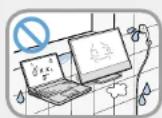
Do not install the product in places exposed to humidity such as a bathrooms.
There is a danger of electric shock. Use the product within the operating conditions specified in the Manufacturers User Manual.
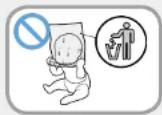
Keep the plastic bags out of the reach of children.
There is a danger of suffocation.

Keep a distance of 15cm or more between the computer and the wall and do not place any objects between them.
This may increase the internal temperature of the computer and may cause an injury.

Do not install the computer on a slant or a place prone to vibrations, or avoid using the computer in that location for a long time.
This increases the risk that a malfunction or damage to the product will occur.

Be careful that people are not exposed to the computer's ventilator, adapter, etc., as they generate heat over a long period of time when your PC is powered on.
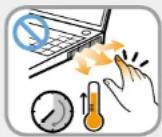
Exposing a part of your body close to the heat from the vent or AC adapter for long periods of time may cause a burn.
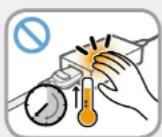
Avoid blocking the vent at the bottom or side of the computer when using it on a bed or cushion.

If the vent is blocked, there is a danger of damaging the computer or overheating the inside of the computer.
Safety Precautions
Chapter 1 Getting Started

Warning
Failure to follow instructions marked with this symbol may cause personal injury and even fatality.
Power Related

The power plug and wall outlet figures may differ depending on the country specifications and the product model.
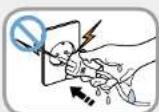
Do not touch the main plug or power cord with wet hands.
There is a danger of electric shock.

Do not exceed the standard capacity (voltage/current) of a multiplug or power outlet extension when using it for the product.
There is a danger of electric shock or fire hazard.
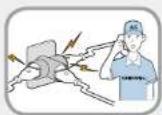
If the power cord or power outlet makes a noise, disconnect the power cord from the wall outlet and contact a service center.
There is a danger of electric shock or fire hazard.
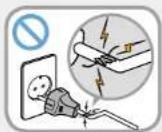
Do not use a damaged or loose main plug or power cord or power outlet.
There is a danger of electric shock or fire hazard.

Plug the power cord firmly into the power outlet and AC adapter.
Failure to do so may cause fire hazard.

Do not unplug the power cord by pulling the cable only.
If the cord is damaged, it may cause electric shock.

Do not bend the power cord excessively or do not place a heavy object over the power cord. It is especially important to keep the power cord out of reach of infants and pets.
If the cord is damaged, it may cause electric shock or fire.
Safety Precautions
Chapter 1 Getting Started

Warning
Failure to follow instructions marked with this symbol may cause personal injury and even fatality.
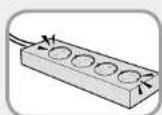
Connect the power cord to an outlet or multiple power plug (extended cable) with a ground terminal.
Failure to do so may result in electric shock.
When the power supply is ungrounded, the current may leak resulting in electric shock.

If water or another substance enters the power input jack, AC adapter or the computer, disconnect the power cord and contact the service center.
If the notebook computer has an external type (removable) battery, separate the battery also.
Damage to the device within the computer may cause electric shock or fire hazard.
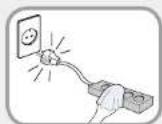
Keep the power cord or outlet clean so that they are not covered with dust.
Failure to do so may result in fire.
AC Adapter Usage Precautions

Connect the power cord to the AC adapter firmly.
Otherwise, there is a danger of fire due to an incomplete contact.
Use only the AC adapter supplied with the product.
Using another adapter may cause the screen to flicker.
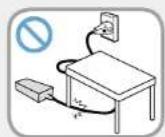
Do not place heavy objects or step onto the power cord or AC adapter to avoid damaging the power cord or AC adapter.
If the cord is damaged, there is a danger of electric shock or fire.
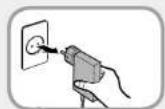
Unplug the wall-mount AC adapter (adapter and plug intergrated type) from the wall outlet while holding the body and pulling it in the direction of the arrow.

If you unplug the adapter by holding and pulling the cable, the adapter may be damaged and an electric shock, explosive sound or spark may occur as a result.
Safety Precautions
Chapter 1 Getting Started

Warning
Failure to follow instructions marked with this symbol may cause personal injury and even fatality.
Battery Usage Related

Please charge the battery fully before using the computer for the first time.

Keep the battery out of the reach of infants and pets, as they could put the battery into their mouths.
There is a danger of electric shock or choking.

Use an authorized battery and AC adapter only.
Please use an authorized battery and adapter approved by Samsung Electronics.
Unauthorized batteries and adapters may not meet the proper safety requirements and may cause problems or malfunctions and result in an explosion or fire.

Do not use the computer in a badly ventilated location such as on bedding, on a pillow or cushion, etc, and do not use it in a location such as room with floor heating as it may cause the computer to overheat.
Take care that the computer vents (on the side or the bottom) are not blocked especially in these environments. If the vents are blocked, the computer may overheat and it may cause a computer problem, or even an explosion.

Do not use the computer in a humid location such as a bathroom or sauna.
Please use the computer within the recommended temperature and humidity range (10\~32°C, 20\~80% RH).
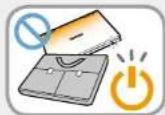
Do not close the LCD panel and put the computer into your bag to move it when it is still turned on.
If you put the computer into your bag without turning it off, the computer may overheat and there is a danger of fire. Shut the computer down properly before moving it.
Safety Precautions
Chapter 1 Getting Started

Warning
Failure to follow instructions marked with this symbol may cause personal injury and even fatality.
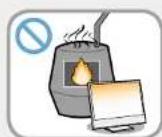
Never heat the product(or battery) or put the product(or battery) into a fire. Do not put or use the product(or battery) in a hot location such as a sauna, inside a vehicle exposed to the heat, and so on.
There is a danger of an explosion or fire.

Take care not to allow metal objects such as a key or clip to touch the battery terminal (metal parts).
If a metal object touches the battery terminals, it may cause excessive current flow and it may damage the battery, or result in a fire.

If liquid leaks out of the product(or battery) or there is a funny smell coming from the product(or battery), remove the the product(or battery) the computer and contact a service center.
There is a danger of an explosion or fire.

To use the computer safely, replace a dead battery with a new, authorized battery.
Usage Related
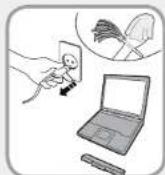
Disconnect all cables connected to the computer before cleaning it. If your notebook is external & removable battery type, remove the external battery.
There is a danger of electric shock or damage to the product.

Do not connect a phone line connected to a digital phone to the modem.
There is a danger of a electric shock, fire or damage to the product.

Do not place any container filled with water or chemicals over or near the computer.
If water or chemicals enter the computer, this may cause fire or electric shock.
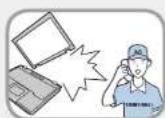
If the computer is broken or dropped, disconnect the power cord and contact a service center for a safety check.
If the notebook computer has an external type (removable) battery, separate the battery also.
Using a broken computer may cause electric shock or fire hazard.
Safety Precautions
Chapter 1 Getting Started

Warning
Failure to follow instructions marked with this symbol may cause personal injury and even fatality.

Avoid direct sunlight when the computer is in an air-tight location such as inside a vehicle.
There is a danger of a fire hazard. The computer may overheat and also present opportunity to thieves.

Do not use your computer for long periods of time while any part of your body is making direct contact with it. The temperature of the product may increase during normal operation.
This may result in harming or burning your skin.
Upgrade Related

Be sure to upgrade the computer by yourself only if you have sufficient knowledge and ability.
If this is not the case, ask for assistance from the service center or an authorized engineer for the upgrade.

Be sure to upgrade only the parts specified in the user manual according to the procedures described in the user manual.
Do not disassemble any other parts or devices by yourself. There is a danger of a electric shock, fire or damage to the product.
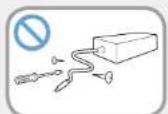
Never disassemble the power supply or AC adapter.
There is a danger of electric shock.
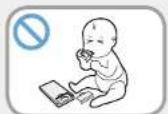
When removing the RTC (Real Time Clock) battery, keep it out of the reach of children as they could touch and/or swallow it.
There is a danger of choking. If a child has swallowed it, contact a doctor immediately.
Safety Precautions
Chapter 1 Getting Started

Warning
Failure to follow instructions marked with this symbol may cause personal injury and even fatality.
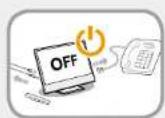
Before upgrading the computer, be sure to shutdown the computer first and then separate all connected cables. If the notebook computer has an external type (removable) battery, separate the battery, too.
Failure to do so may cause electric shock.
Security and Movement Related

Follow the instructions for the relevant location (e.g. airplane, hospital, etc.) when using a wireless communication device (wireless LAN, Bluetooth, etc.).

Avoid exposing a drive to magnetic fields. Security devices with magnetic fields include airport walk-through devices and security wands.
The airport security devices that check carry-on luggage, such as conveyor belts, use x-rays instead of magnetism and will not damage a drive.
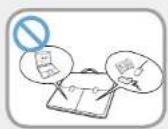
When carrying the notebook computer with other items, such as the adapter, mouse, books etc, take care not to press anything against the notebook computer.
If a heavy object is pressed against the notebook computer, a white spot or stain may appear on the LCD. Therefore, take care not to apply any pressure to the notebook.
In this case, place the notebook computer in a separate compartment away from the other objects.
Safety Precautions
Chapter 1 Getting Started

Caution
Failure to follow instructions marked with this symbol may cause slight injury or damage to the product.
Installation Related
Do not block the ports (holes), vents, etc. of the product and do not insert objects.
Damage to a component within the computer may cause electric shock or fire.
When using the computer with it lying on its side, place it so that the vents face upwards.
Failure to do so, may cause the internal temperature of the computer to rise and the computer to malfunction or halt.
Do not place a heavy object over the product.
This may cause a problem with the computer. In addition, the object may fall and cause injury, or damage the computer.
Battery Usage Related
Dispose of worn-out batteries properly.
There is a danger of fire or explosion.
The battery disposal method may differ depending on your country and region. Dispose of the used battery in an appropriate way.
Do not throw or disassemble the battery and do not put it into water.
This may cause an injury, fire or explosion.
Use only a battery authorized by Samsung Electronics.
Failure to do so may cause an explosion.
Avoid contact with metal objects such as car keys or clips when keeping or carrying a battery.
Contact with a metal may cause excessive current and a high temperature and may damage the battery or cause a fire.
Charge the battery according to the instructions in the manual.
Failure to do so, may cause an explosion or fire from damage to the product.
Do not heat the product(or battery) or expose it to heat (e.g. inside a vehicle during the summer).
There is a danger of explosion or fire.
Safety Precautions
Chapter 1 Getting Started

Caution
Failure to follow instructions marked with this symbol may cause slight injury or damage to the product.
Usage Related
Do not place a candle, light cigar, etc. over or on the product.
There is a danger of fire.
Use a wall outlet or multi-plug with a grounding part.
Failure to do so may cause electric shock hazard.
Make sure to have the product tested by a safety service engineer after repairing the product.
Authorized Samsung Repair Centers will carry out safety checks after a repair. Using a repaired product without testing it for safety may cause an electric shock or fire.
In case of lightning, immediately turn the system off, disconnect the power cord from the wall outlet and phone line from modem. Do not use a modem or phone.
There is a danger of electric shock or fire.
Do not use your computer and AC-Adapter on your lap or soft surfaces.
If the computer temperature increases, there is a danger of burning yourself.
Connect only permitted devices to the connectors or ports of the computer.
Failure to do so, may cause electric shock and fire.
Close the LCD panel only after checking if the notebook computer is turned off.
The temperature may rise and it may cause overheating and deformation of the product.
Do not press the Eject Button while the CD-ROM drive is in operation.
You might lose data and the disk might be suddenly ejected and could cause an injury.
Take care not to drop the product while using it.
This may cause personal injury or loss of data.
Do not touch the antenna with electricity facility such as the power outlet.
There is a danger of electric shock.
When handling computer parts, follow the instructions on the manual supplied with the parts.
Failure to do so, may cause damage to the product.
Safety Precautions
Chapter 1 Getting Started

Caution
Failure to follow instructions marked with this symbol may cause slight injury or damage to the product.
If the computer emits smoke, or there is a burning smell, disconnect the power plug from the wall outlet and contact a service center immediately. If your notebook is external & removable battery type, remove the external battery.
There is a danger of fire.
Do not use a damaged or modified CD.
There is a danger of damaging the product or personal injury.
Do not insert your fingers into the PC Card Slot.
There is a danger of injury or electric shock.
Use recommended computer cleansing solution when cleaning the product and only use the computer when it is completely dried.
Failure to do so may cause electric shock or fire.
Emergency disk eject method using paperclip should not be used while the disk is in motion. Make sure to use the emergency disk eject method only when the Optical Disk Drive has stopped.
There is a danger of injury.
Do not place your face close to the Optical Disk Drive tray when it is operating.
There is a danger of injury due to an abrupt ejection.
Check CDs for cracks and damage prior to use.
It may damage the disc and cause disorder of device and injury of user.
Do not leave the product in a location exposed to magnetic fields.
A magnetic field may cause the product to work abnormally or the battery to discharge.
The information saved on the magnetic tape of a credit card, phone card, bankbook, transportation tickets and so on can be damaged by a computer's electromagnetic field.
Safety Precautions
Chapter 1 Getting Started

Caution
Failure to follow instructions marked with this symbol may cause slight injury or damage to the product.
Upgrade Related
Take care when touching the product or parts.
The device may be damaged or you may be injured.
Take care not to throw or drop a computer part or device.
This may cause injury or damage to the product.
Make sure to close the computer cover before connecting the power after a reassembly.
There is a danger of electric shock if your body touches an internal part.
Use parts authorized by Samsung Electronics only.
Failure to do so, may cause fire or damage the product.
Never disassemble or repair the product by yourself.
There is a danger of electric shock or fire.
To connect a device that is not manufactured or authorized by Samsung Electronics, enquire at your service center before connecting the device.
There is a danger of damaging the product.
Security and Movement Related
When moving the product, turn the power off and separate all connected cables first.
The product might be damaged or users may trip over the cables.
For long periods of not using the notebook computer, discharge the battery and preserve as it is detached. (For external & removable battery type)
The battery will be preserved at its best condition.
Do not operate or watch the computer while driving a vehicle.
There is a danger of a traffic accident. Please concentrate on driving.
Safety Precautions
Chapter 1 Getting Started

Caution
Failure to follow instructions marked with this symbol may cause slight injury or damage to the product.
Cautions on Preventing Data Loss (Hard Disk Management)
Take care not to damage the data on a hard disk drive.
A hard disk drive is so sensitive to external impact that an • external impact may cause loss of data on the surface of the disk.
Take extra care, because moving the computer or an impact • on the computer when it is turned on may damage the data of the hard disk drive.
The company is not liable for any loss of data on the hard disk drive.
Causes that may damage the data of a hard disk drive and the hard disk drive itself.
The data may be lost when an external impact is applied to the disk while disassembling or assembling the computer.
The data may be lost when the computer is turned off or reset by a power failure while the hard disk drive is operating.
The data may be lost and irrecoverable due to a computer virus infection.
The data may be lost if the power is turned off while running a program.
Sudden impact or movement to the computer while the hard disk drive is operating, may cause files to be corrupted or bad sectors on the hard disk.
To prevent data loss due to damage to the hard disk drive, please backup your data frequently.
Proper Posture During Computer Use
Chapter 1 Getting Started
Maintaining a proper posture during computer use is very important to prevent physical harm.
The following instructions are about maintaining a proper posture during computer use developed through human engineering. Please read and follow them carefully when using the computer.
Otherwise, the probability of (RSI: Repetitive Strain Injury) from repeated operations may increase and serious physical harm may be caused.

The instructions in this manual have been prepared so that they can be applied within the coverage of general users. If the user is not included in the coverage, the recommendation is to be applied according to the user's needs.
Proper Posture
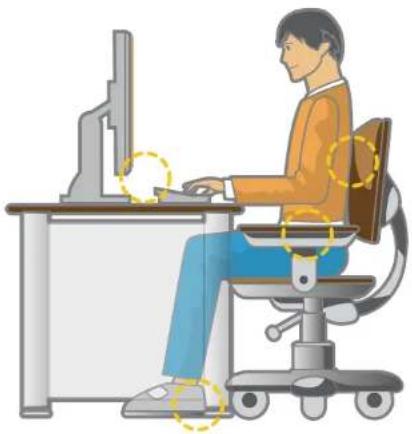
Adjust the heights of desks and chairs appropriate to your height.
The heights are to be adjusted so that your arm forms a right angle when you place your hand over the keyboard while sitting down on a chair.
Adjust the height of chair so that your heel is comfortably placed on the floor.
Do not use the computer while you are lying down, but only • while you are sitting down.
Do not use the computer on your lap. If the computer • temperature increases, there is a danger of burning yourself.
Work while keeping your waist straight.
Use a chair with a comfortable back.
Keep the center of your leg weight not on the chair but on your feet when you are sitting on a chair.
To use the computer while talking over the telephone, use a • headset. Using the computer with the phone on your shoulder is bad for posture.
Keep frequently used items within a comfortable work range • (where you can reach them with your hands).
natural_image
Illustration of a person working at a desk with computer, no text or symbols presentProper Posture During Computer Use
Chapter 1 Getting Started
Eye Position
Keep the monitor or LCD away from your eyes by at least 50cm.

Adjust the height of the monitor and the LCD screen so that its top height is equal to or lower than your eyes.
Avoid setting the monitor and LCD excessively bright.
Keep the monitor and LCD screen clean.
If you wear glasses, clean them before using the computer.
When entering contents printed on a paper into the computer, use a static paper holder so that the height of the paper is almost equal to that of the monitor.
Hand Position
Keep your arm at a right angle as shown by the figure.

natural_image
Illustration of a person in an orange suit typing at a desk, enclosed in a blue circular frame (no text or symbols)Keep the line from your elbow to your hand straight.
Do not place your palm over the keyboard while typing.
Do not hold the mouse with excessive force.
Do not press the keyboard, touchpad or mouse with excessive force.
It is recommended connecting an external keyboard and mouse when using the computer for long periods of time.
Proper Posture During Computer Use
Chapter 1 Getting Started
Volume Control (Headphones and Speakers)
Check your volume first to listen to music.

Check your volume!

Check if the volume is too loud before using headphones.
It is not recommended using headphones for long periods of time.
Any deviation from the equalizer default setting could cause hearing impairment.
The default setting can be changed through software and driver updates without your intervention. Please check the equalizer default setting before first usage.
To prevent possible hearing damage, do not listen at high volume levels for long periods.

Use Time (Break Time)
Take a break for 10 minutes or more after a 50-minute period • when working for more than one hour.
Illumination
Do not use the computer in dark locations. The illumination • level for computer use must be as bright so for reading a book. Indirect illumination is recommended. Use a curtain to prevent • reflection on the LCD screen.
Operation Condition
Do not use the computer in hot and humid locations. • Use the computer within the allowed temperature and humidity range specified in the User Manual.
Front View

The pictures used for the cover and the main body in the • User Manual are those of the representative model of each series. Therefore the colors and appearance of the pictures may differ from the actual appearance of the product depending on the model.
The actual color and appearance of the computer may differ from the pictures used in this guide.
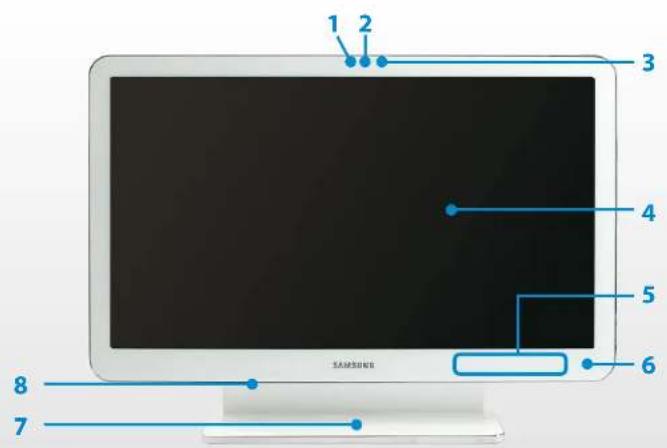
| 1 | Camera operating indicator | This indicates the camera operating status. |
| 2 | Camera | Using this camera, you can take still pictures and record video.You can take a picture or make a movie using theCharms > Start > Camera. |
| 3 | Remote Control Sensor (Optional) | If a user presses a button on the remote control, the sensor detects the signal from the remote control and the computer performs the corresponding action.When using the remote control, take care not to block the sensor.If the sensor is blocked, the remote control will not function. |
| 4 | LCD or Touch screen (Optional) | The screen images are displayed here.It works as a touch screen in models that support the touch screen feature. (Optional) |
| 5 | Touch buttons (for corresponding models only) | You can use the functions by lightly touching the sensor buttons with your fingers. |
| 6 | Power indicator | When the computer starts, this indicator turns on accordingly. |
| 7 | Stand This is the stand supporting the computer. | |
| 8 | Speaker A device used to generate sound. | |
Touch buttons (for corresponding models only)
If you touch the sensor, the touch button works.

| 1 | Volume Control | Adjust the volume. |
| 2 | Source Source | Switches between the PC mode and the monitor mode.PC mode: the computer operates normally as a computer.Monitor mode: the computer functions as a monitor. |
Caution when using the touch buttons
You can only use the • touch buttons when the computer is turned on.
Touch the touch buttons with clean, dry hands.
In a humid environment, use the buttons after first removing moisture from your fingers or the touch buttons.
Since the touch buttons will work even if you do not press them hard, do not press them excessively.
Since a serious impact may damage the sensor in the touch button, take care when using the buttons.
Do not press the buttons with sharp objects such as a stylus pen, ball-point pen, etc. Sharp objects may damage the touch buttons.
When you touch the touch buttons, take care not to touch another button so that your finger tip touches the touch buttons precisely corresponding to the required function.
- When you are wearing gloves or the touch buttons are covered with plastic packaging or some kind of protective covering, the touch buttons may not work properly.
- If a conductive object such as a metal object makes contact with the touch buttons, the touch buttons may malfunction. Therefore, take care not to touch the touch buttons with a conductive object.
Overview
Chapter 1 Getting Started
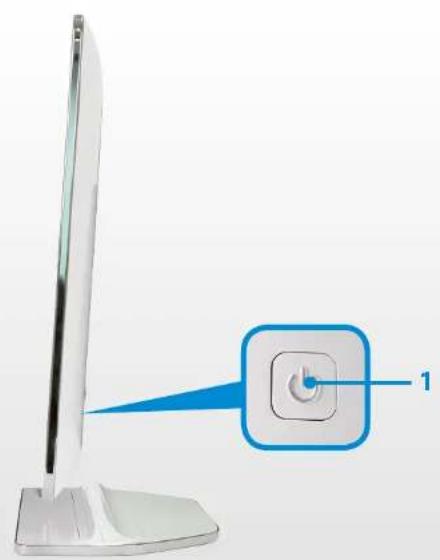
Right View
natural_image
Illustration of a desktop computer monitor with a power button and a numbered label (1) pointing to it, no text or symbols present.1 Power Button
Turns the computer on and off.
Left View

natural_image
Close-up of a transparent electronic device with a finger pointing to its screen (no text or symbols visible)1 Multi Card Slot A card slot supports multi cards.
Rear View

| 1 Microphone You can use the built-in microphone. | ||
| 2 | Ear-set / headset Jack | This is the jack for connecting an ear-set or headset. |
| 3 | USB PortorChargeable USB Port(Optional) | This port is used as a USB port or chargeable USB port.Using a chargeable USB port, you can access or charge a USB device.You can tell the ports apart using the figures printed on the ports or by the colors.USB 2.0 port: blackChargeable USB 2.0 Port: blackUSB 3.0 port: blueChargeable USB 3.0 port: blue |
| 4 | HDMI input (HDMI IN) port | Used to connect an HDMI cable from an external device.Connect an HDMI cable to the HDMI output port of an external device to display the digital source (video/voice) from the device on the computer screen. |
| 5 | HDMI output (HDMI OUT) port | Used to connect an HDMI cable to an external device.Connect an HDMI cable to the HDMI input port of an external device to display the digital source (voice/video) on the external device. |
Overview
Chapter 1 Getting Started

| 6 | Wired LAN Port | Connect the Ethernet cable to this port. |
| 7 | DC Jack◇◇ | A jack to connect the AC adapter that supplies power to the computer.The appearance and size of the jack may differ depending on the model. |
| 8 | TV Antenna Input Port (Optional) | You can watch TV by connecting the antenna cable.Only for models with a TV tuner card.The shape of the port may differ depending on the country. |
| 9 | Security Slot | You can secure the computer by connecting a lock and cable to the Security Slot. |
| 10 | Fan Vents | The internal heat of the computer is emitted through these holes.If the vents are blocked the computer may overheat.Avoid blocking the vents as this may be dangerous. |

What is a chargeable USB port?
USB device accessing and charging functions are supported.
To keep USB charging active in the power-off state, set the following: Click Settings > Power Management > USB Charging, and set it to ON.
Charging a device through a chargeable USB port may take • longer than general charging.
- The user cannot evaluate the charging status of the USB device from the computer.
• This may not be supported for some USB devices.
Turning the Computer On and Off
Chapter 1 Getting Started
Turning the computer on
1 Connect the AC adapter.
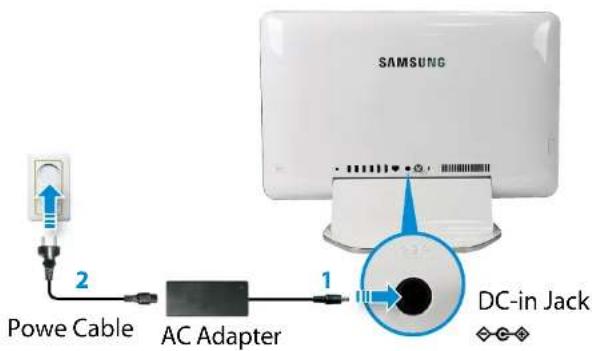
2 Press the Power button to turn the computer on. Power indicator is lit while the computer is turned on.

About Windows Activation
When you turn the computer on for the first time, the Windows activation screen appears.
Follow the activation procedures according to the instructions on the screen to use the computer.

If there is no display but a message of "HDMI" on the screen after you turn on the computer, tapS change the picture mode. (monitor mode > PC mode)
Turning the Computer On and Off
Chapter 1 Getting Started
Turning the computer off

Since the procedures to turn the computer off may differ depending on the installed operating system, please turn the computer off according to the procedures for the purchased operating system.
- Save all your data before clicking on Shut down.
1 Open the Charms.
- Touch screen: Swipe inward from the right edge.
- Mouse: Drag the mouse pointer to the top- or the bottom-right corner of the screen.
2 Click Settings ⚙ > Power ⏻ > Shut down.


If you want to power off your computer when you are logged out, unlock the screen and click Power ⏻ > Shut down.
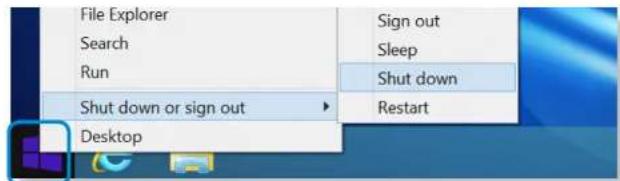
On the desk top
1 • Touch screen: Tap and hold the Start button on the bottom-left corner.
- Mouse: Right-click the Start button 📋 on the bottom-left corner.
2 Click Shut down or sign out > Shut down.
Turning the Computer On and Off
Chapter 1 Getting Started
Unlocking the screen
To unlock the lock screen, do one of the following:
Touch screen: Swipe the lock screen from bottom to top.
Mouse:• Click the lock screen.
Keyboard: Press any key.

natural_image
Abstract geometric pattern with diagonal black lines on orange background, no text or symbols presentIf the account has a password, enter the password to log in after unlocking the screen.

natural_image
Windows logo with four blue squares inside a white circle (no text or symbols)Chapter 2. Using Windows
What is Microsoft Windows? 29
Screen At a Glance 30
Using the Charms 32
Using Apps 34
Windows Hot Key Function 39
Using a Touch Screen (Touch screen models only) 40
What is Microsoft Windows?
Chapter 2 Using Windows
Microsoft Windows is an operating system that is required for operating a computer.
To use your computer optimally, you need to know how to use it properly. To learn how to use the operating system, check out Windows Help and Support, and Help+Tips.

The screen may appear somewhat different depending on the model and the operating system.
This manual is designed for Windows 8.1, and may differ in content depending on the OS version.
The desktop image shown differs depending on the product model and the OS version.
Displaying Help
To open the Help, do the following:
• Keyboard: Press the F1 key.
- Touch screen: Swipe inward from the right edge. The Charms appears. Tap Settings > Help.
Mouse: Place the mouse pointer over the top-right or bottom-right corner of the screen to display the Charms. Tap Settings > Help.

If you are connected to the internet, you can access the most recent online Help.
Viewing Help+Tips
On the Start screen, select Help+Tips.

Windows menu operations are provided in two different ways: mouse manipulation and gestures.
Screen At a Glance
Chapter 2 Using Windows
Windows provides both the new Start screen mode and the Desktop mode of the existing OS.
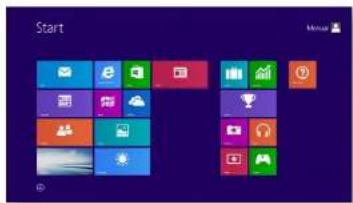
Start screen Desktop

natural_image
Digital photo of a blue sky with motion blur and partial text 'Samsung ATIV' at bottom right (no readable document content)Start screen
When you turn on the computer, the Start screen is displayed, which allows you to use the applications (Application, App, hereafter referred to as an App) at the same location.

| 1 Start Screen Refers to the default Start screen of Windows. | ||
| 2 App Refers to the apps that are currently installed. | ||
| 3 User Account This refers to the currently used user account. | ||
| 4 Displaying the Charms | The Charms is hidden at the right of the screen. Place your mouse pointer at the edge of the top or bottom right of the screen to display the Charms. | |
| 5 Charms | This refers to the menu that allows you to use functions such as Search, Share, Start, Device and Settings. | |
| 6 Desktop Switches to Desktop mode. | ||
| 7 | The Apps screen appears where a tile-based list of all the apps installed on the computer is displayed. This screen appears only when using the mouse. | |
| 8 | Start button | This button appears only when using the mouse. Move the mouse pointer to the bottom-left corner to display the Start button. Click the button to switch to the last-run app screen or the desktop.Right-click this button and select Shut down or Control Panel to your needs. |
Desktop
This provides similar functions to those provided by the desktop in prior Windows 8 versions.

1 Desktop Refers to the Desktop.
| 2 | Displaying the Charms | The Charms is hidden at the right of the screen.The Charms appears as shown.Touch screen: Swipe inward from the right edge.Mouse: Place the mouse pointer over the top- or bottom-right corner of the screen. |
| 3 | Charms | This refers to the menu that allows you to use functions such as Search, Share, Start, Device and Settings. |
| 4 | Start button | Move to the Start screen.Right-click the button or tap and hold it to select quick access menus such as Shut down and Control Panel. |
Using the Start button
Tap and hold the Start button or right-click it to select quick access menus.
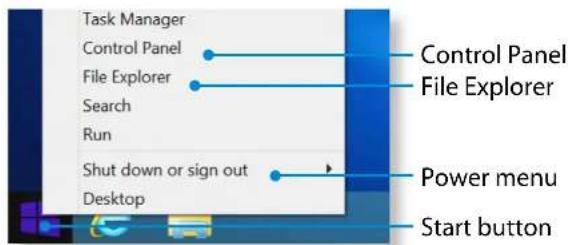
Using the Charms
Chapter 2 Using Windows
The Charms is a new type of menu that combines the Start menu with the Control Panel of existing Windows.
The Charms allows you to quickly configure the device(s) connected to your computer, search for App(s)/file(s), and use the sharing function, etc.
Activating the Charms
To open the Charms, do the following:
Touch screen: • Swipe inward from the right edge.
Mouse: Place the mouse pointer over the top- or bottom-right corner of the screen.

 Search Search | Perform the keyword search to produce an integrated list of search results covering apps, files and web pages. |
 Share Share | Share different types of files with others through email communications. |
 Start Start | Move to the Start screen or open the last-run app. |
 Device Device | Find and use connected devices such as printers and display monitors. |
 Settings Settings | Configure the computer or app settings to your preference. |
Using the Charms
Chapter 2 Using Windows
Changing the Settings
Frequently used Windows menus are collected.
Click the Charms > Settings.
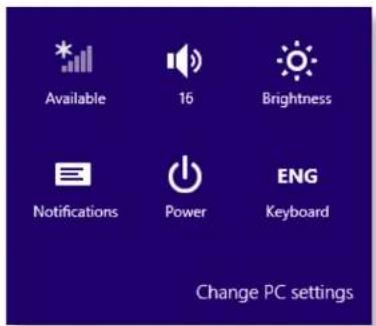
| Icon Name Function Description | ||
 | Wireless Network | You can connect to a wireless network. Select a wireless network to connect to. |
 | Adjusting the Volume | You can adjust the volume or mute the sound. |
 | Notice | You can set the interval at which an App sends notices. |
 | Power | You can turn off your computer or select the Power Options. |
 | Language Select a preferred language. | |
Change PC settings
You can change more settings.
Using Apps
Chapter 2 Using Windows
An App refers to an application program (hereafter referred to as an App). In a larger sense, it refers to all the software programs installed on the operating system.
Windows provides basic Apps for frequently performed tasks.
Starting/Exiting an App
Click on an App in the Start screen to activate it.
To exit the current app on the touch screen
Swipe downward from the top edge of the screen.
To exit the current app using the mouse
1 Move the mouse pointer over the top edge.
Your mouse pointer changes to a hand shape.
2 Click and hold your mouse button and then drag it to the bottom of the screen. The App moves downward and disappears and exits.

natural_image
Group photo of people taking a selfie with a blue downward arrow overlay (no text or symbols)Using Apps
Displaying Currently Running App(s)
1 Move your mouse pointer to the top left corner of the screen to display the last run App.
2 Then, move your mouse pointer down to display a list of the currently running Apps in order.
Using Apps
Chapter 2 Using Windows
3 Click on an App in that list or drag it to the center of the screen. Now, you can check the selected App which is currently running.

Right-click over the App in the list and click Close to exit the App.

Using split screens
1 Select the Apps in the Start screen.
2 • Touch screen: Put your finger on the top edge, and swipe to the left or right.
- Mouse: Move the mouse pointer to the top edge. The pointer changes to the palm shape. Then, drag the mouse to the left or right.
3 Arrange the position of each split screen as appropriate.
4 Move the Screen Split Bar to change the screen split ratio.

Ex) If you run the Weather App and Store App at the same time
Using Apps
Chapter 2 Using Windows
Adding/Removing an App to/from the Start Screen
1 Move to the Apps screen.
- Touch screen: Swipe upward from the Start screen.
- Mouse: Click the icon in the bottom-left corner of the Start screen.
2 Tap and hold the app, or right-click it to display the apps list.
3 Select Pin to Start or Unpin from Start.

Ex) When removing an App in the Start screen
Camera App at a Glance
Use the OS-provided camera app to take photos or make movies and edit them to your preference.
1 Select Camera from the Start screen.
2 To take photos, select 📷 to make movies, select .

natural_image
Group photo of smiling people posing on a bench in a park-like outdoor setting (no visible text or symbols)Using Apps
Chapter 2 Using Windows
To play the photo or movie
▶ To play the Camera-taken photos instantly
- Touch screen: Swipe from the left to the right.
- Mouse: Click the arrow symbol in the left of the screen.
▶ On the Start screen, Select Photos > Camera Roll.
You can play a continuous roll of captured photos and videos.
To edit photos
1 Select a photo to edit.
2 Swipe inward from the top edge, or swipe upward from the bottom edge.
Alternatively, right-click the photo.
3 Then, select Edit and do the editing to your preference.

Cautions
Do not take a photo of others without their permission. Do not take photos or make video recording in areas • prohibiting those actions.
Do not take photos or make video recording that may • infringe on privacy or confidentiality.
Using Apps
Chapter 2 Using Windows
Using the Windows Store
If you run the App Store in the Start screen, the Apps in the Windows Store are displayed.
However, a Microsoft account is required to purchase App(s) in the Windows Store.
Continue after registering your Microsoft Account in the Charms.
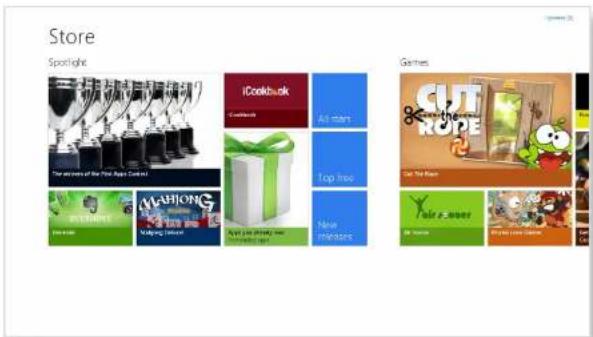

Samsung cannot solve errors occurring with other apps installed from the Windows Store. Contact customer support for the app directly.
Configuring your Microsoft Account
A Microsoft Account allows you to synchronize your settings with other device(s) running Windows online allowing you to share file(s) or settings.
You should register a Microsoft Account to download or purchase App(s) from the Store.
1 Run the Charms and click Settings > Change PC Settings.
2 Select Your account > Connect to a Microsoft account.

3 Register your account through the following relevant procedures.
Windows Hot Key Function
Chapter 2 Using Windows
You can use the following convenient hot keys in Windows.
| Function Hot Keys Function | Description | |
| Displaying the Start Screen | Windows Key | Switches to Start mode. |
| Displaying the Desktop | Windows Key + D | Switches to Desktop mode. |
| Running the Charms Windows Key + C Activates the Charms. | ||
| Locking the Screen Windows Key + L Locks the screen. | ||
| Opening the Ease of Access Center | Windows Key + U | Opens the Ease of Access Center configuration. |
| Opening the Second Screen Settings | Windows Key + P | Opens the External Monitor Settings menu. |
| Opening the Advanced Management Tool | Windows Key + X | Opens the Advanced Management Tool. |
| Exit App | Alt + F4 | Exits the currently running App. |
Using a Touch Screen (Touch screen models only)
Chapter 2 Using Windows
A touch screens allows you to use your computer without a keyboard or mouse.
The touch screen instructions also describe the functions which can be activated via the touch screen.

- If you are using your computer for a long period of time, it is recommended using a keyboard and mouse.
• Make sure to operate your touch screen using your finger. If you operate your touch screen with a hard object, it will not work. - If there any foreign substances such as insects or water on the touch screen, your touch screen will not work properly.
Using a Touch Screening

- This function is supported by Windows touch screen models and is activated by some applications.
- In addition, please note that supported functions may differ depending on the application.
Learning about Basic Touch Screen Operations
You can easily learn how to use the touch screen conveniently.
| Touch Operation Function Description | ||
 | Swipe inward from the right edge | Displays the Charms menu which is hidden at the right of the screen. |
Using a Touch Screen (Touch screen models only)
Chapter 2 Using Windows
| Touch Operation Function Description | ||
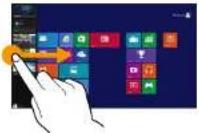 | Swipe inward from the left edge | Displays the last run App. |
 | Swipe downward from the top edge, or swipe upward from the bottom edge | Displays the options for the currently running application. |
 | Swipe upward on the Start screen. | A tile of all apps installed is displayed. |
 | Swipe downward from the top on the All Apps screen | The All Apps screen switches to the Start screen. |
 | Swipe downward from the top edge | Exit all the currently running apps. |
Using a Touch Screen (Touch screen models only)
Chapter 2 Using Windows
| Touch Operation Function Description | ||
 | Touching slightly (Clicking) | Slightly press with your finger to select an item.(If you slightly touch a specific menu, option, application icon, etc. on the screen, the corresponding capability is activated.) |
 | Touching twice (Double-clicking) | Slightly press twice with your finger to select an item. |
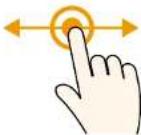 | Tap and swipe | Moves the selected target or moves to the next page.You can draw a picture or write some letters with this operation. |
 | Rotating with more than 2 fingers | Rotates the selected target. |
 | Spreading 2 fingers widely or bringing them towards each other | Zooms in or out of the target. |
Using a Touch Screen (Touch screen models only)
Chapter 2 Using Windows
| Touch Operation Function Description | ||
 | Touching and holding for a while (Right-clicking your mouse) | Provides the same function as right-clicking your mouse button. Displays the additional options which can be set for the selected target or more detailed information. |
 | Touching and dragging 2 fingers up/down, left/right (Scrolling) | Moves up/down, left/right. Provides the same function as scrolling your mouse. |
Using a Touch Screen (Touch screen models only)
Chapter 2 Using Windows
Calibrating the Screen
If you are using the touch screen for the first time or the pointer is not aiming correctly and the accuracy has declined, calibrate your screen.
The screen calibration process may differ depending on the OS. It may not be supported by some operating systems.
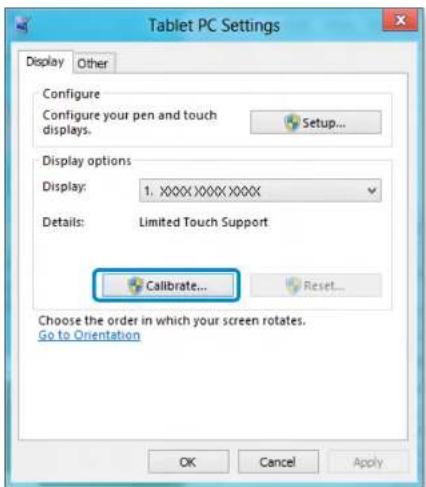
1 On the Desktop, press the Charms > Settings > Control Panel > Tablet PC Settings > Calibration. Then press OK.
2 When the Calibration window appears, press the + mark by following the onscreen instructions.
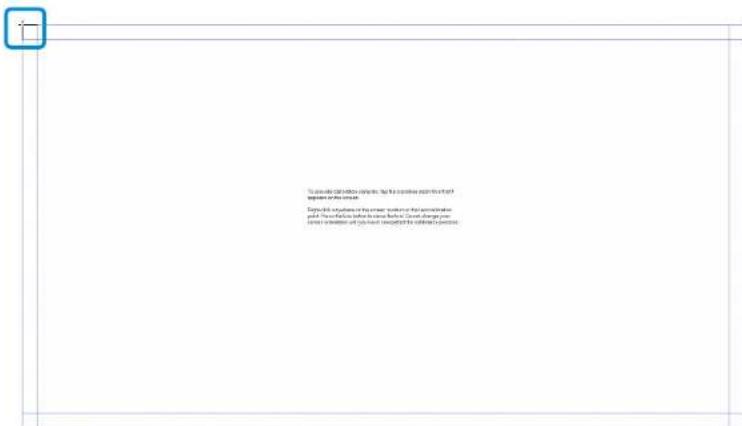
3 The input location of your touch screen is calibrated.
Using a Touch Screen (Touch screen models only)
Chapter 2 Using Windows
Entering Characters
You can use the keyboard or Touch Keyboard to enter characters.
Entering characters may differ depending on the operating system and is not supported by some operating systems.
If you are using your computer for a long period of time, it is recommended using the keyboard.
Entering characters is explained using an example with notepad.
Using the Touch Keyboard
The Touch Keyboard is an onscreen keyboard provided by Windows OS.
Instructions for using both the touch-enabled mode and handwriting mode are provided below.
1 Swipe upward on the Start screen. The All Apps screen appears. Select Notepad.
Alternatively, click the bottom-left icon ↓ on the Start screen, and click Notepad.
2 Put your hand on the Notepad screen to display the cursor.
3 On the desktop, tap the right of the taskbar to display the Touch Keyboard.

![Touch-enabled mode Touch-enabled mode (displays the Numeric Key Pad in the middle.) Handwriting Mode [Input Mode]](/content/2026/05/1025797/images/64abedcac804aded82e2631d31f08812301954187a661c0f6628d9b3e2c2b546.jpg)
Using a Touch Screen (Touch screen models only)
Chapter 2 Using Windows
Touch-enabled mode
The touch-enabled mode provides the same input environment as the physical keyboard.
1 Tap the Touch-enabled mode 📄 on the Touch Keyboard.
2 Press the keys to enter your characters.

Entering characters in Handwriting Mode
You can enter characters by writing them in the Handwriting Mode Input Panel on the touch screen.
1 Tap the Hand-writing mode icon on the Touch Keyboard.
2 Write characters in the input area of the Handwriting Mode Input Panel on the touch screen.

3 Press the Insert button to enter characters.
Using a Touch Screen (Touch screen models only)
Chapter 2 Using Windows
Note for Using the Touch Screen
When using the touch screen, make sure to keep your hands • clean and dry.
In humid environments, dry off your hands and the surface of the touch screen before using the touch screen.
Do not directly spray LCD display cleaner onto the touch screen. The cleaner may soak through the bottom of the touch screen. When using an LCD display cleaner, spray it onto a cloth to clean your touch screen.
(If you use an abrasive cleaner or cloth, your touch screen may be damaged.)
Do not apply severe shocks or impacts to the touch screen or press on it with a sharp object such as a pen.
This may result in your touch screen being damaged.
If your finger touches the screen too softly, the touch may not be recognized.
When touching the screen, press on the item precisely with your finger and take care not to touch any other items.
The touch screen sensors are located at the edges of the touch screen.
When installing a protective cover and accessory, be careful not to cover the edges of the touch screen.
Be careful not to damage the edges of the touch screen.
If the edges of the touch screen are damaged, the touch screen may not work properly.
If there any foreign substances such as insects or water on the touch screen, your touch screen will not work properly. Use your touch screen after removing all foreign substances.
If you operate your touch screen with a hard object such as a nail, pen, etc., it will not work.

natural_image
Blue computer mouse icon inside a white circle on a blue gradient background (no text or symbols)Chapter 3. Using the computer
Using a wireless keyboard/mouse (Optional) 49
Using hand gestures (Optional) 57
Multi Card Slot (Optional) 60
Connecting an External Display Device (Optional) 63
Switching the picture mode 64
Using the product as a monitor (Optional) 65
Adjusting the Volume 66
Wired Network 68
Wireless Network (Optional) 71
Using the TV (Optional) 73
Using the Remote Control (Optional) 79
Using the TPM Security Device (Optional) 81
Using the Multimedia App (Optional) 91
Using Apps With a Samsung Smartphone (Optional) 93
Samsung Software Update 94
Diagnosing the Computer Status and Troubleshooting 95
Using the Security Slot 96
Using a wireless keyboard/mouse(Optional)
Chapter 3. Using the computer
The wireless keyboard and mouse are optional and the appearance and the color of the provided keyboard and mouse may differ depending on the model.
Installing the wireless receiver
1 Open the Battery Cover at the bottom and insert the battery in the right polarity (+,-).
Example) Wireless mouse

If you set this switch to the OFF position when not using the mouse, you can save battery power.
2 Insert the wireless signal receiver into the USB port at the back of the computer.

3 Slide the power switch at the bottom of the mouse to the ON position.
Example) Wireless mouse

4 You can use the wireless keyboard and the mouse without additional settings.

You can use the wireless keyboard and the wireless mouse within a 5m distance of the wireless signal sensor.
The distance is subject to the surroundings and if there is interference nearby, in particular a wireless LAN AP, the distance may be decreased.
Using a wireless keyboard/mouse(Optional)
Chapter 3. Using the computer
Wireless keyboard
1 Locate the battery cover at the bottom back of the keyboard.
Use your fingers to push the cover up.

2 Insert the batteries and then close the battery cover.


Be sure to confirm that the polarities (+ / -) of the batteries are correct.
Do not recharge the batteries (AAA type) supplied with the product.
Using a wireless keyboard/mouse(Optional)
Chapter 3. Using the computer


Using a wireless keyboard/mouse(Optional)
Chapter 3. Using the computer
Shortcut Keys
While pressing and holding the Fn key, press a shortcut keys.

| Shortcut keys Function Description | ||
| F1 Play the previous file | Play the media file | |
| F2 Play/Pause ▶ | ||
| F3 Stop ■ | ||
| F4 Play the next file | ||
F5 Search  | These are Windows menu keys.Each menu item will be activated as appropriate. | |
F6 Share  | ||
| F7 Device [SZXX] | ||
F8 Setup  | ||
Using a wireless keyboard/mouse(Optional)
Chapter 3. Using the computer
| F9 Mute Toggle the sound on and off. | |||
| F10 [5xH2] | Volume control Adjust the volume. | ||
| F11 [30TT] | |||
| F12 Power saving mode Switch to power saving mode. | |||
The wireless keyboard automatically enters power-saving mode if there is no key input for a pre-determined period of time. Press any key to resume using the keyboard in power-saving mode. However, a function to turn the keyboard off is not supported.
Using a wireless keyboard/mouse(Optional)
Chapter 3. Using the computer
Wireless keyboard
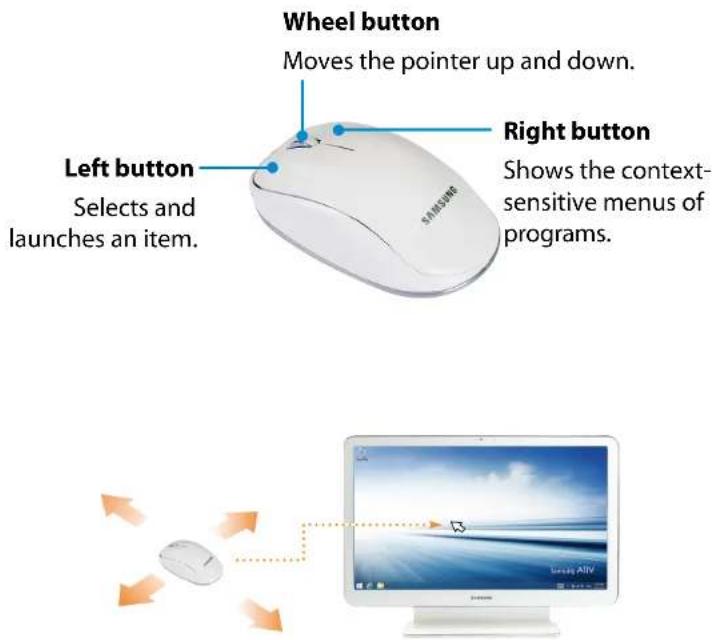
If you move the mouse, the pointer on the screen moves in the same direction.
Click function

Briefly press the left mouse button once.
If you click this mouse button once, the corresponding program is selected.
Double-click function

Quickly press the left mouse button twice.
The corresponding program is launched.
Right click function
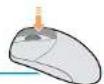
If you click this mouse button once, the context-sensitive menu of the current program appears.
Drag function
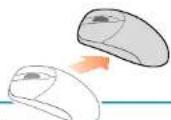
Dragging refers to clicking an item and moving the item to another position while holding the mouse button down.
Click the left mouse button over an item to be dragged and move the item to the new position while holding the mouse button down.
Scroll function

If you turn the wheel button up or down, the screen moves up or down accordingly.
Using a wireless keyboard/mouse(Optional)
Chapter 3. Using the computer
If the wireless keyboard does not work
▶ Check if it is out of battery.
For the keyboard, check if the battery low indicator ☑ at the top right blinks.
If the indicator blinks, you need to replace the battery.
▶ Check the status of the wireless signal receiver.
1 Disconnect the wireless receiver from the main body and then reconnect it.

2 Within 30 seconds of reconnecting the receiver, press and hold the CONNECT button for 1 seconds near the receiver.

3 Check if the device works properly.
Using a wireless keyboard/mouse(Optional)
Chapter 3. Using the computer
If the wireless mouse does not work
▶ When the power switch at the bottom of the mouse is in the OFF position, the mouse does not work.
Turn the switch to the ON position.
▶ Check if it is out of battery.
▶ Check the status of the wireless signal receiver.
1 Set the power switch at the bottom of the mouse to the OFF position.

2 Disconnect and then reconnect the wireless signal receiver to the main body.

3 Set the power switch at the bottom of the mouse to the ON position.
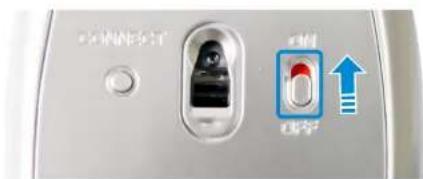
4 Within 30 seconds of reconnecting the receiver, press and hold the CONNECT button for 1 seconds near the receiver.
5 Check if the device works properly.
Using hand gestures (Optional)
Chapter 3. Using the computer
You can turn the pages on the screen, and run and exit programs using hand gestures in front of the computer screen. In addition, you can turn the volume up or down and zoom in or out the screen.
1 Run the hand gesture program (Gesture Control). Click the bottom-left icon in the Start screen, and then click Gesture Control.

Hand Gesture window
2 The Hand Gesture window appears on the right side of the screen.
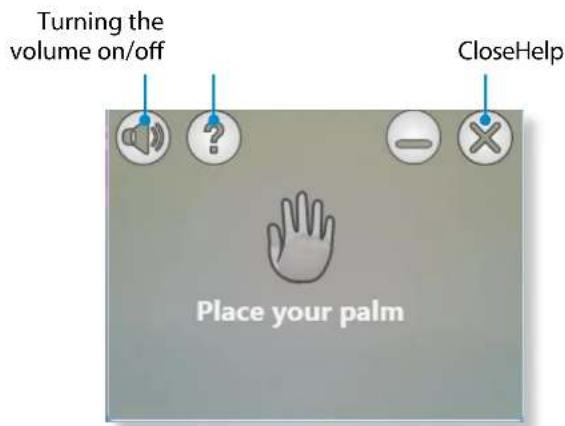
The actual window may differ from the picture in this User Manual.
Using hand gestures (Optional)
Chapter 3. Using the computer
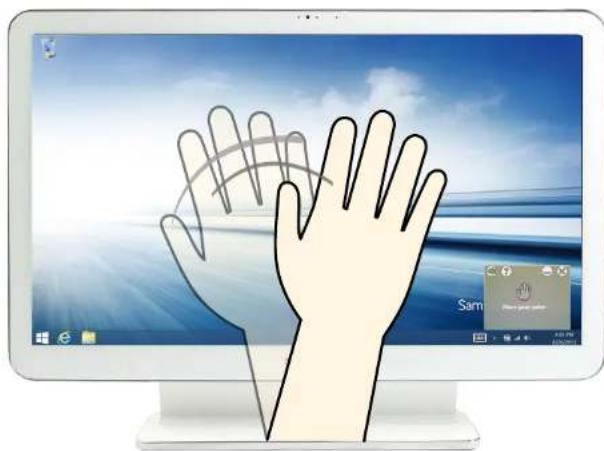
3 If you place your hand in front of the camera, your hand is recognized when the palm-shaped icon appears on the screen.
The hand gesture function works within a 50cm\~100cm range from the camera.
natural_image
Illustration of a computer monitor displaying two hands with curved lines over a blue sky background, no text or symbols present.Tips
This function only works when a hand icon appears on the small window on the right side of the screen. If the function doesn't work properly, please try to move your hand so that the hand icon appears in the window.
The function may not work properly depending on the angle of your hand movement.
The function may not work properly when the ambient • illumination is too bright or dim.
You cannot run two camera programs at the same time. When you use the hand gesture function, please use only one program.
Using this function for an extended period of time may strain your arm.
Using hand gestures (Optional)
Chapter 3. Using the computer
Try to run a function referring to the figure of the gesture below.
| Gestures Hand Motions Operating descriptions | |||
| Move to the Left or Right | Move the palm to the left / Move the palm to the right | 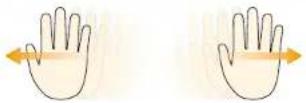 | Previous screen / Next screen |
| Fist Fist Click |  | ||
| Rotate | Rotate the palm counter clockwise / Rotate the palm clockwise |  | Turn the volume down / Turn the volume up |
| Wave Wave | the palm 2~3 times Exit the program |  | |
| Make a fist and move it up | Make a fist and move it up (To the height of the camera) |  | Move to the start screen.Start Screen Mode: Move to the most recently executed application. |

Depending on the program version, some features may be changed or may not be supported without prior notice.
Multi Card Slot (Optional)
Chapter 3. Using the computer
Using the multi-card slot, you can read and write data on various types of memory cards.
When you insert a memory card, make sure to insert the memory card in the correct direction. Pushing an incorrectly inserted memory card may damage the card itself or the slot.

You can use memory cards as a removable disk and • conveniently exchange data with digital devices such as a digital camera, etc.
Separately purchase memory cards of your desired capacity.
The color of the multi-card slot may differ from the picture • in this manual.
Before using the slot, remove the dummy card from inside the slot. (Only for models providing dummy cards.)
Insert the memory card into the multi-card slot in the direction printed on the slot.
For memory cards marked with '*' , you must insert them • into a specified adapter and then insert the adapter into the multi-card slot.
Inserting such memory cards directly into the multi-card slot without using a specified adapter may damage the computer.
The computer may not recognize the device depending on the status of the specified adapter.
The data transfer rate may differ depending on the specification of the memory card.
Using the card
1 Insert a memory card into the multi-card slot in the correct direction.

Multi Card Slot (Optional)
Chapter 3. Using the computer

Memory Card Naming
The following table shows the full names of memory cards for each abbreviation.
| Abbreviation Memory Card's Name | |
| SD Secure Digital | |
| *mini SD mini Secure Digital | |
| *micro SD micro Secure Digital | |
| SDHC Secure Digital High Capacity | |
| *mini SDHC mini Secure Digital High Capacity | |
| *micro SDHC micro Secure Digital High Capacity | |
| SDXC Secure Digital eXtended Capacity | |
| *micro SDXC micro Secure Digital eXtended Capacity | |
2 The following message appears on the top right. Click to open the folder and click View Files.


If a message appears to notify you of any problem, click the corresponding window > Continue without Scanning. You can perform the following process described in No. 3.
3 File Explorer runs on the desktop.
You can save, move and delete data on the corresponding drive.
To remove a memory card
Remove the card while holding the tip of the card.
Alternatively, push the tip of the card in and then remove it once it pops up.
Multi Card Slot (Optional)
Chapter 3. Using the computer
To format a memory card
When using the memory card for the first time, you must format the card before using it.
! Formatting a card deletes all data saved on the card. If the card includes data, backup the data before formatting it.
1 Click the File Explorer icon on the taskbar at the bottom of the desktop.
2 Right-click the card drive and click Format.
3 Click Start to the formatting.
To share a memory card with a digital device such as digital camera, it is recommended to format the memory card in the digital device before use. If you format a memory card on the computer and then insert the memory into the digital device, you may need to format the memory card again in the digital device.
If there is a write-protection device in the memory card and the device is set to the lock position, you cannot format, write data, nor erase data from the card.
Repeatedly inserting and removing a memory card may damage the memory card.
SDIO(Secure Digital Input Output) is not supported.
You cannot read or write copyright-protected data.
Connecting an External Display Device(Optional)
Chapter 3. Using the computer
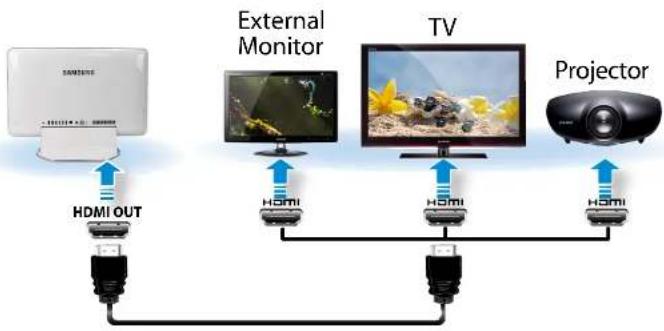
By connecting the computer to a TV with a HDMI port, you can enjoy both a high visual quality and a high sound quality.
After connecting a TV through HDMI, you have to configure the screen and sound.

The HDMI cable is not bundled. You have to purchase it separately.
1
Using an HDMI cable, connect the HDMI output port of the computer to the HDMI input port of the TV.
flowchart
graph TD
    A["Smart TV"] -->|HDMI OUT| B["External Monitor"]
    B -->|HDMI| C["TV"]
    C -->|HDMI| D["Projector"]
    D -->|HDMI| B
    B -->|HDMI| E["External Monitor"]
    E -->|HDMI| F["TV"]
    F -->|HDMI| C
    C -->|HDMI| G["Projector"]

This is only supported for models that support a TV output • port (HDMI).
When a TV provides more than one HDMI port, connect the computer to the DVI IN port.
When connecting the computer to a TV, switch the external input mode of the TV to HDMI.
2
Select Charms menu > Devices □ > Projector > Second Screen.
Select a desired monitor mode.
 | PC screen onlyThe contents are only displayed on the PC monitor (current device). |
 | DuplicateThe contents of the current device are displayed on the external device as well. |
 | ExtendThe screen of the current device is expanded to the external device. |
 | Second screen onlyThe contents are displayed only on the screen of the external device. |

External Monitor / TV is not supported in the DOS Command Prompt window.
Switching the picture mode
Chapter 3. Using the computer
You can switch the picture mode to your preferred viewing pleasure, such as optimizing the display for movies or electronic books.
1 Click the bottom-left icon 📋 the Start screen.
2 Click Settings > Display > Color tone.
Standard• : Standard picture mode.
Movie• : Switch to this mode when the ambient lighting is dark or when watching movies.
Low-contrast scene: This will make a darker scene brighter for distinction.
Sharp• : This will make the picture clear and sharp.
- Read: Suitable for reading electronic books.
• No effect: This is the default picture mode.
Samsung Computer's Defective LCD pixel management standard
Although Samsung Electronics, Co., Ltd. observes strict quality and confidence specifications for LCD manufacturing, the company must inevitably allow a few defective cells in panels due to a technological limitation of the manufacturing process.
Therefore Samsung observes and manages the following dot principles:
- Bright dot : 2 or less
- Black dot : 4 or less
- Combination of Bright and Dark : 4 or less
Instructions for Cleaning the LCD
Clean the LCD panel with a soft cloth lightly moistened with computer cleansing detergent moving in one direction.
Cleaning the LCD panel with excessive force can damage the LCD.
Using the product as a monitor(Optional)
Chapter 3. Using the computer
The LCD screen of this product can be used as a monitor using the Digital Video/Audio Input Port (HDMI-IN).
Try using this product as a monitor by connecting an HDMI device such as a computer, gaming console, DVD player and so on.
Using the product as a monitor
1 Connect the external device (HDMI output port) and this product (digital video/audio input port (HDMI-IN)) with the HDMI cable.
2 Press the touch button to switch this product to monitor mode.

You can only use monitor mode by connecting the Digital Video/Audio Input Port (HDMI-IN). The Digital Video/Audio Out Port (HDMI-OUT) is for output only.

As long as the power cord is connected, you can use the LCD of the product as a monitor even when the product is off.
Even if the product is switched to monitor mode by • pressing the S button during an operation, the
operating system is not terminated. Press the Source button again to return to PC mode.
If the product is switched to monitor mode, the audio is also switched accordingly.
If no picture is displayed on the LCD screen when the product is switched to monitor mode, disconnect and then reconnect the HDMI port.
To use the computer in the monitor mode after the • computer enters the power saving mode or shuts down, press the LCD On/Off button.
Returning to PC mode
To return to PC mode from monitor mode, press the touch button.
Adjusting the Volume
Chapter 3. Using the computer
You can control the volume with the volume control program.
Using the touch button
Tap the touch button to control the volume.

Adjusting the Volume using the Volume Adjustment Program
Click the Charms menu > Settings > to adjust the control bar.

Using the Sound Recorder
The procedures to record sound using the Windows Recorder are described below.
1 Connect a microphone to the microphone jack.
Or use built-in microphone.
2 Right-click over the Volume icon 📋 on the taskbar and select Recording Device.
3 Check if the microphone is set as the default recording device.
If this is the case, it is already set as the default device. If not, right-click over the microphone and select Set default.
4 Click the bottom-left icon ↓ the Start screen, and then click Sound Recorder.
Click Start recording.

Adjusting the Volume
Chapter 3. Using the computer
Using SoundAlive (Optional)
The SoundAlive function enables you to experience more stereophonic sound using stereo speakers.

The software programs provider may vary, depending on your computer model.
In addition, some pictures may differ from actual product depending on the computer model and software version.
1 Right-click over the Volume in the taskbar on the Desktop and click Play Device.
(Alternatively, click the Charms menu on the Desktop > Settings > Control Panel > Hardware and Sound > Sound.)
2 Right-click over the Speakers and select Properties.
3 Select the SoundAlive tab and select one of the modes.
Wired Network
Chapter 3. Using the computer
A wired network is a network environment used for a company network or broadband internet connection at home.

This manual is based on the latest Windows. The content • or pictures may differ from the actual model, depending on the Windows version. However, most of the basic operations are similar as in the previous versions of Windows operating system.
The figures used for the description are of a representative model. Therefore the figures may differ from the real ones.
Connecting to the Wired LAN
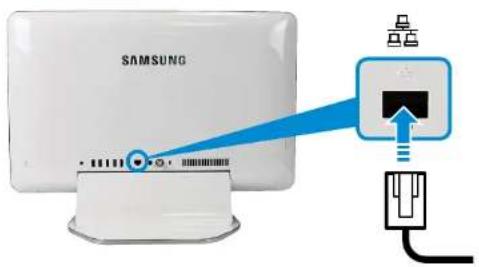
1 Connect the LAN cable to the wired LAN port.
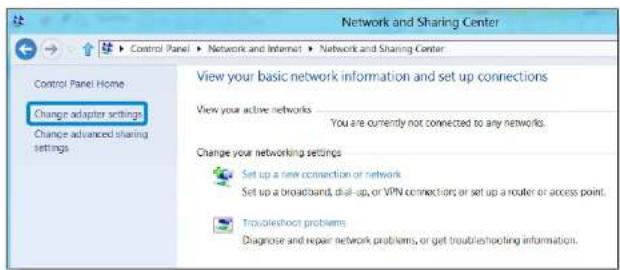
2 Click Charms menu on the Desktop > Settings 🔒 > Control Panel > Network and Internet > Network and Sharing Center and click on Change adapter settings in the left menu pane.
3 Select Ethenet and click the right button of the mouse and select Properties.
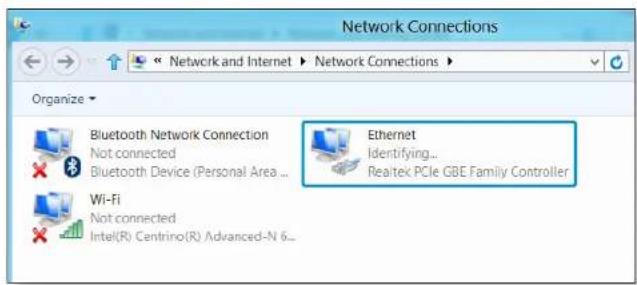
The LAN Device name may differ depending on your computer's Network Device.
Wired Network
Chapter 3. Using the computer
4 Select Internet Protocol Version 4(TCP/IPv4) from the list of Network Components and click Properties.


The Network Component name may differ depending on the Operating System Installed.
To add a network component, click Install in the screen shown in the figure above. You can add clients, services, and protocols.
5 Configure the IP settings.
When using DHCP, select Obtain an IP address automatically. To use a static IP address, select Use the following IP address, and set the IP address manually.
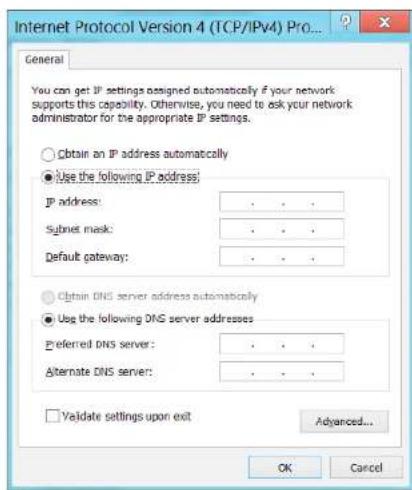

When not using DHCP, ask your network administrator for the IP address.

When you have completed the settings, click the OK button. The network settings have been completed.
Using the WOL (Wake On LAN) function
1 Click Charms menu on the Desktop > Settings > Control Panel > Network and Internet > Network and Sharing Center and click on Change adapter settings in the left menu pane.
2 Right-click on the Wired Ethernet Connection and select Properties.
3 Click Configure > Power Management tab. Select Allow this device to wake the computer, then click OK. Restart the system.
- If the system wakes up from Sleep mode even though there is no received signal, use the system after disabling the
function. - The LAN LED may not be turned off if System is shutdown without disabling the WOL (Wake on LAN) option.
- Connecting a wired LAN while using a wireless LAN may not activate the
function. Set the Wireless LAN to Disable to use the function.
-
Wake On LAN activated by Ping is not supported.
When connected to a 100Mbps/1Gbps wired LAN and the computer exits Sleep/hibernation mode, a message appears informing you of a connection to a 10Mbps/100Mbps wired LAN. This happens because when the computer exits standby/hibernate mode, restoring the network takes about 3 seconds. When the network is restored, it operates at 100Mbps/1Gbps.
When system is running on battery, some time it may take a few second extra after inserting LAN cable to be able to connect to internet. This symptom happen as a result of power saving feature to reduce battery consumption.
When system is running on battery, the Wired LAN speed is decreased automatically to reduce battery consumption. In such case, a 1Gbps/100Mbps LAN would function at 100Mbps/10Mbps speed.
Wireless Network (Optional)
Chapter 3. Using the computer
A wireless network (Wireless LAN) environment is a network environment that enables communication between multiple computers at home or a small-size office through wireless LAN devices.

flowchart
graph TD
    A["Router"] --> B["Laptop 1"]
    A --> C["Laptop 2"]
    A --> D["Laptop 3"]
    A --> E["Laptop 4"]
    A --> F["Laptop 5"]

The screen figures and terms may differ depending on the model.
Depending on the program version, some functions may not be provided or different functions may be provided.
The descriptions below are for computer models with a Wireless LAN card or device. A Wireless LAN device is optional.
The pictures in this manual may differ from the actual product depending on your wireless LAN device model.

What is an Access Point (AP)?
An AP is a network device that bridges wired and wireless LANs, and corresponds to a wireless hub in a wired network. You can connect multiple wireless LAN installed computers to an AP.
Wireless Network (Optional)
Chapter 3. Using the computer
Connecting to a Wireless LAN
If there is an AP, you can connect to the Internet via the AP using the Wireless LAN connection method provided by Windows.
1 If you click the Charms menu > Settings > Network Connections button, a list of available APs appears.
If you select an AP to connect to, the Connect button appears.

2 Click Connect.
If a network key is set for the AP, enter the network key and then click OK.
For the network key, please ask your network administrator.

3 When the AP connection is completed, Connected is displayed next to the corresponding AP. You can now you can use the wireless network.
Using the TV (Optional)
Chapter 3. Using the computer
Products embedded with a TV tuner card (Optional) can use the TV function.
After connecting to the antenna, you can watch TV by using the corresponding TV program.

You can only use the TV function when the TV tuner card (Optional) is installed.
Connecting the TV Antenna
You must connect the TV tuner card (Optional) to the TV antenna. Connect the antenna cable to the TV antenna input port.
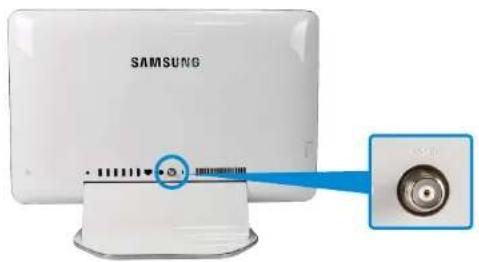
Configuring the TV

The screenshots and terms used in the user manual may differ from the actual ones.
The screen and menu titles of the TV program (ArcSoft TV) may differ depending on the version.
1 Click Start Screen > TV programs (TV ArcSoft).
2 Click Start on the main screen. The built-in TV tuner starts scanning channels available.

Using the TV (Optional)
Chapter 3. Using the computer
3 When the auto scanning is complete, the default TV channel will be run.
* To switch to digital TV channels from an analog channel, click TV/AV.

Resetting the channels
Select Home > Settings > Channel. Then select Scan. The scanned channels are saved.

If you encounter problems scanning channels, select Reset TV Signal > One-click Wizard. Then, the scanning will be performed again from the start.
Note on Configuration
The setup procedures may differ depending on the current • type of your TV service.
You should set the product to the region and postal code • where your computer is currently installed.
If the TV signal provider setup screen appears, select the correct provider. If the configured provider is not correct, not all of the channels will be received or the TV picture quality may be degraded.
Using the TV (Optional)
Chapter 3. Using the computer
TV Program Menu
Click the Home icon in the upper area of the screen to display the main screen.
![Live TV Recorded TV EPG Schedule Settings Live TV Recorded TV EPG (Electronic Program Guide) [Home] Exit Maximize Minimize Settings](/content/2026/05/1025797/images/1833b6789f83851731e8c684ffeaa57facb9dee7cbc8b3686499fd1466013a7e.jpg)
| Live TV | You can watch a currently broadcast TV program. |
| Recorded TV | You can watch a recorded TV program. |
| EPG (Electronic Program Guide) | This is a TV program guide covering all digital TV channels. EPG will extract the program schedule information contained in the digital TV signal.However, it may differ depending on the corresponding station and the reception. Also, some functions may not be provided. |
| Schedule | You can reserve a TV recording and watch a recorded TV program. |
| Settings | You can set the TV channels, parent controls, etc. |
Using the TV (Optional)
Chapter 3. Using the computer
Watching TV
1 Start the TV program (ArcSoft TV).
2 The TV broadcast is displayed immediately. Switch to the channel you want.
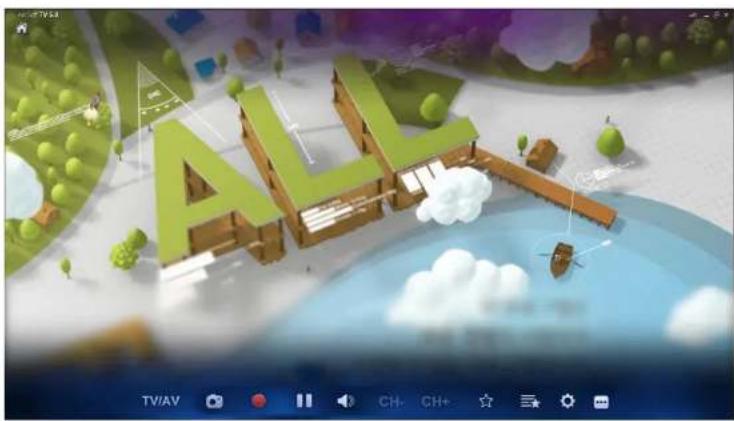
Move your mouse to display the control bar as follows. Then select a function.

Using the TV (Optional)
Chapter 3. Using the computer
Recording TV
You can record a TV program on your computer.
Recording the current program
Move your mouse over the currently viewed screen.
When the control bar appears at the bottom, click Record
A red dot appears indicating that a recording is in progress and the recording begins.

Creating a recording schedule
1 Click Home > Schedule > Add.
2 Set your program and the reservation time.


Even when the computer is in power-saving (sleep) mode, if the recording reservation time is reached, the TV automatically wakes up from power-saving mode and performs the reserved recording.
When the computer is in hibernation mode, recording reservations will not work.
While recording a channel, you cannot record or watch another channel.
Using the TV (Optional)
Chapter 3. Using the computer
Playing a recorded program
Click Home > Recorded TV.
The recorded programs are displayed. Select a program to watch. You can list the recorded programs by program, channel or date.


The recordig file will be saved to File Explorer > Local disk (C:) > User > User Folder > My Video folder.
Using the Remote Control (Optional)
Chapter 3. Using the computer
You can use the TV functions with the remote control.
You can run the Live TV program from the desktop.
Check the functions of each button.

The appearance of the remote control may differ from the actual one. Some functions may not be provided depending on the system.
Use your remote control by pointing it toward the remote • control receiver.
If the remote control does not operate at all, replace it with a new one.
Installing the batteries
Open the cover at the bottom of the remote control and insert the batteries according to the correct polarities (+, -).
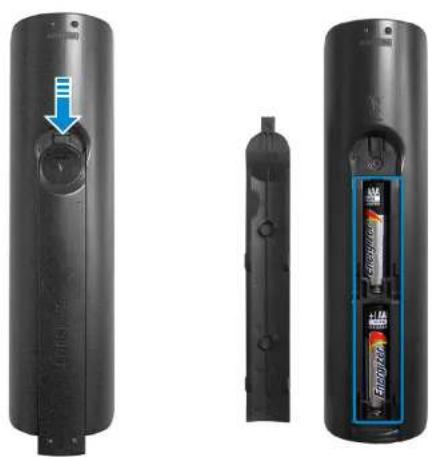
natural_image
Three black cylindrical devices with internal components, one showing a blue arrow and label, the other showing battery compartment (no text or symbols visible)Using the Remote Control (Optional)
Chapter 3. Using the computer

Using the TPM Security Device (Optional)
Chapter 3. Using the computer
A TPM (Trusted Platform Module) security device is a security solution that protects your personal information by saving the user authentication data on the TPM chip installed on the computer.
To use the TPM security device, you have to initialize the TPM chip in the BIOS Setup, initialize the TPM program, and then register the user.

This function is only supported for models with TPM • (security chip).
For more information, refer to the online help for the program.
The program version described in this manual is subject to change and the screenshots and terms used in this manual may differ from the actual product.
Setting Up the TPM
To use the TPM function, you have to complete the following steps.
1 Initializing the TPM chip
Initializes the authentication information saved on the TPM chip.
2 Installing the TPM program
Installs the TPM program.
3 Registering the TPM program
Registers the TPM program.
If you complete the steps above, you can use the TPM function.
Using the TPM Security Device(Optional)
Chapter 3. Using the computer
Initializing the TPM chip
When you use the TPM function for the first time or you want to register the user again, you have to initialize the TPM chip.

Initializing the TPM chip erases all authentication • information saved on the TPM chip. Any decision to initialize must be taken carefully.
To initialize the TPM chip again while the TPM function is in use, you have to decrypt any existing files and folders encrypted by the TPM function first. Otherwise, you will not be able to access the files and folders after re-initialization.
1 Restart the computer.
When the Samsung logo screen appears, press the F2 key repeatedly.
2 If the BIOS screen appears, select the Security > TPM Configuration item and press Enter.
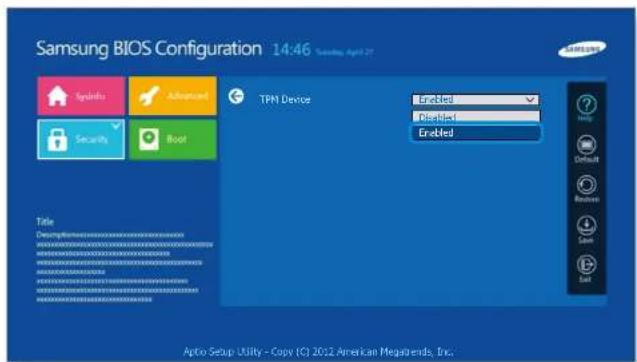
3 Set the TPM Device item to Enabled and set the Change TPM Status to Clear.

Using the TPM Security Device (Optional)
Chapter 3. Using the computer
4 Press the F10 key to save the changes.
5 When the system reboots, press the corresponding key(s) by following the onscreen instructions.
6 When the computer restarts automatically and the Samsung logo screen appears, press the F2 key repeatedly.
7 Select the Security > TPM Configuration > Change TPM Status item and set the item to Enable and Activate.

8 Press the F10 key to save the changes.
9 When the system reboots, press the corresponding key(s) by following the onscreen instructions.
10 Press the F10 key to save the changes. The computer automatically restarts. Initialization of the TPM chip has been completed. Now, install the TPM program and register the TPM program.
Using the TPM Security Device (Optional)
Chapter 3. Using the computer
Installing the TPM program
You can install the TPM program as follows. Install the program according to the procedures below.

This program is only provided for models with Recovery and the TPM function.
1 Turn the computer on and immediately press the F4 key several times.
2 After a moment, the Recovery program runs. Click System Software.
3 When a pop-up window appears to ask you to reboot the system, click Yes.
The system starts to reboot. After a moment, the SW Update program automatically runs.
4 Connect to the network.
5 Select TPM Host SW and click Install.
6 After the program is completely installed, click Close.
7 Close the SW Update window and reboot your computer again.
Registering the TPM program
1 On the Start screen, click the bottom-left icon and then click Infineon Security Platform Solution > Security Platform Management > User Settings. (Run as administrator) Alternatively, double-click the icon on the Taskbar and run initialization with administrator authority.
Using the TPM Security Device (Optional)
Chapter 3. Using the computer
2 The security authentication settings begin with the Initialization Wizard. When the Initialization Wizard appears, click Next.


If the status not initialized message appears, click Yes. If you backup the emergency recovery file to an external storage device according to the instructions of the Initialization Wizard, you can use the TPM security device more safely.
3 Select a Security Platform Feature and set a basic user password.
4 Complete the registration according to the instructions.
5 The user registration for the TPM program has been completed. You can encrypt files and folders by using the encryption file system, and use files and folders to be encrypted by creating or copying them to the virtual drive. The virtual drive is created in the following location.
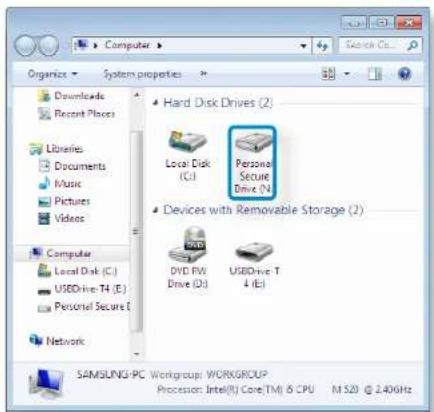
Using the TPM Security Device (Optional)
Chapter 3. Using the computer
Using the TPM program

For more information about using the TPM program, refer to the online help for the program.
Encrypting a file (folder)
This function enables encrypting files and folders. You can safely protect documents through the Encrypt File System (EFS).

The Encrypt File System(EFS) function is supported by the following operating systems.
Windows 7 Professional / Enterprise / Ultimate • Windows 8 Pro / Enterprise •
1 Right-click over the folder (or file) to be encrypted, and select Encrypt from the pop-up menu.
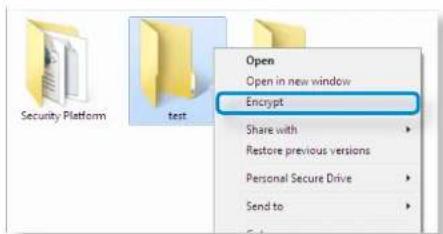
2 If the Confirm Attribute Changes window appears, select the range to apply the encryption to and click OK. (This dialog box only appears when the folder is encrypted.)

3 In the user authentication window, enter the Basic user password you entered when registering the user and click OK.

Using the TPM Security Device (Optional)
Chapter 3. Using the computer
4 You will be able to confirm that the color of the folder (file) name in the encrypted folder has been changed to green.
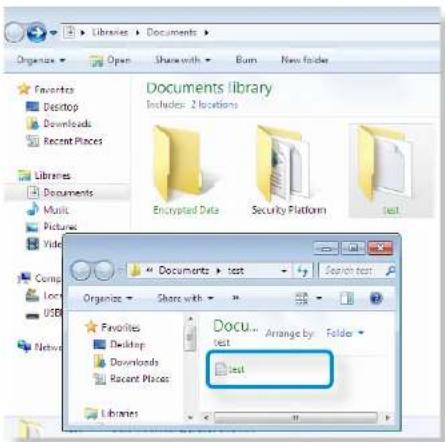
Opening an encrypted folder (file)
1 Double-click an encrypted folder (file).
2 If the user authentication window appears, enter the basic user password you entered when registering the user and click OK.
3 The folder (file) opens.
Decrypting an encrypted folder (file)
1 Right-click over an encrypted folder (file) and select Decrypt from the pop-up window.
2 If the user authentication window appears, enter the basic user password you entered when registering the user and click OK.
3 The folder (file) is decrypted.
Using the virtual drive (Personal Secure Drive: PSD)
The virtual drive (PSD) is a virtual space to save and manage confidential data. In the created virtual drive (PSD), you can create files and folders as with a normal drive (e.g. drive C:) and you can use confidential data saved on another drive by copying the data to the virtual drive (PSD).
Using the TPM Security Device(Optional)
Chapter 3. Using the computer
When the virtual drive (PSD) does not appear
You can only use the virtual drive (PSD) when you have selected the Personal Secure Drive (PSD) option during the program registration.
If you have not selected the option during the registration, complete the following steps.
1 On the Start screen, click the bottom-left icon and then click Infineon Security Platform Solution > Security Platform Management > User Settings tab > Configure Security Platform Features.
2 When the Initialization Wizard appears, select Personal Secure Drive (PSD) and enter the user password.
3 Click Next several times according to the instructions of the Initialization Wizard to finish the wizard.
When the virtual drive (PSD) is not loaded
To use the virtual drive (PSD), the virtual drive (PSD) should be loaded first. If it is not loaded, you can load it according to the procedures below.
1 Right-click over the Security Platform ☐ on in the system tray of the Taskbar and select Personal Secure Drive > Load from the pop-up menu.
2 In the load window, enter the basic user password and click OK.
3 Open the File Explorer . You will see the Personal Secure drive in the left tree pane.
Note that when you have copied confidential data to the PSD, the original data files are not encrypted.
Using the TPM Security Device(Optional)
Chapter 3. Using the computer
When you have to register again (to erase the authentication information on the TPM chip)
To register a user again, you need to delete the existing authentication information saved on the TPM chip and then clear the TPM chip.
Register the user in the following order.
1 Delete the virtual drive.
2 Delete the existing authentication information saved on the TPM chip.
Deleting the virtual drive
If a virtual drive has been created, you have to delete the virtual drive before deleting the existing authentication information saved on the TPM chip.
1 Right-click over ▶ and click Personal Secure Drive > Create/Manage.
2 Click Next.
3 Enter the password that you entered when registering the TPM program and click Next.
4 Select Delete selected PSD and click Next.
5 Select "I want to permanently delete my Personal Secure Drive without saving an unencrypted copy of its contents." and click Next.
6 Click Next and then Finish.
7 Now the virtual drive has been deleted.
Using the TPM Security Device (Optional)
Chapter 3. Using the computer
Deleting the existing authentication information saved on the TPM chip.
1 On the desktop, select the Charms menu > Settings > Control Panel > Programs > Uninstall a program > Infineon TPM Professional Package. Then click Uninstall.
2 If the message window appears, click Yes to remove the program.
3 If the Infineon Security Platform message appears, click No.
4 Click the File Explorer 📋 icon on the taskbar at the bottom of the desktop.
5 In View > Options > Folder Options > View > Hidden files and folders item, select the Show hidden files, folders, and drives option and click OK.
6 Locate and delete the Infineon folder under the File Explorer >Drive C: >ProgramData folder.
7 Now the TPM Program has been deleted.
To use the TPM function, please repeat the procedures of the TPM chip initialization process.
Using the Multimedia App (Optional)
Chapter 3. Using the computer
S PhotoStudio and S Player+ enables you to take photos and make videos and edit them to your preference.
| S PhotoStudio | Edit photos that you took or selected to your preference. |
| S Player+ | Play music or video clips stored on the computer |

Depending on the version of the program, some functions may not be provided or different functions may be provided.
Depending on the model, the application may not be provided.

Third-party software related services
For descriptions about and service requests for third-party software, please contact the relevant manufacturer.
Some troubleshooting actions in response to service requests may not work depending on the software manufacturer.
Using the Multimedia App (Optional)
Chapter 3. Using the computer
Using the PhotoStudio app
1 On the Start screen, select S PhotoStudio.
2 Select a photo to edit.
3 Select an editing mode from the lower-right bar. The content of the top-left bar differs depending on the selected editing mode.

4 When done, save the image as a different name.
Using the S Player+ app
1 On the Start screen, select S Player+.
2 Select a file from the top edge.
Using Apps With a Samsung Smartphone (Optional)
Chapter 3. Using the computer

Depending on the model, the application may not be provided.
Samsung Kies
You can use Samsung Kies to sync multimedia files and documents between the computer and mobile devices, or upgrade the firmware of the connected mobile device to the latest version.

For more information, refer to the Help section of this application.
HomeSync Lite
You can use the computer as Cloud storage to save the uploaded files from Samsung mobile devices. Specify a shared folder and get instant access to the content of the folder on the move.

For more information, refer to the Help section of this application.
SideSync
You can use SideSync to share and control the display between the computer and Samsung mobile devices, or share files between them. Select one from the following two options:
Keyboard/Mouse Sharing : You can use the computer's • keyboard or mouse on mobile devices.

For more information, refer to the Help section of this application.
Samsung Software Update
Chapter 3. Using the computer
SW Update is a software program that searches for Samsung software programs and drivers installed when you purchased the computer and helps you update any drivers or programs.

You can check updatable files before performing the update only when you are connected to the internet.
SW Update does not provide any updates for device drivers • or software programs installed separately by the user.
Depending on the model, the application may not be provided.
1
Click the bottom-left icon 📋 the Start screen, and click SW Update.
2 The SW Update program runs.
Select the items that you want to update before proceeding with the update process.

Diagnosing the Computer Status and Troubleshooting
Chapter 3. Using the computer
The Support Center program, which is Samsung's computer's troubleshooting guide, supports diagnosing the system and has a FAQ for frequently occurring problem(s).

Support Center may not be provided or may be a different version depending on the model.
1 Click the bottom-right icon 📋 the Start screen, and click Support Center.
2 Support Center is activated and starts diagnosing your computer.
After the diagnosing process is finished, the System Status menu displays a list of the current problems to be solved as shown.

3 You can solve a problem by clicking the Troubleshoot button for the problem.
Using the Security Slot
Chapter 3. Using the computer
You can secure the computer by connecting a lock and cable to the Security Slot.
To use this feature, you have to purchase the lock and cable additionally. To use the lock and cable, refer to the product manual.
Tie the lock and cable to a fixed object and install the other end of the cable to the security slot.


natural_image
Blue gear icon inside a white circle on a blue gradient background (no text or symbols)Chapter 4. Settings and Upgrade
BIOS Setup 98
Setting a Boot Password 100
Changing the Boot Priority 103
BIOS Setup
Chapter 4. Settings and Upgrade
The BIOS Setup enables you to configure your computer hardware according to your needs.

Use the BIOS setup to define a boot password, change the • booting priority, or add a new device.
Since incorrect settings may cause your system to • malfunction or crash, take care when configuring the BIOS.
The functions of the BIOS setup are subject to change for product function enhancement purposes.
The BIOS Setup menus and items may differ depending on your computer model.
Entering the BIOS Setup
1 Turn the computer on. Immediately press the F2 key several times.
2 After a moment, the BIOS setup screen appears. The items in the BIOS setup may differ depending on the product.
BIOS Setup
Chapter 4. Settings and Upgrade
The BIOS Setup Screen

The BIOS Setup menus and items may differ depending on your computer model.
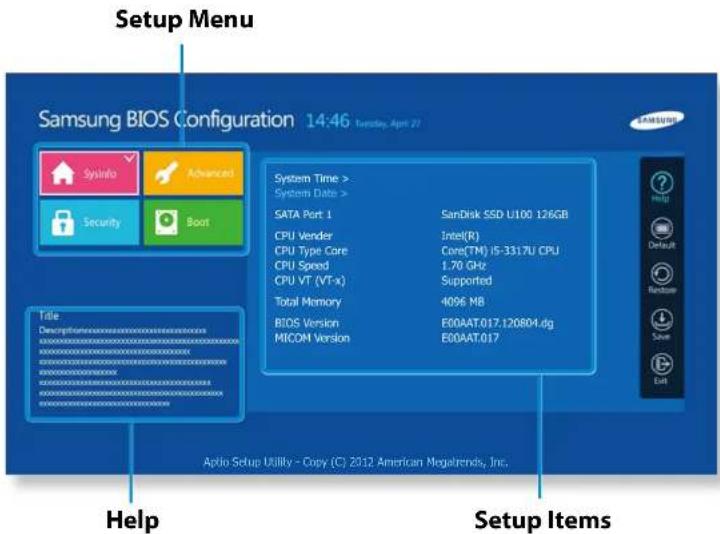
Help for the selected item appears automatically.
| Setup Menu Description | |
| SysInfo | This is a description about the basic specifications of the computer. |
| Advanced | Using this menu, you can configure the major chipsets and additional functions. |
| Security | Used to configure security functions, including passwords. |
| Boot | This menu enables you to configure peripherals and booting related settings such as the boot priority. |
Setting a Boot Password
Chapter 4. Settings and Upgrade
If you set a password, you have to enter the password when you turn the computer on or enter the BIOS Setup.
By configuring a password, you can restrict system access to authorized users only and protect data and files saved on the computer.

The password setting provides the following 3 sub menus. (Supervisor Password, User Password and HDD Password)
Do not lose or forget your password.
Do not let others know your password.
If you forget the Supervisor Password or HDD Password, you will need to request assistance from the service center. In this case, a service fee will be charged.
When you forget the User Password, you can disable the Supervisor Password, and the User Password is also automatically disabled.
The screen images and terms may differ from actual product depending on the computer model and driver version.
Setting a Supervisor Password
If you set a Supervisor Password, you need to enter the password when you turn the computer on or enter the BIOS Setup.
Setting only the Supervisor Password and User Password is not very secure. You can use an HDD Password as well to increase the security level.
1 Select the Security menu in the BIOS Setup.
2 In the Set Supervisor Password item, press

Setting a Boot Password
Chapter 4.
Settings and Upgrade
3 Enter a password, press
The password can be up to 8 alphanumeric characters. Special characters are not allowed.
4 The supervisor password has been set.
The supervisor password is required to turn the computer on or to enter the BIOS Setup.

For some models, if the password entered message appears in the Setup Notice window, the settings are not complete until the
Setting a User Password
Using the User Password, you can turn the computer on but you cannot change the major settings of the BIOS Setup because you cannot enter the BIOS Setup.
This helps prevent unauthorized access to the major settings in the BIOS Setup menu.
Before configuring a user password, a supervisor password must have been configured. Deactivating the supervisor password also deactivates the user password.
In the Set User Password item, press
Setting Up a Boot Password
To setup a boot password, the administrator password (Set Supervisor Password) should be set in advance.
Set the Password on boot item to Enabled.
Once a boot password is set, you have to enter a password to boot up the computer.
Be sure to remember the password for later use.
Setting up a Hard Disk Drive Password (Optional)
If you set a password for a hard disk drive, it cannot be accessed from another computer.
Press

The hard disk drive password setting function is not provided for some models.
Changing the hard disk drive password-
For security purposes, you can only change a hard disk drive password after restarting the computer by pressing the computer Power button.
If you cannot change the hard disk drive password or the HDD Password Frozen message appears when entering the BIOS Setup and then selecting Security > HDD Password, press the Power button to turn the computer on again.
Deactivating the Password
1 Press
2 In the Enter Current Password item, enter the currently configured password and press
3 Leave the Enter New Password item field empty, and press
4 Leave the Confirm New Password field empty, and press
The password is deactivated.

For some models the password is only canceled if the
Changing the Boot Priority
Chapter 4. Settings and Upgrade
The computer is configured so that it boots from the HDD with priority, by default.
This section will show you how to change the setting so that the computer boots from a USB device.

The screen image and terms may change depending on the model and the device driver version.
1 Connect the USB device.
2 Immediately after the computer restarts, press F2 several times.
3 Enter the BIOS Setup. Select the Boot menu in the BIOS Setup.

4 Set the Boot Device Priority > Boot Option #1 item on the right screen to USB device.

5 Select Save and then Yes.
6 The computer will restart.
Now, the boot priority has been changed so that the device will boot from the USB device with priority.

natural_image
Blue circular icon with a large blue question mark, set against a solid blue background (no text or symbols)Chapter 5. Troubleshooting
Recovering/Backing up the Computer (Optional) 105
Reinstalling Windows (Optional) 112
Q&A 115
Recovering/Backing up the Computer(Optional)
Chapter 5. Troubleshooting
If a problem occurs with your computer, Recovery (recovery program) allows you to easily restore your computer to the default (factory) settings. Alternatively, you can back up your computer so that you can restore it to your preferred state at any time.
Recovery Introduction

Function Description
Recover Restores the entire Windows drive.
Back Up You can back up your entire Windows drive.

Recovery• may not be provided or may be a different version depending on the model.
Some functions may differ slightly or be excluded • depending on the version. Refer to the program's Help section for more information.
For models whose hard disk or SSD capacity is less than 64 GB, the Recovery program is not provided.
An ODD (CD/DVD drive, etc.) is not supported by the • Recovery program.
Since restoring the system deletes all data and user-installed programs saved after your last restore point, it is advisable to back up any important data before restoring your system.
Recovering/Backing up the Computer(Optional)
Chapter 5. Troubleshooting
Recovering
You can restore the computer settings to the factory default settings if the computer fails to boot up, or if you encounter a serious problem with the computer.
1 - If Windows does not start
Turn on the computer and press the F4 key several times to enter the Recovery screen.
- In the Start screen after the computer boots up
Click the bottom-left icon 📚 on the Start screen, and click Recovery.
2 If the program is running for the first time, you need to agree to the User Agreement.
3 If the initial menu screen appears, click Recover. Select a recovery point and click Recover.

If you set the User Data Maintenance to ON, the computer is restored while maintaining the current user data.

4 Recover is performed based on the screen instructions. If the recover is completed, you can use your computer normally.
Recovering/Backing up the Computer(Optional)
Chapter 5. Troubleshooting
Recovering after a Backup
You can recover your computer after you have backed up your computer to a separate drive or external storage device.
Backing up
1 To back up your computer to an external storage device, connect the external storage device and select the relevant drive.
2 Click Backup in the Recovery Home screen. Select the drive to save and click Backup.

You cannot select a DVD drive.

3 The backup process is performed based on the instructions.
Recovering/Backing up the Computer(Optional)
Chapter 5. Troubleshooting
Recovering
You can recover your computer using the backup from the above process.
1 If the backup image is saved to an external storage device, connect the device.
2 Start Recovery and click Recover.
3 Select a Recover Option and click Recover. Select a point to recover.

4 The recover is performed based on the screen instructions. You can use your computer after the recover is completed.
Recovering/Backing up the Computer(Optional)
Chapter 5. Troubleshooting
To copy the external storage disk
When you replace a storage device such as the HDD, SSD, etc. (hereafter referred to as a hard disk) built into your computer, you can move your existing data to the new storage device easily and safely.

The new storage device must have sufficient capacity to save your existing data.

You need to purchase an external hard USB connector separately to connect the hard disk and your computer.
1 You need to purchase an external hard USB connector separately to connect the hard disk and your computer.
2 Start Recovery and click Disk copy
3 Select an option in Disk recovery Point and click Disk copy.
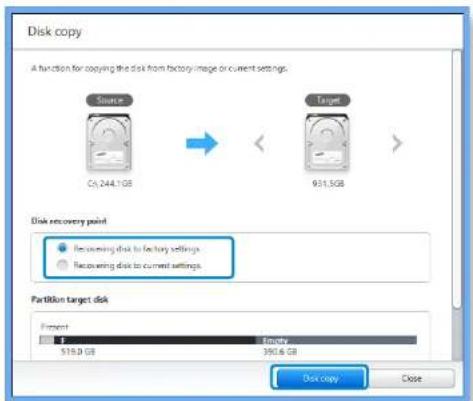
4 The data on the current hard disk is saved to the new hard disk.
5 If the data is completely saved, open the hard disk cover at the bottom of your computer and replace the existing hard disk with the new one.

If you cannot open the cover at the bottom of the computer, contact the Samsung Service Center to request assistance. In this case, you may be charged for the relevant service.
6 Your computer is now equipped with a new hard disk. The new hard disk now contains all data from the old hard disk with the same settings.
Recovering/Backing up the Computer(Optional)
Chapter 5. Troubleshooting
Export Disk Image Function
If you frequently recover your computer to the default (factory) settings, you can conveniently recover your computer after exporting the default (factory) status disk image to an external storage device.
1 Connect the external storage device, and then select a drive to save to.
2 Click Run.
3 Perform the process by following the instructions to completely save the default (factory) status disk image to the external storage device.
Now disconnect the saved external storage device and store it separately.

To restore the computer settings to the factory default settings,
connect the external storage device that contains the disk image of your computer, and repeat the steps mentioned in the Recovering section.
Recovering/Backing up the Computer(Optional)
Chapter 5. Troubleshooting
Computer Recovery Function in Windows 8
If a problem occurs with your computer, the recovery program allows you to restore your computer to the default settings.

For models where the SSD is less than 64GB, use the Windows System Restore function instead of the Recovery program.
1 Click Charms > Settings > Change PC settings > Update and recovery > Recovery.
2 Click the Get started button for Refresh.... or Remove.....
| Refresh.... | If your PC does not work properly, you can restore your PC while keeping your media files such as your photo, video and music files, etc. as well as your personal documents. |
| Remove.... | You can remove all items in your PC and reinstall Windows again. |

You should back up the files in the following folders before using the PC Recovery function since these files are not kept.
\Windows, \Program files, \Program files(x86), \ProgramData, OEM Folder (ex) c:\samsung), \User\
3 Follow the onscreen instructions to proceed with the recovery process. If the recovery is complete, you can use your computer normally.

After recovery, click the bottom-left icon on the Start screen, and run SW Update.
Reinstalling Windows (Optional)
Chapter 5. Troubleshooting
You can reinstall Windows using the SYSTEM RECOVERY MEDIA for Windows when Windows is no longer working properly. (For models supplied with a SYSTEM RECOVERY MEDIA.)

- A SYSTEM RECOVERY MEDIA may not be supplied depending on your computer model.
If you cannot start Windows, or if you want to delete all existing data and reinstall Windows, install Windows according to the descriptions in [Reinstalling when Windows does not start].
Some pictures may differ from actual product.
These descriptions may differ depending on the operating system.

Reinstalling Windows may delete data (files and programs) • saved on the hard disk drive.
Make sure to backup all important data. Samsung • Electronics shall not be held liable for any loss of data.
Reinstalling in Windows
1 Insert the SYSTEM RECOVERY MEDIA into the DVD drive.
2 If the Select Windows Installation window appears, click Install Now. When the Select Update window appears, click on the relevant item.

If you select Go online to get the latest updates for installation in the Select Update window, the latest updates are installed and Step 4 follows. At this time, the computer must be connected to the Internet.
3 If the User Agreement screen appears, select I accept the license terms and then click Next.

This screen may not be displayed depending on the OS version.
Reinstalling Windows (Optional)
Chapter 5. Troubleshooting
4 The following window appears, select an installation option.
If you click Custom, the procedures from Step 5 continue sequentially.
If you click Upgrade, the procedures from Step 6 continue sequentially.

This screen may not be displayed depending on the OS version.
Custom·
Select this option to Reinstall Windows. You have to reinstall all necessary device drivers and programs after the Custom installation. In addition, unnecessary folders and files may remain on the hard disk drives after the installation (e.g. C:\Windows.old, etc.).
Upgrade-
Select this option to Upgrade Windows while maintaining current files, configurations and programs. Although you therefore do not need to reinstall the device drivers and programs, some programs may not work properly after the upgrade.
5 When a window appears asking for the location to install the operating system to, select a disk drive partition and click the Next button.

Drive D includes an area to save the backup image used by Samsung Recovery Solution. Installing Windows to drive C is recommended.

When previous Windows installation files are in the selected partition, a message appears informing you that the files and folders will be moved to the Windows. old folder. Click the OK button.
6 The Windows installation continues.
The computer will restart 3 times during the installation. If the Press any key to boot from CD or DVD... message appears after a restart, do not press any button.
7 Register a user according to the instructions on the Windows screen.
8 When the registration is complete, the Windows Desktop screen appears.

For a smooth computer operation, installing the necessary software installation is recommended.
Reinstalling when Windows does not start
When Windows does not start, boot up with the SYSTEM RECOVERY MEDIA and from there you can reinstall Windows.
1 Insert the SYSTEM RECOVERY MEDIA into the DVD drive and restart the computer.
2 If the Press any key to boot from CD or DVD... message appears while booting, press any key on the keyboard.

3 After a while, the Options windows such as Language, Time, Keyboard, etc. appear. Confirm the settings and click the Next button.
4 If the Select Windows Installation window appears, click Install Now.

Depending on the OS version, you may be prompted to select an operating system. If you click the Next button, the screen of Step 5 appears.
5 If the User Agreement screen appears, select I accept the license terms and then click Next.
This screen may not be displayed depending on the OS version.
6 When the window asking for the installation type appears, click Custom.
This screen may not be displayed depending on the OS version.
7 When a window appears asking for the location to install the operating system to, select the partition of the disk drive and then click the Next button.
Drive D includes an area to save the backup image used by Samsung Recovery Solution. Installing Windows to drive C is recommended.
- A If you click Drive Options (Advanced), you can delete, format, create or expand a partition. Click on a function and proceed according to the instructions on the screen. When previous Windows installation files are in the selected partition, a message appears informing you that the files and folders will be moved to the Windows.old folder. Click the OK button.
8 The subsequent steps are the same as those from Step 7 of Installing in Windows.
Q&A
Chapter 5. Troubleshooting
You can look for potential problems that may occur with the system and view the relevant solutions. Also, you may look up any reference(s) required while operating the computer.
Recovery Related

What is a Recovery Area?
A Samsung computers have an additional partition to recover computers or save backup files. (Only for models with the Recovery.)
This partition is called a Recovery Area and it includes a recovery image that comprises of the OS and application programs.

The capacity representation of the hard disk drive(HDD) in Windows is different from the product specifications.
A The capacity of the storage device (HDD) of the manufacturer is calculated assuming that 1KB=1,000 Bytes. However, the operating system (Windows) calculates the storage device capacity assuming that 1KB=1,024 Bytes, and therefore the capacity representation of the HDD in Windows is smaller than the actual capacity.
The capacity representation in Windows may be smaller than the actual capacity because some programs occupy a certain area of the HDD outside of Windows.
For models with Recovery, the HDD capacity representation in Windows may be smaller than the actual capacity because Recovery uses a hidden area of about 5\~20GB of the HDD to save the recovery image, and that hidden area is not counted towards the total size available to Windows.
The size of Recovery varies by models because of the different size of applied programs.

What is a recovery image?
A This refers to the computer status (including operating system, specific driver(s), software(s), etc.) which is converted to a data image. It is required to recover your computer and is embedded in the computer's hard disk. However, this is not provided for storage devices where the capacity is less than 64 GB due to the small capacity.

How can I restore a computer that does not have the Recovery program?
A You can restore PC settings using the Windows-provided PC Recovery feature.
Refer to the Restore Functionality item in the Help section for more details.
Windows Related
Q1 I cannot find the computer's Shut down button.
A · Touch screen:
- Tap Charms > Settings > Power > Shut down.
- Tap and hold the Start button to select Shut down or sign out > Shut down.
- Mouse:
- Click Charms > Settings > Power > Shut down.
- Right-click the Start button, and then click Shut down or sign out > Shut down.
Q2 The App disappeared in the Start screen.
A · Touch screen:
-
Swipe upward on the Start screen.
-
A tile of all apps installed is displayed.
-
Tap and hold an app to add, and then tap Pin to Start.
- Mouse:
-
Click the bottom-left icon on the Start screen to display a tile of all apps installed on the computer.
-
Right-click over the corresponding App to select in a Pin to Start.
Q3 Since I'm familiar with Windows 7, I would like the Desktop screen to appear as it does in Windows 7.
A To display the desktop at the start as in Windows 7, do the following.
Right-click the taskbar at the bottom of the desktop, click Properties > Navigation tab, and then check the When I sign in or close all apps on a screen, go to the desktop instead of Start.
Q4 How can I uninstall the driver?
A On the Desktop, click Charms > Settings > Control Panel > Uninstall a program.
Alternatively, right-click the Start button, and click Programs and Features.
Click the program. Then click uninstall.
Q5 How can I change the screen settings, environment settings, color, and so on?
A Click Charms > Settings > Change PC Settings > PC and devices. You can set the OS settings such as the screen design, etc.
To configure your computer in detail, click the Charms menu in Desktop > Settings > Control Panel.
You can configure your computer in the same way as existing Windows systems.
Q6 Active X does not run in Internet Explorer on the Start screen.
A Since Internet Explorer on the Start screen complies with the HTML5 web standards, it does not support Active X. However, Internet Explorer on the Desktop supports Active X.
▶ How to activate Active X:
If you right-click over the Internet Explorer, the following window appears. Press the button and click View on the Desktop. Active X is now enabled.
Q7 I want to remove the pre-installed Windows 8 or Windows 8.1, and install a different OS.
A If you want to install a different operating system on your PC, you need to change the BIOS settings first.
For more information, visit http://www.samsung.com and go to Customer Support > Troubleshooting. Search for Windows 8 or Windows 8.1, and look through the list of search results for the relevant issue.
Q8 The screen overlaps the text characters, or the font looks smaller.
A If the font size is set too large or too small, the screen may overlap the text, resulting in poor readability.
On the desktop, right-click an empty area and click Personalize > Display > Resize all items, and then click Apply.

natural_image
Blue icon of a spiral-bound notebook inside a white circle (no text or symbols)Chapter 6. Appendix
Important Safety Information 119
Replacement Parts and Accessories 121
Regulatory Compliance Statements 123
WEEE Symbol Information 135
Samsung Packaging Take-Back Program 136
Product Specifications 137
Glossary 139
Important Safety Information
Chapter 6 Appendix
Safety Instructions
Your system is designed and tested to meet the latest standards for safety of information technology equipment. However, to ensure safe use of this product, it is important that the safety instructions marked on the product and in the documentation are followed.

Always follow these instructions to help guard against personal injury and damage to your system.
Setting Up your System
Read and follow all instructions marked on the product and in the documentation before you operate your system. Retain all safety and operating instructions for future use.
Do not use this product near water or a heat source such as a radiator.
Set up the system on a stable work surface.
The product should be operated only with the type of power • source indicated on the rating label.
Ensure that the electrical outlet you are using to power your equipment is easily accessible in case of fire or short circuit.
If your computer has a voltage selector switch, make sure that the switch is in the proper position for your area.
Openings in the computer case are provided for ventilation. Do not block or cover these openings. Make sure you provide adequate space, at least 6 inches (15 cm), around the system for ventilation when you set up your work area. Never insert objects of any kind into the computer ventilation openings.
Ensure that the fan vents on the bottom of the casing are clear • at all times. Do not place the computer on a soft surface, doing so will block the bottom vents.
If you use an extension cord with this system, make sure that the total power rating on the products plugged into the extension cord does not exceed the extension cord power rating.
For Notebooks with glossy display bezels the user should consider the placement of the Notebook as the bezel may cause disturbing reflections from surrounding light and bright surfaces.
Important Safety Information
Chapter 6 Appendix
Care During Use
Do not walk on the power cord or allow anything to rest on it. Do not spill anything on the system. The best way to avoid • spills is to not eat or drink near your system.
Some products have a replaceable CMOS battery on the system board. There is a danger of explosion if the CMOS battery is replaced incorrectly. Replace the battery with the same or equivalent type recommended by the manufacturer.
Dispose of batteries according to the manufacturers instructions. If the CMOS battery requires replacement insure that a qualified technician performs the task.
When the computer is turned off, a small amount of electrical current still flows through the computer.
To avoid electrical shock, always unplug all power cables, remove the battery and modem cables from the wall outlets before cleaning the system.
Unplug the system from the wall outlet and refer servicing to • qualified personnel if:
- The power cord or plug is damaged.
– Liquid has been spilled into the system. - The system does not operate properly when the operating instructions are followed.
– The system was dropped or the casing is damaged.
– The system performance changes.
The Instruction On Safety Operation of NotePC
- When installing and operating devices please refer to safety requirements in the user manual.
- Devices can be used only with the equipment specified in the technical specifications of the devices.
- If any smell of burning or smoke is detected from the computer the unit should be switched off and battery removed. The unit should be checked by a qualified technician before reuse.
- Service and repair of devices should be carried out by authorized service centers.
- Do not allow your portable computer to operate with the base resting directly on exposed skin for extended periods of time. The surface temperature of the base will rise during normal operation (particularly when AC Power is present). Allowing sustained contact with exposed skin can cause discomfort or eventually a burn.
Replacement Parts and Accessories
Chapter 6 Appendix
Use only replacement parts and accessories recommended by manufacturer.
To reduce the risk of fire, use only No. 26 AWG or larger telecommunications line cord.
Do not use this product in areas classified as hazardous. Such areas include patient care areas of medical and dental facilities, oxygen rich environments, or industrial areas.
Battery Disposal
Do not put rechargeable batteries or products powered by non-removable rechargeable batteries in the garbage.
Contact the Samsung Helpline for information on how to dispose of batteries that you cannot use or recharge any longer. Follow all local regulations when disposing of old batteries.
! THERE IS A RISK OF EXPLOSION IF BATTERY IS REPLACED BY AN INCORRECT TYPE. DISPOSE OF USED BATTERIES ACCORDING TO THE INSTRUCTIONS.
Laser Safety
All systems equipped with CD or DVD drives comply with the appropriate safety standards, including IEC 60825-1. The laser devices in these components are classified as "Class 1 Laser Products" under a US Department of Health and Human Services (DHHS) Radiation Performance Standard. Should the unit ever need servicing, contact an authorized service location.
! Laser Safety Note:
Use of controls or adjustments or performance of procedures other than those specified in this manual may result in hazardous radiation exposure. To prevent exposure to laser beams, do not try to open the enclosure of a CD or DVD drive.
Class 1M laser radiation when operating part is open. Do not view directly with optical instruments.
Class 3B invisible laser radiation when open. Avoid exposure to the beam.
Replacement Parts and Accessories
Chapter 6 Appendix
Connect and Disconnect the AC adapter
The socket-outlet shall be installed near the equipment and shall be easily accessible.
Do not unplug the power cord by pulling the cable only.
Power Cord Requirements
The power cord set (wall plug, cable and AC adapter plug) you received with your computer meets the requirements for use in the country where you purchased your equipment.
Power cord sets for use in other countries must meet the requirements of the country where you use the computer. For more information on power cord set requirements, contact your authorized dealer, reseller, or service provider.
General Requirements
The requirements listed below are applicable to all countries:
All power cord sets must be approved by an acceptable • accredited agency responsible for evaluation in the country where the power cord set will be used.
The power cord set must have a minimum current capacity of 7 A and a nominal voltage rating of 125 or 250 volts AC, as required by each country's power system. (USA ONLY)
The appliance coupler must meet the mechanical configuration of an EN 60 320/IEC 320 Standard Sheet C7 (or C5) connector, for mating with appliance inlet on the computer.
Regulatory Compliance Statements
Chapter 6 Appendix
Wireless Guidance
(If fitted with 2.4G band or 5G band)
Low power, Radio LAN type devices (radio frequency (RF) wireless communication devices), operating in the 2.4GHz/5GHz Band, may be present (embedded) in your notebook system. The following section is a general overview of considerations while operating a wireless device.
Additional limitations, cautions, and concerns for specific countries are listed in the specific country sections (or country group sections). The wireless devices in your system are only qualified for use in the countries identified by the Radio Approval Marks on the system rating label. If the country you will be using the wireless device in, is not listed, please contact your local Radio Approval agency for requirements. Wireless devices are closely regulated and use may not be allowed.
The RF field strength of the wireless device or devices that may be embedded in your notebook are well below all international RF exposure limits as known at this time. Because the wireless devices (which may be embedded into your notebook) emit less energy than is allowed in radio frequency safety standards and recommendations, manufacturer believes these devices are safe using. Regardless of the power levels, care should be taken to minimize human contact during normal operation.
Some circumstances require restrictions on wireless devices. Examples of common restrictions are listed on the next page:

Radio frequency wireless communication can interfere with equipment on commercial aircraft. Current aviation regulations require wireless devices to be turned off while traveling in an airplane.
802.11ABGN (also known as wireless Ethernet or Wifi) and Bluetooth communication devices are examples of devices that provide wireless communication.
In environments where the risk of interference to other devices or services is harmful or perceived as harmful, the option to use a wireless device may be restricted or eliminated. Airports, Hospitals, and Oxygen or flammable gas laden atmospheres are limited examples where use of wireless devices may be restricted or eliminated. When in environments where you are uncertain of the sanction to use wireless devices, ask the applicable authority for authorization prior to use or turning on the wireless device.
Every country has different restrictions on the use of • wireless devices. Since your system is equipped with a wireless device, when traveling between countries with your system, check with the local Radio Approval authorities prior to any move or trip for any restrictions on the use of a wireless device in the destination country.
If your system came equipped with an internal embedded wireless device, do not operate the wireless device unless all covers and shields are in place and the system is fully assembled.
Regulatory Compliance Statements
Chapter 6 Appendix

Wireless devices are not user serviceable. Do not modify them in any way. Modification to a wireless device will void the authorization to use it. Please contact manufacturer for service.
Only use drivers approved for the country in which the device will be used. See the manufacturer System Restoration Kit, or contact manufacturer Technical Support for additional information.
United States of America
USA and Canada Safety Requirements and Notices
Do not touch or move antenna while the unit is transmitting or receiving.
Do not hold any component containing the radio such that the antenna is very close or touching any exposed parts of the body, especially the face or eyes, while transmitting.
Do not operate the radio or attempt to transmit data unless the antenna is connected; if not, the radio may be damaged.
Use in specific environments:
The use of wireless devices in hazardous locations is limited by the constraints posed by the safety directors of such environments.
The use of wireless devices on airplanes is governed by the Federal Aviation Administration (FAA).
The use of wireless devices in hospitals is restricted to the limits set forth by each hospital.

Explosive Device Proximity Warning
Do not operate a portable transmitter (such as a wireless network device) near unshielded blasting caps or in an explosive environment unless the device has been modified to be qualified for such use.
Regulatory Compliance Statements
Chapter 6 Appendix

Use On Aircraft Caution
Regulations of the FCC and FAA prohibit airborne operation of radio-frequency wireless devices because their signals could interfere with critical aircraft instruments.
Other Wireless Devices
Safety Notices for Other Devices in the Wireless Network: Refer to the documentation supplied with wireless Ethernet adapters or other devices in the wireless network.

The Part 15 radio device operates on a non-interference basis with other devices operating at this frequency. Any changes or modification to said product not expressly approved by Intel could void the user's authority to operate this device.
Unintentional Emitter per FCC Part 15
This device complies with Part 15 of the FCC Rules. Operation is subject to the following two conditions:(1) this device may not cause harmful interference, and (2) this device must accept any interference received, including interference that may cause undesired operation.

This equipment has been tested and found to comply with the limits for a Class B digital device pursuant to Part 15 of the FCC Rules. These limits are designed to provide reasonable protection against harmful interference in a residential installation. This equipment generates, uses, and can radiate radio frequency energy. If not installed and used in accordance with the instructions, it may cause harmful interference. If this equipment does cause harmful interference to radio or television reception, which can be determined by turning the equipment off and on, the user is encouraged to try to correct the interference by one or more of the following measures:
Reorient or relocate the receiving antenna.
Increase the separation between the equipment and receiver.
Connect the equipment into an outlet on a circuit different from that to which the receiver is connected.
Consult the dealer or an experienced radio/TV technician • for help.
Regulatory Compliance Statements
Chapter 6 Appendix
If necessary, the user should consult the dealer or an experienced radio/television technician for additional suggestions. The user may find the following booklet helpful: "Something About Interference."
This is available at FCC local regional offices. Our company is not responsible for any radio or television interference caused by unauthorized modifications of this equipment or the substitution or attachment of connecting cables and equipment other than those specified by our company. The correction will be the responsibility of the user. Use only shielded data cables with this system.
Intentional emitter per FCC Part 15
(If fitted with 2.4G band or 5G band)
Low power, Radio LAN type devices (radio frequency (RF) wireless communication devices), operating in the 2.4GHz/5GHz Band, may be present (embedded) in your notebook system. This section is only applicable if these devices are present. Refer to the system label to verify the presence of wireless devices.
Wireless devices that may be in your system are only qualified for use in the United States of America if an FCC ID number is on the system label.
This device is restricted to indoor use due to its operation in the 5.15 to 5.25 GHz frequency range. FCC requires this product to be used indoors for the frequency range 5.15 to 5.25 GHz to reduce the potential for harmful interference to co-channel Mobile Satellite systems. High power radars are allocated as primary users of the 5.25 to 5.35 GHz and 5.65 to 5.85 GHz bands. These radar stations can cause interference with and/or damage this device.
Operation of this device is subject to the following two conditions: (1) This device may not cause harmful interference, and (2) this device must accept any interference received, including interference that may cause undesired operation of the device.

Wireless devices are not user serviceable. Do not modify them in any way.
Modification to a wireless device will void the authorization to use it. Contact manufacturer for service.
Regulatory Compliance Statements
Chapter 6 Appendix
Health and safety information
Exposure to Radio Frequency (RF) Signals Certification Information (SAR)
This product can contain an embedded radio transmitter and receiver. It is designed and manufactured not to exceed the exposure limits for radio frequency (RF) energy set by the Federal Communications Commission (FCC) of the U.S. government. These FCC exposure limits are derived from the recommendations of two expert organizations, the National Council on Radiation Protection and Measurement (NCRP) and the Institute of Electrical and Electronics Engineers (IEEE). In both cases, the recommendations were developed by scientific and engineering experts drawn from industry, government, and academia after extensive reviews of the scientific literature related to the biological effects of RF energy.
The exposure limit set by the FCC for wireless devices employs a unit of measurement known as the Specific Absorption Rate (SAR). The SAR is a measure of the rate of absorption of RF energy by the human body expressed in units of watts per kilogram (W/kg). The FCC requires wireless devices to comply with a safety limit of 1.6 watts per kilogram (1.6 W/kg). The FCC exposure limit incorporates a substantial margin of safety to give additional protection to the public and to account for any variations in measurements.
SAR tests are conducted using standard operating positions accepted by the FCC with the wireless transmitting at its highest certified power level in all tested frequency bands. Although the SAR is determined at the highest certified power level, the actual
SAR level of the device while operating can be well below the maximum value. This is because the device is designed to operate at multiple power levels so as to use only the power required to reach the network. In general, the closer you are to a wireless base station antenna, the lower the power output.
Before a new model is available for sale to the public, it must be tested and certified to the FCC that it does not exceed the exposure limit established by the FCC. Tests for each model are performed in positions and locations (e.g. at the bottom on the body) as required by the FCC.
For body worn operation, this model has been tested and meets the FCC RF exposure guidelines when used with Samsung accessory designated for this product. Non-compliance with the above restrictions may result in violation of FCC RF exposure guidelines.
SAR information on this and other model can be viewed on-line at http://www.fcc.gov/oet/ea/fccid/. This site uses this product FCC ID number on the outside of the product. Sometimes it may be necessary to remove the battery pack to find the number. Once you have the FCC ID number for a particular product, follow the instructions on the website and it should provide values for typical or maximum SAR for a particular product.
Regulatory Compliance Statements
Chapter 6 Appendix
Canada
Unintentional Emitter per ICES-003
This digital apparatus does not exceed the Class B limits for radio noise emissions from digital apparatus as set out in the radio interference regulations of Industry Canada.
Intentional Emitter per RSS 210
This device complies with RSS 210 of Industry Canada. Operation is subject to the following two conditions: (1) this device may not cause interference, and (2) this device must accept any interference, including interference that may cause undesired operation of this device."
The term "IC" before the equipment certification number only signifies that the Industry Canada technical specifications were met. To reduce potential radio interference to other users, the antenna type and its gain should be so chosen that the equivalent isotropically radiated power (EIRP) is not more than that required for successful communication. To prevent radio interference to the licensed service, this device is intended to be operated indoors and away from windows to provide maximum shielding. Equipment (or its transmit antenna) that is installed outdoors is subject to licensing.
(If fitted with 2.4G band or 5G band)
Low power, Radio LAN type devices (radio frequency (RF) wireless communication devices), operating in the 2.4GHz/5GHz Band, may be present (embedded) in your notebook system. This section is only applicable if these devices are present. Refer to the system label to verify the presence of wireless devices.
Wireless devices that may be in your system are only qualified for use in Canada if an Industry Canada ID number is on the system label.
When using IEEE 802.11a wireless LAN, this product is restricted to indoor use due to its operation in the 5.15- to 5.25-GHz frequency range. Industry Canada requires this product to be used indoors for the frequency range of 5.15 GHz to 5.25 GHz to reduce the potential for harmful interference to co-channel mobile satellite systems. High power radar is allocated as the primary user of the 5.25- to 5.35-GHz and 5.65 to 5.85-GHz bands. These radar stations can cause interference with and/or damage to this device.
The maximum allowed antenna gain for use with this device is 6dBi in order to comply with the E.I.R.P limit for the 5.25- to 5.35 and 5.725 to 5.85 GHz frequency range in point-to-point operation.
The power output of the wireless device (or devices), which may be embedded in your notebook, is well below the RF exposure limits as set by Industry Canada.
Regulatory Compliance Statements
Chapter 6 Appendix
Operation of this device is subject to the following two conditions: (1) This device may not cause harmful interference, and (2) this device must accept any interference received, including interference that may cause undesired operation of the device.
To prevent radio interference to licensed service, this device is intended to be operated indoors and away from windows to provide maximum shielding. Equipment (or its transmit antenna) that is installed outdoors is subject to licensing.
Wireless devices are not user serviceable. Do not modify them in any way. Modification to a wireless device will void the authorization to use it. Contact manufacturer for service.
Brazil
Regulatory Compliance Statements
Chapter 6 Appendix
European Union
European Union CE Marking and Compliance Notices
Products intended for sale within the European Union are marked with the Conformité Européenne (CE) Marking, which indicates compliance with the applicable Directives and European standards and amendments identified below. This equipment also carries the Class 2 identifier.
The following information is only applicable to systems labeled with the CE mark C.E
European Directives (€)
This Information Technology Equipment has been tested and found to comply with the following European directives:
EMC Directive 2004/108/EC•
Low Voltage Directive 2006/95/EC•
R&TTE Directive 1999/5/EC•
European Radio Approval Information (for products fitted with EU-approved radio devices)
This Product is a Notebook computer; low power, Radio LAN type devices (radio frequency (RF) wireless communication devices), operating in the 2.4GHz/5GHz band, may be present (embedded) in your notebook system which is intended for home or office use. This section is only applicable if these devices are present. Refer to the system label to verify the presence of wireless devices.
CE!
Wireless devices that may be in your system are only qualified for use in the European Union or associated areas if a CE mark with a Notified Body Registration Number and the Alert Symbol is on the system label.
The power output of the wireless device or devices that may be embedded in you notebook is well below the RF exposure limits as set by the European Commission through the R&TTE directive.
The low band 5.15 - 5.35 GHz is for indoor use only.

See 802.11b and 802.11g restrictions for specific countries or regions within countries under the heading "European Economic Area Restrictions" below.
Regulatory Compliance Statements
Chapter 6 Appendix
EU R&TTE Compliance Statements
| Česky [Czech] | Samsung tímto prohlašuje, že tento Notebook PC je ve shodě se základními požadavky a dalšími příslušnými ustanoveními směrnice 1999/5/ES. | |
| Dansk [Danish] | Undertegnede Samsung erklærer herved, at følgende udstyr Notebook PC overholder de væsentlige krav og øvrige relevante krav i direktiv 1999/5/EF. | |
| Deutsch [German] | Hiermit erklärt Samsung, dass sich das Gerät Notebook PC in Übereinstimmung mit den grundlegenden Anforderungen und den übrigen einschlägigen Bestimmungen der Richtlinie 1999/5/EG befindet. | |
| Eesti [Estonian] | Käesolevaga kinnitab Samsung seadme Notebook PC vastavust direktiivi 1999/5/EÜ pôhinõuetele ja nimetatud direktiivist tulenevatele teistele asjakohastele sätetele. | |
| English | Hereby, Samsung, declares that this Notebook PC is in compliance with the essential requirements and other relevant provisions of Directive 1999/5/EC. | |
| Español [Spanish] | Por medio de la presente Samsung declara que el Notebook PC cumple con los requisitos esenciales y cualesquiera otras disposiciones aplicables o exigibles de la Directiva 1999/5/CE. |
| el | Ελληνική [Greek] | ME THN ΠΑΡΟΥΣΑ Samsung ΔΗΛΩΝΕΙ OTI Notebook PC ΣΥΜΜΟΡΦΩΝΕΤΑΙ ΠΡΟΣ ΤΙΣ ΟΥΣΙΩΔΕΙΣ ΑΠΑΙΤΗΣΕΙΣ ΚΑΙ ΤΙΣ ΛΟΙΠΕΣ ΣΧΕΤΙΚΕΣ ΔΙΑΤΑΞΕΙΣ ΤΗΣ ΟΔΗΓΙΑΣ 1999/5/ΕΚ. |
| fr | Français [French] | Par la présente Samsung déclare que l'appareil Notebook PC est conforme aux exigences essentielles et aux autres dispositions pertinentes de la directive 1999/5/CE. |
| it | Italiano [Italian] | Con la presente Samsung dichiara che questo Notebook PC è conforme ai requisiti essenziali ed alle altre disposizioni pertinenti stabilite dalla direttiva 1999/5/CE. |
| lv | Latviski [Latvian] | Ar šo Samsung deklarē, ka Notebook PC atbilst Direktīvas 1999/5/EK būtiskajām prasībām un citiem ar to saistītajiem noteikumiem. |
| lt | Lietuvių [Lithuanian] | Šiuо Samsung deklaruoja, kad šis Notebook PC atitinka esminius reikalavimus ir kitas 1999/5/ EB Direktyvos nuostatas. |
| nl | Nederlands [Dutch] | Hierbij verklaart Samsung dat het toestel Notebook PC in overeenstemming is met de essentiële eisen en de andere relevante bepalingen van richtlijn 1999/5/EG. |
| mt | Malti [Maltese] | Hawnhekk, Samsung, jiddikjara li dan Notebook PC jikkonforma mal-ħtiāijiet essenzjali u ma provvedimenti oħrajn relevanti li hemm fid-Dirrettiva 1999/5/EC. |
Regulatory Compliance Statements
Chapter 6 Appendix
| hu | Magyar [Hungarian] | Alulírott, Samsung nyilatkozom, hogy a Notebook PC megfelel a vonatkozó alapvető követelményeknek és az 1999/5/EC irányelv egyéb előírásainak. |
| pl | Polski [Polish] | Niniejszym Samsung oświadcza, Še Notebook PC jest zgodny z zasadniczymi wymogami oraz pozostałymi stosownymi postanowieniami Dyrektywy 1999/5/EC. |
| pt | Português [Portuguese] | Samsung declara que este Notebook PC está conforme com os requisitos essenciais e outras disposições da Directiva 1999/5/CE. |
| sl | Slovensko [Slovenian] | Samsung izjavlja, da je ta Notebook PC v skladu z bistvenimi zahtevami in ostalimi relevantnimi določili direktive 1999/5/ES. |
| sk | Slovensky [Slovak] | Samsung týmto vyhlasuje, že Notebook PC spĺňa základné požiadavky a všetky príslušné ustanovenia Smernice 1999/5/ES. |
| fi | Suomi [Finnish] | Samsung vakuuttaa täten että Notebook PC tyyppinen laite on direktiivin 1999/5/EY oleellisten vaatimusten ja sitä koskevien direktiivin muiden ehtojen mukainen. |
| sv | Svenska [Swedish] | Härmed intygar Samsung att denna Notebook PC står I överensstämmelse med de väsentliga egenskapskrav och övriga relevanta bestämmelser som framgår av direktiv 1999/5/EG. |
Regulatory Compliance Statements
Chapter 6 Appendix
To view the EU Declaration of Conformity for this product (in English only), go to: http://www.samsung.com/uk/support/main/supportMain.do or http://www.samsung.com/uk/support then search the model number of the product.
If the Declaration of Conformity for the model you are interested in is not available on our web-site, please contact your distributor or below address.
doc.eu@samsung.com
Manufacturer Information
Samsung Electronics Co., Ltd.
416, Maetan-3Dong, Yeongtong-Gu, Suwon-City, Gyeonggi-Do, 443-742, Korea
Samsung Electronics Suzhou Computer Co., Ltd.
No. 198, Fangzhou Road, Suzhou Industrial Park, Jiangsu Province, 215021, China
Tel: +86-512-6253-8988
Samsung Electronics Vietnam Co., Ltd.
Yen Phong 1, I.P Yen Trung Commune, Yen Phong Dist., Bac Ninh Province, Vietnam
For the web or the phone number of Samsung Service Centre, see the Warranty or contact the retailer where you purchased your product.
European Economic Area Restrictions
Local Restriction of 802.11b/802.11g Radio Usage
[Note to integrator: The following statements on local restrictions must be published in all end-user documentation provided with the system or product incorporating the wireless product.]
Due to the fact that the frequencies used by 802.11b/802.11g wireless LAN devices may not yet be harmonized in all countries, 802.11b/802.11g products are designed for use only in specific countries or regions, and are not allowed to be operated in countries or regions other than those of designated use.
As a user of these products, you are responsible for ensuring that the products are used only in the countries or regions for which they were intended and for verifying that they are configured with the correct selection of frequency and channel for the country or region of use. Any deviation from permissible settings and restrictions in the country or region of use could be an infringement of local law and may be punished as such.
Regulatory Compliance Statements
Chapter 6 Appendix
The European variant is intended for use throughout the European Economic Area. However, authorization for use is further restricted in particular countries or regions within countries, as follows:
General
European standards dictate maximum radiated transmit power of 100 mW effective isotropic radiated power (EIRP) and the frequency range 2400 – 2483.5 MHz.
The low band 5.15 - 5.35 GHz is for indoor use only.
Belgium
The low band 5.15 - 5.35 GHz is for indoor use only.
RTC CAUTION
CAUTION: Danger of explosion if battery is incorrectly replaced. Replace only with the same or equivalent type recommended by the manufacturer. Discard used batteries according to the Manufacturer's instruction.
WEEE Symbol Information
Chapter 6 Appendix

Correct disposal of this product (Waste Electrical & Electronic Equipment)
(Applicable in countries with separate collection systems)
This marking on the product, accessories or literature indicates that the product and its electronic accessories (e.g. charger, headset, USB cable) should not be disposed of with other household waste at the end of their working life.
To prevent possible harm to the environment or human health from uncontrolled waste disposal, please separate these items from other types of waste and recycle them responsibly to promote the sustainable reuse of material resources.
Household users should contact either the retailer where they purchased this product, or their local government office, for details of where and how they can take these items for environmentally safe recycling.
Business users should contact their supplier and check the terms and conditions of the purchase contract. This product and its electronic accessories should not be mixed with other commercial wastes for disposal.
India Only
For more information on safe disposal and recycling visit our website www.samsung.com/in or contact our Helpline numbers - 18002668282, 180030008282.

Correct disposal of batteries in this product
(Applicable in countries with separate collection systems)
This marking on the battery, manual or packaging indicates that the batteries in this product should not be disposed of with other household waste at the end of their working life. Where marked, the chemical symbols Hg, Cd or Pb indicate that the battery contains mercury, cadmium or lead above the reference levels in EC Directive 2006/66. If batteries are not properly disposed of, these substances can cause harm to human health or the environment.
To protect natural resources and to promote material re-use, please separate batteries from other types of waste and recycle them through your local, free battery return system.
USA ONLY

This Perchlorate warning applies only to primary CR (Maganese Dioxide) Lithium coin cells in the product sold or distributed ONLY in California USA.
"Perchlorate Material- special handling may apply, See www.dtsc.ca.gov/hazardouswaste/perchlorate."
Dispose unwanted electronics through an approved recycler.
To find the nearest recycling location, go to our website: www.samsung.com/recyclingdirect Or call, (877) 278-0799
For battery recycling go to call2recycle.org; or call 1-877-723-1297
Samsung Packaging Take-Back Program
Chapter 6 Appendix
In partnering with select recyclers, Samsung offers packaging take-back at no cost to you.
Simply call the following number for the locations nearest you.
CRT Processing, LLC
(877) 278-0799
Kathy Severson – Logistics contact
Dispose unwanted electronics through an approved recycler.
To find the nearest recycling location, go to our website:
www.samsung.com/recyclingdirect Or call, (877) 278-0799
Product Specifications
Chapter 6 Appendix
The system specifications may differ depending on the derived models.
For detailed system specifications, refer to the product catalogue.
| CPU (Optional) | AMD A4 / A6 APU |
| Main Memory DDR3L SODIMM | |
| Storage Device (Optional) | S-ATA2 HDD / S-ATA3 HDD |
| Graphics (Optional) | AMD Radeon HD8330 Graphics (Internal Graphics)AMD Radeon HD8400 Graphics (Internal Graphics)AMD Radeon HD8600M Graphics(External Graphics) |
| Operating Environment | Temperature: -5~40°C for storage,10~35°C when operatingHumidity: 5~90% for storage,20~80% when operating |
| AC/DC Rating (Optional) | Input) 100-240VAC, 50~60HzOutput) 19VDC 4.74A, 19VDC 3.16A |
| PC Rating (Optional) | 19VDC 3.16A(60W),19VDC 4.74A(90W) |

Optional components may not be provided or different • components may be provided depending on the computer model.
The system specifications are subject to change without notice.
Only DDR3L is supported.
The Storage device capacity of a computer in which • Recovery is installed, is represented as smaller than the product specification.
The amount of memory that Windows can use may be smaller than the actual amount of memory available.
If the computer's internal memory or HDD needs to be replaced or upgraded, contact us for further assistance.
Product Specifications
Chapter 6 Appendix
Registered Trademarks
Samsung is a registered trademark of Samsung Co., Ltd.
Microsoft, MS-DOS, and Windows are registered trademarks of the Microsoft Corporation.
The terms HDMI and HDMI High-Definition Multimedia Interface, and the HDMI Logo are trademarks or registered trademarks of HDMI Licensing LLC in the United States and other countries.
All other product or company names mentioned herein are registered trademarks of their respective companies.
ENERGY STAR® Partner

As an ENERGY STAR® Partner, SAMSUNG has determined that this product meets the ENERGY STAR® guidelines for energy efficiency.
HDMI

HIGH-DEFINITION MULTIMEDIA INTERFACE
Glossary
Chapter 6 Appendix
The Glossary lists the terminologies used in this User Manual. For terminologies other than these, look in Windows Help.
Backup
A way to save the current data to restore it later if necessary. A backup is a way to restore computer data when the data or computer is damaged.
Chargeable USB
This program enables supplying power to a specific USB port when the system is in power saving mode, hibernation mode or off.
Client
This refers to a computer that uses a shared network resource provided by a server.
DDR SDRAM
(Double Data Rate Synchronous Dynamic Random Access Memory)
DRAM is a memory type whose cells consist of a capacitor and transistor manufactured at a low price. SDRAM is a memory type whose performance has been improved by synchronizing the clock with the external CPU clock. DDR SDRAM is a memory type whose performance has been improved by doubling the operating speed of the SDRAM and is widely used nowadays. This computer uses DDR SDRAM.
Device Manager
An administrative tool used to manage computer devices. You can add or remove hardware or update a device driver using the Device Manager.
DHCP (Dynamic Host Configuration Protocol)
This refers to automatically allocating IP addresses to the users on the network by the network administrators.
Direct X
An application interface developed to enable Windows application programs to access hardware devices at a very high speed. Since the operating speed of graphics, memory and sound cards must be very fast to provide high quality video and sound for games, Direct X enables faster control and interaction between applications and hardware devices. By using Direct X, the multimedia performance of Windows has been hugely improved.
Driver
Software that interacts between the hardware and the operating system. An operating system knows the hardware information and controls the hardware. In general, a driver is supplied with the corresponding hardware device.
D-sub (D-subminiature)
This is the cable connecting a general CRT monitor and the computer. Analog video is output through this cable.
DVD (Digital Versatile Disk)
DVD was developed to replace CD (compact disk). Although the shape and size of the disc are the same as that of a CD, the capacity of a DVD is at least 4.7GB while the capacity of a CD is 600MB. DVD video is digital unlike VHS (analog) video and supports MPEG2 compression and digital audio. To play a DVD, a DVD drive is required.
Firewall
A security system used to protect an internal network or intranet from external networks through an authentication procedure.
HDMI
This is a digital video / audio interface specification that transmits video and audio signals over a single cable.
Hibernation Mode
A power mode that saves all data in memory to the hard disk and turns the CPU and hard disk off. When canceling Hibernation Mode, all application programs that were running are restored to their last state.
Icon
This refers to a small image that represents a file that users can use.
IEEE802.XX
This is a set fo specifications developed by the 802 committee of IEEE for the LAN connection method called XX.
LAN (Local Area Network)
A communications network connecting computers, printers and other devices within a local area such as within a building. A LAN enables all connected devices to interact with other devices on the network. The current LAN uses the Ethernet media access control method developed in the early 1980s. To connect to an Ethernet, a network card called a LAN card, Ethernet card or network interface card is required. To exchange data between computers, a protocol is required besides the hardware equipment. Windows uses TCP/IP as the default protocol.
LCD (Liquid Crystal Display)
There are Passive Matrix and Active Matrix LCD types. This computer uses the Active Matrix type LCD called a TFT LCD. Since an LCD is implemented by transistors instead of a cathode-ray tube unlike a CRT, its size can be slim. And because it does not blink, it reduces eye strain.
Network
A group of computers and devices, such as printers and scanners, connected by a communications link. A network can be either small or large and can be connected permanently through cables or temporarily through telephone lines or wireless links. The biggest network is the Internet, a worldwide network.
Network Administrator
A user who plans, configures and manages network operations. Sometimes, a network administrator is called a system administrator.
Notification Area
This refers to the right area of the Taskbar including program icons such as the volume control, the power options and the time.
Partition
This refers to the act or practice of dividing the storage space of a hard disk drive into separate data areas known as partitions. If a 100GB hard disk drive is partitioned into 2 x 50GB partitions, the hard disk drive can be used as if there are 2 hard disk drives.
Protocol
A protocol is a set of rules used by computers to communicate with each other across a network. A protocol is a convention or standard that controls or enables the connection, communication, and data transfer between computing endpoints. It defines the data transmission procedures and the transmission medium for more efficient network functions.
Quick Launch
This refers to a toolbar that can be configured so that you can launch a program such as Internet Explorer or display the Windows Desktop with one click. You can add any icon to the quick launch area of the Taskbar and launch frequently used program by clicking that icon.
SDHC (Secure Digital High Capacity) card
This is the extension of the SD card that supports over 2GB bytes.
SDXC (Secure Digital eXtended Capacity)
SDXC provides a higher capacity and speed than the SDHC specification. This is a new SD card specification that can theoretically implement a memory capacity up to 2TB.
For high capacity implementation, apply the exFAT specifications.
Server
In general, a server refers to a computer that provides shared resources for network users.
Share
This refers to setting a resource of a computer such as a folder or printer so that other users can also use it.
Shared Folder
A folder that can be used by other users on the network.
Sleep Mode
A power mode that enables computers to save power consumption when they are not being used. When a computer is in Sleep Mode, the data on the computer memory is not saved to the hard disk. If the power is turned off, the data in memory will be lost.
System File
System Files refer to files that are read and used by the Windows operating system. In general, system files must not be deleted or moved.
TCP/IPv4
This is a 4 byte (32 bit) address system separated into each byte (8 bits) by a dot and each byte is represented as a decimal number.
USB (Universal Serial Bus)
This refers to a serial interface standard developed to replace the conventional interface standards such as Serial and PS/2.
The data transmission specifications are one of the interface standards used to connect a computer to peripheral devices. These specifications include USB 1.0, 1.1, 2.0 and 3.0.
It is appropriate to support peripheral devices that require high data rates such as an AV device, secondary HDD or CD-RW. The higher the version (e.g. USB 3.0), the higher the data rate provided.
Windows Media Player
A multimedia program included with Windows. Using this program, you can play a media file, create an audio CD, listen to a radio broadcast, search and manage media files, and copy files to a portable device, etc.




- Contents
- Chapter 1. Getting Started
- Chapter 2. Using Windows
- Chapter 3. Using the computer
- Chapter 4. Settings and Upgrade
- Chapter 5. Troubleshooting
- Chapter 6. Appendix
- Before You Start
- Copyright
- © 2013 Samsung Electronics Co., Ltd.
- OS and Software Support
- About the Product Capacity Representation Standard
- About the capacity representation of the storage
- About Memory Capacity Representation
- Safety Precautions
- Warning
- Installation Related
- Power Related
- AC Adapter Usage Precautions
- Battery Usage Related
- Usage Related
- Upgrade Related
- Security and Movement Related
- Caution
- Cautions on Preventing Data Loss (Hard Disk Management)
- Take care not to damage the data on a hard disk drive.
- Causes that may damage the data of a hard disk drive and the hard disk drive itself.
- Proper Posture During Computer Use
- Proper Posture
- Adjust the heights of desks and chairs appropriate to your height.
- Eye Position
- Hand Position
- Volume Control (Headphones and Speakers)
- Use Time (Break Time)
- Illumination
- Operation Condition
- Front View
- Touch buttons (for corresponding models only)
- Caution when using the touch buttons
- Overview
- What is a chargeable USB port?
- Turning the Computer On and Off
- Turning the computer on
- Connect the AC adapter.
- Press the Power button to turn the computer on. Power indicator is lit while the computer is turned on.
- About Windows Activation
- Turning the computer off
- Open the Charms.
- Click Settings ⚙ > Power ⏻ > Shut down.
- On the desk top
- Click Shut down or sign out > Shut down.
- Unlocking the screen
- What is Microsoft Windows?
- Displaying Help
- Viewing Help+Tips
- Screen At a Glance
- Start screen
- Desktop
- Desktop Refers to the Desktop.
- Using the Start button
- Using the Charms
- Activating the Charms
- Changing the Settings
- Change PC settings
- Using Apps
- Starting/Exiting an App
- To exit the current app on the touch screen
- To exit the current app using the mouse
- Displaying Currently Running App(s)
- Using split screens
- Adding/Removing an App to/from the Start Screen
- Camera App at a Glance
- To play the photo or movie
- To edit photos
- Cautions
- Using the Windows Store
- Configuring your Microsoft Account
- Windows Hot Key Function
- Using a Touch Screen (Touch screen models only)
- Using a Touch Screening
- Learning about Basic Touch Screen Operations
- Calibrating the Screen
- Entering Characters
- Using the Touch Keyboard
- Touch-enabled mode
- Entering characters in Handwriting Mode
- Note for Using the Touch Screen
- Using a wireless keyboard/mouse(Optional)
- Installing the wireless receiver
- Wireless keyboard
- Shortcut Keys
- Click function
- Double-click function
- Right click function
- Drag function
- Scroll function
- If the wireless keyboard does not work
- ▶ Check if it is out of battery.
- ▶ Check the status of the wireless signal receiver.
- If the wireless mouse does not work
- Using hand gestures (Optional)
- Tips
- Multi Card Slot (Optional)
- Using the card
- Memory Card Naming
- To remove a memory card
- To format a memory card
- Connecting an External Display Device(Optional)
- 1
- 2
- Switching the picture mode
- Using the product as a monitor(Optional)
- Using the product as a monitor
- Returning to PC mode
- Adjusting the Volume
- Using the touch button
- Adjusting the Volume using the Volume Adjustment Program
- Using the Sound Recorder
- Using SoundAlive (Optional)
- Wired Network
- Connecting to the Wired LAN
- Using the WOL (Wake On LAN) function
- Wireless Network (Optional)
- What is an Access Point (AP)?
- Connecting to a Wireless LAN
- Using the TV (Optional)
- Connecting the TV Antenna
- Configuring the TV
- Resetting the channels
- Note on Configuration
- TV Program Menu
- Watching TV
- Recording TV
- Recording the current program
- Creating a recording schedule
- Playing a recorded program
- Using the Remote Control (Optional)
- Installing the batteries
- Using the TPM Security Device (Optional)
- Setting Up the TPM
- Using the TPM Security Device(Optional)
- Initializing the TPM chip
- Restart the computer.
- If the BIOS screen appears, select the Security > TPM Configuration item and press Enter.
- Set the TPM Device item to Enabled and set the Change TPM Status to Clear.
- Installing the TPM program
- Registering the TPM program
- Using the TPM program
- Encrypting a file (folder)
- Opening an encrypted folder (file)
- Decrypting an encrypted folder (file)
- Using the virtual drive (Personal Secure Drive: PSD)
- When the virtual drive (PSD) does not appear
- When the virtual drive (PSD) is not loaded
- When you have to register again (to erase the authentication information on the TPM chip)
- Deleting the virtual drive
- Using the Multimedia App (Optional)
- Third-party software related services
- Using the PhotoStudio app
- Using the S Player+ app
- Using Apps With a Samsung Smartphone (Optional)
- Samsung Kies
- HomeSync Lite
- SideSync
- Samsung Software Update
- Diagnosing the Computer Status and Troubleshooting
- Using the Security Slot
- BIOS Setup
- Entering the BIOS Setup
- The BIOS Setup Screen
- Setting a Boot Password
- Setting a Supervisor Password
- Setting a User Password
- Setting Up a Boot Password
- Setting up a Hard Disk Drive Password (Optional)
- Changing the hard disk drive password-
- Deactivating the Password
- Changing the Boot Priority
- Recovering/Backing up the Computer(Optional)
- Recovery Introduction
- Function Description
- Recovering
- Recovering after a Backup
- Backing up
- To copy the external storage disk
- Export Disk Image Function
- To restore the computer settings to the factory default settings,
- Computer Recovery Function in Windows 8
- Reinstalling Windows (Optional)
- Reinstalling in Windows
- Custom·
- Upgrade-
- Reinstalling when Windows does not start
- Q&A
- Recovery Related
- What is a Recovery Area?
- The capacity representation of the hard disk drive(HDD) in Windows is different from the product specifications.
- What is a recovery image?
- How can I restore a computer that does not have the Recovery program?
- Windows Related
- Q1 I cannot find the computer's Shut down button.
- Q2 The App disappeared in the Start screen.
- Q3 Since I'm familiar with Windows 7, I would like the Desktop screen to appear as it does in Windows 7.
- Q4 How can I uninstall the driver?
- Important Safety Information
- Safety Instructions
- Setting Up your System
- Care During Use
- The Instruction On Safety Operation of NotePC
- Replacement Parts and Accessories
- Battery Disposal
- Laser Safety
- ! Laser Safety Note:
- Connect and Disconnect the AC adapter
- Power Cord Requirements
- General Requirements
- The requirements listed below are applicable to all countries:
- Regulatory Compliance Statements
- Wireless Guidance
- United States of America
- USA and Canada Safety Requirements and Notices
- Use in specific environments:
- Explosive Device Proximity Warning
- Use On Aircraft Caution
- Other Wireless Devices
- Unintentional Emitter per FCC Part 15
- Intentional emitter per FCC Part 15
- Health and safety information
- Exposure to Radio Frequency (RF) Signals Certification Information (SAR)
- Canada
- Unintentional Emitter per ICES-003
- Intentional Emitter per RSS 210
- Brazil
- European Union
- European Union CE Marking and Compliance Notices
- European Directives (€)
- European Radio Approval Information (for products fitted with EU-approved radio devices)
- CE!
- Manufacturer Information
- Samsung Electronics Co., Ltd.
- Samsung Electronics Suzhou Computer Co., Ltd.
- Samsung Electronics Vietnam Co., Ltd.
- European Economic Area Restrictions
- Local Restriction of 802.11b/802.11g Radio Usage
- General
- Belgium
- RTC CAUTION
- WEEE Symbol Information
- Correct disposal of this product (Waste Electrical & Electronic Equipment)
- (Applicable in countries with separate collection systems)
- India Only
- Correct disposal of batteries in this product
- USA ONLY
- Samsung Packaging Take-Back Program
- Product Specifications
- Registered Trademarks
- ENERGY STAR® Partner
- HDMI
- Glossary
- Backup
- Chargeable USB
- Client
- DDR SDRAM
- Device Manager
- DHCP (Dynamic Host Configuration Protocol)
- Direct X
- Driver
- D-sub (D-subminiature)
- DVD (Digital Versatile Disk)
- Firewall
- Hibernation Mode
- Icon
- IEEE802.XX
- LAN (Local Area Network)
- LCD (Liquid Crystal Display)
- Network
- Network Administrator
- Notification Area
- Partition
- Protocol
- Quick Launch
- SDHC (Secure Digital High Capacity) card
- SDXC (Secure Digital eXtended Capacity)
- Server
- Share
- Shared Folder
- Sleep Mode
- System File
- TCP/IPv4
- USB (Universal Serial Bus)
- Windows Media Player
Brand : SAMSUNG
Model : ATIV One 5
Category : Desktop computer