
AZ300X - CD Player PHILIPS - Free user manual and instructions
Find the device manual for free AZ300X PHILIPS in PDF.


| Product Type | Portable CD Player with AM/FM Radio |
| Brand | Philips |
| Model | AZ300X |
| Disc Compatibility | CD, CD-R, CD-RW, MP3-CD |
| Radio Bands | FM, AM |
| Playback Modes | Program, Repeat, Random, Intro Scan |
| Sound Enhancement | Dynamic Bass Boost (DBB) |
| Output Power | 2 x 2 W RMS |
| Power Supply | AC 230V, 50Hz or DC 9V (6 x R20 batteries) |
| Dimensions (W x H x D) | Approx. 345 x 185 x 230 mm |
| Weight | Approx. 2.2 kg (without batteries) |
| Headphone Jack | 3.5 mm stereo |
| Antenna | Built-in FM wire antenna |
| Display | LCD with backlight |
| Control Type | Buttons and rotary volume knob |
| Maintenance | Clean exterior with a dry, soft cloth; lens cleaning with CD cleaner |
| Safety | Class II laser product; do not open casing |
| Spare Parts & Repairability | Contact Philips authorized service centers for spare parts |
| General Information | User manual available online; energy-saving standby mode |
Frequently Asked Questions - AZ300X PHILIPS
User questions about AZ300X PHILIPS
0 question about this device. Answer the ones you know or ask your own.
Ask a new question about this device
Download the instructions for your CD Player in PDF format for free! Find your manual AZ300X - PHILIPS and take your electronic device back in hand. On this page are published all the documents necessary for the use of your device. AZ300X by PHILIPS.
USER MANUAL AZ300X PHILIPS
Register your product and get support at
www.philips.com/welcome
AZ300

EN User manual
PHILIPS
EN Before using your product, read all accompanying safety information.
What's in the box

Connect power
1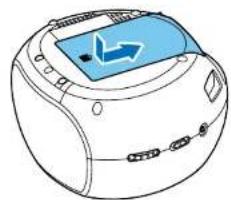
1
EN To play with the device, you can use either alkaline battery (R14) or AC power. Before connecting AC power, adjust the voltage selector to correspond to the local power voltage.
2
2
Listen to FM/MW radio
1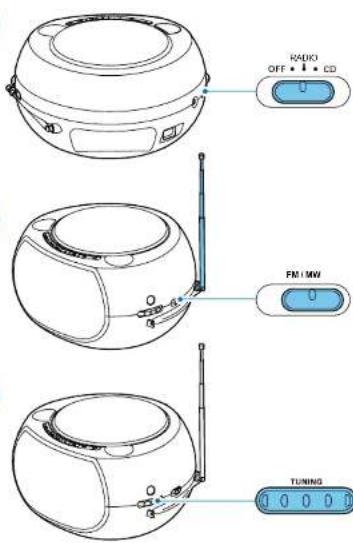
Listen to an external audio device
1
2

Play disk
1
2
3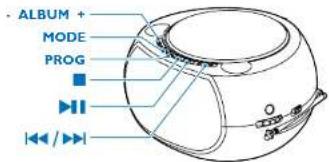
ALBUM For MP3 CDs, select an album. MODE
Play a track/all tracks/an album repeatedly; play tracks randomly.
PROG Program tracks.
Stop play or erase a program.

Pause or start play.

Skip to the previous/next track or search within play.
Program tracks
1 In CD mode, press ■ to stop playback. 2 Press PROG to activate programming. 3 For MP3-CDs press ALBUM +/- to select an album. 4 Press ◀◀/▶▶I repeatedly to select a track, then press PROG to confirm. 5 Repeat steps 3--4 to program more tracks. 6 Press ▶ to play the programmed tracks. 7 To cancel the program, when playback is stopped, press

Adjust volume


For online help

www.philips.com/support


Warning and maintenance


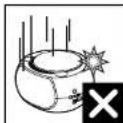


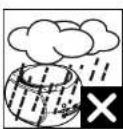


Turn the device off


Specifications are subject to change without notice.
All rights reserved.
AZ300 78 UM V1.0


PHILIPS
EN
Congratulations on your purchase and welcome to Philips!
To fully benefit from the support that Philips offers, register your product at www.philips.com/welcome.
1 Important
- Read these instructions.
- Follow all instructions.
- Do not block any ventilation openings. Install in accordance with the manufacturer's instructions.
- Do not install near any heat sources such as radiators, heat registers, stoves, or other apparatus (including amplifiers) that produce heat.
- Protect the power cord from being walked on or pinched, particularly at plugs, convenience receptacles, and the point where they exit from the unit.
- Only use attachments/accessories specified by the manufacturer.
- Unplug this unit during lightning storms or when unused for long periods of time.
- Refer all servicing to qualified service personnel. Servicing is required when the unit has been damaged in any way, such as power-supply cord or plug is damaged, liquid has been spilled or objects have fallen into the apparatus, the unit has been exposed to rain or moisture, does not operate normally, or has been dropped.
- Battery usage CAUTION – To prevent battery leakage which may result in bodily injury, property damage, or damage to the unit: • Install all batteries correctly, + and - as marked on the unit.
- Do not mix batteries (old and new or carbon and alkaline, etc.).
- Remove batteries when the unit is not used for a long time.
- The unit shall not be exposed to dripping or splashing.
- Do not place any sources of danger on the unit (e.g. liquid filled objects, lighted candles).
- Where the MAINS plug or an appliance coupler is used as the disconnect device, the disconnect device shall remain readily operable.
Know these safety symbols


This 'bolt of lightning' indicates uninsulated material within your unit may cause an electrical shock. For the safety of everyone in your household, please do not remove product covering.
The exclamation point calls attention to features for which you should read the enclosed literature closely to prevent operating and maintenance problems.
WARNING: To reduce the risk of fire or electric shock, this apparatus should not be exposed to rain or moisture and objects filled with liquids, such as vases, should not be placed on this apparatus.
CAUTION: To prevent electric shock, match wide blade of plug to wide slot, fully insert.

Warning
Never remove the casing of this apparatus.
- Never lubricate any part of this apparatus.
- Never place this apparatus on other electrical equipment.
Keep this apparatus away from direct sunlight, naked flames or heat.
Ensure that you always have easy access to the power cord, plug or adaptor to disconnect the apparatus from the power.

Caution
Use of controls or adjustments or performance of procedures other than herein may result in hazardous radiation exposure or other unsafe operation.
2 Notice
Any changes or modifications made to this device that are not expressly approved by Philips Consumer Lifestyle may void the user's authority to operate the equipment.
Disposal of your old product and batteries
Your product is designed and manufactured with high quality materials and components, which can be recycled and reused.
Never dispose of your product with other household waste. Please inform yourself about the local rules on the separate collection of electrical and electronic products and batteries. The correct disposal of these products helps prevent potentially negative consequences on the environment and human health.
Your product contains batteries, which cannot be disposed of with normal household waste.
Please inform yourself about the local rules on separate collection of batteries. The correct disposal of batteries helps prevent potentially negative consequences on the environment and human health.
Please visit www.recycle.philips.com for additional information on a recycling center in your area.
Environmental information
All unnecessary packaging has been omitted. We have tried to make the packaging easy to separate into three materials: cardboard (box), polystyrene foam (buffer) and polyethylene (bags, protective foam sheet.)
Your system consists of materials which can be recycled and reused if disassembled by a specialized company. Please observe the local regulations regarding the disposal of packaging materials, exhausted batteries and old equipment.
This apparatus includes this label:
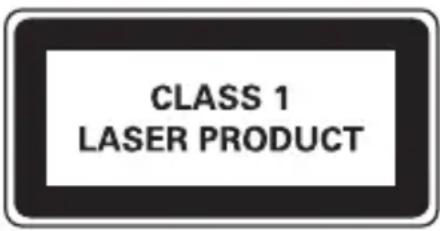

Note
•The type plate is located on the bottom of the apparatus.
3 Specifications
Amplifier
Rated Output Power 2 X 1 W RMS
Frequency Response 80 Hz - 16 kHz, ± 3 dB
Signal to Noise Ratio 50 dB
MP3 Link Input 0.5 V RMS 20 kohm
Discs
Laser Type Semiconductor
Total Harmonic Distortion <1%
Frequency Response 60Hz -16kHz
S/N Ratio 55dBA
Tuner
Tuning Range FM: 87.5 - 108 MHz;
MW: 530 - 1710 kHz;
Total Harmonic Distortion <3%
Signal to Noise Ratio 40 dB
General information
AC power 110–127 V / 220–240 V ∼, 50/60
Hz
Operation Power Consumption 15 W
Standby Power Consumption 1.5 W
Batteries 9 V, 6 x R14/UM2/C Cell
Dimensions
- Main Unit (W × H × D) 245 × 130 × 212 mm
Weight
- With Packing
1.8 kg
- Main Unit
1.4 kg

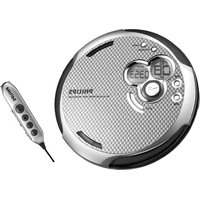
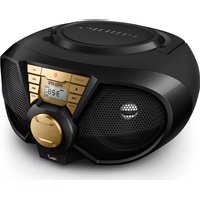

Brand : PHILIPS
Model : AZ300X
Category : CD Player