
10/12 cup filter 47064 - Coffee maker MORPHY RICHARDS - Free user manual and instructions
Find the device manual for free 10/12 cup filter 47064 MORPHY RICHARDS in PDF.


| Brand | Morphy Richards |
| Model | 10/12 cup filter 47064 |
| Product Type | Drip Coffee Maker |
| Capacity | 10 to 12 cups (approx. 1.25 - 1.5 L) |
| Dimensions (H x W x D) | Approx. 35 x 25 x 20 cm |
| Weight | Approx. 2.5 kg |
| Power Supply | 220-240 V, 50/60 Hz, 1000 W |
| Water Reservoir | Removable, with water level indicator |
| Carafe | Glass carafe with lid and handle |
| Filter Type | Uses #4 paper cone filters (included) |
| Brewing Features | Pause & serve, keep warm function, auto shut-off |
| Control Type | On/off switch with indicator light |
| Indicator Lights | Power on and keep warm |
| Filter Basket | Removable, easy to clean |
| Cleaning | Wipe exterior with damp cloth; carafe and filter basket dishwasher safe |
| Descaling | Regular descaling with vinegar or citric acid recommended |
| Safety Features | Auto shut-off after 2 hours, boil-dry protection |
| Warranty | 2 years (subject to registration) |
| Spare Parts Availability | Carafe, filter basket, and water reservoir available via Morphy Richards |
| Certifications | CE, RoHS compliant |
Frequently Asked Questions - 10/12 cup filter 47064 MORPHY RICHARDS
User questions about 10/12 cup filter 47064 MORPHY RICHARDS
0 question about this device. Answer the ones you know or ask your own.
Ask a new question about this device
Download the instructions for your Coffee maker in PDF format for free! Find your manual 10/12 cup filter 47064 - MORPHY RICHARDS and take your electronic device back in hand. On this page are published all the documents necessary for the use of your device. 10/12 cup filter 47064 by MORPHY RICHARDS.
USER MANUAL 10/12 cup filter 47064 MORPHY RICHARDS
natural_image
Two modern kitchen grilles with black and silver shades, no visible text or symbols10/12 cup filter coffee maker

Please read and keep these instructions
Models Covered:
47060- Manual Interface
47061- Digital Interface
47062- Manual Interface & Thermal carafe
47063- Digital Interface & Thermal carafe
47064- Black with Digital Interface
47065- Brushed with Manual Interface
47067- Titanium with Digital Interface
Getting the best from your new coffee maker...
Warning: Hot water and steam
Safety first
Caution must be used when handling hot water, coffee or steam.
Run water through your machine before first use
It is important to run water through your coffee maker in order to rinse the machine. You can also run water through to warm your coffee machine.
Descale as appropriate for the hardness of the water in your area
It is important to descale as the performance of your coffee maker may be impaired by limescale and other impurities in the water supply.



For replacement parts, help with using your Morphy Richards product, problems and lots more, contact us by phone or through our website.
CM47060 Rev3

UK Helpline: 0844 871 0946
Replacement Parts: 0844 873 0712
Ireland Helpline: 1800 409 119
www.morphyrichards.com
IMPORTANT SAFETY INSTRUCTIONS
The use of any electrical appliance requires the following common sense safety rules.
Primarily there is danger of injury or death and secondly the danger of damage to the appliance. These are indicated in the text by the following two conventions:
WARNING: Danger to the person!
IMPORTANT: Damage to the appliance!
In addition, we offer the following safety advice.
Location
- Remove all the packaging and retain for future reference.
- Ensure the coffee maker is used on a firm, flat surface.
- Do not use the coffee maker outdoors or in a bathroom.
- Do not place the coffee maker on a highly polished wooden surface as damage may occur to the surface.
- Do not place the coffee maker on or near hot surfaces such as a hot plate, radiant rings or near a naked flame.
- WARNING: Do not place the coffee maker onto a metal tray or metal surface whilst in use.
Other safety considerations
- Disconnect the coffee maker from the mains supply when filling, cleaning or not in use.
- When unplugging, turn any control to 'OFF', then remove the plug from the wall socket.
- Keep the outside of the coffee maker area clean and dry at all times.
- Do not touch hot surfaces. Always use handles or knobs on the coffee maker.
- Do not immerse the coffee maker itself in water and always ensure the electrical connections are kept dry.
- Do not operate any appliance with a damaged cord or plug or after the appliance malfunctions or has been damaged in any manner. Ring the helpline number for advice on examination and repair.
- The use of attachments or tools not recommended or sold by Morphy Richards may cause fire, electric shock or injury.
- Do not use the coffee maker for anything other than its intended purpose.
- If the supply cord is damaged, it must be replaced by the manufacturer, it's service agent or similarly qualified persons in order to avoid a hazard.
Product safety
- Never use warm or hot water to fill the water reservoir.
- Do not overfill the water reservoir.
Personal safety
- Ensure the lid of the glass jug is securely in place before pouring.
• Take care to pour hot coffee slowly and carefully without tipping the glass jug too fast. - Do not fill above the capacity mark of the water level gauge marked on the jug.
- Do not use the glass jug in a microwave.
- Milk should not be reheated, only heat it when required.
- When heating milk, please use the stainless steel jug provided.
- Do not fill the milk jug above the MAX mark.
- Do not touch metal parts until the unit has cooled.
- This appliance is not intended for use by persons (including children) with reduced physical, sensory or mental capabilities, or lack of experience and knowledge, unless they have been given supervision or instruction concerning use of the appliance by a person responsible for their safety.
Children
• Children do not understand the dangers associated with operating electrical appliances. Never allow children to use this appliance.
• Children should be supervised to ensure that they do not play with the appliance.
Treating scalds
- Run cold water over the affected area immediately. Do not stop to remove clothing, get medical help quickly.
Choice of coffee
- Choose a finely ground espresso coffee to use with this machine.
NOTE: Avoid blends that are very powdery. When the coffee is too finely ground it may block the filter.
ELECTRICAL REQUIREMENTS
Check that the voltage on the rating plate of your appliance corresponds with your house electricity supply which must be A.C. (Alternating Current).
If the socket outlets in your home are not suitable for the plug supplied with this appliance the plug should be removed and the appropriate one fitted.
WARNING: The plug removed from the mains lead, if severed, must be destroyed as a plug with a bared flexible cord is hazardous if engaged into a live socket outlet.
Should the fuse in the 13 amp plug require changing, a 13 amp BS1362 fuse must be fitted.
WARNING: This appliance must be earthed.
PRODUCT FEATURES
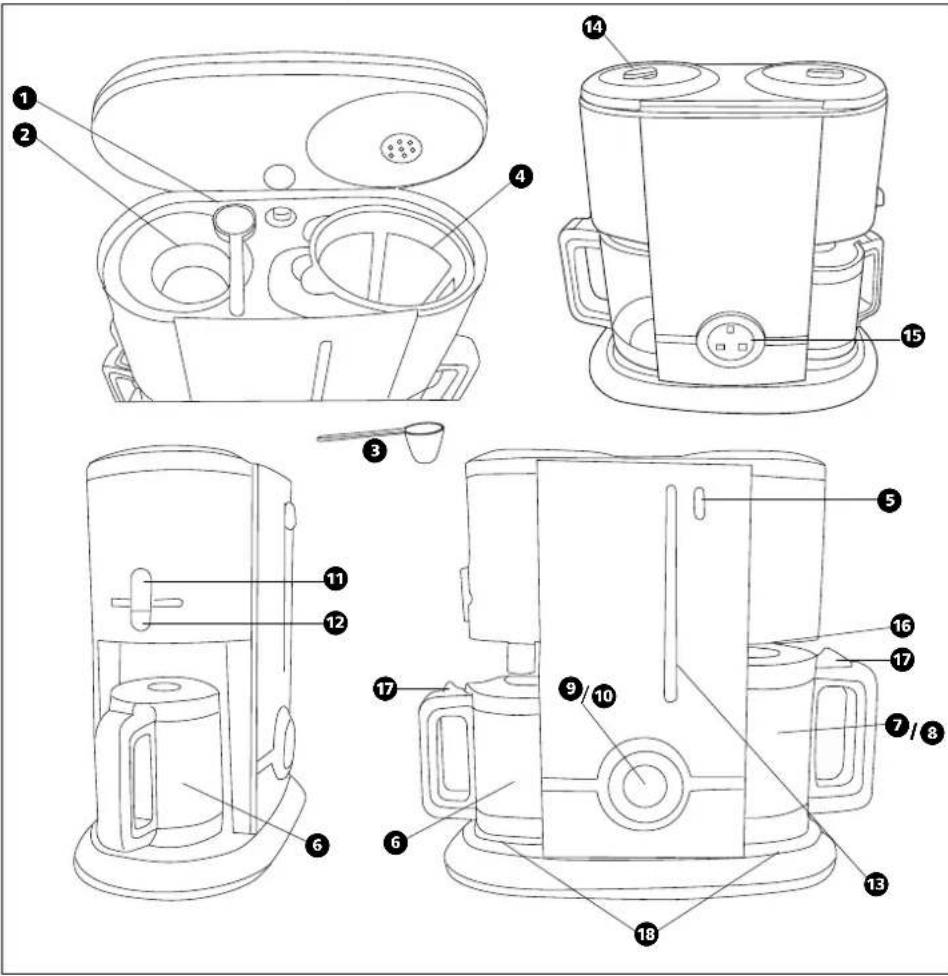
Features
① Measuring spoon storage area
② Water re-fill point
③ Measuring spoon
④ Filter holder and permanent mesh filter
⑤ Lid opening push button
⑥ Milk frother steel jug
⑦ 12/15 cups glass coffee jug
8 8/10 cups steel thermal coffee jug
⑨ Manual interface (see overleaf)
10 Digital interface (see overleaf)
11 Frother control
12 Milk hot plate switch
13 Illuminated water level indicator
14 Coffee strength control
15 Plug storage
16 Anti drip
17 Lid release
18 Hot plates
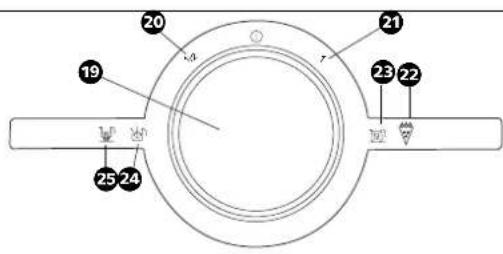
9 Manual interface version
19 Function selector
20 1/2 carafe indicator
21 1 carafe indicator
22 Brewing ON indicator
23 Auto keep warm indicator
24 Milk frother device ON indicator
25 Milk hot plate ON indicator
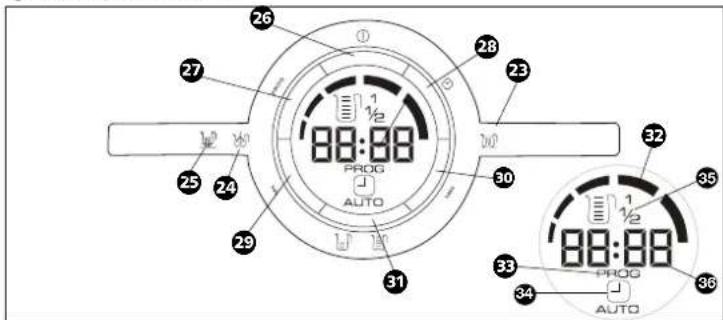
10 Digital interface version
23 Auto keep warm indicator
24 Milk frother device ON indicator
25 Milk hot plate ON indicator
26 Power ON/OFF selection push button
27 Programme selection push button
28 Auto function push button
29 Hour function push button
30 Minute function push button
31 Cup selector push button
32 Quality and brew indicator
Programming mode indicator
34 Automatic timer function indicator
35 Cup selection indicator
36 24 hour clock
Milk frother device off pilot light


Milk hot plate ON pilot light
Milk frother device ON pilot light
^1/_2 carafe light
1 carafe light auto

① Power ON/OFF
natural_image
Line drawing of a mechanical assembly with gears and a central shaft (no text or symbols)OPERATING THE APPLIANCE
BEFORE USE
Before using your coffee maker for the first time or if you have not used it for some time, rinse the machine by running water through. Follow the procedure for making coffee, without coffee in the filter holder.
natural_image
Line drawing of a mechanical device with gears and a handle (no text or symbols)The product that you have purchased is available in four different versions:
• Manual version - Glass carafe
• Manual version - Thermal carafe
• 24 hour automatic timer version - Glass carafe
• 24 hour automatic timer version - Thermal carafe
For the complete understanding of how to use your machine, please refer to the specific section related to your version.
Please note not all variants are available in all countries, please contact your retailer for more information.
natural_image
Line drawing of a kitchen appliance with a glass mug and a side-mounted blender (no text or symbols)MANUAL INTERFACE VERSIONS ⑨
Making coffee
1 Press the push button 5 to open the hinged lid. The lid will automatically rise.
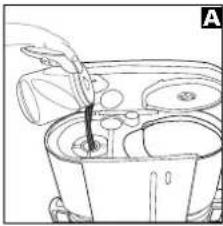
2 Using a jug, fill the water reservoir ② with the required amount of water using the level indicator ⑬ as a guide. Both the jug and water level indicator are marked in cups A.
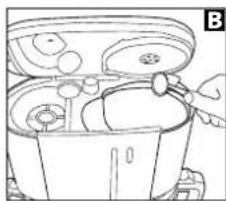
3 Spoon ③ the required amount of ground filter coffee into the mesh filter ④, spreading evenly. We suggest one level measuring spoon for every cup. Ensure the filter is sitting properly in the filter holder B.
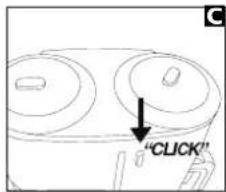
4 Close the lid. Ensure the lid is closed and latched properly C, otherwise the machine will not function correctly.
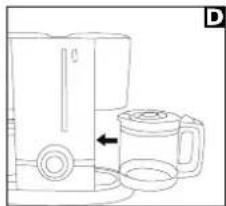
5 Slide the jug 7/8 into the coffee maker, ensuring it sits correctly on the hot plate D. The jug lid must be in place during the brewing process; otherwise the non drip valve will not open, causing the filter to flood.
Thermal Carafe Variant
Note: Thermal carafe versions have no hot plate. Please ensure the jug sits correctly on the base recess.
- Ensure the jug 8 lid is fully closed by turning the lid clockwise, this ensures the maximum temperature is maintained in the jug. To ensure the coffee is kept as warm as possible, we advise you rinse your thermal carafe in hot water before use.
- Please note the jug lid must be in place during the brewing process; otherwise the non-drip valve will not open, causing the filter to flood.
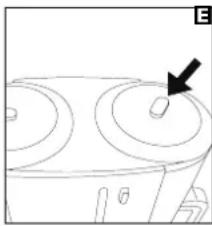
6 Select the required strength of coffee using the strength selector on the lid E.
7 Plug the filter coffee maker in at the wall socket and switch on, the water gauge 13 will illuminate. Rotate the dial 19 to select one of the two on positions available: 1/2 carafe or a full carafe F, depending on the number of cups required. Refer to 'Cup selection function' on page 11 for further information.
8 The cup selection indicator 20/21 and the brewing on indicator 22 will light up. The hot water will start to flow through the coffee grounds and into the jug as coffee for you to enjoy.
• Glass Carafe Variant
When the brewing process is complete, the product will automatically switch to keep warm; the auto keep warm indicator 23 will light up.
The automatic keep warm function will keep the coffee warm 28 in the carafe until the product is switched off.
The anti-drip valve 16 will prevent any remaining coffee dripping onto the hot plate during serving. Ensure that the jug is replaced on the hot plate after serving.
We suggest consuming your coffee within two hours, after this time we suggest brewing another jug of fresh coffee.
WARNING: The coffee maker and hot plates are hot and remain hot for some time after switching off.
NOTE:
- Remember to turn off the machine when you have finished.
- Allow the unit to cool.
- Remove the permanent filter and empty the used coffee grounds. Wash the filter immediately and dry thoroughly.
Thermal Carafe Variants
- When the brewing process is complete, the product remains on, we recommend you switch off your coffee maker as soon as brewing is complete.
- The thermal carafe ⑧ will keep the coffee warm in the jug for up to four hours.
- The anti drip valve 16 will prevent any remaining coffee dripping onto the base recess during serving.
• We suggest consuming your coffee within two hours, after this time we suggest brewing another jug of fresh coffee. - WARNING: The coffee maker and hot plates are hot and remain hot for some time after switching off.
NOTE:
- Remember to turn off the machine when you have finished.
- Allow the unit to cool.
- Remove the permanent filter and empty the used coffee grounds. Wash the filter immediately and dry thoroughly.
natural_image
Simple line drawing of a three-tiered appliance with a black arrow pointing to the topmost ring (no text or symbols)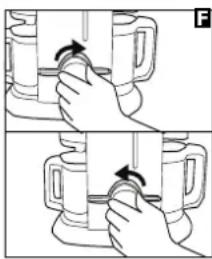
natural_image
Two-step illustration showing hands holding a mug with a handle, no text or symbols present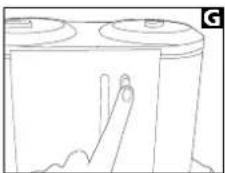
natural_image
Simple line drawing of a battery with two circular tops and a finger pointing at one (no text or symbols)DIGITAL INTERFACE VERSIONS 10
Set the clock
- When the machine is plugged in, the display will flash 12:00 dimly.
• To set the time, press the hour button 29 and minute buttons 30 to reach the desired time.
NOTE: The clock is a 24 hour clock.
natural_image
Diagram of a kitchen appliance with a handle and side bowl (no text or labels)The clock will be reset each time the product is unplugged at the wall.
natural_image
Line drawing of a container with food items and a hand holding a tool (no text or symbols)Making coffee
- Press the push button 5 to open the hinged lid. The lid will automatically rise G.
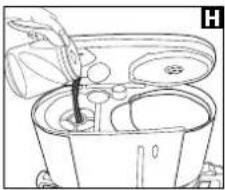
2 Using the jug, fill the water reservoir ② with the required amount of water using the level indicator ⑬ as a guide. Both the jug and water level indicator are marked in cups H.
natural_image
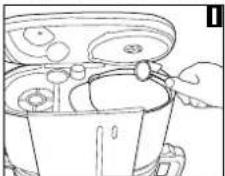
Line drawing of a kitchen blender with a side view showing a glass mug and a side holder (no text or symbols)- Spoon ③ the required amount of ground filter coffee into the mesh filter ④, spreading evenly. We suggest one level measuring spoon for every cup. Ensure the filter is sitting properly in the filter holder ①.
natural_image
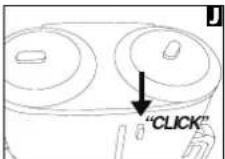
Simple line drawing of a three-tiered appliance with a black arrow pointing to the top surface (no text or symbols)44 Close the lid. Ensure the lid is closed and latched properly, otherwise the machine will not function correctly.
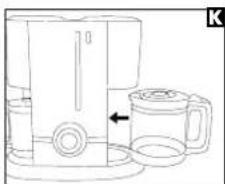
5 Slide the jug 7/8 into the coffee maker, ensuring it sits correctly on the hot plate K. The jug lid must be in place during the brewing process; otherwise the non drip valve will not open, causing the filter to flood.
Thermal Carafe Variant
Note: Thermal carafe versions have no hot plate. Please ensure the jug sits correctly on the base recess.
- Ensure the jug ⑧ lid is fully closed by turning the lid clockwise, this ensures the maximum temperature is maintained in the jug. To ensure the coffee is kept as warm as possible, we advise you rinse your thermal carafe in hot water before use.
- Please note the jug lid must be in place during the brewing process; otherwise the non-drip valve will not open, causing the filter to flood.
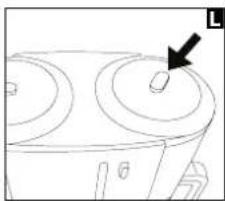
6 Select the required strength of coffee using the strength selector on the lid L.
7 Press the power ON/OFF selection button 26. The display lights up brightly and the cup selection indicator 35 will flash showing the previous selection.
NOTE: If the machine has been unplugged from the wall socket since the last operation, the previous selection will be cleared, the default setting will be applied (1 full carafe).
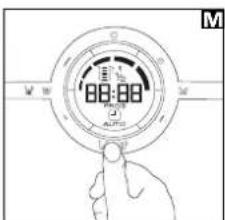
8 Press the cup selection button 31 to select one of the available options, 12 carafe or full carafe M depending on the number of cups required. Refer to 'Cup selection function' on page 11 for further information. The selection indicator will stop flashing, if no buttons are pressed for 2 seconds, the machine will begin the brewing process.
9 The brewing indicator 32 will start to illuminate from left to right, indicating that brewing is in progress, hot water will start to flow through the coffee grounds and into the jug as coffee 8.
Glass Carafe Variant
When the brewing process is complete, the product will automatically switch to keep warm 23; the brewing indicator 32 will stop illuminating from left to right. All segments will remain solidly illuminated, indicating the machine is in keep warm state. The indicator has now changed from a brewing indicator to a quality indicator. Refer to 'Coffee Quality indicator' on page 11 for further information.
The automatic keep warm 23 function will keep the coffee warm in the carafe until the product is switched off.
For safety reasons, the coffee maker will automatically switch off after two hours.
The anti-drip valve 16 will prevent any remaining coffee dripping onto the hot plate during serving. Ensure that the jug is replaced on the hot plate after serving.
We suggest consuming your coffee within two hours, after this time we suggest brewing another jug of fresh coffee.
WARNING: The coffee maker and hot plates are hot and remain hot for some time after switching off.
NOTE:
- Remember to turn off the machine when you have finished.
- Allow the unit to cool.
- Remove the permanent filter and empty the used coffee grounds. Wash the filter immediately and dry thoroughly.
Thermal Carafe Variant
When the brewing process is complete, the product remains on, the brewing indicator 32 will stop illuminating from left to right, all segments will remain solidly illuminated, the indicator has now changed from a brewing indicator to a quality indicator. Refer to 'Coffee Quality indicator' on page 11 for further information.
If the coffee is to be consumed immediately, we recommend switching off your coffee maker as soon as brewing is complete.
NOTE: If you switch off your coffee maker, the coffee quality indicator will turn off and reset.
The thermal carafe will keep the coffee warm in the jug for up to four hours.
For safety reasons, the coffee maker will automatically switch off after two hours.
The anti drip valve will prevent any remaining coffee dripping onto the base recess during serving.
We suggest consuming your coffee within two hours, after this time, we suggest brewing another jug of fresh coffee.
WARNING: The coffee maker and hot plates are hot and remain hot for some time after switching off.
NOTE:
- Remember to turn off the machine when you have finished.
- Allow the unit to cool.
- Remove the permanent filter and empty the used coffee grounds. Wash the filter immediately and thoroughly.
Set the automatic timer function
NOTE: The timer function can be set when the coffee maker is brewing or when it is in standby.
1 Press the programme button 27. The display will change to show the previous set time and cup selection flashing. If no previous setting has been made or the machine has been unplugged from the socket since the last setting, the default setting will be shown; 12:00 and full carafe.
- Select 31 the desired number of cups that want to be brewed, 1/2 or full carafe (see 'Cup selection function' on page 11). The cup selector indicator will stop flashing.
3 Press the hour 23 and minute 30 buttons to set the desired time. The start time will stop flashing.
NOTE: The programming mode indicator continues to flash to show the display is still in programming mode.
- If the programme button 27 is pressed again or if no buttons are pressed within 5 seconds, the cup selection setting and the start time are memorised.
5 To activate the automatic timer function, press AUTO button 28.
- The display will change to show the programmed time and cup selection setting for 5 seconds. The display will then change to show the time, the automatic timer function indicator will illuminate to show the automatic timer function is set.
- With the automatic function activated, the coffee maker will turn on at the desired time and start to brew the coffee.
NOTE: If the AUTO button 28 is pressed during the brewing process, the machine will switch off and the automatic timer function will be activated.
If setting the automatic timer function during the brewing process, wait until the process is complete before pressing the AUTO button.
6 Press the AUTO button 28 again to cancel the automatic function, the timer function indicator will disappear. The machine will keep in the memory the cup selection setting and the start time until it is unplugged from the mains socket.
77 To change the start time and the number of cups, repeat steps 1-5.
WARNING: Remember to fill the water tank with water and the filter with coffee before activating the auto function.
NOTE: The clock is a 24 hour clock.
If no buttons are pressed, the display will revert to the time display within 5 seconds.
Frothing milk
It is advised to start heating your milk ready for frothing when you start making the coffee. This helps to ensure the milk reaches it's optimum frothing temperature.
1 i Fill the stainless steel jug 6 with the required amount of milk. Do not exceed the maximum level.
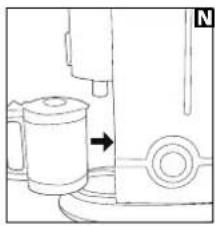
2 Place the jug on the hot plate 18 N and push the frother hot plate 12 ON/OFF switch to the 'ON' 0 position, the hot plate indicator will light up.
3 Once the coffee is brewed (and the auto keep warm indicator lights up), the milk is ready to froth.
- Engage the frother system by turning the frother control lever 11 to the right P, the motor will start automatically and the milk frother device ON indicator 24 will illuminate.
Frothing should take between 30-60 seconds.
NOTE: Frothing time can vary depending on the type of milk used and it's starting temperature. We recommend to use semi skimmed milk from the fridge.
5 Disengage the frother system from the jug by turning the frother control lever 11 to the left Q, the motor will stop automatically. Push and release the milk hot plate switch to turn off the hot plate 12.
WARNING: Take care, the milk will be very hot.
Remove the milk jug 6 from the hot plate and press the lid release button 17 to disengage the lid. The lid assembly can be removed for easy pouring and spooning off the milk.
NOTE: The lid can be turned upside down and rest on the work surface. The inner lid is shaped to collect any dripping milk and froth for minimal mess.
Pour the coffee into the cups and then gently pour or preferably spoon the milk onto the coffee.
WARNING: The stainless steel jug and the hotplate will remain hot for sometime after switching the machine off.
NOTE: The milk frother jug and lid can be disassembled for easy cleaning.
It is recommended that you disassemble and clean the milk frother jug and it's components immediately after use, as dried milk can be difficult to remove.
NOTE: All milk jug and coffee jug components are dishwasher safe for easy cleaning.
natural_image
Diagram of a mechanical device with two cylindrical components and an arrow indicating direction (no text or symbols)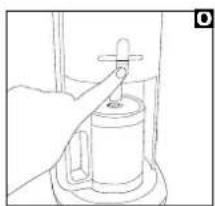
natural_image
Line drawing of a hand using a tool to press or install a cylindrical object (no text or symbols visible)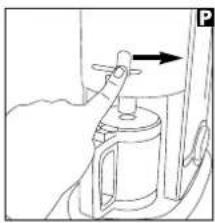
natural_image
Line drawing of a hand operating a valve on a cylindrical device (no text or symbols)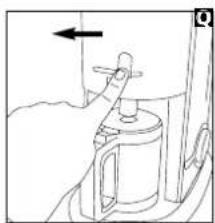
natural_image
Line drawing of a hand holding a tool near a container with an arrow indicating direction (no text or symbols)Cup selection function
- This machine has a special selector that maintains the quality of coffee brewed in relation to the number of cups selected.
There are two options available: - 1/2 carafe (1-6 cups - Glass jug)
(1-5 cups - Thermal jug)
• 1 carafe (7-12 cups - Glass jug) (6-10 cups - Thermal jug)
2 The selection needs to be set in relation to the amount of water in the water tank and the amount of coffee powder in the filter.
3 The incorrect selection of this function will not affect the functionality of the machine, however the quality and taste of the coffee brewed will be affected. - If you find the strength selector does not provide a weak or strong enough cup of coffee to suit your taste, the cup selection function can be used in conjunction to achieve a stronger or weaker cup of coffee.
- The table below shows the settings to use in relation to the volume of water in the tank to help achieve a stronger or weaker coffee. Feel free to experiment with different settings until you achieve the desired strength of coffee to suit your own personal taste.
| 1-61-5 | 7-126-10 | |
| 1/2 | Standard | Stronger |
| 1 | Weaker | Standard |
Coffee quality indicator
The coffee quality indicator will show the quality of the coffee in the carafe in relation to the time since brewing was completed. Quality of the coffee is a personal choice. The quality indicator gives an indication of the quality and taste of coffee after the brewing process is complete.
It is not absolute and can differ due to personal taste or the type of coffee used.
The graph shown below gives an indication of the relation between each segment of the display in relation to both quality and time.
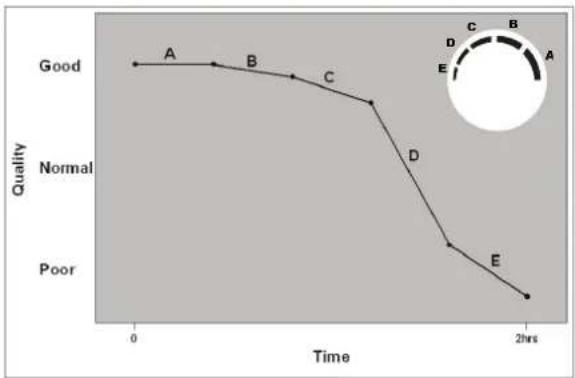
line
| Time | Quality | |---|---| | 0 | A | | ~2hrs | B | | ~4hrs | C | | ~6hrs | D | | ~12hrs | E | | 2hrs | Poor |RECIPES
Cappuccino
1/3 espresso
^1/_3 hot milk
^1/_3 hot frothed milk
Chocolate powder for sprinkling
11 Prepare coffee as per 'Making a coffee' instructions (on pages 5, 6 or 7).
2 Fill the stainless steel milk jug with the required amount of milk, place on the hotplate and switch on. The milk will take approximately 7 minutes to reach the appropriate temperature.
3 Froth milk by lifting the milk jug up to the milk frothing blade, ensuring that the blade is just under the surface of the milk and press the milk frothing button. The milk will take approximately 30 seconds to froth.
4 Pour the coffee in first and then the hot milk into a cappuccino cup, spoon over frothed milk.
55 Sprinkle with chocolate powder to serve.
Amaretto Coffee
250ml hot strong coffee
2 tablespoons of double or whipped cream
2 shots of Amaretto
Sugar to taste
1 i) Stir the coffee and alcohol together either with 2 tablespoons of double cream, or top with a dollop of whipped cream.
2 Sprinkle with grated chocolate and serve.
Cafe Latte
1/2 espresso
1/2 hot frothed milk
11 Prepare coffee as per 'Making a coffee' instructions (on pages 5, 6 or 7).
2 Fill the stainless steel milk jug with the required amount of milk, place on the hotplate and switch on. The milk will take approximately 7 minutes to reach the appropriate temperature.
3 Froth milk by lifting the milk jug up to the milk frothing blade, ensuring that the blade is just under the surface of the milk and press the milk frothing button. The milk will take approximately 30-60 seconds to froth.
4 Pour the coffee into a tall glass and top with the frothed milk.
Moccacino
1/3 espresso
1/3 hot frothed milk
1/3 hot chocolate
1 Prepare coffee as per 'Making a coffee' instructions (on pages 5, 6 or 7).
2 Fill the stainless steel milk jug with the required amount of milk, place on the hotplate and switch on. The milk will take approximately 7 minutes to reach the appropriate temperature.
3 Froth milk by lifting the milk jug up to the milk frothing blade, ensuring that the blade is just under the surface of the milk and press the milk frothing button. The milk will take approximately 30 seconds to froth.
44 Prepare the hot chocolate according to the manufacturer's instructions.
5 Pour the coffee, hot milk and hot chocolate into a tall glass and serve.
Irish Coffee
Makes 2 servings
40ml of double cream
2 tsp sugar
4 shot measurements of Irish whisky
350ml hot strong coffee
11 Whip double cream until thick, then chill.
2 Warm 2 Irish coffee glasses with hot water and place in each a teaspoon of sugar and 2 shots of Irish whisky in glass.
3 Divide coffee among the glasses.
44 Slowly dribble the chilled cream over the back of the spoon onto the top of the coffee.
5 Do not stir.
CLEANING AND MAINTENANCE
Refilling
1 Switch off the coffee maker, and allow 5 minutes to cool.
22 Lift the lid and refill with cold water.
Descaling
- If you live in a harder water area, we recommend that your coffee maker is descaled at regular intervals, eg. every 2 - 3 months. In areas of moderately hard water, you should descale every 6 months.
- If the water filters through more slowly than usual, it is a sign that descaling is necessary.
- We recommend you to use proprietary liquid descaler which is especially made for coffee makers and plastic kettles. Follow the instructions on the bottle or sachet, and then operate the coffee maker with just water 3 times before making coffee.
- Do not use kettle descaler unless the packet specifically states it is suitable for coffee makers.
NOTE: The permanent mesh filter should not be in place during descaling.
Cleaning care
11 Unplug the coffee maker, and allow to cool.
22 Do not immerse the coffee maker in liquid.
3 Rinse the water tank occasionally with cold water. Do not use a cloth, as any residue or lint left behind may clog the coffee maker.
4 Remove the permanent filter and filter holder, discard the used coffee and wash with warm soapy water. Extended soaking is recommended at the same time as descaling. Rinse and dry thoroughly.
5.5 Wash the coffee jug and milk jug, including all frothing components, in warm soapy water. Rinse and dry all parts thoroughly.
NOTE: The coffee jug, milk jug and frother parts are all dishwasher safe.
6 Wipe all external surfaces with a damp cloth and dry thoroughly.
- Care must be taken to ensure the non drip valve situated on the bottom of the filter holder is not damaged during cleaning.
- Never use harsh or abrasive cleaners.
HELPLINE
If you have any difficulty with your appliance, do not hesitate to call. We are more likely to be able to help than the store from where you bought it.
Please have the following information ready to enable our staff to deal with your enquiry quickly:
• Name of the product.
- Model number as shown on the underside of the appliance.
- Serial number as shown on underside of the appliance.
UK Helpline 0844 871 0946
Replacement Parts 0844 873 0712
Ireland Helpline 1800 409 119
YOUR TWO YEAR GUARANTEE
It is important to retain the retailer's receipt as proof of purchase. Staple your receipt to this back cover for future reference.
Please quote the following information if the product develops a fault. These numbers can be found on the base of the product.
Model no.
Serial no.
All Morphy Richards products are individually tested before leaving the factory. In the unlikely event of any appliance proving to be faulty within 28 days of purchase, it should be returned to the place of purchase for it to be replaced.
If the fault develops after 28 days and within 24 months of original purchase, you should contact the Helpline number quoting Model number and Serial number on the product, or write to Morphy Richards at the address shown.
You may be asked to return a copy of proof of purchase
Subject to the exclusions set out below (see Exclusions), the faulty appliance will then be repaired or replaced and dispatched usually within 7 working days of receipt. If, for any reason, this item is replaced during the 2 year guarantee period, the guarantee on the new item will be calculated from the original purchase date. Therefore, it is vital to retain your original till receipt or invoice to indicate the date of initial purchase.
To qualify for the 2 year guarantee, the appliance must have been used according to the manufacturer's instructions. For example, coffee makers should have been regularly descaled.
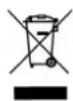
For electrical products sold within the European Community. At the end of the electrical products useful life, it should not be disposed of with household waste. Please recycle where facilities exist. Check with your Local Authority or retailer for recycling advice in your country.
Morphy Richards products are intended for household use only.
Morphy Richards has a policy of continuous improvement in product quality and design. The company, therefore reserves the right to change the specification of its models at any time.
EXCLUSIONS
Morphy Richards shall not be liable to replace or repair the goods under the terms of the guarantee where:
14 The fault has been caused or is attributable to accidental use, misuse, negligent use or used contrary to the manufacturer's recommendations or where the fault has been caused by power surges or damage caused in transit.
2 The appliance has been used on a voltage supply other than that stamped on the products.
3 Repairs have been attempted by persons other than our service staff (or authorised dealer).
- The appliance has been used for hire purposes or non domestic use.
55 The appliance is second hand.
6 Morphy Richards are not liable to carry out any type of servicing work, under the guarantee.
7 Plastic filters for all Morphy Richards kettles and coffee makers are not covered by the guarantee.
- This guarantee does not confer any rights other than those expressly set out above and does not cover any claims for consequential loss or damage. This guarantee is offered as an additional benefit and does not affect your statutory rights as a consumer.
- This guarantee is valid in the UK and Ireland only.
morphy richards®
The After Sales Division Morphy Richards Ltd Mexborough, South Yorkshire, England, S64 8AJ
Helplines (office hours) UK 0844 871 0946 Spare Parts 0844 873 0712 Republic of Ireland 1800 409 119
47060 MUK Rev3 06/08
For details of other products in the Morphy Richards range, please see our website . . .
- 10/12 cup filter coffee maker
- Getting the best from your new coffee maker...
- Safety first
- Run water through your machine before first use
- Descale as appropriate for the hardness of the water in your area
- IMPORTANT SAFETY INSTRUCTIONS
- WARNING: Danger to the person!
- Location
- Other safety considerations
- Product safety
- Personal safety
- Children
- Treating scalds
- Choice of coffee
- ELECTRICAL REQUIREMENTS
- PRODUCT FEATURES
- Features
- Manual interface version
- Digital interface version
- OPERATING THE APPLIANCE
- BEFORE USE
- MANUAL INTERFACE VERSIONS ⑨
- Making coffee
- Thermal Carafe Variant
- • Glass Carafe Variant
- WARNING: The coffee maker and hot plates are hot and remain hot for some time after switching off.
- NOTE:
- Thermal Carafe Variants
- DIGITAL INTERFACE VERSIONS 10
- Set the clock
- Glass Carafe Variant
- Set the automatic timer function
- Frothing milk
- WARNING: Take care, the milk will be very hot.
- WARNING: The stainless steel jug and the hotplate will remain hot for sometime after switching the machine off.
- Cup selection function
- Coffee quality indicator
- RECIPES
- Cappuccino
- Amaretto Coffee
- Cafe Latte
- Moccacino
- Irish Coffee
- CLEANING AND MAINTENANCE
- Refilling
- Descaling
- Cleaning care
- HELPLINE
- YOUR TWO YEAR GUARANTEE
- Model no.
- Serial no.
- EXCLUSIONS
- morphy richards®
Brand : MORPHY RICHARDS
Model : 10/12 cup filter 47064
Category : Coffee maker