
SX-T100 - Conference system SONY - Free user manual and instructions
Find the device manual for free SX-T100 SONY in PDF.


| Brand | Sony |
| Model | SX-T100 |
| Product type | Conference system |
| Dimensions (approx.) | 200 x 150 x 50 mm |
| Weight (approx.) | 1 kg |
| Power supply | 100-240 V AC, 50/60 Hz |
| Power consumption | 15 W (max) |
| Built-in microphone | Yes, an omnidirectional microphone |
| Built-in speaker | Yes, wideband speaker |
| Audio range | Up to 10 meters |
| Connectivity | Audio input/output (3.5 mm jack), USB for updates |
| Main functions | Two-way audio conference, echo reduction |
| Volume control | Rotating volume dial |
| Indicator light | Power and status LED |
| Care and cleaning | Wipe with a soft, dry cloth. Do not use solvents. |
| Safety | Do not expose to moisture or rain. Disconnect before cleaning. |
| Spare parts and repairability | Contact an authorized Sony service center. No spare parts provided. |
| General information | Complies with Canadian NMB-003 standard. Class A. |
Frequently Asked Questions - SX-T100 SONY
User questions about SX-T100 SONY
0 question about this device. Answer the ones you know or ask your own.
Ask a new question about this device
Download the instructions for your Conference system in PDF format for free! Find your manual SX-T100 - SONY and take your electronic device back in hand. On this page are published all the documents necessary for the use of your device. SX-T100 by SONY.
USER MANUAL SX-T100 SONY
Operating Instructions
Before operating the unit, please read this manual thoroughly and retain it for future reference.
Owner's Record
The model and serial numbers are located on the rear of the SX-M100 and on the bottom of the SX-C100A/ D100A/T100. Record the serial numbers in the spaces provided below. Refer to them whenever you call upon your Sony dealer regarding these products.
Model No. SX-M100
Serial No.
Model No. SX-C100A/C150
Serial No.
Model No. SX-D100A/D150
Serial No.
Model No. SX-T100
Serial No.
WARNING
To prevent fire or shock hazard, do not expose the unit to rain or moisture.
For the customers in the U.S.A.
This symbol is intended to alert the user to the presence of uninsulated "dangerous voltage" within the product's enclosure that may be of sufficient magnitude to constitute a risk of electric shock to persons.

This symbol is intended to alert the user to the presence of important operating and maintenance (servicing) instructions in the literature accompanying the appliance.
WARNING
This equipment has been tested and found to comply with the limits for a Class A digital device, pursuant to Part 15 of the FCC Rules. These limits are designed to provide reasonable protection against harmful interference when the equipment is operated in a commercial environment. This equipment generates, uses, and can radiate radio frequency energy and, if not installed and used in accordance with the instruction manual, may cause harmful interference to radio
communications. Operation of this equipment in a residential area is likely to cause harmful interference in which case the user will be required to correct the interference at his own expense.
You are cautioned that any changes or modifications not expressly approved in this manual could void your authority to operate this equipment.
The shielded interface cable recommended in this manual must be used with this equipment in order to comply with the limits for a digital device pursuant to Subpart B of Part 15 of FCC Rules.
For the customers in Canada
This Class A digital apparatus complies with Canadian ICES-003.
The wires in this mains lead are coloured in accordance with the following code:
Green-and-yellow: Earth
Blue: Neutral
Brown: Live
As the colours of the wires in the mains lead of this apparatus may not correspond with the coloured markings identifying the terminals in your plug proceed as follows:
The wire which is coloured green-and-yellow must be connected to the terminal in the plug which is marked by the letter E or by the safety earth symbol 12 or coloured green or green-and-yellow.
The wire which is coloured blue must be connected to the terminal which is marked with the letter N or coloured black.
The wire which is coloured brown must be connected to the terminal which is marked with the letter L or coloured red.
VORSICHT
Location and Function of Parts and Controls 6
SX-M100 Control Unit 6
SX-C100A/C150/SX-D100A/D150 Chairman's Unit/Delegate's Unit .. 9
SX-T100 Telephone Coupler 13
Setting Up the System 14
Precautions 14
System Connection 14
Turning On the Power of the System 16
Preparing the Control Unit 17
Operation During a Conference 19
Operation Performed by the Chairman and Delegates 19
Taking Part in a Conference via a Telephone 20
Troubleshooting Guide 21
Specifications 22
Features
The SX-M100 conference system is a flexible discussion system that can be configured with the versatile units introduced below.
The standard system supports a conference of up to 60 delegates. Connecting the SX-E120 Expansion Unit (not supplied) allows the system to support up to 120 delegates. The SX-T100 Telephone Coupler (not supplied) allows the use of a telephone line during a conference. By using the telephone, a person not actually in the conference hall can also take part in the conference.
The standard system consists of the following units.
- SX-M100 Control Unit
This unit controls the conference system.
The control unit can be mounted in a 19-inch rack.
Chairman's Unit/Delegate's Unit
- SX-C100A/SX-D100A Chairman's Unit/Delegate's Unit: Desktop type. You can move these units freely in the conference room.
- SX-C150/SX-D150 Chairman's Unit/Delegate's Unit: Desk-mounted type. These units are fixed to the desks.
These units feature both a microphone and speaker.
Use the above combination of the chairman's unit and delegate's unit.
- SX-T100 Telephone Coupler
This coupler is used to connect the control unit to a telephone line. Using this coupler allows a person to take part in a conference from a remote location, even from overseas.
In addition to the units described above, the following optional units are available.
SXA-120 Expansion Board
The board is designed to allow the expansion of the system's functions. Installing this board in the control unit allows the following function expansion units to be connected.
- SX-E120 Expansion Unit
- SX-8300/SX-S100 Microphone Control Panel
Used to enable or disable delegates' microphones.
When multiple SX-8300 microphone control panels are used, the power interface unit is required.
When the SX-S100 microphone control panels are used, they are connected using only the connecting cables.
For detailed information on the power interface unit, contact your Sony dealer.
- Personal computer
For details of the SXA-120 Expansion Board, refer to the manual supplied with the expansion board.
System Configuration
The figure below shows an example of the conference system.
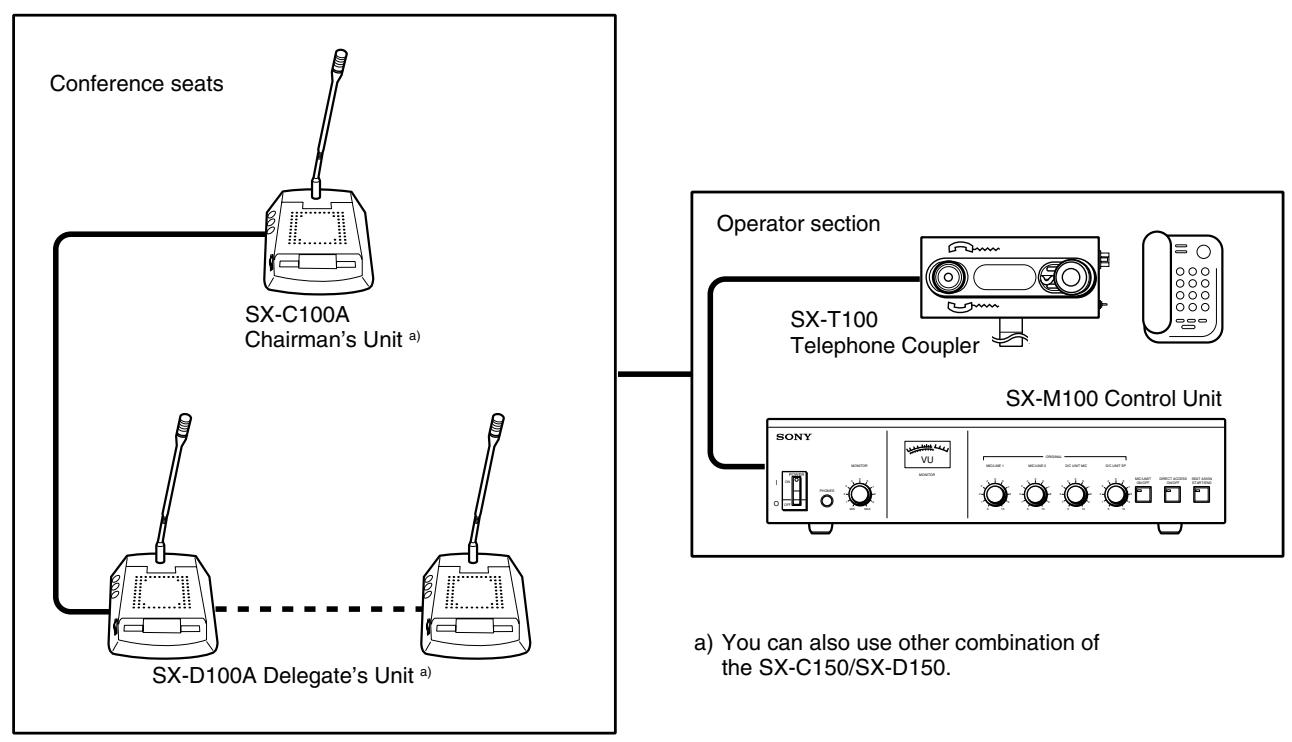
Conference hall
System configuration
SX-M100 Control Unit
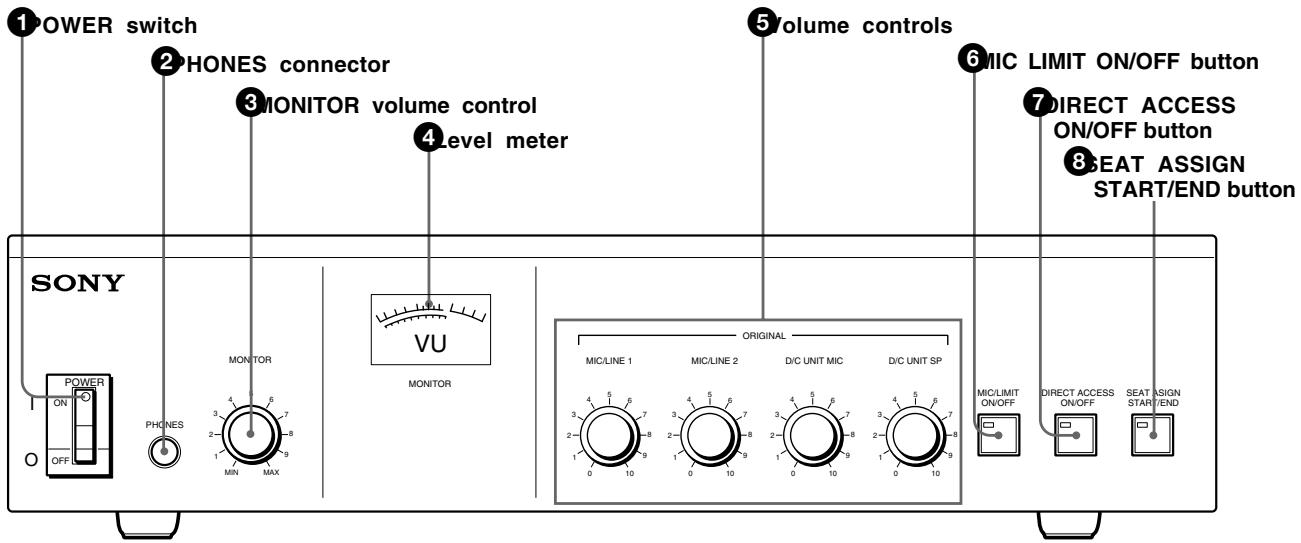
Front panel
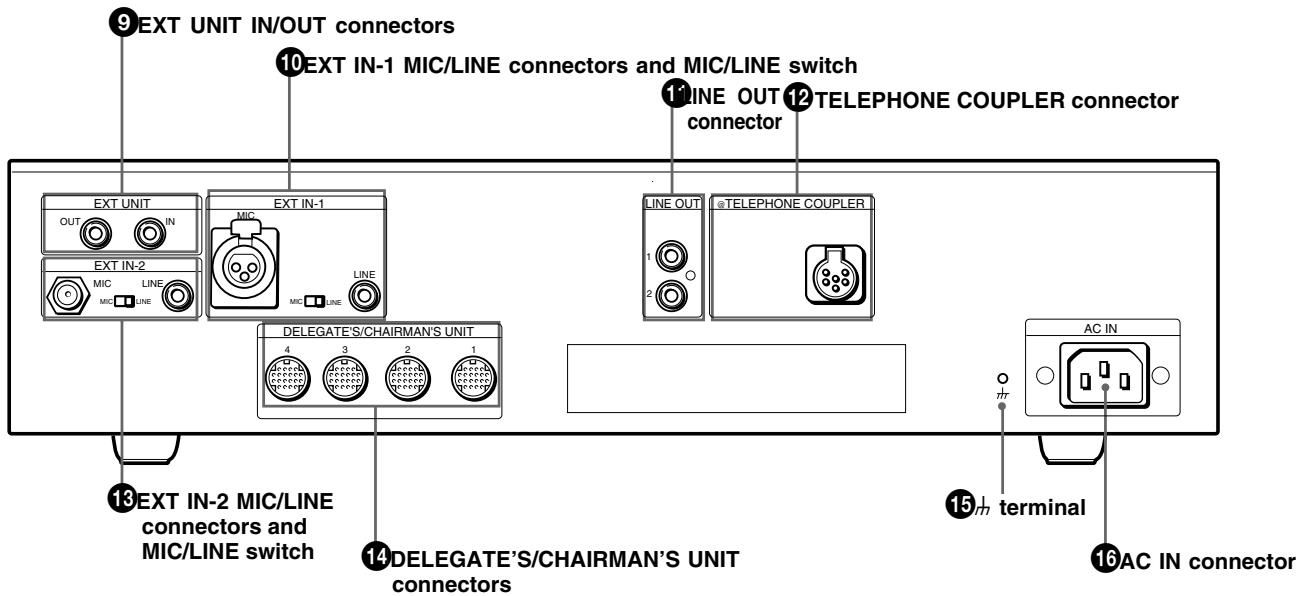
Rear panel
1 POWER switch
Setting the switch to ON (I) turns the power on.
The level meter will light.
Setting the switch to OFF (O) turns the power off.
2 PHONES connector (stereo phone jack)
Connect 8-ohm stereo or monaural headphones. Note that the output is monaural even when stereo headphones are connected.
3 MONITOR volume control
Adjusts the volume of the headphones.
Level meter
Indicates the level of the audio signal output to the LINE OUT 11 TELEPHONE COUPLER 12 and DELEGATE'S/CHAIRMAN'S UNIT 14 connectors.
Volume controls
Used to adjust the level of the following sound.
D/C UNIT SP volume control: Adjusts the level of the audio signal output to the chairman's unit/delegate's unit.
D/C UNIT MIC volume control: Adjusts the input level of the audio signal sent from the microphones on the chairman's units and delegate's units.
MIC/LINE 1 volume control: Adjusts the input level of the signal input through the EXT IN-1 MIC or LINE connector.
MIC/LINE 2 volume control: Adjusts the input level of the signal input through the EXT IN-2 MIC or LINE connector.
When the MIC/LINE switch of the EXT IN-1 or EXT IN-2 connector is set to LINE, the input level of the signal input through the LINE connector can be adjusted.
When the MIC/LINE switch of the EXT IN-1 or EXT IN-2 connector is set to MIC, the input level of the signal input through the MIC connector can be adjusted.
MIC (microphone mode) LIMIT ON/OFF button
Selects the microphone mode for the delegate's units. The microphone of the chairman's unit remains live regardless of the setting of this button.
MIC (microphone) LIMIT ON: Press this button to set the microphone to the speaker's number limitation mode. The button indicator lights. Setting this mode allows the microphones of up to five delegate's units to be live at the same time.
MIC (microphone) LIMIT OFF: Press the button again to set the microphone to the speaker's number unlimitation mode. The button indicator goes out. Setting this mode allows the microphones of all delegate's units to be live at the same time.
DIRECT ACCESS ON/OFF button
This button is effective only when the SXA-120 Expansion Board (not supplied) is installed and the SX-8300/SX-S100 Microphone Control Panel is connected to the control unit.
While the SX-8300 is not connected, this button indicator lights, even though it is not operative. The button indicator does not go out even if you press this button.
⑧ SEAT ASSIGN START/END button
This button is effective only when the SXA-120 Expansion Board (not supplied) is installed and the SX-8300/SX-S100 Microphone Control Panel is connected to the control unit for performing seat assignment.
While the SX-8300 Microphone Control Panel is not connected, the button indicator does not light even if you press the button.
For details of the functions and how to use the DIRECT ACCESS ON/OFF and SEAT ASSIGN START/END buttons, refer to the manuals supplied with the SXA-120 Expansion Board.
EXT UNIT IN/OUT (external unit input/output) connectors (phone jack)
Connect to the howling suppressor unit or filter unit (not supplied).
Notes
- Be sure to connect both the IN and OUT connectors. Connecting only one of the two connectors results in incorrect operation of the unit.
- When it is not necessary to use the howling suppressor or filter unit, disconnect cables from both connectors.
EXT IN-1 MIC/LINE (external 1 microphone/ line signal input) connectors and MIC/LINE switch
EXT IN-1 MIC/LINE connectors
Accept an external audio signal.
MIC connector (XLR type): Connect a rostrum or conference hall microphone.
Note
When you use a connecting cable with an XLR connector, pin No.1 and the case (metal part) of which are connected, noise may be picked up.
LINE connector (phono jack): Connect to external equipment such as audio equipment.
MIC/LINE switch
Selects the signal input to the EXT IN-1 connector.
MIC: Set the switch to this position when a microphone is connected.
LINE: Set the switch to this position when an item of audio equipment is connected.
LINE OUT (line output) connectors (phono jacks)
Supply the signal from the chairman's unit/ delegate's unit, that from the rostrum or conference hall microphone. There are two connectors. Use these connectors when recording the output to a tape recorder or when sending the line output to the monitor system transmitter by means of an infrared or induction-based system.
12 TELEPHONE COUPLER connector (6-pin multi-connector)
Connect to the SX-T100 telephone coupler (not supplied).
EXT IN-2 MIC/LINE (external 2 microphone/ line signal input) connectors and MIC/ LINE (microphone/line signal select) switch
EXT IN-2 MIC/LINE connectors
Input an external audio signal.
MIC connector (phone jack): Connect a rostrum or conference hall microphone.
LINE connector (phono jack): Connect to external equipment such as audio equipment.
MIC/LINE switch
Selects the signal input to the EXT IN-2 connector.
MIC: Set the switch to this position when a microphone is connected.
LINE: Set the switch to this position when an item of audio equipment is connected.
DELEGATE'S/CHAIRMAN'S UNIT connectors (20-pin multi-connectors)
Connect to the SX-C100A/SX-C150/SX-D100A/ SX-D150 Chairman's Unit/Delegate's Unit. The same signal is output from four connectors. Up to 15 SX-C100A/D100A units can be connected to each of the four connectors. Thus, up to 60 SXC100A/SX-C150/SX-D100A/SX-D150 units can be connected.
(13)(signal ground) terminal
Ground if necessary.
16AC IN (AC power input) connector
Connect the unit to an AC power source by means of the supplied AC power cord.
SX-C100A/C150/SX-D100A/D150 Chairman's Unit/Delegate's Unit
The following two combinations of the chairman's unit and delegate's unit are available for use with the system.
- SX-C100A/SX-D100A Chairman's Unit/Delegate's Unit
- SX-C150/SX-D150 Chairman's Unit/Delegate's Unit
This section explains the location and function of parts and controls of the chairman's unit and delegate's unit. The explanation applies to both combinations. Read the explanation corresponding to the numbered parts and controls in the illustration.
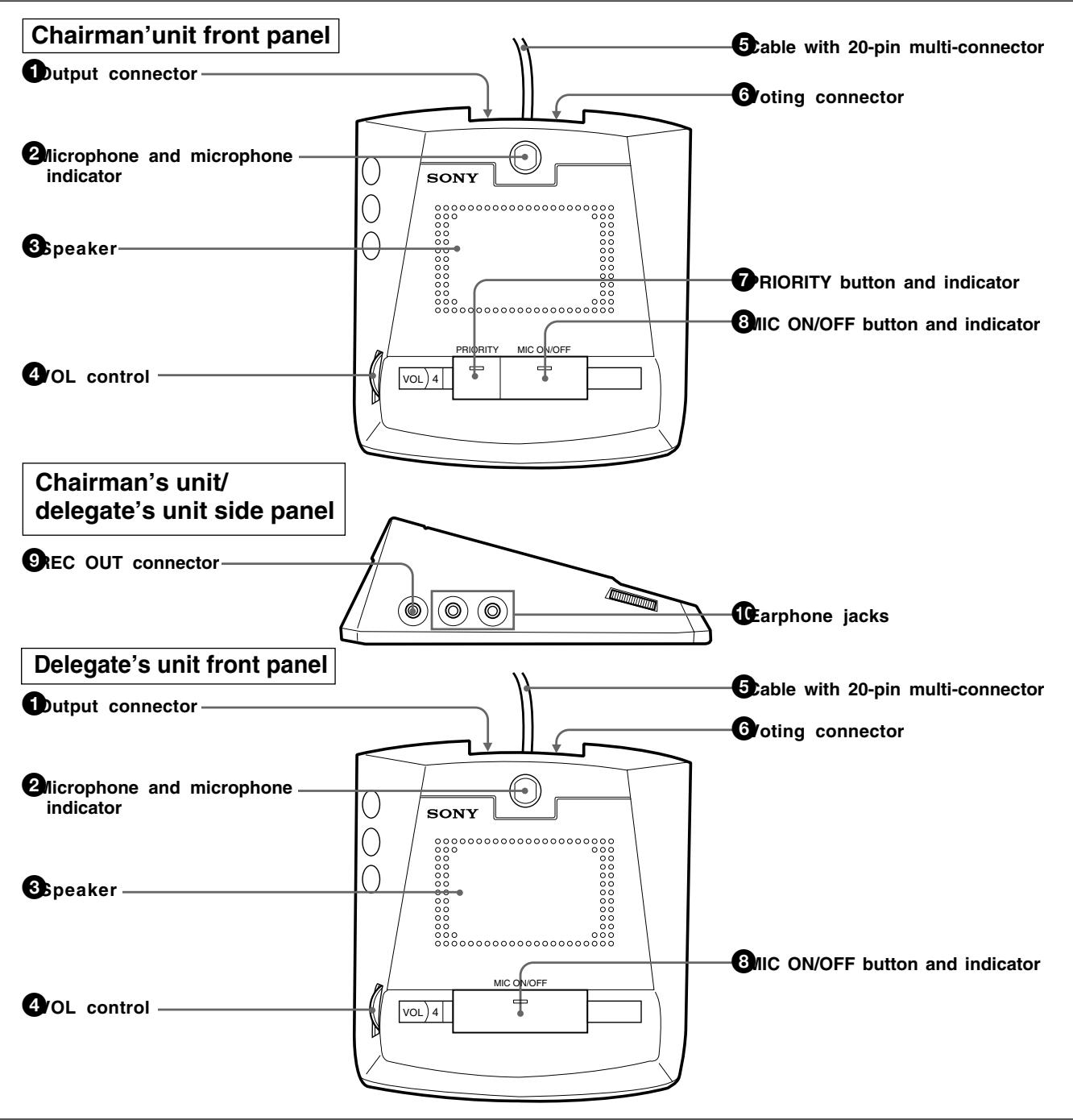
SX-C100A/SX-D100A Chairman's Unit/Delegate's Unit
SX-C150/SX-D150 Chairman's Unit/Delegate's Unit
Chairman's unit top
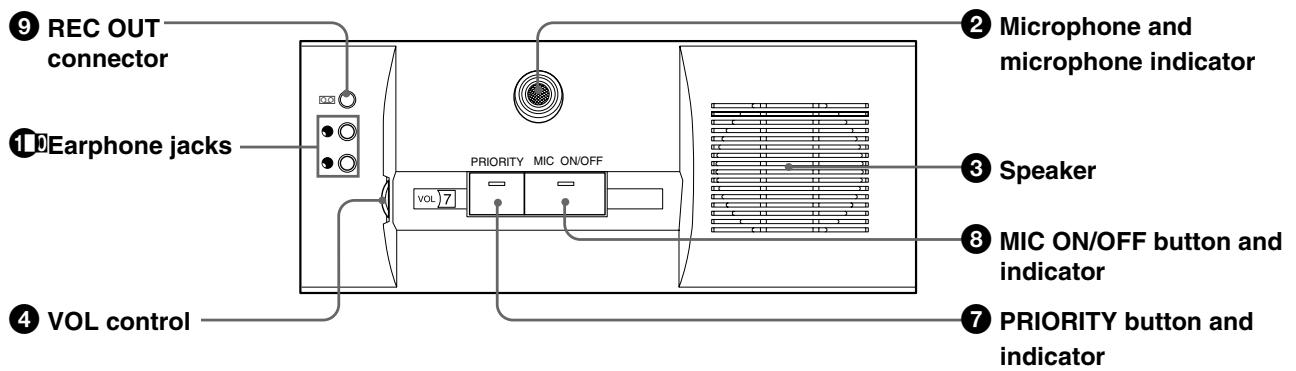
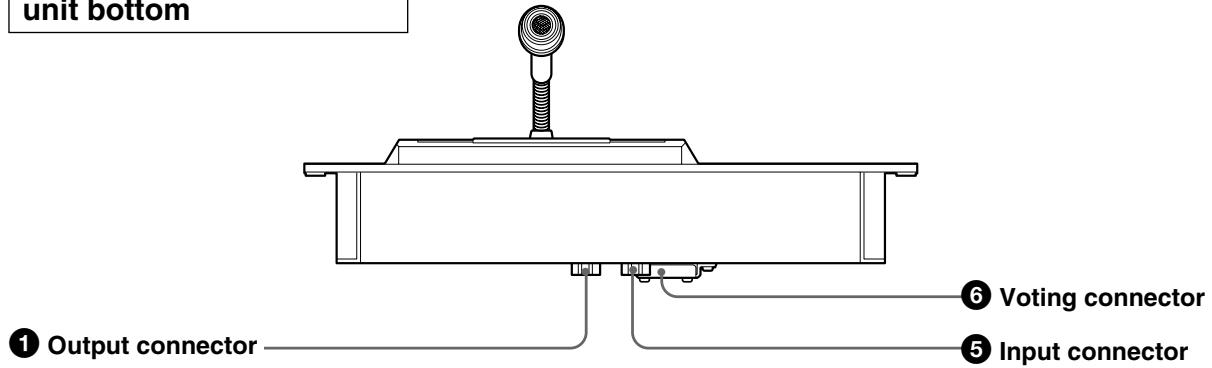
Chairman's unit/delegate's unit bottom
Delegate's unit top
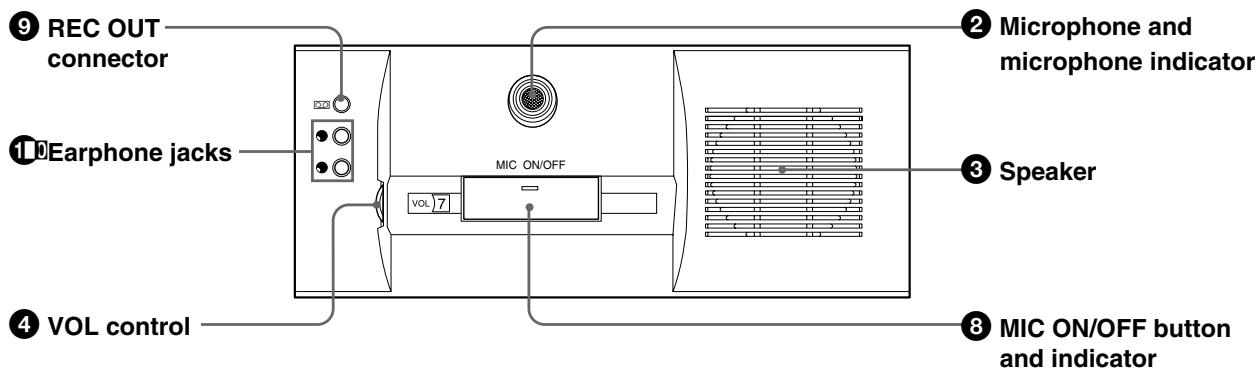
The explanations given here apply to both units, unless noted otherwise, with the exception of PRIORITY button ⑦
Output connector
For SX-C100A/SX-D100A (20-pin multi-connector)
Connect the cable with a 20-pin multi-connector of the chairman's unit/delegate's unit placed opposite the SX-M100 Control Unit and the next chairman's unit/delegate's unit.
For SX-C150/SX-D150 (D-sub 15-pin)
Connect to the input connector on the next chairman's unit and delegate's unit.
Microphone and microphone indicator
The microphone can be rotated freely. The microphone operation depends on the setting of the MIC ON/OFF button 8
For details, see the explanation of the MIC ON/OFF button 8
Speaker
The sound is heard through this speaker when the microphone is not being used and when an earphone is not plugged into the earphone jack. The speaker's volume is adjusted from the SX-M100 Control Unit. To prevent howling, nothing is output from the speaker when the microphone of the chairman's/delegate's unit is enabled. Also at the same time, the speaker volume of the units on either sides of the unit is automatically reduced.
VOL (volume) control
Adjusts the volume of the earphone. Even if the VOLUME control is turned fully counterclockwise, the earphone volume cannot be turned off. (The speaker volume is not affected by this control.)
Cable with 20-pin multi-connector (for the SX-D100A/SX-C100A only)
Connect to the DELEGATE'S/CHAIRMAN'S UNIT connector of the SX-M100 Control Unit, SX-E120 Expansion Board (not supplied) or the output connector of another chairman's unit/ delegate's unit.
Input connector (D-sub 15-pin) (for SX-C150/SX-D150 only)
Connect to the DELEGATE'S/CHAIRMAN'S UNIT connector of the SX-M100 Control Unit, SX-E120 Expansion Board (not supplied) or the output connector of another chairman's unit/ delegate's unit.
Voting connector
Connect to the SX-CV10/SX-DV10 voting unit (not supplied).
For details, contact your Sony dealer.
PRIORITY button and indicator (for the SX-C100A/SX-C150 only)
Press this button to disconnect the microphones of the delegate's units and enable the use of only the microphone of the chairman's unit.
Holding down this button turns on the microphone of the chairman's unit.
MIC ON/OFF button and indicator
SX-C100A/SX-C150: Pressing this button turns the microphone on. The MIC ON/OFF button indicator and microphone indicator ②light. Pressing this button again turns the microphone off. The indicators go out.
SX-D100A/SX-D150: When the MIC LIMIT ON/OFF button on the control unit is set to OFF (the MIC LIMIT ON/OFF button indicator does not light), pressing this button turns the microphone on. The MIC ON/OFF button indicator and microphone indicator ②light. In this mode, since the number of speakers is not limited, the microphones of all the delegate's units are enabled.
When the MIC LIMIT ON/OFF button on the control unit is set to ON (the MIC LIMIT ON/OFF button indicator is lit), the number of speakers is limited. Thus, when the MIC ON/OFF buttons of more than six delegate's units are pressed at the same time, the indicator of the sixth delegate's unit blinks (for about 3 seconds) to tell the user that the microphone cannot be enabled since the number of units whose MIC ON/OFF button is pressed exceeds six.
When the MIC ON/OFF button of the delegate's unit is pressed under the condition where the PRIORITY button of the chairman's unit is held down, the MIC ON/OFF button indicator and microphone indicator blink for about 3 seconds to tell the user that the microphone cannot be enabled.
REC OUT (recording output) connector (minijack)
Connect to the input connector of the tape recorder to record the monitor sound.
Note
Use a connecting cable with a terminating resistor (RK-G64 and so on) to connect the unit to the microphone input connector of a tape recorder. Use a connecting cable without a terminating register (RK-G69 and so on) to connect the unit to the line input connector of a tape recorder.
Earphone jacks (minijack)
Connect an earphone to monitor the signal from the interpreter's unit or the original signal.
SX-T100 Telephone Coupler
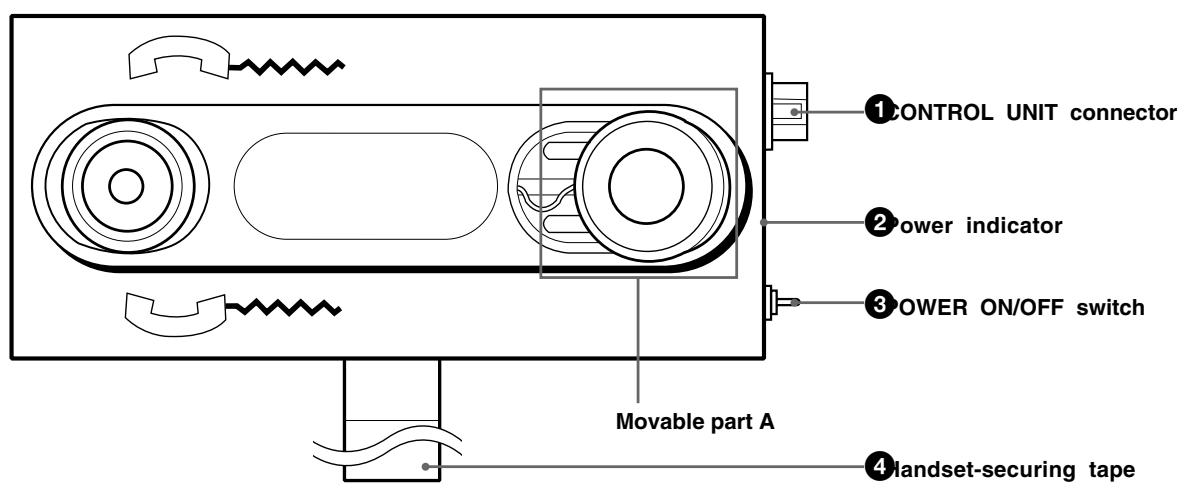
SX-T100 Telephone Coupler
CONTROL UNIT connector (6-pin multi-connector)
Connect to the TELEPHONE COUPLER connector of the SX-M100 Control Unit, using the connecting cord supplied with the SX-T100.
Power indicator
This indicator lights when the telephone coupler power is turned on.
POWER ON/OFF switch
Turns the telephone coupler power on or off.
Note
When the POWER ON/OFF switch is set to ON, howling or noise may arise because the microphone and the speaker are enabled. When the telephone coupler is not used, set the POWER ON/ OFF switch to OFF.
4 Handset-securing tape
After being connected to other party telephone, place your handset on the telephone coupler and secure it with the handset-securing tape. Adjust the movable part A in the above illustration, to fit the handset being used.
Note
If the handset is not secured firmly, communication may not be satisfactory.
Precautions
Safety precautions
Power supply
- Operate the unit only with a power source as specified in "Specifications" section.
- Do not drop or place heavy objects on the power cord. If the power cord is damaged, turn off the power immediately. It is dangerous to use the unit with a damaged power cord.
- Disconnect the power cord from the AC outlet by grasping the plug, not by pulling the cord.
Keep foreign objects out of the cabinet
Dropping flammable or metal objects into the cabinet, or spilling liquids onto the cabinet can lead to accidents.
In case of malfunctions
If you notice any unusual sound, smell or smoke, turn off the power immediately, disconnect the power supply and contact your Sony dealer.
Cleaning
Clean the cabinet and panels by wiping with a soft, dry cloth. For severe stains, moisten the cloth with a small amount of neutral solvent, and finish by wiping with a dry cloth. Do not use alcohol, benzine, thinner or volatile liquids, as these may discolor or damage the cabinet surface.
System Connection
This section explains how to connect the system.
Chairman's unit/delegate's unit and interpreter's unit
The SX-M100 Control Unit is provided with four DELEGATE'S/CHAIRMAN'S UNIT connectors. Up to 15 chairman's/delegate's units can be connected to each of the DELEGATE'S/CHAIRMAN'S UNIT connectors in serial connection. The distance between the control unit and the last chairman's/delegate's unit should not exceed 60 meters (196.8 feet).
Notes
- Be sure to turn off the power of any units before attempting connection or disconnection.
- The desktop type SX-C100A/D100A and the desk-mounted SX-C150/D150 are used with this system. It is not recommended to mix both combinations.
- When the SX-C100A/D100A is used, the SX-C700A/C750/D700A/D750 Chairman's Unit/Delegate's Unit, designed for the simultaneous interpretation conference system, can be connected to configure this conference system. However, after the system power is turned on, the microphone indicator and MIC ON/OFF buttons of the chairman's unit and delegate's unit continue to blink for about 3 seconds to inform that the SX-C700A/D700A units for simultaneous interpretation conference system have been connected to the conference system.
- If you turn on the system power before connecting the chairman's unit/delegate's unit, the microphone indicators and MIC ON/OFF buttons continue to blink and these units cannot be controlled by the control unit. In such a case, turn the power off, then back on again.
- When using the DELEGATE'S/CHAIRMAN'S UNIT connectors of the SX-M100 Control Unit, attach the dust caps removed from the 20-pin multi-connectors on the control unit to the 20-pin multi-connectors on the last unit connected. If the 20-pin multi-connector has no dust cap, keep it away from metal tools, such as screwdrivers to prevent the connector being inadvertently shorted.
The figure below shows an connection example.
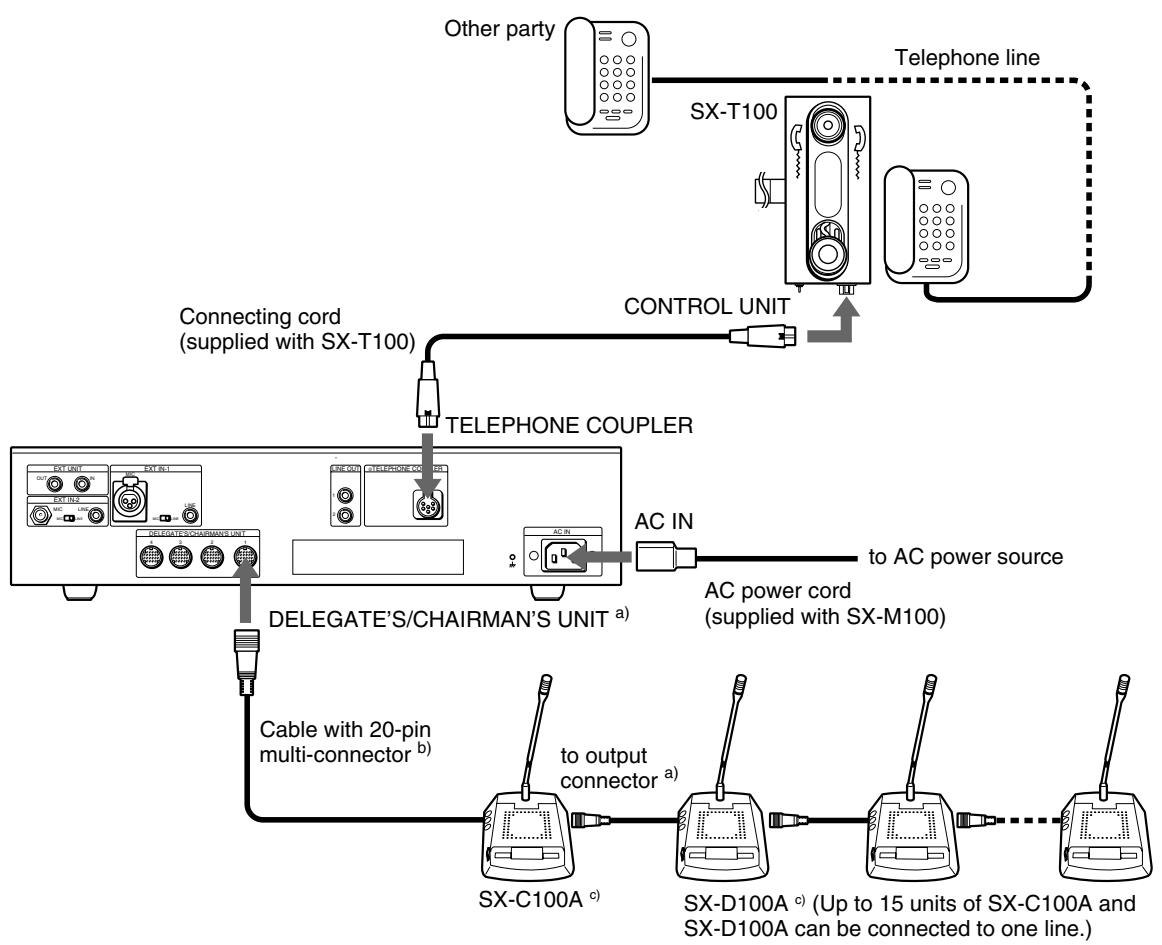
a) For details of connecting cables, see "How to connect cables" shown below.
b) You can extend the distance between units by using the RK-1710/1713 connecting cable (not supplied).
c) The desk-mounted SX-C150/SX-D150 can also be used in this system. Up to 15 desk-mounted SX-C150 and SX-D150 units can be connected to one line.
The specially designed cables are used to connect these units to the system. For details, contact your Sony dealer.
System connection example
How to connect cables of the SX-C100A/SX-D100A
The figure below shows how to connect and disconnect the 20-pin multi- connectors of the chairman's/delegate's unit and RK-1710/1713 connecting cables.
When connecting
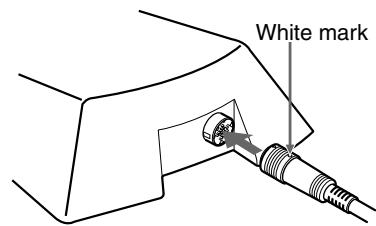
With the white mark on the 20-pin multi-connector facing up, push the connector home until it clicks.
When disconnecting
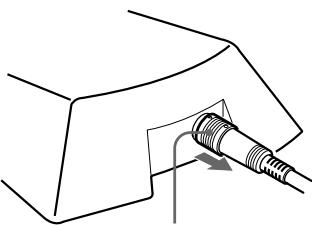
Grasp the knurled part of the connector and pull it towards you.
When connecting
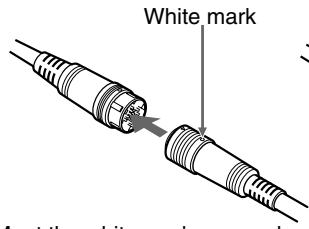
Meet the white marks on each connector and push the connectors each other until they click.
When disconnecting
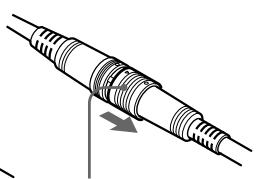
Grasp the knurled part of the connector and pull it towards you.
Turning On the Power of the System
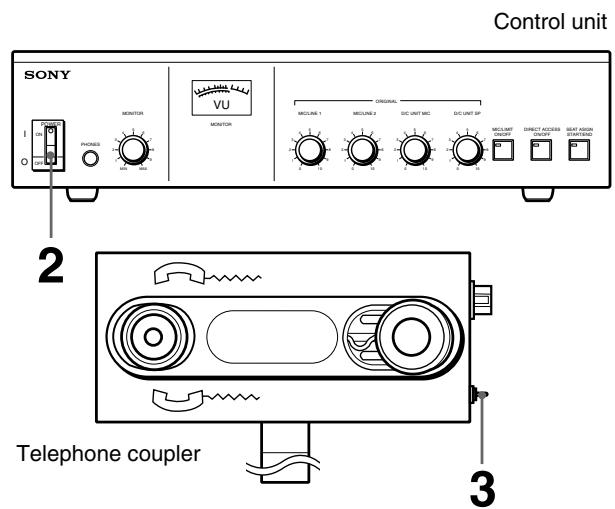
Turning on the power of the system
1 Turn on the power of the units connected to the EXT IN-1/2 connectors of the control unit.
2 Set the POWER switch of the control unit to ON.
3 When necessary, set the POWER switch of the telephone coupler to ON.
Preparing the Control Unit
Adjusting the audio level
Adjust the audio signal output to the chairman's/delegate's unit and input from the external equipment connected to EXT IN-1/2 before the conference.
Adjusting the output level of the audio signal to the chairman's unit/ delegate's unit
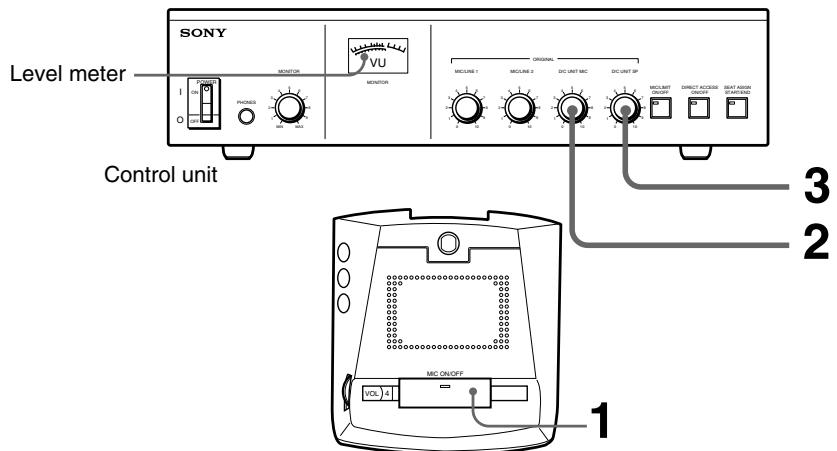
Chairman's unit/delegate's unit
Output level adjustment of the audio signal to the chairman's unit/delegate's unit
1 Select several chairman's units/delegate's units placed in the hall and set their MIC ON/OFF buttons to turn on their indicators.
2 Adjust the speaker volume on the chairman's units/delegate's units so that the level meter indicates around 0 VU using the D/C UNIT MIC volume control on the control unit, while an assistant in the conference hall is speaking into the microphone.
3 If howling occurs, rotate the D/C UNIT SP volume control counterclockwise to reduce the volume until the howling stops.
If howling does not stop even if you rotate the D/C UNIT SP volume control counterclockwise, it is recommended to use the howling suppressor or filter unit (not supplied).
Note
The person speaking into the microphone should bring his/her mouth close to the microphone.
Adjusting the input level of the audio signal from equipment connected to EXT IN-1/2 connectors
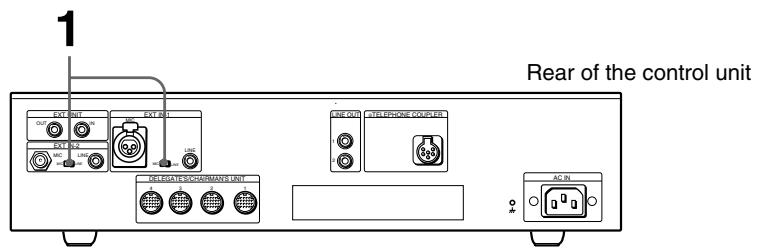
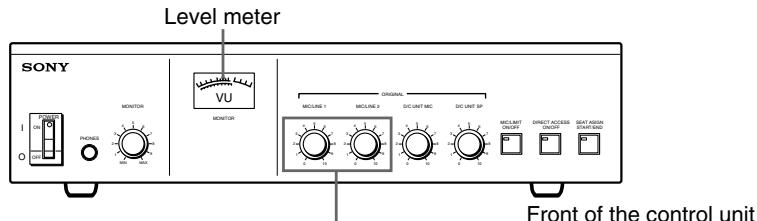
2
Input level adjustment of the audio signal from external equipment
- To adjust the output of the conference microphone, set the MIC/LINE switch of the EXT IN connector, to which the conference microphone to be adjusted is connected, to MIC.
- To adjust the output of external equipment, set the MIC/LINE switch of the EXT IN connector, to which the external equipment to be adjusted is connected, to LINE.
2 Adjust either MIC/LINE 1 or MIC/LINE 2, corresponding to the equipment to be adjusted, so that the level meter pointer indicates about 0VU .
Note
In this case, do not rotate the MASTER control because it has already been adjusted as described in "Adjusting the output level of the audio signal to the chairman's unit/delegate's unit" (previous page).
To select the microphone mode of the chairman's unit/delegate's units
Select the microphone mode (whether the number of speakers is limited) according to the conference type.
To limit the number of speakers to five: Press the MIC LIMIT ON/OFF button such that the button indicator lights.
Note
When the power of the control unit is turned off, the MIC LIMIT ON/OFF button is automatically reset to OFF even if it has been set to ON.
To set the mode to limit the number of speakers to five after the power of the control unit is turned on again, press the MIC LIMIT ON/OFF button such that the button indicator lights.
To allow all speakers to participate freely: Press the MIC LIMIT ON/OFF button such that the button indicator goes out.
Operations Performed by the Chairman and Delegates
Operations common to both the chairman and delegates
The chairman and delegates can both talk and listen by using their individual unit. The operations are the same.
To speak
Press the MIC ON/OFF button of the unit.
The button indicator and the microphone indicator light. The microphone is enabled.
When the MIC ON/OFF button indicator and microphone indicator blink (delegate's unit)
The microphone mode is set such that only five person can speak at any one time. Currently, the microphones of five units are already turned on. In this case, the indicators blink for about 3 seconds, then go out.
The MIC ON/OFF button indicator and microphone indicator blink for about 3 seconds, then go out, when the PRIORITY button of the chairman's unit is held down.
Note
When a delegate's microphone is enabled, the volume level of his or her earphone is automatically reduced. When a delegate is listening through the speaker, the speaker is turned off and the volume levels of the speakers of the units on both sides of the unit are also automatically reduced while the microphone is enabled.
Upon finishing speaking
Upon finishing speaking, press the MIC ON/OFF button again.
The MIC ON/OFF button indicator and the microphone indicator go out and the microphone is disabled.
To listen the sound through the microphone
The sound can be monitored through the earphone. Connecting an earphone to the earphone jack mutes the speaker of the unit.
Set the CH selector to the channel corresponding to the desired target language.
Note
The speaker volume is controlled from the control unit. It cannot be adjusted from each chairman's unit/delegate's unit.
Chairman's operations
The chairman can interrupt a delegate and take control of the conference at any time.
To take control of the conference
Press and hold down the PRIORITY button. While the PRIORITY button is held down, the PRIORITY button and the microphone indicator are lit and the microphone of the chairman's unit is enabled. On the other hand, the microphones of the delegates' units are disabled.
Taking Part in a Conference via a Telephone
A person can take part in a conference from a remote location by using the SX-T100 Telephone Coupler.
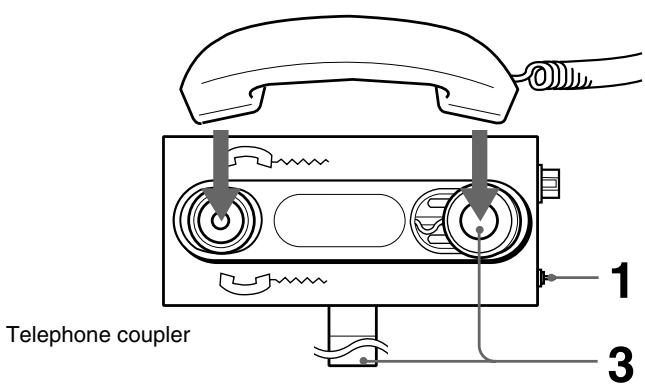
Taking part in a conference via the telephone
1 Set the POWER ON/OFF switch of the telephone coupler to ON.
2 Set up a telephone connection with the party who will take part in the conference.
3 Place the handset on the telephone coupler after the other party answers the phone. The handset catch part is movable. Adjust the coupler to the handset size and secure the handset with the handset-securing tape. The called person can now take part in the conference.
Notes
- Orient the handset correctly.
- If the handset is not adjusted to the coupler, the satisfactory communication may not be possible.
Should a problem arise in your system, check the system while referring to the instructions in the table below. If the system continues to malfunction after applying the following checks and remedies, contact your nearest Sony dealer. The system indicates the problem by lighting the microphone indicator and MIC ON/OFF button of chairman's/delegate's units.
| Lighting of the microphone indicator and MIC ON/OFF button of the chairman's unit/ delegate's unit | Possible cause | Remedies |
| The indicator and button blink for a few seconds when the POWER switch of the control unit is set to ON. | The chairman's unit/ delegate's units for a conference system, SX-C100A/D100A/SX-C150/D150, and those for a simultaneous interpretation conference system, SX-C700A/D700A/SX-C750/D750, have been connected. | The SX-C700A/D700A/SX-C750/D750 can be used.However, same sound is output from channel 1 to channel 6. |
| The indicator and button of the chairman's/ delegate's units continue to blink, after the power switch of the control unit is set to ON. | The units whose indicator and button are blinking cannot be controlled by the control unit and cannot be used in this system. | ·When the indicator and button of units subsequent to the 16th unit of the units connected to one DELEGATE'S/CHAIRMAN'S connector of the control unit blink: - More than 16 units cannot be connected to one DELEGATE'S/CHAIRMAN'S connector in series. Disconnect the 16th unit and subsequent units. ·Even though the number of connected units is less than 16, the indicators of some of the connected units blink: - The first unit whose indicator and button are blinking may be defective, or the connecting cable may be broken. Disconnect the first unit of those whose indicator and button are blinking. When the indicator and button of the subsequent units stop blinking and go out, it indicates that the disconnected unit was defective. Remove it from the system or replace it with a functioning unit. When the indicator and button continue to blink even after removing the first unit, the connecting cable is probably broken. Replace the connecting cable linking the first unit whose indicator and button are blinking and the unit immediately prior to that unit. ·Even though the number of connected units is less than 16, the indicator and button of some of the connected units blink: - The unit whose indicator and button blink is defective. Disconnect it from the system or replace it with a functioning unit. |
| After the unit has been operated for a while after the power is turned on, the unit's indicator and button start blinking and do not go out, even after a few seconds. | A communication error has occurred. | Briefly turn the power off, then back on again. If the unit subsequently operates normally, communication is resumed. If this problem occurs frequently, contact your nearest Sony dealer. If the indicator and button continue to blink just after the power is turned on again, a problem described above may have occurred. Proceed as described above. |
| The volume of the microphone cannot be adjusted by using the VOL control. | The microphone may be disconnected. | Insert the microphone plug into the microphone jack surely. |
| The indicator and button blink and the microphone is disabled even if the MIC ON/OFF button is pressed. | ·The mode is that where the number of speakers is limited. ·The PRIORITY button is held down by the chairman. | ·Wait until the speaker finishes speaking. Press the MIC ON/OFF button again. ·Wait until the chairman releases the PRIORITY button. |
SX-M100 Control Unit
Input/output connectors
DELEGATE'S /CHAIRMAN'S
UNIT (20-pin multi-connector) × 4
TELEPHONE COUPLER (6-pin multi connector) × 1
Input EXT IN-1/EXT IN-2
MIC (XLR 3-pin connector) × 1 Balanced type, input level 0.77 mV (-60dBs), for microphone having low impedance
MIC (phone jack) × 1 Unbalanced type, input level 0.77mV (-60dBs), for microphone having low impedance LINE (phono jack) × 2 Balanced type, input level 250 mV (-10dBs), input impedance 10 kilohms
AC IN (3-pin) × 1 for AC power input
Output LINE OUT (phono jack) × 2 Output level 250mV (-10dBs), load impedance 10 kilohms or more PHONES (stereo phone jack) × 1
Power requirements
USA model:120 V, 60Hz
European model: 230V 50 / 60Hz
Power consumption
USA model: 1.06A
European model: 90W
Dimensions 424× 98× 378mm (w/h/d) (16~^3 / 4× 3~^7 / 8× 15 inches)
Mass 6.2kg (13 lb 10 oz)
Accessories supplied
AC power cord (1)
Operating instructions (1)
SX-C100A/SX-C150 Chairman's Unit SX-D100A/SX-D150 Delegate's Unit
Output Earphone output (minijack) × 2 REC OUT (minijack) × 1 Output level 250mV (-10d load impedance 47 kilohms
Power requirements
24 V (supplied with the 20-pin multi-connector)
Power consumption
45 mA
Dimensions
SX-C100A/SX-D100A:
134× 401× 152mm (w / h / d)
(6^3 / 4 × 15^7 / 8 × 6 inches)
SX-C150/SX-D150:
245× 372.5^a)× 100mm(w / h / d)
(934× 1434× 4 inches)
a) This does not include the part under the desk.
The part under the desk is 40mm
Mass SX-C100A/SX-D100A:
0.7kg (1 lb 9 oz)
SX-C150/SX-D150:
0.65kg (1 lb 7 oz)
SX-T100 Telephone Coupler
Input/output CONTROL UNIT (6-pin multi connector) × 1 250mV (-10 dBs)
Power consumption
18 mA
Dimensions 90× 74.5× 213mm (w/h/d)
(3^5 / 8 × 3 × 8^1 / 2 inches)
Mass 0.6kg (1 lb 5 oz)
Accessory supplied
Connecting cord (1)
Design and specifications are subject to change without notice.
- Owner's Record
- WARNING
- To prevent fire or shock hazard, do not expose the unit to rain or moisture.
- For the customers in Canada
- VORSICHT
- Features
- SXA-120 Expansion Board
- System Configuration
- SX-M100 Control Unit
- Front panel
- Rear panel
- POWER switch
- PHONES connector (stereo phone jack)
- MONITOR volume control
- Level meter
- Volume controls
- MIC (microphone mode) LIMIT ON/OFF button
- DIRECT ACCESS ON/OFF button
- ⑧ SEAT ASSIGN START/END button
- EXT UNIT IN/OUT (external unit input/output) connectors (phone jack)
- Notes
- EXT IN-1 MIC/LINE connectors
- Note
- MIC/LINE switch
- EXT IN-2 MIC/LINE connectors
- SX-C100A/C150/SX-D100A/D150 Chairman's Unit/Delegate's Unit
- SX-C150/SX-D150 Chairman's Unit/Delegate's Unit
- Chairman's unit top
- Chairman's unit/delegate's unit bottom
- Delegate's unit top
- Output connector
- For SX-C100A/SX-D100A (20-pin multi-connector)
- For SX-C150/SX-D150 (D-sub 15-pin)
- Microphone and microphone indicator
- Speaker
- VOL (volume) control
- Cable with 20-pin multi-connector (for the SX-D100A/SX-C100A only)
- Input connector (D-sub 15-pin) (for SX-C150/SX-D150 only)
- Voting connector
- PRIORITY button and indicator (for the SX-C100A/SX-C150 only)
- MIC ON/OFF button and indicator
- REC OUT (recording output) connector (minijack)
- Earphone jacks (minijack)
- SX-T100 Telephone Coupler
- CONTROL UNIT connector (6-pin multi-connector)
- Power indicator
- POWER ON/OFF switch
- Handset-securing tape
- Precautions
- Safety precautions
- Power supply
- Keep foreign objects out of the cabinet
- In case of malfunctions
- Cleaning
- System Connection
- Chairman's unit/delegate's unit and interpreter's unit
- How to connect cables of the SX-C100A/SX-D100A
- Turning On the Power of the System
- Preparing the Control Unit
- Adjusting the audio level
- Adjusting the output level of the audio signal to the chairman's unit/ delegate's unit
- Adjusting the input level of the audio signal from equipment connected to EXT IN-1/2 connectors
- To select the microphone mode of the chairman's unit/delegate's units
- Operations Performed by the Chairman and Delegates
- Operations common to both the chairman and delegates
- To speak
- When the MIC ON/OFF button indicator and microphone indicator blink (delegate's unit)
- Upon finishing speaking
- To listen the sound through the microphone
- Chairman's operations
- To take control of the conference
- Taking Part in a Conference via a Telephone
- SX-C100A/SX-C150 Chairman's Unit SX-D100A/SX-D150 Delegate's Unit
Brand : SONY
Model : SX-T100
Category : Conference system