
PN-K322BH - Screen SHARP - Free user manual and instructions
Find the device manual for free PN-K322BH SHARP in PDF.


| Product Type | 32-inch LCD Display |
| Model | PN-K322BH |
| Brand | Sharp |
| Screen Size | 32 inches (81.28 cm diagonal) |
| Resolution | Full HD 1920 x 1080 pixels |
| Brightness | 350 cd/m² (typical) |
| Contrast Ratio | 3000:1 (typical) |
| Viewing Angle | 178° horizontal and vertical |
| Response Time | 8 ms (GTG) |
| Input Connectors | HDMI, VGA, USB, Audio In |
| Power Supply | AC 100-240V, 50/60 Hz |
| Power Consumption | 65 W (typical), <0.5 W standby |
| Dimensions (W x H x D) | 727.0 x 429.0 x 52.0 mm (without stand) |
| Weight | 10.0 kg (without stand) |
| VESA Mount | 200 x 200 mm |
| Operating Temperature | 5°C to 35°C |
| Storage Temperature | -20°C to 60°C |
| Cleaning Instructions | Use a soft, dry cloth; avoid harsh chemicals |
| Safety Warnings | Do not open the unit; risk of electric shock |
| Spare Parts & Repairability | Contact Sharp authorized service center |
| General Information | Professional display for signage or monitoring |
Frequently Asked Questions - PN-K322BH SHARP
User questions about PN-K322BH SHARP
0 question about this device. Answer the ones you know or ask your own.
Ask a new question about this device
Download the instructions for your Screen in PDF format for free! Find your manual PN-K322BH - SHARP and take your electronic device back in hand. On this page are published all the documents necessary for the use of your device. PN-K322BH by SHARP.
USER MANUAL PN-K322BH SHARP
Starting and Exiting the Software ....4
Pen Software modes and how to start the modes .....4
Exiting the software 5
Layout of Basic Screen 6
Toolbar 7
Saving and Opening a File ....10
Saving data 10
Opening the whiteboard file 11
Edit Operations ....12
Changing the sheet to edit (whiteboard mode) .....12
Drawing with a Pen 14
Erasing a drawn line 15
Drawing shapes ....16
Drawing straight lines or arrows 16
Drawing a shape with the figure pen ....17
Inputting text 17
Importing and pasting an image ....18
Editing an object 20
Undo/redo operation 22
Deleting an object 22
Enlarging the view of the screen 23
Using the background image 24
Displaying the Pen Software in a split-screen .....25
Launching an external application ....26
Searching the Internet 27
Importing a Document as an Image
(Pen Software Printer Driver) 28
Acquiring an Image From a Multifunction Machine ...29
Using the Network Scanner Tool to acquire an image...29
Acquiring an image from a TWAIN device ....30
Linking to Microsoft PowerPoint 31
Printing 32
Using a secondary display ....33
Customizing the Settings ....34
Installing/Uninstalling the Software ....37
Installing the Pen Software ....37
Installing the Network Scanner Tool ....38
Introduction
This software is intended to facilitate effective meetings and presentations.
- Letters can be created directly so that the computer screen can be used as a whiteboard.
- Any document can be converted into an image and imported for display.
- An image can be acquired from a multifunction machine for display.
- The contents being edited can be printed out or saved.
| Applicable models(as of August 2013) | PN-L series (PN-L601B/PN-L602B/PN-L702B/PN-L802B) / LL-S series (LL-S201A) / PN-K series (PN-K322B/PN-K322BH) / PN-ZC01 |
Available models differ according to region.
Important Information
- This software has been shipped after strict quality control and product inspection. If, however, you find any failure, contact your product dealer.
- Please understand that SHARP CORPORATION bears no responsibility for errors made during use by the customer or a third party, nor for any other malfunctions or damage to this software arising during use, except where indemnity liability is recognized under law.
- Transcribing or duplicating part or all of this manual and/or this software without permission from our company is not permitted.
- As a part of our policy of continuous improvement, SHARP reserves the right to make design and specification changes for product improvement without prior notice.
- This software uses the ImageKit7 technology. ImageKit7 Copyright © 2005 Newtone Corp.
- The screens and procedures are examples. The contents or details may vary depending on the screen configuration and OS version, etc. Windows 7 is used as an example in this manual.
- This manual does not contain basic operating instructions for Windows.
- The paths used in this manual assume the case where this software is installed in the default folder. The actual path may vary depending on the folder specified during installation.
Trademarks
- Microsoft, Windows, Windows Vista, Internet Explorer and PowerPoint are either registered trademarks or trademarks of Microsoft Corporation in the United States and/or other countries.
- Names of products and other proper nouns are the registered trademarks or trademarks of their respective copyright holders.
Caution
• For a landscape installation. - Dual touch cannot be used with the PN-L601B. - Dual touch cannot be used in Windows XP/Vista. - If SHARP Pen Software for the PN-L series is launched with the touch panel driver in single-touch mode, a warning message will appear. - On the LL-S series and PN-K series, the touch pen does not have a function button, and the shape of the pen is different from the shape shown in this manual. • In Windows 8, the action of starting to draw from the edge of the screen is sometimes detected as a swipe.
Starting and Exiting the Software
Pen Software modes and how to start the modes
TIPS
- The LL-S and PN-K series do not support the use of a secondary display. To use a secondary display with the PN-L series, please refer to page 33 of this manual.
- Whiteboard mode and overlay mode cannot be started at the same time. To change modes, touch the "Select Whiteboard / Overlay Mode" button (☐ - ☐). • To prevent the Windows taskbar from moving, lock it.
- Set the screen resolution to 1920 x 1080 (3840 x 2160 for PN-K series) and the screen color to 32 bits.
■ Whiteboard mode
You can use the screen as a whiteboard.
The work area is displayed for each "sheet". By changing the sheet, you can edit data on another screen.

Starting whiteboard mode
Follow the steps below to start the software.
- On the desktop, touch the "Pen Software" shortcut icon ( ) twice quickly (or double-click the icon).
- Click the "Start" button, and then select "All Programs" - "SHARP Pen Software" - "Pen Software".
- Touch a whiteboard file (a file saved in the SWS format) twice quickly (or double-click the file).
- In Windows 8, launching is also possible from the Start screen and the Apps screen.
■ Overlay mode
The board is shown as transparent.
The work area consists of a single screen.
Your drawing will appear on the transparent board placed over the screen, so that you can write comments directly on the items displayed on the screen. Note, however, that you cannot operate the screen shown behind the transparent board.

Starting overlay mode
Follow the steps below to start the software.
- On the desktop, touch the "Overlay mode Pen Software" shortcut icon ( ) twice quickly (or double-click the icon).
- Click the "Start" button, and then select "All Programs" - "SHARP Pen Software" - "Overlay mode Pen Software".
- In Windows 8, launching is also possible from the Start screen and the Apps screen.
Exiting the software
Touch the "Quit" button.
When there is no data which is being edited and is not saved
The software is exited.
When there is data which is being edited and is not saved
A confirmation dialog box appears.
When you touch "Save and exit", a dialog box appears to allow you to specify the destination to save the data. Confirm the saving format, specify the destination, and save the data. (Page 10)
When you touch "Exit without saving", the software is terminated without saving the data.
When there is unsaved content in both whiteboard mode and overlay mode, a confirmation dialog box will appear first for the mode that is currently displayed. After that, the mode automatically changes and a dialog box for the other mode appears.

Layout of Basic Screen
Screen example: Whiteboard mode

(1) Toolbar
Used to switch functions. (Page 7)
(2) SHEET LIST
This is displayed only in the whiteboard mode.
Touch this tab to display the list of sheets shown as thumbnail images. (Page 13)
(3) Move toolbar icon
This appears on the side opposite to the toolbar, and can be touched to move the toolbar to that side. (The icon and the toolbar will switch places.)
Only appears when the toolbar is set to "Docked".
(4) Board
Work area. You can write letters, draw lines, and paste images here.
The board can be displayed in two modes: whiteboard mode and overlay mode. The latter is transparent, showing the background.
TIPS
- The background color and grid used in the whiteboard mode can be changed. (Page 35)
(5) Sheet navigation buttons/Page No.
This is displayed only in the whiteboard mode.
Touch the sheet navigation button to change the displayed sheet. (Page 12)
The number shown at the center is the page No. of the current sheet.
Toolbar
■ Toolbar display method
The toolbar display method can be changed. (Page 36)
Docked
The toolbar is displayed on the left side or the right side of the screen. You can have the toolbar automatically disappear after a fixed time elapses after the touch pen is moved away from the toolbar. (Select "Hide automatically" in the settings screen.) When the toolbar is hidden, the show toolbar icon (← or ) appears. Touch the show toolbar icon to show the toolbar.
Floating
The toolbar can be moved to any position.

Title bar
To minimize the toolbar so that only the title bar appears, touch 📄.
To restore the toolbar to its normal size when minimized, touch
The toolbar can be changed to a horizontal orientation by touching 📄. Each time you touch 📄, the toolbar toggles between vertical and horizontal orientations.
To move the toolbar, drag the background.
Toolbar function buttons
The toolbar functions are shown as buttons. Touch a button to select that function.
The function buttons that appear on the toolbar vary depending on the mode.
Whiteboard mode / Overlay mode
| Button Function Page | ||
| Toolbar Help | The name of each function button appears next to the button. To make the name disappear, touch anywhere. | - |
| Open*1 | Open a whiteboard file. 11 | |
| Save Save the data being edited. 10 | ||
| Turn off Overlay mode*2 | Turn off overlay mode.By disabling the board function temporarily, you can operate something other than the software (files, other application software, etc.). | - |
| Background image*1 | Set the background (template) of the whiteboard. 24 | |
| Import images*1 | Paste an image file acquired from the Pen Software printer driver, a multifunction machine or TWAIN device onto the board. | 28 - 30 |
| Print Current Sheet Print the displayed sheet. 32 | ||
| Print All*1 | Print all sheets. 32 | |
| Delete Delete an object. 22 | ||
| Settings of Pen Software | Set this software according to the user's preference. | 34 |
| Pens 1 to 3 | Draw lines. | 14 |
| Eraser | Erase hand-drawn lines. | 15 |
| Undo | Cancel the immediately preceding operation. | 22 |
| Redo | Redo the immediately preceding canceled operation. | 22 |
| Select | Select an object. | 20 |
| Pan*1 | Enlarge the view of the whiteboard, change the display position, and change pages. | 12, 23 |
| Zoom In*2 | Enlarge part of the screen in overlay mode. | 24 |
| Pan window*1 | This shows a thumbnail image of the displayed sheet. Operate inside this window to enlarge the view of the board or move the display position. | 23 |
| Select Whiteboard / Overlay Mode | Switches between whiteboard mode and overlay mode. | 4 |
| Minimize | The software will be minimized in the task tray. | - |
| Quit | Exit this software. | 5 |
*1 Only appears in whiteboard mode. *2 Only appears in overlay mode.
Function buttons displayed with "Customize toolbar".
"Customize toolbar" (Page 36) can be used to change the function buttons that appear on the toolbar.
| Button Function Page | ||
| Web Search Enter a keyword | to search the Internet. | 27 |
| Save PDF/image Save the data as other than a Whiteboard file (SWS file). 10 | ||
| Save to the same file* Save the data to the same Whiteboard file (SWS file). | 10 | |
| Save as a new file* Save the data as a new Whiteboard file (SWS file). | 10 | |
| External Application Launch another software program while this software is running. | 26 | |
| Open as a new SWS file* Open a new Whiteboard file (SWS file). | 11 | |
| Add to the current sheet* Open a Whiteboard file (SWS file) as a newly added sheet. | 11 | |
| Split screen* Show Pen Software in a split-screen. 25 | ||
| Text box Enter text. 17 | ||
| Drawing Object | Enter a shape. | 16 |
| Figure pen | Automatically form a shape drawn by hand. | 17 |
| Enlarge Specified Area | Enlarge the view of only the specified area. | 23 |
| Insert Image | The “Insert an image file” or “Screen Capture” selection screen appears. | 18 - 19 |
| Insert an image file | Paste an image on a sheet. | 18 |
| Screen Capture | Capture the currently displayed image and paste it on a sheet. | 19 |
| Line/Arrow | Draw a line / arrow. | 16 |
* Only appears in whiteboard mode.
Saving and Opening a File
Saving data
Data can be saved in the following file formats:
| File format Description | |
| SWS(Whiteboard file) | Data on the whiteboard is saved in the SWS format. The saved data can be re-edited with this software. |
| PDF, BMP, JPEG, PNG | The working screen is saved as a screen shot. The data is converted into the different file format so that it cannot be re-edited with the software. |
In whiteboard mode
Data can be saved in SWS, PDF, BMP, JPEG, or PNG format.
All sheets will be saved. (A sheet without data will not be saved.)
When data is saved in BMP, JPEG, or PNG format, each sheet is saved in a separate file.
In the overlay mode
Data can be saved in PDF, BMP, JPEG, or PNG format.
- Touch the "Save" button.
- To save a whiteboard file, touch "Save as a new file" or "Save to the same file". To save in a different file format, touch "Save PDF/image".
- Specify the destination and touch "Save".
■ Automatic backup
This function automatically saves the whiteboard file at regular intervals. In the event that the Pen Software suddenly stops due to a power outage or other problem, the automatically saved file is restored the next time the Pen Software is started.
(The automatic backup cannot be used for the data in the overlay mode.)
You can change whether to enable/disable the automatic backup and the backup interval time. (Page 35)
!Caution
- The backup data is deleted when the Pen Software is exited normally.
Opening the whiteboard file
When whiteboard mode is started, a new whiteboard file opens. (If you start the software by directly touching a whiteboard file (SWS), the whiteboard file opens.)
To open a saved whiteboard file, touch the "Open" button and select the file.
When "Add to the current sheet" is touched, the current sheets are retained and the content of the selected file is added to the end of the sheets.
When "Open as a new SWS file" is touched, all current sheets are deleted and the selected file is loaded. If a new whiteboard file is opened while a whiteboard file is already open, a dialog box appears.

Edit Operations
Changing the sheet to edit (whiteboard mode)
In the whiteboard mode, each screen is displayed on a sheet.
To change the sheet, touch the sheet navigation button at the bottom of the screen. The number shown at the center is the page No. of the current sheet.

(1) Page No. of the current sheet (2) Sheet navigation button (Previous)
Touch this button to display the previous sheet. When the first sheet is displayed, this button is disabled.
(3) Sheet navigation button (Next)
Touch this button to display the next sheet. When the last sheet is displayed, this button is disabled.
When the last non-blank sheet is displayed, a new sheet is automatically added.
(4) Sheet advance area
With the sheet list closed, area (4) can be dragged left/right to move forward or backward through the sheets.
This operation can be prohibited. (Page 35)
■ Changing the sheet by dragging the screen
A sheet can be changed by dragging when the zoom (enlargement percentage) is 100%.
- Touch the "Pan" button.
- Drag horizontally with the touch pen.
- Drag to the right to show the previous sheet.
- Drag to the left to show the next sheet.
![graph LR A["△"] --> B["Right edge of sheet"] B --> C["△"] C --> D["O"] D --> E["S"] E --> F["SAMPLE"]](/content/2026/05/1022316/images/75018a1660bb236073e554414401b65e71c3b4dd2a0feef78f023627c87e2067.jpg)
TIPS
- Sheets can be changed by dual touch action. When using the PN-L series, set the touch mode setting of the touch panel driver to "Dual", and the input mode to "Standard" or "HandWrite".
![graph LR A["△ ○"] --> B["△ ○"] B --> C["S"] C --> D["SAMPLE"]](/content/2026/05/1022316/images/572075bba4ddef4a2be38ce24cd1bc0c685b49dfcbb78f9999a633dbf4e39bee.jpg)
Drag with two fingers
• Dual touch can be disabled (Page 35).
■ Changing the sheet by referring to thumbnail images / Editing the sheet
When "SHEET LIST" is touched in the bottom left corner of the screen, thumbnails of each sheet appear. A thumbnail can be touched to change to that sheet. The sheets can be edited, including adding, deleting, copying, and moving sheets.
The method of displaying thumbnails when "SHEET LIST" is touched can be changed. (Sheet view: Page 35)
Tiled View
- Touch "SHEET LIST" in the lower left corner of the screen.
The list of the thumbnail images of the sheets is displayed.
- Quickly touch the thumbnail image of the sheet that you want to display twice (double-click).
"SHEET LIST" closes and the selected sheet appears.
![graph TD A["Address"] --> B["Copy"] B --> C["Delete"] C --> D["Close"] style A fill:#f9f,stroke:#333 style B fill:#ccf,stroke:#333 style C fill:#cfc,stroke:#333 style D fill:#fcc,stroke:#333](/content/2026/05/1022316/images/024680429d3e0865c99accc3ad755c8b8cdf175536243aa53e697c6f0e4efc0b.jpg)
(1) Currently selected sheet
(6) Scroll the thumbnails screen.(Previous)
(2) Thumbnail images
(7) Scroll the thumbnails screen.(Next)
(3) Delete the selected sheet.
(8) Touch this button to close the sheet list.
(4) Add a new sheet to the right of the selected sheet.
(5) Copy the selected sheet and insert it on the right of the selected sheet.
TIPS
• The sheet list can be dragged vertically to move through the thumbnails.
Filmstrip View
- Touch "SHEET LIST" in the lower left corner of the screen.
The list of the thumbnail images of the sheets is displayed.
- Touch the thumbnail image of the sheet you want to display.
The screen changes to the selected sheet.

(1) SHEET LIST
(2) Currently selected sheet
(3) Thumbnail navigation button (Previous)
(4) Thumbnail images
(5) Thumbnail navigation button (Next)
(6) Touch this button to close the sheet list.
(7) ☐: Add a new sheet to the right of the selected sheet.
- : Delete the selected sheet.
☐: Copy the selected sheet and insert it on the right of the selected sheet.
←: Move the selected sheet one to the left.
→: Move the selected sheet one to the right.
TIPS
• The sheet list can be dragged horizontally to move through the thumbnails.
Drawing with a Pen
- Touch any of the "Pen 1" to "Pen 3" buttons.
- Draw on the board with the touch pen.
The drawn shape will be determined as an object 0.5 second* after you lift the touch pen from the board. If you start drawing another object within 0.5 second* after you lift the touch pen from the board, the drawn shapes will be determined to be a single object even though they are separate.
* This period can be changed. (Page 34)
![graph LR A["Circle with pencil"] -->|Less than 0.5 second| B["Circle with triangle"] B -->|After 0.5 second| C["Circle with triangle and dot grid"]](/content/2026/05/1022316/images/6e1db1d5209b3e9d5778e0958885d4c3399281b8c209e210c7e1de6d69f62bb3.jpg)
Draw a shape. Draw another shape. Both shapes are determined as a single object.
TIPS
- You can switch through "Pen 1" to "Pen 3" and "Eraser" by repeatedly pressing Function Button 2 of the touch pen. (You will not be able to switch to functions that have been hidden due to the factory default settings or toolbar customization.) To change functions using Function Button 2, select the touch panel driver "Properties", and set "Function Button 2" to "Pen Software Link" on the "Operation Setting" tab. • For details about objects, refer to page 20.
- In certain cases, such as when a button on the toolbar is touched, the drawn shape will be fixed as an object before the specified time elapses after the touch pen is lifted from the board.
- When "Pen Drawing" is set to "Both touch pen and finger", you can draw with your finger.
■ Changing the color and thickness of the pen
The "Pen 1" to "Pen 3" palettes can be used to change the pen function settings.
To display the palette, touch the button of the selected pen once again.

(1) Check this box to make the line translucent.
The pen icon changes when this setting is enabled.
Normal Translucent


(2) Set the color and thickness of the line.
The palette is closed.
To use a pen of a different color and thickness, click (3) and select.
TIPS
• The method of closing the palette can be changed. (Page 34)
Erasing a drawn line
- Touch the "Eraser" button.
- With the pen touching the screen, move the pen.
The part you move over is erased.

TIPS
- You can switch through "Pen 1" to "Pen 3" and "Eraser" by repeatedly pressing Function Button 2 of the touch pen. To change functions using Function Button 2, select the touch panel driver "Properties", and set "Function Button 2" to "Pen Software Link" on the "Operation Setting" tab.
- The eraser function can erase only the objects drawn with the pen function. You cannot use the "Eraser" button to erase pasted images. You cannot use it either to erase the edges of a line to make the line thinner. Even if you erase the edges only, the entire width of the line will be erased.
• An object drawn with the pen function cannot be erased if it is part of a group.
- The display may change as follows when the "Eraser" button is selected in the overlay mode. The display returns to normal when a function other than the "Eraser" button is selected.
- The computer screen in the background is hidden even by translucent objects.
- An object is surrounded with a white line.
- When using a PN-L series interactive display, the following functions can be used: If "Auto Pen/Eraser Mode Switching" is enabled (Page 34), you can erase with the eraser or your finger when "Pen 1" to "Pen 3" or "Eraser" is selected. Touch the screen with the eraser or your finger, and after the cursor changes to the eraser, move the eraser or your finger. You can set the eraser size for erasing with the eraser or your finger to the touched area of the screen, or to the size selected on the palette.
When "The area you touch (or cover)" is selected
When "The selected size in Eraser Palette" is selected
■ Changing the eraser size
The size of the eraser can be changed by selecting it from the palette for the "Eraser" button. To display the palette, touch the "Eraser" button again while it is in the selected state.

TIPS
• The method of closing the palette can be changed. (Page 34)
Drawing shapes
You can draw shapes such as circles, rectangles and triangles.
- Touch the "Drawing Object" button.
* Touch again to show "Property of figure". For the properties, see below.
- Drag on the board to draw the shape.
The shape is drawn in the area specified by dragging.
TIPS
- "Drawing Object" can be displayed on the toolbar using "Customize toolbar" (Page 36).
■ Property of figure
Select the shape that you want to change. The shape settings can be changed from the properties.

(1) Select a shape to change its setting.
The selected shape is displayed in the preview area.
(2) Set the color to fill in.
(3) Set the line color.
(4) Check this box to make the shape translucent.
(5) Set the line width.
Drawing straight lines or arrows
- Touch the "Line/Arrow" button.
Touch again to show "Property of straight line and arrow". For the properties, see below.
- Draw a line from the starting point to the ending point with the touch pen.
TIPS
- "Line/Arrow" can be displayed on the toolbar using "Customize toolbar" (Page 36).
■ Property of straight line and arrow
The line/arrow settings can be changed from the properties.

(1) The selected lines or arrows are displayed in the preview area. (2) Set the color of the line or arrow. (3) Check this box to make the line or arrow translucent. (4) Set the width of the line or arrow.
Drawing a shape with the figure pen
Circles, squares, triangles, and lines drawn by hand can be automatically formed.
- Touch the ✗ "Figure pen" button.
Touch again to display a palette with pen color, thickness, and translucent settings.
- Draw a shape on the board with the pen.
![graph LR A["Circle Shape"] --> B["Arrow"] B --> C["Circle"]](/content/2026/05/1022316/images/0e0984553309ca5729d22c1b5dd667d0a16b8630e1b665c0dd715449e6afe398.jpg)
Draw a shape. The shape that you drew is formed.
TIPS
- The "Figure pen" can be displayed on the toolbar using "Customize toolbar" (Page 36).
- Some drawn shapes may not be formed and will remain hand-drawn.
- Arrow lines are not formed.
Inputting text
- Touch the "A Text box" button.
- Drag the area to input text.
- Input text in the displayed text box.
■ Changing text
You can select text that you want to change and change the settings.

(1) Set the font and the size of the text. (2) Set the style of the text (bold, italics, underline, translucent). (3) Set the color of the text.
TIPS
- "Text box" can be displayed on the toolbar using "Customize toolbar" (Page 36). • To modify the text, follow the steps below:
(1) Touch the "Select" button.
(2) Touch the text.
The text is selected.
(3) Touch with the text selected, and select "Property"
The text box is displayed to allow you to modify the text.
- You can search the Internet using text you enter as a keyword. (Page 27)
Importing and pasting an image
An image file can be imported, and the current display can be pasted.
Up to 50 items can be pasted on one sheet.
■ Inserting an image file
A BMP, JPEG, or PNG image can be imported.
- Touch the "Insert Image" button.
- Touch the "Insert an image file" button.
- Select the image you want to insert.
The image is inserted.
TIPS
- "Insert Image" and "Insert an image file" can be displayed on the toolbar using "Customize toolbar" (Page 36).
- The inserted image is not affected if the original file is changed or the file is moved to a different location.
- If multiple large-size images are pasted on the same page, operation may become slow.
■ Capturing/saving the currently displayed screen
You can load an image file or paste the currently displayed screen.
Display the image that you want to capture.
Capturing the entire screen
- Touch the "Insert Image" button.
- Touch the "Screen Capture" button.
- Select the screen to be captured from "Desktop", "Whiteboard", or "Overlay mode".
- Touch the "Whole Screen Capture" button.
The software display disappears temporarily.
- Check the preview. To capture the image, touch "Paste to this sheet".
The captured image is pasted on the current working sheet.
To save the image, touch "Save to a file".
Select the file format in the drop-down list, specify the save location, and touch "Save".
! Caution
When the current whiteboard or overlay is captured, the toolbar also appears in the captured image.
Capturing/saving a specified area
- Touch the "Insert Image" button.
- Touch the "Screen Capture" button.
- Select the screen to be captured from "Desktop", "Whiteboard", or "Overlay mode".
- Touch the "Capture selection" button.
The software display disappears temporarily.
- Drag the area which you want to capture.
- Check the preview. To capture the image, touch "Paste to this sheet".
The captured image is pasted on the current working sheet.
To save the image, touch "Save to a file".
Select the file format in the drop-down list, specify the save location, and touch "Save".

Drag the area to capture. Check the captured image in the preview area.
Editing an object
The drawn lines and the images pasted on the board are handled in the software as an "object".
■ Selecting an object
You need to select an object before editing it.
- Touch the "Select" button.
- Touch an object.
The object is selected.

Touch an object.
Touch an area where something is drawn. You cannot select an object by touching the area where nothing is drawn.
Selected object
The area of the object is indicated with a dotted line, and symbols called select points appear on the vertices and sides of the area.
When you select an object and then touch ▼the expansion menu appears to allow you the following edit operations:
- Cut
- Copy
- Paste
- Delete
- Rotate
- Order
- Cancel selection
- Group
- Ungroup
- Property
By specifying an area by dragging, you can select several objects inside the area. (Objects which are not entirely included in the area are not selected.)
![graph TD A["Start: Shape with diagonal line, arrow, triangle, pencil"] --> B["Change: Arrow to rectangle"] B --> C["Result: Shape with selection and transformation steps"]](/content/2026/05/1022316/images/663b6b7310e4a7da27e1ad74237675420ae0c7532bf14c590640ab56e409ea49.jpg)
■ Grouping objects
You can edit several selected objects as one object.
- Select objects to be grouped.
- Select "Group" from the expansion menu.
Canceling the grouping
- Select the grouped objects.
- Select "Ungroup" from the expansion menu.
■ Moving an object
You can move an object by selecting the object and dragging it.
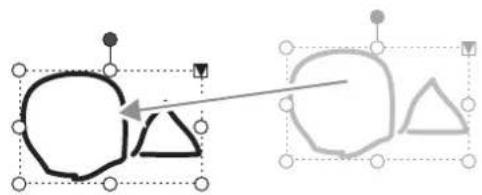
■ Enlarging/reducing an object
- Select an object.
- Drag the select point.
- Dragging the select point on the vertex enlarges/reduces the object with the same aspect ratio.
- Dragging the select point on the side enlarges/reduces the object in the direction of either width or height.
- The line width remains the same after the object is enlarged/reduced.
- The font size remains the same even if the text box is enlarged or reduced.

Select point

■ Rotating an object
- Select an object.
- Drag the select point at the center top.
Or, select "Rotate Right", "Rotate Left" or "Rotate 180 degrees" from "Rotate" in the expansion menu.
TIPS
- You can also rotate by specifying an angle of rotation.

■ Copying an object
You can copy an object to the clipboard.
- Select an object.
- Select "Copy" from the expansion menu.
■ Cutting an object
You can cut an object and save it to the clipboard.
- Select an object.
- Select "Cut" in the expansion menu.
■ Pasting an object
To paste the object in the clipboard, select "Paste" in the expansion menu.
■ Changing the order of objects
You can change the order of the object placement.
- Select an object.
- Select the object placement from "Order" in the expansion menu.
- Bring to Front : The object moves to the front.
- Send to Back : The object moves to the back.
- Bring forward : The object moves one forward.
- Send backward : The object moves one backward.
Object placement order
When several objects overlap, the objects at the back are hidden behind the objects in front. To show the hidden part, change the placement order of the objects.
![graph LR A["△ (1) (2)"] --> B["Rectangle (3)"] C["△ (2) (3)"] --> D["Rectangle (1)"]](/content/2026/05/1022316/images/2dc3b52180c4b7af482fe472dc04fdfa75545c6340db1b8b0f7dc613509990b4.jpg)
(1) Object placed in front of the other objects (2) Object placed second from the front object (3) Object placed at the back of the other objects
Undo/redo operation
Touching the "Undo" button cancels the preceding drawing or editing operation. Touching the "Redo" button repeats the operation canceled with the "Undo" button.
TIPS
- Up to 50 actions can be undone.
Deleting an object
■ Deleting a selected object
- Select an object.
- Touch the "Delete" button and "Delete selected object". Or select "Delete" from the expansion menu.
The selected object disappears.
■ Deleting a group of objects
- Touch the "Delete" button.
- Touch the deletion method.

- Delete selected object: Delete the selected object only. (See above) This button is disabled when no object is selected.
- Delete handwriting on this sheet: Delete all hand-drawn lines drawn on the current sheet.
- Clear this sheet: Delete all objects shown in the current sheet.
- Delete all sheets: Delete all sheets and create new 8 sheets.
Enlarging the view of the screen
The steps for enlarging the view of the screen vary depending on the mode.
The following operations can be performed in both modes.
Enlarging a specified area
- Touch "Enlarge Specified Area".
- Drag the area you want to enlarge.
The specified area is enlarged in a separate window.
TIPS
- The narrower the area specified, the more the view is enlarged.
- The drawing and image capturing functions cannot be used in a window whose view is enlarged.
! Caution
- If the specified area is too narrow, it will not enlarge.
■ Enlarging the screen in whiteboard mode
Double-click to enlarge the screen
- Touch the "Pan" button.
- Quickly touch the part of the board that you want to enlarge twice (double-click).
Each time you double-click, the view changes in the order 100% > 150% > 200%, centered on the click position. Double-clicking at 200% returns the view to 100%.
![graph LR A["Input Image"] --> B["Transformation"] B --> C["Output 200% 150%"] A --> D["100%"]](/content/2026/05/1022316/images/4099c931360463526145c5a30f20cab1a1f82104056b67f6a8c59e420e74b1f8.jpg)
Changing the display position when the view is enlarged
To change the display position, drag on the screen with “Pan” selected.
Enlarging the view of the screen with the pan window
A thumbnail of the current sheet appears in the pan window on the toolbar.

(1) Magnification
Shows the current screen magnification.
(2) [-] [+]
Touch to enlarge or reduce the view between 100% and 400% in increments of 50%.
(3) Pan window
Shows a thumbnail of the current sheet. Each time you double-click inside the display frame, the zoom changes in the order 100% > 150% > 200%, centered on the clicked point.
(4) Display frame
Shows the area that is displayed on the screen. To move the area that is displayed, drag the display frame.
TIPS
- The screen can be enlarged or reduced by "Zoom" dual touch. When the screen is enlarged, the display position can be changed by dual touch. When using the PN-L series, set the touch mode setting of the touch panel driver to "Dual", and the input mode to "Standard" or "HandWrite".
- Dual touch can be disabled (Page 35).

Drag with two fingers
Enlarging the screen in overlay mode
You can enlarge part of the screen and display it.
- Touch the "Zoom In" button.
- Touch the board.
The area around the touched point is enlarged and displayed.

Touch the point to enlarge. The area around the point is enlarged.
Using the background image
You can show a template image such as a monthly schedule sheet or a calendar as the background of the whiteboard. (The background image can be set individually for each sheet.)
Touching the "Background image" button displays a dialog box.

(1) Selection of whether to show or hide the background image (2) Preview
The selected background image is displayed.
(3) Reference
Select a file to use for the background image.
This button is disabled when "Don't show background image" is selected.
(4) Display method
Select the method to display the background image.
- Center: Display the image in the center of the screen.
- Stretch: Display the image so that it fits the screen.
- Tile: Display several images side by side.
TIPS
- Image files in JPEG, BMP, or PNG format can be used as the background image.
- The sample background images are stored in the following folder: (When installed in the default folder) C:\Program Files\SHARP\SHARP Pen Software\Background
Displaying the Pen Software in a split-screen
The Pen Software can be displayed in a split-screen.
Touch "Split screen" to change from full-screen display to half-screen display.


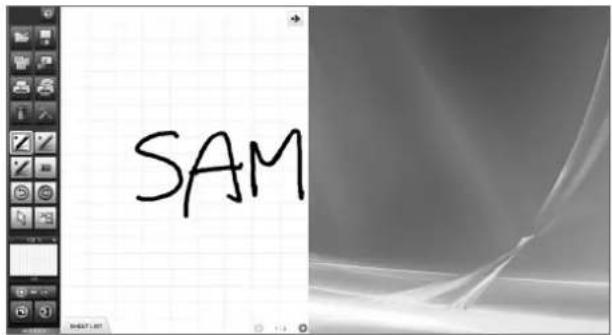
TIPS
• This can only be used in whiteboard mode. - "Split screen" can be displayed on the toolbar using "Customize toolbar" (Page 36). • The screen is the half of the screen in which the toolbar appears. - The screen zoom is fixed at 100%. If the zoom was changed in the full screen, the zoom will revert to 100% when the display is changed to split screen. • In split screen, the following functions can be used. - Pen 1 to Pen 3, Eraser, Drawing Object, Line/Arrow, Text box, Select, Figure pen, Undo, Redo, Delete (excluding "Delete all sheets").
Launching an external application
An external application can be added to allow the application to be launched while this software is running.
■ Adding an external application
Up to 5 applications can be added.
Adding a new application
- Touch "Settings of Pen Software".
- Touch "External Application Settings".
- Touch "Edit" next to an application that is shown in the list as being "Not set".


Set the information below.
- Name: Set the name that will be shown on the toolbar.
- File path: Set the file path of the application to be added. You can touch "Ref." to the right of the entry box to select and add the application.
- Launch Options: Set launch options for the application.
- When you have completed the settings, touch "OK".
Editing/deleting an added application
- Touch "Settings of Pen Software".
- Touch "External Application Settings".
- To edit an application, touch "Edit" and change the settings (step 3 of "Adding a new application"). To delete an application, touch "Delete" and then touch "Yes" when the confirmation dialog box appears.
■ Launching an external application
- Touch "External Application".
- Touch the application that you want to launch.
TIPS
- "External Application" can be displayed on the toolbar using "Customize toolbar" (Page 36).
- An added application can also be shown on the toolbar.
The added application is set in "Application commands" under the name "External App - Name". Set this in "Show the following functions" in "Customize toolbar". (Page 36)
To launch the application, touch the icon of the application on the toolbar.
Searching the Internet
By specifying a keyword and a search engine, you can search the Internet while the software is running.
■ Entering a keyword and searching
1. Touch "Web Search".
The search keyword entry screen appears.

2. Enter the "Keyword".
3. Select the "Search Engine" and touch "Search".
The last used search engine is selected.
TIPS
- "Web Search" can be displayed on the toolbar using "Customize toolbar" (Page 36).
■ Searching using entered text as a keyword
1. Touch the text to be set as the keyword. (Page 17)
2. With the text selected, touch and select "Web Search".

The selected text is entered in "Keyword".
! Caution
- It is not possible to set only one part of the text in the text box as the keyword.
3. Select "Search Engine" and touch "Search".
The last used search engine is selected.
Importing a Document as an Image (Pen Software Printer Driver)
A document of any application can be converted into an image and displayed on the whiteboard.
A document is imported as an image similar to an image printed by a printer.
■ In the software application
- In the software application, open the document that you wish to import.
- Select the print command and open the print settings screen.
For details, see the manual for the software application.
- Change the printer to "Send print data to SHARP Pen Software", and select print settings.
- "Paper Size", "Orientation", and "Resolution" can be selected.
- When you have finished selecting settings, touch "OK".
- Execute printing.
The printed document will be converted into an image and sent to the Pen Software.
■ In the Pen Software (whiteboard mode)
When the image has been sent, the "Import images" button will blink.
5. Touch the "Import images" button.
The first sheet of the acquired image appears.
TIPS
- It may not be possible to correctly convert documents from some software applications.
- It may not be possible to correctly convert parts of contents from some websites.
- In some cases, data may not import when you select "Send print data to SHARP Pen Software" with the Web site that you want to import displayed in Internet Explorer. It may be possible to correctly import the data if you remove the checkmark from "Turn on Protected Mode" on the "Security" tab in "Internet Options" in Internet Explorer.
- If the "Resolution" setting of the Pen Software printer driver is set too high, enlargement, reduction, and scrolling of sheets may not be smooth.
Acquiring an Image From a Multifunction Machine
If a SHARP multifunction machine is connected to the same network as the computer on which the Pen Software is installed, an image scanned on the multifunction machine can be acquired onto the whiteboard.
TIPS
• Supports the Network Scanner Tool 3.3 or higher (as of August 2013). - For details, contact your dealer or nearest authorized service representative for the multifunction machine. - For the procedures for using the multifunction machine, see the manual for the multifunction machine.
Using the Network Scanner Tool to acquire an image
The first time you use the Network Scanner Tool, install the Network Scanner Tool on the computer on which the Pen Software has been installed and configure the Network Scanner Tool settings. (Page 38)
To acquire an image from a multifunction machine, the Network Scanner Tool must be running on your computer.
Use JPEG for the scan send format.
■ In the multifunction machine
- Place the document in the multifunction machine.
- Select a destination stored in the Network Scanner Tool.
- Select JPEG for the scan send format.
- Execute scanning in the color mode.
The document will be scanned and sent to the Pen Software.
■ In the Pen Software (whiteboard mode)
When the image has been sent, the "Import images" button will blink.
5. Touch the "Import images" button.
The first sheet of the acquired image appears.
Acquiring an image from a TWAIN device
When a scanner or other TWAIN device is connected to the computer on which the Pen Software is installed, an image scanned on the TWAIN device can be acquired to the Whiteboard. Before starting, make sure that "Import images" is not blinking.
TIPS
- For the procedure for using the TWAIN device, see the manual for the TWAIN device.
- Place the original in the TWAIN device
- Touch the "Import images" button.
The acquire image screen of your scanner or other TWAIN device will appear.
After acquiring the image, close the acquire image screen. The last sheet of the acquired image appears.
Linking to Microsoft PowerPoint
When the slideshow display of Microsoft PowerPoint is detected, a control toolbar that makes it easy to operate the Microsoft PowerPoint slideshow and Pen Software appears automatically.
The presentation support tool automatically starts and an icon (☐) appears on the taskbar.
Supported applications
• Microsoft PowerPoint 2007/2010

(1) Show the previous slide. (2) Show the next slide. (3) Change to arrow (select) mode. (4) Change to pen mode.
- The pen color can be changed in "Set Up Slide Show" in Microsoft PowerPoint.
- The pen thickness cannot be changed.
(5) Change to eraser mode.
(6) Start the Pen Software whiteboard.
When the Whiteboard is running, the icon (🔍) that appears on the Whiteboard can be clicked to return to the slideshow. (7) End the displayed slideshow and close the control toolbar.
If draw screen is performed in pen mode, a confirmation screen asking "Do you want to keep your ink annotations?" will appear.
Exiting
- Click the presentation support tool icon (☐) on the taskbar.
- Click "Exit".
TIPS
- In some cases, it may not be possible to use this tool to operate PowerPoint presentations that are prohibited from being edited.
Printing
To print only the currently displayed sheet, touch the "Print Current Sheet" button. To print all sheets on the whiteboard, touch the "Print All" button. (Whiteboard mode only) Store the print settings ahead of time.
TIPS
• The operation tools of the software, such as the toolbars and tabs will not be printed. • In the whiteboard mode, a sheet with no data will not be printed.
■ Register the settings for printing
- In the "Settings" dialog box (Page 34), touch "Print Current Sheet" or "Print All".
- Specify the print settings. (See below.)
- When you finish adjusting the settings, touch "OK".

(1) Printer Name
Select the printer to be used for printing.
(2) Properties
Set the printer details. The setting options depend on the printer. For the setting options, refer to the instruction manual of the printer.
(3) Number of Copies
Specify the number of copies to print.
(4) Options
- Print Background: Select this to print the color that is set for the whiteboard background. (Only when in whiteboard mode)
- Print Sheet Number: Select this to print page numbers, and select the "Position". (Only when in whiteboard mode)
- Print Date: Select this to print the print date, and select the "Position".
TIPS
• "Sheets to Print" cannot be changed.
Using a secondary display
| Applicable models(as of August 2013) | PN-L602B/PN-L702B/PN-L802B |
Available models differ according to region.
!Caution
- This feature is not compatible with Window XP/Vista.
- Set the screen resolution to 1920 x 1080.
- Set the touch mode of the touch panel driver to "Dual".
- The software keyboard for text entry does not appear in a secondary display.
- An external application (Page 26) launched from the pen software may appear in the primary display.
■ Secondary display settings
To use the touch panel in the secondary display, touch panel settings must be configured.
- Connect the display to the external display port on the computer, and connect to the display with a USB cable.
- Select "Hardware and Sound" from Control Panel
- Select "Tablet PC Settings".
- Select "Setup".
- Press the [Enter] key until the screen below is shown as the secondary display.
Touch this screen to identify it as the touchscreen.
If this is not the Tablet PC screen, press Enter to move to the next screen. To close the tool, press Esc.
If the pen or touch input selection screen appears, select touch input.
6. Touch the screen.
7. Press "OK".
"Tablet PC Settings" closes.
■ Using a secondary display
1. Launch the software. (Page 4)
The display selection screen appears.

If the power of the secondary display is not turned on, it will not appear.
2. Select the display on which the software is to be displayed.
The software is displayed on the selected display.
TIPS
- If the software is displayed on the secondary display and minimize (Page 8) is selected, a window will appear for restoration from minimize. To restore the display, touch the window.
Customizing the Settings
You can customize various settings of this software.
The settings are the same in both whiteboard mode and overlay mode. However, the contents of the screen will vary depending on which mode is started.
- Touch the "Settings of Pen Software" button.
- Set the options as necessary. (See below.)
- When you finish adjusting the settings, touch "OK".

*1 Only whiteboard mode can be selected. *2 For "Print All", only whiteboard mode can be selected. *3 Only overlay mode can be selected.
(1) Default settings for the Pen/Eraser/Text/Figure/Figure Pen/Line/Arrow
Set the following default settings that are applied when the Pen Software is started: the color and thickness of "Pen 1" to "Pen 3" and "Figure pen", the size of "Eraser", the font, size, style and color of "Text", the shape, fill color, and line color/thickness of "Figure", and line color/thickness/type of "Line/Arrow".
(2) Pen Drawing
Set whether or not you can draw with your finger when the pen function is selected (Page 14).
If a PN-L series interactive display is not connected when the pen software is started, this function cannot be used. The setting is fixed to "Both touch pen and finger".
(3) Auto Pen/Eraser Mode Switching
Use auto switching
To use this function, select this to have the pen automatically switch to the eraser when the screen is touched with the eraser or your finger in pen mode. Set the eraser size that is applied in "Eraser Size".
- The area you touch (or cover) : When using an eraser or other object and the area of contact on the screen is at least 1-9/16 inch (4 cm) x 1-9/16 inch (4 cm), erase the area of contact.
- The selected size in Eraser Palette : Erase with the selected eraser size regardless of the amount of contact on the screen. If a PN-L series interactive display is not connected when the pen software is started, this function cannot be used.
TIPS
- To use this function with a PN-L series interactive display, select the touch panel driver "Properties", and configure the settings on the "Operation Setting" tab as shown below. For information on the touch panel driver, see the Touch Panel Driver Operation Manual.
- Set "Input Mode Setting" to "Standard". If set to other than "Standard", the pen/eraser auto switching function cannot be used.
- If you have selected "The area you touch (or cover)", set "Detect Eraser Area" to "Enable".
(4) Pen/Eraser palette
Select this to have the palettes of "Pen 1" to "Pen 3" and "Eraser" close when a pattern is selected from a palette. If the checkmark is removed, must be clicked to close the palette.
(5) Pen Cursor
Set whether to show a cursor when you draw with the pen function.
In Windows 8, the cursor only appears when mouse operation is used (not during pen touch), regardless of this setting.
(6) Sheet view
Set the sheet list display method (Page 13).
(7) Flick Sheet
To disable moving to the previous/next sheet by flicking the sheet advance area (Page 12), remove the checkmark.
(8) About
The version information of this software is displayed.
(9) Default
Reset the settings to the initial values.
(10) Background setting of whiteboard
- Preview: The image of the whiteboard with the current setting is displayed.
- Background color: Set the background color of the whiteboard.
- Show the grid lines: Select to show the grid on the whiteboard.
(11) Printer setting
Register the settings for printing (Page 32).
(12) External Application
You can add external applications that can be launched while the software is running (Page 26).
(13) Dual Touch
Set whether dual touch is enabled. When enabled, the following actions are possible:
- "Zoom" can be used to change the sheet display magnification, and two-finger drag can be used to change the display position (Page 23).
- Two-finger left/right drag can be used to change the sheet (Page 12).
TIPS
- Dual touch cannot be used in Windows XP/Windows Vista.
- When using a PN-L series interactive display, the touch mode setting of the touch panel driver must be set to "Dual" and the input mode setting must be set to "Standard" or "HandWrite".
- Dual touch may not operate correctly in the following cases: Touching is too quick. The distance between the two points is too short. The two points intersect. The points are aligned horizontally or vertically.
(14) Automatic backup settings
Specify whether to back up data automatically in the whiteboard mode.
To use the automatic backup, specify the interval.
(15) Zoom Setting
Specify the size and magnification of the zoom display.
(16) Toolbar Customize
Set the toolbar display method and show/hide function buttons (Page 36).
(17) Interval until object is captured
Set the period until a hand-drawn line is determined as an object.
■ Customizing the toolbar
You can set the toolbar display method and show/hide function buttons.
- In the "Settings" dialog box (Page 34), touch the "Customize toolbar" button for "Toolbar Customize".
- Set the options as necessary. (See below.)
- When you finish adjusting the settings, touch "OK".

(1) Style
Set the toolbar display style. (Page 7)
The display style is the same in whiteboard and overlay mode.
(2) Docked style settings
Set the toolbar display method when the toolbar display type is set to "Docked".
- Icon size: The size of the toolbar icon can be set.
- Hide automatically: Select to automatically hide the toolbar.
(3) Hide the following functions
Function buttons that are not shown on the toolbar are listed.
(4) Show the following functions
Function buttons that are shown on the toolbar are listed.
TIPS
- Set separately for whiteboard mode and overlay mode. Settings are configured for the currently displayed mode.
To include a function button in the toolbar
Select the function to add from "Hide the following functions" and then touch "Add >>".
Caution
- When the display format is fixed position display, an added command may not always appear on the toolbar.
To exclude a function button from the toolbar
Select the function to exclude from the "Show the following functions" list and then touch "<< Remove".
* You cannot exclude the "Minimize", "Quit", "Toolbar Help", and "Select Whiteboard / Overlay Mode" buttons from the toolbar.
To change display order in the toolbar
Select the function to change its display order from the "Show the following functions" list and then touch either "Up" or "Down".
To restore the default function button display order and show/hide settings
Touch "Default" and then touch "OK".
Installing/Uninstalling the Software
The operations in this section require administrator privilege.
Installing the Pen Software
■ Installing the Pen Software
- Exit all running software applications.
- Insert the supplied CD-ROM into the CD-ROM drive of the computer.
- Double-click the setup program.
- 32-bit/64-bit operating system: \PenSoftware\setup.exe
- For the remainder of the procedure, follow the instructions shown on the screen.
- When the "User Account Control" dialog box appears, click "Yes" (or "Allow").
- When a security warning screen (The publisher could not be verified.) appears, click "Allow".
- For the PN-K series, remove the checkmark from "Install Touch Display Launcher" in the screen below. Touch Display Launcher cannot be used with the PN-K series.

When installation is finished, shortcut icons for whiteboard mode ( ) and overlay mode ( ) will be created on the desktop. In Windows 8, "Pen Software" and "Overlay mode Pen Software" tiles are also added to the Start screen and Apps screen. The Pen Software printer driver will also be added. (Page 28)
■ Uninstalling
- Exit all running software applications.
- Open "Control Panel".
- Click "Uninstall a program".
- If you are using icon view (Classic View), double-click "Programs and Features".
- When Windows XP is used, click "Add or Remove Programs". (In the classic view, double-click "Add or Remove Programs".)
- In Windows 8, you can also right-click "Pen Software" (or "Overlay mode Pen Software") in the Start screen or Apps screen and click "Uninstall".
- Select "SHARP Pen Software" and click "Uninstall".
When Windows XP is used, click "Remove".
- For the remainder of the procedure, follow the instructions shown on the screen.
When the "User Account Control" dialog box appears, click "Continue".
This completes the uninstallation process.
Installing the Network Scanner Tool
The Network Scanner Tool is used to acquire an image from a SHARP multifunction machine connected to the same network.
■ Installing the Network Scanner Tool
The Network Scanner Tool is not included on the provided CD-ROM. Use the Network Scanner Tool (Version 3.3 or later) that is provided with the multifunction machine. (If already installed, there is no need to reinstall.)
For details on installing and using the Network Scanner Tool, see the Network Scanner Tool user's guide. For questions on the compatibility of your multifunction machine or the Network Scanner Tool, contact your dealer or authorized service representative.
■ Configuring settings for the Network Scanner Tool
The folder that will be used to acquire images scanned from the multifunction machine must be stored as a destination in the multifunction machine's address book. When creating a profile, select "Move File to Folder" and set the folder (below) for acquiring images in "Details".
• Windows Vista/Windows 7/8: Startup drive:\ProgramData\SHARP\PenSoftware\JPEG
- Windows XP: Startup drive:\Documents and Settings\All Users\Application Data\SHARP\PenSoftware\JPEG
If the above directories cannot be located, please confirm that 'Show hidden files, folders, and drives' is selected in the Folder and Search options tab. This tab can be located under the Windows 7 'Organize' menu, or under the 'Tools' menu in Windows XP.
■ Uninstalling
Exit the Network Scanner Tool, open the uninstall screen as explained on page 37, and remove "Network Scanner Tool" (or "Sharpdesk").
- INTRODUCTION
- IMPORTANT INFORMATION
- TRADEMARKS
- CAUTION
- STARTING AND EXITING THE SOFTWARE
- PEN SOFTWARE MODES AND HOW TO START THE MODES
- TIPS
- WHITEBOARD MODE
- STARTING WHITEBOARD MODE
- OVERLAY MODE
- STARTING OVERLAY MODE
- EXITING THE SOFTWARE
- LAYOUT OF BASIC SCREEN
- SCREEN EXAMPLE: WHITEBOARD MODE
- TOOLBAR
- SHEET LIST
- MOVE TOOLBAR ICON
- BOARD
- SHEET NAVIGATION BUTTONS/PAGE NO
- TOOLBAR DISPLAY METHOD
- DOCKED
- FLOATING
- TITLE BAR
- TOOLBAR FUNCTION BUTTONS
- FUNCTION BUTTONS DISPLAYED WITH "CUSTOMIZE TOOLBAR
- SAVING AND OPENING A FILE
- SAVING DATA
- IN WHITEBOARD MODE
- IN THE OVERLAY MODE
- AUTOMATIC BACKUP
- OPENING THE WHITEBOARD FILE
- EDIT OPERATIONS
- CHANGING THE SHEET TO EDIT (WHITEBOARD MODE)
- CHANGING THE SHEET BY DRAGGING THE SCREEN
- CHANGING THE SHEET BY REFERRING TO THUMBNAIL IMAGES / EDITING THE SHEET
- TILED VIEW
- FILMSTRIP VIEW
- DRAWING WITH A PEN
- CHANGING THE COLOR AND THICKNESS OF THE PEN
- NORMAL TRANSLUCENT
- ERASING A DRAWN LINE
- CHANGING THE ERASER SIZE
- DRAWING SHAPES
- PROPERTY OF FIGURE
- DRAWING STRAIGHT LINES OR ARROWS
- PROPERTY OF STRAIGHT LINE AND ARROW
- DRAWING A SHAPE WITH THE FIGURE PEN
- INPUTTING TEXT
- CHANGING TEXT
- IMPORTING AND PASTING AN IMAGE
- INSERTING AN IMAGE FILE
- CAPTURING/SAVING THE CURRENTLY DISPLAYED SCREEN
- CAPTURING THE ENTIRE SCREEN
- CAPTURING/SAVING A SPECIFIED AREA
- EDITING AN OBJECT
- SELECTING AN OBJECT
- GROUPING OBJECTS
- MOVING AN OBJECT
- ENLARGING/REDUCING AN OBJECT
- ROTATING AN OBJECT
- COPYING AN OBJECT
- CUTTING AN OBJECT
- PASTING AN OBJECT
- CHANGING THE ORDER OF OBJECTS
- OBJECT PLACEMENT ORDER
- UNDO/REDO OPERATION
- DELETING AN OBJECT
- DELETING A SELECTED OBJECT
- DELETING A GROUP OF OBJECTS
- ENLARGING THE VIEW OF THE SCREEN
- ENLARGING A SPECIFIED AREA
- ENLARGING THE SCREEN IN WHITEBOARD MODE
- DOUBLE-CLICK TO ENLARGE THE SCREEN
- CHANGING THE DISPLAY POSITION WHEN THE VIEW IS ENLARGED
- ENLARGING THE VIEW OF THE SCREEN WITH THE PAN WINDOW
- MAGNIFICATION
- [-] [+]
- PAN WINDOW
- DISPLAY FRAME
- ENLARGING THE SCREEN IN OVERLAY MODE
- USING THE BACKGROUND IMAGE
- DISPLAYING THE PEN SOFTWARE IN A SPLIT-SCREEN
- LAUNCHING AN EXTERNAL APPLICATION
- ADDING AN EXTERNAL APPLICATION
- ADDING A NEW APPLICATION
- EDITING/DELETING AN ADDED APPLICATION
- SEARCHING THE INTERNET
- ENTERING A KEYWORD AND SEARCHING
- TOUCH "WEB SEARCH
- ENTER THE "KEYWORD
- SELECT THE "SEARCH ENGINE" AND TOUCH "SEARCH
- SEARCHING USING ENTERED TEXT AS A KEYWORD
- TOUCH THE TEXT TO BE SET AS THE KEYWORD. (PAGE 17)
- WITH THE TEXT SELECTED, TOUCH AND SELECT "WEB SEARCH
- SELECT "SEARCH ENGINE" AND TOUCH "SEARCH
- IMPORTING A DOCUMENT AS AN IMAGE (PEN SOFTWARE PRINTER DRIVER)
- IN THE SOFTWARE APPLICATION
- IN THE PEN SOFTWARE (WHITEBOARD MODE)
- TOUCH THE "IMPORT IMAGES" BUTTON
- ACQUIRING AN IMAGE FROM A MULTIFUNCTION MACHINE
- USING THE NETWORK SCANNER TOOL TO ACQUIRE AN IMAGE
- IN THE MULTIFUNCTION MACHINE
- ACQUIRING AN IMAGE FROM A TWAIN DEVICE
- LINKING TO MICROSOFT POWERPOINT
- SUPPORTED APPLICATIONS
- EXITING
- PRINTING
- REGISTER THE SETTINGS FOR PRINTING
- PRINTER NAME
- PROPERTIES
- NUMBER OF COPIES
- OPTIONS
- USING A SECONDARY DISPLAY
- SECONDARY DISPLAY SETTINGS
- TOUCH THE SCREEN
- PRESS "OK
- LAUNCH THE SOFTWARE. (PAGE 4)
- SELECT THE DISPLAY ON WHICH THE SOFTWARE IS TO BE DISPLAYED
- CUSTOMIZING THE SETTINGS
- USE AUTO SWITCHING
- PEN CURSOR
- SHEET VIEW
- FLICK SHEET
- ABOUT
- DEFAULT
- BACKGROUND SETTING OF WHITEBOARD
- PRINTER SETTING
- EXTERNAL APPLICATION
- DUAL TOUCH
- AUTOMATIC BACKUP SETTINGS
- ZOOM SETTING
- TOOLBAR CUSTOMIZE
- INTERVAL UNTIL OBJECT IS CAPTURED
- CUSTOMIZING THE TOOLBAR
- TO INCLUDE A FUNCTION BUTTON IN THE TOOLBAR
- TO EXCLUDE A FUNCTION BUTTON FROM THE TOOLBAR
- TO CHANGE DISPLAY ORDER IN THE TOOLBAR
- TO RESTORE THE DEFAULT FUNCTION BUTTON DISPLAY ORDER AND SHOW/HIDE SETTINGS
- INSTALLING/UNINSTALLING THE SOFTWARE
- INSTALLING THE PEN SOFTWARE
- UNINSTALLING
- INSTALLING THE NETWORK SCANNER TOOL
- CONFIGURING SETTINGS FOR THE NETWORK SCANNER TOOL
Brand : SHARP
Model : PN-K322BH
Category : Screen