
5R65 - Montre-bracelet SEIKO - Free user manual and instructions
Find the device manual for free 5R65 SEIKO in PDF.


| Product Type | Wristwatch |
| Brand | Seiko |
| Model | 5R65 |
| Caliber | 5R65 (without 24-hour hand) |
| Movement | Spring Drive (automatic winding with manual winding mechanism) |
| Accuracy (daily rate) | ±15 seconds per day (within ±1 second under normal conditions) |
| Power Source | Mainspring (self-winding and hand winding) |
| Power Reserve | Approximately 72 hours (3 days) when fully wound |
| Functions | Hour, minute, seconds hands; date display; power reserve indicator |
| Seconds Hand Movement | Smooth slide motion (Spring Drive) |
| Water Resistance | Depends on model; refer to case back indications |
| Magnetic Resistance | Depends on model; refer to case back indications |
| Crown Type | Normal or screw down crown (depends on model) |
| Case Back Information | Displays caliber, water resistance, and magnetic resistance ratings |
| Lumibrite | Luminous paint on hands and markers (if applicable) |
| Band Material | Varies (metal, leather, polyurethane, silicone, etc.) |
| Clasp Type | Tri-fold clasp or easy adjust type (depends on model) |
| Care Instructions | Wipe with soft cloth; avoid water when crown is pulled out; periodic crown turning |
| Safety Precautions | Keep away from magnets, extreme temperatures, and strong vibrations; do not use for scuba diving |
| After-Sales Service | Contact retailer or Seiko service center; overhaul recommended every 3-4 years |
Frequently Asked Questions - 5R65 SEIKO
User questions about 5R65 SEIKO
0 question about this device. Answer the ones you know or ask your own.
Ask a new question about this device
Download the instructions for your Montre-bracelet in PDF format for free! Find your manual 5R65 - SEIKO and take your electronic device back in hand. On this page are published all the documents necessary for the use of your device. 5R65 by SEIKO.
USER MANUAL 5R65 SEIKO
5R65 / 5R66 JSY5R6C1-A1903
SEIKO WATCH CORPORATION
Copyright©2019 by SEIKO WATCH CORPORATION
Printed in Japan
S-4
SEIKO
5R65 / 5R66
スプリングドライブ 取扱説明書
SPRING DRIVE INSTRUCTIONS
日本語 JA 1
English ...... EN 1
Please refer to the Instruction Manuals
of other languages by accessing
"Customer Service"→ "Instruction"
on our Website from PC or Smartphone.
Deutsch / Français / Italiano / Español /
Русский язык / العربية / Português /
Thank you very much for choosing a SEIKO watch. For proper and safe use of your SEIKO watch, please read carefully the instructions in this booklet before using it.
Keep this manual handy for easy reference.
* Length adjustment service for metallic bands is available at the retailer from whom the watch was purchased. If you cannot have your watch repaired by the retailer from whom the watch was purchased because you received the watch as a gift, or you moved to a distant place, please contact SEIKO CUSTOMER SERVICE CENTER. The service may also be available on a chargeable basis at other retailers, however, some retailers may not undertake the service.
* If your watch has a protective film for preventing scratches, make sure to peel it off before using the watch. If the watch is used with the film on it, dirt, sweat, dust, or moisture may be attached to the film and may cause rust.
EN 1
CONTENTS
1 HOW TO USE
Handling cautions 4
Characteristics 8
Names of the parts and their functions ..... 10
CROWN 12
2 BEFORE USE
How to wind the mainspring 13
Guide for winding state of the mainspring .. 13
How to wind the mainspring by using crown
(Hand winding) 14
Power reserve indicator 15
How to read the power reserve indicator ... 16
3 5R65 (A model without a 24-hour hand)
① How to set the time and date 17
How to set the time and date 17
Tips for more accurate time setting ..... 20
Date adjustment at the end of the month ... 21
4 5R66 (A model with a 24-hour hand)
① How to set the time and date 22
How to set the time and date 22
Tips for more accurate time setting ..... 25
Date adjustment at the end of the month ... 26
How to use the 24-hour hand .... 29
② Time difference adjustment function .... 31
How to use the time difference adjustment
function 31
List of time zone differences in major
regions of the world 33
③ How to use the simple compass (For
models with rotating bezel having direction
Indicator) 35
How to find a direction by using the 24-hour
Hano 35
④ How to use the rotating bezel with 24-hour scale (For models with rotating bezel having 24-hour scale) .... 37
In the case of 24-hour hand being set to 24
hours of the hour and minute hands ..... 37
In the case of 24-hour hand being set to
different time zone 39
5 TO PRESERVE THE QUALITY OF YOUR WATCH
Daily care 40
Performance and type 41
Lumibrite 42
Water resistant performance 43
Magnetic resistant performance 44
Band 46
How to use tri-fold type clasp for leather band
(Special clasps) 49
How to use an easy adjust type clasp .... 55
After sales service 58
6 TROUBLESHOOTING
Troubleshooting 60
7 SPECIFICATIONS
Specifications 62
EN 3
Handling cautions
WARNING
Please note that there is a risk of serious consequences such as severe injury if the following safety regulations are not strictly observed.
Immediately stop wearing the watch in following cases:
○ If the watch body or band becomes edged by corrosion etc.
○ If the pins protrude from the band.
* Immediately consult the retailer from whom the watch was purchased or SEIKO CUSTOMER SERVICE CENTER.
Keep the watch and accessories out of the reach of babies and children.
Care should be taken to prevent a baby or a child accidentally swallowing the accessories. If a baby or child swallows the battery or accessories, immediately consult a doctor, as it will be harmful to the health of the baby or child.
CAUTION
Please note that there is a risk of minor injury or material damage if the following safety regulations are not strictly observed.
Avoid the following places for wearing or keeping the watch:
- Places where volatile agents (cosmetics such as polish remover, bug repellent, thinners etc.) are vaporizing
O Places where the temperature drops below
5°C or rises above 35°C for a long time
O Places affected by strong magnetism or static electricity
○ Places affected by strong vibrations
○ Places of high humidity
○ Dusty places
If you observe any allergic symptoms or skin irritation
Stop wearing the watch immediately and consult a specialist such as a dermatologist or an allergist.
Other cautions
- For adjusting the length of the metallic band, specialized knowledge and expertise are necessary. Therefore, in such a case, contact the retailer from whom the watch was purchased. If you attempt to adjust the metallic band, injury may occur to your hand or fingers, or parts of the band may be lost. - Do not disassemble or tamper with the watch.
Keep the watch out of the reach of babies and children. Extra care should be taken to avoid risks of any injury or allergic rash or itching that may be caused when they touch the watch.
O If your watch is of the job or pendant type, the strap or chain attached to the watch may damage your clothes, or injure the hand, neck, or other parts of your body.
EN 4
EN 5
WARNING

Do not use the watch in scuba diving or saturation diving.
The various tightened inspections under simulated harsh environment, which are usually required for watches designed for scuba diving or saturation diving, have not been conducted on the water resistant watch with the BAR (barometric pressure) display. For diving, use watches specifically designed for diving.
CAUTION

Do not pour running water directly from faucet.
The water pressure of tap water from a faucet is high enough to degrade the water resistant performance of a water resistant watch for everyday life.
CAUTION
Please note that there is a risk of minor injury or material damage if the following safety regulations are not strictly observed.

Do not turn or pull out the crown when the watch is wet.
Water may get inside of the watch. * If the inner surface of the glass is clouded with condensation or water droplets appear inside of the watch for a long time, the water resistant performance of the watch is deteriorated. Immediately consult the retailer from whom the watch was purchased or SEIKO CUSTOMER SERVICE CENTER.

Do not leave moisture, sweat and dirt on the watch for a long time.
Be aware of a risk that a water resistant watch may lessen its water resistant performance because of deterioration of the adhesive on the glass or gasket.

Do not wear the watch while taking a bath or a sauna.
Steam, soap or some components of a hot spring may accelerate the deterioration of water resistant performance of the watch.
EN 6
EN 7
1
HOW TO USE
Characteristics
This watch is equipped with Seiko's unique mechanism "Spring Drive", and provides the following features.
- Spring Drive
Spring Drive, the unique mechanism made available only by Seiko technology, achieves a high precision comparable to that of a quartz watch while using the unwinding power of the mainspring as its sole power source.
■ Self-winding
This is a mechanism that uses the natural motion of your arm as the power source to wind the mainspring to power the watch.
mechanism......
This is a mechanism that enables you to wind the mainspring by turning the crown by hand to power the watch. This function is convenient especially for winding the mainspring when you start using the watch.
■ Manual-winding
The power reserve indicator shows the winding state of mainspring (continuous operating time).
mechanism....→P.14
The watch keeps working for approximately 72 hours (approximately three days) with its mainspring in fully wound state.
■ Power reserve
The seconds hand of the watch moves around the dial in a perfectly smooth movement.
EN 8
● Function and Performance
■ Time difference When you move to a location having different time zone, you can easily set adjustment function...... the watch to indicate the local time. (5R66 only) → P. 31
CAUTION
This watch is powered by the mainspring. To ensure constant operation of the watch, be sure to wind up the mainspring sufficiently before the power reserve indicator points to "0."
The watch may stop if the power reserve indicator is showing less than one-sixth, especially it is left under a temperature below 0 °C.
EN 9
1
HOW TO USE
Names of the parts and their functions
5R65
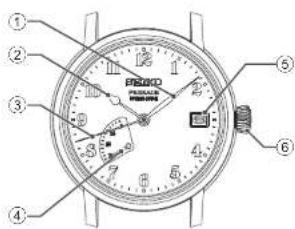
① Minute hand
② Hour hand
③ Seconds hand
④ Power reserve indicator
Displaying the continuous operating time → P. 15
⑤ Date
⑥ Crown
- Normal position (not locked): Wind up the watch (hand-wound)
- First click position: Time difference adjustment/ Date setting
• Second click position: Time setting
* The position and design of the display may vary depending on the model.
5R66
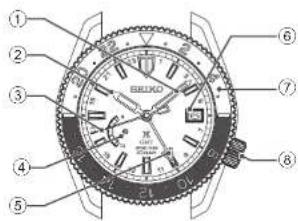
① Minute hand
② Hour hand
③ Seconds hand
④ Power reserve indicator Displaying the continuous operating time → P.15
⑤ 24-hour hand
⑥ Date → P.26
⑦ Rotating bezel With simple compass → P.35 With 24-hour scale → P.37
⑧ Crown • Normal position (not locked): Wind up the watch (hand-wound)
- First click position: Time difference adjustment/Date setting
• Second click position: Time setting
* The position and design of the display may vary depending on the model.
EN 11
EN 10
1
HOW TO USE
1
HOW TO USE
CROWN
There are two types of crowns, a normal crown and a screw down crown.
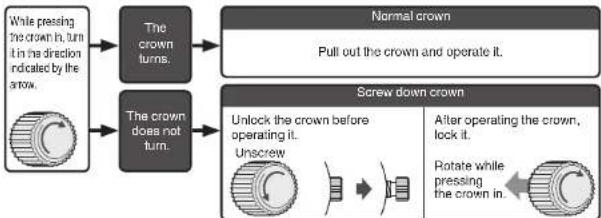
flowchart
graph TD
    A["While pressing the crown in turn in the direction indicated by the arrow."] --> B["The crown turns."]
    C["While pressing the crown in turn in the direction indicated by the arrow."] --> D["The crown does not turn."]
    E["Normal crown"] --> F["Pull out the crown and operate it."]
    G["Screw down crown"] --> H["Unlock the crown before operating it. Unscrew"]
    G --> I["After operating the crown, lock it. Rotate while pressing the crown in."]
* By locking the crown by screw, a screw down crown can prevent malfunction and increase water resistance.
* Be careful not to screw the crown in by force as it may damage the slots of the crown.
EN 12
How to wind the mainspring
This watch is a self-winding watch equipped with a manual winding mechanism.
- When the watch is worn on the wrist, the motion of the wearer's arm winds the mainspring of the watch.
- When first using a stopped watch, it is recommended that you manually wind the mainspring by turning the crown.
■ Guide for winding state of the mainspring
Self-winding: The mainspring of the watch becomes fully wound when the watch is worn for twelve hours per day for three to five consecutive days.
Manual-winding: It is possible to wind up for appropriately 10 hours by rotating the crown 5
times.
Observe the power reserve indicator to check the winding state of the mainspring.
* "Power reserve indicator" → P. 15
* This watch is configured in such a way that the mainspring cannot be over-wound.
Even if you turn the crown after the mainspring is tully wound, the mainspring will not wind up any more. Even if you continue to turn the crown, it will not damage the watch, however, please refrain from operating the crown excessively.
* Under a low-temperature condition (below 0 °C), please keep at least one-sixth of the watch power shown by the power reserve indicator. There are possibilities that the watch may stop.
EN 13
■ How to wind the mainspring by using crown (Hand winding)
1 With extra care so as not to press the crown in, slowly turn it in the direction of the arrow.
* For models with screw down crown, please unlock the crown before operating it.
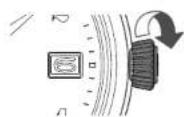
2 Wind the mainspring until the power reserve indicator shows a full-wound state.
"Power reserve indicator" → P. 15
Make sure that the seconds hand is moving.
* For models with screw down crown, please be sure to lock the crown after operating it.
* When setting the time and date after winding, please continue the procedure without locking the crown. "How to set the time and date" → P. 22
* Even if you turn the crown counterclockwise, the mainspring will not be wound, but will turn into idle form.

Full-wound state
EN 14
Power reserve indicator
- The power reserve indicator lets you know the winding state of the mainspring. - Before removing the watch from your wrist, observe the power reserve indicator to check if the watch has stored enough power to keep running until the next time you wear it. If necessary, wind the mainspring. (To prevent the watch from stopping, wind the mainspring to store the excess power that will allow the watch to run for extra time.)
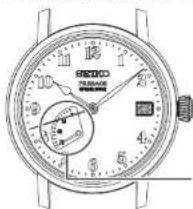
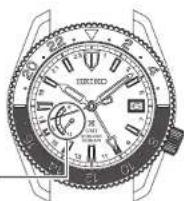
* The continuous operating time of the watch may vary depending on the conditions of your usage (such as the number of hours you wear the watch or the extent of your movement while wearing it).
* In a case where you wear the watch for a short period of time each day, observe the power reserve indicator to check the level of the remaining power. It necessary, manually wind the mainspring.
EN 15
■ How to read the power reserve indicator
| The Power Reserve Indicator | ||||||
| The winding state of the mainspring | Fully wound Half wound Unwound | |||||
| The number of hours the watch can run | Approximately 72 hours (3 days) | Approximately 36 hours (1 day and a half) | The watch either stops or is running down. | |||
Designs vary depending on the model. Refer to the above diagram to read the approximate continuous operating time.
EN 16
How to set the time and date
■ How to set the time and date
The watch is provided with a date function and is so designed that the date changes once every 24 hours.
The date changes around 12 o'clock midnight. If AM/PM is not properly set, the date will change at 12 o'clock noon.
CAUTION
Do not set the date between 9:00 p.m. and 1:00 a.m. Amending the date during this time period may cause problems such as the date failing to change the next day.
EN 17
1 Make sure that the watch is working.
* To carry out the procedure, please make sure that the watch is in working state. Please wind the mainspring when the watch is not working. "How to wind the mainspring by using crown (Hand winding)" → P. 14
2 Pull out the crown to the first click.
The seconds hand continues moving. * For models with screw down crown, please unlock the crown before operating it.

Pull out the crown to the first click
3 The date can be set by turning the crown counterclockwise.
Turn it until the previous day's date appears.
Ex.) To display the date as "6," then set this to "5." Turn the crown to the left (counterclockwise) to set the date.
4 Pull out the crown to the second click and set the time.
Pull out the crown to the second click when the seconds hand is at the 12 o'clock position; the seconds hand stops on the spot.
Turn the crown to advance the hands until the date changes to the next. The time is now set for the A.M. period. Advance the hands to set the correct time. While doing so, set the minute hand about ten minutes behind the correct time, and then slowly advance it to the desired time.

5 Push the crown back in to the normal position in accordance with a time signal.
The seconds hand immediately starts moving.
* The telephone time signal service is helpful for setting the seconds hand exactly. * For models with screw down crown, please be sure to lock the crown after operating it.
EN 19
EN 18
■ Tips for more accurate time setting
Take notice of the following points in order to set the time more accurately.
- Before setting the time, wind the mainspring until the power reserve indicator shows a full-wound state.
- When using a watch after it has stopped, wait approximately 30 seconds after the seconds hand starts moving, and then pull the crown out to the second click.
- Do not stop the seconds hand with the crown being at the second click position for thirty minutes or longer. If the time the crown has been at the second click position and the seconds hand has been stopped exceeds 30 minutes, push the crown back in to its original position, and let the seconds hand move for 30 seconds or longer, then restart the time setting.
EN 20
How to set the time and date
■ How to set the time and date
To set both time and date, set the 24-hour hand and minute hand first, and then set the date and the hour hand.
* To adjust the date only on a day such as the next day after the completion of a month that has less than 31 days (February, April, June, September and November), please refer to 'Date adjustment at the end of the month' - P. 26.
First, set the 24-hour hand and the minute hand.
1 Make sure that the watch is working.
* To carry out the procedure, please make sure that the watch is in working state. Please wind the mainspring when the watch is not working. "How to wind the mainspring by using crown (Hand winding)" + P. 14
2 Pull out the crown to the second click when the seconds hand is pointing at the 0 second position. The seconds hand stops moving.
* For models with screw down crown, please unlock the crown before operating it.
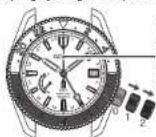
Pull out the crown to the second click when the seconds hand is pointing at the 0 second position.
EN 22
■ Date adjustment at the end of the month
It is necessary to adjust the date at the end of February and 30-day months.
Ex.) To adjust the date in the A.M. period on the first day of a month following a 30-day month. The watch displays "31" instead of "1." Pull out the crown to the first click.
Turn the crown counterclockwise to set the date to "1" and then push the crown back in to the normal position.
* For models with screw down crown, please be sure to lock the crown after operating it.

Pull out the crown to the first click
CAUTION
Avoid amending the date when the watch is displaying between 9 PM and 1 AM. Doing so may cause damage.
EN 21
3 For advancing the hands clockwise, turn the crown in the direction of the arrow and set the time of the 24-hour hand and the minute hand.
From about 10 minutes before the desired time, slowly advance and set the 24-hour hand and the minute hand.
As the hour hand moves together, it may point to a different time from the one you wish to set, or the date may change. Please set the minute hand and the 24-hour hand first.
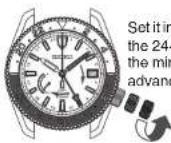
Set it in such a way that the 24-hour hand and the minute hand advance clockwise
4 Push the crown back in to the normal position.
Thereby, the 24-hour hand, the minute hand and the seconds hand will be in alignment.
* Time signal service is useful for second setting.

EN 23
Next, set the date and the hour hand.
5 Pull out the crown to the first click. The seconds hand continues moving.

Pull out the crown to the first click
6 Turn the crown to set the date and the hour hand.
Each time the hour hand makes two full rotations, the date is adjusted for "one day". While turning the crown, the moment the date changes is midnight. Please be sure that AM/PM is set correctly and then set the time.
The crown can be turned in either direction, however it is recommended that, you turn the crown in the direction which enables you to set the date with smaller adjustments.
* Turn the crown slowly, checking that the hour hand moves in one-hour increments.
* When adjusting the hour hand, the other hands may move slightly. However, this is not a malfunction.
7 Push the crown back in to the normal position.
* For models with screw down crown, please be sure to lock the crown after operating it.
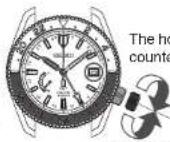
The hour hand moves clockwise

Push the crown back in to the normal position
EN 24
■ Tips for more accurate time setting
Take notice of the following points in order to set the time more accurately.
- Before setting the time, wind the mainspring until the power reserve indicator shows a full-wound state.
- When using a watch after it has stopped, wait approximately 30 seconds after the seconds hand starts moving, and then pull the crown out to the second click.
- Do not stop the seconds hand with the crown being at the second click position for thirty minutes or longer. If the time the crown has been at the second click position and the seconds hand has been stopped exceeds 30 minutes, push the crown back in to its original position, and let the seconds hand move for 30 seconds or longer, then restart the time setting.
■ Date adjustment at the end of the month
It is necessary to adjust the date at the end of February and 30-day months.
The hour hand and the date move in tandem. To set the date, two full rotations of the hour hand has to be performed, and thereby, the date will be adjusted for one day.
1 Make sure that the watch is working.
To carry out the procedure, please make sure that the watch is in working state. Please wind the mainspring when the watch is not working. "How to wind the mainspring by using crown (Hand winding)" → P. 14
2 Pull out the crown to the first click.
The seconds hand continues moving. * For models with screw down crown, please unlock the crown before operating it.
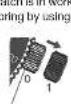
Pull out the crown to the first click
EN 26
3 Turn the crown to set the date and day.
Turn the crown to rotate the hour hand. Each time the hour hand makes two full rotations, the date is adjusted for "one day".
Turn the crown counterclockwise (in the direction of the arrow):
the date is advanced for one day.
The crown can be turned in either direction, however it is recommended that, you turn the crown in the direction which enables you to set the date with smaller adjustments.
* Turn the crown slowly, checking that the hour hand moves in one-hour increments.
* When adjusting the hour hand, the other hands may move slightly. However, this is not a malfunction.
Turning the crown clockwise (in the direction of the arrow):
the date is set back for one day.
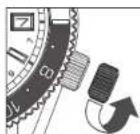
To advance the date for one day (7th)
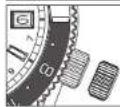
Before date adjustment (6th)
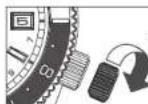
To move the date back for one day (5th)
EN 27
4 Turn the crown to set the hour hand to the current time.
Please set it while make sure that AM/PM is set correctly. The moment the date changes is midnight. * When you set the time to any time between 9:00 PM and midnight, by turning the hour hand counterclockwise passing midnight, move the hour hand back to 8:00 PM, and then carry out the setting. (It is an operation to move the date back.)
5 Push the crown back in to the normal position.
For models with screw down crown, please be sure to lock the crown after operating it.

Push the crown back in to the normal position
● Indicating the time of two different regions (as a dual time indicator)
It is possible to indicate the time of a region that is different from the time indicated by the hour and minute hand.
The watch offers two display modes. You can choose it depending on your needs and preferences.
"Time difference adjustment function" → P. 31
"How to set the time and date"→P.22
[Example 1]
Hour hand, date: A region (Japan) 24-hour hand: B region (Honolulu)
[Example 2]
Hour hand, date : B region (Honolulu) 24-hour hand : A region (Japan)
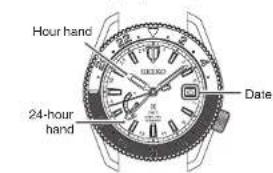
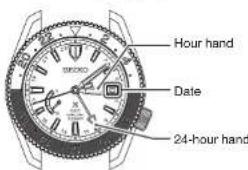
Japan : At 10:08 AM on 6th Honolulu : At 03:08 PM on 5th
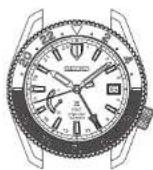
■ How to use the 24-hour hand
There are two ways to use the 24-hour hand as follows.
● Distinguishing between AM and PM (Standard usage type)
The time indicated by the hour and minute hand is shown in 24-hour format.
[Example]
Hour hand, date : Japan
24-hour hand : Japan
Japan: At 10:08 AM on 6th
Time difference adjustment function
When using the watch in a region with a different time zone, you can easily set the watch to indicate the local time.
The time can be adjusted without stopping the watch.
The hour hand and the date move in tandem. By setting the hour hand, it is adjusted to indicate
the date of your desired region having different time zone.
The time difference can be adjusted in one-hour
■ How to use the time difference adjustment function
1 Make sure that the watch is working.
* To carry out the procedure, please make sure that the watch is in working state. Please wind the mainspring when the watch is not working. "How to wind the mainspring by using crown (Hand winding)" → P. 14
2 Make sure that the hour hand, minute hand and the date correctly indicate the time and date of the region before changing the time zone.
* "How to set the time and date" → P. 22
3 Pull out the crown to the first click.
The seconds hand continues moving. * For models with screw down crown, please unlock the crown before operating it.

Pull out the crown to the first click
4 Turn the crown to set the hour hand and the date to indicate the time of the region you wish to set.
Please set it after making sure that the date and AM/PM are correctly set.
* Please set it by referring to "List of time zone differences in major regions of the world" → P. 33.
* During this operation, the hour hand and the date move in tandem. If AW/PM is not correctly set, the date may be off by 12 hours. While turning the crown, the moment the date changes is midnight.
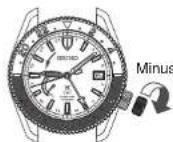
1 hour Plus 1
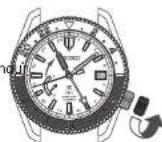
* Turn the crown slowly, checking that the hour hand moves in one-hour increments.
* When adjusting the hour hand, the other hands may move slightly. However, this is not a malfunction.
When you set the time to any time between 9:00 PM and midnight, by turning the hour hand counterclockwise passing midnight, move the hour hand back to 8:00 PM, and then carry out the setting. (It is an operation to move the date back.)
5 Push the crown back in to the normal
position.
* For models with screw down crown, please be sure to lock the crown after operating it.

Push the crown back in to the normal position
EN 32
■ List of time zone differences in major regions of the world
• To adjust the time difference, please refer to "How to use the time difference adjustment function" → P. 31.
| Name of the representing cities | Time difference from Japan | Time difference from UTC | Other cities |
| Wellington★ | +3 hours +12 hours | Fiji islands★, Auckland★ | |
| Noumea +2 hours +11 hours Solomon Islands | |||
| Sydney★ | +1 hour +10 hours Guam Island, Khabarovsk | ||
| Tokyo ±0 hour +9 hours Seoul, Pyongyang | |||
| Hong Kong -1 hour +8 hours Manila, Beijing, Singapore | |||
| Bangkok -2 hours +7 hours Jakarta | |||
| Dhaka -3 hours +6 hours | |||
| Karachi -4 hours +5 hours Tashkent | |||
| Dubai -5 hours +4 hours | |||
| Jeddah -6 hours +3 hours Mecca, Nairobi, Istanbul | |||
| Cairo | -7 hours +2 hours | Athens★ |
UTC = Coordinated Universal Time
UTC is a universal standard time determined by international agreements. It is used as the official time around the world when recording the time. UTC is a time coordinated by adding leap seconds to the "International Atomic Time (UTI)" determined from atomic clocks in the world, in order to correct the deviation from the astronomically defined universal time (UT).
EN 33
In the regions marked with , daylight saving time is introduced. (As of Oct, 2018)
| Name of the representing cities | Time difference from Japan | Time difference from UTC | Other cities |
| Paris★ | -8 hours -1 hour | Rome★, Amsterdam★ | |
| London★ | -9 hours -0 hour | ||
| Azores Islands★ | -10 hours -1 hour | ||
| Rio de Janeiro★ | -12 hours -3 hours | ||
| Santo Domingo | -13 hours -4 hours | ||
| New York★ | -14 hours -5 hours | Washington★, Montreal★ | |
| Chicago★ | -15 hours -6 hours | Mexico City★ | |
| Denver★ | -16 hours -7 hours | Edmonton★ | |
| Los Angeles★ | -17 hours -8 hours | San Francisco★ | |
| Anchorage★ | -18 hours -9 hours | ||
| Honolulu | -19 hours -10 hours | ||
| Midway Island | -20 hours -11 hours |
* There are time zone differences around the world based on time offsets from Coordinated Universal Time (UTC). The world is divided into 24 time zones where each part has a time difference of one hour. This system is adopted internationally in such a way that one full rotation of the earth corresponds to 24 hours (one day).
Depending on the country or the region, daylight saving time (summer time) is adopted individually.
* Daylight saving time, being defined as time difference +1 hour, is a system that advances the time by 1 hour during summer time to prolong the daylight hours.
* Time difference and daylight saving time are subject to change depending on the conditions of the respective countries or regions.
EN 34
How to use the simple compass (For models with rotating bezel having direction indicator)
By using the rotating bezel with a direction indicator and the 24-hour hand, the direction can be found.
The compass is usable only within the northern hemisphere, and it may not function properly in lower latitudes (South of the Tropic of Cancer) depending on the season of the year.
* It is a simple compass and it should not be used to indicate direction with high accuracy.
■ How to find a direction by using the 24-hour hand
When the 24-hour hand is set to indicate the current time, the direction can be found be using 24-hour hand.
1 Make sure that the 24-hour hand is indicating the current time of your current location.
2 Set the ☐ (North) of rotating bezel to 12 o'clock position.
Rotating
direction of the bezel
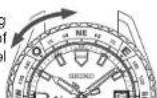

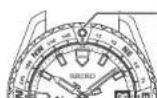
Set o to 12 o'clock position
EN 35
3 Keep the watch horizontal and point the 24-hour hand towards the direction of the sun.
The direction indicators on the rotating bezel indicates the direction of the point.
- In the rotating bezel, the direction (○ : North, E: East, W: West, S: South) and the angle in numerals are shown.
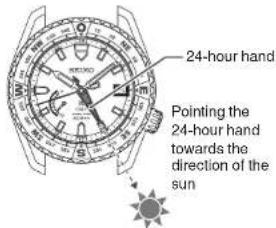
EN 36
How to use the rotating bezel with 24-hour scale (For models with rotating bezel having 24-hour scale)
By turning the rotating bezel, another time can be read at the 24-hour hand.
In the case of 24-hour hand being set to 24 hours of the hour and minute hands
(The direction and the amount to turn the rotating bezel can be determined by the following method. [The direction and the amount to turn the rotating bezel] E
is calculated as,
[Time difference from UTC of 24-hour hand, C] - [Time difference from UTC of the region you wish to know, D]
E=C-D
In this example, the 24-hour hand indicates Japan time, and therefore, C = +9.
a) As an example, If the time of a region you wish to know belongs to the time zone of UTC, the time difference from UTC is "0" and hence.
D=0
UTC can be read as "1:00" on the rotating bezel scale.
* If E is a positive number *-, turn the rotating bezel clockwise. If it is a negative number *-, turn it counter clockwise.
b) As another example, if you wish to know the time of the region "Los Angeles", the time difference from UTC is "-8 hours", so D = -8 E = C - D = (+9) - (-8) = +17
Turn the rotating bezel 17 hours clockwise (Result: Same as the counter clockwise rotation of 7 hours)
Los Angeles time can be read as "17:00". * When this intended usage is no longer needed, please return the original position "24" mark of rotating bezel to 12 hour position.
* "List of time zone differences in major regions of the world" • P. 33
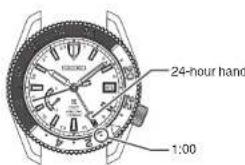
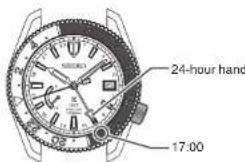
EN 38
■ In the case of 24-hour hand being set to different time zone
Three different time zones can be read by turning the rotating bezel.
[Example] When displaying 10:08 AM Japan time with the hour and minute hands, and displaying Paris time with the 24-hour hand.
Time difference from UTC of "Paris" where the 24-hour hand is set, C = +1
Time difference from UTC of "Bangkok" that you wish know from now on, D = +7 E=C-D= (+1) - (+7) = -6
Turn the rotating bezel counterclockwise and set.
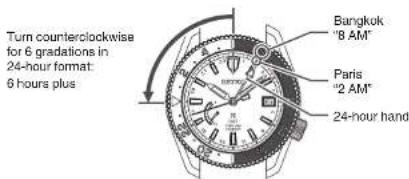
EN 37
EN 39
Daily care
● The watch requires good daily care
- Do not wash the watch when its crown is in the extended position.
- Wipe away moisture, sweat or dirt with a soft cloth.
• After soaking the watch in seawater, be sure to wash the watch in clean pure water and wipe it dry
Carefully. Do not pour running water directly from a faucet onto the watch. Put some water into a bowl first, and then soak the watch in the water to wash it.
* If your watch is rated as "Non-water resistant" or "water resistant for daily use," please do not wash the watch.
"Performance and type" · P. 41
"Water resistant performance" → P. 43
● Turn the crown from time to time
• In order to prevent corrosion of the crown, turn the crown from time to time.
• The same practice should be applied to a screw down crown.
"CROWN"→P.12
Lumibrite
If your watch has Lumibrite
Lumibrite is a luminous paint that absorbs the light energy of sunlight and lighting apparatuses in a short time and stores it to emit light in the dark. For example, it exposed to a light of more than 500 lux for approximately 10 minutes. Lumibrite can emit light for 3 to 5 hours. Please note, however, that, as Lumibrite emits the light it stores, the luminance level of the light decreases gradually over time. The duration of the emitted light may also differ slightly depending on such factors as the brightness of the place where the watch is exposed to light and the distance from the light source to the watch.
In general, when coming from a place that is bright to a place that is dark, it takes human eyes some time to adapt to the darkness making it difficult to see objects initially. (Dark adaptation)
* Lumibrite is luminous paint that stores and emits light, which is harmless to human beings and the environment, containing no toxic materials such as radioactive substances.
| Condition Illumination | ||
| Sunlight | Fine weather 100,000 lux | |
| Cloudy weather 10,000 lux | ||
| Indoor (Window-side during daytime) | Fine weather more than 3,000 lux | |
| Cloudy weather 1,000 to 3,000 lux | ||
| Rainy weather less than 1,000 lux | ||
| Lighting apparatus (40-watt daylight fluorescent light) | Distance to the watch: 1 m 1000 lux | |
| Distance to the watch: 3 m 500 lux (average room luminance) | ||
| Distance to the watch: 4 m 250 lux | ||
Performance and type
The case back shows the caliber and performance of your watch
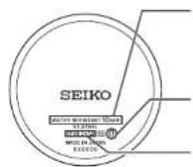
• Water resistant performance
Please refer to P. 43.
- Case Number
The number to identify the type of your watch.
* The above illustration is provided as an example, therefore it may not be exactly the same as your watch.
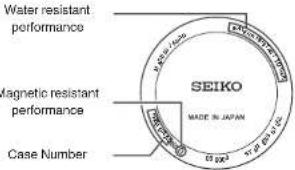
• Magnetic resistant performance
Refer to pages P. 44 and P. 45.
Water resistant performance
Refer the table below for the description of water resistant performance of your watch before using. (Please look at P. 41)
| Indication on the case back | Water resistant performance | Conditions of Use | |
| No indication Non-water resistance Avoid drops of water or sweat | |||
| WATER RESISTANT | Water resistance for everyday life | The watch withstands accidental contact with water in everyday life. | ⚠️ Please do not use it WARNING for swimming. |
| WATER RESISTANT 5 BAR | Water resistant enforced for daily use is at 5-BAR water resistant. | The watch is suitable for sports such as swimming. | |
| WATER RESISTANT 10(20)BAR | Water resistance for everyday life at 10 (20) barometric pressures | The watch is suitable for diving not using an air cylinder. | |
Magnetic resistant performance
Affected by nearby magnetism.
a watch may temporarily gain or lose time or stop operating
DANGER
| Indication on the case back Condition of use | |
| No indication Keep the watch more than 10 cm away from magnetic products. | |
| Keep the watch more than 5 cm away from magnetic products.(JIS level-1 standard) | |
| Keep the watch more than 1 cm away from magnetic products.(JIS level-2 standard) | |
If the watch becomes magnetized and its accuracy deteriorates to an extent exceeding the specified rate under normal use, the watch needs to be demagnetized. In this case, you will be charged for demagnetization and accuracy readjustment even if it happens within the guarantee period.
The reason why a watch is affected by magnetism
The built-in regulating mechanism is provided with a magnet, which may be influenced by a strong external magnetic field.
EN 44
Band
The band touches the skin directly and becomes dirty with sweat or dust. Therefore, lack of care may accelerate deterioration of the band or cause skin irritation or stain on the sleeve edge. The watch requires a lot of attention for long usage.
Metallic band
- Moisture, sweat or soil will cause rust even on a stainless steel band if they are left for a long time.
- Lack of care may result in a rash or cause a yellowish or gold stain on the lower sleeve edge of shirts.
- Wipe off moisture, sweat or soil with a soft cloth as soon as possible.
• To clean the soil around the joint gaps of the band, wipe it out in water and then brush it off with a soft toothbrush.
(Protect the watch body from water splashes by wrapping it up in plastic wrap etc.)
Clean it off with a soft cloth. - Because some titanium bands use pins made of stainless steel, which has outstanding strength, rust may form in the stainless steel parts.
- If rust advances, pins may poke out or drop out, and the watch case may fall off the band, or the clasp may not open.
- If a pin is poking out, personal injury may result. In such a case, refrain from using the watch and request repair.
EN 46
Examples of common magnetic products that may affect watches


AC adapter Bag
(with magnet
buckle)
Smartphone, cellular phone tablet terminal (speaker)

AC-powered shaver

Magnetic cooking device

Portable radio (speaker)

Magnetic necklace

Magnetic health pillow
EN 45
● Leather band
- A leather band is susceptible to discoloration and deterioration from moisture, sweat and direct sunlight.
- Wipe off moisture and sweat as soon as possible by gently blotting them up with a dry cloth.
- Do not expose the watch to direct sunlight for a long time.
- Please take care when wearing a watch with light-colored band, as dirt is likely to show up.
- Refrain from wearing a leather band watch other than Aqua Free bands while bathing, swimming, and when working with water even if the watch itself is water resistant enforced for daily use (10-BAR/20-BAR water resistant).
● Polyurethane band
- A polyurethane band is susceptible to discoloration from light, and may be deteriorated by solvent or atmospheric humidity.
- Especially a translucent, white, or pale colored band easily adsorbs other colors, resulting in color smears or discoloration.
- Wash out dirt in water and clean it off with a dry cloth.
(Protect the watch body from water splashes by wrapping it up in plastic wrap etc.) - When the band becomes less flexible, have the band replaced with a new one. If you continue to use the band as it is, the band may develop cracks or become brittle over time.
EN 47
Silicone band
- As for material characteristics, the band is easily dirtied, and may be stained and discolored. Wipe off dirt with a wel cloth or cleaning tissue.
- Unlike bands of other materials, cracks may result in the band being cut. Take care not to damage the band with an edged tool.
| Notes on skin irritation and allergy | Skin irritation caused by a band may result from various factors such as allergy to metals or leathers, or skin reactions against friction on dust or the band itself. |
| Notes on the length of the band | Adjust the band to allow a little clearance with your wrist to ensure proper airflow.When wearing the watch, leave enough room to insert a finger between the band and your wrist. |  |
How to use tri-fold type clasp for leather band (Special clasps)
There are 3 types of special clasps as described below:
If the clasp of the watch you purchased is one of them, please refer to the indications.
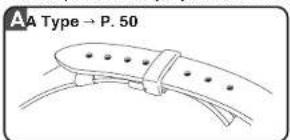
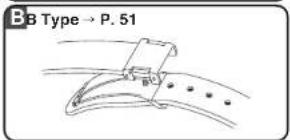
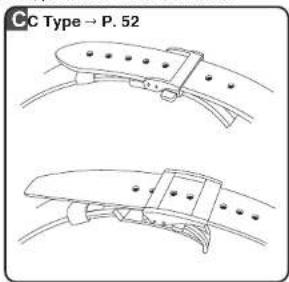

Type
1 Lift up the clasp to release the buckle.
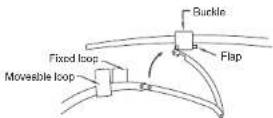

Open the flap.
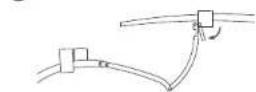
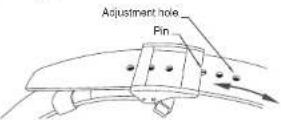
3 Remove the pin from the adjustment hole. Slide the band left and right, and reinsert the pin into the adjustment hole at an appropriate length.
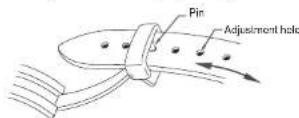
4 Fasten the flap.
Do not push the flap in too hard.
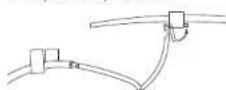
* When fastening the clasp, insert the tip of the band into the movable loop and fixed loop, and then, securely tighten the clasp.

Type
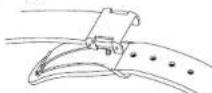
1 While pressing the push buttons on the both sides of the flap, lift to open the clasp.
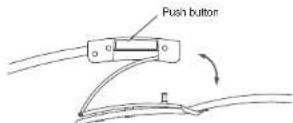
② Remove the pin from the adjustment hole. Slide the band left and right, and insert the pin into the adjustment hole at an appropriate length. Push the buckle and fasten the clasp.
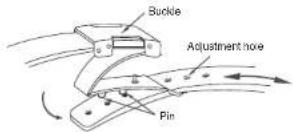

Type
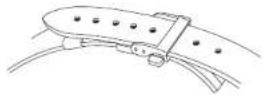
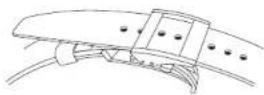
● How to wear or take off the watch
① Press the push buttons on both sides of the flap; pull the buckle up. The band will automatically come out of the loop.
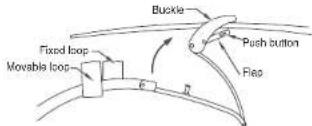
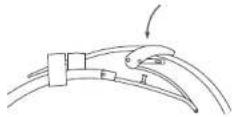
② Place the tip of the band into the movable loop and fixed loop, and fasten the clasp by pressing the frame of the buckle.
EN 52
● How to adjust the length of the band

Press the push buttons on both sides of the flap; pull the buckle up. The band will automatically come out of the loop.

Press the push buttons again to unfasten the flap.
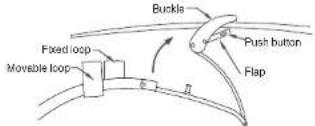
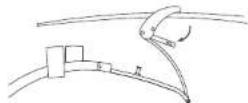

Pull the pin out of a adjustment hole of the band. Slide the band to adjust its length and find an appropriate hole. Place the pin into the hole.
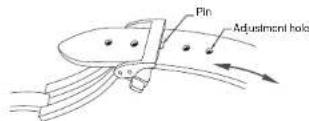

Fasten the flap.
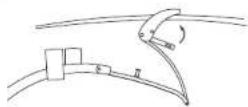
EN 54
How to use an easy adjust type clasp
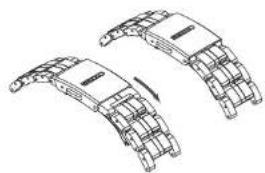
Some bands are provided with an easy adjust type clasp for fine adjustment of the band's length.
* The hand can be lengthened by up to about 5 mm.
This is useful if the band feels too tight or is uncomfortable for some reason.
natural_image
Technical line drawing of two mechanical components with curved brackets and a central plate (no text or symbols)● How to wear the band (opening and closing the clasp)
-
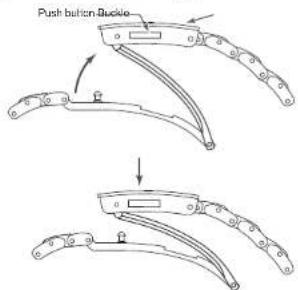
Lightly press the push buttons to open the clasp. * Note that pressing the push buttons too firmly (deeply) actuates the adjuster, which lengthens the band.
-
Fasten the clasp by pressing the frame of the buckle.
EN 56
● How to adjust the length of the band
-
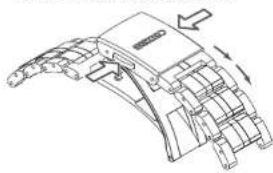
You can lengthen the band by up to about 5 mm (2 stages) by firmly pressing the push buttons from both sides to actuate the adjuster.
-
Fasten the clasp by pressing the frame of the buckle. * Even while the clasp is closed, you can still retract the length of band extended by the adjuster.
natural_image
Technical line drawing of a mechanical component with no visible text or symbols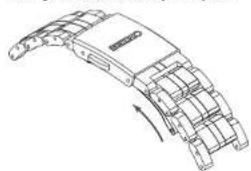
natural_image
Technical line drawing of a curved mechanical component with internal components and a rotation arrow (no text or symbols)* The above illustrations are provided as examples. Some details may differ depending on the model.
EN 57
After sales service
Notes on guarantee and repair
- Contact the retailer from whom the watch was purchased or SEIKO CUSTOMER SERVICE CENTER for repair or overhaul.
- Within the guarantee period, present the certificate of guarantee to receive repair services.
- Guarantee coverage is provided in the certificate of guarantee.
• For repair services after the guarantee period has expired, if the functions of the watch can be restored by repair work, we will undertake repair services upon request and payment.
● Replacement with functional parts
- Please keep in mind that if original parts are not available, they may be replaced with substitutes whose outward appearance may differ from the originals.
● Inspection and adjustment by disassembly and cleaning (overhaul)
- Periodic Inspection and adjustment by disassembly and cleaning (overhaul) is recommended approximately once every 3 to 4 years in order to maintain optimal performance of the watch for a long time.
- The power transmission gear of the movement of this watch constantly receives force. To ensure that this mechanism works properly all the time, washing parts, changing oil, adjusting accuracy, checking functions and replacing consumable parts on a regular basis are important. The first overhaul after the purchase of your watch is particularly important for preserving long-time use of your watch. According to use conditions, the oil retaining condition of your watch mechanical parts may deteriorate, abrasion of the parts may occur due to contamination of oil, which may ultimately lead the watch itself to stop. As the parts such as gasket may deteriorate, water resistant performance may be impaired due to intrusion of perspiration and moisture. Inspection and adjustment by disassembly and cleaning (overhaul) should be performed by the retailer from whom the watch was purchased, and who specifies "SEIKO GENUINE PARTS." At this time, also request replacement of the gasket and the spring bar.
- When your watch is inspected and adjusted by disassembly and cleaning (overhauled), the movement of your watch may be replaced.
EN 58
EN 59
Troubleshooting
| Troubles Possible causes Solutions | ||
| The watch stops operating. | The mainspring has not been wound. | Wind the mainspring as mentioned in "How to wind the mainspring" – (P. 13), and reset the time and use it. If it does not work still, contact the retailer where the watch was purchased. |
| Even though you wear the watch every day, the power reserve indicator does not move up. | The watch is worn on your wrist only for a short period of time, or the amount of arm movement is small. | Wear the watch for an extended period of time, or when taking off the watch, turn the crown to wind the mainspring if the remaining power shown by the power reserve indicator is not sufficient for the next use. |
| The watch stops even though the power reserve indicator is not showing "0". | The watch has been left at a low temperature (below 0°C). | Turn the crown to wind the mainspring and reset the time. At a temperature below 0°C, the watch may stop if the power reserve indicator is showing less than one-sixth of the power reserve. |
EN 60
| Troubles Possible causes Solutions | ||
| The watch temporarily galns/loses time. | The watch has been left in extremely high or low temperatures for a long time. | Return the watch to a normal temperature so that it works accurately as usual, and then reset the time. The watch has been adjusted so that it works accurately when it is worn on your wrist under a normal temperature range between 5°C and 35°C. |
| The watch has been left close to an object with a strong magnetic field. | Correct this condition by moving and keeping the watch away from the magnetic source, and reset the time. If this action does not correct the condition, contact the retailer from whom the watch was purchased. | |
| You drop the watch, hit it against a hard surface, or wear it while playing active sports. The watch is exposed to strong vibrations. | If accuracy does not return after setting the time, consult the retailer from whom the watch was purchased. | |
| The watch has not been overhauled for more than 3 years. | Consult the retailer from whom the watch was purchased. | |
| Right after starting the watch, it seems that the seconds hand moves more quickly than usual when setting the time. | When the watch starts moving, it takes a little time before the speed-regulating unit starts operating. (This is not a malfunction.) | It takes several seconds before the speed-regulating unit starts operating. To set the time correctly, wait for approximately 30 seconds after the seconds hand starts to move, and set the time. |
| The date changes at 12 o'clock noon. | AW/PM is not properly set. Advance the hands | is by 12 hours. |
| Blur in the display persists. | Small amount of water has got inside the watch due to deterioration of the gasket, etc. | Consult the retailer from whom the watch was purchased. |
EN 61
Specifications
| Cal, 5Hz 5Hz | ||
| 1.Features 3 hands (hour, minute and secondshands), date display. power reserveindicator | 3 hands (hour, minute and secondshands), 24-hour hand, date display.power reserve indicator | |
| 2. Frequency of crystaloscillator | 32,768 Hz (Hz = Cycles per second) | |
| 3. Loss/gain (daily rate) | ±15 seconds (±1 second per day)(Only if worn on the wrist in a temperature range of 5°C to 35°C) | |
| 4. Operationaltemperature range | -10 °C to +60 °CUnder a low-temperature condition (below 0 °C), always keep at least one-sixth ofthe watch power shown by the power reserve indicator. | |
| 5. Driving System Automatic winding type with manual winding mechanism | ||
| 6. Hand movement Slide motion | ||
| 7. Continuous operatingtimes | Approx. 72 hours (Approx. 3 days)* When the power reserve indicator shows fully wound.* Continuous operating time may be shortened depending on how the product is used. | |
| 8. IC (Integrated Circuit) | Oscillator, frequency divider, and spring drive control circuit (C-MOS-IC): 1 piece | |
| 9. Jewels (30 jewes) | ||
* The specifications are subject to change without prior notice due to product improvements.
EN 62
- Thank you very much for choosing a SEIKO watch. For proper and safe use of your SEIKO watch, please read carefully the instructions in this booklet before using it.
- CONTENTS
- HOW TO USE
- BEFORE USE
- 5R65 (A model without a 24-hour hand)
- 5R66 (A model with a 24-hour hand)
- TO PRESERVE THE QUALITY OF YOUR WATCH
- TROUBLESHOOTING
- SPECIFICATIONS
- Handling cautions
- WARNING
- CAUTION
- 1
- Characteristics
- - Spring Drive
- ● Function and Performance
- Names of the parts and their functions
- CROWN
- How to wind the mainspring
- ■ Guide for winding state of the mainspring
- ■ How to wind the mainspring by using crown (Hand winding)
- Power reserve indicator
- How to set the time and date
- ■ How to set the time and date
- ■ Tips for more accurate time setting
- ■ Date adjustment at the end of the month
- Time difference adjustment function
- Turn the crown to set the hour hand and the date to indicate the time of the region you wish to set.
- Push the crown back in to the normal
- position.
- ■ List of time zone differences in major regions of the world
- How to use the simple compass (For models with rotating bezel having direction indicator)
- ■ How to find a direction by using the 24-hour hand
- How to use the rotating bezel with 24-hour scale (For models with rotating bezel having 24-hour scale)
- ■ In the case of 24-hour hand being set to different time zone
- Daily care
- ● The watch requires good daily care
- ● Turn the crown from time to time
- Lumibrite
- If your watch has Lumibrite
- Performance and type
- Water resistant performance
- Magnetic resistant performance
- Band
- Metallic band
- Examples of common magnetic products that may affect watches
- ● Leather band
- ● Polyurethane band
- Silicone band
- How to use tri-fold type clasp for leather band (Special clasps)
- Type
- ● How to wear or take off the watch
- ● How to adjust the length of the band
- How to use an easy adjust type clasp
- ● How to wear the band (opening and closing the clasp)
- After sales service
- Notes on guarantee and repair
- ● Replacement with functional parts
- ● Inspection and adjustment by disassembly and cleaning (overhaul)
Brand : SEIKO
Model : 5R65
Category : Montre-bracelet