
5D88 - Montre-bracelet SEIKO - Free user manual and instructions
Find the device manual for free 5D88 SEIKO in PDF.


| Product Type | Wristwatch |
| Brand | Seiko |
| Model | 5D88 |
| Movement Type | Quartz (battery-powered) |
| Case Material | Stainless steel |
| Band Material | Stainless steel or leather (depending on variant) |
| Crystal | Mineral glass |
| Water Resistance | 100 meters (10 ATM) |
| Display Type | Analog with hour, minute, second hands |
| Calendar | Date and day display at 3 o'clock |
| Power Source | One silver oxide battery (e.g., SR626SW) |
| Battery Life | Approximately 2-3 years |
| Dimensions | Case diameter: 38-42 mm; Thickness: 10-12 mm; Band width: 18-22 mm |
| Weight | Approximately 80-120 g (depending on band material) |
| Care Instructions | Clean with a soft dry cloth; avoid exposure to strong magnetic fields and chemicals |
| Safety | Do not open the case; battery replacement should be done by a professional |
| Repairability | Spare parts available through authorized Seiko service centers; battery replacement is straightforward |
Frequently Asked Questions - 5D88 SEIKO
User questions about 5D88 SEIKO
0 question about this device. Answer the ones you know or ask your own.
Ask a new question about this device
Download the instructions for your Montre-bracelet in PDF format for free! Find your manual 5D88 - SEIKO and take your electronic device back in hand. On this page are published all the documents necessary for the use of your device. 5D88 by SEIKO.
USER MANUAL 5D88 SEIKO
INSTRUCTIONS (P. 45)
ISTRUZIONI (P. 66)
You are now the proud owner of a SEIKO KINETIC ^® Cal. 5D88. For best results, please read the instructions in this booklet carefully before using your SEIKO KINETIC ^® . Please keep this manual handy for ready reference.
For the care of your watch, see "TO PRESERVE THE QUALITY OF YOUR WATCH" in the attached Worldwide Guarantee and Instruction Booklet.
FEATURES
SEIKO KINETIC Cal. 5D88 is an analogue quartz watch equipped with the Kinetic technology developed by SEIKO. It generates the electric energy to power the watch, utilizing the movement of your body, and stores it in the rechargeable battery, which requires no periodical replacement unlike conventional button-type batteries. The watch is equipped with a direct drive indicator that constantly displays how long the watch will keep operating. The direct drive indicator also dynamically displays the electric power generation status while charging the watch. In addition, the watch is equipped with a 24-hour hand, date hand, day hand, and moon phase display.

CAUTION
● The movement of your arm while the watch is worn generates electrical energy to power the watch. Even if the watch is worn on your arm, it will not be charged while your arm is not in motion.
- It is recommended that the watch be worn on your wrist daily for at least 10 hours.
- If you do not wear the watch for more than the continuous operating time that it displays, charge the watch as necessary so as not to stop operation of the watch until the next time you wear it. Refer to "How to charge and start the watch" for further details.
DISPLAY AND BUTTON OPERATION
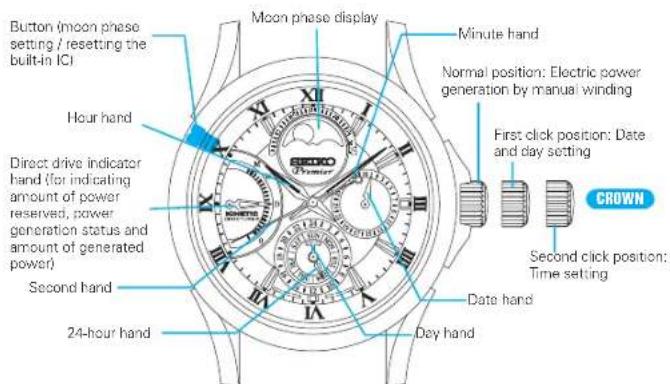
CROWN WITH DRIVING WHEEL
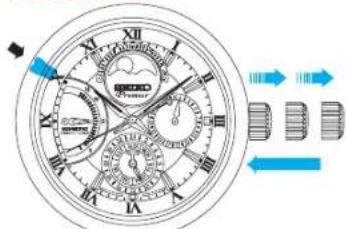
Some models may have a crown with a special structure as illustrated below. Refer to the following instructions when operating this type of crown, as it should be operated in a different way from that of ordinary ones.
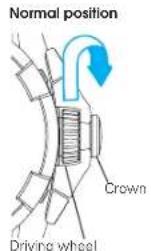
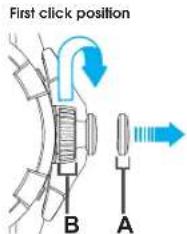
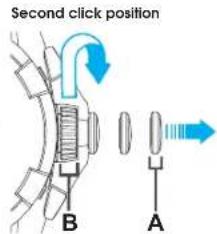
To pull out the crown, pull out the A portion (crown). To turn the crown, turn the B portion (driving wheel).
HOW TO CHARGE AND START THE WATCH
natural_image
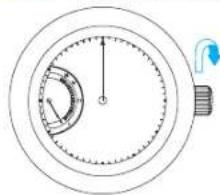
Diagram of a circular stopwatch with an arrow indicating clockwise motion (no text or symbols)- Turn the crown clockwise repeatedly to charge the watch.
* The manual winding mechanism for generating the electric power functions when the crown is turned clockwise. The watch can also be charged when the crown is turned in a reciprocating motion.
* When the watch is completely stopped, the direct drive indicator hand points at scale marking 1 under the 0 position (standby position).
natural_image
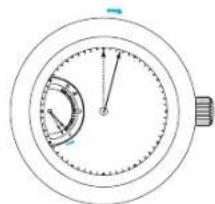
Simple line drawing of a stopwatch with no text or symbols- After electric power generation by turning the crown continues for a certain period, the direct drive indicator hand moves to point at scale marking 0 and the second hand starts moving. Make sure to stop turning the crown to check it.
* If the second hand does not move even though the crown is turned, turn the crown more quickly.
* If the watch has been left untouched for several years, the second hand starts moving in 2-second intervals after the crown is turned. This is not a malfunction. Charge the watch by turning the crown until the direct drive indicator hand moves from the standby position to the 0 position. It may take approximately 5 to 6 minutes.
3. Continue to turn the crown to sufficiently charge the watch.
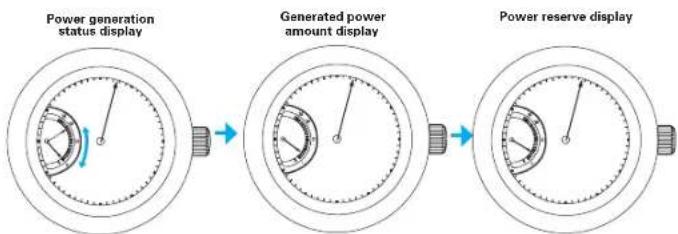
* The direct drive indicator hand moves up and down to display the electric power generation status.
* When you stop turning the crown, the indicator hand displays the amount of power generated by the current manual winding for approximately 4 seconds, and then the hand returns to display the total amount of power reserve. Charge the watch until the indicator hand points at the second marking above '0' (approximately 6 hours of power reserve).
* This watch will keep on operating for approximately 1 month (30 days) if it is fully charged. However, it is not necessary to charge the watch fully, as it is charged automatically while it is worn on your wrist.
* Refer to "How to read the direct drive indicator" for further details.
flowchart
graph LR
    A["Power generation status display"] --> B["Generated power amount display"]
    B --> C["Power reserve display"]
HOW TO READ THE DIRECT DRIVE INDICATOR
The direct drive indicator can be used to check the following:
(1) Power reserve amount (continuous operating time)
(2) Real-time power generation status and newly generated amount of power while charging the watch
POwER RESERvE INDICATOR
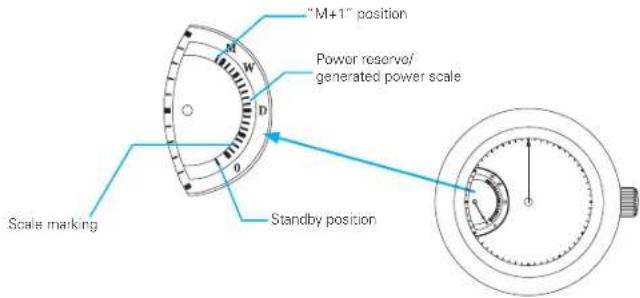
The watch checks power reserved in the rechargeable battery and displays how long the watch will keep operating in 18 steps (0 - M scale marking).
The continuous operating time until approximately one month (30 days) can be displayed.
* The power reserve indicator provides an approximate time that the watch keeps operating without needing to be charged.
* If the direct drive indicator hand moves to the 0 position, the watch will stop operating within 3 hours. When the watch stops, the indicator hand moves to the standby position to show that the watch stops operating due to a power shortage.
* If the crown is turned after the watch is fully charged, the indicator points at the "M+1" position.
REAL-TImE POWER INDICATOR
- While turning the crown to charge the watch, the watch checks a newly generated amount of power and displays it in 19 steps (0 - "M+1" scale marking).
A maximum 6 hours of generated power can be displayed.
* The real-time power indicator provides an approximate amount of power generated through current power generation.
* After power generation by turning the crown is completed, the indicator hand will display the amount of newly generated power for approximately 4 seconds, and then the indicator hand will move to display the total amount of power reserve.
■ SCALE TABLE OF POwER RESERvE AmOUNT AND GENERATED POwER AmOUNT
| Scale marking | Standby position | 0 1 2 3 | 4 5 6 | 7 8 9 10 | 11 | ||||||||
| Indication and dial | 0 | D (Day) | |||||||||||
| Power reserve amount | The watch stops operating | 0 3 H | 6 H | 9 H | 12 H | 15 H | 18 | H 21 H | 1 D 2 | D 3 D | 1 D | ||
| Amounts of generated power | 0 20 Min. | 40 Min. | 1 H | 1 H 20 Min. | 1 H 40 Min. | 2 H 2 Min. | 2 H 40 Min. | 3 H 3 H 20 Min. | 3 H 40 Min. | ||||
| Scale marking | 12 13 | M | 15 16 | T | 19 | ||
| Indication on dial | W(Week) | M(Month) | |||||
| Power reserve amount | 5 D 6 | D 1 W | 2 W | 3 W 30 | D | ||
| Amount of generated power | 4 H 4 | H20Min. | 4 H40Min. | 5 H 5 | -20Min. | 5 H40Min. | 6 H |
H : Hour
D:Day
W:Week
* The minimum amount of power reserve and generated power is described in the table.
English
Ex.) How to read the scale table of power reserve and generated power.
| Scale, marking, Power reserve | |
| 3 Not shorter than 9 hours | and not longer than 12 hours |
| 9 Not shorter than 2 days. | and not longer than 3 days |
| 17 30 days | |
| Scale, marking. Generated, power | |
| 3 1, hour, or, more. | |
| 9 3, hour, or, more | |
| 18 6, hour, or, more | |
■ HOW TO READ THE DIRECT DRIVE INDICATOR WHILE CHARGING THE WATCH
- Turn the crown clockwise. After approximately 1 second, the direct drive indicator hand starts moving.
- Continue to turn the crown. The indicator hand moves upward and downward according to the power generation status. When further continuing to turn the crown, the point where the indicator hand starts moving goes up as the amount of generated power increases. If you temporarily stop turning the crown, the indicator hand goes down to display the accumulated power generated by the current power generation.
- Stop turning the crown. The direct drive indicator hand returns to display the total amount of power reserve after approximately 4 seconds.
After the crown is turned repeatedly, the indicator hand will stop at the maximum scale value ("M+1" position). If the crown is turned after the indicator hand stops at the "M+1" position, the watch continues to accumulate power reserve, but stops displaying the power generation status. If you want to display the power generation status, stop turning the crown, and after the indicator hand returns to display the power reserve, start turning the crown again.
* If turning the crown more quickly and in long strokes so that the indicator hand makes large movement, the generated power increases efficiently.
* Depending on intervals between turning the crown, the indicator hand may not move. This is not a malfunction.
* The watch is equipped with a system to prevent overcharge. Even if the crown is turned when the indicator hand points at the maximum scale value of power reserve, no malfunction
will result.
* The watch can be charged if it is swung from side to side, however, it may take time until it displays the power generation status.
* Even if the watch is worn on the wrist after it is charged fully (power reserve of 30 days), and then it is left untouched, the watch will not operate for more than 30 days after it is worn again.
* When you take off the watch and leave it untouched, look at the indicator to check if the watch continues to operate until you wear the watch the next time, and turn the crown to charge the watch as necessary (make sure to store extra power so as not to stop operation of the watch).
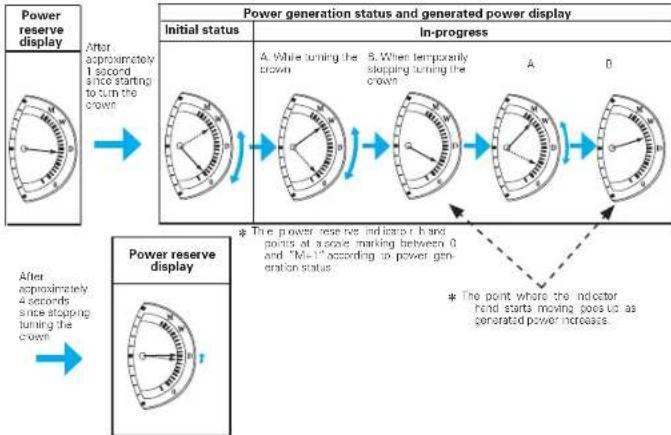
flowchart
graph LR
    A["Power reserve display"] --> B["After approximately 1 second, since starting to turn the crown"]
    B --> C["Power generation status and generated power display"]
    C --> D["Initial status: A. While turning the crown, B. When temporarily stopping turning the crown"]
    D --> E["Power generation status: A, B"]
    E --> F["Power reserve display"]
    F --> G["After approximately 4 seconds, since stopping turning the crown"]
    G --> H["Power generation status: A, B"]
    H --> I["Power generation status: A, B"]
    I --> J["Power reserve display"]
    J --> K["Power generation status: A, B"]
    K --> L["Power generation status: A, B"]
    L --> M["Power reserve display"]
    M --> N["Power generation status: A, B"]
    N --> O["Power generation status: A, B"]
    O --> P["Power reserve display"]
    P --> Q["Power generation status: A, B"]
    Q --> R["Power generation status: A, B"]
    R --> S["Power reserve display"]
    S --> T["Power generation status: A, B"]
    T --> U["Power generation status: A, B"]
    U --> V["Power reserve display"]
    V --> W["Power generation status: A, B"]
    W --> X["Power generation status: A, B"]
    X --> Y["Power reserve display"]
    Y --> Z["Power generation status: A, B"]
    Z --> AA["Power generation status: A, B"]
    AA --> AB["Power reserve display"]
    AB --> AC["Power generation status: A, B"]
    AC --> AD["Power generation status: A, B"]
    AD --> AE["Power reserve display"]
    AE --> AF["Power generation status: A, B"]
    AF --> AG["Power generation status: A, B"]
    AG --> AH["Power reserve display"]
    AH --> AI["Power generation status: A, B"]
    AI --> AJ["Power generation status: A, B"]
    AJ --> AK["Power reserve display"]
    AK --> AL["Power generation status: A, B"]
    AL --> AM["Power generation status: A, B"]
    AM --> AN["Power reserve display"]
    AN --> AO["Power generation status: A, B"]
    AO --> AP["Power generation status: A, B"]
    AP --> AQ["Power reserve display"]
    AQ --> AR["Power generation status: A, B"]
    AR --> AS["Power generation status: A, B"]
    AS --> AT["Power reserve display"]
    AT --> AU["Power generation status: A, B"]
    AU --> AV["Power generation status: A, B"]
    AV --> AW["Power reserve display"]
    AW --> AX["Power generation status: A, B"]
    AX --> AY["Power generation status: A, B"]
    AY --> AZ["Power reserve display"]
    AZ --> BA["Power generation status: A, B"]
    BA --> BB["Power generation status: A, B"]
    BB --> BC["Power reserve display"]
    BC --> BD["Power generation status: A, B"]
    BD --> BE["Power generation status: A, B"]
    BE --> BF["Power reserve display"]
    BF --> BG["Power generation status: A, B"]
    BG --> BH["Power generation status: A, B"]
    BH --> BI["Power reserve display"]
    BI --> BJ["Power generation status: A, B"]
    BJ --> BK["Power generation status: A, B"]
    BK --> BL["Power reserve display"]
    BL --> BM["Power generation status: A, B"]
    BM --> BN["Power generation status: A, B"]
    BN --> BO["Power reserve display"]
    BO --> BP["Power generation status: A, B"]
    BP --> BQ["Power generation status: A, B"]
    BQ --> BR["Power reserve display"]
    BR --> BS["Power generation status: A, B"]
    BS --> BT["Power generation status: A, B"]
    BT --> BU["Power reserve display"]
    BU --> BV["Power generation status: A, B"]
    BV --> BW["Power generation status: A, B"]
TIME/CALENDAR SETTING
English
natural_image
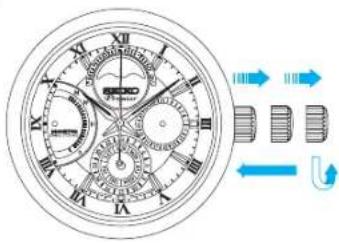
Technical illustration of a mechanical stopwatch with dual dials and directional arrows (no text or symbols)- Pull out the crown to second click when the second hand is at the 12 o'clock position.
- Turn the crown to set the time.
* When setting the hour hand, check that AM/PM is correctly set. The watch is designed so that the calendar changes once in 24 hours.
Turn the hand past the 12 o'clock marker to determine whether the watch is set for the A.M. or P.M. period. If the calendar changes, the time is set for the A.M. period. If the calendar does not change, the time is set for the P.M. period.
* When setting the minute hand, advance it 4 to 5 minutes ahead of the desired time and then turn it back to the exact minute.
3. Push the crown back in to the normal position in accordance with a time signal.
■ HOw TO SET THE DATE AND DAy
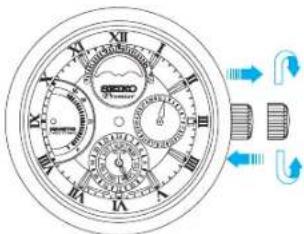
- Pull out the crown to first click.
- Turn the crown counterclock wise to set the date hand to point at the correct date.
- Turn the crown clockwise to set the day hand to point at the correct day of the week.
* Do not set the date and day of the week between 9:00 p.m. and 4:00 a.m. Other wise, it may not change properly.
* It is necessary to adjust the date and day of the week on the first day after a 30-day month and February.
4. Push the crown back in to the normal position.
English
HOW TO SET THE MOON PHASE
The moon phase represents the period from the time when the last new moon occurred to noon of the current day in day increments.
The period between new moons is called a "synodic month," and its average length is approximately 29.5 days.
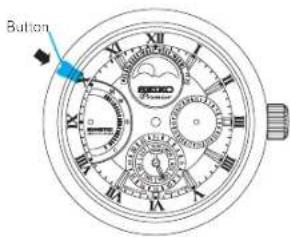
- Press the button using an object with a long tapered tip such as a ballpoint pen.
When the button is pressed, the moon phase advances by one phase.
* Round off the number of moon phases to the nearest whole number. (Example: 7.8 → 8, 24.2 → 24)
* Refer to the weather report of your local newspaper for current mo on phase information.
* Do not set the moon phase between 9 p.m. and 1 a.m., as the moon phase may not change to the correct display on the following day.
| Moon phase 0 (new moon) | Moon phase 7 | Moon phase 15 (full moon) | Moon phase 22 |
 |  |  |  |
IMPROPER FUNCTION
When the watch stops operating even though it displays the remainder of the power reserve, follow the instructions below to reset the built-in IC.
■ HOw TO RESET THE BUILT-IN IC
- Pull out the crown to the second click.
- Press the button for 2 seconds or more using a sharp-pointed tool (e.g. ball point pen).
- Push the crown back into the normal position.
* The indicator hand will point at the 0 position, and the watch resumes its normal operation.
* If the indicator hand points at under the 0 position, sufficiently charge the watch. Refer to "How to charge and start the watch".
* By conducting this operation, the indicator hand moves to the 0 position even though it displayed that there was remaining power reserve; however, this is not a malfunction.
* If the watch does not resume normal operation even after resetting the built-in IC, consult the retailer from whom the watch was purchased.
- Turn the crown to charge the watch at least until the indicator hand points at the second marking above "0"(approximately 6 hours of power reserve). And then set the time, date, day of the week, and moon phase.
AUTOMATIC HAND ALIGNMENT
The position of the indicator hand may move out of alignment in rare cases. The watch automatically corrects the position of the indicator hand once every 24 hours. While correcting the hand position, the indicator hand moves abnormally, however, this is not a malfunction. After automatic hand alignment is performed, the indicator hand will return to display power reserve amount.
POWER SOURCE (RECHARGEABLE BATTERY)
This watch requires no periodic battery replacement as it is powered by the exclusive rechargeable battery, which is completely different from conventional batteries for watches.
This exclusive rechargeable battery is an environmentally friendly, clean energy storage device.

CAUTION
Never install a silver oxide battery for conventional watches in place of the rechargeable battery, which can generate heat that can cause bursting or ignition.
NOTES ON OVERHAUL
The watch is a precision device. If the parts run short of oil or get worn out, the watch may stop its operation or lose time. We recommend you have the watch overhauled periodically to keep it running accurately.
SPECIFICATIONS
1 Frequency of crystal oscillator 32,768 Hz (Hz = Hertz ... Cycles per second)
2 Loss/gain (monthly rate) .... Less than 15 seconds (worn on the wrist at normal temperature range between 5^ and 35^ )
3 Operational temperature range -10°C - +60°C
4 Driving system Step motor: 2 pieces
5 Display system 24-hour, hour, minute, second, date, day of the week, and moon phase Power reserve display, power generation status display, and presented power output displays
6 Rechargeable battery Button type, 1 piece
7 Duration of charge ....Approximately 1 month (if the watch is fully charged)
B Additional functions ...... Overcharge prevention function
9 IC (Integrated Circuit) C-MOS-IC, 1 piece
10 Generating system Miniature AC generator
* The specifications are subject to change without prior notice for product improvements.
- FEATURES
- CAUTION
- CROWN WITH DRIVING WHEEL
- HOW TO CHARGE AND START THE WATCH
- Continue to turn the crown to sufficiently charge the watch.
- HOW TO READ THE DIRECT DRIVE INDICATOR
- POwER RESERvE INDICATOR
- REAL-TImE POWER INDICATOR
- ■ HOW TO READ THE DIRECT DRIVE INDICATOR WHILE CHARGING THE WATCH
- TIME/CALENDAR SETTING
- ■ HOw TO SET THE DATE AND DAy
- HOW TO SET THE MOON PHASE
- IMPROPER FUNCTION
- ■ HOw TO RESET THE BUILT-IN IC
- AUTOMATIC HAND ALIGNMENT
- POWER SOURCE (RECHARGEABLE BATTERY)
- NOTES ON OVERHAUL
- SPECIFICATIONS
Brand : SEIKO
Model : 5D88
Category : Montre-bracelet