
4F32 - Montre-bracelet SEIKO - Free user manual and instructions
Find the device manual for free 4F32 SEIKO in PDF.


| Product Type | Wristwatch |
| Brand | Seiko |
| Model | 4F32 |
| Movement Type | Quartz (Caliber 4F32) |
| Case Diameter | Approx. 40 mm |
| Case Material | Stainless steel |
| Band Material | Stainless steel bracelet or leather strap |
| Weight | Approx. 100 g |
| Power Source | One SR920SW battery (approx. 3 years life) |
| Functions | Hours, minutes, seconds, date |
| Water Resistance | 10 bar (100 meters) - suitable for swimming and snorkeling |
| Crystal | Hardlex or mineral glass |
| Care & Cleaning | Wipe with a soft cloth; avoid solvents. Rinse with fresh water after saltwater exposure. |
| Safety Precautions | Keep away from strong magnetic fields; do not press buttons underwater. |
| Spare Parts & Repairability | Available through authorized Seiko service centers; battery replacement recommended every 2-3 years. |
| General Information | Designed for everyday wear; accuracy within ±15 seconds per month. |
Frequently Asked Questions - 4F32 SEIKO
User questions about 4F32 SEIKO
0 question about this device. Answer the ones you know or ask your own.
Ask a new question about this device
Download the instructions for your Montre-bracelet in PDF format for free! Find your manual 4F32 - SEIKO and take your electronic device back in hand. On this page are published all the documents necessary for the use of your device. 4F32 by SEIKO.
USER MANUAL 4F32 SEIKO
You are now the proud owner of a SEIKO Analogue Quartz Watch Cal. 4F32/8F32/8F33. For best results, please read the instructions in this booklet carefully before using your SEIKO Analogue Quartz Watch. Please keep this manual handy for ready reference.
NOTES ON USING THE WATCH 9
BATTERY CHANGE 11
SPECIFICATIONS 13
☆For the care of your watch, see "TO PRESERVE THE QUALITY OF YOUR WATCH" in the attached Limited Warranty and Instruction Booklet.
SEIKO CAL. 4F32, 8F32, 8F33
PERPETUAL CALENDAR
- Once set, the calendar automatically adjusts for odd and even months including February of leap years up to February 28, 2100.
- It indicates the month, date, day of the week (Cal. 8F33) and the number of years since the last leap year.
HIGH ACCURACY
- Loss/gain: Annual rate of less than 20 seconds
Before using the watch:
- Because the calendar is preadjusted at the factory, you only need to set the time, date and day (Cal. 8F33), and the calendar will automatically update itself.
- Before using the watch, be sure to read "HOW TO CHECK THE CALENDAR", and then, set the time, date and day (Cal. 8F33) correctly following the procedures in "TIME/DATE SETTING" and "DAY SETTING".
* In case the calendar indication is not correct after the time/date setting is made, consult the retailer from whom the watch was purchased or an AUTHORIZED SEIKO DEALER.
Cal. 4F32, 8F32 Cal. 8F33
Hour hand Minute hand
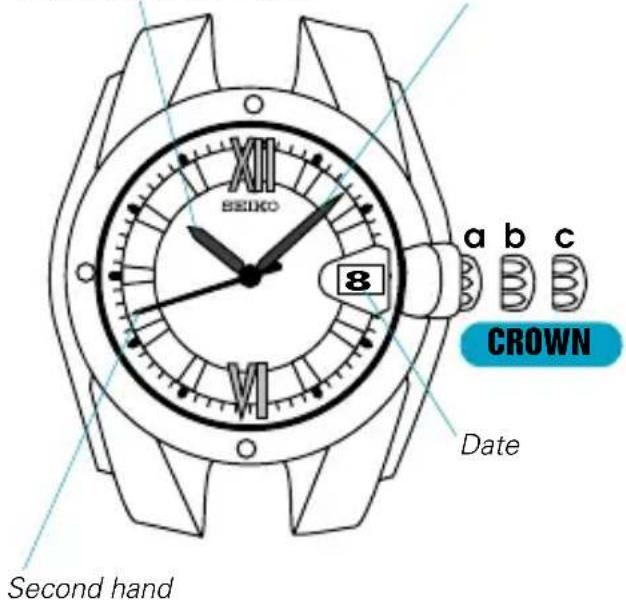
a: Normal position b: First click
Hour hand Minute hand
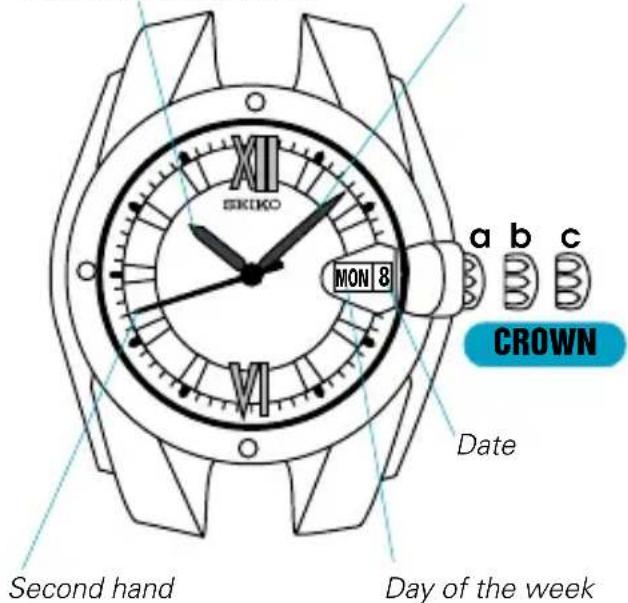
c: Second click
TIME/DATE SETTING
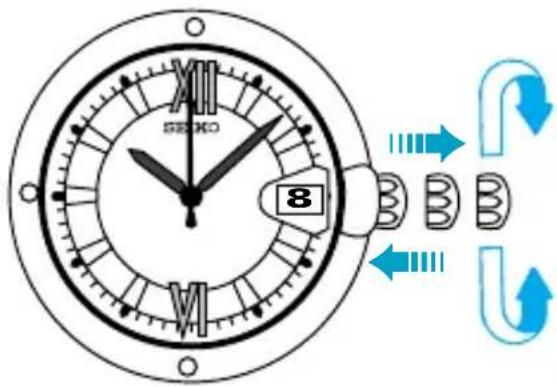
CROWN
Pull out to second click when Second hand is at the 12 o'clock position.
Turn in either direction to set the time and date.
Push back completely in accordance with a time signal.
DAY SETTING (For Cal. 8F33)
- Set the time and date first, and then, set the day of the week.
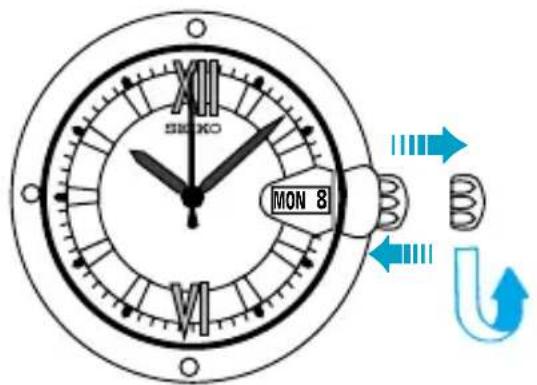
CROWN
Pull out to first click.
Turn counterclockwise to set the day.
Push back in to normal position.
HOW TO CHECK THE CALENDAR
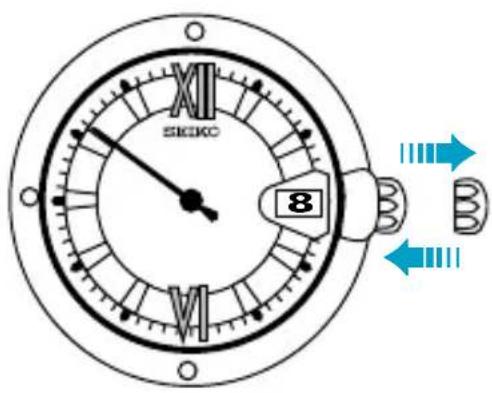
CROWN
Pull out to first click, and push back in to normal position within a second.
- The watch shows the calendar in the following order:
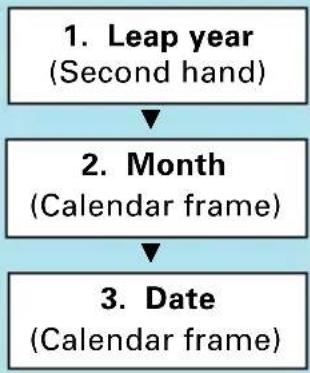
flowchart
graph TD
    A["1. Leap year\n(Second hand)"] --> B["2. Month\n(Calendar frame)"]
    B --> C["3. Date\n(Calendar frame)"]
1. Leap year indication
The second hand moves quickly at five-second intervals and stops to indicate the number of years that have passed since the last leap year. Before pulling out the crown to the first click, check and remember where the second hand is so that you can read how many seconds it has advanced.
| Quick movement of second hand | 5 seconds 10 seconds 15 seconds | 20 seconds | ||
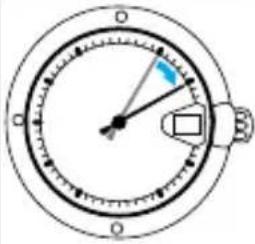 | 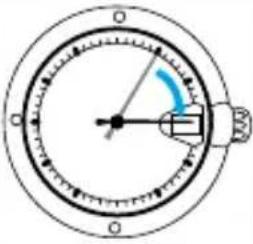 | 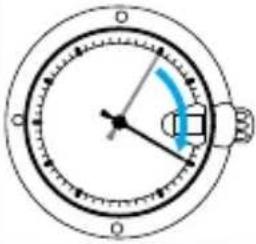 | 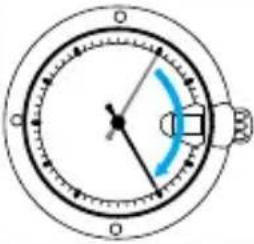 | |
| Number of years since the last leap year | 1 year 2 years 3 years | 4 years (leap year) | ||
| Year | 1997 | 1998 | 1999 | 2000 |
| 2001 | 2002 | 2003 | 2004 | |
| 2005 | 2006 | 2007 | 2008 | |
| . | . | . | . | |
| . | . | . | . | |
| . | . | . | . | |
| 2093 | 2094 | 2095 | 2096 | |
| 2097 | 2098 | 2099 | - | |
2. Current month
The current month is shown in the calendar frame for 5 seconds.
* January is represented by "1", February "2", and so on.
3. Current date
The numeral in the calendar frame returns to the current date.
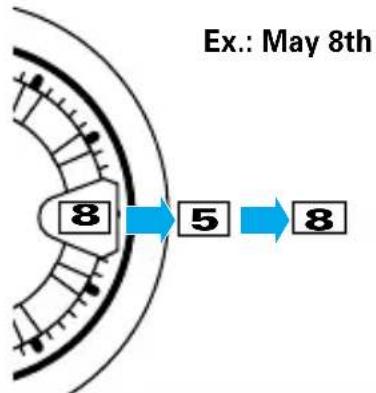
flowchart
graph LR
    A["Start"] --> B["Step 5"]
    B --> C["Step 8"]
    style A fill:#f9f,stroke:#333
    style C fill:#bbf,stroke:#333
* When the month and date are represented by the same numeral as in the case of "January 1st", "February 2nd" and so on, the numeral in the calendar frame quickly advances and moves back by one to indicate that the month and date numerals are identical.
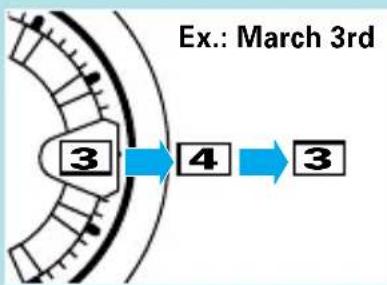
flowchart
graph LR
    A["Ex.: March 3rd"] --> B["3"]
    B --> C["4"]
    C --> D["3"]
★ After the calendar has been displayed, the second hand starts moving quickly and then resumes normal movement.
NOTES ON USING THE WATCH
HOW TO OPERATE THE SCREW LOCK TYPE CROWN (for models with screw lock type crown)
• To unscrew the crown:
Turn the crown counterclockwise. (Then, pull it out for setting the time or checking the calendar)
• To screw in the crown:
With the crown at the normal position, turn it clockwise while pressing it.
TIME, DATE AND DAY SETTING
- When setting the date and day, turn the crown counterclockwise to advance the date and day and clockwise to move them back. The date and day change one day by turning the hour hand two full circles.
TIME/DATE SETTING
- The date changes between 11:45 p.m. and 0:30 a.m. while the watch is in operation and between 9:00 p.m. and 3:00 a.m. when it is changed manually by turning the hands. Therefore, note the following.
[AM/PM checking]
When setting the hour hand, check that AM/PM is correctly set.
* When setting the time by advancing the hands, turn the hour hand past the 3 o'clock marker. If the date advances, the time is set for the AM period. If it does not change, the time is set for the PM period.
* When setting the time by turning back the hands, turn the hour hand past the 9 o'clock marker. If the date moves back, the time is set for the PM period. If it does not change, the time is set for the AM period.
[Setting the time between 9:00 p.m. and 3:00 a.m.]
* If the time is adjusted to the time period between 9:00 p.m. and 3:00 a.m., the date may not change properly. The watch, however, will indicate the date properly after 3:00 a.m.
* To prevent this from occurring, first turn back the hour hand past 9:00 p.m., checking that the date moves back to the previous day, and then, advance the hands to the desired time.
- When setting the minute hand, advance it 4 to 5 minutes ahead of the desired time and then turn it back to the exact time.
DAY SETTING
- The day changes between 11:00 p.m. and 4:00 a.m. while the watch is in operation and also when it is changed manually by turning the hands.
- Do not change the day between 10:00 p.m. and 5:00 a.m. Otherwise, it may not change properly. If it is necessary to set the day during that time period, first change the time to any time outside it, set the day and then reset the correct time.
HOW TO CHECK THE CALENDAR
- If the crown is pulled out to the second click instead of the first click and pushed back in to the normal position, the watch will not show the calendar.
- Do not leave the crown at the first or second click when you use the watch, as this will shorten the battery life.
• Note on the leap second
One day normally is said to consist of 86,400 seconds. In fact, it can be longer or shorter than this because of irregular changes in the rotation cycle of the earth. When the accumulated fluctuations in the length of a day total plus or minus one second, one
second must then be added or subtracted as a correction factor. This is known as a "leap second".
The leap second correction is executed every year or two simultaneously throughout the world on the basis of information collected by astronomical observatories all over the world. The correction is effected between 11:59'59" p.m. and 0:00'00" a.m. GMT either on December 31 or on June 30, during which one second is added or subtracted.
When this happens, please adjust your watch accordingly.
Please refer to your newspaper for information on the leap second.
BATTERY CHANGE

[Cal. 4F32]

[Cal. 8F32, 8F33]
The miniature battery which powers your watch should last approximately 5 years (Cal. 4F32) / 10 years (Cal. 8F32 and 8F33). However, because the battery is inserted at the factory to check the function and performance of the watch, its actual life once in your possession may be less than the specified period. When the battery expires, be sure to replace it as soon as possible to prevent any malfunction. For battery replacement, we recommend that you contact an AUTHORIZED SEIKO DEALER and request SEIKO CR1612 (Cal. 4F32) / SEIKO CR2412 (Cal. 8F32 and 8F33) battery.
* If the calendar checking function is used frequently, the battery life may be less than the specified period.
- Battery life indicator
When the second hand starts moving at two-second intervals instead of the normal one-second interval, replace the battery with a new one as soon as possible. Otherwise, the watch will stop operating in two weeks.
* The time accuracy is not affected even if the second hand is moving at two-second intervals.
* While the second hand is moving at two-second intervals, the watch will not show the calendar even if the crown is pulled out to the first click.
- Checking and adjustment of the calendar after battery change
The calendar function is not affected by battery changes. However, after the battery is replaced with a new one, be sure to check that the calendar is correct. (See "HOW TO CHECK THE CALENDAR")
If the watch does not indicate the leap year, month and date correctly, have the watch adjusted by an AUTHORIZED SEIKO DEALER.

WARNING
- Do not remove the battery from the watch.
- If it is necessary to take out the battery, keep it out of the reach of children. If a child swallows it, consult a doctor immediately.

CAUTION
- Never short-circuit, heat or otherwise tamper with the battery, and never expose it to fire. The battery may burst, become very hot or catch fire.
- The battery is not rechargeable. Never attempt to recharge it, as this may cause battery leakage or damage to the battery.
SPECIFICATIONS
1 Frequency of crystal oscillator 196,608 Hz (Hz = Hertz ... Cycles per second)
2 Loss/gain (Annual rate) .... ±20 seconds when used on the wrist approximately 12 hours a day, at normal temperature range (5°C \~ 35°C) (41°F \~ 95°F)
* Monthly rate of loss/gain may amount to approximately 4 seconds depending on the condition of use.
3 Operational temperature range .... -10°C \~ +60°C (14°F \~ 140°F)
4 Driving system .... Step motor for the time indication
Ultrasonic motor for the calendar indication
5 Battery .... SEIKO CR1612, 1 piece (Cal. 4F32)
SEIKO CR2412, 1 piece (Cal. 8F32 and 8F33)
6 Battery life indicator
7 IC (Integrated Circuit) C-MOS-LSI, 1 piece
* The specifications are subject to change without prior notice for product improvement.
- SEIKO CAL. 4F32, 8F32, 8F33
- PERPETUAL CALENDAR
- HIGH ACCURACY
- Before using the watch:
- Cal. 4F32, 8F32 Cal. 8F33
- TIME/DATE SETTING
- CROWN
- DAY SETTING (For Cal. 8F33)
- HOW TO CHECK THE CALENDAR
- Leap year indication
- Current month
- Current date
- NOTES ON USING THE WATCH
- HOW TO OPERATE THE SCREW LOCK TYPE CROWN (for models with screw lock type crown)
- • To unscrew the crown:
- • To screw in the crown:
- TIME, DATE AND DAY SETTING
- [AM/PM checking]
- [Setting the time between 9:00 p.m. and 3:00 a.m.]
- DAY SETTING
- • Note on the leap second
- BATTERY CHANGE
- - Battery life indicator
- - Checking and adjustment of the calendar after battery change
- WARNING
- CAUTION
- SPECIFICATIONS
Brand : SEIKO
Model : 4F32
Category : Montre-bracelet