UMFI-22-GEN2 - Measurement Radiant - Free user manual and instructions
Find the device manual for free UMFI-22-GEN2 Radiant in PDF.


| Product Type | Digital Multimeter |
| Brand | Radiant |
| Model | UMFI-22-GEN2 |
| Category | Measurement |
| Dimensions | Approx. 150 x 80 x 30 mm |
| Weight | Approx. 250 g (with battery) |
| Power Supply | 1 x 9V battery (6F22, NEDA 1604) |
| Display | LCD, 3 1/2 digits, 2000 counts |
| DC Voltage Range | 200 mV, 2V, 20V, 200V, 600V |
| AC Voltage Range | 200 mV, 2V, 20V, 200V, 600V |
| DC Current Range | 200 µA, 2 mA, 20 mA, 200 mA, 10 A |
| Resistance Range | 200 Ω, 2 kΩ, 20 kΩ, 200 kΩ, 2 MΩ, 20 MΩ |
| Other Functions | Diode test, continuity buzzer, transistor test |
| Safety Rating | CAT II 600V |
| Operating Temperature | 0°C to 40°C (32°F to 104°F) |
| Storage Temperature | -10°C to 50°C (14°F to 122°F) |
| Accessories Included | Test leads, battery, user manual |
| Maintenance | Clean with a dry cloth; replace battery when low |
| Spare Parts Availability | Test leads and battery are commonly available |
| Reparability | Basic user serviceable: battery replacement; otherwise contact service center |
Frequently Asked Questions - UMFI-22-GEN2 Radiant
User questions about UMFI-22-GEN2 Radiant
0 question about this device. Answer the ones you know or ask your own.
Ask a new question about this device
Download the instructions for your Measurement in PDF format for free! Find your manual UMFI-22-GEN2 - Radiant and take your electronic device back in hand. On this page are published all the documents necessary for the use of your device. UMFI-22-GEN2 by Radiant.
USER MANUAL UMFI-22-GEN2 Radiant
Airspeed screen: Indicated Airspeed / True Airspeed / Digital Altitude / Analog (Dial) Representation of Airspeed / Digital VSI / Settable Kollsman / Outside Air Temperature / System Voltage (8 points of data on one screen)
Altimeter Focus: Digital Altitude / Analog (Dial) Representation of altitude / Density Altitude / Outside Air Temperature / Digital VSI / Settable Kollsman
Technical Specifications / Operation
Last updated July 29, 2024
RADIANT Technology's GEN2 instrument lineup includes a Universal Multi-Function Instrument (UMFI) with rich airspeed and altimeter functions on ONE SCREEN. The “Presentation Screen” contains all primary functions. A secondary “Altimeter Focus” provides a smooth analog representation of altitude and a bonus density altitude calculation. Access the “Altimeter Focus” by pushing any button for 5 seconds.
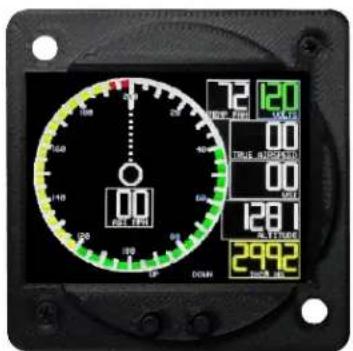
text_image
100 20 30 40 50 60 70 80 90 100 110 120 130 140 150 160 170 180 190 200 210 220 230 240 250 260 270 280 290 300 310 320 330 340 350 360 370 380 390 400 410 420 430 440 450 460 470 480 490 500 510 520 530 540 550 560 570 580 590 600 610 620 630 640 650 660 670 680 690 700 710 720 730 740 750 760 770 780 790 800 810 820 830 840 850 860 870 880 890 900 910 920 930 940 950 960 970 980 990 1000Presentation Screen
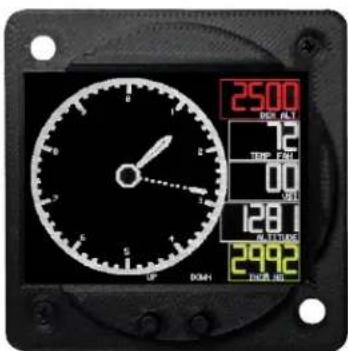
text_image
25.00 RMB FLT 12 TEMP 240 00 031 128.1 RMB/FLT 299.2 OFF DKNAltimeter Focus
GENERAL TECHNICAL SPECIFICATIONS:
Sunlight readable, with extremely high contrast.
- User selectable for airspeed 100 or 200 range (airspeed units).
- User selectable for airspeed knots or MPH (airspeed units).
- User selectable for Celsius or Fahrenheit (outside air temperature).
- Airspeed: Indicated Airspeed / True Airspeed / Digital Altitude / Analog (Dial) Representation of Airspeed / Digital VSI / Settable Kollsman / Outside Air Temperature / System Voltage (8 points of data on one screen).
- Altimeter Focus: Digital Altitude / Analog (Dial) Representation of altitude / Density Altitude / Outside Air Temperature / Digital VSI / Settable Kollsman
- Dimmable (uses external potentiometer, not included).
- Designed to fit 2 14 " instrument rectangular cutout with 2 bolts (included), or 3 1/8" standard panel cutout using included adapter ring. Will also fit into standard 2 14 " round instrument cutout with very slight clipping of the left side of the screen.
- Power Source: +6.5 to +14 volts, approximately 0.125 ampere. Functions with reduced screen brightness down to 4.5 volts.
- Case is black nylon with chopped carbon fiber, 3D printed.
- Includes external temperature sensor for OAT with included 2 meter harness (\~80 inch).
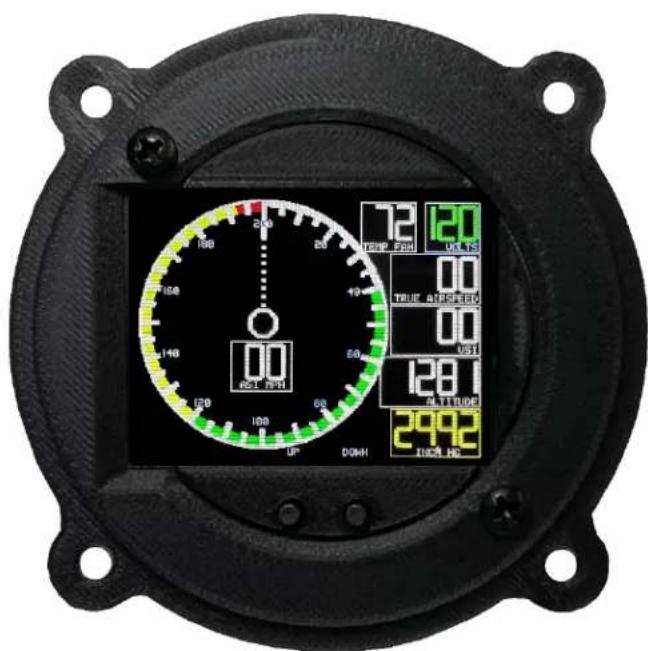
text_image
200 150 140 00 UP DOWN 72 TEMP Fdd 120 UFS 00 TRUE AURSSED 00 UFSI 128.1 ALTITUDE 299.2 INCE HSAirspeed Indicator in 3 1/8 cutout packaging showing digital / analog dial representation; OAT, system voltage; True airspeed; VSI; altitude; settable Kollsman window.
INSTALLATION:
- Install instrument in 2 14 " panel left side rectangular cutout using two supplied nuts / bolts. 3 1/8" installation in standard panel cutout using four supplied nuts / bolts. If the 2 14 " left side rectangular cutout is not made, a small portion of the dial indicator on the left side may be slightly clipped from viewing.
- Attach black wire (ground) to ship ground.
- Attach red wire (power) to ship power, +6.5 to +14 volts. Do not exceed 14 volts. Use appropriate fuse (1 amp) and avionics master switch for operation.
- For control of dimming, optionally wire the yellow wire to a 10K potentiometer, with ONLY +5 volts / ground.) +5 is available via individual red wire from instrument. Leave the yellow wire unconnected for continuous full bright operation. If you send us an email request within one year of purchase, we will mail you a potentiometer without charge to any US / Canadian address.
• The ASI dongle is attached via the 7 pin connector. - The back of all units has a static port for the altimeter. It may be attached to an adapter tube (included) into your aircraft's static pressure port, or left unconnected.
- The ASI dongle has a “P” (pitot) and a “S” (static) marking. Using the included adapter tubes, attach these to your pitot tube and your static pressure port.
- Attach the temperature probe using the included 2 meter cable to any shaded spot on your airplane, such as the underside of a wing.
SETUP:
- You only need to set up the instrument once in its lifetime. If you wish to skip setup, the factory settings are already set to Fahrenheit / 200 / Knots / 29.92 / 50 / 70 / 90 on airspeeds. The unit will operate out of the box.
- To enter Setup mode, before turning on power, push either button in and hold it in. Then turn on the power. Keep the button pushed in throughout! After 10 seconds, the SETUP screen will appear. You can now release the button. The setup screen looks like the following:
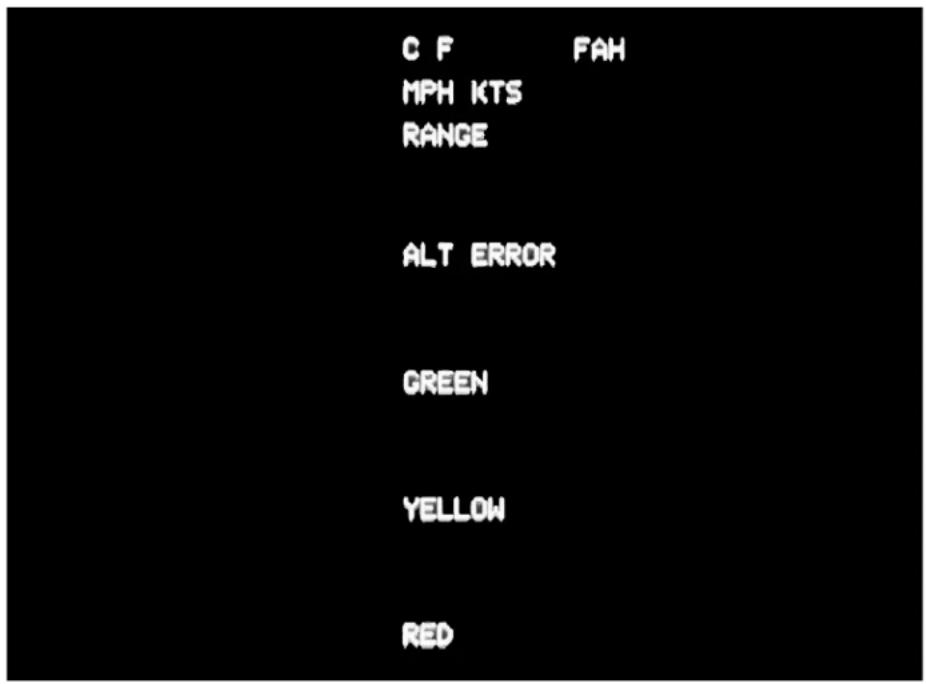
text_image
C F FAH MPH KTS RANGE ALT ERROR GREEN YELLOW RED- Briefly touch either button, and the Celsius / Fahrenheit indicator will switch back and forth. When you have made the appropriate selection, hold either button for five seconds, and the next data line will appear.
- You may now select MPH or Knots in a similar manner. Hold either button for five seconds, and the range will appear.
• In a similar manner, select 100 or 200.
- In a similar manner, you may change the 29.92 error value. Increasing will result in 10 feet of additional altitude; decreasing works in the other direction. THIS IS THE ERROR CALIBRATION VALUE. It needs to be changed only in response to an error in the altitude. You shouldn't have to do this more than once per year. If you don't understand this, just leave it at 29.92. When you have selected your appropriate value, hold either button for five seconds to advance to the next screen.
- Set your Green start speed, yellow start speed, and redline values. When all is done, the setup screen will look like this:
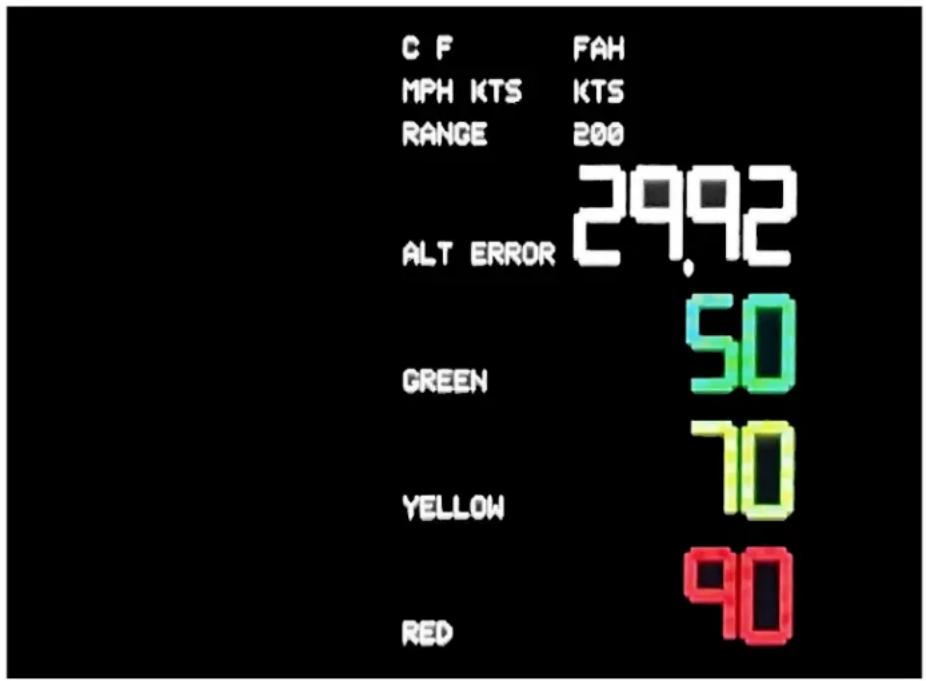
bar
| Category | Value | |---|---| | C F | FAH | | MPH KTS | KTS | | RANGE | 200 | | ALT ERROR | 29.92 | | GREEN | 50 | | YELLOW | 70 | | RED | 90 |- After you've set the redline, hold either button for more than five seconds, and the unit will begin normal operation.
OPERATION:
Turn the unit on using an external switch.
- The brightness may be adjusted using the optional external potentiometer.
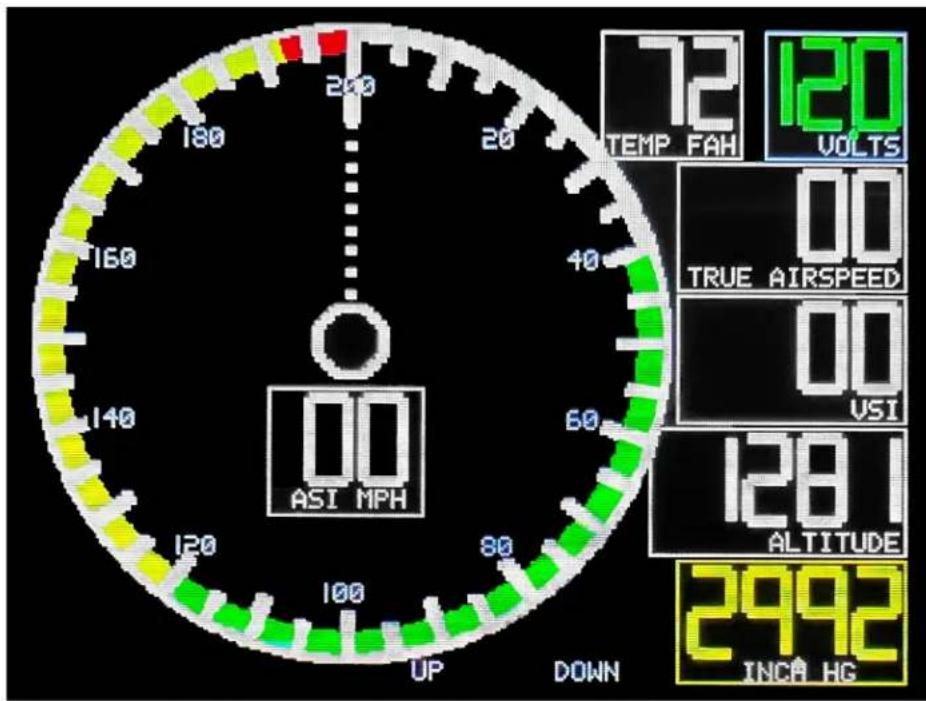
• The following picture shows the main screen:
text_image
200 180 160 140 120 100 UP DOWN 72 TEMP FAH 120 VOLTS 00 TRUE AIRSPEED 00 VSI 128.1 ALTITUDE 2992 INCA HG√ The round dial shows current indicated airspeed in dial format.
√ The boxed ASI shows digital indicated airspeed in digital format.
√ The temperature box shows OAT.
√ The VOLTS box shows current system voltage.
√ The true airspeed box shows the result of the air computer calculation, which incorporates altitude and temperature to produce TAS.
√ The VSI shows current vertical speed.
√ Altitude shows current digital altitude, as adjusted by the Kollsman window.
√ You set the Kollsman window using the UP and DOWN buttons. This functionality is identical to any aircraft altimeter. Get the correct pressure value from your nearest weather reporting station. Set the Kollsman value by briefly pressing either button. If you press both UP and DOWN buttons simultaneously, the Kollsman value will reset to 29.92. The altitude will be calculated and shown as both a digital and a dial value.
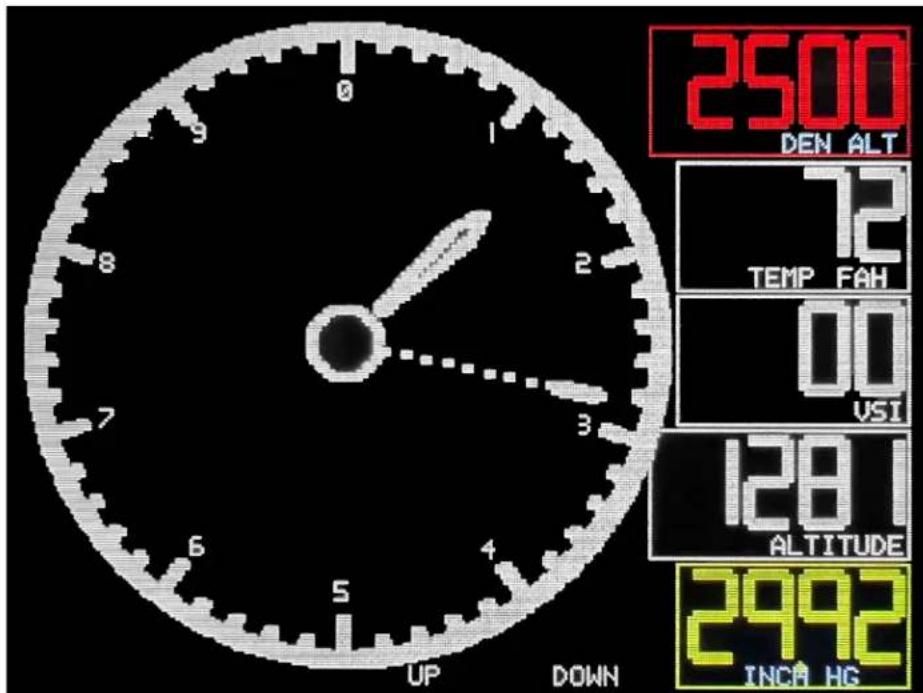
- By pressing either button for more than 3 seconds continuously, the unit will advance to a secondary, ‘Altitude Focus’ screen. It adds a Density Altitude calculation and a dial representation of the altitude.
text_image
2500 DEN ALT 12 TEMP FAH 00 USI 128.1 ALTITUDE 2992 INCH HG UP DOWN- By pressing either button for more than three seconds, the unit will revert to the primary Airspeed display.
DISCLAIMERS:
Products from Radiant Technology are not designed to be used in applications where their failure would endanger safe flight or human life in any way.
They are intended solely for use in VFR conditions. They are not certified to meet any Technical Standard Order and are not produced under a Parts Manufacturing Authority (TSO / PMA). As a result, if installed in the aircraft, they are suitable only for use in experimental and ultralight aircraft, and in Light Sport Aircraft, if meeting the requirements of the respective manufacturer.
WARRANTY:
Your new Radiant Technology instrument carries a three-year warranty, from the invoice date. Please contact us at
support@radiantinstruments.com should your product need warranty service. There is an additional charge for international warranty service.
RETURN / REFUND INFORMATION:
Must be returned in new, uninstalled, resalable condition within 14 days after receipt. Ship to Radiant Technology, PO Box 20690, Wichita KS 67208.