
AXSUB-FD1 - Car audio interface Axxess - Free user manual and instructions
Find the device manual for free AXSUB-FD1 Axxess in PDF.


| Product Type | Powered Subwoofer |
| Brand | AXESS |
| Model | AXSUB-FD1 |
| Dimensions (H x W x D) | 12.6 x 11.8 x 12.2 inches |
| Weight | 18.5 lbs |
| Power Output (RMS) | 150 Watts |
| Frequency Response | 20 Hz - 200 Hz |
| Impedance | 4 ohms |
| Driver Size | 10 inches |
| Enclosure Type | Bass-reflex (ported) |
| Inputs | RCA line-level, speaker-level |
| Power Supply | AC 110-120V, 60Hz |
| Power Consumption | 200W max |
| Phase Control | 0° / 180° switch |
| Low-Pass Filter | Variable 40-150 Hz |
| Auto On/Off | Yes |
| Remote Control | Not included |
| Cleaning Instructions | Wipe with dry cloth; avoid liquids |
| Safety Certifications | CE, RoHS |
| Warranty | 1 year limited |
Frequently Asked Questions - AXSUB-FD1 Axxess
User questions about AXSUB-FD1 Axxess
0 question about this device. Answer the ones you know or ask your own.
Ask a new question about this device
Download the instructions for your Car audio interface in PDF format for free! Find your manual AXSUB-FD1 - Axxess and take your electronic device back in hand. On this page are published all the documents necessary for the use of your device. AXSUB-FD1 by Axxess.
USER MANUAL AXSUB-FD1 Axxess
FORD (Add a SUB) Interface 2006-2014
Visit AxxessInterfaces.com for more detailed information about the product and up-to-date vehicle specific applications
INTERFACE FEATURES
- Can be used in amplified and non-amplified models
- Easy behind the radio installation with pre-wired harness
- Bass knob included for level control of subwoofer amp
- Micro-B USB updatable
INTERFACE COMPONENTS
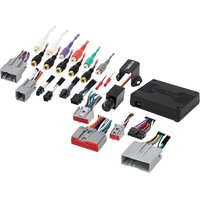
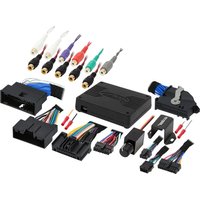
- AXSUB-FD1 interface
- AXDSPX-FD1 vehicle T-harness (LD-DSP-FD1)
- Bass knob (LD-BASSKNOB)
TABLE OF CONTENTS
Connections......2
Programming......3
Testing....3
Specifications....3
Troubleshooting......4
TOOLS REQUIRED
- Crimping tool and connectors, or solder gun, solder, and heat shrink • Tape • Wire cutter
- Zip ties • Multimeter
If the vehicle is equipped with Active noise cancellation (ANC) microphones, they will need to be bypassed. Please refer to www.Axxessinterfaces.com for ANC bypass harnesses offered for select vehicles.
www.AxxessInterfaces.com

MetraOnline.com may be used to assist with dash assembly instructions. Simply enter your Year, Make, Model vehicle into the vehicle fit guide and look for the Dash Kit Installation Instructions.
www.MetraOnline.com

ATTENTION: With the key out of the ignition, disconnect the negative battery terminal before installing this product. nsure that all installation connections, especially the air bag indicator lights, are plugged in before reconnecting the battery or cycling the ignition to test this product. NOTE: Refer also to the instructions included with the aftermarket radio.
CONNECTIONS
![graph TD A["Factory Radio"] --> B["Factory Radio Harness"] B --> C["Interface"] C --> D["4-Pin"] D --> E["AXXESS"] E --> F["20-Pin"] F --> G["LD-BASSKNOB"] G --> H["LD-DSP-FD1"] H --> I["Brown - Remote Turn On"] I --> J["Sub OUT"] J --> K["AXXESS®"] K --> L["Sub OUT"] L --> M["RCA Jacks (sold separa…](/content/2026/05/1014663/images/4638ac80ed2dd8132d5eaac3b90b8f0b5d71a1195b80101de1de4566b3eac4c9.jpg)
PROGRAMMING
- With everything plugged in Turn on ignition and make sure audio volume is turned all the way down. Also ensure that your LD-BASSKNOB is turned all the way to the left.
- Increase audio volume to desired listening level
- Wait for aftermarket amp to turn on (up to 15 seconds)
- You are now programmed
TESTING
- Turn on audio and increase volume to desired level
- Rotate the LD-BASSKNOB to the right to increase SUB level. Turn to the left to decrease SUB level
NOTE: Lowering the bass or volume knob completely will deactivate the aftermarket amplifier. Similarly, muting the radio will also result in turning off the aftermarket amplifier.
SPECIFICATIONS
• 2 Channel non-fading 5V RMS output
- Fixed low pass frequency of 234Hz
- 250mA remote turn on output

AXSUB-FD1
INSTALLATION INSTRUCTIONS
TROUBLESHOOTING
- Not getting sound from Factory radio's speakers.
A) Make sure Factory Volume isn't set to zero or a mute button has been pressed on radio.
B) Make sure 8pin male and female connectors are plugged in to each other.
- Not getting 12v on the Amp on out to amp
A) Make sure LD-BASSKNOB isn't turned all the way down(to left)
B) Your Orange and Black wires are properly connected from AXSUB-INTERFACE to LD-BASSKNOB
- Not getting 12v on the Amp on out to amp
A) Make sure the t-harness is seated properly at the radio and OE harness.
B) Make sure the RCA's are connected to aftermarket amplifier.
Having difficulties? We're here to help.

Contact our Tech Support line at:
57-1187

email at:
upport@metra-autosound.com
Tech Support Hours (Eastern Standard Time)
Monday - Friday: 9:00 AM - 7:00 PM
Saturday: 10:00 AM - 5:00 PM
Sunday: 10:00 AM - 4:00 PM

Metra recommends MECP
certified technicians



Brand : Axxess
Model : AXSUB-FD1
Category : Car audio interface