
Wireless Music Mate - Receiver Platinet - Free user manual and instructions
Find the device manual for free Wireless Music Mate Platinet in PDF.


| Product Type | Wireless Audio Receiver |
| Brand | Platinet |
| Model | Wireless Music Mate |
| Connectivity | Bluetooth 5.0 |
| Audio Output | 3.5 mm Stereo Jack, RCA Line Out |
| Power Supply | DC 5V via Micro USB (cable included) |
| Wireless Range | Up to 10 meters (30 feet) |
| Supported Audio Codecs | SBC, AAC |
| Frequency Response | 20 Hz – 20 kHz |
| Signal-to-Noise Ratio | >90 dB |
| Dimensions (W x H x D) | Approx. 70 x 70 x 20 mm (2.8 x 2.8 x 0.8 in) |
| Weight | Approx. 50 g (1.8 oz) |
| LED Indicators | Power (red/blue) and Bluetooth pairing (flashing blue) |
| Controls | Pairing button, volume up/down (on device) |
| Operating Temperature | 0°C to 40°C (32°F to 104°F) |
| Cleaning Instructions | Wipe with a soft, dry cloth. Do not use liquids or abrasives. |
| Safety Precautions | Keep away from moisture, heat sources, and direct sunlight. Do not disassemble. |
| Included Accessories | Micro USB charging cable, 3.5 mm audio cable, user manual |
| Repairability | Not user-serviceable; contact Platinet support for assistance. |
Frequently Asked Questions - Wireless Music Mate Platinet
User questions about Wireless Music Mate Platinet
0 question about this device. Answer the ones you know or ask your own.
Ask a new question about this device
Download the instructions for your Receiver in PDF format for free! Find your manual Wireless Music Mate - Platinet and take your electronic device back in hand. On this page are published all the documents necessary for the use of your device. Wireless Music Mate by Platinet.
USER MANUAL Wireless Music Mate Platinet
Platinet Wireless Music Mate
PWMM
EZCast
EZCast is used to play music from USB Drive or your device, modify the password, change the audio output mode, connect to internet and upgrade for your Wireless Music Mate.
The latest EZCast is available in GooglePlay and AppStore. Search EZCast in GooglePlay or AppStore to download and install it on your device.
Connect to Speaker
This Wireless Music Mate can support L/R Audio and S/PDIF, you can connect the wireless music mate to Speaker with L/R audio cable or optical cable.
Power on
Connect the wireless music mate to power adapter(5V) with Micro-USB cable. Wireless music mate will boot automatically after connect to the power outlet.
SSID and Password
The SSID of Wireless Music Mate is EZMusicxxxx, and the default password is 00000000.
EZCast on Android
- System requirements
Android 4.0 ICS or later with 1GB RAMat least
- Download
- You can use QR code scanner app to scan the QR code on display, then you will be redirected to download our app

- Or you can search the App name "EZCast" in Google Play. (http://goo.gl/1usQ23)
● Device Connection
- Before you start the app, we suggest connect your Android device's WiFi with Platinet Wireless Music Mate (SSID displaying as Platinet EZMusicxxxx). However, if you skip WiFi connection first, the EZCast will allow you to connect to the Wireless Music Mate in app.
-
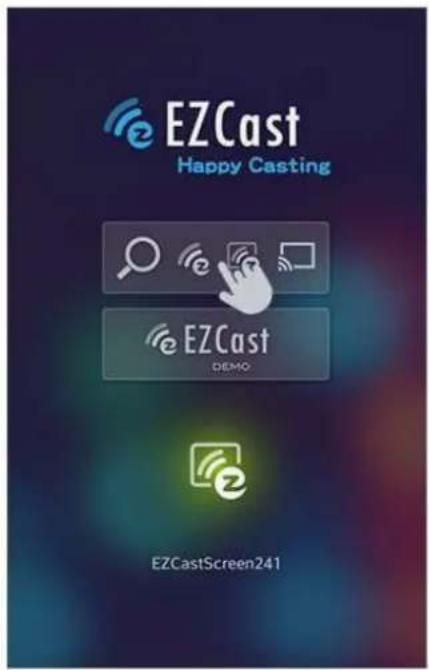
When you opened the app, you can use "Demo mode" or "Find device" to start over to enjoy our features.
-
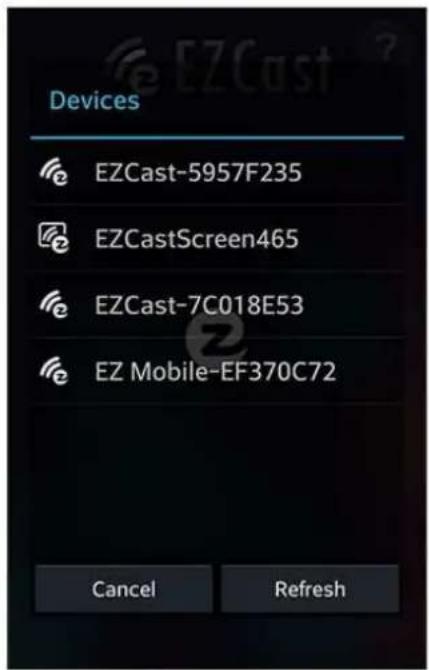
Click "Find device" to discover Platinet Wireless Music Mate and start to cast.
-
If you didn't connect EZCast in the beginning, our android app will automatically list the Platinet Wireless Music Mate so that you can click it and connect it directly.
-
You will be able to find another EZCast installed phone if they are under the same network, it's a new feature to enhance your mobile phone to an Platinet Wireless Music Mate.
-
We strongly recommend you to establish Platinet Wireless Music Mate WiFi with your home/company network to keep internet surfing since your mobile device's WiFi is linking to Platinet Wireless Music Mate.
Play music on Wireless Music Mate
Step1, On your device, go to Settings-> WiFi, connect to EZMusicxxxx.
Step2, On your device, run EZCast->Tap Search to search EZMusi->Tap EZMusicxxxxx in the device list to connect.
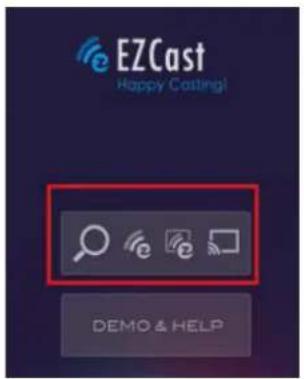

Step3, Tap Music->Select music from playlist to play on the Wireless Music Mate.

EZCast on Windows
- System requirements
| CPU Dual Core 2 GHz or | higher (ATOM not supported) |
| Graphic card Graphic card with 64MB VRAM or above | |
| OS version Windows XP | SP3, Vista SP2, Windows 7 SP1, Windows 8/8.1 and above |
| PC's WiFi 802.11n (2T2R) | recommended) |
*Noted that audio will not be supported on XP, and extension mode is not available on Win8 now.
- Download
- You can download Windows app from www.iezvu.com
Windows EZCast 7/8 Download -Latest version 1.0.0.143 Date:2014-06-05
EZCast application for Windows version, developed by WinnerWave, displays your Windows embedded PC and Notebook wirelessly via EZCast
Read Full Description>>

Download
Windows EZCast Portable Version
EZCast Green version developed by WinnerWave, displays your Windows embedded PC and Notebook wirelessly via EZCast

Download
Read Full Description>>
Windows EZCast XP/Vista Download
EZCast application for Windows version, developed by WinnerWave, displays your Windows embedded PC and Notebook

Download
Read Full Description>>
- Select the version you would like to download.
- Device Connection
- Please connect Platinet Wireless Music Mate and power on.
- After installation and restart your PC to take affected for our app.
- Before you start the app, we suggest connect your PC's WiFi with Platinet Wireless Music Mate (SSID displaying as Platinet EZMusicxxxx), then open EZCast.
- Open EZCast and allow access.
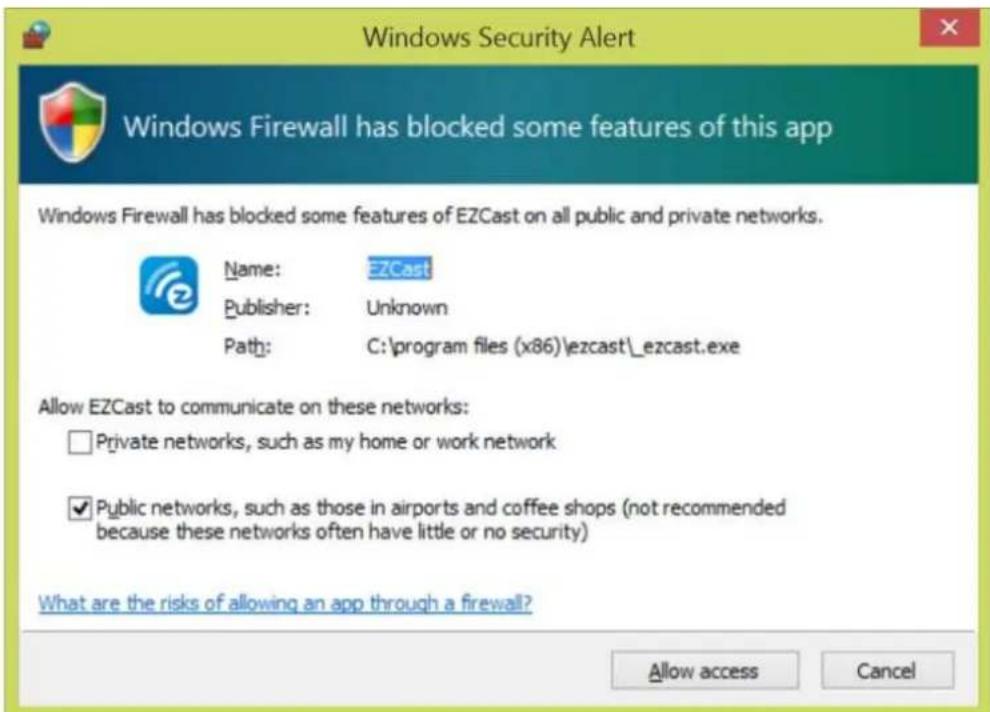
- The EZCast will be listed, select the device ID and connect with it.

- Features
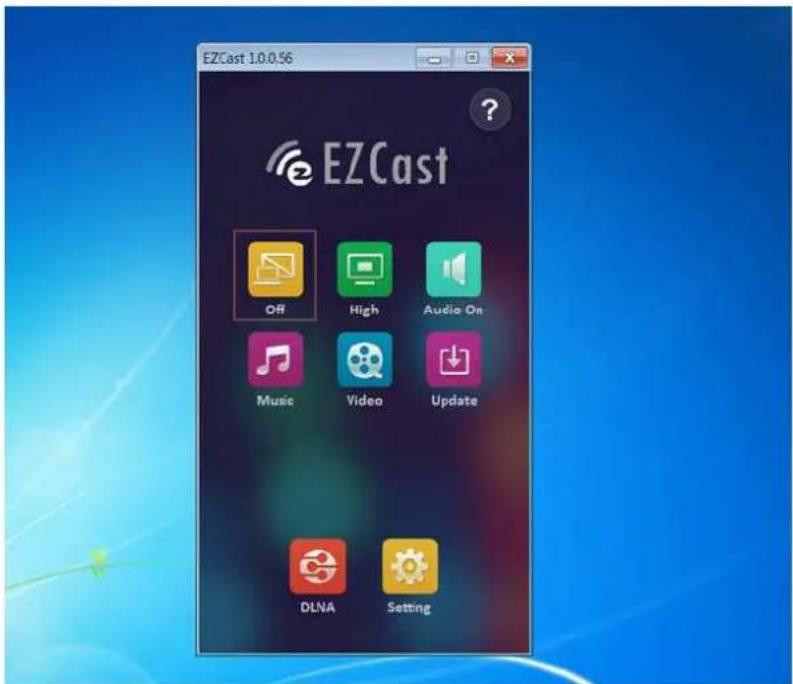

Music Streaming
When you enable music streaming, we will launch file manager so that you can choose the music you want to play to Platinet Wireless Music Mate.
◆ You can use EZCast control bar to adjust the volume and progress bar.
*Noted that Only the supported audio formats will be played.

EZCast on iOS
- System requirements
| iOS iOS 7 and later | |
| Device All iPhone | model after iPhone 4All iPad model after iPad 2All iPod touch after iPod touch 4^th generation |
- Download
- You can use QR code scanner app to scan the QR code on display, then you will be redirected to download our app:

- Or you can search the App name "EZCast" in App Store. (http://goo.gl/TUA7tz)
- Device Connection
- Before you start up EZCast, connect your iOS device's WiFi with Platinet Wireless Music Mate (SSID displaying as Platinet EZMusicxxxx).


- After you opened the app, you can use "Demo mode" or "Find device" to start over to enjoy it.
- Click "Find device" to discover Platinet Wireless Music Mate and start to cast.
- In the first time of app launching, we will pop up WiFi router list so that you can control your Platinet Wireless Music Mate to connect your Home WiFi router to keep internet surfing. (We strongly recommend you to establish Platinet Wireless Music Mate WiFi with your home/company network to keep internet surfing since your mobile device's WiFi is linking to Platinet Wireless Music Mate).
How add music to EZCast Music playlist for IOS Device
Step1, Launch iTurns on PC and connect your IOS Device to PC. Click Apps on your ISO device, Select EZCast from the File Sharing apps list, Click Add to add music to EZCast.

Step2, On your IOS device, run EZCast->Tap Search to search EZMusi->Tap EZMusicxxxxx in the device list to connect. Select Music->Tap Edit->Tap Add, then select music files to add to the EZCast Playlist.
Tap Edit

Tap Add

natural_image
User interface toolbar with three icons: cyan square, white square, and red plus button (no text or symbols)Select music files to add to the EZCast Playlist.

AirPlay
Step1, On your IOS device, go to Settings-> WiFi, connect to EZMusicxxxx.
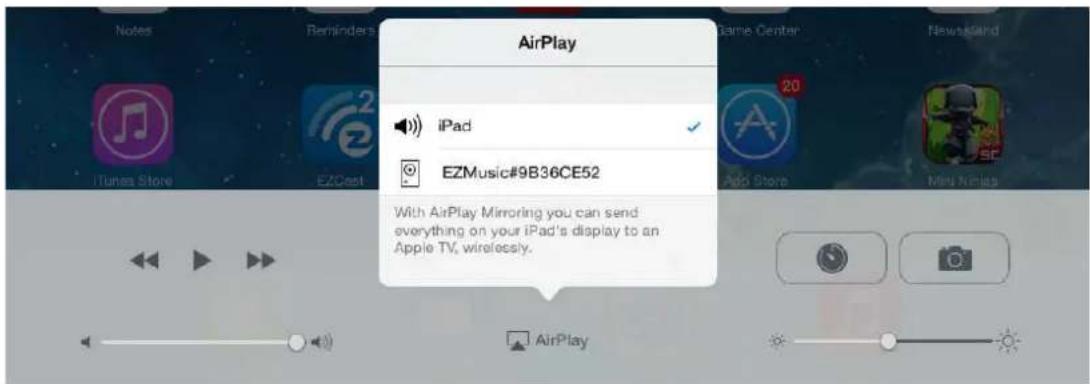
Step2, Swipe up from the bottom of your screen to access Control Center. Tap AirPlay, Tap the name of the Wireless Music Mate you wish to AirPlay to. Now you can Airplay your music on your ISO device to Wireless Music Mate.
Play music from USB drive
Step1, Connect your USB drive to the Wireless Music Mate.
Step2, On your device, go to Settings-> WiFi, connect to EZMusicxxxx.
Step3, On your device, run EZCast->Tap Search to search EZMusi->Tap EZMusicxxxxx in the device list to connect.
Step4, Tap Airdisk to find and play music files on your USB drive.
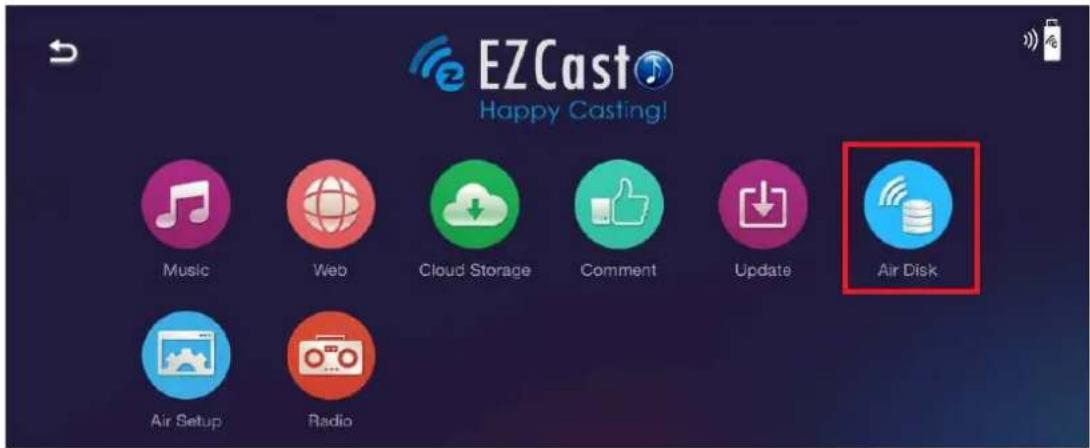
Listen internet radio on Wireless Music Mate
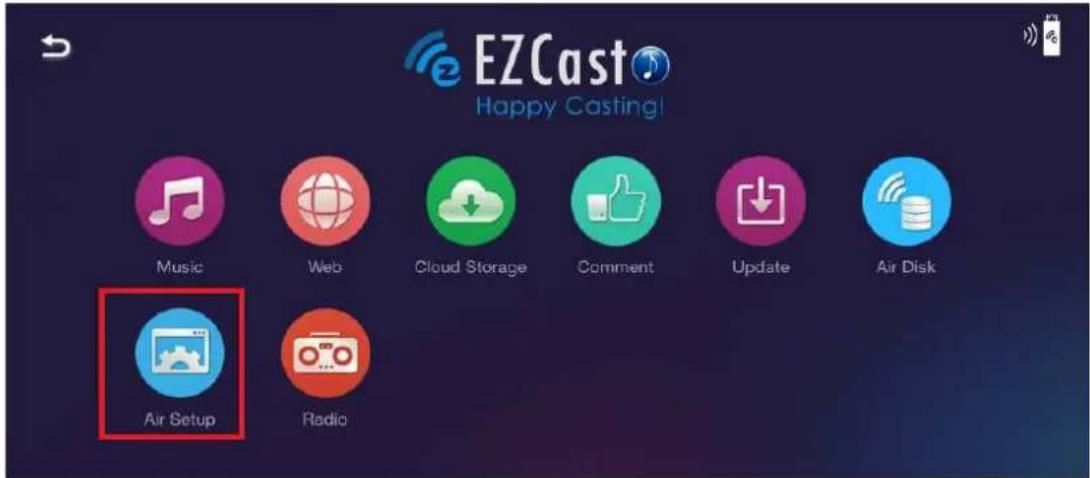
Step1, Tap AirSetup to allow your Wireless Music Mate connect to internet.
Step2, Tap Radio to listen internet radio.

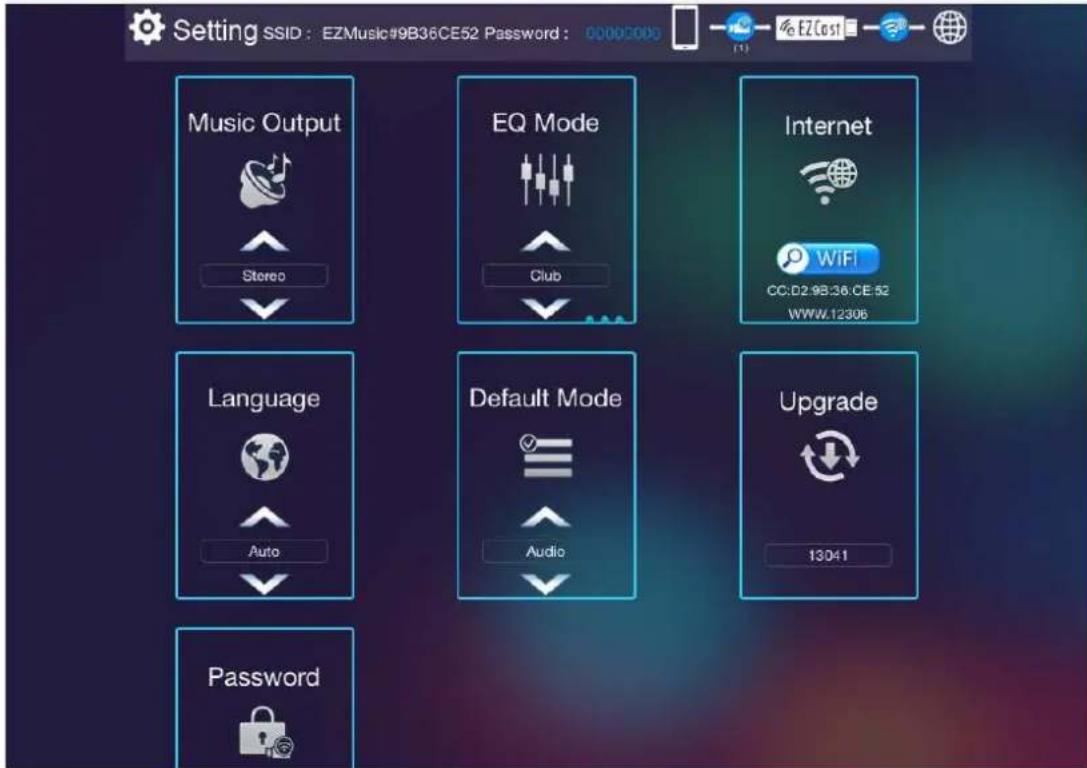
Setting Wireless Music Mate
Tap AirSetup to Setting Wireless Music Mate. Here you can modify the password, change the audio output mode, connect to internet and upgrade your Wireless Music Mate.
EZCast

- Platinet Wireless Music Mate
- PWMM
- EZCast
- Connect to Speaker
- Power on
- SSID and Password
- EZCast on Android
- Play music on Wireless Music Mate
- EZCast on Windows
- Windows EZCast Portable Version
- Windows EZCast XP/Vista Download
- Music Streaming
- EZCast on iOS
- - Device Connection
- How add music to EZCast Music playlist for IOS Device
- AirPlay
- Play music from USB drive
- Listen internet radio on Wireless Music Mate
- Setting Wireless Music Mate
Brand : Platinet
Model : Wireless Music Mate
Category : Receiver