
PF-L950UT - Projector ACER - Free user manual and instructions
Find the device manual for free PF-L950UT ACER in PDF.


| Product Type | Video Projector |
| Brand | Acer |
| Model | PF-L950UT |
| Display Technology | DLP |
| Native Resolution | 3840 x 2160 (4K UHD) |
| Brightness (ANSI Lumens) | 5000 |
| Contrast Ratio (Dynamic) | 1,000,000:1 |
| Light Source | Laser (Laser Phosphor) |
| Lamp Life | Up to 20,000 hours |
| Lens Shift | Vertical: ±50%, Horizontal: ±15% |
| Keystone Correction | ±30° Vertical & Horizontal |
| Inputs | HDMI 2.0 (x2), VGA, USB-A, RJ45, RS-232, 3D Sync |
| Dimensions (W x D x H) | 10.2 x 18.7 x 6.1 inches (259 x 475 x 155 mm) |
| Weight | 25.4 lb (11.5 kg) |
| Power Consumption (Max) | 600W |
| Noise Level (Eco Mode) | 30 dB |
| Safety Certifications | Laser Class 1, RoHS, FCC, CE |
| Maintenance | Filter cleaning every 5,000 hours |
| Spare Parts Availability | Laser module, filter kit, remote control |
Frequently Asked Questions - PF-L950UT ACER
User questions about PF-L950UT ACER
0 question about this device. Answer the ones you know or ask your own.
Ask a new question about this device
Download the instructions for your Projector in PDF format for free! Find your manual PF-L950UT - ACER and take your electronic device back in hand. On this page are published all the documents necessary for the use of your device. PF-L950UT by ACER.
USER MANUAL PF-L950UT ACER
Acer Projector FL8610/LU-P950UT/FL950/ PF-L950UT/LP-620/DL710/ AWU1907/FL8620/LU- P1000UT/FL1000/PF- L1000UT/LP-630/DL720/ AWU1906/FL8630/LU- P1200UT/FL1200/PF- L1200UT/LP-640/DL730/ AWU1905 Series User's Guide
Copyright © 2020. Acer Incorporated.
All Rights Reserved.
Acer Projector User's Guide
Original Issue: 2/2020
Changes may be made periodically to the information in this publication without obligation to notify any person of such revisions or changes. Such changes will be incorporated in new editions of this manual or supplementary documents and publications. This company makes no representations or warranties, either expressed or implied, with respect to the contents hereof and specifically disclaims the implied warranties of merchantability or fitness for a particular purpose.
Record the model number, serial number, purchase date and place of purchase information in the space provided below. The serial number and model number are recorded on the label affixed to your projector. All correspondence concerning your unit should include the serial number, model number and purchase information.
No part of this publication may be reproduced, stored in a retrieval system, or transmitted, in any form or by any means, electronically, mechanically, by photocopy, recording or otherwise, without the prior written permission of Acer Incorporated.
Acer Projector
Model number: ____
Serial number: ____
Date of purchase: ____
Place of purchase: ____

HIGH-DEFINITION MULTIMEDIA INTERFACE
Acer and the Acer logo are registered trademarks of Acer Incorporated. Other companies' product names or trademarks are used herein for identification purposes only and belong to their respective companies.
"HDMI™, the HDMI logo and High-Definition Multimedia Interface are trademarks or registered trademarks of HDMI Licensing LLC."
Information for Your Safety and Comfort
Read these instructions carefully. Keep this document for future reference.
Follow all warnings and instructions marked on the product.
Turning the product off before cleaning
Unplug this product from the wall outlet before cleaning. Do not use liquid cleaners or aerosol cleaners. Use a damp cloth for cleaning.
Caution for plug as disconnecting device
Observe the following guidelines when connecting and disconnecting power to the external power supply unit:
• Install the power supply unit before connecting the power cord to the AC power outlet.
- Unplug the power cord before removing the power supply unit from the projector.
- If the system has multiple sources of power, disconnect power from the system by unplugging all power cords from the power supplies.
Caution for Accessibility
Be sure that the power outlet you plug the power cord into is easily accessible and located as close to the equipment operator as possible. When you need to disconnect power to the equipment, be sure to unplug the power cord from the electrical outlet.

Warnings!
- Do not use this product near water.
- Do not place this product on an unstable cart, stand or table. If the product falls, it could be seriously damaged.
- Slots and openings are provided for ventilation to ensure reliable operation of the product and to protect it from overheating. These openings must not be blocked or covered. The openings should never be blocked by placing the product on a bed, sofa, rug or other similar surface.
This product should never be placed near or over a radiator or heat register, or in a built-in installation unless proper ventilation is provided.
- Never push objects of any kind into this product through cabinet slots as they may touch dangerous voltage points or short-out parts that could result in a fire or electric shock. Never spill liquid of any kind onto or into the product.
iv
- To avoid damage of internal components and to prevent battery leakage, do not place the product on a vibrating surface.
- Never use it under sporting, exercising, or any vibrating environment which will probably cause unexpected short current or damage rotor devices.
Using electrical power
- This product should be operated from the type of power indicated on the marking label. If you are not sure of the type of power available, consult your dealer or local power company.
- Do not allow anything to rest on the power cord. Do not locate this product where people will walk on the cord.
- If an extension cord is used with this product, make sure that the total ampere rating of the equipment plugged into the extension cord does not exceed the extension cord ampere rating. Also, make sure that the total rating of all products plugged into the wall outlet does not exceed the fuse rating.
- Do not overload a power outlet, strip or receptacle by plugging in too many devices. The overall system load must not exceed 80% of the branch circuit rating. If power strips are used, the load should not exceed 80% of the power strip's input rating.
- This product's AC adapter is equipped with a three-wire grounded plug. The plug only fits in a grounded power outlet. Make sure the power outlet is properly grounded before inserting the AC adapter plug. Do not insert the plug into a non-grounded power outlet. Contact your electrician for details.

Warning! The grounding pin is a safety feature. Using a power outlet that is not properly grounded may result in electric shock and/or injury.

Note: The grounding pin also provides good protection from unexpected noise produced by other nearby electrical devices that may interfere with the performance of this product.
- Use the product only with the supplied power supply cord set. If you need to replace the power cord set, make sure that the new power cord is equivalent to the original supplied power cord. Please contact your local dealer or Acer service center for details.
Product servicing
Do not attempt to service this product yourself, as opening or removing covers may expose you to dangerous voltage points or other risks. Refer all servicing to qualified service personnel.
Unplug this product from the wall outlet and refer servicing to qualified service personnel when:
•the power cord or plug is damaged, cut or frayed
- liquid was spilled into the product
•the product was exposed to rain or water
•the product has been dropped or the case has been damaged
•the product exhibits a distinct change in performance, indicating a need for service
•the product does not operate normally after following the operating instructions

Note: Adjust only those controls that are covered by the operating instructions, since improper adjustment of other controls may result in damage and will often require extensive work by a qualified technician to restore the product to normal condition.

Warning! For safety reasons, do not use non-compliant parts when adding or changing components. Consult your reseller for purchase options.
Your device and its enhancements may contain small parts. Keep them out of the reach of small children.
Additional safety information
- Do not look into the lens while the light source is on. The strong light from the light source may cause damage to your eyesight.
RG2 IEC 62471-5:20151 - Do not place anything in front of the lens while the projector is operating. Things placed in front of the lens may overheat and burn or start a fire. If you want to temporarily stop the projected image, use the Blank key on the remote control.
- Do not remove any screws. Do not block or cover the vents.
- Do not look into the lens. (For USA and Canada only).
- Laser aperture warning: (For USA and Canada only).
- CLASS 3R LASER PRODUCT-AVOID DIRECT EYE EXPOSURE
- Do not look into the light source using optical instruments (such as magnifying glasses and mirrors). Visual impairment could result.
- When turning on the projector, make sure no one within projection range is
looking at the lens.

- Keep any items (magnifying glass etc.) out of the light path of the projector. The light path being projected from the lens is extensive, therefore any kind of abnormal objects that can redirect light coming out of the lens, can cause an unpredictable outcome such as a fire or injury to the eyes.
- Laser aperture warning: (For other countries).
• CLASS 1 LASER PRODUCT - RISK GROUP 2
- Do not stare into the beam, maybe harmful to the eyes.
- Risk group 3: (Except USA and Canada) This projector may become RG3 when an interchangeable lens with throw ratio greater than the number stated on the label.
• As with any bright light source, do not stare into the beam.
RG2 IEC 62471-5:2015
- No direct exposure to the beam shall be permitted. RG3 IEC 62471-5:2015
- Operators shall control access to the beam within the hazard distance or install the product at the height that will prevent spectators' eyes from being in the hazard distance.
- Hazard distance
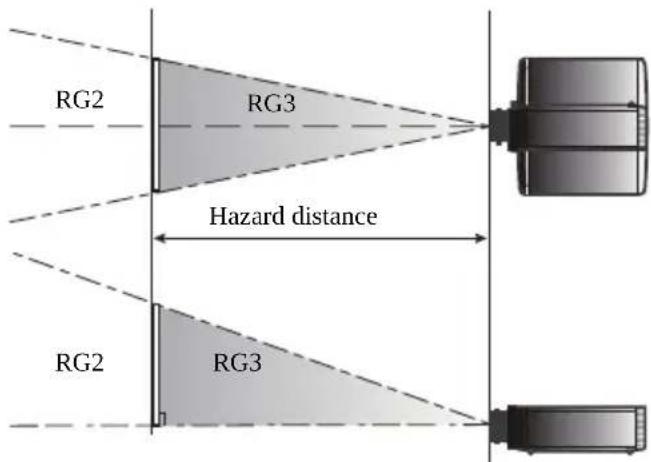
| Type name of lens | Throw ratio | Hazard distance | IEC62471-5:2015 |
| Acer FL8 series Ultra Short Throw Lens 0.377 N/A RG2 | |||
| Acer FL8 series Ultra Short Throw Zoom Lens 0.76–0.95 N/A RG2 | |||
| Acer FL8 series Short Throw Zoom Lens 1.14–1.71 N/A RG2 | |||
| Acer FL8 series Standard Zoom Lens 1.61–2.42 N/A RG2 | |||
| Acer FL8 series Middle Throw Zoom Lens 2.37–3.6 N/A RG2 | |||
| Acer FL8 series Long Throw Zoom Lens 3.53–5.65 1550 mm RG3 | |||
| Acer FL8 series Ultra Long Throw Zoom Lens 5.52–8.83 1370 mm RG3 |
- Cinema projectors that have a hazard distance greater than 1 m and emit light into an uncontrolled area where persons may be present should be positioned in accordance with “the fixed projector installation” parameters, resulting in a hazard distance that does not extend into the audience area unless the beam is at least 2 m above the floor level.
- In non-cinema, environments where unrestrained behaviour is reasonably foreseeable, the minimum separation height should be greater than or equal to 3.0m to prevent potential exposure, for example by an individual sitting on another individual's shoulders, within the hazard distance. For example, a sufficiently large separation height may be achieved by mounting the projector on the ceiling or through the use of physical barriers.
- Turn on the projector first and then signal sources.
- Do not place the product in the following environments:
- Space that is poorly ventilated or confined. At least 50cm clearance from walls and free flow of air around the projector are necessary.
- Locations where temperatures may become excessively high, such as inside of a car with all windows rolled up.
- Locations where excessive humidity, dust, or cigarette smoke may contaminate optical components, shorten the life span and darken the image.
- Locations near fire alarms.
- Locations with an ambient temperature above 40^ / 104^ .
- Locations where the altitudes are higher than 10000 feet.
- Unplug immediately if there is something wrong with your projector. Do not operate if smoke, strange noise or odor comes out of your projector. It might cause fire or electric shock. In this case, unplug immediately and contact your dealer.
- Do not keep using this product to break or drop it. In this case contact your dealer for inspection.
- Do not face the projector lens to the sun. It can lead to fire.
- When switching the projector off, please ensure the projector completes its cooling cycle before disconnecting power.
- Do not frequently turn off the main power abruptly or unplug the projector during operation. The best way is to wait for the fan to stop before turning main power off.
- Do not touch the air outlet grille and bottom plate which become hot.
- Clean the air filter frequently. The temperature inside may rise and cause damage when the filter/ventilation slots are clogged with dirt or dust.
- Do not look into the air outlet grille when projector is operating. It may hurt your eyes.
- Always open the lens shutter or remove the lens cap when the projector is on.
- Do not block the projector lens with any object when the projector is under operation as this could cause the object to become heated and deformed or even cause a fire. To temporarily turn off the light, press Blank on the remote control.
- Do not attempt to disassemble this projector. There are dangerous high voltages inside which may hurt you.
- Do not stand the projector on end vertically. It may cause the projector to fall over, causing injury or damage.
- This product is capable of displaying inverted images for ceiling mount installation. Only use acer ceiling mount kit for mounting the projector and ensure it is securely installed.
viii
Caution for Listening
To protect your hearing, follow these instructions.
- Increase the volume gradually until you can hear clearly and comfortably.
- Do not increase the volume level after your ears have adjusted.
- Do not listen to music at high volumes for extended periods.
- Do not increase the volume to block out noisy surroundings.
• Decrease the volume if you can't hear people speaking near you.
Disposal instructions
Do not throw this electronic device into the trash when discarding. To minimize pollution and ensure utmost protection of the global environment, please recycle. For more information on the Waste from Electrical and Electronics Equipment (WEEE) regulations, visit http://www.acer-group.com/public/Sustainability/index.htm

natural_image
Symbol of a trash bin crossed with no text or numbers, representing waste sorting or disposal (no text present)First Thing First
Usage Notes
Do:
- Turn off the product before cleaning.
- Use a soft cloth moistened with mild detergent to clean the display housing.
- Disconnect the power plug from AC outlet if the product is not being used for a long period of time.
Don't:
- Block the slots and openings on the projector provided for ventilation.
- Use abrasive cleaners, waxes or solvents to clean the unit.
- Use under the following conditions:
•In extremely hot, cold or humid environments.
•In areas susceptible to excessive dust and dirt.
- Near any appliance that generates a strong magnetic field.
- Place in direct sunlight.
Precautions
Follow all warnings, precautions and maintenance as recommended in this user's guide to maximize the life of your unit.

Warning:
- Do not look into the projector's lens when the projector is on. The bright light may hurt your eyes.
• To reduce the risk of fire or electric shock, do not expose this product to rain or moisture. - Please do not open or disassemble the product as this may cause electric shock.
- When switching the projector off, please ensure the projector completes its cooling cycle before disconnecting power.
- Turn on the projector first and then the signal sources.
- Do not use lens cap when projector is in operation.
Information for Your Safety and Comfort iii
First Thing First ix
Usage Notes ix
Precautions ix
Introduction 1
Product Features 1
Package Overview 2
Projector Overview 3
Projector Outlook 3
Control Panel 5
Remote Control Layout 6
MHL Feature Introduction 8
Getting Started 9
Installing the Projection Lens 9
Removing the Projection Lens 9
Connecting the Projector 10
Connecting Multiple Sources through HDBaseT Module (Optional) 11
Turning the Projector On/Off 13
Turning On the Projector 13
Turning Off the Projector 14
Adjusting the Projected Image 15
Adjusting the Height of the Projected Image 15
Optimizing Image Size and Distance 16
How to Get a Preferred Image Position by Adjusting Lens Shift 20
User Controls 22
Onscreen Display (OSD) Menus 22
Image Adjustment 23
Display settings 25
Default Adjustment 28
Options 32
Appendices 35
Troubleshooting 35
LED & Alarm Definition Listing 39
Specifications 41
Compatibility Modes 44
Regulations and Safety Notices 49
Introduction
Product Features
This product is a single-chip DLP ^® projector, including the following outstanding features:
•DLP ^® technology
- Enables projecting 3D content via DLP Link Technology: Blu-Ray 3D supported
- Acer ColorBoost technology delivers vivid, life-like images
•High brightness and contrast ratio
- Versatile display modes enable optimum performance in any situation
•NTSC/PAL/SECAM compatible and HDTV (720p, 1080i, 1080p) supported
- Lower power consumption and economy (ECO) mode extends projector life
• Advanced keystone correction delivers optimum presentations
- Multi-language Onscreen Display (OSD) menus
- Extensive lens options with motorized focus/zoom and motorized lens shift functions
•Equipped with motorized dual color filter
- Optional 3G-SDI module and HDBaseT module
- 360-degree projection allows you to project images from any angle
- Microsoft ^ Windows ^ 2000, XP, 7, 8, 8.1, 10, Vista ^ , Macintosh OS, Chrome OS compliant
•LAN settings enable remote management of projectors via a web browser
- Crestron compliant
•CEC (Consumer Electronics Control) function supported
•3D VESA compatible
Package Overview
This projector comes with all the items shown below. Check to make sure you have them all. Contact your dealer immediately if any thing is missing.

natural_image
Line drawing of a projector with lens and control panel (no text or symbols)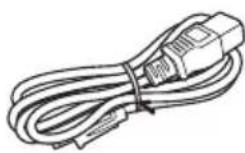
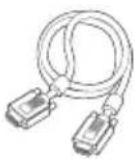
Projector Power cord VGA cable

Security card (optional)

Remote control Quick start guide AAA Battery x 2


3G-SDI module (optional)

HDBaseT module (optional)

Note: Do not install 2 HDBaseT modules or 2 3G-SDI modules simultaneously. The projector can only recognize one when that happens.

Warning: Do not leave the optional extension board uncovered during operation.
Projector Overview
Projector Outlook
Front/upper side
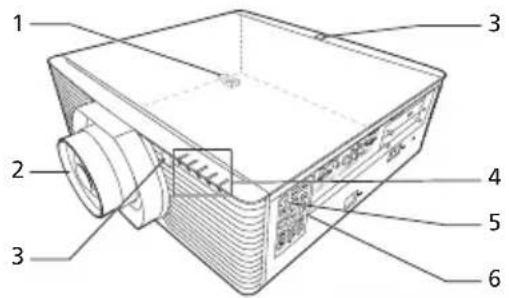
| # Description # Description | ||
| 1 Security bar 4 Indicator LED | ||
| 2 Projection lens (optional) 5 Power key | ||
| 3 Remote control receiver 6 Control panel |
Side

| # Description # Description | ||
| 1 Wired remote control input connectorWired remote control output connector | 12 | USB connector (Type A)(DC 5V output) |
| 2 RS232 input connector 13 LAN (RJ45 port for | for | 10/100MEthernet) |
| 3 RS232 output connector | ||
| 4 S-Video input connector 14 3D sync input/output | out | putconnectors |
| 5 Composite video input connector | ||
| 6 BNC connectors 15 HDBaseT connector (Optionalextension board) | ||
| 7 Analog RGB signal/HDTV/componentvideo input connector | 16 | 3G-SDI input/output connector(Optional extension board) |
| 8 Monitor loop-through outputconnector | 17 | Tilt adjusting wheel |
| 9 HDMI (MHL) connector 18 Power socket | ||
| 10 DVI-D input connector | 19 | 12V DC output connectors |
| 11 Mini USB connector | 20 | KensingtonTM lock port |
Bottom side
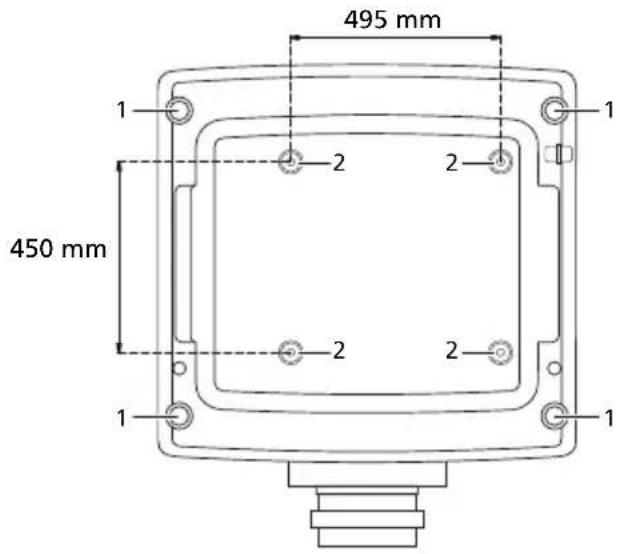
| # Description # Description | ||
| 1 Tilt adjusting wheel 2 Ceiling mount holes (screw type: M6) | ||
Dimensions
![[A] mm 552.5 mm 548 mm 179.5 mm 189.5 mm](/content/2026/05/1010841/images/63c4019c01456a2c0b306441f587088105c5591bbf4faf57500660ef0db04a4a.jpg)

Note: [A] differs when different lens is installed.
| Lens installed [A] | |
| Acer FL8 series Standard Zoom Lens 594.1 | |
| Acer FL8 series Ultra Short Throw Zoom Lens 609.9 | |
| Acer FL8 series Short Throw Zoom Lens 611.4 | |
| Acer FL8 series Middle Throw Zoom Lens 631.5 | |
| Acer FL8 series Long Throw Zoom Lens 631.5 | |
| Acer FL8 series Ultra Long Throw Zoom Lens 631.5 | |
| Acer FL8 series Ultra Short Throw Lens 612.1 |
Control Panel

flowchart
graph TD
    1["Power"] --> 2["MENU"]
    2 --> 3["PATTERN"]
    3 --> 4["▲"]
    4 --> 5["ENTER"]
    5 --> 6["BACK"]
    6 --> 7["▼"]
    7 --> 8["LENS SHIFT"]
    8 --> 9["LIGHT"]
    9 --> 10["SOURCE"]
    10 --> 11["RESYNC"]
    11 --> 12["ZOOM"]
    12 --> 13["O"]
    13 --> 14["O"]
    14 --> 15["O"]
| # Function Description | ||
| 1 | Power key | Refer to the "Turning the Projector On/Off" section. |
| 2 | PATTERN Displays the test pattern. | |
| 3 | MENU Launches the | Onscreen Display (OSD) menu, returns to the previous step for the OSD menu operation or exits the OSD menu. |
| 4 | ENTER Confirms your selection of items. | |
| 5 | Selects items or makes adjustments to your selection | |
| 6 | BACK Cancels your selection, or goes back to previous page. | |
| 7 | FOCUS Press "FOCUS" and the indicator below lights up. Useto adjust the focus setting. | |
| 8 | LENS SHIFT Press "LENS SHIFT" and the indicator below lights up.Use to shift the projection lens. | |
| 9 | LIGHT Turns on or off the back light of the control panel. | |
| 10 | SOURCE Changes the active source. | |
| 11 | RESYNC | Automatically synchronizes the projector to the input source. |
| 12 | ZOOM | Press "ZOOM" and the indicator below lights up. Useto adjust the zoom setting. |
Remote Control Layout

| # Function Description | ||
| 1 | ON [IMAGE] | Refer to the "Turning the Projector On/Off" section. |
| 2 | OFF [IMAGE] | |
| 3 Video To change source to composite video. | ||
| 4 VGA To change source to VGA IN. | ||
| 5 HDMI1 To change source to HDMI. | ||
| 6 BNC To change source to BNC. | ||
| 7 S-Video To change source to S-Video. | ||
| 8 DVI-D To change source to DVI-D. | ||
| 9 | F o directional selection keys directional selection keys | Selectsitems or makes adjustments to your selection. |
| 10 ENTER Confirms your selection of items. | ||
| 11 Keystone Displays the Keystone correction menu. | ||
| 12 Menu Launches the Onscreen Display (OSD) menu, returns to the previous step for the OSD menu operation or exits the OSD menu. | ||
| 13 Back Cancels the selection, or goes back to previous page. | ||
14 Lens Shift Press "Lens Shift" and the indicator below lights up. Use to shift the projection lens. to shift the projection lens. | ||
| # | Function | Description |
| 15 | Zoom Press "Zoom" | " and the indicator below lights up. Use ➕ to adjust the zoom setting. |
| 16 | Focus Press "Focus" | and the indicator below lights up. Use ➕ to adjust the focus setting. |
| 17 | Picture Selects the | preset picture mode. |
| 18 | Pattern Displays the | test pattern. |
| 19 | Blank Press "Blank" | to hide screen image; press again to display the image. |
| 20 | Freeze To pause the | screen image. |
| 21 | Aspect Chooses your | desired aspect ratio. |
| 22 | ECO Dims the projector | light source which will lower power consumption and extend the light source life. |
| 23 | Set Set the code for this remote control. Press and hold "Set", and then press a number (01, 02, 03...99) to designate an ID. You can control projector with the matching ID set in the "Options" > "Control" > "Projector ID" OSD. Press and hold "Set" and press "0" twice to cancel the remote control code. | |
| 24 | INFO Displays the current projector related information. | |
| 25 | Lens Lock Displays the Lens Lock menu. | |
| 26 | Lens Displays the Lens menu. | |
| 27 | Network Displays the Network menu. | |
| 28 | HSG Displays the HSG menu. | |
| 29 | Language Displays the OSD language selection menu. | |
| 30 | Security Displays the Security menu. | |
| 31 | 3D Press to open the 3D menu for adjusting 3D settings. | |
| 32 | Source Changes the active source. | |
| 33 | Keypad 0~9 Inputs numbers. | |
MHL Feature Introduction
Press "SOURCE" for one second to enter or leave the MHL control mode. After entering the MHL control mode, press "RESYNC" to switch between the navigation mode (default) and numeric mode.
| Function | Description | ||
| Navigation mode Numeric mode | |||
| SOURCE Long press for one | second to enter or leave the MHL control mode. | ||
| RESYNC After entering the | MHL control mode, press to switch between the navigation mode (default) and numeric mode. | ||
| Four directional select keys | Up Up (No function) | ||
| down down (No function) | |||
| Left Left (No function) | |||
| Right Right (No function) | |||
| Keypad 0~9 (No function) | Enters 0~9. | ||
| MENU Goes to the root menu. (No function) | |||
| ENTER | Selects or enters items. | (No function) | |
| BACK | Exits current page. | (No function) | |
Getting Started
Installing the Projection Lens
1 Remove the dust cap and upper lens cover.
2 Align the slot on the projection lens with the one on the projector to insert the projection lens. (Illustration #1)
3 Turn the lever counterclockwise until you feel it click into place to lock the lens in position. (Illustration #2)
4 Install the upper lens cover back. ( Illustration #3)

Compatible projection lens
- Acer FL8 series Standard Zoom Lens (MC.JNN11.001)
- Acer FL8 series Ultra Short Throw Lens (MC.JNN11.00A)
- Acer FL8 series Ultra Short Throw Zoom Lens (MC.JNN11.002)
- Acer FL8 series Short Throw Zoom Lens (MC.JNN11.003)
- Acer FL8 series Middle Throw Zoom Lens (MC.JNN11.004)
- Acer FL8 series Long Throw Zoom Lens (MC.JNN11.005)
- Acer FL8 series Ultra Long Throw Zoom Lens (MC.JNN11.006)
Removing the Projection Lens
1 Remove the upper lens cover. (Illustration #1)
2 Turn the lever clockwise to release the lens. ( Illustration #2)
3 Pull out the projection lens. (Illustration #3)

Connecting the Projector

flowchart
graph TD
    A["RS232"] --> B["3"]
    B --> C["2 4 6"]
    C --> D["RS232"]
    D --> E["8"]
    E --> F["7 or HDTV adapter"]
    F --> G["or"]
    G --> H["12"]
    H --> I["13"]
    I --> J["14"]
    J --> K["15"]
    K --> L["3D glasses"]
    M["Wired remote control"] --> N["RS232"]
    N --> O["3"]
    O --> P["8"]
    P --> Q["7 or HDTV adapter"]
    Q --> R["or"]
    R --> S["12"]
    S --> T["13"]
    T --> U["14"]
    U --> V["15"]
    V --> W["3D glasses"]
    X["VGA/DVI/HDMI"] --> Y["USB"]
    Y --> Z["D-Sub"]
    Z --> AA["HDATV receiver"]
    AB["Video/S-Video Output"] --> AC["3"]
    AD["BNC"] --> AE["9"]
    AF["RCA"] --> AG["10"]
    AH["DVD player, Set-top box, HDTV receiver"] --> AI["11"]
    AJ["Display"] --> AK["8"]
    AL["Smart device"] --> AM["1"]
| # Description # Description | ||
| 1 Power cord 9 3 RCA component cable | ||
| 2 Wired remote control 10 HDMI (MHL) cable | ||
| 3 RS232 cable 11 DVI cable | ||
| 4 S-Video cable 12 USB cable | ||
| 5 Composite video cable 13 RJ45 cable | ||
| 6 5-BNC cable 14 3D glasses | ||
| 7 VGA cable 15 3G-SDI cable | ||
| 8 VGA to component video/HDTV adapter |

Note: To ensure the projector works well with your computer, please make sure the timing of the display mode is compatible with the projector.
Note: Some smart devices require a converter (supplied by the smart device maker) to enable the MHL function.
Connecting Multiple Sources through HDBaseT Module (Optional)
HDBaseT is a connectivity standard for whole-house and commercial distribution of uncompressed HD multimedia content. After installing the HDBaseT module (optional) to the projector and using the HDBaseT switching matrix (commercially available), you may connect multiple sources to your projector with HDBaseT connection.

Note: The illustration below is for reference only, actual layout may vary.

flowchart
graph TD
    A["Laptop"] --> B["Router"]
    B --> C["HD BaseT"]
    B --> D["RS232"]
    B --> E["RS232"]
    B --> F["VGA IN YPbPr RJ45"]
    B --> G["HDMI RS232 RJ45"]
    B --> H["HD Connect"]
    B --> I["IR TX"]
    B --> J["IR RX"]

Note: Use a shielded LAN cable up to 100 meters in length rated at CAT5e or better.
Note: The maximum transmission distance is 100 m. However, it may be shorter under some circumstances.
Note: Avoid using the LAN cable when it is coiled or bundled.
Note: Inserting or removing the LAN cable during projection may cause noise.
Note: Connectivity with all HDBaseT transmitters on the market is not guaranteed.
Note: Some HDBaseT transmitters may not enable correct projection when used to connect source equipment to the projector.
Note: Commands cannot be received through HDBaseT when the projector is in standby mode.
Turning the Projector On/Off
Turning On the Projector
1 Ensure that the power cord and signal cable are securely connected. The Power LED will light red.
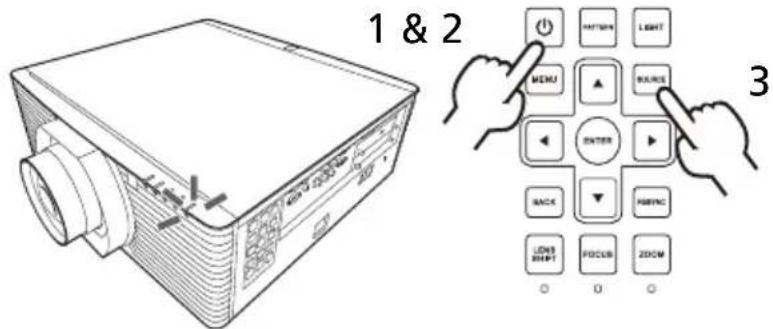
2 Turn on the projector by pressing (POWER) on the control panel or ☐ on the remote control, and the Power indicator LED will turn blue.
3 Turn on your source (computer, notebook, video player, etc.). Select your source. (The projector will detect your source automatically if Auto Source is "On").
- If the screen displays "No Signal", please make sure the signal cables are securely connected.
- If you connect to multiple sources at the same time, use "SOURCE" on the control panel or remote control, or the direct source key on the remote control to switch between inputs.
Turning Off the Projector
1 To turn the projector off, press the power button. This message appears:
"Please press power button again to complete the shutdown process"
Press the power button again.
2 The LED Power indicator will turn solid red to indicate standby mode.
3 It is now safe to unplug the power cord.
Adjusting the Projected Image
Adjusting the Height of the Projected Image
The projector is equipped with two elevator feet for adjusting the image height.
To raise the image:
1 Use the front Tilt adjusting wheels to raise the image to the desired height and angle.
2 Use the rear Tilt adjusting wheels to fine-tune the display angle.
To lower the image:
1 Use the front Tilt adjusting wheels to lower the image to the desired height angle.
2 Use the rear Tilt adjusting wheels to fine-tune the display angle.

Optimizing Image Size and Distance

Only with the following lenses:
Acer FL8 series Standard Zoom Lens/
Acer FL8 series Middle Throw Zoom Lens/
Acer FL8 series Long Throw Zoom Lens/
Acer FL8 series Ultra Long Throw Zoom Lens
[A] differs when different lens is installed.
| Lens installed [A] | |
| Acer FL8 series Standard Zoom Lens 0.6H | |
| Acer FL8 series Ultra Short Throw Zoom Lens 0.5H | |
| Acer FL8 series Short Throw Zoom Lens 0.6H | |
| Acer FL8 series Middle Throw Zoom Lens 0.6H | |
| Acer FL8 series Long Throw Zoom Lens 0.6H | |
| Acer FL8 series Ultra Long Throw Zoom Lens 0.6H | |
| Acer FL8 series Ultra Short Throw Lens N/A |
- With Acer FL8 series Standard Zoom Lens
| Diagonal length (inch) size of 16:10 Screen | Screen Size W x H Projection Distance (D) Offset (Hd) | |||||||||||
| (m) | (inch) | (m) | (feet) | (m) | (feet) | |||||||
| Width | Height | Width | Height Wide | Tele | Wide | Tele | Min. | Max | Min. | Max | ||
| 60 | 1.29 | 0.81 | 50.88 | 31.8 | 2.08 | 3.12 | 6.83 | 10.24 | -0.4 | 0.08 | -1.32 | 0.26 |
| 70 | 1.51 | 0.94 | 59.36 | 37.1 | 2.43 | 3.64 | 7.97 | 11.95 | -0.47 | 0.09 | -1.55 | 0.31 |
| 80 | 1.72 | 1.08 | 67.84 | 42.4 | 2.78 | 4.16 | 9.11 | 13.66 | -0.54 | 0.11 | -1.77 | 0.35 |
| 90 | 1.94 | 1.21 | 76.32 | 47.7 | 3.12 | 4.68 | 10.24 | 15.37 | -0.61 | 0.12 | -1.99 | 0.4 |
| 100 | 2.15 | 1.35 | 84.8 | 53 | 3.47 | 5.2 | 11.38 | 17.07 | -0.67 | 0.13 | -2.21 | 0.44 |
| 120 | 2.58 | 1.62 | 101.76 | 63.6 | 4.16 | 6.24 | 13.66 | 20.49 | -0.81 | 0.16 | -2.65 | 0.53 |
| 150 | 3.23 | 2.02 | 127.2 | 79.5 | 5.2 | 7.81 | 17.07 | 25.61 | -1.01 | 0.2 | -3.31 | 0.66 |
| 180 | 3.88 | 2.42 | 152.64 | 95.4 | 6.24 | 9.37 | 20.49 | 30.73 | -1.21 | 0.24 | -3.97 | 0.79 |
| 200 | 4.31 | 2.69 | 169.6 | 106 | 6.94 | 10.41 | 22.77 | 34.15 | -1.35 | 0.27 | -4.42 | 0.88 |
| 250 | 5.38 | 3.37 | 212 | 132.5 | 8.67 | 13.01 | 28.46 | 42.68 | -1.68 | 0.34 | -5.52 | 1.1 |
| 300 | 6.46 | 4.04 | 254.4 | 159 | 10.41 | 15.61 | 34.15 | 51.22 | -2.02 | 0.4 | -6.62 | 1.32 |
| 350 | 7.54 | 4.71 | 296.8 | 185.5 | 12.14 | 18.21 | 39.84 | 59.76 | -2.36 | 0.47 | -7.73 | 1.55 |
| 400 | 8.62 | 5.38 | 339.2 | 212 | 13.88 | 20.82 | 45.53 | 68.3 | -2.69 | 0.54 | -8.83 | 1.77 |
| 450 | 9.69 | 6.06 | 381.6 | 238.5 | 15.61 | 23.42 | 51.22 | 76.83 | -3.03 | 0.61 | -9.94 | 1.99 |
| 500 | 10.77 | 6.73 | 424 | 265 | 17.35 | 26.02 | 56.91 | 85.37 | -3.37 | 0.67 | -11.04 | 2.21 |
| 550 | 11.85 | 7.4 | 466.4 | 291.5 | 19.08 | 28.62 | 62.6 | 93.91 | -3.7 | 0.74 | -12.15 | 2.43 |
| 600 | 12.92 | 8.08 | 508.8 | 318 | 20.82 | 31.22 | 68.3 | 102.44 | -4.04 | 0.81 | -13.25 | 2.65 |
- With Acer FL8 series Ultra Short Throw Zoom Lens
| Diagonal length (inch) size of 16:10 Screen | Screen Size W x H Projection Distance (D) Offset (Hd) | |||||||||||
| (m) | (inch) | (m) | (feet) | (m) | (feet) | |||||||
| Width | Height | Width | Height | Wide | Tele | Wide | Tele | Min. | Max | Min. | Max | |
| 60 | 1.29 | 0.81 | 50.88 | 31.8 | 0.98 | 1.22 | 3.21 | 4.02 | -0.4 | 0 | -1.32 | 0 |
| 70 | 1.51 | 0.94 | 59.36 | 37.1 | 1.14 | 1.43 | 3.75 | 4.69 | -0.47 | 0 | -1.55 | 0 |
| 80 | 1.72 | 1.08 | 67.84 | 42.4 | 1.31 | 1.63 | 4.29 | 5.36 | -0.54 | 0 | -1.77 | 0 |
| 90 | 1.94 | 1.21 | 76.32 | 47.7 | 1.47 | 1.84 | 4.82 | 6.03 | -0.61 | 0 | -1.99 | 0 |
| 100 | 2.15 | 1.35 | 84.8 | 53 | 1.63 | 2.04 | 5.36 | 6.7 | -0.67 | 0 | -2.21 | 0 |
| 120 | 2.58 | 1.62 | 101.76 | 63.6 | 1.96 | 2.45 | 6.43 | 8.03 | -0.81 | 0 | -2.65 | 0 |
| 150 | 3.23 | 2.02 | 127.2 | 79.5 | 2.45 | 3.06 | 8.03 | 10.04 | -1.01 | 0 | -3.31 | 0 |
| 180 | 3.88 | 2.42 | 152.64 | 95.4 | 2.94 | 3.67 | 9.64 | 12.05 | -1.21 | 0 | -3.97 | 0 |
| 200 | 4.31 | 2.69 | 169.6 | 106 | 3.27 | 4.08 | 10.71 | 13.39 | -1.35 | 0 | -4.42 | 0 |
| 250 | 5.38 | 3.37 | 212 | 132.5 | 4.08 | 5.1 | 13.39 | 16.74 | -1.68 | 0 | -5.52 | 0 |
| 300 | 6.46 | 4.04 | 254.4 | 159 | 4.9 | 6.12 | 16.07 | 20.09 | -2.02 | 0 | -6.62 | 0 |
| 350 | 7.54 | 4.71 | 296.8 | 185.5 | 5.71 | 7.14 | 18.75 | 23.43 | -2.36 | 0 | -7.73 | 0 |
| 400 | 8.62 | 5.38 | 339.2 | 212 | 6.53 | 8.16 | 21.43 | 26.78 | -2.69 | 0 | -8.83 | 0 |
| 450 | 9.69 | 6.06 | 381.6 | 238.5 | 7.35 | 9.18 | 24.1 | 30.13 | -3.03 | 0 | -9.94 | 0 |
| 500 | 10.77 | 6.73 | 424 | 265 | 8.16 | 10.2 | 26.78 | 33.48 | -3.37 | 0 | -11.04 | 0 |
| 550 | 11.85 | 7.4 | 466.4 | 291.5 | 8.98 | 11.22 | 29.46 | 36.83 | -3.7 | 0 | -12.15 | 0 |
| 600 | 12.92 | 8.08 | 508.8 | 318 | 9.8 | 12.24 | 32.14 | 40.17 | -4.04 | 0 | -13.25 | 0 |
- With Acer FL8 series Short Throw Zoom Lens
| Diagonal length (inch) size of 16:10 Screen | Screen Size W x H Projection Distance (D) Offset (Hd) | |||||||||||
| (m) | (inch) | (m) | (feet) | (m) | (feet) | |||||||
| Width | Height | Width | Height Wide | Tele | Wide | Tele | Min. | Max | Min. | Max | ||
| 60 | 1.29 | 0.81 | 50.88 | 31.8 | 1.47 | 2.2 | 4.82 | 7.23 | -0.4 | 0.08 | -1.32 | 0.26 |
| 70 | 1.51 | 0.94 | 59.36 | 37.1 | 1.71 | 2.57 | 5.62 | 8.44 | -0.47 | 0.09 | -1.55 | 0.31 |
| 80 | 1.72 | 1.08 | 67.84 | 42.4 | 1.96 | 2.94 | 6.43 | 9.64 | -0.54 | 0.11 | -1.77 | 0.35 |
| 90 | 1.94 | 1.21 | 76.32 | 47.7 | 2.2 | 3.31 | 7.23 | 10.85 | -0.61 | 0.12 | -1.99 | 0.4 |
| 100 | 2.15 | 1.35 | 84.8 | 53 | 2.45 | 3.67 | 8.03 | 12.05 | -0.67 | 0.13 | -2.21 | 0.44 |
| 120 | 2.58 | 1.62 | 101.76 | 63.6 | 2.94 | 4.41 | 9.64 | 14.46 | -0.81 | 0.16 | -2.65 | 0.53 |
| 150 | 3.23 | 2.02 | 127.2 | 79.5 | 3.67 | 5.51 | 12.05 | 18.08 | -1.01 | 0.2 | -3.31 | 0.66 |
| 180 | 3.88 | 2.42 | 152.64 | 95.4 | 4.41 | 6.61 | 14.46 | 21.69 | -1.21 | 0.24 | -3.97 | 0.79 |
| 200 | 4.31 | 2.69 | 169.6 | 106 | 4.9 | 7.35 | 16.07 | 24.1 | -1.35 | 0.27 | -4.42 | 0.88 |
| 250 | 5.38 | 3.37 | 212 | 132.5 | 6.12 | 9.18 | 20.09 | 30.13 | -1.68 | 0.34 | -5.52 | 1.1 |
| 300 | 6.46 | 4.04 | 254.4 | 159 | 7.35 | 11.02 | 24.1 | 36.16 | -2.02 | 0.4 | -6.62 | 1.32 |
| 350 | 7.54 | 4.71 | 296.8 | 185.5 | 8.57 | 12.86 | 28.12 | 42.18 | -2.36 | 0.47 | -7.73 | 1.55 |
| 400 | 8.62 | 5.38 | 339.2 | 212 | 9.8 | 14.69 | 32.14 | 48.21 | -2.69 | 0.54 | -8.83 | 1.77 |
| 450 | 9.69 | 6.06 | 381.6 | 238.5 | 11.02 | 16.53 | 36.16 | 54.23 | -3.03 | 0.61 | -9.94 | 1.99 |
| 500 | 10.77 | 6.73 | 424 | 265 | 12.24 | 18.37 | 40.17 | 60.26 | -3.37 | 0.67 | -11.04 | 2.21 |
| 550 | 11.85 | 7.4 | 466.4 | 291.5 | 13.47 | 20.2 | 44.19 | 66.29 | -3.7 | 0.74 | -12.15 | 2.43 |
| 600 | 12.92 | 8.08 | 508.8 | 318 | 14.69 | 22.04 | 48.21 | 72.31 | -4.04 | 0.81 | -13.25 | 2.65 |
• With Acer FL8 series Long Throw Zoom Lens
| Diagonal length (inch) size of 16:10 Screen | Screen Size W x H | Projection Distance (D) | Offset (Hd) | |||||||||
| (m) | (inch) | (m) | (feet) | (m) | (feet) | |||||||
| Width | Height | Width | Height | Wide | Tele | Wide | Tele | Min. | Max | Min. | Max | |
| 60 | 1.29 | 0.81 | 50.88 | 31.8 | 4.56 | 7.3 | 14.96 | 23.94 | -0.4 | 0.08 | -1.32 | 0.26 |
| 70 | 1.51 | 0.94 | 59.36 | 37.1 | 5.32 | 8.51 | 17.46 | 27.93 | -0.47 | 0.09 | -1.55 | 0.31 |
| 80 | 1.72 | 1.08 | 67.84 | 42.4 | 6.08 | 9.73 | 19.95 | 31.92 | -0.54 | 0.11 | -1.77 | 0.35 |
| 90 | 1.94 | 1.21 | 76.32 | 47.7 | 6.84 | 10.95 | 22.45 | 35.92 | -0.61 | 0.12 | -1.99 | 0.4 |
| 100 | 2.15 | 1.35 | 84.8 | 53 | 7.6 | 12.16 | 24.94 | 39.91 | -0.67 | 0.13 | -2.21 | 0.44 |
| 120 | 2.58 | 1.62 | 101.76 | 63.6 | 9.12 | 14.6 | 29.93 | 47.89 | -0.81 | 0.16 | -2.65 | 0.53 |
| 150 | 3.23 | 2.02 | 127.2 | 79.5 | 11.4 | 18.24 | 37.41 | 59.86 | -1.01 | 0.2 | -3.31 | 0.66 |
| 180 | 3.88 | 2.42 | 152.64 | 95.4 | 13.68 | 21.89 | 44.89 | 71.83 | -1.21 | 0.24 | -3.97 | 0.79 |
| 200 | 4.31 | 2.69 | 169.6 | 106 | 15.2 | 24.33 | 49.88 | 79.81 | -1.35 | 0.27 | -4.42 | 0.88 |
| 250 | 5.38 | 3.37 | 212 | 132.5 | 19.01 | 30.41 | 62.35 | 99.76 | -1.68 | 0.34 | -5.52 | 1.1 |
| 300 | 6.46 | 4.04 | 254.4 | 159 | 22.81 | 36.49 | 74.82 | 119.72 | -2.02 | 0.4 | -6.62 | 1.32 |
| 350 | 7.54 | 4.71 | 296.8 | 185.5 | 26.61 | 42.57 | 87.29 | 139.67 | -2.36 | 0.47 | -7.73 | 1.55 |
| 400 | 8.62 | 5.38 | 339.2 | 212 | 30.41 | 48.65 | 99.76 | 159.62 | -2.69 | 0.54 | -8.83 | 1.77 |
| 450 | 9.69 | 6.06 | 381.6 | 238.5 | 34.21 | 54.73 | 112.23 | 179.58 | -3.03 | 0.61 | -9.94 | 1.99 |
| 500 | 10.77 | 6.73 | 424 | 265 | 38.01 | 60.82 | 124.71 | 199.53 | -3.37 | 0.67 | -11.04 | 2.21 |
| 550 | 11.85 | 7.4 | 466.4 | 291.5 | 41.81 | 66.9 | 137.18 | 219.48 | -3.7 | 0.74 | -12.15 | 2.43 |
| 600 | 12.92 | 8.08 | 508.8 | 318 | 45.61 | 72.98 | 149.65 | 239.43 | -4.04 | 0.81 | -13.25 | 2.65 |
- With Acer FL8 series Ultra Long Throw Zoom Lens
| Diagonal length (inch) size of 16:10 Screen | Screen Size W x H Projection Distance (D) Offset (Hd) | |||||||||||
| (m) | (inch) | (m) | (feet) | (m) | (feet) | |||||||
| Width | Height | Width | Height Wide | Tele | Wide | Tele | Min. | Max | Min. | Max | ||
| 60 1.2 | 9 0.81 | 50.88 31 | 7.8 7.13 | 11.41 23 | 4 37.4 | -0.4 | 0.08 -1 | 32 0.26 | ||||
| 70 | 1.51 | 0.94 | 59.36 | 37.1 | 8.32 | 13.31 | 27.3 | 43.68 | -0.47 | 0.09 | -1.55 | 0.31 |
| 80 | 1.72 | 1.08 | 67.84 | 42.4 | 9.51 | 15.22 | 31.2 | 49.92 | -0.54 | 0.11 | -1.77 | 0.35 |
| 90 1.9 | 4 1.21 | 76.32 47 | 7 10.7 | 17.12 35 | 5.1 56.1 | -0.6 | 0.12 -1 | 99 0.4 | ||||
| 100 | 2.15 | 1.35 | 84.8 | 53 | 11.89 | 19.02 | 39 | 62.4 | -0.67 | 0.13 | -2.21 | 0.44 |
| 120 | 2.58 | 1.62 | 101.76 | 63.6 | 14.27 | 22.82 | 46.8 | 74.88 | -0.81 | 0.16 | -2.65 | 0.53 |
| 150 | 3.23 | 2.02 | 127.2 | 79.5 | 17.83 | 28.53 | 58.5 | 93.6 | -1.01 | 0.2 | -3.31 | 0.66 |
| 180 | 3.88 | 2.42 | 152.64 | 95.4 | 21.4 | 34.24 | 70.2 | 112.33 | -1.21 | 0.24 | -3.97 | 0.79 |
| 200 | 4.31 | 2.69 | 169.6 | 106 | 23.78 | 38.04 | 78 | 124.81 | -1.35 | 0.27 | -4.42 | 0.88 |
| 250 | 5.38 | 3.37 | 212 | 132.5 | 29.72 | 47.55 | 97.5 | 156.01 | -1.68 | 0.34 | -5.52 | 1.1 |
| 300 | 6.46 | 4.04 | 254.4 | 159 | 35.66 | 57.06 | 117.01 | 187.21 | -2.02 | 0.4 | -6.62 | 1.32 |
| 350 | 7.54 | 4.71 | 296.8 | 185.5 | 41.61 | 66.57 | 136.51 | 218.41 | -2.36 | 0.47 | -7.73 | 1.55 |
| 400 | 8.62 | 5.38 | 339.2 | 212 | 47.55 | 76.08 | 156.01 | 249.61 | -2.69 | 0.54 | -8.83 | 1.77 |
| 450 | 9.69 | 6.06 | 381.6 | 238.5 | 53.49 | 85.59 | 175.51 | 280.81 | -3.03 | 0.61 | -9.94 | 1.99 |
| 500 | 10.77 | 6.73 | 424 | 265 | 59.44 | 95.1 | 195.01 | 312.01 | -3.37 | 0.67 | -11.04 | 2.21 |
| 550 | 11.85 | 7.4 | 466.4 | 291.5 | 65.38 | 104.61 | 214.51 | 343.22 | -3.7 | 0.74 | -12.15 | 2.43 |
| 600 | 12.92 | 8.08 | 508.8 | 318 | 71.33 | 114.12 | 234.01 | 374.42 | -4.04 | 0.81 | -13.25 | 2.65 |
- With Acer FL8 series Ultra Short Throw Lens
| Diagonal length (inch) size of 16:10 Screen | Screen Size W x H Projection Distance (D) Offset (Hd) | |||||||||||
| (m) | (inch) | (m) | (feet) | (m) | (feet) | |||||||
| Width | Height | Width | Height Wide | Tele | Wide | Tele | Min. | Max | Min. | Max | ||
| 70 | 1.51 | 0.94 | 59.36 | 37.1 | 0.59 | 0.59 | 1.94 | 1.94 | 0.24 | 0.24 | 0.77 | 0.77 |
| 80 | 1.72 | 1.08 | 67.84 | 42.4 | 0.67 | 0.67 | 2.19 | 2.19 | 0.28 | 0.28 | 0.92 | 0.92 |
| 90 | 1.94 | 1.21 | 76.32 | 47.7 | 0.74 | 0.74 | 2.43 | 2.43 | 0.32 | 0.32 | 1.07 | 1.07 |
| 100 | 2.15 | 1.35 | 84.8 | 53 | 0.82 | 0.82 | 2.68 | 2.68 | 0.37 | 0.37 | 1.21 | 1.21 |
| 120 | 2.58 | 1.62 | 101.76 | 63.6 | 0.97 | 0.97 | 3.18 | 3.18 | 0.46 | 0.46 | 1.51 | 1.51 |
| 150 | 3.23 | 2.02 | 127.2 | 79.5 | 1.2 | 1.2 | 3.92 | 3.92 | 0.59 | 0.59 | 1.95 | 1.95 |
| 180 | 3.88 | 2.42 | 152.64 | 95.4 | 1.42 | 1.42 | 4.67 | 4.67 | 0.73 | 0.73 | 2.39 | 2.39 |
| 200 | 4.31 | 2.69 | 169.6 | 106 | 1.57 | 1.57 | 5.16 | 5.16 | 0.82 | 0.82 | 2.68 | 2.68 |
| 250 | 5.38 | 3.37 | 212 | 132.5 | 1.95 | 1.95 | 6.41 | 6.41 | 1.04 | 1.04 | 3.41 | 3.41 |
| 300 | 6.46 | 4.04 | 254.4 | 159 | 2.33 | 2.33 | 7.65 | 7.65 | 1.26 | 1.26 | 4.15 | 4.15 |
| 350 | 7.54 | 4.71 | 296.8 | 185.5 | 2.71 | 2.71 | 8.89 | 8.89 | 1.49 | 1.49 | 4.88 | 4.88 |
How to Get a Preferred Image Position by Adjusting Lens Shift
The projector is equipped with lens shift for adjusting the position of projected image without requiring you to physically move the projector. To shift the lens, use the control panel or remote control, or select "Display settings" > "Lens" on the OSD and adjust the lens.

Note: The figures shown in this section are for reference only not approximate value. The figures between units can be different due to assembly tolerance.
The horizontal width can be adjusted between -10% and 10% of the image width. The vertical height can be adjusted between 0% and 50% – 60% (depending on the projection lens installed) of the image height.
The horizontal position

The vertical position
![[B] 1 image height](/content/2026/05/1010841/images/084f457bcda1cc4bdd5f0a1146d535eee704fe7782cc9b4e4513a73cef386bca.jpg)

Note: [B] differs when different lens is installed.
| Lens installed [B] | |
| Acer FL8 series Standard Zoom Lens 60% | |
| Acer FL8 series Ultra Short Throw Zoom 50% | |
| Acer FL8 series Short Throw Zoom Lens 60% | |
| Acer FL8 series Middle Throw Zoom Lens 60% | |
| Acer FL8 series Long Throw Zoom Lens 60% | |
| Acer FL8 series Ultra Long Throw Zoom Lens 60% | |
| Acer FL8 series Ultra Short Throw Lens 83.2% |
User Controls
Onscreen Display (OSD) Menus
The projector has multilingual Onscreen Display (OSD) menus that allow you to make image adjustments and change a variety of settings.
Using the OSD menus
- To open the OSD menu, press "MENU" on the control panel or remote control.
- When the OSD is displayed, use to select an item in the main menu. After selecting the desired main menu item, press to enter a submenu for feature setting.
- Use ▲ ▼ to select the desired item and adjust the settings by using ◀ ▶.
- Select the next item to be adjusted in the submenu and adjust as described above.
- Press "MENU" on the control panel or remote control, the screen will return to the main menu.
- To exit the OSD menu, press "MENU" on the control panel or remote control again. It will close and the projector will automatically save the new settings.
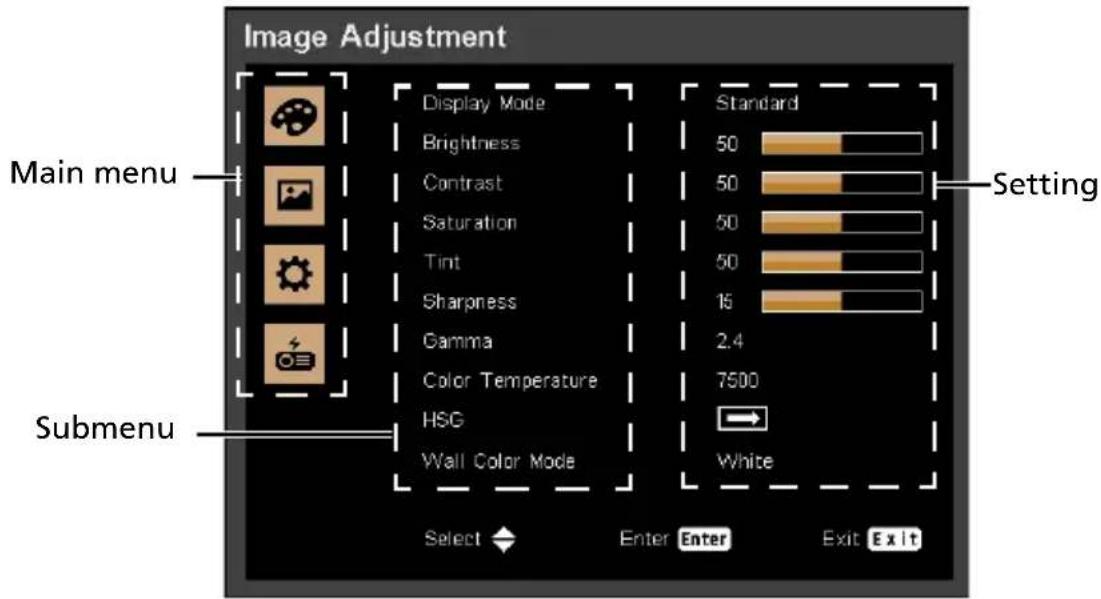

Note: Some of the following OSD settings may not be available. Please refer to the actual OSD of your projector.
Image Adjustment
| Display Mode | There are many factory presets optimized for various types of images.·Bright: For brightness optimization.·Standard: For common environment.·Video: For playing video in a bright environment.·sRGB: For sRGB standard.·DICOM SIM: For DICOM format files in simulation mode, and not for actual diagnosis.·User: Memorize user's settings. |
| Brightness | Adjusts the brightness of the image.·Press to darken the image.·Press to lighten the image. |
| Contrast | Controls the degree of difference between the lightest and darkest parts of the picture. Adjusting the contrast changes the amount of black and white in the image.·Press to decrease the contrast.·Press to increase the contrast. |
| Saturation | Adjusts a video image from black and white to fully saturated colors.·Press to decrease the amount of color in the image.·Press to increase the amount of color in the image. |
| Tint | Adjusts the color balance of red and green.·Press to increase the amount of green in the image.·Press to increase the amount of red in the image. |
| Sharpness | Adjusts the sharpness of the image.·Press to decrease the sharpness.·Press to increase the sharpness. |
| Gamma | Effects the representation of dark scenery. With greater gamma value, dark scenery will look brighter. |
| Color Temperature | Adjusts the color temperature. At higher color temperatures, the screen looks colder; at lower color temperatures, the screen looks warmer. |
| HSG | HSGUse this function to enhance color and reproduce vivid colors.HSG settings•Color: Use key to select a color that you wish to enhance.•When selecting Red/Green/Blue/Cyan/Magenta/Yellow, the following options are available.-Hue: Use Key to change the hue of the selected color.-Saturation: Use Key to change the saturation of the selected color.-Gain: Use Key to change the contrast level of the selected color.•When selecting White, the following options are available.-Red/Green/Blue: Use Key to change the level of each color.-Reset: Use this function to return the adjustments and settings made above to the factory default values. |
| Wall Color Mode | Use this function to choose a proper color according to the wall. There are several choices, including White, Light Yellow, Light Blue, Pink and Dark Green. It will compensate for the color deviation due to the wall color to show the correct image tone. |

Note: "Saturation" and "Tint" functions are not supported under computer mode.

Display settings
| Aspect Ratio | Use this function to choose your desired aspect ratio.•Auto: Keeps the image with original width-height ratio and maximizes the image to fit native horizontal or vertical pixels.•4:3/16:9/16:10/1.88:1/2.35:1: The image will be scaled to fit the screen and displayed using a 4:3/16:9/16:10/1.88:1/2.35:1 ratio. |
| Phase | Eliminates flicker from the image displayed. Usekey to adjust the value. |
| Frequency | Changes the projector's refresh rate to match the frequency of your computer's graphics card. If you experience a vertical flickering bar in the projected image, use this function to correct it. |
| H. Position | •Press to move the image left.•Press to move the image right. |
| V. Position | •Press to move the image down.•Press to move the image up. |
| Keystone | V. KeystoneManually adjusts image distortion caused by tilting projection. H. KeystoneManually adjusts image distortion caused by tilting projection. H. KeystoneManually adjusts image distortion caused by tilting projection. Four CornersUse key to select which corner to adjust and press the "ENTER" key to enter its submenu.Use key to adjust the setting. Four CornersUse key to select which corner to adjust and press the "ENTER" key to enter its submenu.Use key to adjust the setting. |
| Lens | Lens SettingsLens Lock: Selecting Yes will lock all the functions provide in this menu and the Lens Centering menu. You will not be able to change lens related settings.Lens Shift: Press to select Normal Speed or Fine Tune to determine how fast you want the lens to move. After selection, press ENTER to enable the lens shift function, and use to adjust the projection position.Focus: Adjusts the projector's focus.Zoom: Adjusts the size of the projected image.Load Settings: Applys the settings that you previously saved.Save Settings: After making lens shift, zoom and focus adjustments, you can choose a set of setting to memorize current lens settings.Clear Settings: Clears the settings.Lens CenteringReturns the lens to the centered position. |
| Advanced | RGB Input RangeAdjusts the color range of the HDMI image data to prevent color display error.Auto: Automatically adjusts the color range by information from the player.Limited Range: Processes the input image as limited color range data.Full Range: Processes the input image as full color range data.OverscanUse this function to conceal the poor picture quality in the four edges.Start-up ScreenUse this function to select your desired startup screen. If you change the setting, it will take effect when you exit the OSD menu.Background on No SignalUse this function to select a background image to be displayed when no signal is detected. |
| Advanced | Screen CaptureUse this function to customize the startup screen. To capture the image that you want to use as the startup screen, follow the instructions below.Before proceeding with the following steps, make sure that the "Keystone" is set to the default value "0".1 Project the image you want you capture.2 Select "Screen Capture" and press "ENTER".3 A dialog box appears to confirm the action. Choose "Yes" to use the current image as your customized startup screen. Choose "No" to cancel the screen capture and exist the Onscreen Display (OSD).4 A message appears stating that the screen capture is in progress.5 When the screen capture is finished, the message disappears and the original display is shown.6 If the screen capture failed, a "Screen Capture FAILED!" message will pop up. Your image size may exceed the maximum capturing capacity of 8 MB. Please change another image and try again.7 To use this image as the startup screen, change the "Start-up Screen" from the default setting to "User".8 To use this image as signal searching screen, select "User" in "Start-up Screen" and "User" in "Background on No Signal".Test PatternDisplays the test pattern.Closed CaptionSelects a preferred closed captioning mode from CC1, CC2, CC3, CC4 (CC1 displays captions in the primary language in your area). Select "Off" to turn off the captioning feature. This function is only available when a composite video or S-Video input signal is selected and its system format is NTSC. |

Note: "H. Position", "V. Position", and "Frequency" functions are not supported under video mode.

Note: "RGB Input Range" is only available when the input signal is HDMI.
Default Adjustment
| Language | Sets a language for the OSD menus. Use to select your preferred language. |
| Menu Display Time | Sets the length of time the On Screen Display will remain active after your last key press. |
| Menu Position Sets | the On Screen Display menu position. |
| Projector Installation | Frontable: The factory default setting.Fronteiling: When you select this function, the projector inverts the image for ceiling-mounted projection.ReaTable: When you select this function, the projector reverses the image so that you can project behind a translucent screen.ReaCeiling: When you select this function, the projector reverses and inverts the image at same time. You can project from behind a translucent screen with ceiling mounted projection. |
| Auto Source | When this function is turned "On", the projector will search for other signals if the current input signal is lost. When this function is turned "Off", it will only search a specified connection port. |
| Input Source | Use this option to enable/disable input sources. Press "ENTER" to enter the sub menu and select which sources you require. Press "ENTER" to finalize the selection. The projector will only search for inputs that are enabled. |
| Power Settings | AC Power OnSelecting "On" enables the function. The projector will automatically turn on when power is supplied via the power cord.IO Power OnSelecting "On" to enables this function. The projector will automatically turn on when a VGA signal is detected, without pressing the power button.Power Off NoticeWhen "On" is selected, a power off message will be displayed after pressing the button. When "Off" is selected, the projector turns off after pressing the button one time.Date & TimeSets the date and time for this projector.Auto Power Off (min)The projector will automatically shut down while there is no signal input detected after the time you set.Customize Power Off (Hours) |
| Schedules automatic shutdown of the projector. | |
| Standby Settings | VGA OutSelecting "On" enables the function. The projector can output a VGA signal when it is in standby mode and the VGA IN (or VGA IN 1) and VGA OUT sockets are correctly connected to the devices.Enabling this function slightly increases the standby power consumption.NetworkEnables/Disables the network function.DC 5V OutSelecting "On" enables the function. Both micro USB cable inside the projector and the DC 5V out port/USB A port (if available) on the back of the projector can output 5V power when it is in standby mode.Enabling this function slightly increases the standby power consumption.HDBaseT IR CarrierUse this function to enable HDBaseT IR Carrier. |
| Network | StatusDisplays the network connection status.DHCPSelect On to allow the projector to obtain an IP address automatically from your network. Select "Off" to manually assign IP, Subnet Mask and Gateway configuration.IP AddressSet an IP address or display IP address provided from DHCP server when DHCP is set to "On".Subnet MaskSet subnet mask number or display subnet mask number provided from DHCP server when DHCP is set to "On".ApplySelect "Yes" to apply the changes made in network configuration settings.MAC AddressDisplays MAC address. |
| Security Settings | Password ProtectionSelect "On" to use the security verification when the turning on the projector. Select "Off" to be able to switch on the projector without a password verification.Change PasswordSets the password.Lock to User Startup ScreenUse this function to lock the Startup Screen and it cannot be changed by the "Start-up Screen" or "Screen Capture" function. |
| Reset | Press "ENTER" after choosing "Yes" to return the display parameters on all menus to the factory default settings. |

About Network Setting
Note 1: An overview of the remote network operation page
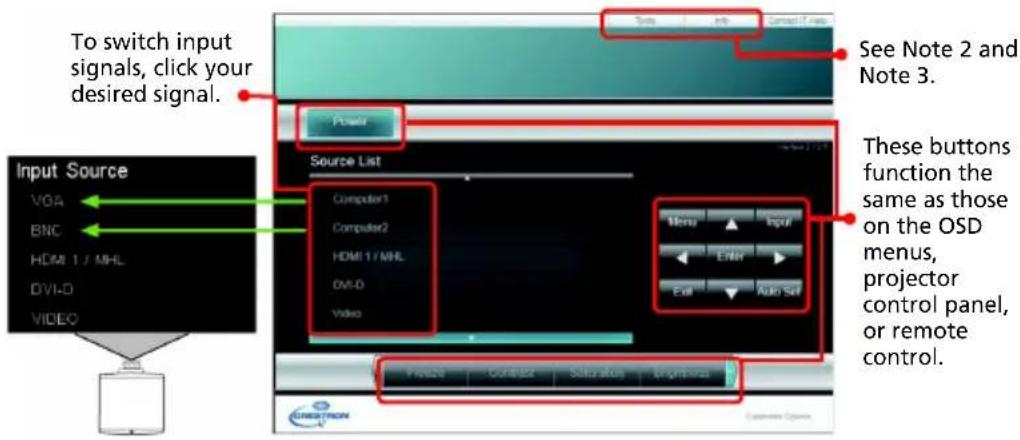
Note 2: An overview of the Tools page
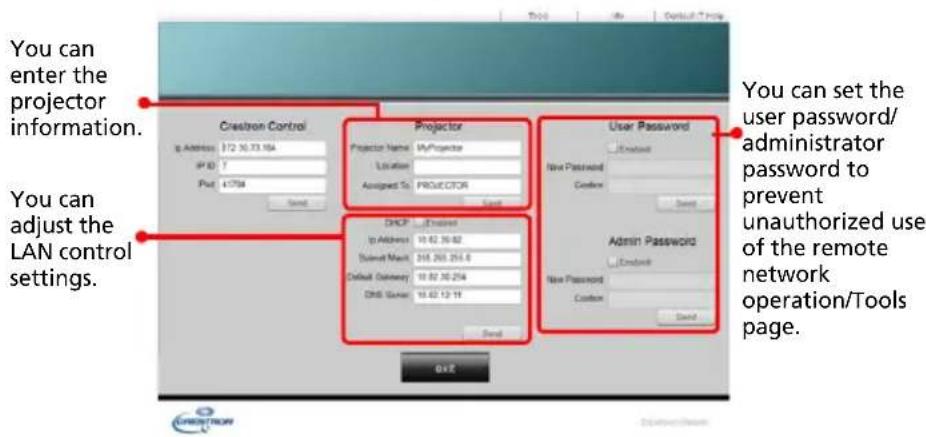
Note 3: The Info page shows the projector information and status.

Options
| Laser Mode | Sets the brightness mode.·Normal: Increases the brightness.·Eco.: Dims the projector light source which will lower power consumption and extend the light source life.·User: Memorize user's settings. |
| User | Use to adjust the brightness to your desired level. |
| High Altitude Mode | Choose "On" to turn on the High Altitude mode. When this function is turned on, the projector fans operate at full speed continuously to cool down the projector's temperature. |
| Status Display When | "On" is selected, the status will be displayed. |
| Control | HDMI CECSelecting "On" allows synchronized power ON/OFF operation between the projector and a CEC-compatible device connected to the HDMI/MHL port of the projector.This function is only available for the HDMI/MHL port.Projector IDSets the remote control ID for this projector. When multiple adjacent projectors are in operation at the same time, switching the remote control codes can prevent interference from other remote controls. After the Projector ID is set, switch to the same ID for the remote control to control this projector.Trigger OutSets the port to provide trigger out function. |
| 3D | 3D SYNCUse this option to select the appropriate 3D function.•DLP Link: Choose "DLP Link" to use DLP Link 3D Glasses.• External: Choose "External" to use VESA 3D emitter and 3D Glasses.3D SYNC OutputUse this option to select the appropriate 3D sync output method.•Normal: Choose "Normal" to output 3D sync to other projector(s).•Pass Through: Choose "Pass Through" to receive 3D sync and/or pass 3D sync to another projector.3D FormatIf the 3D content is not displayed correctly, you can select a 3D format that suits the 3D content you are viewing and obtain the best result.3D SYNC InvertIf you see a discrete or overlapping image while wearing DLP 3D glasses, you may need to choose "On" to get best match of left/right image sequence to get the correct image (for DLP 3D). |
| Information | • Source: Display the input source that is currently connected to.•Resolution: Display the resolution setting of the current input source.•Display Mode: Display current Display Mode.•Laser Mode: Display current Laser Mode.•Total Time: Display the light source hours.•Inlet Temp: Display the temperature of the intake vent.•FW Version: Display the firmware version. |

Note: Supported 3D signal timings:
| Signal source type Supported timing | |
| Video/S-Video/Component video | HQFS 3D (480i@60Hz), 576i@50Hz |
| VGA/HDMI (PC mode) 640 x 480@50/60/100/120Hz | 800 x 600@50/60/100/120Hz1024 x 768@50/60/100/120Hz1280 x 800@50/60/100/120Hz (RB) |
| HDMI (Video mode) HQFS 3D (480i@60Hz), 576i@50Hz,Frame Packing (1080p@23.98/24Hz,720p@50/60Hz)Side-by-Side Horizontal (1080i@50/60Hz,1080p@50/60Hz)Top-and-Bottom (720p@50/60Hz,1080p@23.97/24Hz, 1080p@50/60Hz) |
It needs correct settings on graphics card 3D application program for correct 3D display.
Appendices
Troubleshooting
If you experience a problem with your Acer projector, refer to the following troubleshooting guide. If the problem persists, please contact your local reseller or service center.
Image Problems and Solutions
| # Problem Solution | |
| 1 No image appears onscreen | Make sure all the cables are correctly connected as described in the "Getting Started" section.Ensure none of the connector pins are bent or broken.Make sure the projector is switched on. |
| 2 Partial, scrolling or incorrectly displayed image (For PC) | Press "RESYNC" on the control panel or remote control.For an incorrectly displayed image:Open "My Computer > Control Panel," and then double-click the "Display" icon.Select the "Settings" tab.Verify that your display resolution setting is lower than or equal to 1600 x 1200 or 1920 x 1080.Click the "Advanced Properties" button.If the problem still appears, change the monitor display you are using and follow the steps below:Verify that the resolution setting is lower than or equal to 1600 x 1200 or 1920 x 1080.Click the "Change" button under the "Monitor" tab.Click "Show all devices > Standard monitor types" under the SP box, and choose the resolution mode you need under the "Models" box.Verify that the resolution setting of the monitor display is lower than or equal to 1600 x 1200 or 1920 x 1080. |
| 3 Partial, scrolling or incorrectly displayed image (For notebooks) | •Press "RESYNC" on the control panel or remote control.•For an incorrectly displayed image:•Follow the steps for item 2 (above) to adjust the resolution of your computer.•Press the toggle output settings. Example: [Fn]+[F4], Compaq [Fn]+[F4], Dell [Fn]+[F8], Gateway [Fn]+[F4], IBM [Fn]+[F7], HP [Fn]+[F4], NEC [Fn]+[F3], Toshiba [Fn]+[F5]•If you experience difficulty changing resolutions or your monitor freezes, restart all equipment including the projector. |
| 4 The screen of the notebook computer is not displaying your presentation | •If you are using a Microsoft ® Windows® based notebook: Some notebook PCs may deactivate their own screens when a second display device is in use. Each has a different way to be reactivated. Refer to your computer's manual for detailed information.•If you are using an Apple ® Mac® OS based notebook: In System Preferences, open Display and select Video Mirroring "On." |
| 5 Image is unstable or flickering | •Change the display color setting on your computer. |
| 6 Image has vertical flickering bar | •Use "Frequency" to make an adjustment. Refer to the "Display settings" section for more information.•Check and reconfigure the display mode of your graphics card to make it compatible with the projector. |
| 7 Image is out of focus | •Adjust the focus ring on the projector lens.•Make sure the projection screen is within the required distance.Refer to the "Optimizing Image Size and Distance" section for more information. |
| 8 Image is stretched when displaying a "widescreen" DVD title | When you play a DVD encoded in anamorphic or 16:9 aspect ratio you may need to adjust the following settings:•If you play a 4:3 format DVD title, please change the format to 4:3 with the projector OSD.•If the image is still stretched, you will also need to adjust the aspect ratio. Set up the display format to 16:9 (wide) aspect ratio on your DVD player. |
| 9 Image is too small or too large | Adjust the zoom lever on the top of the projector.Move the projector closer to or further from the screen.Press "MENU" on the control panel or remote control. Go to "Display settings" > "Aspect Ratio" and try different settings. |
| 10 Image has slanted sides | If possible, reposition the projector so that it is centered on the screen and below the bottom of the screen.Perform keystone correction (if available).Press "MENU" on the control panel or remote control to open the OSD menu. Go to "Keystone" to make adjustments. |
| 11 Image is reversed | Select "Default Adjustment" > "Projector Installation" on the OSD and adjust the projection direction. |
Problems with the Projector
| # Condition Solution | |
| 1 The projector stops responding to all controls | If possible, turn off the projector, then unplug the power cord and wait at least 30 seconds before reconnecting power. |
OSD Messages
| # | Condition Message Reminder |
| 1 | Message Fan Fail - the system fan is not working.Laser will automatically turn off soon.Projector Overheated - the projector has exceeded its recommended operating temperature and must be allowed to cool down before it is used. Please also check the dust filters if they are installed. If the dust filter is clogged with dust, please clean it.Laser will automatically turn off soon.Replace the liquid coolerThe water from liquid cooler is insufficient. Contact the service center for replacement. |
LED & Alarm Definition Listing
LED Messages
| Message | Power LED Temp | LED | Status1 LED | Status2 LED | Status3 LED | |
| Blue Red | Red Red Red | |||||
| Standby -- V -- -- -- -- | ||||||
| Power up processing | Flashing -- | -- -- -- -- | ||||
| Start to move C0 position | V -- Flashing Flashing | Flashing | Flashing | |||
| C0 position ready V -- | V V V V | |||||
| Power On (Normal) V | -- -- -- -- -- | |||||
| Shutdown processing (Cooling) | -- Flashing -- -- -- -- | |||||
| Firmware Download mode | - | - | V | V | V | V |
| Timer Backup Error(Standby) | -- Quick flashing | -- -- -- -- | ||||
| Laser (1 Bank fail) V | -- V -- -- | |||||
| Laser (2 Banks fail) V | -- -- V -- | |||||
| Laser (3 Banks fail) V | -- -- V V -- | |||||
| Laser (4 Banks fail) V | -- -- -- -- V | |||||
| Laser (5 Banks fail) V | -- -- V V | |||||
| Laser (6 Banks fail) V | -- -- -- V V | |||||
| Laser (7 Banks fail) V | -- -- V V V | |||||
| Laser (All Banks fail) | -- -- -- Flashing | Flashing | Flashing | |||
| Temperture 1 Error | -- V -- -- -- | |||||
| Temperture 2 Error | -- V V -- -- | |||||
| F a | n | 1 | E | r | r | o |
| Fan 2 Error | -- -- Flashing V -- -- | |||||
| F a | n | 3 | E | r | r | o |
| Fan 4 Error | -- -- Flashing V V -- | |||||
| F a | n | 5 | E | r | r | o |
| Fan 6 Error | -- -- Flashing V -- V | |||||
| F a | n | 7 | E | r | r | o |
| Fan 8 Error | -- -- Quick | Flashing | -- -- -- | |||
| Fan 9 Error | -- -- Quick | Flashing | V | - | - | |
| Fan 10 Error | -- -- Quick | Flashing | -- V -- | |||
| Fan 11 Error | -- -- Quick | Flashing | V | V | -- | |
| Fan 12 Error | -- -- Quick | Flashing | -- -- V | |||
V
| Message | Power LED Temp | LED | Status1 LED | Status2 LED | Status3 LED | |
| Blue Red | Red Red Red | Red Red | ||||
| Fan 13 Error -- Quick | Flashing | V | -- | V | ||
| Fan 14 Error -- Quick | Flashing | -- V V | ||||
| Fan Errors (more than 2 fans) | -- -- Quick | Flashing | V | V | V | |
| Color Wheel -- -- -- -- | -- Flashing | |||||
| Phosphor Wheel 1 -- | -- -- -- V Flashing | |||||
| Phosphor Wheel 2 -- | -- -- V -- Flashing | |||||
| Liquid Pump 1 V -- -- | -- Flashing -- | |||||
| Liquid Pump 2 V -- -- | V Flashing -- | |||||
| Liquid Pump 1&2 V -- | -- Flashing | Flashing -- | ||||
Specifications
The specifications below are subject to change without notice. For final specs, please refer to Acer's marketing documentation.
| Projection system | DLP^TM |
| Resolution Native: WUXGA (1920 x 1200)Maximum: WUXGA (1920 x 1200) (supports reduce blanking only) | |
| Computer compatibility Refer to the "Compatibility Modes" section for more information. | |
| Video compatibility NTSC (3.58/4.43), PAL (M/N), PAL 60, SECAM, HDTV (720p, 1080i, 1080p), EDTV (480p, 576p), SDTV (480i, 576i) | |
| Aspect ratio Auto, 4:3, 16:9, 16:10, 1.88:1, 2.35:1 | |
| Displayable colors 1.07 billion colors | |
| Projection lens | •Standard zoom lens: F = 1.6 - 2.0 , f = 24.1 mm - 35.8 mm ,1:1.5 Motorized Zoom and Motorized Focus•Ultra short throw zoom lens: F = 1.84 - 2.32 , f = 11.3 mm - 14.1 mm ,1:1.25 Motorized Zoom and Motorized Focus•Short throw zoom lens: F = 1.82 - 2.34 , f = 17.2 mm - 25.5 mm ,1:1.5 Motorized Zoom and Motorized Focus•Middle throw zoom lens: F = 1.8 - 2.23 , f = 35.2 mm - 53.5 mm ,1:1.52 Motorized Zoom and Motorized Focus•Long throw zoom lens: F = 1.8 - 2.2 , f = 51.33 mm - 82.49 mm ,1:1.6 Motorized Zoom and Motorized Focus•Ultra long throw zoom lens: F = 1.84 - 2.34 , f = 79.18 mm - 125.95 mm ,1:1.6 Motorized Zoom and Motorized Focus•Ultra short throw lens: F = 2.0 , f = 5.64 mm ,Fixed Zoom and Motorized Focus |
| Projection screen size (diagonal) with clear focus | 60" – 600" (152 cm – 1524 cm) |
| Throw ratio | •With standard zoom lens: 1.61 – 2.42 (98" @ 3.4 m)•With ultra short throw zoom lens: 0.76 – 0.95 (98" @ 1.6 m)•With short throw zoom lens: 1.14 – 1.71 (98" @ 2.4 m)•With middle throw zoom lens: 2.37 – 3.6 (98" @ 5.0 m)•With long throw zoom lens: 3.53 – 5.65 (98" @ 7.45 m)•With ultra long throw zoom lens: 5.52 – 8.83 (98" @ 11.65 m)•With ultra short throw lens:0.377 (166" @ 1.31 m) |
| Horizontal scan rate 15 – 100 KHz | |
| Vertical refresh scan rate 24 – 120 Hz | |
| Keystone correction | •Standard zoom lens/Short throw zoom lens/Middle throw zoom lens/Long throw zoom lens/Ultra long throw zoom lens:+/-30 Degrees (Vertical/Horizontal), Manual•Ultra short throw zoom lens:+/-25 Degrees (Vertical/Horizontal), Manual |
| Digital zoom N/A | |
| Audio N/A | |
| Lens shift Refer to the "How to Get a Preferred Image Position by Adjusting Lens Shift" section for more information. | |
| Weight Approximate 26.5 kg (58.4 lbs.) | |
| Dimensions Refer to the "Dimensions" section for more information. | |
| Power supply Universal AC input 100 - 240 V, input frequency 50/60 Hz | |
| Power consumption (typical) Standard mode: 1350 W @100 VAC; 1210 W @240 VACECO mode: 1080 W @ 100 VAC; 980 W @240 VACStandby mode: < 0.5 WNetwork standby mode: < 2 W | |
| Operating temperature 0°C to 40°C / 32°F to 104°F | |
| I/O connectors | •Power socket x 1•Wired remote input x 1•Wired remote output x 1•RS232 input x 1•RS232 output x 1•Composite video x 1•S-Video x 1•BNC connector x 5•VGA input x 1•VGA output x 1•HDMI/MHL x 1•DVI-D input x 1•USB Type mini B x 1•USB Type A (DC 5V output) x 1•RJ45 LAN input x 1•3D sync connector x 2•12V DC out x 2•HDBaseT x 1•3G-SDI x 1 |
| Standard package contents | •AC power cord x 1•Remote control x 1•AAA Battery x 2 (for the remote control)•Quick start guide x 1 |
| Accessory (optional) | •Security card x 1•HDBaseT module x 1•3G-SDI module x 1 |
Spare parts
•Acer HDBaseT module for FL8 series (MC.JNM11.005)
•Acer 3G-SDI module for FL8 series
* Design and specifications are subject to change without notice.
Compatibility Modes
1 VGA Analog - PC Signal
| Mode Resolution V.Frequency [Hz] | H.Frequency [KHz] | ||
| VGA 640 x 480 | 60 31.47 | ||
| 72 37.86 | |||
| 75 37.50 | |||
| 85 43.27 | |||
| 120 61.91 | |||
| SVGA 800 x 600 | 56 35.20 | ||
| 60 37.88 | |||
| 72 48.08 | |||
| 75 46.88 | |||
| 85 53.67 | |||
| 120 77.43 | |||
| XGA 1024 x 768 | 60 48.36 | ||
| 70 56.48 | |||
| 75 60.02 | |||
| 85 68.68 | |||
| 120 98.96 | |||
| SXGA | 1152 x 864 | 70 63.85 | |
| 75 67.50 | |||
| 85 77.10 | |||
| 1280 x 1024 | 60 63.98 | ||
| 72 76.97 | |||
| 75 79.98 | |||
| 85 91.15 | |||
| QuadVGA | 1280 x 960 60 60.00 | ||
| 1280 x 960 75 75.00 | |||
| SXGA+ 1400 x 1050 60 65.32 | |||
| UXGA 1600 x 1200 60 75.00 | |||
| PowerBook G4 | 640 x 480 60 31.50 | ||
| 640 x 480 66.6 (67) 35.00 | |||
| 800 x 600 60 37.88 | |||
| 1024 x 768 60 48.36 | |||
| 1024 x 768 75 60.241 | |||
| 1152 x 870 75 68.681 | |||
| WXGA | 1280 x 768 60 47.78 | ||
| 1280 x 768 75 60.29 | |||
| 1280 x 768 85 68.63 | |||
| HD 720 | 1280 x 720 60 45.00 | ||
| WXGA | 1280 x 800 60 49.70 | ||
| 1280 x 800 - RB 120 101.6 | |||
| 1440 x 900 60 55.94 | |||
| WSXGA+ | 1680 x 1050 60 65.29 | ||
| acer_16:9 | 1366 x 768 60 47.71 | ||
| HD 1080 | 1920 x 1080-RB 60 66.60 | ||
| 1920 x 1080-EIA 60 67.50 | |||
| WSVGA | 1024 x 600 60 37.50 | ||
| WUXGA | 1920 x 1200-RB 59.95 74.04 | ||
2 HDMI - PC Signal
| Mode Resolution | V.Frequency [Hz] | H.Frequency [KHz] | |
| VGA_60 | 37.861640 x 48043.269 | 59.94 31.469 | |
| VGA_72 72.809 | |||
| VGA_75 | 75 | 37.5 | |
| VGA_85 85.008 | |||
| VGA_120 | 119.518 61.91 | ||
| SVGA_56 | 800 x 600 | 56.25 35.156 | |
| SVGA_60 | 60.317 37.879 | ||
| SVGA_72 | 72.188 48.077 | ||
| SVGA_75 | 75 | 46.875 | |
| SVGA_85 | 85.061 53.674 | ||
| SVGA_120 | 119.854 | 77.425 | |
| XGA_60 | 56.4761024 x 76860.023 | 60.004 48.363 | |
| XGA_70 70.069 | |||
| XGA_75 75.029 | |||
| XGA_120 | 119.804 | 98.958 | |
| SXGA_75 | 1152 x 86477.094 | 75 | 67.5 |
| SXGA_85 84.99 | |||
| SXGA_60 | 1280 x 1024 | 60.02 63.981 | |
| SXGA_72 | 72 | 76.97 | |
| SXGA_75 | 75.025 79.976 | ||
| SXGA_85 | 85.024 91.146 | ||
| QuadVGA_75 | 1280 x 960 | 75 | 75 |
| SXGA+_60 | 1400 x 1050 | 59.978 65.317 | |
| UXGA_60 1600 x | 1200 60 75 | ||
| Mac G4 640 x | 480@60Hz 59.94 31.469 | ||
| MAC13 640 x | 480@67Hz 66.667 35 | ||
| Mac G4 | 800 x 600@60Hz | 60.317 | 37.879 |
| Mac G4 1024 x | 768@60Hz 60.004 48 | 363 | |
| MAC19 1024 x | 768@75Hz 75.02 60.2 | 41 | |
| MAC21 1152 x | 870@75Hz 75.061 68 | 681 | |
| WXGA_60 | 59.87 47.776 | ||
| WXGA_75 74.893 | 60.28280 x 768 | ||
| WXGA_85 84.837 | 68.633 | ||
| WXGA_60 1280 x | 720 | 60 45 | |
| WXGA_60 1280 x | 800 | 59.81 49.702 | |
| WXGA_120-RB | 1280 x 800 | 119.909 | 101.563 |
| WXGA+_60 | 1440 x 900 | 59.887 55.935 | |
| 1680x1050_60 1680 x 1050 | 59.954 65.29 | ||
| acer_16:9 | 1366 x 768 | 59.79 47.712 | |
| 1920 x 1080_RB | 1920 x1080 60 6 | 6.587 | |
| 1920 x 1080_EIA 1920 x1080 60 | 67.5 | ||
| 1920 x 1200-RB | 1920 x 1200 | 59.95 74.038 | |
3 HDMI - Video Signal
| Mode | Resolution | V.Frequency [Hz] | H.Frequency [KHz] |
| 480i | 720 x 480(1440 x 480) | 60 | 15.73 |
| 480p 720 x 480 | 60 | 31.47 | |
| 576i | 720 x 576(1440 x 576) | 50 | 15.63 |
| 576p 720 x 576 | 50 | 31.25 | |
| 720p | 1280 x 720 | 60 | 45.00 |
| 720p | 1280 x 720 | 50 | 37.50 |
| 1080i 1920 x 1080 | 60 | 33.75 | |
| 1080i 1920 x 1080 | 50 | 28.13 | |
| 1080p | 1920 x 1080 | 60 | 67.50 |
| 1080p | 1920 x 1080 | 50 | 56.26 |
| 1080p | 1920 x 1080 | 24 | 27.00 |
| 1080p | 1920 x 1080 | 23.98 | 26.97 |
4 MHL - Video Signal
| Mode | Resolution | V.Frequency [Hz] | H.Frequency [KHz] |
| 480i | 720 x 480(1440 x 480) | 60 15.73 | |
| 480p 720 x | 480 60 31.47 | ||
| 576i | 720 x 576(1440 x 576) | 50 15.63 | |
| 576p 720 x | 576 50 31.25 | ||
| 720p 1280 | x 720 60 45.00 | ||
| 720p 1280 | x 720 50 37.50 | ||
| 1080i 1920 | x 1080 60 33.75 | ||
| 1080i 1920 | x 1080 50 28.13 | ||
| 1080p 1920 | x 1080 24 27.00 | ||
| 1080p 1920 | x 1080 23.98 26.97 | ||
| 1080p 1920 | x 1080 30 33.75 |
5 YPbPr Signal
| Mode | Resolution | V.Frequency [Hz] | H.Frequency [KHz] |
| 480i | 720 x 480 | 59.94 15.73 | |
| 480p | 720 x 480 | 59.94 31.47 | |
| 576i | 720 x 576 | 50.00 15.63 | |
| 576p | 720 x 576 | 50.00 31.25 | |
| 720p | 1280 x 720 | 60.00 45.00 | |
| 720p | 1280 x 720 | 50.00 37.50 | |
| 1080i | 1920 x 1080 | 60.00 33.75 | |
| 1080i | 1920 x 1080 | 50.00 28.13 | |
| 1080p | 1920 x 1080 | 60.00 67.5 | |
| 1080p | 1920 x 1080 | 50.00 56.26 | |
| 1080p | 1920 x 1080 | 24.00 27.00 | |
| 1080p | 1920 x 1080 | 23.98 26.97 |
6 Video, S-Video Signal
| Mode | V.Frequency [Hz] | H.Frequency [KHz] | fsc (MHz) |
| NTSC | 15.73 60 | 3.58 | |
| PAL | 15.63 50 | 4.43 | |
| SECAM 15.63 50 | 4.25 or 4.41 | ||
| PAL-M | 15.73 60 | 3.58 | |
| PAL-N | 15.63 50 | 3.58 | |
| PAL-60 | 15.73 60 | 4.43 | |
| NTSC4.43 | 15.73 60 | 4.43 | |
7 3 D T i m i n g
| Input Resolutions | HDMI 3D Input (with 3D Info Frame information) | Input timing | ||
| 1280 X 720P @ 50Hz T | Top - and - Bottom | |||
| 1280 X 720P @ 60Hz T | Top - and - Bottom | |||
| 1280 X 720P @ 50Hz F | Frame packing | |||
| 1280 X 720P @ 60Hz F | Frame packing | |||
| 1920 X 1080i @ 50 Hz | Side- by-Side (Half) | |||
| 1920 X 1080i @ 60 Hz | Side- by-Side (Half) | |||
| 1920 X 1080P @ 24 Hz | Top - and - Bottom | |||
| 1920 X 1080P @ 24 Hz | Frame packing | |||
| HDMI 3D Input (without 3D Info Frame information) | 1920 x 1080i @ 50Hz | Side-by-Side (Half) | SBS mode is on | |
| 1920 x1080i @ 60Hz | ||||
| 1280 x 720P @ 50Hz | ||||
| 1280 x 720P @ 60Hz | ||||
| 1920 x 1080i @ 50Hz | Top-and-Bottom | TAB mode is on | ||
| 1920 x1080i @ 60Hz | ||||
| 1280 x 720P @ 50Hz | ||||
| 1280 x 720P @ 60Hz | ||||
| 480i HQFS | ||||
| VGA (PC) | 800x600 @ 60Hz | SBS or TAB | ||
| 1024x768 @ 60Hz | ||||
| 800x600 @ 120Hz | Frame Sequential | |||
| 1024x768 @ 120Hz | ||||
| Composite NTSC HQFS | ||||
| S-Video NTSC HQFS | ||||
Regulations and Safety Notices
Declaration of Conformity for EU countries
Acer hereby, declares that this projector series is in compliance with the essential requirements and other relevant provisions of Directive 1999/5/EC.
Compliant with Russian/Ukraine/Belarus regulatory certification



Radio device regulatory notice

Note: The regulatory information below is for models with wireless LAN and/or Bluetooth only.
General
This product complies with the radio frequency and safety standards of any country or region in which it has been approved for wireless use. Depending on configurations, this product may or may not contain wireless radio devices (such as wireless LAN and/or Bluetooth modules).
List of applicable countries
This device must be used in strict accordance with the regulations and constraints in the country of use. For further information, please contact a local office in the country of use. Please see http://ec.europa.eu/enterprise/rtte/implem.htm for the latest country list.
EU Declaration of Conformity
We,
Acer Incorporated
8F, 88, Sec. 1, Xintai 5th Rd., Xizhi, New Taipei City 221, Taiwan
And,
Acer Italy s.r.l.
AWU1905/AWU1906/AWU1907
Marketing Name:
FL8630/LU-P1200UT/FL1200/PF-L1200UT/LP-640/
DL730/FL8620/LU-P1000UT/FL1000/PF-L1000UT/
LP-630/DL720/FL8610/LU-P950UT/FL950/PF-L950UT/
LP-620/DL710
We, Acer Incorporated, hereby declare under our sole responsibility that the product described above is in conformity with the relevant Union harmonization legislations as below Directive and following harmonized standards and/or other relevant standards have been applied:
EMC Directive: 2014/30/EU
EN EN 55032:2015+AC:2016-07, Class B EN 55024:2010/A1:2015
EN 61000-3-2:2014 EN 61000-3-3:2013
LVD Directive: 2014/35/EU
EN 60950-1:2006/A11:2009/A1:2010/A12:2011/A2:2013
EN 60825-1:2014 EN 624792015
RoHS Directive: 2011/65/EU
EN 50581:2012
ErP Directive: 2009/125/EC
☐ Regulation (EU) No. 617/2013 ☒ Regulation (EC) No. 1275/2008; EN 50564:2011
☐ Regulation (EC) No. 278/2009; EN 50563:2011
Year to begin affixing CE marking 2020.
RuJum
RU Jan/Sr. Manager
Acer Incorporated (Taipei, Taiwan)
Feb. 24, 2020
Date




- Information for Your Safety and Comfort
- Turning the product off before cleaning
- Caution for plug as disconnecting device
- Caution for Accessibility
- Warnings!
- Using electrical power
- Product servicing
- Additional safety information
- Caution for Listening
- Disposal instructions
- First Thing First
- Usage Notes
- Do:
- Don't:
- Precautions
- Warning:
- Information for Your Safety and Comfort iii
- First Thing First ix
- Introduction 1
- Getting Started 9
- User Controls 22
- Appendices 35
- Introduction
- Product Features
- Package Overview
- Projector Overview
- Projector Outlook
- Control Panel
- Remote Control Layout
- MHL Feature Introduction
- Getting Started
- Installing the Projection Lens
- Compatible projection lens
- Removing the Projection Lens
- Connecting Multiple Sources through HDBaseT Module (Optional)
- Turning the Projector On/Off
- Turning On the Projector
- Turning Off the Projector
- Adjusting the Projected Image
- Adjusting the Height of the Projected Image
- To raise the image:
- To lower the image:
- Optimizing Image Size and Distance
- How to Get a Preferred Image Position by Adjusting Lens Shift
- The horizontal position
- The vertical position
- User Controls
- Onscreen Display (OSD) Menus
- Using the OSD menus
- Display settings
- About Network Setting
- Appendices
- Troubleshooting
- OSD Messages
- LED & Alarm Definition Listing
- Specifications
- Compatibility Modes
- Regulations and Safety Notices
- General
- List of applicable countries
- EU Declaration of Conformity
Brand : ACER
Model : PF-L950UT
Category : Projector