
401025 - Luxmeter Extech - Free user manual and instructions
Find the device manual for free 401025 Extech in PDF.


| Product Type | Luxmeter |
| Model | 401025 |
| Brand | Extech |
| Measurement Range | 0 to 200,000 lux |
| Accuracy | ±5% of reading + 10 digits |
| Resolution | 0.1 lux (low range), 1 lux (high range) |
| Sampling Rate | 2.5 times per second |
| Display | 3¾-digit LCD with backlight |
| Functions | Data Hold, Peak Hold, Auto-Ranging, Min/Max |
| Power Supply | 1 x 9V battery (6F22 or equivalent) |
| Battery Life | Approximately 200 hours with alkaline battery |
| Dimensions | 150 x 70 x 30 mm (5.9 x 2.8 x 1.2 in) |
| Weight | 200 g (7.05 oz) including battery |
| Operating Temperature | 0°C to 40°C (32°F to 104°F) |
| Storage Temperature | -10°C to 60°C (14°F to 140°F) |
| Operating Humidity | <80% RH non-condensing |
| Sensor | Silicon photodiode with spectral response matching CIE photopic curve |
| Accessories Included | 9V battery, carrying case, user manual |
| Care and Cleaning | Wipe with a dry cloth; do not use solvents. Keep sensor lens clean. |
| Safety | Use only as intended. Do not expose to extreme temperatures or moisture. |
| Spare Parts and Repairability | Battery user-replaceable. No user-serviceable parts inside; contact Extech for repair. |
| Warranty | 1 year limited warranty |
Frequently Asked Questions - 401025 Extech
User questions about 401025 Extech
0 question about this device. Answer the ones you know or ask your own.
Ask a new question about this device
Download the instructions for your Luxmeter in PDF format for free! Find your manual 401025 - Extech and take your electronic device back in hand. On this page are published all the documents necessary for the use of your device. 401025 by Extech.
USER MANUAL 401025 Extech
Congratulations on your purchase of the Extech Digital Light Meter. This device is shipped fully tested and calibrated and, with proper use, will provide years of reliable service. Please visit our website (www.extech.com) to check for the latest version of this User Guide, Product Updates, and Customer Support.
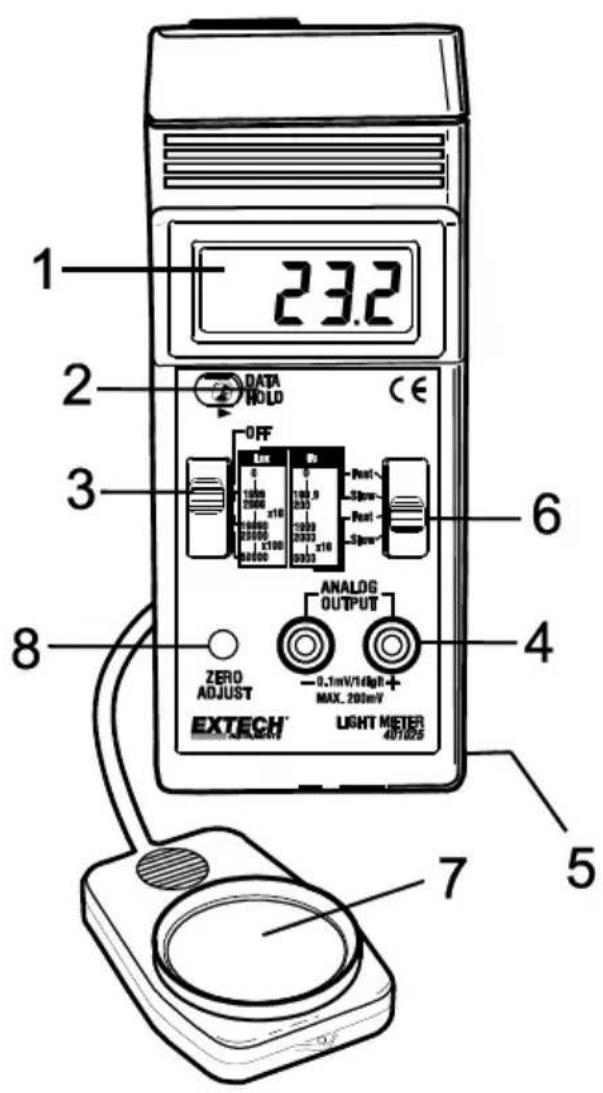
Meter Description
- LCD Display
- Data Hold Switch
- Power Off/Range Switch
- Analog Output Terminal
- Battery Compartment (rear)
- LUX/Fc Switch & Response Switch
- Light Sensor
- Zero adjust
- Select Units (Lux or Ft-candle) and the Response Time (Fast/Slow) using the slide switch. Typical selection is Slow and Fc using the gray lettering.
- Select the maximum range using the Range Switch.
- Hold the Light Sensor so that the sensor faces the light source to be measured.
- The display will indicate measured values. Use a range display multiplier if on the Lux 20,000 and 50,000 ranges or on the Fc 5000 range (see notes below).
- To hold (freeze) a measurement, slide the Data Hold Switch to the Hold position. The reading will freeze in the display until the Data Hold Switch is released.
Note 1: An Over Range indication is a display of "1__". If this occurs, switch to a higher range.
Note 2: For measurements made on the Fc 5000 range, the displayed reading must be multiplied by 10.
Note 3: For measurements made on the Lux 20000 or 50000 ranges the displayed reading must be multiplied by 10 and 100 respectively.
Note 4: The meter will indicate values above the maximum ranges. The accuracy of these measurements is unknown.
| Range Display Multipliers | ||
| Range | Units | Multiplier |
| 200 | Fc | Direct reading |
| 2000 | Fc & Lux | Direct reading |
| 5000 | Fc | Reading x10 |
| 20,000 | Lux | Reading x10 |
| 50,000 | Lux | Reading x100 |
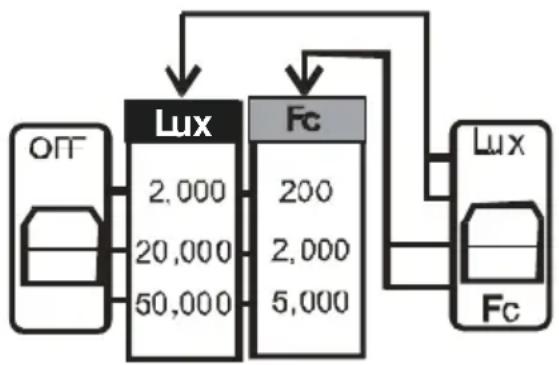
flowchart
graph TD
    A["OFF"] --> B["Lux 2,000\n20,000\n50,000"]
    B --> C["Fc 200\n2,000\n5,000"]
    C --> D["Lux"]
    D --> E["Fc"]
    B --> F["Out"]
    C --> G["Out"]
    D --> H["Out"]
Example: If a measurement on the 5000 Fc range displays 350 the actual measured value is: 350 × 10 = 3500 Fc.
Selecting a Measurement Range
The meter has three measurement ranges for each unit of measure (0-200, 0-2000, and 0-5000 Fc) and (0-2000, 0-20000, and 0-50000) Lux). The proper range selection will produce the most accurate reading. Always select the range that produces the maximum number of digits without exceeding the maximum count for that particular range. For example, a reading of 1456 Fc should be read on the 0 - 2000 range, not the 0-5000 range.
Zero procedure
The meter zero (display with no light input) may change with time. Occasional checking and adjustment may be required.
- Completely cover the sensor to block out any light.
- Set the range switch to the lowest Lux or Fc range.
- Using a small screwdriver, adjust the Zero control for a zero display. The last digit may change slightly. This is normal and does not affect the accuracy of the meter.
Analog Output
The analog output jacks on the front panel produce a 0.1mV DC per digit signal that can be used for recording or datalogging purposes.
Lighting Type Correction Factors
The 401025 light meter is calibrated under a precise Standard tungsten light source of 2856^ K. If the meter is to be used under a different type of light the correction factor of from the table below should be applied to the readings obtained.
| Mercury Lamp | x1.14 |
| Fluorescent Lamp | X0.92 to 1.12 |
| Daylight | x1.00 |
| Sodium | x1.22 |
| Metal Halide | x1.00 |
When the left corner of the LCD display shows LO BAT the battery output is below the design limit and the battery needs to be replaced. However, reliable measurement can still be taken for several hours before the tester becomes inaccurate or switches off.
- Open the Battery Cover at the back of the tester and remove the old battery.
- Replace with a new 9V battery and install the cover securely.
Never dispose of used batteries or rechargeable batteries in household waste. As consumers, users are legally required to take used batteries to appropriate collection sites, the retail store where the batteries were purchased, or wherever batteries are sold.
Disposal: Do not dispose of this instrument in household waste. The user is obligated to take end-of-life devices to a designated collection point for the disposal of electrical and electronic equipment.
Specifications
General Specifications
| Display | 13mm (0.5") LCD (Liquid Crystal Display) |
| Measurement types | Lux, Ft-candles (Fc) |
| Ranges (see range table below) | Lux: 0 to 50,000 Lux in 3 rangesFoot-candles: 0-5,000 Fc in 3 ranges |
| Sensor | Exclusive photo diode & color correction filter, spectrum designed to meet C. I. E. |
| Zero Adjust | Manual adjustment |
| Sampling Time | Approx. 0.4 seconds |
| Response Time | Fast: 0.4 seconds; Slow: 2 seconds |
| Over input indication | Indication of "1_" |
| Analog Output | 0.1 mV/1 digit (maximum output: 200mV) |
| Operating Temperature | 0°C to 50°C (32°F to 122°F) |
| Operating Humidity | Less than 80% RH |
| Power Supply | 9V DC battery |
| Power Current | Approx. 2 mA DC |
| Weight | 220 g (0.52 lbs.) |
| Dimensions | Main instrument: 163 x 70 x 30 mm (6.4 x 2.8 x 1.2")Sensor Probe: 85 x 55 x 12 mm (3.2 x 2.2 x 0.5") |
| Optional Accessories | Vinyl pouch carrying case (Part Number 409996) |
Range Specifications
| Lux | |||
| Range | In-range Display | Resolution | Accuracy (FS) |
| 2,000 Lux | 0-1,999 Lux | 1 Lux | ± (5% + 2digits) |
| 20,000 Lux | 2,000-19,990 Lux | 10 Lux | ± (5 % + 2digits) |
| 50,000 Lux | 20,000-50,000 Lux | 100 Lux | ±(5 % + 2digits) |
| Foot-candle (Fc) | |||
| Range | In-range Display | Resolution | Accuracy (FS) |
| 200 Fc | 0-199.9 Fc | 0.1 Fc | ± (5% + 2digits) |
| 2,000 Fc | 200-1,999 Fc | 1 Fc | ± (5% + 2digits) |
| 5,000 Fc | 2,000-5,000 Fc | 10 Fc | ± (5% + 2digits) |
Frequency Spectrum
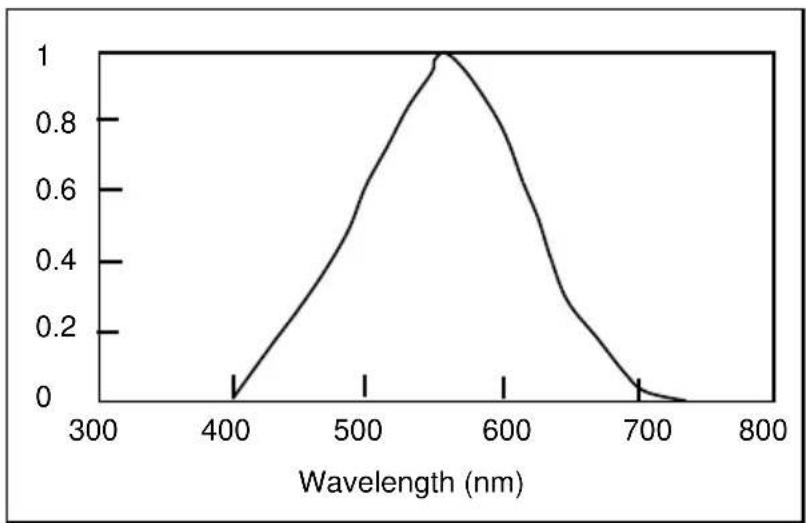
line
| Wavelength (nm) | Value | | --------------- | ----- | | 400 | 0.0 | | 500 | 0.6 | | 550 | 1.0 | | 600 | 0.8 | | 700 | 0.2 | | 800 | 0.0 |Appendix A - Typical Light Levels
| Lux | Foot Candles | Lux | Foot Candles | ||
| Factories | Home | ||||
| 20-75 | 2-7 | Emergency Stairs, Warehouse | 100-150 | 10-15 | Washing |
| 75-150 | 7-15 | Exit/Entrance Passages | 150-200 | 15-20 | Recreational Activities |
| 150-300 | 15-30 | Packing Work | 200-300 | 20-30 | Drawing Room, Table |
| 300-750 | 30-75 | Visual Work: Production Line | 300-500 | 30-50 | Makeup |
| 750-1,500 | 75-150 | Typesetting: Inspection Work | 500-1,500 | 50-150 | Reading, Study |
| 1,500-3,000 | 150-300 | Electronic Assembly, Drafting | 1,000-2,000 | 100-200 | Sewing |
| Office | Restaurant | ||||
| 75-100 | 7-10 | Indoor Emergency Stairs | 75-150 | 7-15 | Corridor Stairs |
| 100-200 | 10-20 | Corridor Stairs | 150-300 | 15-30 | Entrance, Wash Room |
| 200-750 | 20-75 | Conference, Reception Room | 300-750 | 30-75 | Cooking/Dining Room |
| 750-1,500 | 75-150 | Clerical Work | 750-1,500 | 75-150 | Show Window |
| 1,500-2,000 | 150-2000 | Typing, Drafting | |||
| Store | Hospital | ||||
| 75-150 | 7-15 | Indoors | 30-75 | 3-7 | Emergency Stairs |
| 150-200 | 15-20 | Corridor/Stairs | 75-100 | 7-10 | Stairs |
| 200-300 | 20-30 | Reception | 100-150 | 10-15 | Sick Room, Warehouse |
| 300-500 | 30-50 | Display Stand | 150-200 | 15-20 | Waiting Room |
| 500-750 | 50-75 | Elevator | 200-750 | 20-75 | Medical Exam Room |
| 750-1,500 | 75-150 | Show Window, Packing Table | 750-1,500 | 75-150 | Operating Room |
| 1,500-3,000 | 150-300 | Storefront, Show Window | 5,000-10,000 | 500-1000 | Eye Inspection |
Appendix B - Common Terms and Conversion Factors
| Illuminance (Visible Flux Density) | 1 lm/m2 = | 1 lux (lx) |
| 10-4lm/cm2 | ||
| 10-4phot (ph) | ||
| 9.290 x 10⁻²lm/ft2 | ||
| 9.290 x 10⁻²foot-candles | ||
| Luminance (Visible Flux Density per Solid Angle) | 1 lm/m2/sr = | 1 candela/m2 |
| Luminous Intensity (Visible Flux per Solid Angle) | 1 lm/sr = | 1 candella |
| Luminous Flux ( Visible Flux) | 1 lumen (lm) = | 1.464 x 10⁻³watts @ 555 nm |
Copyright © 2013-2018 FLIR Systems, Inc.
All rights reserved including the right of reproduction in whole or in part in any form
ISO-9001 Certified
www.extech.com
Brand : Extech
Model : 401025
Category : Luxmeter