
JEM Roadie Compact - Smoke machine MARTIN - Free user manual and instructions
Find the device manual for free JEM Roadie Compact MARTIN in PDF.


| Product Type | Automatic Guitar Tuner |
| Brand | Martin |
| Model | JEM Roadie Compact |
| Dimensions (H x W x D) | 2.5 x 1.5 x 0.8 inches |
| Weight | 1.2 oz (34 g) |
| Power Source | Rechargeable Lithium-ion battery |
| Battery Life | Up to 8 hours of continuous use |
| Charging | Micro-USB cable (included) |
| Tuning Range | A0 to C8 |
| Tuning Accuracy | ±0.02 cents |
| Connectivity | Bluetooth 4.0 |
| Compatible Instruments | Acoustic and electric guitars, ukulele, bass, mandolin |
| Modes | Automatic, Chromatic, Strobe |
| Display | LED indicator lights |
| Maintenance | Clean with a soft, dry cloth |
| Water Resistance | Not water resistant; keep dry |
| Operating Temperature | 32°F to 104°F (0°C to 40°C) |
| Included Accessories | Micro-USB cable, quick start guide |
| Warranty | 1 year limited warranty |
Frequently Asked Questions - JEM Roadie Compact MARTIN
User questions about JEM Roadie Compact MARTIN
0 question about this device. Answer the ones you know or ask your own.
Ask a new question about this device
Download the instructions for your Smoke machine in PDF format for free! Find your manual JEM Roadie Compact - MARTIN and take your electronic device back in hand. On this page are published all the documents necessary for the use of your device. JEM Roadie Compact by MARTIN.
USER MANUAL JEM Roadie Compact MARTIN
Product description....6
Features at a glance 6
Product details....7
Connections....8
Quick Start 9
Setting up....9
Making fog 9
Installation and setting up 10
Location 10
AC power 10
Setting up.... 11
Final checks....11
Turning on the power.... 11
Control settings 12
Overview 12
Setting Fog density.... 13
Setting Fan speed.... 13
Setting the Timer.... 13
Setting the DMX base address 14
Setting the operating temperature.... 14
Setting the control panel display brightness 14
Setting the master-slave link mode 14
Aux option....14
Priming the machine after fluid out.... 15
Resetting options to factory settings 15
Remote control....16
Overview 16
Functions 16
Connection.... 17
DMX control....18
Overview 18
Connection.... 18
DMX functions.... 18
Fog fluid types.... 19
Basic service....20
Cleaning....20
Fuse replacement 20
Troubleshooting 21
Status messages 22
Specifications 23
Safety information
The following symbols are used to identify important safety information:

Caution! Safety hazard. Risk of personal injury.

Caution! Burn hazard. Hot surface. Do not touch.

Danger!
Hazardous
voltage. Contact
will cause electric
shock.

Caution! Fire hazard.

Warning! This product is not for household use. It presents risks of injury due to electric shock, burns, falls and respiratory problems!
Read this manual before operating the machine, follow the safety precautions listed below, and observe all warnings in this manual and printed on the machine. Use the system only as described in this manual and in accordance with local laws and regulations.
If you have questions about how to operate the machine safely, or if you have followed the instructions in this manual and the machine is malfunctioning, please contact Jem Service.

Preventing electric shocks
• Always ground (earth) the machine electrically.
- Use only a source of AC power that complies with local building and electrical codes, and that has both overload and ground-fault protection.
- Before connecting the Roadie Compact to power, check that the voltage indicated on the machine's serial label matches your local AC power voltage. If your AC power voltage does not match, do not use the machine. Contact Jem Service for assistance.
- Before using the machine, check that all power distribution equipment and cables are in perfect condition and rated for the current requirements of all connected devices.
- If the machine or any cables connected to it are in any way damaged, defective, wet, or show signs of overheating, stop using the machine and contact Jem Service for assistance.
- Disconnect the machine from AC power before servicing and when not in use.
- This system is not waterproof and should not be exposed to wet outdoor conditions. Do not immerse in water or any other liquid. Do not expose to high-pressure water jets.
- Do not spill fluid over or inside the machine. If fluid is spilled, disconnect AC power and clean with a damp cloth. If fluid is spilled onto electronic parts, take the system out of service and contact Jem for advice.
- Do not remove the covers or attempt to repair a faulty machine. Refer any service not described in this manual to Jem.
- Do not operate the machine if any parts are damaged, defective or missing.
- Moisture and electricity do not mix. Do not aim smoke output at electrical connections or devices.
Preventing burns and fire


- The smoke produced by the machine is hot enough to cause burns when it leaves the nozzle, and very hot droplets of fluid escape occasionally. Keep people and objects at least 1 meter (39 inches) away from the smoke output nozzle.
- Do not touch the smoke output nozzles during or after use – they become extremely hot and remain hot for several hours after the machine have been shut down.
- Smoke output contains glycol, a flammable alcohol that burns with an almost invisible blue flame. Do not point smoke output at sources of ignition such as open flames or pyrotechnic effects.
- Do not attempt to bypass thermostatic switches, fluid sensors or fuses.
- Replace fuses only with ones of the type and rating specified in this manual for the machine.
- Provide a minimum free space of 100mm (4 inches) around the machine.
- Provide a minimum free space of 500mm (20 inches) around fans and air vents and ensure free and unobstructed air flow to and around the machine.
- Keep the machine at least 600mm (24 inches) away from combustible and heat-sensitive materials.
- Do not operate the machine if the ambient temperature (Ta) is below 5°C (41°F) or above 40°C (104°F).
- Do not operate the machine if the relative air humidity exceeds 80%.
Preventing injuries

- Ensure that the surface on which the machine is located or installed can safely hold the weight of the machine.
- Do not install the machine over areas where people are present.
- This appliance is not intended for use by persons (including children) with reduced physical sensory or mental capabilities, or lack of experience and knowledge, unless they have been given supervision or instruction concerning use of the appliance by a person responsible for their safety. Children should be supervised to ensure that they do not play with the appliance.
- Verify that the machine's temperature setting is suitable for the type of fluid in use whenever changing fluid or resetting the default menu values.
- Smoke machines can cause condensation. Do not point the output at smooth floors. Floors and surfaces may become slippery. Check these frequently and wipe dry as necessary to avoid any danger of slipping.
- Ensure at least 2m visibility in areas where smoke is being produced.
- Smoke fluid contains food-grade glycols in solution but may present health risks if swallowed. Do not drink it. Store it securely. If eye contact occurs, rinse with water. If fluid is swallowed, give water and obtain medical advice.
Preventing breathing problems

- A smoke machine can operate safely only with the smoke fluid it is designed for. Use the machine only with fluids specified under “Smoke fluid options” on page 19 or you may cause the release of toxic gases, presenting a severe health hazard. You will also probably damage the machine.
- Do not create dense smoke in confined or poorly ventilated areas.
- Do not expose people with health problems (including allergic and/or respiratory conditions such as asthma) to smoke output.
- Do not point smoke output directly at a person's face or at face height.
Product overview
Product description
The Roadie Compact smoke machine from Jem provides a uniquely flexible and convenient solution to a wide range of smoke requirements whether permanently installed or, with the addition of the touring accessories, taken on the road.
Featuring twin independent outputs and a high speed radial blower, the Roadie Compact can quickly produce large volumes of fog to create large scale effects in the biggest venues.
With variable-temperature heat exchangers, the Roadie Compact can use multiple weights of fluid. Just about anything that can be done with smoke - from an ephemeral steam chases to a dense, long-lasting “whiteout” - can be achieved with the Roadie Compact.
Congratulations on your purchase of the Roadie Compact smoke machine from Jem. Details of the full range of Jem products are available on our website at www.jemsmoke.com.
Features at a glance
• High speed radial blower
• 16A single phase supply
- Twin independent block design for high output and reliability
- Operates horizontally or vertically
• Control panel with alphanumeric display
- Optional full function digital remote with display (25m max cable length)
• Durable 4" swivel castors
- Carrying handles
- Indirect fluid sensing system for unattended operation
• DMX control (2 channels)
• 9.5 litre fluid container with easy remote fluid connection
Product details

Top view


Product
overview
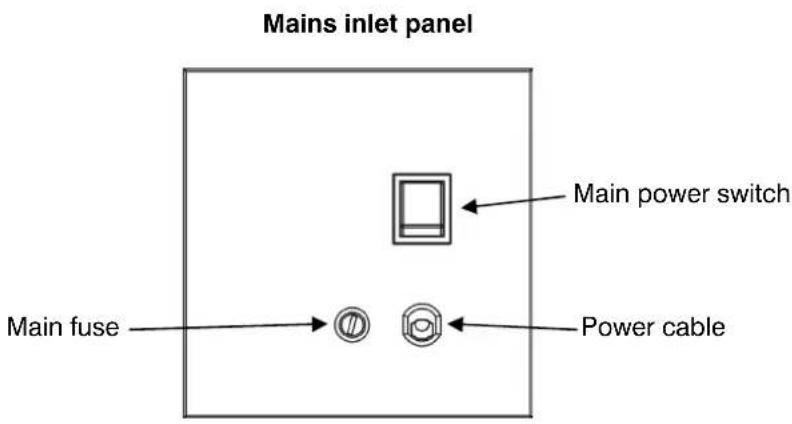
Connections

Quick Start
You are no doubt eager to switch on the machine and try it out by making a lot of fog. This section tells you how to do that. However, please also make the time to read the safety and servicing instructions in the remainder of this manual.
Setting up
Locate the machine in a suitably large area with nothing in front of the smoke output. Read the “Installation” section before rigging the machine from suspension points.
Fill the fluid tank with JEM-approved fluid (see page 19).
Connect a suitably rated power supply to the machine. The machine requires 13.1A at 230V (EU) or 11.8A at 208V (US).
Turn on the Standby switch. The display will show HERT for about 8-12 minutes and will then change to RYY (Ready).
Making fog
You can then use the Timer or Continuous switches on the back of the machine or the buttons on the remote (optional accessory) to turn on the fog output.
If no fog is produced, check that the FOG option is not set to 0% (see page 13) and that if using Timer mode the TRUN setting is not set to 0. Also check that the machine has fluid.
Installation and setting up

DANGER! DO NOT operate the Roadie Compact until you have read and observed all the precautions listed under "Safety information" on page 3.
Location
The Roadie Compact may be located on the floor or may be suspended using the rigging points.
The machine can operate in any orientation from horizontal (on its wheels) to vertical (resting on its back firing upwards into the air). If using the machine vertically the smoke fluid bottle must be turned round in the fluid compartment so that the outlet remains on top.
The maximum downward tilt is 35 degrees (unless using an external fluid line) as steeper angles may cause fluid leakage.
If the machine is to be suspended, a qualified rigger must be employed to ensure the machine is rigged safely. Do not suspend the machine over areas where people will be underneath.
Ensure that there is at least 100mm clearance all round the machine, 500mm clearance round the fan intake and at least 600mm in front of the smoke output.
AC power
Before using the machine, a grounding-type (earthed) power plug that fits the local power outlets must be obtained locally and installed on the power cable.

DANGER! Make sure the power plug is correctly rated:
- 'Attachment plugs shall be rated not less than 125% of the rated current of the equipment'
When installing the plug, follow the plug manufacturer's instructions and connect pins as follows:
yellow and green wire to ground (earth), blue wire to neutral and brown wire to live.
The table below shows some common pin identification schemes.
| wire | function | marking | screw |
| brown live “L” yellow or brass | |||
| blue | neutral | “N” | silver |
| green/yellow | earth | green |
colour
Before connecting the Roadie Compact to power, verify that the AC supply is adequately dimensioned for the current draw of the machine. The machine requires 13.1A at 230V (EU) or 11.8A at 208V (US).
Check that the local AC voltage is appropriate, as indicated on the machine's serial number label. If your AC voltage is outside the appropriate range, do not use the machine. Contact Jem Service for assistance.
Setting up
Fill the fluid tank with JEM-approved fluid (see page 19), or connect up the fluid line extension kit (optional accessory) if remote fluid tanks are being used.
If DMX control is being used, connect the machine to the DMX line (see page 18).
If the Jem Digital Remote is being used (optional accessory), connect the remote to the Remote socket. (see page 18)
Final checks
Before applying power to the Roadie Compact, verify the following:
- the machine is safely located or installed and meets the location requirements stated on page 10
- the operator is familiar with, and able to comply with, the requirements for safe operation listed on page 3
- the smoke fluid is one of the genuine Jem fluids listed under “Smoke fluid options” on page 19
- the machine is electrically grounded (earthed)
- the AC power distribution circuits and lines are adequately rated for the current load
Turning on the power
Turn on the main power switch located next to the power cable inlet.
Turn on the Standby switch on the control panel.
The display will show H RT for about 8-12 minutes as the machine heats up to operating temperature and will then change to RT (Ready).
You can then use the control panel to make fog.
Control settings
Overview

Four quick access switches at the sides of the panel allow you to control the main functions:
Standby: Enables the machine and tells it to heat up when turned on. When turned off, disables the machine and turns off the heaters.
Fan: Turns on continuous fan mode. The Fan speed can be set using the Fan menu option.
Timer: Turns on the Fog Timer mode. The Run and Off times for the timer can be set using the TRUN and TOFF menu options, and are initially set to 10 secs run, 20 secs off. The Fog density can be set using the Fog menu option.
Fog: Turns on continuous fog mode. The Fog density can be set using the Fog menu option. This is initially set to 50%.
The digital display in the centre of the panel allows you to configure the machine using option menus.

Setting Fog density
Use the Menu Previous / Next buttons to select the FOG option. Use the Up/Down buttons to select the density from 0% - 100%. Press the Enter button to store the fog setting. The display shows SET.
The machine will only produce fog if the Timer or Continuous switches are On. (Or, if using the digital remote, if you press the Timer or Fog buttons).

If you want to temporarily change the fog density, do not press Enter. The fog setting will go back to its stored value next time the machine is powered up. This applies to all options.
If a long burst of fog is produced, after a time the fog density will be automatically reduced to keep the machine temperature within the operating range. This allows continuous operation, so that the machine does not have to stop and re-heat.
Setting Fan speed
Use the Previous / Next buttons to select the FAN option. Use the Up/Down buttons to select the fan speed from 0% - 100%. Press the Enter button to store the fan setting.
The fan will run continuously if set above 0% and the Fan, Timer or Continuous switches are On. (Or, if using the digital remote, if the RUN menu is set to FAN, TIME or CONT).
If fog is being produced and the fan is off or set to a low speed, the fan speed will be automatically increased to prevent buildup of fog at the machine output.
Setting the Timer
If smaller amounts of fog are required the machine has an automatic timer to give timed bursts of fog. You can set the "Run" and "Off" times independently between 1 and 90 seconds.
Use the Previous / Next buttons to select the TRUN or TOFF option. Use the Up/Down buttons to select the run or off time from 1 seconds to 90 seconds. If you hold down the button the time will count up or down, getting faster the longer you hold it. Press the Enter button to store the timer setting.
To enable timer mode, switch on the Timer switch (or, if using the digital remote, press the Timer button).

When the timer is running and the display is not showing a menu, the display shows a countdown for the run time (RU--) and the off time (OF--).
Setting the DMX base address
Use the Previous / Next buttons to select the ADDR option.
Use the Up/Down buttons to set the DMX base address from ☐☐ 1 to ☐ 1☐. If you hold down the button the address will count up or down, getting faster the longer you hold it.
Press the Enter button to store the address setting.
The machine will automatically respond to a DMX controller whenever it is connected.
Setting the operating temperature
The machine provides three temperature settings which are required for different types of JEM smoke fluid. See page 19 for details of the fluids available.
Use the Previous / Next buttons to select the TEMP option.
Use the Up/Down buttons to select LOW, NORM or HIGH.
Press the Enter button to store the temperature setting.
| fluid | temperature |
| Pro Steam Simulation | LOW |
| Regular DJ Fluid (DJ mix) | NORM |
| Pro Smoke Super (ZR mix) | HIGH |
| Pro Smoke High Density (SP mix) | HIGH |
setting
Setting the control panel display brightness
Use the Previous / Next buttons to select the DISP option.
Use the Up/Down buttons to select LOW, NORM or HIGH.
Press the Enter button to store the brightness setting.
This function might be useful to make the display less obtrusive if the machine is visible to audience.
Setting the master-slave link mode
It is possible to control several machines from one digital remote. The machine with the remote plugged into it becomes the Master. The other machines are Slaves. The machines are interconnected with DMX cabling.
Use the Previous / Next buttons to select the LINK option.
Use the Up/Down buttons to select RECV or SEND.
Press the Enter button to store the link setting.
The machine should be set to SEND only if it is running as a master. If running as a slave, stand-alone or DMX controlled it should be set to REEV.
Aux option
This option is not currently used and has no effect on the machine.
Priming the machine after fluid out
If the machine runs out of fluid it will display FLU OUT and shut down to prevent damage to the pumps. To suck the new fluid back into the machine and reset the fluid out error, refill the fluid and use the prime function.
Use the Previous / Next buttons to select the PRME option.
Use the Up/Down buttons to change the option to ¥.
Press the Enter button to start the priming function.
The machine will pump at full power for about 7 seconds. You may need to use the function several times to get both nozzles running properly.
To exit this menu if you decide not to activate the Prime function, select N and press Enter.
If the machine is not up to operating temperature the Prime function will do nothing.
Resetting options to factory settings
The factory settings configure a standard mode of operation for the machine.
Use the Previous / Next buttons to select the RESET option.
Use the Up/Down buttons to change the option to ¥.
Press the Enter button to reset all options.
To exit this menu if you decide not to reset the options, select N and press Enter.
The factory settings are:
| option | setting |
| FOG | 10 |
| FAN | 10 |
| TRUN | 10 |
| TOFF | 20 |
| RUN | OFF |
| TEMP | NORM |
| DISP | HIGH |
| LINK | RECV |
Remote control
Overview
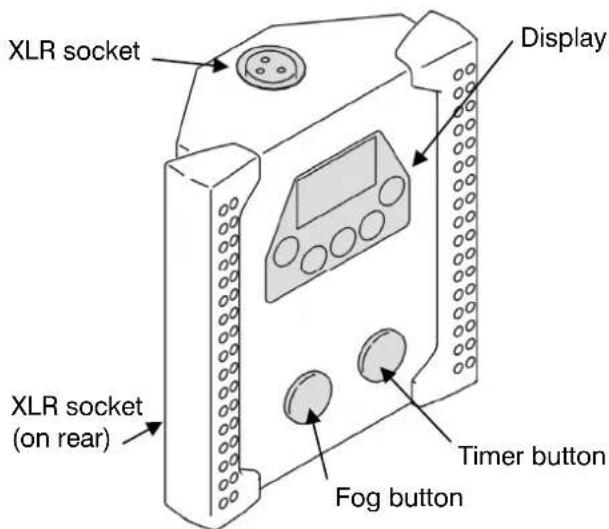
The Jem digital remote control, available separately, may be used for remote control of the Roadie Compact. Several machines may be controlled from one remote using the LINK function (see page 14).
Functions
The remote control provides the following functions:
- Fog button: turns fog output on and off. Press once to start fog and again to stop.
- Timer button: turns the fog timer on and off.
• Fog level setting (FOG = 0 -100%)
• Fan speed setting (FAN = 0 -100%)
• Timer run time/off time settings (TRUN, TOFF = 0 - 90 seconds) - Run mode (RUN = OFF, STBY, FAN, TIME, CONT)
• Head temperature setting (TEMP = LOW, NORM, HIGH)
The functions are the same as on the built in control panel and are described on page 13.
The RUN menu duplicates the functions of the Standby, Fan, Timer and Continuous Fog quick-access switches on the rear of the machine. The Fog and Timer buttons on the remote are simply a quick way to control this menu function.
Connection
The remote control has two identical XLR sockets on the top and back for connection to the Roadie Compact. Plug the cable provided with the remote control into one of these sockets and into the XLR socket labelled REMOTE on the rear panel of the Roadie Compact.
The remote control is powered through its cable by the Roadie Compact; no batteries are required.
The cable may be extended to up to 25 m (82 ft.) with a 3-pin XLR DMX cable, available from your Jem dealer.
Overview
DMX is a digital control system widely used in entertainment and architectural lighting. Any controller meeting the DMX-512 standard may be used to control and program the fog output of the Roadie Compact.

When a DMX signal is present, the Roadie Compact's stand-alone functions do not work. To fire the unit from the control panel or remote control, the DMX controller must be powered off or disconnected.
Connection
The Roadie Compact provides both 3-pin and 5-pin XLR sockets on the rear panel of the base for DMX connection. The sockets are interconnected: a DMX line connected to the 3-pin IN socket may be continued through the 5-pin OUT socket and vice versa. Do not, however, attempt to split a DMX line by using both the 3-pin and 5-pin OUT sockets.
For best results, use cable designed for high speed digital data transmission. Suitable DMX cable is available from your Jem dealer.
DMX functions
The Roadie Compact's address setting must match the DMX address allocated to it on the controller. To set the address, see "Setting the DMX base address" on page 14. The Roadie Compact requires two DMX channels.
DMX channel function
| 1 | Fog density 0-100% |
| 2 | Fan speed 0-100% and Shutdown |
Channel 1 uses the full range 0-255 for fog density control. Channel 2 has the following control values.
DMX value function
| 0-244 | Fan speed 0-100%, heaters on |
| 245-255 | machine shutdown, heaters off |
For example if the Roadie Compact is set to DMX address 100, channel 1 will be controlled by address 100 and channel 2 will be controlled by address 101.
When the machine is at running temperature and is under DMX control it displays .
Fog fluid types
The following types of Jem fog fluid are suitable for use in this machine. Each produces a different effect as described below. Jem supplies high quality fog fluids that are based on ultra-pure deionized water. Use only the following genuine Jem fog fluids. No other fluid is suitable for use.

DANGER! The Roadie Compact can run safely only on the specific smoke fluids it is designed for. Use ONLY the Jem smoke fluids designated in this manual. NEVER use any other type of fluid, or toxic gas may be produced. You will probably also cause damage to the system that is not covered by the product warranty. Do not dilute smoke fluid with water or any other liquid. Discard smoke fluid if it becomes contaminated.
Ensure the operating temperature is set to the correct option for the fluid type. See page 14.
Pro Steam Simulation
Pro Steam Simulation fluid is a light fluid that produces well-defined cones of steam that disperse quickly. It is ideal for chase effects and theatrical use. When using Pro Steam Simulation fluid, the operating temperature must be set to LOW.
Regular DJ Fluid (DJ mix)
Regular DJ fluid is an economical fluid that gives a good, medium density smoke well-suited for atmospheric effects. When using DJ mix, the operating temperature must be set to NORM.
Pro Smoke Super (ZR mix)
Pro Smoke Super fluid is a high-quality, general purpose fluid that produces a dense white airborne fog with medium dispersal time. Its medium to high index of refraction permits both good atmospheric effects and denser "white-outs". When using ZR mix, the operating temperature must be set to HIGH.
Pro Smoke High Density (SP mix)
Pro Smoke High Density fluid generates a high density, white, airborne fog with a very high index of refraction and slow evaporation rate. It is well suited for scenic obscuring, dramatic strobe effects, and "white-outs". When using SP mix, the operating temperature must be set to HIGH.
Basic service

Before servicing the Roadie Compact, read and observe all the precautions listed in “Safety information” on page 3. Any service not described in this section must be carried out by a Jem service technician.
Cleaning
Excessive dust, smoke fluid, and dirt buildup will degrade performance and cause overheating and damage to the machine that is not covered by the product warranty. To maintain adequate cooling, dust must be cleaned from the outer casing and air vents of the machine periodically.

Isolate the machine from power and allow to cool completely before cleaning. The smoke output nozzle remains hot for up to 10 hours after use.
- Remove dust from the air vents with a soft brush, cotton swab, vacuum, or compressed air.
- Clean smoke fluid residues from the fog output of the machine.
- Clean the outer casing with a damp cloth only.
Fuse replacement
The main fuse for the Roadie Compact is in a fuse holder located adjacent to the power inlet. To replace the fuse, disconnect the power cord from the supply, unscrew the cap of the fuse holder and pull out the fuse. Remove the spent fuse and replace with one of exactly the same size and rating. The fuse type is indicated on the serial number label. Contact Jem Service if the fuse blows repeatedly.
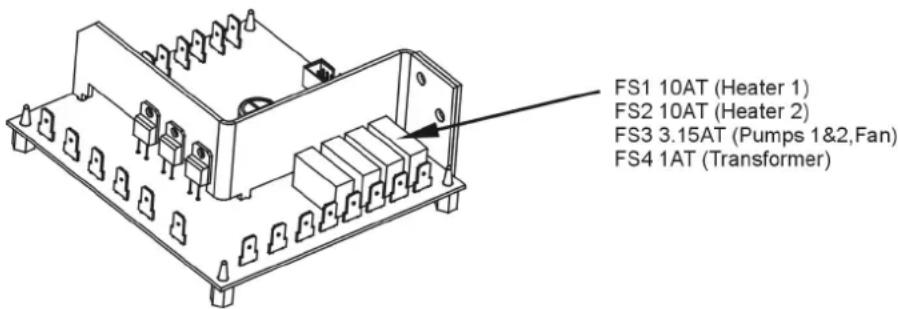
If the machine partially runs but some features do not operate, one of the internal fuses may have blown. These fuses are located on the power pcb which may be accessed by removing the power inlet panel.

DANGER! Isolate the machine from power before removing any panels. Live electrical parts inside.
One output not operating: Check heater fuses FS1/FS2 Heating but not pumping / fan not working: Check FS3 Mains in OK but electronics power LED not lit: Check FS4.
Contact Jem Service if the problem persists.
Troubleshooting
Problem Probable cause(s) Suggested remedy
| Machine will not produce fog when control panel or remote control Fog switch turned on | Machine not at operating temperature | Wait 10 to 15 minutes |
| F05 set to 0 | Increase setting | |
| TRUN set to 0 Increase setting | ||
| DMX signal present | Disconnect or turn off DMX controller | |
| Fog is only produced from one output nozzle | One output has heated faster, the other is not ready yet | Wait a few more minutes for the other output to heat |
| “Flu out” message displayed, but there is fluid in the tank | Machine requires priming Prime machine (page 15) | |
| Machine can be fired from control panel or remote control, but not by DMX controller | DMX address setting incorrect | Change DMX address (page 14) |
| Poor connection in DMX line | Check DMX cables and connections | |
| Smoke output is weak Machine requires priming Prime machine (page 15) | ||
| Wet, greasy, non-uniform smoke output, fluid drips or spits from nozzles, or very loud noise when firing machine | Incompatible smoke fluid Use approved fluid! | |
| Incorrect operating temperature | Refer to “Setting the operating temperature” on page 14 | |
| Machine appears dead | Mains fuse blown Replace fuse (page 20) | |
| No power at AC cable inlet | Check power cable and circuit breaker | |
Status messages
| message | reason |
| OFF | The heaters are Off, the unit is shut down. |
| HEAT | The unit is heating up to operating temperature. |
| RJY | One or both of the heaters are at operating temperature, but Fog is not turned on. |
| IMX | One or both of the heaters are at operating temperature and the unit is under DMX control. |
| OVER | One or both of the heaters is at too high a temperature. This indicates a fault. Turn the machine off and call Jem Service. |
| FLU OUT | The machine has detected that it has run out of fluid. Refill the fluid container and use the Prime function to prime the machine and reset the fluid out error. |
| RNOT | (number may be 01 to 90): Machine is in timer mode, counting down the run period. |
| OFOI | (number may be 01 to 90): Machine is in timer mode, counting down the off period. |
| CAL ERR | The machine has detected an error with its calibration settings and will not operate. Call Jem Service. |
| TEMP ERR | The machine has detected an error in the temperature sensors and will not operate. Call Jem Service. |
Specifications
Physical
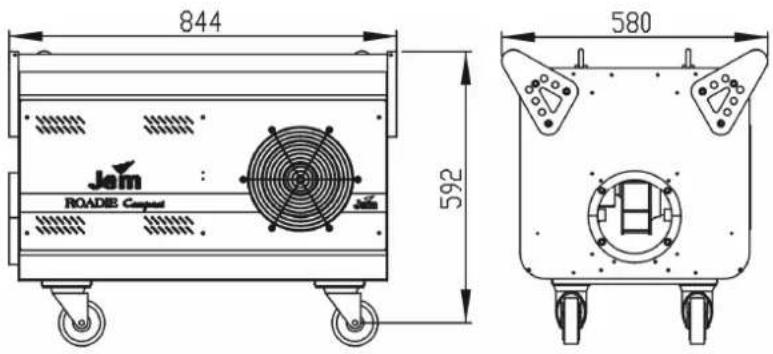
Length 844mm
Width 580mm
Height 592mm
Dry weight....80kg
Performance
Air volume of effect 1490m³/hour
Exit velocity 12.7m/sec (2500ft/min)
Operating time ...... Continuous
Warm-up time....9 minutes (EU)/12 minutes (US)
Control and programming
Control options ......DMX, stand-alone, Jem Remote Control (not included)
DMX channels....2
Fluid system
Fluid pumps 16 bar
Fluid capacity 9.5 litres
Maximum fluid consumption at peak output 220ml per minute
Installation
Orientation.... Horizontal or vertical
Connections
DMX....3 and 5 pin XLR
Remote control....3 pin XLR
AC power ...... Captive power cable
Electrical
AC power (auto voltage/frequency adjust) 208-250V, 50/60Hz
Main fuse....15AT (slow-blow)
Power and current
Maximum at 230V 50Hz 3000W, 13A
Maximum at 208V 60Hz 2450W, 11.8A
Thermal
Maximum ambient temperature (Ta max)....40°C (104°F)
Exterior surface temperature, steady state....40°C (104°F)
Approvals
European EMC: EN 61000-6-3:2001 – Part 6-3
European safety: EN 60 335-1:2002
Immunity: EN 61000-6-1:2001 – Part6-1
Included items
1 x 9.5 litre fluid container (empty)
Accessories
Roadie Compact remote control....P/N 92765031
Roadie Compact ducting kit P/N 92625010
Ordering information
Jem Roadie Compact 208V-230V 50/60Hz P/N 92230500


- Safety information
- Preventing electric shocks
- Preventing burns and fire
- Preventing injuries
- Preventing breathing problems
- Product overview
- Product description
- Features at a glance
- Connections
- Quick Start
- Setting up
- Making fog
- Installation and setting up
- Location
- AC power
- Final checks
- Turning on the power
- Control settings
- Overview
- Setting Fog density
- Setting Fan speed
- Setting the Timer
- Setting the DMX base address
- Setting the operating temperature
- Setting the control panel display brightness
- Setting the master-slave link mode
- Aux option
- Priming the machine after fluid out
- Resetting options to factory settings
- Remote control
- Functions
- Connection
- DMX functions
- Fog fluid types
- Pro Steam Simulation
- Regular DJ Fluid (DJ mix)
- Pro Smoke Super (ZR mix)
- Pro Smoke High Density (SP mix)
- Basic service
- Cleaning
- Fuse replacement
- Troubleshooting
- Specifications
- Physical
- Performance
- Control and programming
- Fluid system
- Installation
- Electrical
- Power and current
- Thermal
- Approvals
- Included items
- Accessories
- Ordering information
Brand : MARTIN
Model : JEM Roadie Compact
Category : Smoke machine