
High Performance with Touch-Activated Display - Blender Beautiful - Free user manual and instructions
Find the device manual for free High Performance with Touch-Activated Display Beautiful in PDF.


| Type of product | High-Performance Blender |
| Model | High Performance with Touch-Activated Display |
| Brand | Beautiful |
| Jar capacity | 64 oz (1.9 L) |
| Jar material | BPA-free Tritan copolyester |
| Blade material | Stainless steel with hardened edges |
| Motor power | 1500 watts (peak) |
| Speed settings | Variable speed dial + 5 preset programs |
| Control type | Touch-activated display with digital interface |
| Preset programs | Smoothie, Ice Crush, Soup, Puree, Self-Clean |
| Power source | 120 V / 60 Hz |
| Dimensions (H x W x D) | 17.3 x 7.9 x 7.9 in (44 x 20 x 20 cm) |
| Weight | 9.5 lb (4.3 kg) |
| Cord length | 3.3 ft (1 m) |
| Dishwasher safe parts | Jar, lid, and blade assembly |
| Self-cleaning function | Yes, with warm water and a drop of soap |
| Safety features | Safety lock mechanism; overload protection; non-slip feet |
| Warranty | 5-year limited motor warranty; 1-year on parts |
| Included accessories | Tamper, recipe book, quick-start guide |
| Repairability | Authorized service centers; spare parts available |
Frequently Asked Questions - High Performance with Touch-Activated Display Beautiful
User questions about High Performance with Touch-Activated Display Beautiful
0 question about this device. Answer the ones you know or ask your own.
Ask a new question about this device
Download the instructions for your Blender in PDF format for free! Find your manual High Performance with Touch-Activated Display - Beautiful and take your electronic device back in hand. On this page are published all the documents necessary for the use of your device. High Performance with Touch-Activated Display by Beautiful.
USER MANUAL High Performance with Touch-Activated Display Beautiful
natural_image
Exterior view of a modern kitchen blender with a black handle and golden lid (no visible text or symbols)High Performance Blender with Touch-Activated Display Instruction Manual
natural_image
Black-and-white photo of a smiling woman sitting on a kitchen counter surrounded by shelves with food items like air fryers and thermos (no visible text or symbols)The kitchen is my family's happy place. It's where we cook and eat and bake and laugh and share our most beautiful moments together. That's what inspired the creation of Beautiful, my new collection of easy-to-use kitchenware that you'll want to keep out on your kitchen counter. So whether your kitchen has flour all over the place from a kid's baking session or you're throwing an adult dinner party, I hope every step will be simple, delicious and beautiful!
- Drie J ♥
www.cookwithbeautiful.com
Table of Contents
Section 1: Safety
Important Safeguards 2-6
Additional Important Safeguards 7-8
Notes on the Plug 8
Notes on the Cord 8-9
Plasticizer Warning 9
Electric Power 9
Section 2: Instructions
Getting to Know Your High Performance Blender 11
Touch-Activated Display Control Panel 12-14
Before Using for the First Time 15
Jar Assembly 16
Operation 16-18
Function Selection Guide 19
Beautiful Blender Notes 20
Beautiful Food Prep Tips 20
User Maintenance Instructions 20
Care & Cleaning Instructions 21
Storing Instructions 21
Troubleshooting 20
Warranty 22-23
Table of Contents
Section 1: Safety
Section 2: Instructions
When using electrical appliances, basic safety precautions should always be followed including the following:
- READ ALL INSTRUCTIONS.
- To protect against risk of electrical shock do not put cord, plugs, or appliance in water or other liquid.
- This appliance is not intended for use by persons (including children) with reduced physical, sensory or mental capabilities, or lack of experience and knowledge, unless they have been given supervision or instruction concerning use of the appliances by a person responsible for their safety.
- Close supervision is necessary when any appliance is used by or near children.
- This Blender is not a toy. Children should be supervised to ensure they do not play with the appliance.
-
Unplug from outlet when not in use, before putting on or taking off parts and before cleaning. Flashing light (or identify other means used) indicates ready to operate. Avoid inadvertent contact with the touch screen.
-
Flashing light indicates ready to operate. Avoid any contact with blades or moveable parts.
- Do not operate any appliance with a damaged cord or plug or after the appliance malfunctions, or it is dropped, or has been damaged in any manner. If the manufacturer has authorized service facilities, instruction to return the appliance to the nearest authorized service facility may be used instead of instructing the user to contact the manufacturer at the customer service phone number: 1-866-832-4843.
NOTE: DO NOT ATTEMPT TO REPAIR THE UNIT YOURSELF. THIS WILL VOID THE WARRANTY. - The use of attachments, including canning jars, not recommended by the manufacturer may cause a risk of injury to persons.
- Do not use outdoors.
- Do not let cord hang over edge of table or counter.
- Do not let cord contact hot surfaces, including the stove.
- Blades are sharp. Handle carefully.
- Do not blend hot liquids.
- Never use the blender jar to process ingredients without the lid and measuring cap properly locked in place.
- Never place any Blender attachments into a microwave oven.
- Keep hands and utensils out of the jar while blending
to reduce the risk of severe injury to persons or damage to the unit.
- Always operate the Blender with its lid in place. A scraper may be used ONLY when the Blender is not running.
- Never add ingredients to the jar while the Blender is operating.
SAVE THESE INSTRUCTIONS
ADDITIONAL IMPORTANT SAFEGUARDS
- All users of this appliance must read and understand this instruction manual before operating or cleaning this appliance.
- The cord to this appliance should be plugged into a 3-prong 120V AC electrical outlet only.
- If this appliance begins to malfunction during use, immediately press Ⓞ or any illuminated SPEED or PRESET button to turn the Blender OFF, then unplug the cord. Do not use or attempt to repair the malfunctioning appliance. Contact Consumer Service: 1-866-832-4843.
- If this appliance falls or accidentally becomes immersed in water, unplug it immediately. Do not reach into the water!
- Do not use this appliance after it has fallen into or becomes immersed in water.
- To reduce the risk of injury to persons or property, never use this appliance in an unstable position
-
Do not use this appliance for other than its intended use.
-
Do not use if the jar is cracked or chipped.
IMPORTANT: Do not overfill beyond the jar's MAX line.
WARNING: To avoid spills, make sure the lid is properly locked in place on the jar with the measuring cap in position before pressing any button.
GROUNDED 3-CONDUCTOR PLUG
This appliance is equipped with a grounded-type 3-wire cord (3-prong plug). This plug will only fit into an electrical outlet made for a 3-prong plug. This is a safety feature. If the plug should fail to fit the outlet, contact an electrician to replace the obsolete outlet. Do not attempt to defeat this safety feature.
NOTES ON THE CORD
a) A short power-supply cord (or detachable power-supply cord) is to be provided to reduce risks resulting from becoming entangled in or tripping over a longer cord.
b) Longer detachable power-supply cords or extension cords are available and may be used if care is exercised in their use.
c) If a long detachable power-supply cord or extension cord is used:
1) The marked electrical rating of the detachable power-supply cord or extension cord should be at least as great as the electrical rating of the appliance;
2) If the appliance is of the grounded type, the extension cord should be a grounding-type 3-wire cord; and
3) The longer cord should be arranged so that it will not drape over the counter top or table top where it can be pulled on by children or tripped over.
PLASTICIZER WARNING
CAUTION: To prevent Plasticizers from migrating to the finish of the counter top or table top or other furniture, place NON-PLASTIC coasters or place mats between the appliance and the finish of the counter top or table top. Failure to do so may cause the finish to darken; permanent blemishes may occur, or stains can appear.
ELECTRIC POWER
If the electrical circuit is overloaded with other appliances, your appliance may not operate properly. It should be operated on a separate electrical circuit from other appliances.
Section 2
Instructions
Getting To Know Your High Performance Blender
Product may vary slightly from illustration
- 2 oz. Measuring Cap
- Jar Lid
- 50 oz. Tritan™ Jar
- 4 Tip Stainless Steel Blade
- Motor Base with Soft Matte Premium Finish
- Touch-Activated Display Control Panel
- 3-Prong Plug (not shown)
- Cord Storage (not shown)
- Non-Skid Feet
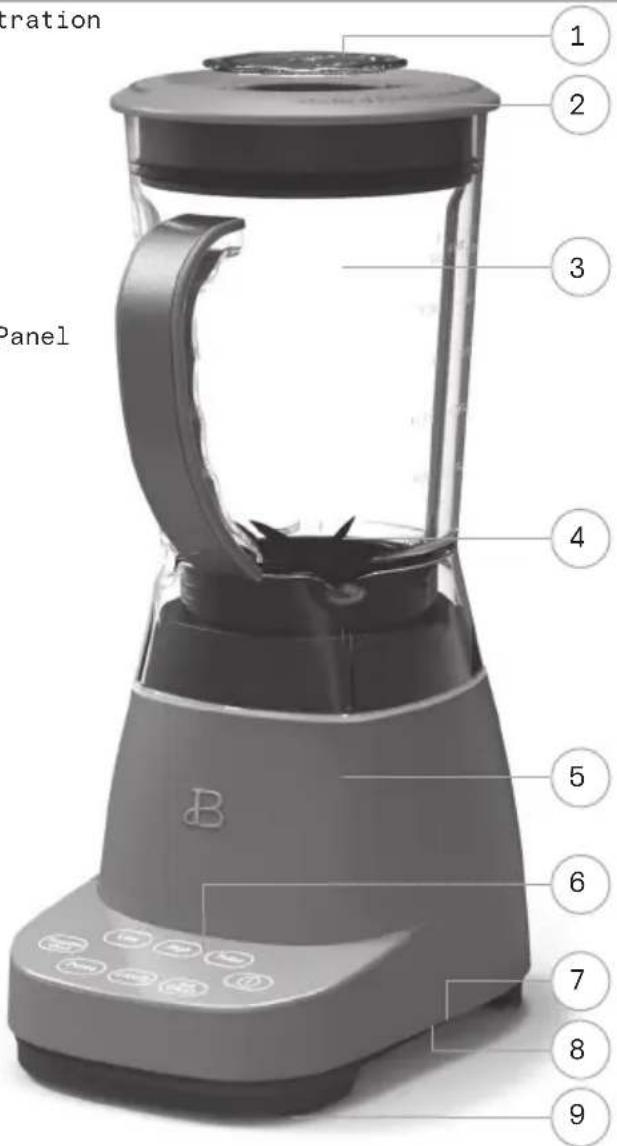
11
Touch-Activated Display Control Panel
A screen that only shows up when you need it.
3 SPEED buttons: LOW, HIGH, PULSE as well as 4 PRESET blending functions: PUREE, LIQUIFY, ICE CRUSH, SMOOTHIE/CLEAN illuminate when active and disappear when not in use.
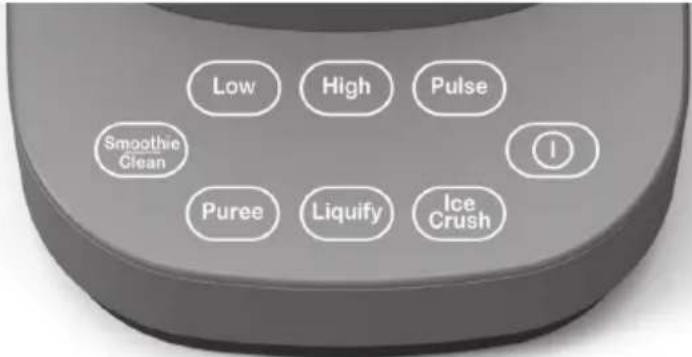
1.
-
PULSE
-
ICE CRUSH
-
LOW
-
PUREE
-
SMOOTHIE/CLEAN
-
HIGH
-
LIQUIFY

- When the Blender is plugged in, all buttons will illuminate and a tone will sound, the Ⓞ button will illuminate and then pulse slowly on and off.
- When Ⓓ is pressed, a tone will sound, and the control panel will illuminate and the power button will begin to flash.
- Press Ⓞ to STOP any operation.

- Select LOW when a slower speed is required; to begin mixing, to prevent over-mixing, and when working with heavier batters.
- Press Ⓞ to turn the function OFF.
- LOW speed blending will automatically turn OFF after 60 seconds.
High
- Select HIGH to blend ingredients to the desired consistency when a faster speed is required.
- Press Ⓞ to turn the function OFF.
• HIGH speed blending will automatically turn OFF after 60 seconds.
Pulse
- Select PULSE to blend ingredients through controlled bursts of power.
- Use PULSE to dislodge ingredients clumped around the blade and at the bottom of the jar.
- PULSE is activated as the button is pressed. Release the PULSE button to turn the Blender OFF.
- For best results, time the pulses to ensure that blades come to a complete stop before pulsing again.
Puree
- Use PUREE to prepare smooth soups and spreads, and to puree fruits and vegetables. All ingredients should be blended cold or at room temperature.
• Make sure sufficient liquid is added to create a smooth and even consistency. Add small amounts of stock, yogurt, milk, or water through the measuring cap, until the desired consistency is achieved. - Press Ⓞ to turn the function OFF.
- PUREE has a preset cycle time and will automatically turn OFF after 60 seconds.
Liquify
- Ideal for preparing soups and to blend thick or dense foods.
- When LIQUIFY is pressed, a tone will sound, the button will illuminate and the Blender will begin blending at lower speeds, then progressively increase to high speed.
- Press Ⓞ to turn the function OFF.
- LIQUIFY has a preset cycle time and will automatically turn OFF after 60 seconds.
Ice Crush
- ICE CRUSH quickly crushes up to 10 ice cubes and is perfect for preparing frozen drink recipes such as margaritas and daiquiris.
- Press Ⓞ to turn the function OFF.
- ICE CRUSH has a preset cycle time and will automatically turn OFF after 26 seconds.
Smoothie Clean
- Blends fresh or frozen fruits and vegetables into the perfect smoothie.
- Press Ⓞ to turn the function OFF.
- SMOOTHIE/CLEAN has a preset cycle time and will automatically turn OFF after 60 seconds.
- To best automatically clean the Blender jar, first fill jar with water to the 24 oz line and add a small amount of liquid dish soap. Press SMOOTHIE/CLEAN. The initial cleaning will continue for 60 seconds.
- Rinse the jar thoroughly with warm water. Repeat procedure without soap. Add room temperature water to the blender jar MAX line. Press SMOOTHIE/CLEAN and run once again. Rinse well. Then place the clean jar upside down on a rack to dry.
• Always clean jar and blade immediately after use to prevent food from hardening.
• The Tritan™ Jar is top rack dishwasher safe.
Before Using for the First Time
Carefully unpack the Blender and remove all packaging materials. Check the contents to ensure that all attachments (50 oz. jar, lid and measuring cap) are present (see Figure 1), and have been received in good condition.
- Wash the jar, lid, and measuring cap in warm, soapy water before first use. Rinse thoroughly.
WARNING: Do not touch blade. Blending blades are very sharp. Use extreme care when handling. Failure to do so can result in personal injury.
- Wipe the motor base with a damp cloth.
WARNING: DO NOT IMMERSE THE MOTOR BASE IN WATER.

Jar Assembly
- Always check to be sure the blade collar is properly fitted into the jar before use.
- To avoid spills, ensure that the lid is firmly secured to the jar. Press the lid down on the top portion of the jar until it rests firmly in place. Place the measuring cap into the center of the lid and twist clockwise to secure it safely in place.
- Use the measuring cap to measure and add ingredients before and while blending.
- Add ingredients to the jar.
NOTE: When blending, foods or liquids tend to expand as they rise up the side of the jar. Do not fill jar past its MAX line.
WARNING: Pay close attention while processing. Never operate the Blender when the jar is empty.
Operation
- Place the motor base on a flat, clean, dry counter top or table.
- Plug the power cord into a 3-prong 120V AC electrical outlet. A tone will sound. The Ⓞ will illuminate and then pulse slowly on and off.
- Add ingredients to the jar (Figure 1).
WARNING: Never overfill the jar. To avoid personal injury, leakage, or damage to the Blender, make sure that ingredients do not surpass the MAX line. Place the jar securely onto the motor base.
IMPORTANT: When adding Smoothie ingredients to the jar, add liquids and/or yogurt to the blender jar first. Then layer smaller chopped ingredients, both fresh and frozen. Larger chunks and ice should be added last. To avoid spinning blades and ensure a successful, creamy Smoothie, do not try to process too many frozen chunks.
-
Make sure the measuring cap is in position in the lid.
-
Add the lid onto the jar. Press to seal. Check before blending.
WARNING: To avoid spills, make sure the lid is locked securely before pressing any SPEED or PRESET buttons.
WARNING: Do not blend hot liquids.
-
When the pulsing ⓘ is pressed, a tone will sound as the control panel illuminates, the ⓘ button will flash and remains active for 20 seconds.
-
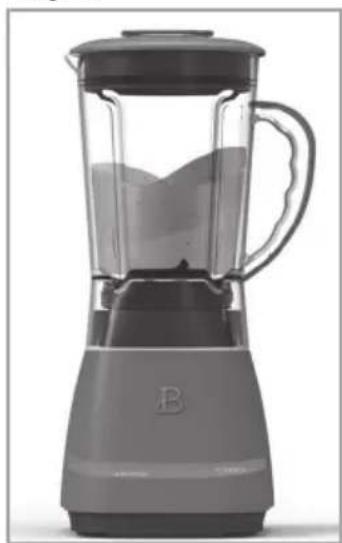
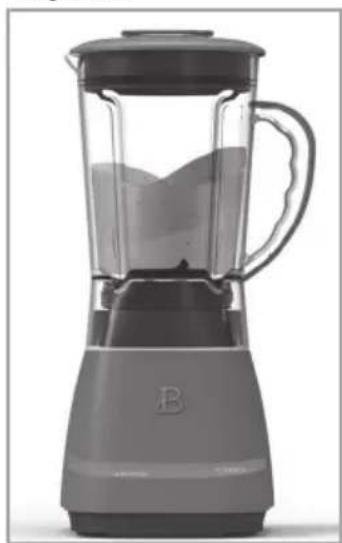
Press the desired SPEED or PRESET button to begin blending (Figure 2). A tone will sound. The Ⓐ button will illuminate and selected SPEED or PRESET will begin to flash. All other buttons will disappear when not in use. Press the desired SPEED or PRESET once more to activate the setting and begin blending. (Figure 3)
NOTE: If no buttons are pressed in 20 seconds, the control panel will darken and the Ⓞ button will illuminate and begin to pulse.
-
When using the PULSE function, the PULSE button will illuminate when pressed. When the button is released, the control panel will remain active for 20 seconds.
-
When blending HIGH or LOW SPEED, press Ⓐ to STOP blending when desired consistency is reached.
-
HIGH or LOW speed blending will automatically turn OFF after 60 seconds.
-
PUREE, LIQUIFY, ICE CRUSH, SMOOTHIE/CLEAN times and speeds are PRESET and will STOP automatically when cycles are complete.
-
Press Ⓓ to STOP blending. Check results and if necessary, stir in liquid, water, juice, or stock to thin food until the desired consistency is reached.
WARNING: Do not operate the motor continuously for more than 1 minute at a time.
- After processing food in the jar, pull the lid up and off jar to remove. The spouted jar makes pouring easy. (Figure 4)
HINT! A small spatula is helpful for removing thicker processed foods.
- Unplug the Blender when not in use and before cleaning.
Fig. 1

natural_image
Exterior view of a modern blender with fruit toppings (no text or symbols visible)Fig. 3
natural_image
Exterior view of a modern blender with visible blade and handle (no text or symbols)Fig. 2

Fig. 4

natural_image
Black-and-white photo of a glass filled with liquid, pouring from a container (no text or symbols visible)Function Selection Guide
| INGREDIENT/RECIPE FUNCTION DESCRIPTION | ||
| Pudding, Pie Filling, Custard PULSE or LOW Thick and creamy | ||
| Bread, Stale Bread, Crackers, Cookies (1/2 inch pcs, 1 cup batches) | PULSE or LOW Coarse to fine crumbs | |
| Nuts (shelled, 1/2 cup or less at a time) | PULSE or LOW Coarse to fine chopped nuts, chopped nuts for baking | |
| Nuts (shelled, 1/2 cup or less at a time Homemade Nut Flours, Meals, Nut Butter) | ICE CRUSH Fine ground nut flours,nut meals Fresh preservative free nut butters | |
| Mayonnaise, Salad Dressings, Salsas | LOW Thick and creamy, blended,and emulsified | |
| Pancake/Waffle Batter, Omelets LOW Light and fluffy | ||
| Cream, Egg Whites HIGH Thick and frothy | ||
| Milk Shakes HIGH Smooth and creamy | ||
| Smoothies, Drinks SMOOTHIE Smooth, thick & creamy and health drinks | ||
| Vegetable Puree PUREE Smooth and creamy | ||
| Crush Ice (up to 10 cubes) ICE CRUSH Coarse crush to snowy | ||
| Frozen Cocktails ICE CRUSH Thick and slushy | ||
| Dips, Appetizers ICE CRUSH Perfect for leafy recipes | ||
| Almond Milk, Coconut Milk, Soy Milk Oat Milk | LIQUIFY | Unfiltered for cooking.Filter for drinking. |
| Fresh Fruit Drinks | LIQUIFY | Thick and pulpy |
Beautiful Blender Notes:
- When using the PULSE function, Blender operation will STOP when the button is released.
- PUREE, LIQUIFY, ICE CRUSH, SMOOTHIE/CLEAN are preset and will STOP automatically when their cycle is complete. To interrupt blending, press POWER Ⓞ or any illuminated SPEED or PRESET button to turn the Blender OFF.
- Use LOW speed to begin the blending process or whenever the recipe calls for slower speeds.
Beautiful Food Prep Tips
- Use organic fruits and vegetables whenever possible.
- Wash all produce (even organic) thoroughly before removing peels and skins.
- Reduce risk of bacteria contamination by using a wooden cutting board (not plastic). It is best practice to identify and use separate cutting boards for meats/fish/poultry and fruits/vegetables.
- Choose USDA Certified Organic
- No additives, no sweeteners, no hydrogenated fats.
• No harmful pesticides.
• Organic farming produces fewer waste products and less pollution.
• Organic foods are arsenic-free.
• Higher quality ingredients for you and the entire family.
User Maintenance Instructions
This appliance requires little maintenance. It contains no user-serviceable parts. Any servicing requiring disassembly other than cleaning must be performed by a qualified appliance repair technician.
Care & Cleaning Instructions
CAUTION: DO NOT IMMERSE THE MOTOR BASE, PLUG, OR CORD IN WATER OR ANY OTHER LIQUID.
- Always unplug the Blender before cleaning.
- Rinse jar, lid and measuring cap immediately after processing to prevent food from hardening and to make cleanup easier. It is not recommended to remove the blade from the jar.
- To clean the jar, fill with clean, warm water to the MAX line and add a small amount of liquid dish soap.
- Press SMOOTHIE/CLEAN. A tone will sound. Both the Ⓞ button, and SMOOTHIE/CLEAN will illuminate. All other buttons will disappear.
NOTE: CLEAN has a preset cycle time and will automatically turn OFF after 60 seconds. - Rinse out the jar's contents with warm water. Repeat procedure without soap. Add room temperature water to the blender jar and fill to the 24oz / 3 cup line. Press SMOOTHIE/CLEAN and run once again. Place the clean jar upside down on a rack to dry.
- The Tritan™ Jar is top rack dishwasher safe.
- Wipe the motor base with a damp cloth or sponge. Dry thoroughly.
Storing Instructions
- Unplug and clean unit.
- Store in original box or in a clean, dry place.
- Never store the Blender while it is hot or plugged in.
- Never wrap cord tightly around the appliance. Never place any stress on cord, especially where the cord enters the motor base, as this could cause the cord to fray and break.
Troubleshooting
| PROBLEM CAUSE | SOLUTION | |
| The blender motor rotates very slowly. | Jar is overloaded. | Remove some food from the jar and continue blending. Ensure that ingredients do not surpass the max line.Add liquid to the jar and continue blending. |
| Ingredients are not mixing together well. | Heavier ingredients have fallen to the bottom. | If necessary, remove jar and shake ingredients to re-distribute.Continue blending.If the puree is still not blended smooth, it may be necessary to add liquid to the jar and continue blending. |
| The blender has stopped operating. | The motor is overloaded and stopped functioning to prevent damage. | The blender has a resettable thermal protection. Unplug the unit and let it cool for 25 minutes. Reduce the load of the jar and clear any jams.Commence operation again as indicated in the operation section. |
| The jar is leaking from the blade area. | The blade base is loose. | Turn the blade base located below the jar clockwise to tighten. |
Limited Two-Year Warranty
Sensio Inc. dba Made by Gather™ hereby warrants that for a period of TWO YEARS from the date of purchase, this product will be free from mechanical defects in material and workmanship, and for 90 days in respect to non-mechanical parts. At its sole discretion, Sensio Inc. dba Made by Gather™ will either repair or replace the product found to be defective, or issue a refund on the product during the warranty period.
The warranty is only valid for the original retail purchaser from the date of initial retail purchase and is not transferable. Keep the original sales receipt, as proof of purchase is required to obtain warranty validation. Retail stores selling this product do not have the right to alter, modify, or in any way revise the terms and conditions of the warranty.
Exclusions:
The warranty does not cover normal wear of parts or damage resulting from any of the following: negligent use of the product, use of improper voltage or current, improper routine maintenance, use contrary to the operating instructions, disassembly, repair, or alteration by anyone other than qualified Sensio Inc. dba Made by Gather™ personnel. Also, the warranty does not cover Acts of God such as fire, floods, hurricanes, or tornadoes.
Sensio Inc. dba Made by Gather™ shall not be liable for any incidental or consequential damages caused by the breach of any express or implied
warranty. Apart from the extent prohibited by applicable law, any implied warranty of merchantability or fitness for a particular purpose is limited in time to the duration of the warranty. Some states, provinces or jurisdictions do not allow the exclusion or limitation of incidental or consequential damages, or limitations on how long an implied warranty lasts, and therefore, the above exclusions or limitations may not apply to you. The warranty covers specific legal rights which may vary by state, province and/or jurisdiction.
How To Obtain Warranty Service:
You must contact Customer Service at our toll-free number: 1-877-775-3564. A Customer Service Representative will attempt to resolve warranty issues over the phone. If the Customer Service Representative is unable to resolve the problem, you will be provided with a case number and asked to return the product to Sensio Inc. dba Made by Gather™ Attach a tag to the product that includes: your name, address, daytime contact telephone number, case number, and description of the problem.
Also, include a copy of the original sales receipt. Carefully package the tagged product with the sales receipt, and send it (with shipping and insurance prepaid) to SENSIO Inc.'s address. Sensio Inc. dba Made by Gather™ shall bear no responsibility or liability for the returned product while in transit to Sensio Inc. DBA Made by Gather™ Customer Service Center.
Beautiful™
Kitchenware
Sección 1
Seguridad
1
- LOW (Baja)
-
HIGH (Alta)
-
PULSE (Pulso)
- PUREE (Hacer puré)
-
LIQUIFY (Licuar)
-
ICE CRUSH (Picar hielo)
- SMOOTHIE/CLEAN (Batido/limpiar)

natural_image
Exterior view of a modern kitchen blender with fruit toppings (no text or symbols visible)Figura 3
natural_image
Exterior view of a modern blender with visible blade and handle (no text or symbols)Figura 2
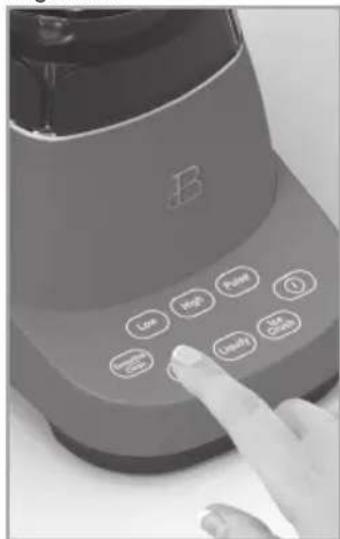
Figura 4

natural_image
Black-and-white photo of a glass filled with liquid, pouring from a container (no text or symbols visible)Make Something Beautiful! ♥ Drew

Sensio Inc.
dba Made by Gather™
New York,NY 10016/USA
www.cookwithbeautiful.com
For customer service questions or comments


- Table of Contents
- Section 1: Safety
- Section 2: Instructions
- SAVE THESE INSTRUCTIONS
- ADDITIONAL IMPORTANT SAFEGUARDS
- GROUNDED 3-CONDUCTOR PLUG
- NOTES ON THE CORD
- PLASTICIZER WARNING
- ELECTRIC POWER
- Section 2
- Instructions
- Getting To Know Your High Performance Blender
- Touch-Activated Display Control Panel
- High
- Pulse
- Puree
- Liquify
- Ice Crush
- Smoothie Clean
- Before Using for the First Time
- Jar Assembly
- Operation
- Beautiful Blender Notes:
- Beautiful Food Prep Tips
- User Maintenance Instructions
- Care & Cleaning Instructions
- CAUTION: DO NOT IMMERSE THE MOTOR BASE, PLUG, OR CORD IN WATER OR ANY OTHER LIQUID.
- Storing Instructions
- Limited Two-Year Warranty
- Exclusions:
- How To Obtain Warranty Service:
- Beautiful™
- Sección 1
- Seguridad
- 1
Brand : Beautiful
Model : High Performance with Touch-Activated Display
Category : Blender