Gumbody Personal 4 plus - Remote control MELICONI - Free user manual and instructions
Find the device manual for free Gumbody Personal 4 plus MELICONI in PDF.


User questions about Gumbody Personal 4 plus MELICONI
0 question about this device. Answer the ones you know or ask your own.
Ask a new question about this device
Download the instructions for your Remote control in PDF format for free! Find your manual Gumbody Personal 4 plus - MELICONI and take your electronic device back in hand. On this page are published all the documents necessary for the use of your device. Gumbody Personal 4 plus by MELICONI.
USER MANUAL Gumbody Personal 4 plus MELICONI
Remote control for TV sets PHILIPS ready to use
Thank you for choosing a Meliconi remote control.
Keep this booklet for future reference
This remote control, after inserting the batteries, is normally ready for use as it is already set at the factory with a specific code.
If problems are found to command the TV, or some functions do not produce the desired effect, to follow the instructions to the chapter ACTIVATION OF REMOTE CONTROL.
The Personal 4 plus remote control is designed to command a PHILIPS digital television sets.
Its ergonomic shape and soft rubber body make it easy to grip and protect it from shocks and drops.
By LEARN function, you can capture and store infrared signals from other remotes and match at will to one or more buttons.
The MELICONI remote control reproduces infrared signals corresponding to the original; the functions that operate in radio frequency (e.g. voice commands and pointers) are not supported.
The remote control has a permanent memory, so it does not lose its settings even if there are no batteries in it.

SAFETY WARNINGS
The remote control and batteries should not be exposed to excessive heat such as sunlight, fire or the like.
The product is not a toy. Keep out of reach of children or domestic animals.
INSERTING THE BATTERIES
The remote control requires 2 new 1.5V AAA/LR03 alkaline batteries, not included in the package. Insert with the correct polarity as shown in figure.
DO NOT use rechargeable batteries.
BATTERIES TEST: Press and hold the 5 button and check that the LED remains on continuously until the button is released. If the light is off or blinks, the inserted batteries are low, therefore they need replacement.
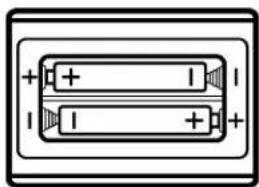
natural_image
Simple line drawing of two rectangular blocks with positive and negative charges, no text or symbols present.Do not leave exhausted batteries inserted, as liquid may leak and damage the remote control
ACTIVATION OF REMOTE CONTROL
If the remote control can not control the TV correctly, it is essential to set a specific code, it matched. Identify the specific code and set it into the remote control using one of the following ways:

Use the qr-code on the side or connect to the www.cme.it page and follow the instructions.
Once you have found the specific code for your device, set it in the remote control as described in the ENTERING THE CODE DIRECTLY chapter.
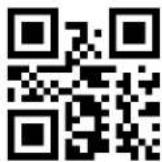

watch the video
MANUAL SEARCH
- Stand in front of the device to be controlled and make sure it is ON (not in stand-by). If necessary, switch it on using the original remote control (if this is still working) or the buttons present on the device itself. (on TVs they can be on the side or the top)
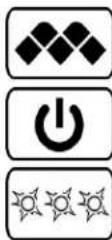
- On the MELICONI remote control press and hold the button until the LED of the remote control lights up; release.
- Pointing the remote control towards the device, PRESS AND HOLD the ON/OFF button and wait for the device to switch off.
- PAY ATTENTION, when the device turn off, IMMEDIATELY RELEASE the button.
- Three final flashes indicate that the operation has been completed successfully.
VERIFY
Check that the MELICONI remote control operates your device in the main functions; if it does not, REPEAT the procedure.
NOTE: When the list of codes to be searched is over, the remote control exits the search and the LED remains off. If after 7 attempts no results are obtained, try using the procedure described in the SMARTPHONE - TABLET - WEB chapter or contact the ASSISTANCE.

watch the video
ENTERING THE CODE DIRECTLY
(only to be performed if you know the specific code to be set)
- On the MELICONI remote control press and hold the button until the LED lights up; release.
- Immediately enter the previously identified specific code.
- Three final flashes indicate that the operation has been completed successfully.
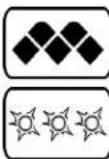
If the remote control does NOT carry out the three final flashes, the setting is NOT successful; repeat the procedure. If still unsuccessful, it means that the code is not included in the remote control, contact the ASSISTANCE.
DELETE FUNCTION BY SINGLE BUTTON
If you want to delete the function in combination with a single button, operate as follows:
- On the MELICONI remote control press and hold the button.
- When the LED turn on, without releasing the button, enter the code 1600; release the buttons.
- Within 30 seconds, press and hold the button of which you want to delete the function; wait three flashes indicating the end of the operation, release the button. (to recall the original function, setting again the activation code)
BUTTONS AND FUNCTIONS
The functions of the buttons on the MELICONI remote control are only available if the original device is equipped with it. Sometimes some functions of the original remote control are not directly present on the MELICONI remote control keypad. To enable them, connect to the www.cme.it page, use the on-line tool ACTIVATION OF REMOTE CONTROL and continue until you see the list matching buttons between the original remote control and the MELICONI remote control.
To obtain some functions, press and hold the button and press the corresponding key indicated in the table. If the function you want to play is matched with an number in orange color, operate as follows:
- On the MELICONI remote control press and hold the button.
- When the LED turn on, without releasing the button, point the remote control towards the device and enter the previously identified number corresponding to the function you want to get. (at the last digit pressure, the remote control already transmits this function)
- Release the buttons; to match the function obtained to a MELICONI remote control button, within 30 seconds, press and hold the desired button.
- Wait three flashes indicate that storage; release the button. (the used button loses the original function that will be called by setting again the activation code)
DISPLAY CODE IN USE
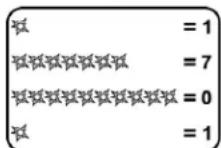
For any future activation of the remote control, it is advisable to extract and note the code in use, operate as follows:
- On the MELICONI remote control press and hold the button until the LED lights up; release.
- Enter the code 0010.
- After a pause of several seconds, the LED produces four sets of flashes, spaced out, corresponding to the code to be obtained. Count the number of flashes. Each set of flashes corresponds to one digit in the code. Ten flashes correspond to the digit zero "0".
(example code obtained = 1701)
- Make a note of the code obtained. You may need it in future.

RESET THE REMOTE CONTROL
If necessary it is possible to completely reset the remote control and bring it back to the initial conditions. WARNING : All user settings will be lost. Operate as follows:
- On the MELICONI remote control press and hold the button until the LED lights up; release.
- Enter the code 0100.
- Three final flashes indicate that the operation has been completed successfully.
LEARN FUNCTION
The Personal 4 plus remote control is equipped with Learn technology that can acquire and memorise signals from other infrared remote controls. This feature is particularly useful in several cases.
To add or change a function connected to a button on the MELICONI remote control.
Having activated the remote control and checked it is working correctly, you may need to add or replace a function on one of the MELICONI remote control buttons with another function you consider to be handler or more frequently used.
➢ Assign some functions to some buttons to control other devices (example: volume +/- SOUNDBAR).
The Personal 4 plus remote control can learn up to a maximum of 10 signals coming from various original remote controls and connect at will to the desired buttons.
Signals can also be learnt and set on all the buttons on the MELICONI remote control, except the button. Obviously the preset functions are lost, but they can be restored by setting again the activation code.
The Learn operation can be repeated numerous times, and the signals captured are kept in the memory even if the batteries are removed or go flat.
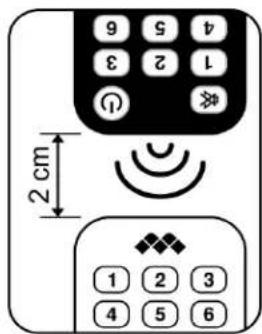
- POSITIONING THE REMOTE CONTROLS CORRECTLY.
- Check that the batteries in both remote controls (the original and the MELICONI remote) are fully charged; if semi-charged batteries are used the signal acquisition procedure may prove difficult or fail completely.
- Position the original remote control in front of the MELICONI remote control so the areas which emit the infrared signals are opposite each other at a distance of approximately 2 cm.
- On the MELICONI remote control press for a moment the button.
- Within 30 seconds, press and hold down one of the buttons on the original remote control; the LED on the MELICONI remote control should start flashing; if it doesn't, move the remote controls closer together.
- Gradually move the original remote control away, making sure the two remotes stay aligned, until the point at which the LED stops flashing; then move the remote control to half the previous distance and keep both remotes in this position until the process has terminated.
• CAPTURING SIGNALS.
- On the MELICONI remote control press and hold the button until the LED lights up; release.
- Press the button again briefly and immediately press for a moment the button to which to combine the capture signal.
- Press the button on the original remote to be captured, hold it down until the LED goes out and then release it. IMPORTANT: If after releasing the button the LED comes back on, press the same button again until the LED goes out once more.
- When the signal has been captured correctly the LED will produce three final flashes.
To capture other signals to connect to other buttons, repeat the procedure described above.
Reached the number of records available, the dedicated memory becomes full, preventing further use.
To free memory use one of the following procedures in relation to the data that you want to delete:
- DELETE FUNCTION BY SINGLE BUTTON
- ENTERING THE CODE DIRECTLY
- RESET THE REMOTE CONTROL
ASSISTANCE
web: www.cme.it
e-mail: telecomandi@meliconi.com
IMPORTANT! To obtain technical assistance, it is essential to indicate the BRAND and MODEL of the appliance you intend to control and the name of the MELICONI remote control you are using.
TROUBLESHOOTING (F.A.Q.)
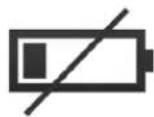
ATTENTION!
Most problems are caused by using insufficiently charged batteries.
We recommend checking and replace them as shown in the INSERTING THE BATTERIES chapter.
- IF THE REMOTE CONTROL IS NEW AND YOU CAN NOT MAKE IT WORK
It is possible that the code set in the remote control is incorrect for the device that you want to control. Check that you have carried out all the settings procedures correctly. If necessary repeat them, following all the steps indicated carefully.
Consult the website www.cme.it to identify the specific code associated with your device or contact the ASSISTANCE.
- IF THE REMOTE CONTROL IS NO LONGER ABLE TO CONTROL THE DEVICE
Disconnect the device from the electric socket and leave it without power for a few minutes; switch the device on again.
Remove the batteries from the remote control, press the ON/OFF button twice and insert NEW batteries.
Make sure that the remote control is pointing at the device without any obstacles between them.
If necessary try to the RESET THE REMOTE CONTROL and carry out a new activation.
- IF SOME FUNCTIONS ARE NOT AVAILABLE ON THE REMOTE CONTROL
If some of the MAIN functions are not available, you are probably using an incorrect code. Find and set a more suitable code as described in the ACTIVATION OF REMOTE CONTROL chapter.
Sometimes some functions of the original remote control are not directly present on the MELICONI remote control keypad.
To enable them, operate as described in the BUTTON AND FUNCTIONS chapter.
• HOW TO CHECK IF THE REMOTE CONTROL SENDS INFRARED SIGNALS
The human eye is not able to detect infrared signals; use a camera (even that of the mobile phone).
Aim the infrared LED located in front of the remote control (not the red LED above) and press and hold on the remote control the 5 button.
If you see through the camera, the LED light with short white / light blue flashes means that the remote control works and emits infrared.
WARRANTY: 2 year
Always keep your sales receipt as proof of the validity of the product's warranty. The warranty is voided if the product is tampered with or used improperly.

Meliconi SpA, Via Minghetti 10 - 40057 Cadriano di Granarolo Emilia, (BO) Italy web: www.meliconi.com email: telecomandi@meliconi.com
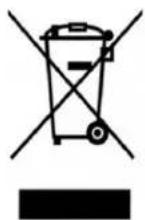
The symbol showing a wheelie bin with a cross through it which appears on the device indicates that at the end of its useful life the product must be collected separately from other waste. Therefore, at the end of the device's life, you must take it to appropriate centres for the differentiated collection of electrical and electronic waste, or return it to the retailer when purchasing a new device of equivalent type. Suitable differentiated collection to allow subsequent recycling of the decommissioned device, with environmentally-compatible treatment and disposal, help to prevent any negative effects on the environment and health and to promote the recycling of the materials of which the device is made.
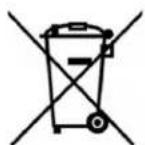
CAUTION: Batteries must not be disassembled, thrown into fire or released into the environment. Improper use can cause damage to the environment and health. The symbol of the bins, indicating that the batteries should be disposed of according to current regulations; inquire on collection of spent batteries and accumulators in force in your country.