
VS20R9045T3 - Vacuum Cleaner SAMSUNG - Free user manual and instructions
Find the device manual for free VS20R9045T3 SAMSUNG in PDF.


| Product Type | Cordless Stick Vacuum |
| Model | VS20R9045T3 |
| Brand | Samsung |
| Suction Power | 210 AW (Air Watts) |
| Motor | Digital Inverter Motor (120,000 RPM) |
| Battery Type | Lithium-ion, removable |
| Battery Voltage | 21.6 V |
| Battery Capacity | 2000 mAh (rated) |
| Run Time (Normal) | 40 min (non-motorized tool) |
| Run Time (Max) | 10 min (with motorized brush) |
| Charging Time | 3.5 h |
| Dustbin Capacity | 0.5 L |
| Filtration System | Washable Micro Filter + Fine Dust Filter |
| Height (with wand) | 112 cm approximately |
| Weight (main body) | 1.8 kg |
| Weight (total) | 2.9 kg (with wand and brush) |
| Dimensions (body) | 30 x 21 x 27 cm (LxWxH) |
| Accessories Included | Motorized brush, crevice tool, combination tool, charging stand, wall mount |
| Noise Level | 80 dB (A) |
| Input Power | 100-240 V ~ 50/60 Hz |
| Cleaning Modes | Normal, Turbo (Max) |
| Display | LED indicators for battery and mode |
| Filter Maintenance | Washable; rinse and air dry every 3 months |
| Spare/replacement parts | Battery (VCA-SBC90), filter (VCA-SCF90), brush roller available |
Frequently Asked Questions - VS20R9045T3 SAMSUNG
User questions about VS20R9045T3 SAMSUNG
0 question about this device. Answer the ones you know or ask your own.
Ask a new question about this device
Download the instructions for your Vacuum Cleaner in PDF format for free! Find your manual VS20R9045T3 - SAMSUNG and take your electronic device back in hand. On this page are published all the documents necessary for the use of your device. VS20R9045T3 by SAMSUNG.
USER MANUAL VS20R9045T3 SAMSUNG
VS20R90**** Series / VS15R85**** Series
- Before operating this unit, please read the instructions carefully.
- For indoor use only

PREPARATION
Safety information 3
INSTALLATION
Name of the parts 13
Accessories
Installing the charging stand 15
Installation guide 15
OPERATION
Using the vacuum cleaner 16
Using the charging stand 16
Charging the battery 17
Operating the vacuum cleaner 18
Using the accessories 19
MAINTENANCE
Maintaining the vacuum cleaner 21
When to empty the dustbin 21
Emptying the dustbin easily without causing dust clouds 21
Emptying and cleaning the dustbin 21
14 Cleaning the filter 23
Cleaning the accessories 24
APPENDIX
Notes and cautions 26
Battery usage 26
Operation 28
Maintenance 29
Troubleshooting 30
Safety information
- Before operating the appliance, please read this manual thoroughly and retain it for your reference.
- Because the following operating instructions cover various models, the characteristics of your vacuum cleaner may differ slightly from those described in this manual.
Caution/Warning symbols used
WARNING
Indicates that a danger of death or serious injury exists.
CAUTION
Indicates that a risk of personal injury or material damage exists.
Other symbols used
NOTE
Indicates that the following text contains additional important information.
Failure to meet these requirements could cause damage to the internal parts of the vacuum and void your warranty.
General
- Read all instructions carefully. Before switching the vacuum on, make sure that the voltage of your electricity supply is the same as that indicated on the rating plate at the rear of the handy vacuum cleaner (battery contact side).
- WARNING: Do not use the vacuum cleaner on a wet rug or floor.
- Close supervision is necessary when any appliance is used by or near children. Do not allow the vacuum cleaner to be used as a toy. Do not allow the vacuum cleaner to run unattended at any time. Use the vacuum cleaner only for its intended purpose as described in these instructions.
- Do not use the vacuum cleaner without a dustbin.
- Empty the dustbin before it is full to maintain the highest efficiency.
- Do not use the vacuum cleaner to pick up matches, live ashes or cigarette butts. Keep the vacuum cleaner away from stoves and other heat sources. Heat can deform and discolor the plastic parts of the unit.
- Avoid picking up hard, sharp objects with the vacuum cleaner as they may damage the vacuum's parts.
- Do not block the suction or the exhaust port.
- To avoid damage, remove the plug by grasping the plug, not by pulling the cord.
- This appliance can be used by children aged from 8 years and above and persons with reduced physical, sensory or mental capabilities or lack of experience and knowledge if they have been given supervision or instruction concerning use of the appliance in a safe way and understand the hazards involved. Children should not play with the appliance. Children should not clean or perform maintenance on the vacuum without adult supervision.
- Children should be supervised to ensure that they do not play with the appliance.
- The battery must be removed from the main unit before cleaning or performing maintenance on the vacuum.
- The use of an extension cord is not recommended.
- If your vacuum cleaner is not operating correctly, switch off the power supply and consult an authorized Samsung service agent.
- If the supply cord is damaged, it must be replaced by the manufacturer or its service agent or a similarly qualified person to avoid any electrical hazards.
- Do not use to suction up water.
- Do not immerse in water for cleaning.
- Please contact Samsung or a Samsung service center for a replacement if one is needed.
- For information on Samsung's environmental commitments and product specific regulatory obligations e.g. REACH (WEEE, Batteries) visit: samsung.com/uk/aboutsamsung/samsungelectronics/corporatecitizenship/data_corner.html
Charging stand
- Do not modify the polarized plug to fit a non-polarized outlet or extension cord.
- Do not use outdoors or on wet surfaces.
- Unplug the charging stand from the outlet when not in use and before servicing.
- Use only the charging stand supplied by the manufacturer to recharge.
- Do not use with a damaged cord or plug.
- Do not pull or carry by the cord, use the cord as a handle, close a door on the cord, or pull the cord around sharp edges or corners. Keep the cord away from heated surfaces.
- Do not use extension cords or outlets with inadequately rated current.
- Do not charge a non-rechargeable battery.
- Do not unplug by pulling on the cord. To unplug, grasp the plug, not the cord.
- Do not mutilate or incinerate batteries as they will explode at high temperatures.
- Do not attempt to open the charging stand. Repairs should be only carried out by a qualified Samsung service center.
- Do not expose the charging stand to high temperatures or allow moisture or humidity of any kind to come into contact with the charging stand.
Vacuum cleaner
- Do not pick up hard or sharp objects such as glass, nails, screws, coins, etc.
- Do not use without a filter in place. When servicing the unit, never put fingers or other objects into the fan chamber in case the unit accidentally turns on.
- Do not put any objects into openings. Do not use with any openings blocked. Keep openings free of dust, lint, hair, and anything that may reduce air flow.
- Do not pick up toxic materials (chlorine bleach, ammonia, drain cleaner, etc.).
- Do not pick up anything that is burning or smoking, such as cigarettes, matches, or hot ashes.
- Do not use the vacuum cleaner in an enclosed space filled with vapours given off by oil based paint, paint thinner, moth proofing substances, flammable dust, or other explosive or toxic vapours.
Installation
- If you have a problem with installing the charging stand, contact a Samsung service center.
* Injury or product malfunction from not installing the charging stand may not be compensated.
Power related
WARNING
- When installing the charging stand, do not bend the power cord with excessive force or put heavy objects on the power cord.
- Otherwise, electric shock or fire may occur.
- If there is dust, water, etc. on a pin or contact point of the power plug, wipe them carefully.
- Otherwise, abnormal operation or electric shock may occur.
- Do not pull the cord and do not touch the plug with wet hands.
- Do not plug the charging stand into a power source with the incorrect voltage. Do not plug the charging stand into a multi-plug outlet or power strip. Do not leave the power cord lying on the floor. Attach the cord close to a wall.
- Otherwise, electric shock or fire may occur.
- Do not use a damaged power plug, power cord, or loose power outlet.
- Otherwise, electric shock or fire may occur.
- If the power cord is damaged, have a Samsung authorized service center replace the power cord with a new power cord.
- Otherwise, electric shock or fire may occur.
Operation
WARNING
- Do not touch the charging terminal of a vacuum or charging stand with chop sticks, metal screw drivers, forks, knives, etc.
- Otherwise, product malfunction or electric shock may occur.
- Make sure that the battery terminals of the charging stand do not come into contact with a conductor such as a bracelet, watch, metal rod, nail, etc.
- Make sure that any liquid such as water or juice is not allowed to enter the vacuum cleaner or the charging stand.
- Otherwise, electric shock or fire may occur.
- Do not use the charging stand for other purposes.
- Otherwise, severe damage to the charging stand or fire may occur.
- Do not vacuum liquid, blades, pins, embers, etc. during cleaning.
- Otherwise, abnormal operation or product damage may occur.
- Do not step on the product body or strike the product.
- Otherwise, an injury or product damage may occur.
- The brush and air outlet should not be blocked during cleaning.
- Otherwise, product malfunction or fire may occur due to overheating of the product.
- This product is intended for household use only. Do not use this product for heavy duty cleaning, commercial cleaning, industrial cleaning, or cleaning outdoors, especially on stone or cement. Do not use to pick up chalk powder in and around billiard tables or in hospital aseptic rooms.
- Otherwise, abnormal operation or product damage may occur.
- Do not use the product near heating appliances such as heaters, or in areas containing combustible sprays, or flammable materials.
- Otherwise, fire or product deformation may occur.
- Before using the product, make sure that the filters are correctly inserted.
- Otherwise, dust can enter the motor inside the main body and cause product damage. Suction force can decrease.
- If there is a gas leak or combustible spray is used, do not touch the power outlet and open the window for ventilation.
- Otherwise, an explosion or fire may occur.
- If the vacuum makes a strange sound or emits a smell or smoke, turn off the vacuum immediately, and then contact a Samsung service center.
- Otherwise, electric shock or fire may occur.
CAUTION
- Do not use the product near combustible material. Also do not use:
- In a place where a burning candle or desk lamp is placed on the floor.
- In an area where an unattended place heater is turned on or an area in which there are unextinguished embers in a fireplace, in an ashtray, etc.
- In a place where there are combustible materials such as gasoline, alcohol, thinner, ashtrays with unextinguished cigarettes, etc.
- Do not allow children to cling to or push the charging stand.
- Personal injury, product and floor damage may occur.
- When you need to store the vacuum cleaner for a short time during cleaning, lay the vacuum on the floor.
- Otherwise, the vacuum cleaner may fall and could cause an injury or severe product damage.
- Do not charge the product near a window, heater, toilet, bathroom, etc.
- After using the vacuum cleaner, you should store it in the charging stand or lay it safely on the floor.
- Otherwise, the product may fall and could cause an injury or severe product damage.
- Do not store the vacuum cleaner by leaning it against a wall or table.
- Do not use the vacuum cleaner for other than its intended purpose. (Do not allow children to ride on or play with the product.)
- An injury or product damage may occur.
- Before plugging in or unplugging the charging stand, turn off the vacuum and make sure that the pins of the power plug do not come into contact with your hands.
- Otherwise, fire or electric shock may occur.
- When using the vacuum cleaner, be careful not to hurt yourself on the moving or spinning parts.
- Be careful not to suction body parts into a brush of the vacuum cleaner (Hair, etc.).
- When cleaning the wall or ceiling, use both hands.
- Use both hands to clean with the vacuum. If you clean with one hand, you can damage your wrist or drop the vacuum and cause an injury or damage the vacuum.
- When assembling the vacuum, be careful not to catch your fingers or hands in the movement fold of the handle.
- Do not use the vacuum cleaner on objects that can be easily scratched (monitors, stainless steel appliances, etc.).
- Do not store the vacuum cleaner inside a car.
- Do not use water to clean the vacuum cleaner when in use.
• Use the vacuum cleaner in dry places only.
- Do not use the vacuum cleaner in wet places or on water.
- Do not use the vacuum cleaner to pick up spilled beverages or pet waste.
- Do not use the vacuum cleaner in direct sunlight or high heat.
Maintenance
WARNING
- Before removing foreign matter inside the vacuum, turn off the vacuum cleaner first.
- If the vacuum is on while you are removing the foreign matter, you can hurt yourself or damage the vacuum.
- When cleaning the exterior of the product, turn off the product first and then wipe it with a dry towel. Do not spray water directly onto the product or wipe it with volatile materials such as benzene, thinner, or alcohol.
- If water gets into the product and an error occurs, turn off the product and contact a Samsung service center.
• After unplugging the product, clean the charging stand.
- When cleaning the washable parts, do not use alkaline detergent, acid, industrial detergent, air freshener, acetic acid, etc.
- Otherwise, product damage such as plastic breakage, deformation, discoloration, printing deterioration, etc. may occur.
| Washable Parts | Dustbin, washable micro filter, ultra fine dust filter, metal mesh grille filter, dry cloth | |
| Acceptable detergent | Neutral Dish | washing detergent |
| Prohibited detergent | Alkaline Lox, | mold cleaner, etc. |
| Acid Paraffin oil, an emulsifier, etc. | ||
| Industrial cleaners | NV-I, PB-I, Opti, alcohol, acetone, benzene, thinner, etc. | |
| Air freshener Jet spray air fresheners (coffee flavor, herb, etc.) | ||
| Oils Animal oils, vegetable oils | ||
| Etc. Edible acetic acid, vinegar, glacial acetic acid, etc. | ||
CAUTION
- Do not push the vacuum cleaner while it is stored in the charging stand. - Personal injury, floor and product damage may occur.

01 Pipe (Adjustable) 02 Dustbin 03 Metal mesh grille filter 04 Washable micro filter 05 Ultra fine dust filter 06 Dustbin release button 07 Display 08 Power( ) button 09 Suction power control button 10 Handle
11 Battery level indicator 12 Battery release button 13 Pipe release button 14 Pipe length adjustment button 15 Brush release button 16 Vacuum charging part 17 Accessory holder 18 Additional battery charging slot 19 Power cord
* Battery Spec
VS20R90**** Series : Lithium-ion 21.9 V, 2850 mAh, 6 cell
VS15R85**** Series : Lithium-ion 21.6 V, 1800 mAh, 6 cell
* Those two batteries are not compatible with each other.
Accessories
Accessories may differ depending on the models.


Pipe (Adjustable) Soft Action Brush Turbo Action Brush
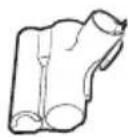

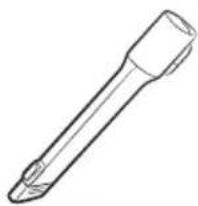
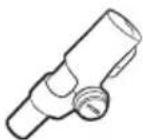
Mini Motorized Tool Combination Tool Extension Crevice Tool

Flexible Tool Battery


Power cord User manual Charging stand /
Screw: 1 EA

Screws: 2 EA /
Screw anchors: 2 EA /
Fixing hook: 1 EA
Installation guide


Assembling the charging stand
1. Assemble the stand pipe to the bottom support, and fix it with a small screw. Make sure the direction for the assembly is correct and push it in firmly so that the screw hole is made correctly. 2. Assemble the vacuum charging part to the top of the stand pipe. Do not disassemble it after the assembly. 3. Connect the power cord to the rear of the charging stand. Hold the connection part of the cord and push it onto the connection pins firmly until the gray lines on the tip of the cord are not visible. When inserting the cord into the groove on the bottom of the bottom support, the charging stand can be installed close against the wall.
4. Plug in the charging stand.
Fixing by the hook
1. Using the fixing hook as a template, mark where the top and bottom screw holes will be placed on the wall.
- Top: 66 cm from the floor
- Bottom: 60 cm from the floor
2. Drill the holes using a 6 mm drill bit, and put the provided screw anchors into the holes. 3. Fix the fixing hook to the wall with the provided screws (large). 4. Hook the groove of the charging stand into the fixing hook.
* Please refer to the QR code for detailed information on the installation and charging method of the charging stand.
Using the charging stand

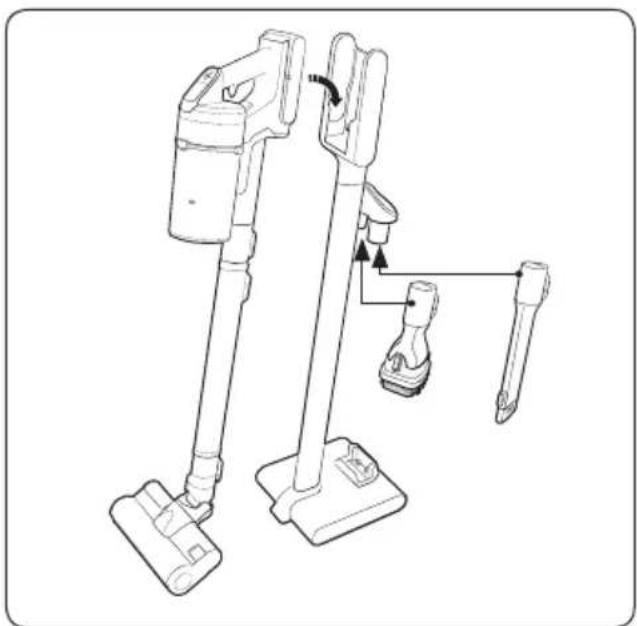
Charging
* Make sure the back of the battery is correctly placed onto the vacuum charging part. * Check if the battery level indicator is displayed while charging. * The battery level indicator blinks while charging. When charging is complete, the blinking stops and the light level dims.
Storing the accessories
* When accessories are disassembled to be stored, dust may fall from the suction part of the vacuum cleaner. * After cleaning, shorten the pipe length and operate in MAX mode for 10 seconds.
Charging the battery
* When the battery level indicator is at its lowest level and blinks, charge the battery.
* When charging the vacuum, make sure the connection part of the charging stand is correctly connected.
* The vacuum cleaner cannot be used while it is charging.
CAUTION
- Before ejecting the battery, the product must be turned off. (If the battery is forcibly ejected while the vacuum is operating, the vacuum can malfunction.)
- Be careful not to drop the battery. If you do, you can injure yourself or damage the battery.
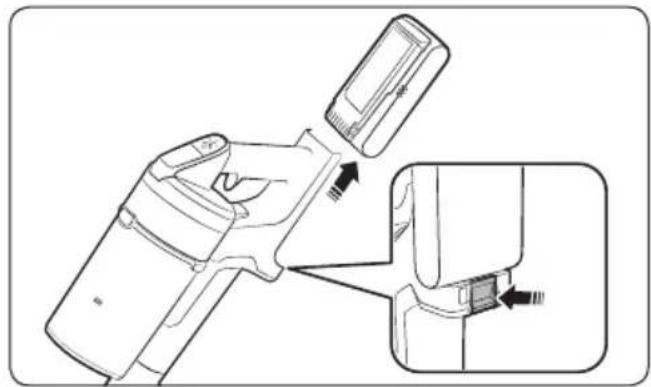
Ejecting the battery
Press the battery release button at the rear of the handle to eject the battery.

Re-inserting the battery
Push the battery to the end until you hear it click.

Charging the additional battery
- Charge the additional battery at the additional battery charging slot at the bottom of the charging stand.
- Push the battery in firmly.
- Check if the battery level indicator is displayed while charging.
Operating the vacuum cleaner
When the brush clings to the floors such as a carpet, a mat, bedding, etc. or does not spin properly, change the suction power to 'MIN' or 'MID' mode.

Power (on/off)
When pressing the power button, the vacuum cleaner starts operation in 'MID' mode.
Controlling suction power
You can control the suction power of the vacuum cleaner.
• + button: Increases suction power. - button: Decreases suction power.
Checking the display
01 Clogged: When the dustbin, pipe, or suction part is clogged 02 Spinning brush stuck: When a foreign matter is clogged at the spinning brush * If the overheating prevention device of the motor works, the spinning brush stuck display will not turn on. 03 No Filter: When the washable micro filter is not assembled correctly 04 Suction power: Displays current suction power. * If the display above 01, 02, or 03 blinks a few times and the vacuum cleaner stops operation, please take action by referring to the maintenance part of this manual.
Using the accessories
If the vacuum operates with the spinning brush not working, check whether the brush gets excessive force or clogged with a foreign matter. (Please refer to the troubleshooting part of this manual.)

Adjusting the pipe length
Press the button at the rear of the pipe to adjust the length of the pipe in 4 steps.

Soft Action Brush
Use to clean a floor (wood and linoleum).

Mini Motorized Tool
Use to clean bedding.

Combination Tool
Use to remove dust from curtains, furniture, sofas, etc.


Extension Crevice Tool
Use to remove dust in grooves of window frames, chinks, corners, etc.
Flexible Tool
Use to clean the places hard to reach such as upper or rear parts of furniture or ceilings.

NOTE
- The Flexible Tool can be connected to the Combination Tool and Extension Crevice Tool.
Disassembling the accessories
- When disassembling the pipe, press the release button at the rear of the pipe.
- Before disassembling the accessories, operate in MAX mode for more than 10 seconds to remove foreign matter remained in the accessories.
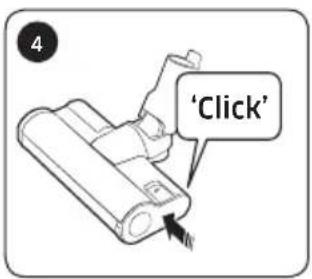
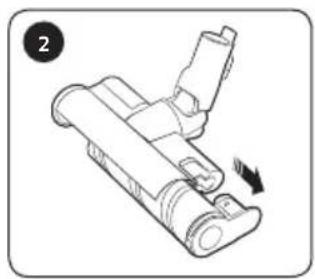
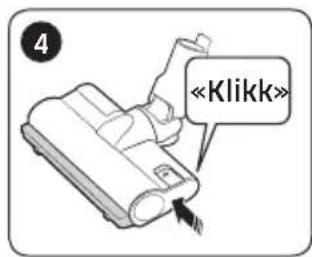
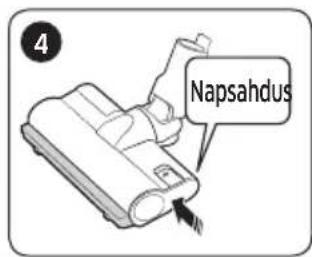
- When disassembling the brush, press the release button at the rear of the brush.

* For detailed information, please refer to the QR code.
CAUTION
• Before cleaning the vacuum cleaner, turn it off. - When the dustbin or filter is filled with dust, the vacuum cleaner may stop due to the overheating prevention device of the motor. - You should clean the dustbin or filter before it becomes completely full (Max sign).
When to empty the dustbin: Emptying the dustbin easily without causing dust clouds.

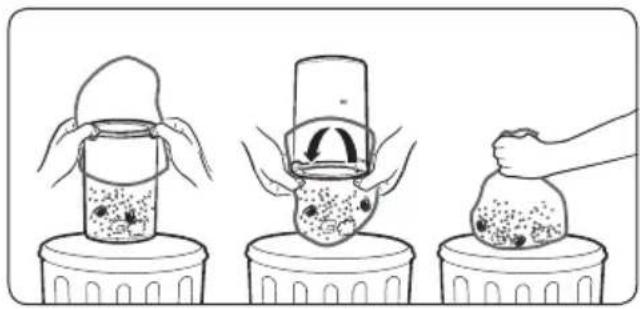
Emptying and cleaning the dustbin

1. After pressing the dustbin release button, 2. pull the dustbin in the direction of the arrow.

Pull the washable micro filter out by holding the filter handles inside the washable micro filter.

1. While pressing the button, 2. turn the dustbin cover and 3. remove it from the dustbin.

Remove the dust on the metal mesh grille filter with the combination tool.
* Do not pull the rubber attached to the metal mesh grille filter.

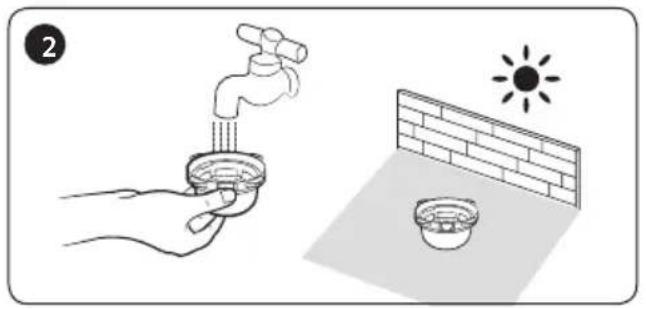
After emptying the dustbin, clean it and dry in the shade.

Reassemble the dustbin cover aligning the dustbin release button with the groove of dustbin.

Put the washable micro filter in the dustbin cover by fitting in the groove on the filter first as shown in the picture.
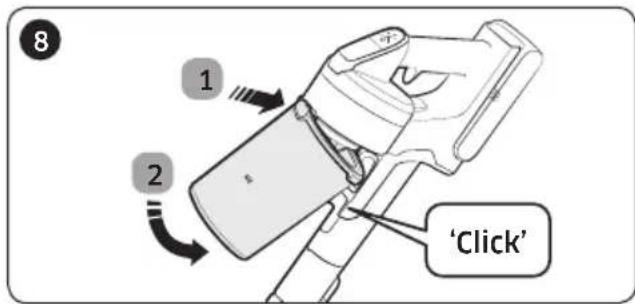
Assemble the dustbin to the vacuum in the order shown in the image by pushing it until you hear it click.
Cleaning the filter
- To maintain the best performance of the filter, remove the dust on the filter frequently and clean the filter with water once a month.
- After cleaning, dry completely for more than 24 hours in the shade before use.
Washable micro filter


Ultra fine dust filter


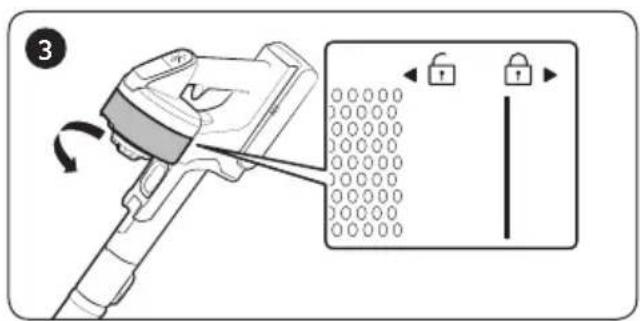
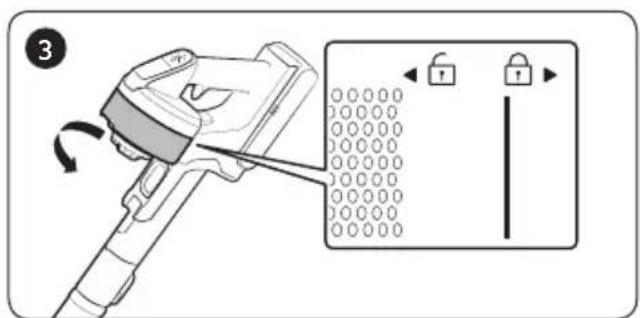
* When assembling, turn the filter until the line below the lock image is not visible.
Cleaning the accessories

Mini Motorized Tool
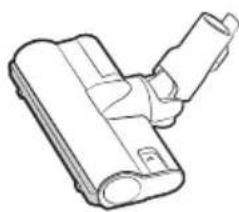
Soft Action Brush



NOTE
- When foreign matter remains on the brush, remove it with a wet tissue or a dry cloth.

CAUTION
- Do not clean the spinning brush and suction part with water.
- Do not use the Soft Action Brush to remove moisture such as spilt liquid and pet's waste.
- If the spinning brush does not work even after cleaning the Soft Action Brush and Turbo Action Brush, the overheating prevention device of the brush motor might be in operation. Wait 30 minutes or more to cool the motor and operate again.
Turbo Action Brush

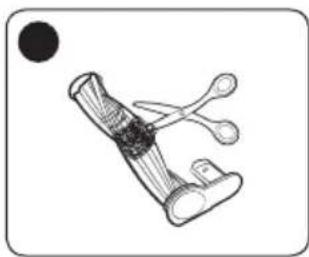
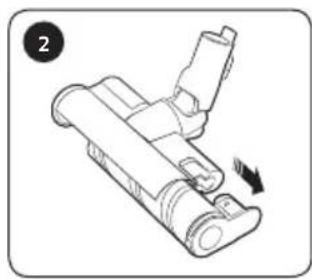
- If the foreign matter is not removed, use a scissors to remove it.

NOTE
- If a cloth or other foreign matter is vacuumed up and becomes tangled with the spinning brush (drum), the spinning brush will stop working to protect the brush motor. After cleaning the brush, turn the power off and then on again.
- If a brush does not work after cleaning, turn the power off and then on again.
- When cleaning the brush, be careful not to catch your fingers in the fold of the brush.

Extension Crevice Tool / Adjustable pipe
Battery usage

NOTE
- If your vacuum cleaner does not work after you charge the battery, change the battery. If it still does not work with the new battery, contact a Samsung service center.
- When you purchase a battery in a Samsung service center, check for the genuine Samsung logo on the battery (SAMSUNG) and the battery name (VS20R90**** Series: VCA-SBT90 / VS15R85**** Series: VCA-SBT90E).

CAUTION
- Do not disassemble the battery or the charging stand.
- Do not apply heat to the battery and do not put the battery in a fire.
- As the battery is manufactured only for this product, do not use the battery for other electronic appliances or other purposes.
- Removing the battery during operation may cause product malfunction.
- If the battery is removed while the vacuum cleaner motor is operating, the battery may not work for 30 seconds after being re-attached for safety reasons.
- Battery charging time and usage time may shorten with increased battery use. When the battery no longer charges or runs down quickly, replace the exhausted battery with a new one.
- Use only the charging stand and batteries provided by the manufacturer.
- Before inserting the battery, confirm that the battery is being inserted in the correct direction and orientation.
- When discarding a dead battery, put it into a battery collection box for recycling.
- If you are not going to use your vacuum cleaner for a long time, detach the battery from the vacuum.
- When attaching the battery to the vacuum, insert it until you hear a click. This assures that the battery is firmly attached.
- Otherwise, the battery may fall and could cause product damage or injury.
- Do not drop or strike the battery or subject it to a sudden shock.
- Do not disassemble the battery and make sure that you do not create a short circuit across the plus (+) and minus (-) terminals.
- Leaks from battery cells can occur under extreme usage or temperature conditions. If the liquid gets on your skin, wash the affected area quickly with water. If the liquid gets into your eyes, flush them immediately with clean water for a minimum of 10 minutes. Seek medical attention.
- To protect the motor and battery, the vacuum cleaner may not operate when the temperature is lower than 5 °C or higher than 45 °C.
Operation

NOTE
- If excessive force is applied to a brush or foreign matter is caught in the spinning brush (drum), the brush may stop working to protect the motor or vacuum. Turn the vacuum off, remove the foreign matter, and then turn the vacuum on. If the vacuum does not start, turn it off and then on again.
- Static electricity may occur depending on the humidity, temperature, or floor material, etc. in your home. If it happens repeatedly, contact a Samsung service center.
- Please charge the battery fully:
- Before using a newly purchased battery for the first time or if you haven't used the battery for a long time.
- When the battery level indicator is on the lowest indication and blinks.
- If you are not going to use the vacuum for a long period of time or you're going to be away from home for a long period of time, unplug the charging stand, and then detach the charging stand from the battery. When the battery is not being charged and not being used, it will slowly discharge.
- When the battery level is low, recharge it. If the level of the battery remains low for a long period of time, it can cause the performance of the battery to degrade.

CAUTION
- When the spinning brush (drum) inside a brush is working, do not touch the brush.
- Otherwise, your hand can be caught and it may cause an injury.
- When assembling the handle, be careful not to catch your fingers or hands in the movement fold of the handle.
- Do not use the vacuum cleaner on items that can be scratched (TV and monitor screens, etc.)
Maintenance

NOTE
- Sometimes the wheel of a brush can scratch the floor. Before using the vacuum cleaner, check the status of the wheels of the brush.
- If there is foreign matter on the brush wheel that cannot be removed easily, contact a Samsung service center.

CAUTION
- Storing the vacuum cleaner in direct sunlight for long periods may cause parts to deform or discolor. Therefore, after cleaning the parts of the vacuum cleaner, dry them in the shade.
- Do not clean the brush of the vacuum cleaner with water. Cleaning it with water can cause the brush to deform or discolor.
- Before cleaning the charging stand, you must unplug the charging stand.
- If you notice a continuous reduction in suction or the vacuum cleaner overheats abnormally, replace the ultra fine dust filter.
Troubleshooting
Before calling for service, review the problems and solutions below. If none of the suggested solutions resolve your problem, please visit our website at www.samsung.com or call Samsung Customer Care. Note that you will be charged for any service calls in which no defects were found.
| Problems Solutions | |
| The vacuum cleaner does not work. | ·Check the battery level and charge the battery.·Check whether the product is turned off, and then press the power button to turn it on.·Check whether the pipe, dustbin or brush is blocked.·Check whether the washable micro filter is inserted correctly.·If the vacuum has not been used for a long time, charge the battery.·If the battery dies, replace the battery. |
| Suction force decreases suddenly and the vacuum makes a vibrating sound. | ·Check whether a brush, dustbin or pipe is clogged with foreign matter and remove it.·Check whether the pipe, dustbin is fully filled with dust. If it is, empty the bin.·Check whether the filter is dirty. If it is, clean the filter. |
| The vacuum cleaner cannot be charged. | ·Confirm that the voltage provided to the charging stand matches the requirements of the charging stand.·Check if the vacuum cleaner is turned on, and then check if the LED of the battery level indicator is turned on.·Check if foreign matter (dust) is on the charging terminal. Remove any foreign matter with a cotton swab or soft cloth. |
| The spinning brush (drum) inside a brush does not work. | ·When the spinning brush stuck display is turned on, turn off the vacuum and check whether the brush is clogged with foreign matter. If so, remove the foreign matter and restart the vacuum.·Check if the vacuum cleaner is turned on and then turn it off and on again.- For the Soft Action Brush and Turbo Action Brush, if the overheating prevention device of the brush motor operates, it may take about 30 minutes to cool the motor. |
| An odor is coming from the air outlet or filter of the vacuum cleaner. | ·Empty the dustbin and clean the filters frequently.- As your vacuum cleaner is a new product, it may have a slight odor for the first 3 months after purchase.- If you use the vacuum cleaner frequently, accumulated dirt in the dustbin or dust on the filter may generate an odor.·Replacement filters are available at your local Samsung service agent. |
| Cleaning is finished but small dust particles come out of the brush. | After cleaning, operate the vacuum for 10 seconds or more to suction up the small dust particles. |
| Vacuum cleaner stops operation during cleaning. | As this product has the overheating prevention device of the brush motor, product will stop operation temporarily for the following conditions.When the vacuum operates with a full dustbin.When the vacuum operates with suction part or brush clogged.When the Extension Crevice Tool is used for long hours.Check these problems then turn the vacuum on after a while. (This case may differ depending on the ambient temperature.) |
| Static electricity occurs when cleaning a thick and soft mat. | Materials of a mat (childcare center mat, noise prevention mat for between floors, etc.) may cause the static electricity.Move the brush on a normal floor for a while and clean again, then the static electricity should disappear. |
- This vacuum cleaner is approved for the following:
- The Low Voltage Directive 2014/35/EU
- The EMC Directive 2014/30/EU
SAMSUNG
Vacuum cleaner
User manual
Series VS20R90****/Series VS15R85****


Tube (adjustable) Soft brush Turbo brush


Charging
Remove the battery
Charge the extra battery


Power (On/Off)
Adjust the tube length


Crevice tool

Ultra-fine dust filter




NOTE!


VS20R90**** Series / VS15R85**** Series


Screw: 1 EA

Screws: 2 EA/
Screw anchors: 2 EA/
Charging
Combination tool


Extension wand
Insert the washable micro filter into the dust container cover by first aligning the groove on the filter as shown in the picture.


Ultra-fine dust filter


NOTE
01 Tube (adjustable) 02 Dust container 03 Metal grid filter 04 Washable micro filter 05 Ultra-fine dust filter 06 Dust container release button 07 Display 08 On/off button (○) 09 Suction power control button 10 Handle

Charging
Releasing the battery
Charging the extra battery
- Charge the extra battery in the extra battery charging slot at the bottom of the charging stand. • Push the battery in with firm force.
- Check that the battery level indicator is displayed during charging.
Using the vacuum cleaner
Adjusting the tube length
Ultra-fine dust filter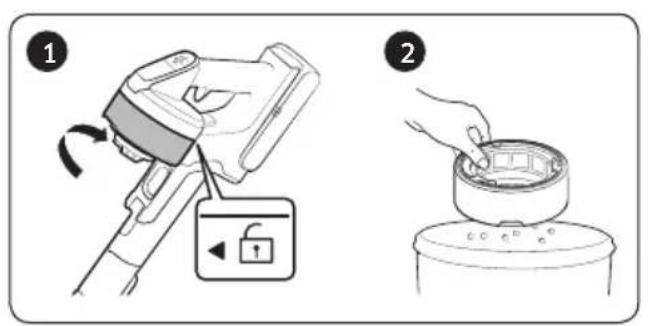


NOTE




Charging
Detaching the unit
Charging the additional battery


Power (On/Off)
Soft brush
Mini motor tool

Crevasse nozzle



NOTE.

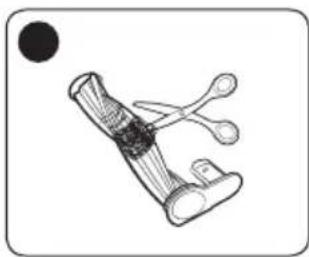
- If the foreign object does not come off, remove it with scissors.
NOTE.
- PREPARATION
- INSTALLATION
- OPERATION
- MAINTENANCE
- APPENDIX
- SAFETY INFORMATION
- CAUTION/WARNING SYMBOLS USED
- WARNING
- CAUTION
- OTHER SYMBOLS USED
- NOTE
- GENERAL
- CHARGING STAND
- VACUUM CLEANER
- POWER RELATED
- ACCESSORIES
- INSTALLATION GUIDE
- ASSEMBLING THE CHARGING STAND
- FIXING BY THE HOOK
- USING THE CHARGING STAND
- CHARGING
- STORING THE ACCESSORIES
- CHARGING THE BATTERY
- EJECTING THE BATTERY
- RE-INSERTING THE BATTERY
- CHARGING THE ADDITIONAL BATTERY
- OPERATING THE VACUUM CLEANER
- POWER (ON/OFF)
- CONTROLLING SUCTION POWER
- CHECKING THE DISPLAY
- USING THE ACCESSORIES
- ADJUSTING THE PIPE LENGTH
- SOFT ACTION BRUSH
- MINI MOTORIZED TOOL
- COMBINATION TOOL
- EXTENSION CREVICE TOOL
- FLEXIBLE TOOL
- DISASSEMBLING THE ACCESSORIES
- WHEN TO EMPTY THE DUSTBIN: EMPTYING THE DUSTBIN EASILY WITHOUT CAUSING DUST CLOUDS
- EMPTYING AND CLEANING THE DUSTBIN
- CLEANING THE FILTER
- WASHABLE MICRO FILTER
- ULTRA FINE DUST FILTER
- CLEANING THE ACCESSORIES
- TURBO ACTION BRUSH
- EXTENSION CREVICE TOOL / ADJUSTABLE PIPE
- BATTERY USAGE
- TROUBLESHOOTING
- SAMSUNG
- USER MANUAL
- REMOVE THE BATTERY
- CHARGE THE EXTRA BATTERY
- ADJUST THE TUBE LENGTH
- CREVICE TOOL
- ULTRA-FINE DUST FILTER
- EXTENSION WAND
- RELEASING THE BATTERY
- CHARGING THE EXTRA BATTERY
- USING THE VACUUM CLEANER
- ADJUSTING THE TUBE LENGTH
- DETACHING THE UNIT
- SOFT BRUSH
- MINI MOTOR TOOL
- CREVASSE NOZZLE
Brand : SAMSUNG
Model : VS20R9045T3
Category : Vacuum Cleaner