Epcom GT-002 - Uncategorized

GT-002 - Uncategorized Epcom - Free user manual and instructions

Find the device manual for free GT-002 Epcom in PDF.

📄 1 pages English EN Download 💬 AI Question 10 questions ⚙️ Specs
Notice Epcom GT-002 - page 1
Pick your language and provide your email: we'll send you a specifically translated version.
Product Type Electronic Device
Model GT-002
Brand Epcom
Dimensions (Approx.) 10 x 5 x 2 cm
Weight 150 g
Power Supply USB 5V DC, 1A
Material ABS Plastic
Indicator Light LED (Green/Red)
Operating Temperature 0°C to 40°C
Storage Temperature -10°C to 50°C
Main Functions Power on/off, status indication
Compatibility Standard USB devices
Cable Length 1 m (approx.)
Cleaning Wipe with a dry cloth, avoid liquids
Storage Keep in a cool, dry place
Safety Do not disassemble, avoid water
Repairability Contact manufacturer for service
Replacement Parts USB cable available separately
Certification CE, RoHS

Frequently Asked Questions - GT-002 Epcom

How do I turn on the Epcom GT-002?
Connect the device to a USB power source using the included cable. The LED indicator will light up to confirm power.
What does the LED indicator mean?
A solid green light indicates normal operation. A blinking or red light may indicate a fault or low power. Refer to the manual for details.
Can I use the GT-002 with a wall charger?
Yes, as long as the wall charger provides 5V DC output (standard USB). Avoid using chargers with output above 2A to prevent damage.
Is the GT-002 waterproof?
No, the device is not waterproof. Keep it away from water and moisture. If it gets wet, dry it immediately and do not use until fully dry.
What should I do if the device stops working?
First, check the USB connection and try a different cable or power source. If the issue persists, contact Epcom customer support.
How do I clean the GT-002?
Use a soft, dry cloth to wipe the exterior. Do not use liquid cleaners or submerge the device.
Can I leave the GT-002 plugged in all the time?
Yes, the device is designed for continuous operation. However, unplug it during thunderstorms or if not used for extended periods.
Is the GT-002 compatible with fast chargers?
It works with standard USB chargers. Fast chargers may work but are not guaranteed; using a 5V/1A adapter is recommended.
What is the warranty period?
The Epcom GT-002 comes with a 1-year limited warranty. Retain your receipt for warranty claims.
Where can I download the user manual?
The manual is available for free download on notice-facile.com. Search for 'Epcom GT-002' to access the PDF.

User questions about GT-002 Epcom

0 question about this device. Answer the ones you know or ask your own.

Ask a new question about this device

The email remains private: it is only used to notify you if someone responds to your question.

No questions yet. Be the first to ask one.

Download the instructions for your Uncategorized in PDF format for free! Find your manual GT-002 - Epcom and take your electronic device back in hand. On this page are published all the documents necessary for the use of your device. GT-002 by Epcom.

USER MANUAL GT-002 Epcom

Thank you very much for purchasing this EPCOM Industrial cabinet. Please keep this guide for future reference.
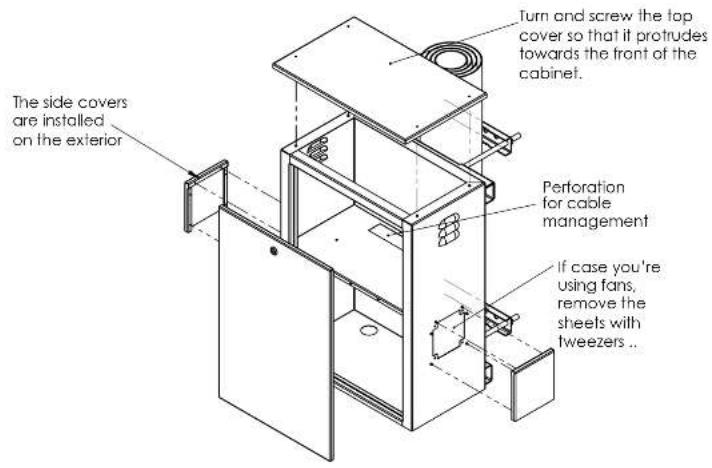
The side covers are installed on the exterior Turn and screw the top cover so that if protrudes towards the front of the cabinet. Perforation for cable management If case you're using fans, remove the sheets with tweezers ..

Attach the mounting to the post as shown, using flat washer, pressure washer and nut at each end of the threaded rods. Make use of the crescent key or Spanish keys.

g to the post as sher, pressure each end of the e use of the finish keys. C

Epcom GT-002 - 3

natural_image Line drawing of a cabinet with a door and handle, no text or symbols present

Hang the cabinet over the assembly with a downward movement.

Epcom GT-002 - 4

Epcom GT-002 - 5

natural_image Technical line drawing of a mechanical device with cylindrical components and mounting brackets (no text or symbols)

Epcom GT-002 - 6
Secure the mounting on the top with the 7/16" screws included.

Epcom GT-002 - 7
Lastly, secure the cabinet with the lower clamp. Use flat and pressure washers on each end.

Epcom GT-002 - 8

natural_image Technical line drawing of a door with screw holes and mounting brackets (no text or symbols)

Epcom GT-002 - 9
EPCOM Industrial ^

Manual assistant
Powered by Anthropic
Waiting for your message
Product information

Brand : Epcom

Model : GT-002

Category : Uncategorized