
Ironn GXT430 - Headphones TRUST - Free user manual and instructions
Find the device manual for free Ironn GXT430 TRUST in PDF.


Pick your language and provide your email: we'll send you a specifically translated version.
| Product Type | Wired Gaming Headset |
| Brand | Trust |
| Model | Ironn GXT430 |
| Form Factor | Over-Ear, Closed-Back |
| Connectivity | 3.5mm Audio Jack (1.2m cable) |
| Driver Size | 40mm Neodymium |
| Frequency Response | 20 Hz – 20,000 Hz |
| Impedance | 32 Ω |
| Sensitivity | 108 dB ±3 dB |
| Microphone | Omnidirectional, Detachable Boom Mic |
| Microphone Frequency Response | 50 Hz – 10,000 Hz |
| Microphone Sensitivity | -42 dB ±3 dB |
| Weight | Approx. 280 g (without cable) |
| Dimensions (L x W x H) | 20 x 18 x 8 cm |
| Compatibility | PC, Mac, PlayStation, Xbox, Nintendo Switch, Mobile (with 3.5mm jack) |
| Color | Black with Red Accents |
| Cable Length | 1.2 m |
| Volume Control | In-line remote with volume wheel and microphone mute switch |
| Ear Cushions | Memory foam with leatherette cover |
| Headband Padding | Adjustable, padded headband |
| Power Source | No external power required (passive) |
| Maintenance | Wipe with soft dry cloth; avoid liquids |
| Cleaning | Remove ear cushions and hand-wash with mild soap if necessary |
| Safety | Keep away from children under 3 years; avoid prolonged high volume |
| Spare Parts | Replacement ear cushions available; detachable mic can be replaced |
| Repairability | Repairs should be carried out by qualified personnel |
Frequently Asked Questions - Ironn GXT430 TRUST
How do I adjust the headset for a comfortable fit?
Extend the headband by pulling the earcups downwards. The headband is flexible and self-adjusting. Ensure the ear cushions fully enclose your ears for optimal sound isolation.
Is the microphone detachable?
Yes, the boom microphone can be removed by gently pulling it out of the jack on the left earcup. You can use the headset without the mic for music listening.
Which devices are compatible with the Trust Ironn GXT430?
The headset uses a standard 3.5mm audio jack, so it works with PCs, Macs, consoles (PlayStation, Xbox, Nintendo Switch) and mobile devices that have a headphone jack.
How do I mute the microphone?
Use the in-line remote control. Flip the switch on the remote to mute the mic. A red indicator light shows when muted.
Can I use the headset with a single 3.5mm jack?
Yes, the headset has a single 3.5mm plug that combines audio and microphone signals. For PCs with separate jacks, you may need a splitter (not included).
How do I clean the ear cushions?
Remove the ear cushions by gently pulling them off the earcups. Hand-wash with mild soap and water, then air dry completely before reattaching. Wipe the headband and earcups with a soft cloth.
What is the warranty period?
Trust offers a 2-year limited warranty for this headset. Keep your proof of purchase for warranty claims.
Are replacement parts available?
Yes, replacement ear cushions and microphone can be purchased through Trust's spare parts program. Contact customer support for ordering.
Why is there no sound in one earcup?
Check the audio cable connection. Ensure the plug is fully inserted. Test with another device. If the issue persists, the cable may be damaged; contact support.
How do I store the headset properly?
Store in a cool, dry place away from direct sunlight. Use the included carrying bag if available. Avoid wrapping the cable tightly around the headset to prevent damage.
User questions about Ironn GXT430 TRUST
0 question about this device. Answer the ones you know or ask your own.
Ask a new question about this device
No questions yet. Be the first to ask one.
Download the instructions for your Headphones in PDF format for free! Find your manual Ironn GXT430 - TRUST and take your electronic device back in hand. On this page are published all the documents necessary for the use of your device. Ironn GXT430 by TRUST.
USER MANUAL Ironn GXT430 TRUST

natural_image
Line drawing of a pair of headphones with a blue cable, no text or symbols present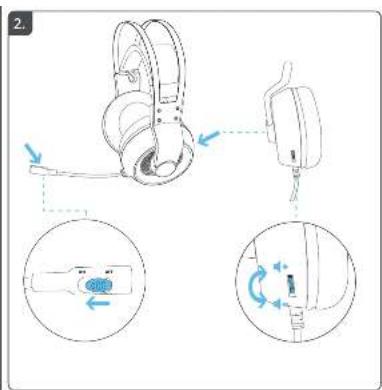


natural_image
Line drawing of a game controller with a cable inserted, shown alongside a small inset image of a handheld device (no text or symbols)
Manual assistant
Powered by Anthropic
Waiting for your message
Product information
Brand : TRUST
Model : Ironn GXT430
Category : Headphones