S2000 DMX - Effects Device BeamZ - Free user manual and instructions
Find the device manual for free S2000 DMX BeamZ in PDF.


| Product Type | Fog Machine (Effect Device) |
| Model | S2000 DMX |
| Brand | BeamZ |
| Power Consumption | 1500 W |
| Power Supply | AC 230 V, 50/60 Hz |
| Warm-Up Time | Approx. 4 minutes |
| Fluid Tank Capacity | 1.5 liters |
| Output Volume | Approx. 10,000 cu.ft/min (continuous) |
| DMX Channels | 1 or 2 (selectable) |
| Control Options | DMX512, Wireless Remote, Manual On/Off |
| Remote Control | Wired and wireless (included) |
| Weight | 10.5 kg |
| Dimensions (L x W x H) | 480 x 280 x 320 mm |
| Fuse | 10 A (internal) |
| Safety Features | Thermal cut-off, auto shut-off when fluid empty |
| Usage | Indoor only, dry location |
| Cleaning | Use distilled water or cleaning fluid after each use |
| Storage | In a cool, dry place, empty tank |
| Reparability | Replaceable pump, heater, and fuse; serviceable by qualified technician |
Frequently Asked Questions - S2000 DMX BeamZ
User questions about S2000 DMX BeamZ
0 question about this device. Answer the ones you know or ask your own.
Ask a new question about this device
Download the instructions for your Effects Device in PDF format for free! Find your manual S2000 DMX - BeamZ and take your electronic device back in hand. On this page are published all the documents necessary for the use of your device. S2000 DMX by BeamZ.
USER MANUAL S2000 DMX BeamZ
natural_image
Exterior view of a black beamZ 0200 LED 243W device with green laser emitting smoke, connected to a control unit (no readable text or symbols on main body)S2000 DMX
INSTRUCTION MANUAL GEBRUIKSAANWIJZING BEDIENUNGSANLEITUNG
Warning:
- The smokemachine must be placed at least 100 cm away from inflammable materials such as curtains, books, etc. Make sure that the housing cannot be touched by accident.
- For indoor use only.
- During installation, nobody should stand beneath the mounting area.
- Prior to the first use, have the unit checked by a qualified person.
- The unit contains voltage carrying parts. DO NOT open the smokemachine
- Never plug or unplug the unit with wet hands.
- If the plug and/or mains lead are damaged, they need to be repaired by a qualified technician.
- If the unit is damaged to an extent that you can see internal parts, do not plug the unit into a mains outlet. It needs to be repaired by a qualified technician.
- Only connect this unit to an earthed mains outlet of 230Vac/50Hz.
- Always unplug the unit during a thunderstorm or when it is not in use.
- If the unit has not been used for a longer period of time, condensation can occur inside the housing. Please let the unit reach room temperature prior to use.
- When you unplug the unit from the mains always pull the plug, never the lead.
- In order to prevent dropping of the unit, a safety fastening needs to be installed. This can be a solid chain, a steel cable, etc. which has to be fastened separately from the mounting bracket.
- The supplied bracket is the main fixing and must be used to solidly mount the light effect.
- In order to avoid accidents in public premises, the local legal requirements and safety regulations/warnings must be fulfilled.
- Keep out of the reach of children.
Safety
Plug the smoke machine only in an earthed mains outlet or extension cord! ATTENTION: the powercord can only be replaced by an original replacement, supplied by Tronios.
Be careful when filling the fluid tank. First of all, unplug the mains lead! Then unscrew the cap on the tank and fill it by means of a funnel.
Only use the original Beamz smoke fluid which is environmental friendly and, if used correctly, leaves no residues.
Do not obstruct the openings on top of the case to guarantee a good ventilation. The heating element of the smoke machine generates heat which needs to be removed. Don't put any objects on the smoke machine.
Installation and Use
Unpack the fog machine. Do not connect yet the net cable. Connect the lead of the manual control with the 3-pin plug at the rear of the smoke machine. Fill the fluid tank by means of a funnel. Connect the remote control with the Remote Control-socket. Plug the unit into a mains outlet. The heating element is automatically switched on. Depending on the room temperature, it takes about 8 minutes until the working temperature is reached, during this time the display shows "Warming Up". When the machine is ready for fogging, the display shows "Ready To Fog".
The remote interface allows to customize fog machine functions by adjusting fogging volume, duration, interval and LED color.
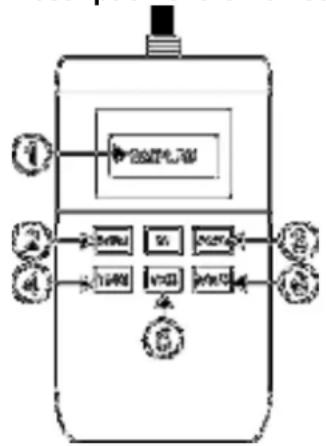
Description of the Remote control:
flowchart
graph TD
    A["输入"] --> B["数据处理模块"]
    B --> C["数据采集模块"]
    C --> D["数据输出模块"]
    D --> E["反馈处理"]
    E --> F["用户界面"]
    style A fill:#f9f,stroke:#333
    style B fill:#ccf,stroke:#333
    style C fill:#cfc,stroke:#333
    style D fill:#fcc,stroke:#333
    style E fill:#cff,stroke:#333
    style F fill:#ffc,stroke:#333
- LCD-Display
- Menu button
- Up-/Down buttons
- Timer button
- Volume-Lock button
- Manual button
Settings
Via the Menu key (2), you can adjust the desired settings. After pressing the menu, the display shows the following settings:
- Man Vol Out xxx%.
Adjust the manual volume output within the range of 0% to 100% by means of the Up/Down keys. - Interval Set xxxS
Adjust the interval between each fog emission within the range of 1 to 100S by means of the Up-/Down keys. - Duration Set xxxS
Adjust the duration of each fog emission within the range of 1 to 100S. - Volume Out xxx%
Adjust the volume output during the timer function within the range of 0-100% -
DMX 512 #xxx
Adjust the DMX address for DMX control. -
Wind For Class xx
NO FUNCTION for this smoke machine
- Angel Set xx%
NO FUNCTION for this smoke machine
- LED Pro Set xx
Adjust the LED program within the range of 0 to 11.
- LED Spe xxx
Adjust the LED speed/strobe/fade of the LED program mode
- Temper Max:xxx
Adjust the maximum heating temperature of the heating element, adjustable between 285^ - 330^ C.
- LED Sync Set Yes/No
Adjust the LED mode. Yes=LEDs work together with the smoke output, NO=LEDs are always on.
- Temper Min:xxx
Adjust the minimum heating temperature of the heating element, adjustable between 260^ - 310^ C.
Timer control
Press the Timer key (4) to activate the timer function. The display shows the adjusted interval and the device counts the seconds down to "0". After that, the fog emission is triggered at the volume adjusted under "Timer Out". The duration depends on the settings adjusted under "Duration Set". If you wish to deactivate the timer function, press the Timer key once more.
Manual control (locked)
Press the Lock switch (5) for immediate triggering of the fog emission at the volume adjusted under "Volume Out". Press the Volume switch once more in order to stop the fog emission.
Manual control (100% output)
Press the Manual key for immediate triggering of the fog emission at 100 % volume. Let the Manual key loose in order to stop the fog emission.
DMX control
Connect the machine directly to a DMX controller or a DMX loop with multiple DMX effects. The machine uses a 3-pin XLR connector for DMX connection.
Address Setup: Press the MODE button a number of times until Add appears on the display, with the UP / DOWN buttons the start address may be set. The start address is defined as a first channel to which the machine will respond to. Check that there are no overlapping channels used!
Note: It is necessary always lock the DMX loop with a 120 Ohm terminator for correct data transmission.
| CHANNEL | VALUE FUNCTION | |
| 1 | 0 – 100% Smoke level | |
| 2 | No function | |
| 3 | 000 LEDs OFF | |
| 001 – 010 Color Change | ||
| 011 – 020 Blue | ||
| 021 – 030 Red | ||
| 021 – 040 Green | ||
| 041 – 050 Blue strobe | ||
| 051 – 060 Red strobe | ||
| 061 – 070 Green strobe | ||
| 071 – 080 Blue fade | ||
| 081 – 090 Red fade | ||
| 091 – 100 Green fade | ||
| 101 – 110 Blue/Red/Green fade | ||
| 111 – 255 Color Change | ||
| 4 | 0 – 100% | Strobe +Fade/change speedfunction |
Location
Select a location where it is easy to fill the tank. It is also possible to hang the unit by means of the supplied holder and fixing screws.
Switching the unit off
Switch the unit off by unplugging it from the mains. Otherwise the 2000W heating element will draw unnecessarily current.
Maintenance
Refilling the fluid reservoir should be done carefully. Remove the plug from the mains first! Then unscrew the cap of the reservoir and fill it by means of a suitable funnel. Use only the original Beamz smoke liquid. This fluid is environmentally friendly, biodegradable and leaves no residue when used correctly. Make sure the smoke liquid to become contaminated, close the cap of the liquid smoke can and after filling tank right.
After 40 hours, the smoke machine must be cleaned to avoid deposits in the machine, pump and heater.
Clean procedure
Run clean procedure in a well-ventilated area
- Remove smoke liquid from the tank, add cleaning solution to tank
- Switch smoke machine and wait until it is warm up
- Press the button to switch the liquid pumped through the machine
- Perform the above operation until the tank is empty
- Fill the tank with liquid smoke
Specifications
Power supply: 220-240V\~/50Hz
Heating element: 2000 watts
Heat up time: 8 minutes
Continuous use:......Max. 1 minute
Smoke production:......ca. 530 m3/minute
Tank capacity: ....ca 2 liters
Dims: 410 x 320 x 150mm
Weight.... 5.9 kg
Accessories
Smoke fluid, high quality fluid on water basis, specially designed for Beamz smoke machines. Guarantees a trouble-free use.
5 liter packaging, ref. no. 160.583
1 liter packaging, ref. no. 160.644
Flavor, adds a pleasant fragrance to the air. One bottle is sufficient for 5 liter smoke fluid.
coconut 160.650 tropical 160.653
mint 160.651 strawberry 160.654
vanilla 160.652
Do not attempt to make any repairs yourself. This would invalid your warranty. Do not make any changes to the unit. This would also invalid your warranty. The warranty is not applicable in case of accidents or damages caused by inappropriate use or disrespect of the warnings contained in this manual. Tronios BV cannot be held responsible for personal injuries caused by a disrespect of the safety recommendations and warnings. This is also applicable to all damages in whatever form.

Electric products must not be put into household waste. Please bring them to a recycling centre. Ask your local authorities or your dealer about the way to proceed.
Waarschuwing
NL
Handmatige bediening (locked)
natural_image
Blue circular icon with a stylized white 't' symbol (no text or numbers)tronios
Sound & Light
CE Declaration of Conformity
Importer: TRONIOS BV
The product meets the requirements stated in Directives 2006/95 and 2004/108/EC and conforms to the above mentioned Declarations.
ALMELO,
21-10-2013
Signed:
P. Feldman

- S2000 DMX
- INSTRUCTION MANUAL GEBRUIKSAANWIJZING BEDIENUNGSANLEITUNG
- Warning:
- Safety
- Installation and Use
- Settings
- Timer control
- Manual control (locked)
- Manual control (100% output)
- DMX control
- Location
- Switching the unit off
- Maintenance
- Clean procedure
- Specifications
- Accessories
- Waarschuwing
- NL
- Handmatige bediening (locked)
- tronios
- Sound & Light
- CE Declaration of Conformity
Brand : BeamZ
Model : S2000 DMX
Category : Effects Device