
GX75 - Mouse Natec - Free user manual and instructions
Find the device manual for free GX75 Natec in PDF.


Pick your language and provide your email: we'll send you a specifically translated version.
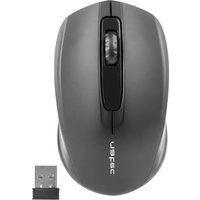
| Product Type | Computer Mouse |
| Model | GX75 |
| Brand | Natec |
| Connectivity | Wired USB 2.0 |
| Cable Length | 1.5 m |
| Dimensions (L x W x H) | 120 x 70 x 40 mm |
| Weight | 100 g |
| Buttons | 6 (Left, Right, Scroll wheel, DPI switch, Forward, Back) |
| DPI Resolution | 800 / 1200 / 1600 DPI (switchable) |
| Sensor Type | Optical |
| LED Lighting | Red LED (fixed) |
| Power | Powered via USB (no battery required) |
| Operating Systems | Windows XP/Vista/7/8/10/11, macOS, Linux |
| Compatibility | Desktop and laptop computers with USB port |
| Plug and Play | Yes (no driver needed) |
| Usage | Office, everyday computing |
| Cleaning | Wipe with dry soft cloth; avoid liquids |
| Safety Precautions | Keep away from water and heat sources; do not disassemble |
| Spare Parts / Repairability | Not designed for user repair; contact support |
| Package Contents | Mouse, user manual |
Frequently Asked Questions - GX75 Natec
How do I connect the Natec GX75 mouse?
Simply plug the USB cable into an available USB port on your computer. The mouse is Plug and Play and will work immediately without additional drivers.
How can I change the DPI settings?
Press the DPI button located behind the scroll wheel to cycle through the preset DPI levels: 800, 1200, and 1600 DPI. The corresponding LED will indicate the current setting.
Does this mouse have side buttons?
Yes, the Natec GX75 features two side buttons (Forward and Back) for easy navigation in web browsers and file explorers.
How to clean the mouse?
Use a soft, dry cloth to wipe the exterior gently. For stubborn dirt, slightly dampen the cloth with water (do not use solvents). Do not immerse the mouse in any liquid.
What operating systems are supported?
The mouse is compatible with Windows (XP/Vista/7/8/10/11), macOS, and Linux. It works without any special software.
Why is the mouse cursor not moving?
Ensure the USB cable is firmly connected. Try a different USB port. If the issue persists, test on another computer. The optical sensor may be blocked; check for debris.
Is the mouse left-handed friendly?
The GX75 is ergonomically designed for right-handed users, with left buttons on top and side buttons on the left side.
How long is the cable?
The USB cable is approx.1.5 meters long, providing comfortable reach to your computer.
Does the mouse have LED lighting?
Yes, the scroll wheel glows with a red LED that lights up when the mouse is connected. The lighting is fixed and cannot be turned off.
What is the warranty period?
The Natec GX75 typically comes with a 24-month warranty. Contact Natec support or your point of purchase for warranty claims.
User questions about GX75 Natec
0 question about this device. Answer the ones you know or ask your own.
Ask a new question about this device
No questions yet. Be the first to ask one.
Download the instructions for your Mouse in PDF format for free! Find your manual GX75 - Natec and take your electronic device back in hand. On this page are published all the documents necessary for the use of your device. GX75 by Natec.
USER MANUAL GX75 Natec
natural_image
Blank white image with no visible content, text, or symbols.



Manual assistant
Powered by Anthropic
Waiting for your message
Product information
Brand : Natec
Model : GX75
Category : Mouse