
VOLVO RTI V50 (2005) - Browser

RTI V50 (2005) - Browser VOLVO - Free user manual and instructions

Find the device manual for free RTI V50 (2005) VOLVO in PDF.

📄 87 pages English EN Download 💬 AI Question 10 questions ⚙️ Specs
Notice VOLVO RTI V50 (2005) - page 1
Pick your language and provide your email: we'll send you a specifically translated version.
Type Car Navigation System (RTI)
Brand Volvo
Model RTI V50 (2005)
Display Size 6.5-inch Color TFT
Navigation Features GPS, Route Planning, Traffic Information, Alternative Routes
Control Interface Remote Control, Keypad on Dashboard
Antenna External GPS Antenna
Power Supply 12V DC from Vehicle Battery via ISO Connector
Dimensions (Approx.) 2-DIN Size (178 x 100 x 160 mm)
Weight Approx. 1.2 kg
Map Storage CD/DVD Disc (Preloaded Maps)
Languages Multiple European Languages (via Manual Translation Service)
Operating Temperature -10°C to 60°C
Safety Features Do Not Operate While Driving; Secure Mounting Required
Maintenance Keep Lens Clean; Avoid Direct Sunlight; Ventilate Properly
Repair and Spare Parts Contact Authorized Volvo Dealer; Genuine Parts Recommended
Accessories Remote Control, Antenna Cable, Mounting Kit
Compatibility Volvo S40, V50 (2005 Model Year)

Frequently Asked Questions - RTI V50 (2005) VOLVO

How do I update the maps on my Volvo RTI V50?
Map updates for the RTI V50 are provided on CD or DVD discs. Check with your local Volvo dealer for the latest available map disc. Insert the disc into the navigation unit and follow the on-screen instructions.
Can I use the navigation system while driving?
For safety, the system is designed to be operated only when the vehicle is stationary. Some functions may be locked while driving to prevent driver distraction. Use voice commands or a co-driver to input destinations.
What should I do if the GPS signal is weak?
Ensure the antenna is properly mounted on the dashboard or rear window with a clear view of the sky. Avoid metallic or tinted windscreens. Check the antenna cable connection at the back of the unit.
How do I reset the system?
You can perform a soft reset by turning off the ignition and restarting the vehicle. For a hard reset, consult the manual or press the reset button (if available) with a pointed object. This will restore factory settings.
The screen is blank/dim. What can I do?
Adjust the brightness and contrast settings via the system menu. If the screen remains blank, check the vehicle's fuse for the radio/navigation unit. If the problem persists, contact a Volvo service center.
Can I use the remote control from any position?
The remote control uses infrared (IR) signals and requires a direct line of sight to the IR receiver located near the display. For best results, point the remote directly at the receiver.
How do I plan a route with waypoints?
Go to the navigation menu and select Route Planning. Enter your destination, then add intermediate stops using the 'Add Waypoint' option. The system will calculate the route including all waypoints.
What does the TP (Traffic Program) function do?
TP stands for Traffic Program. It provides real-time traffic information and alerts. When enabled, the system can automatically suggest alternative routes to avoid congestion or incidents.
How do I clean the display?
Use a soft, dry microfiber cloth to gently wipe the screen. Avoid using harsh chemicals or abrasive materials. For stubborn smudges, slightly dampen the cloth with water or a mild screen cleaner.
Where can I find the system's serial number?
The serial number is usually printed on a label attached to the side or bottom of the navigation unit. It may also be displayed in the System Information menu (typically under Settings > System Info).

User questions about RTI V50 (2005) VOLVO

0 question about this device. Answer the ones you know or ask your own.

Ask a new question about this device

The email remains private: it is only used to notify you if someone responds to your question.

No questions yet. Be the first to ask one.

Download the instructions for your Browser in PDF format for free! Find your manual RTI V50 (2005) - VOLVO and take your electronic device back in hand. On this page are published all the documents necessary for the use of your device. RTI V50 (2005) by VOLVO.

USER MANUAL RTI V50 (2005) VOLVO

VOLVO RTI SYSTEM

System loading...

Road and Traffic Information

©Volvo Car Corporation

Inhoud

1. Antenne

Toetsenset
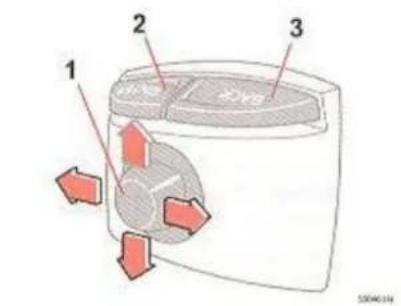
1 2 3

Positie IR-oog S40/V50

1. NAVIGATOR

Opties selecteren

[Instellingen] [Systeemopties]

Omvang

Navigation is deleted 74

NAVIGATOR 11

Omleiding, alternative route - 52

TP 7887 (Dutch). AT 0520. Printed in Sweden, Elanders Infologistics Våst AB, Mölnlycke 2005
Manual assistant
Powered by Anthropic
Waiting for your message
Product information

Brand : VOLVO

Model : RTI V50 (2005)

Category : Browser