
RTI S80 (2009) - Browser VOLVO - Free user manual and instructions
Find the device manual for free RTI S80 (2009) VOLVO in PDF.


| Product Type | In-car Navigation System (RTI S80) |
| Brand | Volvo |
| Model | RTI S80 (2009) |
| Screen Size | 7 inches (estimated) |
| Display Type | Color TFT LCD |
| Weight | Approx. 0.5 kg (1.1 lbs) |
| Power Source | 12V DC vehicle battery (via ignition) |
| Power Consumption | ~15 W (estimated) |
| Navigation Functions | GPS navigation, route guidance, POI search, traffic info |
| Map Storage | Internal hard drive or DVD (depending on version) |
| Map Updates | Periodic updates via DVD or USB |
| Audio Input | Integrated microphone for voice commands |
| Audio Output | Through vehicle speakers (via MOST bus) |
| Additional Features | Bluetooth handsfree, phone book sync, FM traffic (TMC) |
| Maintenance | Clean screen with soft dry cloth; avoid liquids |
| Safety Warnings | Do not use while driving; mount securely; no amateur disassembly |
| Spare Parts Availability | Contact Volvo dealer for replacement parts (e.g., knob, screen) |
| Repairability | Repair should be performed by authorized service center |
| Operating Temperature | -20°C to +70°C (estimated) |
| Certifications | CE, E-mark (vehicle use) |
Frequently Asked Questions - RTI S80 (2009) VOLVO
User questions about RTI S80 (2009) VOLVO
0 question about this device. Answer the ones you know or ask your own.
Ask a new question about this device
Download the instructions for your Browser in PDF format for free! Find your manual RTI S80 (2009) - VOLVO and take your electronic device back in hand. On this page are published all the documents necessary for the use of your device. RTI S80 (2009) by VOLVO.
USER MANUAL RTI S80 (2009) VOLVO
ROAD AND TRAFFIC INFORMATION - RTI
natural_image
Close-up of a car wheel rim and tire, showing metallic alloy and mounting holes (no text or symbols visible)
natural_image
Black-and-white photo of tire tracks curving across a snowy plain, no text or symbols visibleVOLVO XC60, V70, XC70 & S80
ROAD AND TRAFFIC INFORMATION SYSTEM (RTI)
GEBRUIKSAANWIJZING


natural_image
Black-and-white photo of a car on a mountain road with two cars ahead, showing wheel rim and tire (no visible text or symbols)01


Due to road conditions, some recommendations may not be accurate. Obey all traffic laws and use your own good judgment when driving. Always concentrate on your driving by keeping your eyes and mind on the road. For map update information refer to: www.volvocars.com/navi
Press ENTER to confirm your agreement.
Press BACK to decline and exit the system.
natural_image
Black-and-white photo of a car driving on a narrow road with motion blur, no visible text or symbols02


© Volvo Car Corporation
natural_image
Close-up of a computer setup with a camera and remote control unit (no visible text or symbols)natural_image
Black-and-white landscape photo of a winding road through mountainous terrain with misty valleys (no text or symbols visible)03


03 Route plannen
Bestemm. instellen
Adres
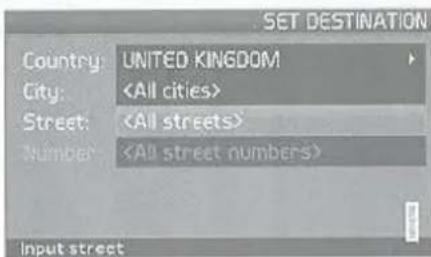
Bestemm. instellen → Adres → Land/Stad
(Set destination → Address → Country/City → )
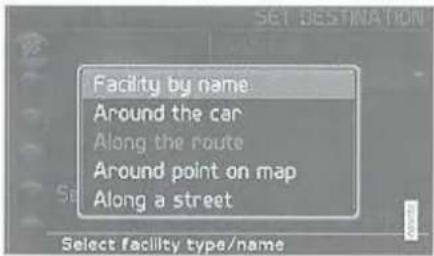
Bestemm. instellen → Facilitteiten →
(Set destination → Facilities →)
Facilitelt op naam (Facility by name)
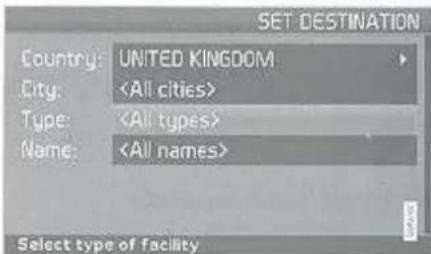
(Set destination → Facilities → Facility by name → )
Reisplan →
(Itinerary →)

N.B.
Start Gidsen (Start guidance)
Reisplan→
(litinerary → Start guidance → )
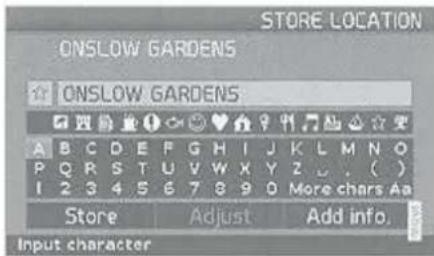
Reisplan →
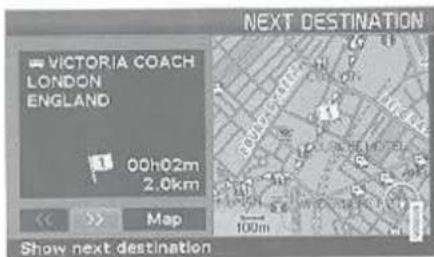
Volgende bestemming (Next destination)
Route (Route)
(Settings → Map options)
Due to road conditions, some recommendations may not be accurate. Obey all traffic laws and use your own good judgment when driving. Always concentrate on your driving by keeping your eyes and mind on the road.
Press ENTER to confirm your agreement Press BACK to decline.

natural_image
Interior view from a car showing a city street at night with vehicles and headlights visible (no text or symbols)04


natural_image
Black-and-white landscape photo of three wind turbines on a hillside with mountainous background (no text or symbols)05


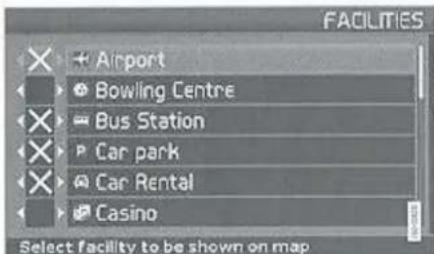
(Settings → Map options → Facility selection)
© Based upon Crown Copyright material.
Greece
Copyright Geomatics Ltd.
Hungary
Copyright © 2003; Top-Map Ltd.
Italy
Copyright © 2000; Norwegian Mapping Authority.
Poland
© EuroGeographics.
Portugal
Source: IgeoE - Portugal.
Spain
Based upon electronic data © National Land Survey Sweden.
Switzerland
© 2005-2009 NAVTEQ All rights reserved.
Denso
Antenne positie.... 15, 19, 21
Auto. Info.... 57
Autotransport 68
B
BACKSPACE.... 8.22
Basisfunctions....8
Beeldscherm verzorging.... 25
Symbol "Niet storen" 22
Systeem activeren.... 8
Systeeminstellingen.... 13
Systeemopties.... 52
T
Taal 52
TMC-ontvanger 15, 19, 21
Toetsenset.... 22 positie.... 15, 19, 21
V
Volvo Car Corporation TP 11/S1 (Dutch) AT 0920 Printed in Sweden, Gateborg 2009. Copyright © 2009-2009 Volvo Car Corporation

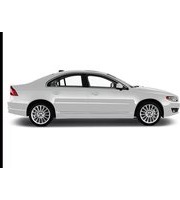

Brand : VOLVO
Model : RTI S80 (2009)
Category : Browser