
VG0002A - Receiver LOGILINK - Free user manual and instructions
Find the device manual for free VG0002A LOGILINK in PDF.


| Product Type | Wireless Receiver |
| Brand | LogiLink |
| Model | VG0002A |
| Connectivity | USB 2.0 Type-A |
| Wireless Frequency | 2.4 GHz |
| Operating Range | Up to 10 meters (33 ft) |
| Dimensions (L x W x H) | 19 x 14 x 6 mm |
| Weight | 2 g |
| Power Supply | USB bus powered (5V DC) |
| Compatibility | Windows, macOS, Linux, Android (with OTG) |
| Supported Devices | LogiLink wireless keyboards, mice, and other peripherals |
| LED Indicator | Yes (pairing/activity status) |
| Operating Temperature | 0°C to 40°C (32°F to 104°F) |
| Storage Temperature | -20°C to 60°C (-4°F to 140°F) |
| Humidity | 10% to 90% non-condensing |
| Color | Black |
| Material | ABS plastic |
| Package Contents | 1 x VG0002A Receiver |
| Certifications | CE, FCC, RoHS |
Frequently Asked Questions - VG0002A LOGILINK
User questions about VG0002A LOGILINK
0 question about this device. Answer the ones you know or ask your own.
Ask a new question about this device
Download the instructions for your Receiver in PDF format for free! Find your manual VG0002A - LOGILINK and take your electronic device back in hand. On this page are published all the documents necessary for the use of your device. VG0002A by LOGILINK.
USER MANUAL VG0002A LOGILINK
USB2.0 DVB-T Receiver for Digital TV and Radio
Do not throw the appliance away with the normal household waste at the end of its life, but hand it in at an official collection point for recycling. By doing this you will help to preserve the environment.
1.0 Safety Instructions
- Put the Device always on a stable and straight Surface. In case of falling, the Device can be damaged.
- Don't place the Device into direct Sunlight or in Places with high Temperature. This can damage it or shorten his average useful Life.
-
Don't place the Device in the near of Heat Sources, like Radiators or other heat sources.
-
Don't expose the Device to Rain, Water, Wetness or high Humidity.
- Don't place it in the Bathroom or the Kitchen in the near of a Sink. Avoid the direct Contact with Water.
- Don't try to open the Device.
Congratulations on the purchase of the YG0002A! Read the instructions and warning references in this operating instructions carefully, before you use the product for the first time. During neglect it can come to damages of the equipment.
2.0 Introduction
2.1 Product

2.2 Package Contents:
- 1 x Digital TV USB 2.0 device - 1 x Installation CD (Driver/Arcsoft TotalMedia/ Software Manual)
- 1 x Quick Installation G
- 1 x Portable Antenna - 4 x Remote Control
• Tax Remiss Control
2.3 System Requirements
- Windows XP (8P2) / Vista - Pentium4 1.6 GHz CPU
- 512 MB RA
- 4 GB+ free hard drive space (For DVB-T TV recording and Time Shifting) - 15 hA drive driving at 1924 v TFB
- DirectK 9.0
[Non-Text]
[Non-Text]
3.0 Installation
5.0 installation
3.1 Software Installation Please install following drives for software before you plan i4000001 into your GP on
Please install following driver's NB.
- Driver Installation
• Arcsoft TotalMedia Software
Installation • Manual /TotalMedia Help files
in Multi-Language

- Before using DVD-T USB device, please insert the installation CD and install all
necessary driver and software. 2. If you are XP user, please make sure if you have installed "DirectX9.0" before. If
- If you are not done, please install sure if you have installed "Windows" or other (if you are VISTA user, the DirectX9.0 has been installed. You don't need to install it
again) 7. Install drive by climbing lift drive installation*. May only need to define the instructions
-
Inletan driver by clicking "driver installation". You only need to blow the instruction to finish the driver installation.
-
When driver is installed, please install Arcsoft TotalMedia for running DVB-T TV.
-
For TotalMedia application detail operation manual, please refer to TotalMedia Help files. Click "Manual" and find an appropriate language for TotalMedia
Help me, offer manual and find an appropriate language for totally manual.
3.2 Hardware Install:
When driver and software are installed, please connect Digital TV USB Device to USB port and portable options to the accessories on device. For better To signal
USB port and portable antenna to the connector on device. For better TV signal reception, please shift the portable antenna close to window as close as possible.
Note: the reception signal may be influential by the distance / obstacle objects, such
Where the reception signal may be difficult by the distance - discrete sequence, such as buildings, mountain area. If the signal is not as good as expected, please


For the first time to use TotalMedia to watch DVB-T TV, the TV program scanning is required. Please follow the following TV scanning process In our the TV program
required. Please for scanning.
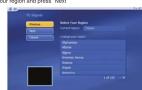
- Press 'Next' to a

-
Select your region and press "Next"
-
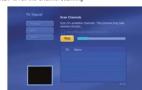
Press "Start" to run the Channel scanning
-
When the scan is finished, please press "Finish" to finalize the DVD-T TV program

4.3 TotalMedia Interface Interview

2016年1月1日
-
Full Screen 2. EPG 3. Channels 4. Recorded TV 5. Schedule 6. Capture Frame
-
Teletext 8. Settings 9. Playback
-
Stop 11. Backward 12. Forward
-
Skip to beginning 14. Skip to end 15. Volume Bar 16. Volume Down 17. Volume Up 18. Channel Down
-
Channel Up 20. My Favorite 21. Aspect Ratio
-
MTS 23. RECORD

4.4 Remote Controller
-
POWER
-
DOWN
-
UP
-
NUMBERS
-
VOLUME UP
-
VOLUME DOWN
-
ENTER
-
CHANNEL UP
-
CHANNEL DOWN
Note: The Remote Controllers supports Total Media only
14046
c€
.
The CE mark confirmed that this product meets the main requirements of the
Directive 1794/5/CE of the European Parliament and the Council of Europe concerning telecommunications and terminals regarding the Safety and health of
users and of electro-magnetic interference compliance. The CE has been
demonstrated. These statements are deposited by the manufacturer.
Size: 105 x 148mm

LogiLink®
VG0002A
USB2.0 DVB-T Receiver
- 15 CJD (Thelset/Archsoft, TotalMedia Software Manual)
a Driver Installation
(一)董事会会议召开情况
4.0 Total Media Software
4.1 Frankfurt
m = 311
m = 311
m = 311
m = 311
m = 311


Brand : LOGILINK
Model : VG0002A
Category : Receiver