24MN33N - Monitor LG - Free user manual and instructions
Find the device manual for free 24MN33N LG in PDF.


Pick your language and provide your email: we'll send you a specifically translated version.
| Product Type | LED Monitor |
| Model | 24MN33N |
| Screen Size | 24 inches (61 cm) |
| Resolution | 1920 x 1080 (Full HD) |
| Aspect Ratio | 16:9 |
| Brightness | 250 cd/m² |
| Contrast Ratio | 1000:1 (Static) |
| Response Time | 5 ms (GTG) |
| Viewing Angle | 178° / 178° (CR ≥10) |
| Connectivity | VGA, DVI-D, Headphone out |
| Power Consumption (Typical) | 23 watts |
| Standby Power | <0.3 watts |
| Dimensions (with stand) | 555 x 196 x 421 mm (WxHxD) |
| Weight (with stand) | 3.5 kg |
| VESA Mount | 100 x 100 mm |
| Tilt Angle | -5° to 20° |
| Power Supply | Internal, AC 100-240V 50/60Hz |
| Safety Features | Anti-glare coating, Kensington lock slot |
| Cleaning Instructions | Use a soft, dry cloth. No liquid cleaners directly on screen. |
| Repairability | Spare parts available via LG service centers; user-replaceable stand and power cord. |
| Warranty | 2 years (depending on region) |
Frequently Asked Questions - 24MN33N LG
What is the screen resolution of the LG 24MN33N monitor?
The monitor has a Full HD resolution of 1920 x 1080 pixels.
How do I connect the monitor to my computer?
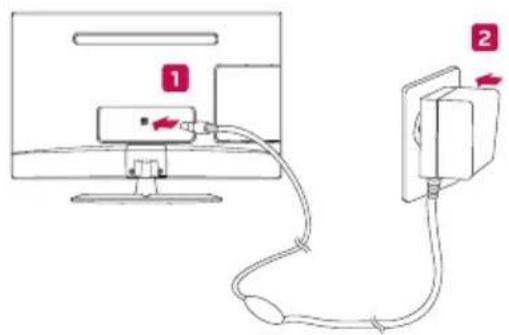
Use the VGA or DVI-D cable provided. Connect one end to the monitor and the other to your computer's corresponding port.
Does the monitor have built-in speakers?
No, the LG 24MN33N does not have built-in speakers. Use the headphone out port to connect external speakers or headphones.
How can I clean the screen safely?
Turn off the monitor and unplug it. Wipe the screen gently with a soft, dry microfiber cloth. Do not use liquid cleaners or spray directly onto the screen.
What is the VESA mount pattern for this monitor?
The VESA mount pattern is 100 x 100 mm. Use M4 screws (not included) to attach a wall mount arm.
The monitor shows 'No Signal' when powered on. What should I do?
Check that the video cable is securely connected to both the monitor and the computer. Ensure the computer is turned on and the correct input source is selected using the monitor's Source button.
How do I adjust the brightness and contrast?
Press the Menu button on the monitor to open the On-Screen Display (OSD). Navigate to Picture settings to adjust brightness and contrast levels.
Can I use the monitor with a gaming console?
Yes, if your console supports VGA or DVI-D output. Note that HDMI is not available, so you may need an adapter.
What is the power consumption in standby mode?
In standby mode, the monitor consumes less than 0.3 watts.
How do I enable the energy saving feature?
Access the OSD menu and go to Settings > Energy Saving. Choose between modes like Off, Minimum, Normal, and Maximum.
User questions about 24MN33N LG
0 question about this device. Answer the ones you know or ask your own.
Ask a new question about this device
No questions yet. Be the first to ask one.
Download the instructions for your Monitor in PDF format for free! Find your manual 24MN33N - LG and take your electronic device back in hand. On this page are published all the documents necessary for the use of your device. 24MN33N by LG.
USER MANUAL 24MN33N LG
natural_image
Circular gray icon with stylized white 'L' and circular outline, no text or symbols present.LG
Controle Remoto....15
natural_image
Line drawing of a rectangular electronic device with a clip and internal components (no text or symbols)Cuidado
natural_image
Diagram of a mechanical assembly with a magnified inset showing a component detail (no text or symbols)Cuidado
natural_image
Line drawing of a hand holding a small object with a circular emblem (no text or symbols)ou
Cuidado
natural_image
Technical line drawing of a mechanical assembly with an inset close-up showing internal components (no text or symbols)Não Fornecido
Cuidado
natural_image
Black-and-white photo of fresh tomatoes (no text or symbols visible)
natural_image
Black-and-white photo of a cluster of tomatoes on a white background (no text or symbols)