
NX213B - Processor AVERMEDIA - Free user manual and instructions
Find the device manual for free NX213B AVERMEDIA in PDF.


| Product Type | Fanless Box PC |
| Model Number | NX213B |
| Dimensions (with mounting ears) | 226 mm x 196 mm x 60 mm |
| Weight | 1.25 kg |
| Power Input | 54 VDC, 2.78 A |
| Power Consumption (typical) | 15.2 W (without PoE); up to 150 W with PoE |
| Operating Temperature | -10°C to 65°C |
| Storage Temperature | -20°C to 85°C |
| Relative Humidity | 95% at 40°C, non-condensing |
| Mounting Options | Desk, Wall, DIN Rail |
| Processor Support | NVIDIA Jetson Nano / Xavier NX module |
| Video Output | 1x HDMI 2.0a/b (max. 3840x2160 @ 60 Hz) |
| Ethernet Ports | 8x 10/100 Mb PoE (PSE, IEEE 802.3 AT/AF) + 1x GbE RJ-45 |
| USB Ports | 2x USB 3.0 Type-A (900 mA each), 1x USB 2.0 Micro-B (OTG) |
| Audio | 1x Mic-in, 1x Speaker-out (3.5 mm jack) |
| SATA | 1x SATA 3.0 (for 2.5" or 3.5" drive) |
| RS-485 | 1x 3-pin terminal block |
| Expansion Header | 20-pin header (UART, I2C, SPI, GPIO, I2S) |
| Mini-PCIe Slot | 1x (USB 2.0 only, for Wi-Fi/BT) |
| RTC Battery | CR2032 (3V) |
| Cooling | Fanless with AVerCooler Wave-Fin |
| Regulatory | CE, FCC Class B, KC |
Frequently Asked Questions - NX213B AVERMEDIA
User questions about NX213B AVERMEDIA
0 question about this device. Answer the ones you know or ask your own.
Ask a new question about this device
Download the instructions for your Processor in PDF format for free! Find your manual NX213B - AVERMEDIA and take your electronic device back in hand. On this page are published all the documents necessary for the use of your device. NX213B by AVERMEDIA.
USER MANUAL NX213B AVERMEDIA
AVerAI Carrier Board and Box PC
EN713-AAE9/ EN713/ NX213B
Designed for NVIDIA ® Jetson Nano/ Xavier NX Module


AVerMedia Technologies, Inc.
No. 135, Jian 1st Rd., Zhonghe Dist., New Taipei City 23585, Taiwan
Tel: 886-2-2226-3630
Fax: 886-2-3234-4842
Sales and Marketing: Contact
Technical Support: Professional User
Table of Contents
Preface 4
1.0 Introduction 8
1.1 Product Specifications....8
2.0 Product Overview....10
2.1 Block Diagram....10
2.2 Top View of Carrier Board ....11
2.3 Connector Summary ....13
2.4 Switch Summary ....13
3.0 Feature Description....14
3.1 Connector and Switch Locations....14
3.2 10/100Mb 4-port Ethernet Connectors....15
3.3 1Gb single-port Ethernet Connector ....16
3.4 260-Pin SODIMM Connector....16
3.5 SATA Power Wafer and SATA Connector....17
3.6 Fan Wafer ....17
3.7 Mic and Speaker Connector....18
3.8 USB 3.1 Gen 1 2-Port Connector ....18
3.9 HDMI Video Output Connector....18
3.10 USB/OTG Micro-Type Connector....19
3.11 RS-485 Connector....19
3.12 54VDC Power Jack....20
3.13 20-Pin Header ....20
3.14 Mini Card Connector ....21
3.15 RTC Battery Connector ....21
3.16 Force Recovery Button ....23
3.17 Power on Button....23
3.18 4-Pin DIP Switch....24
AVerMedia


3.19 Other Switch and Jumpers....24
4.0 Installation....25
5.0 Software 25
6.0 Force Recovery Mode....26
7.0 Power Consumption....27
Preface
Disclaimer
The information contained in this user manual, including but not limited to any product specification is subject to change without notice. AVerMedia assumes no liability for any damages incurred directly or indirectly from any technical or typographical errors or omissions contained herein or for discrepancies between the product and the user manual.
Technical Support
If you experience the difficulty after reading this manual and/or using the product, please contact the reseller from which you purchased the product. In most cases, the reseller can help you with the product installation and the difficulty you encountered.
In case the reseller is not able to resolve your problem, our highly capable global technical support team can certainly assist you. Our technical support section is available 24 hours a day and 7 days a week through our website, with the click here. For more contact information, you may find it in the section of AVerMedia Global Offices.
Contact Enquiry:
For more information of our products, pricing, and order placement, please fill in our inquiry form here, we will contact you within 24 hours.
Download User Manual
Please click this link, here, to download the file of this user manual from AVerMedia website.
Revision History
| Revision | Date | Updates |
| 1.00 | 02/24/2021 | Initial release. |
AVerMedia Global Offices
https://www.avermedia.com/professional/contact
Headquarters
Taiwan Office
No. 135, Jian 1st Rd., Zhonghe Dist., New
Taipei City 23585, Taiwan
Tel: +886-2-2226-3630
Fax: +886-2-3234-4842
Sales & Marketing: Contact
Technical Support: Home users /
Professional users
The Americas
USA Office
4038 Clipper Court Fremont, CA 94538
Tel: \$ (510) 403-0006
Fax: (510) 403-0022
Sales & Marketing: Contact
Technical Support: Home users /
Professional users
Brazil Office
Sales & Marketing: Contact
Technical Support: Home users /
Professional users
Latin America Office
Sales & Marketing: Contact
Technical Support: Home users /
Professional users
Europe
Head Office EU
AVT Solutions GmbH
S: technicalsupport_120
Sales & Marketing: Contact
Technical Support: Home users /
Professional users
Russia Office
Sales & Marketing: Contact
Technical Support: Home users /
Professional users
Professional Solutions Support Tel:
S+7 (925) 834-0310
Spain Office
AVerMedia Europe Group
s: technicalsupport_120
Sales & Marketing: Contact
Technical Support: Home users /
Professional users
Asia-Pacific
China Office
Room 1510, No.488, Hitech Plaza, South
Wuning Rd., Jingan District, Shanghai,
China
Tel: +86-021-5298 7985
Fax: +86-021-5298 7981
Sales & Marketing: Contact
Technical Support: Home users /
Professional users
Japan Office
6F,Kojimachi Syuei Bldg,4-3-13 Kudan-
minami, Chiyoda-ku, Tokyo, 102-0074,
Japan
Sales & Marketing: Contact
Technical Support: Home users /
Professional users
Limited Product Warranty
AVerMedia provides the one-year product warranty. Should this product, in AVerMedia's opinion, fail to be in the good working order during the warranty period, AVerMedia will, at its option, repair or replace it at no charge, provided that the product has not been subjected to abuse, misuse, accident, disaster, or non-AVerMedia authorized modification or repair.
You may obtain the warranty service by delivering this product to an authorized AVerMedia business partner or to AVerMedia along with the proof of purchase. Product returned to AVerMedia must be pre-authorized by AVerMedia with an RMA (Return Material Authorization) number marked on the outside of the package and sent prepaid, insured, and packaged for the safe shipment. AVerMedia will return the product by prepaid shipment service.
The limited product warranty is only valid over the serviceable life of the product. This is defined as the period during which all components are available. Should the product prove to be irreparable, AVerMedia reserves the right to substitute an equivalent product if available or to retract the product warranty if no replacement is available.
The above product warranty is the only warranty authorized by AVerMedia. Under no circumstances will AVerMedia be liable in any way for any damages, including any lost profits, lost savings, or other incidental or consequential damages arising out of the use of, or inability to use, such product.
Copyright Notice
The information contained in this document is subject to change without notice. AVerMedia shall not be liable for errors contained herein or for incidental consequential damages in connection with the furnishing, performance, or use of this material. This document contains proprietary information that is protected by copyright. All rights are reserved. No part of this document may be photocopied, reproduced, or translated to another language without the prior written consent by AVerMedia.
Trademark Acknowledgement
AVerMedia acknowledges all the trademarks, registered trademarks, and/or copyrights referred to in this document as the property of their respective owners. Not listing all possible trademarks or copyright acknowledgments does not constitute the lack of acknowledgment to the rightful owners of the trademarks and copyrights mentioned in this document.
ESD Warning
Electronic components and circuits are sensitive to Electrostatic Discharge (ESD). When handling any circuit board assemblies including AVerMedia AVerAI products, it is highly recommended that ESD safety precautions can be observed. ESD safe best practices can include, but are not limited to the following ones.
- Leave the circuit board in the antistatic package until it is ready to be installed.
- Use a grounded wrist strap when handling the circuit board. At a minimum, you need to touch a grounded metal object to dissipate any static charge, which may be present on you.
- Avoid handling the circuit board in the carpeted areas.
- Handle the board by the edges and avoid the contact [1] with the components.
- Only handle the circuit boards in ESD safe areas, which may include ESD floor and/or table mats, wrist strap stations, and ESD safe lab coats.
1.0 Introduction
AVerMedia AVerAI EN713-AAE9 is a fully featured carrier board developed for NVIDIA ® Jetson Nano/ Xavier NX module (EN713/NX213B). It is specifically designed to have eight 10/100Mb Ethernet ports with PoE (PSE, Power Sourcing Equipment) support.
Operating with NVIDIA ® Jetson Nano/ Xavier NX module, EN713-AAE9/EN713/NX213B can process eight channels of 1080p30 video stream, which makes it the perfect choice in building the high performance AI edge computing platform for the intelligent video analytics applications.
EN713-AAE9/ EN713/ NX213B have compact size, which can fit in the compact platform for the commercial and industrial application. And it can operate in the temperature range from -10°C up to 70°C . AVerAI EN713-AAE9/ EN713/ NX213B provides not only the access to a great list of latest interfaces on Nano/ Xavier NX module but also 1x RS-485 interface, 1x micro controller unit (MCU), and 1x RTC battery as the function enrichment.
1.1 Product Specifications
| Product Name | Fanless/Fan/Carrier Board | Fanless Box PCEN713/ NX213B | Carrier BoardEN713-AAE9 | |
| Core | System on Module (SoM) | Equips NVIDIA® Jetson NanoTM/ Xavier NX module | Fully support NVIDIA®Jetson NanoTM/ Xavier NX module | |
| Front I/O | HDMI 2.0 Output | 1x HDMI 2.0a/b Type-A supports maximum resolution 3840x2160 at 60Hz | ||
| USB 2.0 | 1x USB 2.0 Micro-B for recovery | |||
| USB 3.0 | 2x USB 3.0 Type-A | |||
| 10/100/1000 BASE-TEthernet | 1x GbE RJ-45 | |||
| 8 ports PoE (8x 10/100 MbE RJ-45 PSE, Power Sourcing Equipment, IEEE 802.3 AT/AF with power budget) | ||||
| SATA Rev. 3.0 | 1x | |||
| Audio | 1x Mic-in, 1x Speaker-out | |||
| RS-485 | 1x RS-485 Euroblock (3 pins) | |||
| Expansion Header | 20 pin with 1x 3.3V UART2, 1x SPI, 1x I2S, 2x I2C | |||
| Power Button | 1x with a Green color LED | |||
| Recovery Button | X 1 | |||
| Internal PCIe Sockets | Mini-PCIe | Alternative option: 1x Mini-PCIe slot, Only support USB 2.0 (for Wi-Fi/BT card, reserved) | ||
| Power | Power Input | 54V/2.78A for PoE (PSE, IEEE 802.3 AT/AF with power budget) | ||
| Environment | Operating Temperature | -10°C ~ 65°C fanless chassis with AVerCoolerTM Wave-Fin | -10°C ~ 65°C Fanless chassis | -10°C ~ 70°C |
| Storage Temperature | -20°C ~ 85°C | |||
| Relative Humidity | 40°C @ 95%, Non-Condensing | |||
| Physical Characteristics | Chassis Dimension | W:212mm x L:196mm x H:60mm (W:226 mm with mounting ears) | W:190mm x L:175mm x H:80mm (W:225mm with mounting ears) | W:170mm x L:170mm x H:4.5mm |
| Weight | 1.25 Kg | 4 Kg | 269g | |
| Thermal Solution | With fanless chassis | With fanless chassis | (Optional) with fan module | |
| Mounting | Desk/Wall/Din Rail | Desk/Wall/Din Rail | N/A | |
| Regulation | EMC/Safety | CE/FCC Class B, KC | ||
2.0 Product Overview
2.1 Block Diagram
![graph TD subgraph Power IC A["Power IC MPS MP9928"] --> B["Power IC MPS MP9928"] C["DC 54 V IN"] --> D["Power Recovery"] E["GPIO"] --> F["RS485"] G["OTG"] --> H["HDMI"] I["USB"] --> J["Audio Controller C-Micro CM108B"] end subgraph Control K["Gbe PHY IC+ IP1001M"] --> L["Gbe PHY IC+ IP1001M"] M["Gbe…](/content/2026/05/1001129/images/961e7c35cc5255835ec14b2f6c65b7e19096557a370cd7ec1faacec1fd9b00b2.jpg)
AVerMedia


2.2 Top View of Carrier Board

AVerMedia


Bottom View of Carrier Board
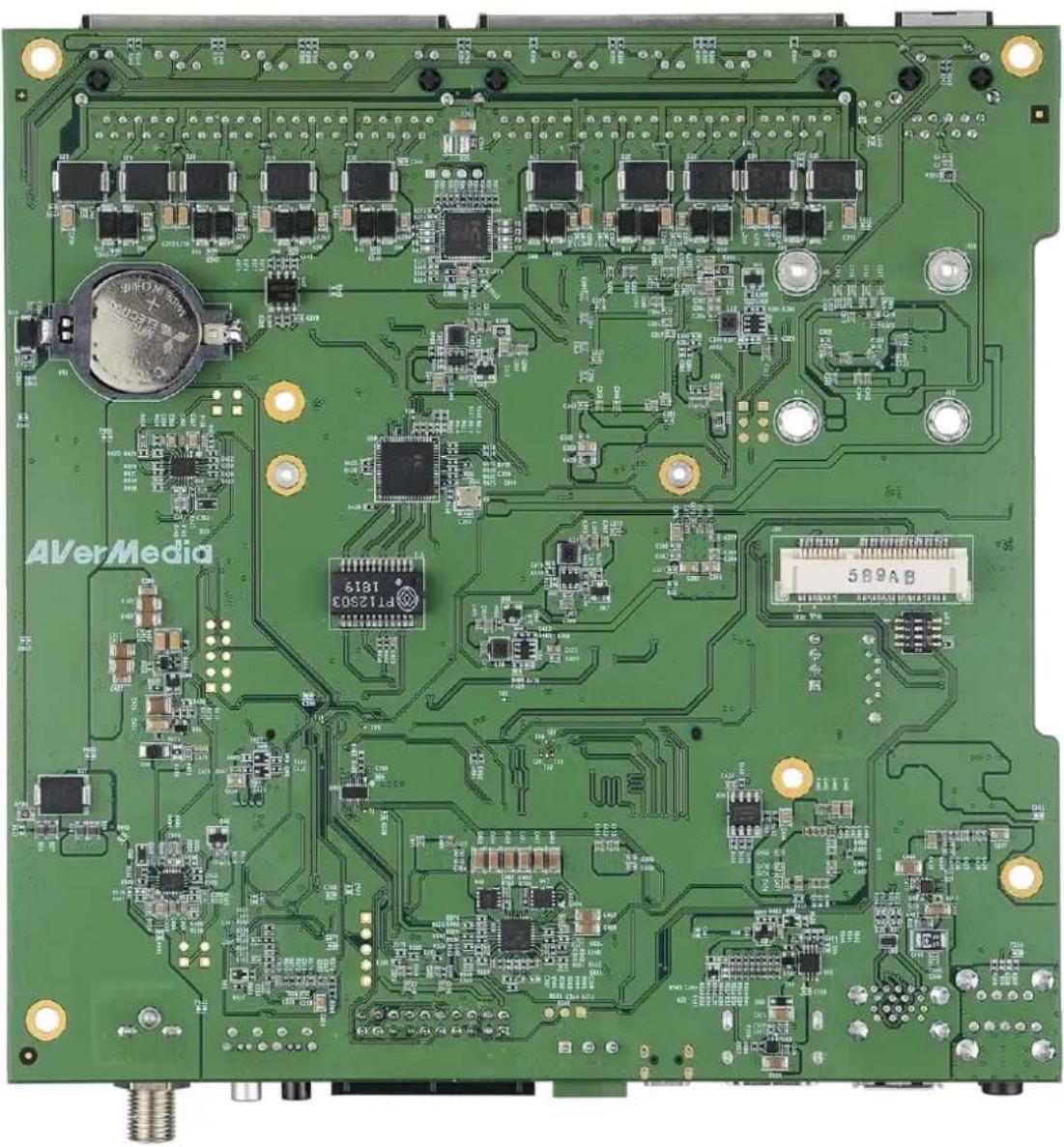
2.3 Connector Summary
| Designation | Description |
| J1 | RJ45 10/100Mb 4-port Ethernet connector with POE support |
| J2 | RJ45 10/100Mb 4-port Ethernet connector with POE support |
| J3 | RJ45 1Gb single-port Ethernet connector |
| J5 | 260-pin SODIMM connector for NVIDIA Jetson Nano/ Xavier NX module |
| J6 | SATA power wafer |
| J7 | Fan wafer |
| J8 | Mic and speaker connector |
| J9 | USB 3.1 Gen 1 2-port connector with 900mA x2 |
| J10 | HDMI video output connector |
| J11 | USB/OTG micro-type connector |
| J12 | RS-485 connector |
| J13 | 54VDC power Jack |
| J14 | 20-pin header UART console for debug, I2C, GPIO |
| J16 | Mini card for USB only |
| J17 | SATA connector |
| BT1 | RTC battery connector |
2.4 Switch Summary
| Designation | Description |
| SW8 | Force recovery button |
| SW9 | Power on button |
| SW10 | 4-pin DIP switch with four sets of setting as defined in Section 3.20. |
3.0 Feature Description
3.1 Connector and Switch Locations


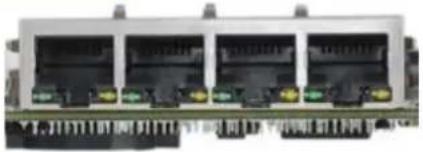
3.2 10/100Mb 4-port Ethernet Connectors
| Function | 10/100Mb 4-port Ethernet connectors, used to connect IP cameras and/or the network switches. |
| Location | J1 and J2 |
| Type Description | RJ45*4 with integrated magnetics for PoE application |
| Manufacturer and Part Number | CHAMPWAY, CWJ46614AENL |
| Mating Connector | Any standard 10/100Mb Ethernet mating connector can be applicable. |
| Pinout | Comply with Ethernet standards. |

 | ||
| Remarks | POE support is enabled on J1 and J2. | |
3.3 1Gb single-port Ethernet Connector
| Function | 1Gb single-port Ethernet connector, used to connect to the host system. |  |
| Location | J3 | |
| Type Description | RJ45 with integrated magnetics | |
| Manufacturer and Part Number | FOXCONN, JFM38013-0L03-4F-BX3 | |
| Mating Connector | Any standard 1Gb Ethernet mating connector can be applicable. | |
| Pinout | Comply with Ethernet standards. | |
| Remarks | None | |
3.4 260-Pin SODIMM Connector
| Function | Used to mount with and connect to NVIDIA Jetson Nano/ Xavier NX module. |  |
| Location | J5 | |
| Type Description | 260-pin SODIMM connector | |
| Manufacturer and Part Number | FOXCONN, ASAA826-EASB0-7H | |
| Mating Connector | DDR4 SO-DIMM 260PIN 9.2mmH STANDARD | |
| Pinout | Please refer to NVIDIA Jetson Nano System-on-Module datasheet for the pinout details. | |
| Remarks | None | |
3.5 SATA Power Wafer and SATA Connector
| Function | 2.5" hard drive/SSD3.5" surveillance hard drive/SSD |  | |
| Location | J6 (on the left) and J17 (on the right) | ||
| Type Description | SATA HD power (on the left) and signal (on the right) connector | ||
| Manufacturer and Part Number | J6:PINREX, 753-81-04TW00J17:FOXCONN, LE18077-Z54B-4H | ||
| Mating Connector | 4-pin wafer and SATA 3.0 connector | ||
| Pinout | J6:Pin Number | Description | |
| 1 | 5V Power | ||
| 2 | GND | ||
| 3 | GND | ||
| 4 | 12V Power | ||
| J17: Please refer to SATA 3.0 standard | |||
| Remarks | None | ||
3.6 Fan Wafer
| Function | Fan power and control wafer | 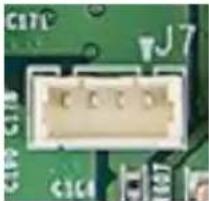 | |
| Location | J7 | ||
| Type Description | 1*4 pin wafer with 1.25 mm pitch | ||
| Manufacturer and Part Number | Joint Tech,A1250WV-04PNLNT1N00B | ||
| Mating Connector | (Combination with PINREX's housing) | ||
| Pinout | Pin Number | Description | |
| 1 | GND | ||
| 2 | 5V Power | ||
| 3 | TACH from fan to module | ||
| 4 | PWM from module to fan | ||
| Remarks | None | ||
3.7 Mic and Speaker Connector
| Function | Mic and speaker jack | 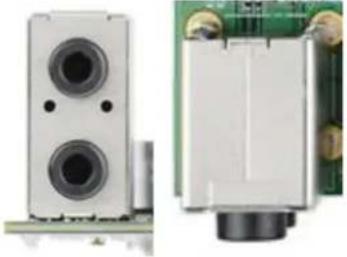 |
| Location | J8 | |
| Type Description | 3.5 mm miniature jack | |
| Manufacturer and Part Number | JKCR, PJD-035-87HAB | |
| Mating Connector | 2 or 3 conductors type plug | |
| Pinout | Mic input (on the top) and speaker output (on the bottom) | |
| Remarks | None | |
3.8 USB 3.1 Gen 1 2-Port Connector
| Function | USB 3.1 Gen 1 device connector |  |
| Location | J9 | |
| Type Description | 2-port USB Type-A female connector | |
| Manufacturer and Part Number | CHAMPWAY, CU3B-AFR15U-096H | |
| Mating Connector | Any USB standard Type-A interface cable or device. | |
| Pinout | Please refer to USB 3.1 Gen 1 standard. | |
| Remarks | Support 900mA x2 | |
3.9 HDMI Video Output Connector
| Function | HDMI Type-A TX connector | 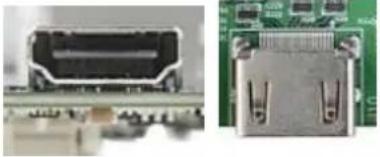 |
| Location | J10 | |
| Type Description | HDMI Type-A female connector | |
| Manufacturer and Part Number | Compupack, ACNHM220028-001 | |
| Mating Connector | Any HDMI standard Type-A interface cable or device. | |
| Pinout | Please refer to HDMI standard. | |
| Remarks | None | |
3.10 USB/OTG Micro-Type Connector
| Function | OTG programming recovery |  |
| Location | J11 | |
| Type Description | USB Micro-type female connector | |
| Manufacturer and Part Number | Fullglory, FG-MCB-111440 | |
| Mating Connector | Any USB standard Micro-type interface cable or device. | |
| Pinout | Please refer to USB Micro-type standard. | |
| Remarks | None | |
3.11 RS-485 Connector
| Function | RS485 interface from Jetson Nano module UART control |  |  | ||
| Location | J12 | ||||
| Type Description | 3-pin terminal block | ||||
| Manufacturer and Part Number | DECA, ME030-38103T | ||||
| Mating Connector | Combination with the plug terminal block from DECA | ||||
| Pinout | Pin Number | Description | |||
| 1 | GND | ||||
| 2 | B | ||||
| 3 | A | ||||
| Remarks | |||||
3.12 54VDC Power Jack
| Function | 54V DC power input |  | |
| Location | J13 | ||
| Type Description | 2.5 mm power jack | ||
| Manufacturer and Part Number | JKCR, DCD-020-105B | ||
| Mating Connector | Any 2.5mm power plug cable | ||
| Pinout | Pin Number | Description | |
| 3 | GND | ||
| 1 | 54V Power | ||
| 2 | GND | ||
| Remarks | None | ||
3.13 20-Pin Header
| Function | UART console for debug, I2C, GPIO |  | |||||
| Location | J14 | ||||||
| Type Description | 2.54 mm pitch 2*10 header | ||||||
| Manufacturer and Part Number | COXOC, 302AE20PGAR003 | ||||||
| Mating Connector | Any 2.5mm pitch DuPont wire | ||||||
| Pinout | EN713 | ||||||
| Address | Pin Name | 20-Pin Index | Pin Name | Address | |||
| +3V3 | 1 | 2 | +5V | ||||
| GND | 3 | 4 | GND | ||||
| /dev/i2c-1 | I2C1_SDA | 5 | 6 | UART2_TXD_3V3 | Debug Console /dev/ttyS0 | ||
| I2C1_SCL | 7 | 8 | UART2_RXD_3V3 | ||||
| /dev/i2c-0 | I2C0_SDA | 9 | 10 | GND | |||
| I2C0_SCL | 11 | 12 | SPI1_SCK | gpio14 | |||
| gpio79 | I2S0_SCLK | 13 | 14 | SPI1_MISO | gpio13 | ||
| gpio78 | I2S0_DOUT | 15 | 16 | SPI1_MOSI | gpio12 | ||
| gpio77 | I2S0_DIN | 17 | 18 | SPI1_CS0 | gpio15 | ||
| gpio76 | I2S0_FS | 19 | 20 | SPI1_CS1 | gpio232 | ||
NX213B
| Address | Pin Name | 20-pin index | Pin Name | Address | |
| +3V3 | 1 | 2 | +5V | ||
| GND | 3 | 4 | GND | ||
| /dev/i2c-8 | I2C1_SDA | 5 | 6 | UART2_TXD | /dev/ttyTCU0 Debug Console |
| I2C1_SCL | 7 | 8 | UART2_RXD | ||
| /dev/i2c-1 | I2C0_SDA | 9 | 10 | GND | |
| I2C0_SCL | 11 | 12 | SPI1_SCK | gpio480 Bidirection | |
| gpio445 Bidirection | I2S0_SCLK | 13 | 14 | SPI1_MISO | gpio481 Bidirection |
| gpio446 Bidirection | I2S0_DOUT | 15 | 16 | SPI1_MOSI | gpio482 Bidirection |
| gpio447 Bidirection | I2S0_DIN | 17 | 18 | SPI1_CS0 | gpio483 Bidirection |
| gpio448 Bidirection | I2S0_FS | 19 | 20 | SPI1_CS1 | gpio484 Bidirection |
| Remarks | GPIO uses 3.3V |
3.14 Mini Card Connector
| Function | LTE or Wi-Fi Module | 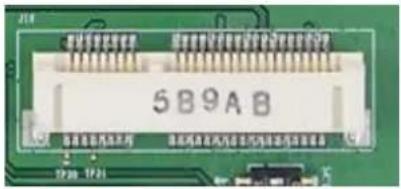 |
| Location | J16 | |
| Type Description | Mini-Card for USB | |
| Manufacturer and Part Number | FOXCONN, AS0B221-S68Q-7H | |
| Mating Connector | Any Mini-Card standard interface device. | |
| Pinout | Please refer to Mini-Card standard for the pinout details. | |
| Remarks | Support USB 2.0 only, not PCIe | |
3.15 RTC Battery Connector
| Function | RTC battery for module |  | |
| Location | BT1 | ||
| Type Description | RTC holder and RTC battery | ||
| Manufacturer and Part Number | Holder:LOTES, AAA-BAT-054-P06RTC Battery:MITSUBISHI, CR2032 3V | ||
| Mating Connector | Any CR2032 3V battery | ||
| Pinout | Pin Number | Description | |
| 1 | 3V Power | ||
| 2 | GND | ||
| Remarks | Please be reminded to pay the proper attention on the polarity of this 3V battery, when it is being replaced. The correct placement is to keep the “+” mark on the battery outward, as shown in the above photo. | ||
3.16 Force Recovery Button
| Function | Force recovery |  |
| Location | SW8 | |
| Type Description | Button | |
| Manufacturer and Part Number | N/A | |
| Mating Connector | N/A | |
| Pinout | N/A | |
| Remarks | None | |
3.17 Power on Button
| Function | Power control button |  |
| Location | SW9 | |
| Type Description | Button with Green LED | |
| Manufacturer and Part Number | N/A | |
| Mating Connector | N/A | |
| Pinout | N/A | |
| Remarks | The green light on LED is activated when the board is powered on. | |
3.18 4-Pin DIP Switch
| Function | Optional function selection |  | |
| Location | SW10 | ||
| Type Description | 4 SPST DIP switch | ||
| Manufacturer and Part Number | N/A | ||
| Mating Connector | N/A | ||
| Pinout | Please refer to the following table. | ||
| Remarks | |||
| SW10 | Default (OFF) | ON | |
| S1 | Fan PWM controller | Fan always on | |
| S2 | Auto power on | Auto power on disabled | |
| S3 | RS-485 normal mode | RS-485 terminal mode | |
| S4 | Test mode off | Test mode on (for the factory use) | |
3.19 Other Switch and Jumpers
Other switch and jumpers, such as SW1, JP3, JP4, and JP5, etc. marked on the printed circuit board of EN713-AAE9 carrier board, are reserved for the internal use by AVerMedia. They are not open to the client application.
4.0 Installation
-
Check and ensure all the external system power supplies are turned off.
-
Install NVIDIA ® Jetson Nano/ Xavier NX module onto 260-pin SODIMM connector (J5). Check and be sure to follow the manufacturer's instructions for the proper installation of the mounting hardware, heat sink or heat spreader, fan, and any other applicable requirements from the associated manufacturers.
-
Install the necessary cables for the application. The cables can include the following ones. For the additional information of these mentioned cables, please refer to 8.0 Cable Assembly in this manual.
● Power cable to the input power connector (J13) on the carrier board.
● HDMI video display cable to HDMI video output connector (J10).
● Mouse and keyboard cables to USB connectors (J9).
-
Connect the power cable to the power adapter.
-
Turn on the power adapter. (Please be reminded NOT to power on the system by plugging in the live power.)
5.0 Software
For L4T (Linux for Tegra) BSP and the software support associated with NVIDIA ® Jetson Nano/ Xavier NX module, please check this link, https://www.avermedia.com/professional/download/en713_aae9#ans_part/ https://www.avermedia.com/professional/download/nx213b#ans_part, to download the file from AVerMedia website.
6.0 Force Recovery Mode
USB 3.I/OTG port (J11) can be used to re-program NVIDIA ® Jetson Nano/ Xavier NX module by using the other host system running NVIDIA Jetpack TM , as the procedure described below.
- Power off the system. Ensure the system power must be completely OFF, instead of staying in the suspend mode or the sleep mode.
- Connect a USB cable from OTG USB port to the other host system which will be used to re-program the new system file into NVIDIA * Jetson Nano/ Xavier NX module.
- Press and hold down Force Recovery Button (SW8) and then power on the carrier board.
- After three seconds, release Force Recovery Button.
- NVIDIA ® Jetson Nano/ Xavier NX module will show up on the USB list of the host system as a new NVIDIA target device.
- After the system software is updated successfully, please ensure to power off the system. A clean power-on will then revert OTG port back to the host mode.
7.0 Power Consumption
| Item Description | Power Consumption |
| Theoretical Maximum System Power Consumption | Maximum power consumption of EN713 is 13.5W (w/ HDMI, RJ45), and embedded w/ POE, that would be extra up to 100WMaximum power consumption of NX213B is 15.2W (w/ HDMI, RJ45), and embedded w/ POE, that would be extra up to 100W(maximum power consumption up to 150W based on adapter) |
| Typical System Power Consumption | The power consumption under the normal operating mode is depending on the application software running with NVIDIA® Jetson Nano /Xavier NX. |
- AVERAI CARRIER BOARD AND BOX PC
- EN713-AAE9/ EN713/ NX213B
- TABLE OF CONTENTS
- AVERMEDIA
- PREFACE
- DISCLAIMER
- TECHNICAL SUPPORT
- CONTACT ENQUIRY
- DOWNLOAD USER MANUAL
- AVERMEDIA GLOBAL OFFICES
- HEADQUARTERS
- TAIWAN OFFICE
- THE AMERICAS
- USA OFFICE
- BRAZIL OFFICE
- LATIN AMERICA OFFICE
- EUROPE
- HEAD OFFICE EU
- RUSSIA OFFICE
- SPAIN OFFICE
- ASIA-PACIFIC
- CHINA OFFICE
- JAPAN OFFICE
- LIMITED PRODUCT WARRANTY
- COPYRIGHT NOTICE
- TRADEMARK ACKNOWLEDGEMENT
- ESD WARNING
- 1.0 INTRODUCTION
- 1.1 PRODUCT SPECIFICATIONS
- 2.0 PRODUCT OVERVIEW
- 2.2 TOP VIEW OF CARRIER BOARD
- 2.3 CONNECTOR SUMMARY
- 2.4 SWITCH SUMMARY
- 3.0 FEATURE DESCRIPTION
- 3.1 CONNECTOR AND SWITCH LOCATIONS
- 3.5 SATA POWER WAFER AND SATA CONNECTOR
- 3.6 FAN WAFER
- 3.18 4-PIN DIP SWITCH
- 3.19 OTHER SWITCH AND JUMPERS
- 4.0 INSTALLATION
- 5.0 SOFTWARE
- 6.0 FORCE RECOVERY MODE
- 7.0 POWER CONSUMPTION
Brand : AVERMEDIA
Model : NX213B
Category : Processor