
MSB5305 - Loudspeaker MAGNAVOX - Free user manual and instructions
Find the device manual for free MSB5305 MAGNAVOX in PDF.


| Brand | Magnavox |
| Model | MSB5305 |
| Product Type | Soundbar / Bluetooth Speaker |
| Dimensions (W x H x D) | Approximately 400 x 60 x 70 mm |
| Weight | Around 1.5 kg |
| Power Supply | AC 100-240V, 50/60Hz |
| Channels | 2.0 Stereo |
| Connectivity | Bluetooth, USB, FM Radio, AUX Input (3.5mm) |
| Remote Control | Included (IR or Bluetooth) |
| Functions | Playback control, volume adjust, input selection, preset radio stations |
| Cleaning Instructions | Unplug before cleaning; wipe with a soft, dry cloth. Do not use solvents or abrasive cleaners. |
| Safety Precautions | Do not expose to water or moisture. Do not disassemble. Keep away from heat sources. |
| Spare Parts Availability | Contact authorized service centers. Remote control and power cord may be replaced. |
| Repair Service | Refer to user manual for troubleshooting. For repairs, contact Magnavox support. |
| General Information | This product is designed for indoor use. Keep away from children and pets. |
Frequently Asked Questions - MSB5305 MAGNAVOX
User questions about MSB5305 MAGNAVOX
0 question about this device. Answer the ones you know or ask your own.
Ask a new question about this device
Download the instructions for your Loudspeaker in PDF format for free! Find your manual MSB5305 - MAGNAVOX and take your electronic device back in hand. On this page are published all the documents necessary for the use of your device. MSB5305 by MAGNAVOX.
USER MANUAL MSB5305 MAGNAVOX
Expandable Soundbar Speakers
MSB5305
MSB5300

natural_image
Exterior view of a black audio streaming device with speaker and audio block (no text or symbols on main body)(MSB5305 only)
MAGNAVOX
MAGNAVOX is a registered trademark of Philips Electronics North America Corporation and is used by Funai Electric Co., Ltd. and Funai Corporation, Inc. under license from Philips Electronics North America.
Contents
1 Notice 3
Trademark Information 3
2 Important 3
SAFETY INSTRUCTIONS 3
3 Get started 4
Supplied accessories 4
Replace the remote control battery 4
Control panel 5
Remote control 5
Subwoofer (MSB5305 only) 5
Terminals 5
Adjusting the length of this Soundbar 6
Connecting your TV 6
Connecting your MP3 Player 6
Connecting the Power 7
Connecting the Subwoofer (MSB5305 only) 7
Table top placement 7
Wall mounting using bracket 7
4 Hint for better acoustic setting
What is SRS acoustic advantage? 8
How to adjust Soundbar volume level for optimum acoustic performance 8
5 Useful tips
Troubleshooting 8
6 Specifications
7 Warranty
9
9
1 Notice
Trademark Information

SRS is a trademark of SRS Labs, Inc. TruSurround HD technology is incorporated under license from SRS Labs, Inc.
SRS TruSurround HD ™ creates an immersive, feature-rich surround sound experience from two speakers, complete with rich bass, high frequency detail and clear dialog.

SRS is a trademark of SRS Labs, Inc. TruVolume technology is incorporated under license from SRS Labs, Inc. TruVolume™ maintains a steady volume, allowing listeners to set their desired volume level once to enjoy television, music and all other content without annoying volume fluctuations.
2 Important
SAFETY INSTRUCTIONS
Read and understand all instructions before you use your SoundBar. If damage is caused by failure to follow instructions, the warranty does not apply.
Risk of electric shock or fire
- Never expose the product and accessories to rain or water. Never place liquid containers, such as vases, near the product. If liquids are spilt on or into the product, disconnect it from the power outlet immediately. Contact Funai Corporation Inc. to have the product checked before use.
- Never place the product and accessories near naked flames or other heat sources, including direct sunlight.
- Never insert objects into the ventilation slots or other openings on the product.
- Where the AC plug or an appliance coupler is used as the disconnect device, the disconnect device shall remain readily operable.
- Disconnect the product from the power outlet before lightning storms.
- When you disconnect the power cord, always grasp the plug, never the cable.
Risk of short circuit or fire
- Before you connect the product to the power outlet, ensure that the power voltage matches the value printed on the back or bottom of the product. Never connect the product to the power outlet if the voltage is different.
Risk of injury or damage to the SoundBar
- For wall-mountable products, use only the supplied wall mount bracket. Secure the wall mount to a wall that can support the combined weight of the product and the wall mount. Funai Corporation Inc. bears no responsibility for improper wall mounting that results in accident, injury or damage.
- Never place the product or any objects on power cords or on other electrical equipment.
- If the product is transported in temperatures below 43ircF (5ircC) , unpack the product and wait until its temperature matches room temperature before connecting it to the power outlet.
- Handle with care to avoid injury and damage.
- Do not place the unit on the furniture that is capable of being tilted by a child and an adult leaning, pulling, standing or climbing on it. A falling unit can cause serious injury or even death.
Risk of overheating
- Never install this product in a confined space.
- Always leave a space of at least 2 inches around the product for ventilation. Ensure curtains or other objects never cover the ventilation slots on the product.
Risk of contamination
- Danger of explosion if batteries are incorrectly replaced. Replace only with the same or equivalent type.
- Remove batteries if they are exhausted or if the remote control is not to be used for a long time.
- Batteries contain chemical substances, they should be disposed of properly.
Risk of swallowing batteries
- The product / remote control may or may not contain a coin / button type battery, which can be swallowed. Keep the battery out of reach of children at all times! If swallowed, the battery can cause serious injury or death.
IMPORTANT NOTES:
- Severe internal burns can occur within two hours of ingestion.
- If the battery has been swallowed, seek immediate medical attention.
- When you change the batteries, always keep all new and used batteries out of reach of children. Ensure that the battery compartment is completely secure after you replace the battery.
- If the battery compartment cannot be completely secured, discontinue use of the product. Keep out of reach of children and contact the manufacturer.
3 Get started
Supplied accessories
Expandable Soundbar Sub woofer

(MSB5305 only)

Quick Start Guide

Remote Control
and Battery
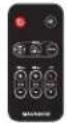
Mounting Bracket
(×2)

Speaker feet for table top

Analog Audio L / R cable
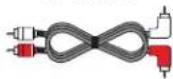
3.5mm MP3 / Headphone connection cable (1.5mm - 3.5mm)

AC - DC Adapter
and
AC power cord for Soundbar

AC - DC Adapter
and
AC power cord for Subwoofer
(MSB5305 only)

You must take an insulation sheet out before you use the remote control.

natural_image
Line drawing of a rectangular electronic device with a small internal component, no text or symbols presentReplace the remote control battery
1 Press the tab lock to the right, then slide out the battery compartment out.

natural_image
Line drawing of a rectangular electronic device with a scroll wheel and two arrows indicating motion (no text or symbols)2 Replace CR2025 battery. Be sure the + on the battery is facing up.

3 Slide the battery compartment into remote control until it clicks

natural_image
Line drawing of a device with a button and connector (no text or symbols)
Note
- Remove the batteries if not using the remote control for an extended period of time.
Control panel
Remote control

Subwoofer (MSB5305 only)

Terminals
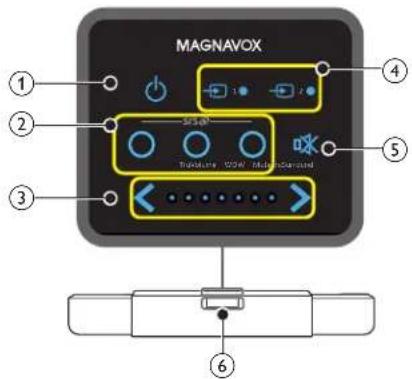
① (POWER-ON / STANDBY-ON)
Press to Turn the unit On or go into Standby mode.
② srs
TruSurround HD To Tum On the SRS Trusurround HD.
TruVolume To Turn On SRS TruVolume.
WOW To Turn On SRS WOW.
③ Volume
[Control panel]
Touch to adjust volume down ( )< up ( >for Soundbar.
[Remote control]
| MAIN | Press to adjust volume up (+)/down (-) for Soundbar. |
| SUB* | Press to adjust volume up (+)/down (-) for Subwoofer.* This function only works for MSB5305. |
④ Source
Press to select source 1 (AUX1) or source 2 (AUX2) of connected devices to this Soundbar.
⑤ Mute
Press to mute the sound and recover the sound.
⑥ Infrared sensor
Receives IR signals from remote control.
⑦ Main power switch*
To turn the Subwoofer's main power On or Off. * This function only works for MSB5305.
⑧ DC 24V IN
⑨ Power On indicator
Lights up green when Subwoofer is Turned On. Lights up red when Subwoofer goes into Standby mode. Subwoofer will go into Standby mode automatically if there is no signal input from the Soundbar for 10 seconds.
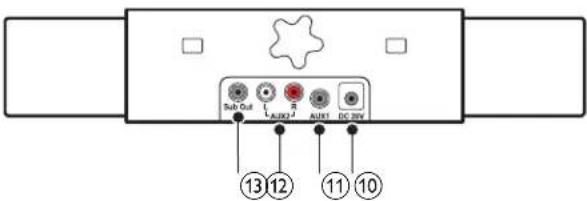
⑩ DC 20V
⑪ AUX1
Connects to an Headphone Audio Output on your device.
⑫ AUX2 (L/R)
Connects to an Analog Audio Output on your device.
⑬ Sub Out
Connects to the Subwoofer (MSB5305 only).
Adjusting the length of this Soundbar
You can adjust the length of the unit to fit your TV screen size (from 32 to 46 inch) using rotary knob at rear of this unit. (The factory default is minimum length of the unit.)
To extend the Soundbar
• Tum rotary knob clockwise.

flowchart
graph LR
    A["Input"] --> B{Decision}
    B -->|Yes| C["Process Step"]
    B -->|No| D["Output"]
    C --> E["Final Output"]
    style C fill:#f9f,stroke:#333
    style E fill:#ccf,stroke:#333
To shorten the Soundbar
• Turn rotary knob counter clockwise
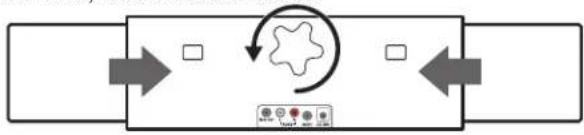
flowchart
graph LR
    A["Input"] --> B{Decision}
    B -->|Yes| C["Output 1"]
    B -->|No| D["Output 2"]
Connecting your TV
If your TV has an Audio Out L / R

Analog Audio L / R cable
If your TV has no Audio Out L / R, but has a Headphone jack
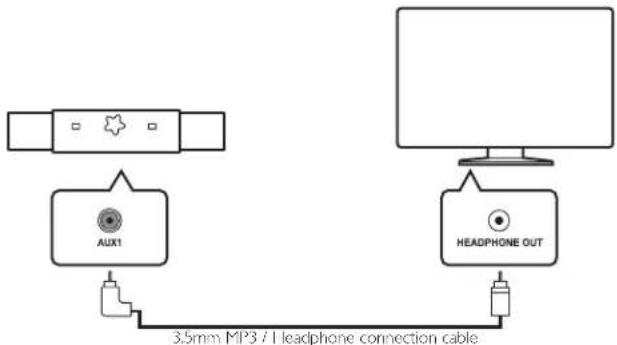
flowchart
graph TD
    A["AUX1"] --> B["3.5mm MP3 / I headphone connection cable"]
    C["Computer monitor"] --> D["HEADPHONE OUT"]
- If you connect to your TV through supplied 3.5mm MP3 / Headphone connection cable, make sure that any surround mode, auto volume function and TV speakers on your TV are Off. How to adjust Soundbar volume level for optimum acoustic performance p.8
Connecting your MP3 Player
If your TV is connected to Soundbar through RCA Audio L/R cable
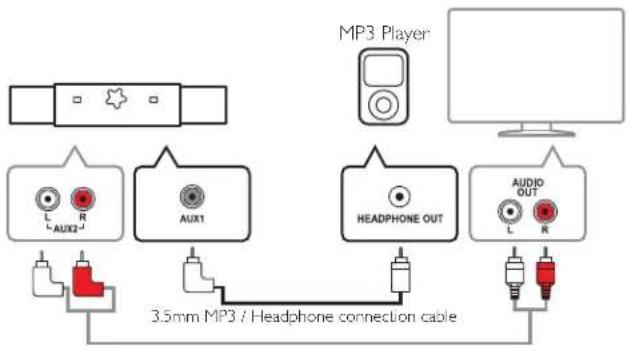
flowchart
graph TD
    A["MP3 Player"] --> B["MP3 MP3 / Headphone connection cable"]
    B --> C["AUX1"]
    B --> D["AUX2"]
    B --> E["HEADPHONE OUT"]
    B --> F["AUDIO OUT"]
    C --> G["3.5mm MP3 / Headphone connection cable"]
    D --> G
    E --> G
    F --> G
If your TV is connected to Soundbar through MP3 / Headphone connection cable
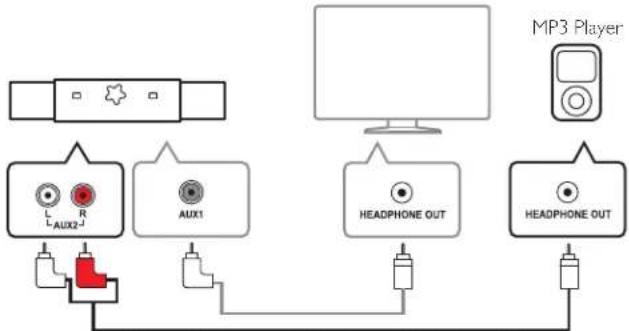
flowchart
graph TD
    A["Audio System"] --> B["AUX1"]
    B --> C["Headphone OUT"]
    C --> D["Headphone OUT"]
    D --> E["MP3 Player"]
    style A fill:#f9f,stroke:#333
    style B fill:#ccf,stroke:#333
    style C fill:#cfc,stroke:#333
    style D fill:#fcc,stroke:#333
3.5 mm | Headphone to RCA adapter cable (not supplied)
Connecting the Power
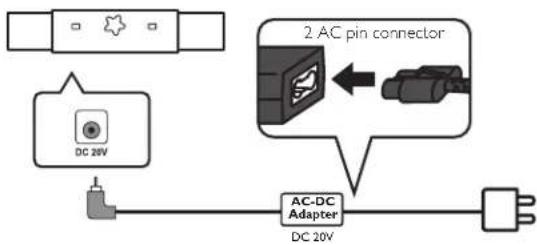
flowchart
graph TD
    A["DC 20V"] --> B["AC-DC Adapter"]
    B --> C["2 AC pin connector"]
    C --> D["DC 20V"]
• Make sure that the Soundbar is not muted after you Turn the unit On.
Connecting the Subwoofer (MSB5305 only)

flowchart
graph TD
    A["3 blade connector"] --> B["AC-DC Adapter"]
    B --> C["Subwoofer"]
    C --> D["MSB5305 only"]
    E["Sub Out"] --> C
    F["Power Supply"] --> G["AC-DC Adapter DC 24V"]
• Make sure that the Soundbar is not muted after you Turn the unit On.
Table top placement
For secure table top placement, affix 2 self-adhesive rubber feet to the bottom of the expanded part of this unit using the below guide.

Wall mounting using brackets
You can use the Wall Mounting Template located in the Quick Start Guide to mark the Top screw positions. (Mounting Bracket Screws are not included.)
1 Measure your TV width to find the center, then 3 15/16 from the center line mark the 2 top screw positions which are 2"(min.) to 2- 12 " (max.) from the bottom edge of the TV. Then mark the other 4 bottom screw positions using the brackets.

2 It is recommended to use drywall Molly anchors that have a minimum of 5 lbs. holding strength to use with these brackets. Mount the 2 Mounting Brackets where you marked the six screw holes for the Molly anchor locations.

• Make sure that both brackets are securely mounted to the drywall.
- Make sure that the width of this Soundbar fits your TV screen size and the power cord / audio cables are securely connected before wall mounting the Expandable Soundbar.
3 Hook the Soundbar onto Mounting Brackets.

natural_image
Technical line drawing of a mechanical assembly with two curved components attached (no text or symbols)Complete.
4 Hint for better acoustic setting
What is SRS acoustic advantage?
Many movies and much music has been recorded at studios by applying SRS technology to enhance better sound reproduction and clarity for maximum entertainment.
You can find one that works best for you.
| SRS TruSurround HD | : Creates an immersive, feature-rich surround sound experience from two Speakers, complete with rich bass, high frequency and clear speech.(Note: It includes SRS WOW effect already, so no need to Turn On SRS WOW at the same time.) |
| SRS TruVolume | : Maintain the steady volume between different signal sources such as TV, Music, and MP3 and so on without volume fluctuation. It works on TV commercials where some TV commercial increase volume level. |
| SRS WOW | : Significantly improves the playback quality of Audio, with dynamic deep, rich bass. It works when you have decreased volume level but need good bass sound. |
How to adjust Soundbar volume level for optimum acoustic performance
When you connect to your TV through supplied 3.5mm MP3 / Headphone connection cable
1 Adjust TV Volume to 0.
2 Adjust Soundbar volume to turn on level indicator three or four.
3 Adjust TV volume to your desired level.
When you connect to your MP3 player through supplied 3.5mm MP3 / Headphone connection cable
1 Adjust MP3 player volume about 34 level of full volume.
2 Adjust Soundbar volume at your desired volume. You can adjust Soundbar volume from MP3 player.
5 Useful tips
Troubleshooting
| Symptom Remedy | |
| No power• Make sure the AC power cord is plugged in. | Make sure that the AC outlet supplies the proper voltage, plug another electrical appliance into the AC outlet to ensure that the AC outlet operates normally.If a power failure occurs, unplug the AC power cord for 1 minute to allow the unit to reset itself. |
| No sound or distorted sound. | Check if the Power is On.Check whether all the cables are connected to the correct Output jack of your device.Make sure that the selected → Source is connected to the working Input jack.Make sure that the sound is not muted.Make sure that SRS functions and Auto volume settings of your TV are Turned Off when you connect to your TV or MP3 player through supplied 3.5 mm MP3 / Headphone cable. |
| No reaction to the remote control. | Make sure the AC power cord is plugged in.Check the batteries in the remote control to ensure they are good.Reduce the distance to the unit.Re-insert the batteries with their polarities (+/-) as indicated. |
| Control buttons do not work. | Press only one button at a time. Do NOT press more than one button at the same time.Unplug the AC power cord and wait for about 1 minute, then plug the AC power cord and Turn On the unit again. |
| No bass. | Make sure the AC power cord is plugged into the Subwoofer.Make sure Subwoofer's main power Switch is Turned On. |
6 Specifications
| Model # MSB5305 MSB5300 | ||
| Power requirements | ||
| Soundbar DC 20V | ||
| Subwoofer DC 24V - | ||
| Power consumption | ||
| 26 W (Standby: 1.8 W) 8 W (Standby: 0.6 W) | ||
| Dimensions (W x D x H) | ||
| Soundbar | 30.3~44.3 x 3.4 x 4.3 inches(769~1123 x 86 x 109 mm) | |
| Subwoofer | 8.8 x 13.4 x 7.3 inches(223 x 339 x 185 mm) | - |
| Weight | ||
| Soundbar 7.48 lbs. (3.4 kg) | ||
| Subwoofer 7.7 lbs. (3.5kg) | - | |
7 Warranty
LIMITED WARRANTY
FUNAI CORP. will repair this product, free of charge in the USA in the event of defect in materials or workmanship as follows:
DURATION:
PARTS: FUNAI CORP. will provide parts to replace defective parts without charge for one (1) year from the date of original retail purchase. Certain parts are excluded from this warranty.
LABOR: FUNAI CORP. will provide the labor without charge for a period of ninety (90) days from the date of original retail purchase.
Note: Any product sold and identified as refurbished or renewed carries a ninety (90) days labor and parts limited warranty.
LIMITS AND EXCLUSIONS:
THIS WARRANTY IS EXTENDED ONLY TO THE ORIGINAL RETAIL PURCHASER. A PURCHASE RECEIPT OR OTHER PROOF OF ORIGINAL RETAIL PURCHASE WILL BE REQUIRED TOGETHER WITH THE PRODUCT TO OBTAIN SERVICE UNDER THIS WARRANTY.
This warranty shall not be extended to any other person or transferee.
This warranty is void and of no effect if any serial numbers on the product are altered, replaced, defaced, missing or if service was attempted by an unauthorized service center. This limited warranty does not apply to any product not purchased and used in the United States.
This warranty only covers failures due to defects in material or workmanship which occur during normal use. It does not cover damage which occurs in shipment, or failures which are caused by repairs, alterations or products not supplied by FUNAI CORP, or damage, which results from accident, misuse, abuse, mishandling, misapplication, alteration, faulty installation, improper maintenance, commercial use such as hotel, rental or office use of this product, or damage which results from fire, flood, lightning or other acts of God.
THIS WARRANTY DOES NOT COVER PACKING MATERIALS, ANY ACCESSORIES (EXCEPT REMOTE CONTROL), ANY COSMETIC PARTS, COMPLETE ASSEMBLY PARTS, DEMO OR FLOOR MODELS. FUNAI CORP. AND ITS REPRESENTATIVES OR AGENTS SHALL IN NO EVENT BE LIABLE FOR ANY GENERAL, INDIRECT OR CONSEQUENTIAL DAMAGES ARISING OUT OF OR OCCASIONED BY THE USE OF OR THE INABILITY TO USE THIS PRODUCT. THIS WARRANTY IS MADE IN LIEU OF ALL OTHER WARRANTIES, EXPRESS OR IMPLIED, AND OF ALL OTHER LIABILITIES ON THE PART OF FUNAI, ALL OTHER WARRANTIES INCLUDING THE WARRANTY OF MERCHANTABILITY AND FITNESS FOR A PARTICULAR PURPOSE, ARE HEREBY DISCLAIMED BY FUNAI AND ITS REPRESENTATIVES IN THE UNITED STATES. ALL WARRANTY INSPECTIONS AND REPAIRS MUST BE PERFORMED BY AN AUTHORIZED SERVICE CENTER.
THIS WARRANTY IS ONLY VALID WHEN THE UNIT IS CARRIED-INTO AN AUTHORIZED SERVICE CENTER.
THE PRODUCT MUST BE ACCOMPANIED BY A COPY OF THE ORIGINAL RETAIL PURCHASE RECEIPT.
IF NO PROOF OF PURCHASE IS ATTACHED, THE WARRANTY WILL NOT BE HONORED AND REPAIR COSTS WILL BE CHARGED.
IMPORTANT:
THIS LIMITED WARRANTY GIVES YOU SPECIFIC LEGAL RIGHTS. YOU MAY HAVE OTHER RIGHTS THAT VARY FROM STATE TO STATE. IF, AT ANY TIME DURING THE WARRANTY PERIOD, YOU ARE UNABLE TO OBTAIN SATISFACTION WITH THE REPAIR OF THIS PRODUCT, PLEASE CONTACT FUNAI CORP.
ATTENTION:
FUNAI CORP. RESERVES THE RIGHT TO MODIFY ANY DESIGN OF THIS PRODUCT WITHOUT PRIOR NOTICE.
WARRANTY STATEMENT REGARDING NON AUTHORIZED REPAIRS:
To obtain warranty service, you must take the product, or deliver the product freight prepaid, in either its original packaging or packaging affording an equal degree of protection, to any AUTHORIZED SERVICE CENTER. FUNAI CORP: will not reimburse you for any service done by unauthorized service providers without prior written approval.
To locate your nearest AUTHORIZED SERVICE CENTER or for general service inquiries, please contact us at:
Funai Corporation Inc.
Tel: 1-800-605-8610
www.magnavox.com/support
2200 Spiegel Drive, Groveport, OH 43125
- Expandable Soundbar Speakers
- MAGNAVOX
- Contents
- Notice 3
- Important 3
- Get started 4
- Hint for better acoustic setting
- Useful tips
- Specifications
- Warranty
- Notice
- Trademark Information
- Important
- SAFETY INSTRUCTIONS
- Risk of electric shock or fire
- Risk of short circuit or fire
- Risk of injury or damage to the SoundBar
- Risk of overheating
- Risk of contamination
- Risk of swallowing batteries
- IMPORTANT NOTES:
- Get started
- Supplied accessories
- Replace the remote control battery
- Control panel
- Remote control
- Subwoofer (MSB5305 only)
- Terminals
- [Remote control]
- Adjusting the length of this Soundbar
- To extend the Soundbar
- To shorten the Soundbar
- Connecting your TV
- Connecting your MP3 Player
- Connecting the Power
- Connecting the Subwoofer (MSB5305 only)
- Table top placement
- Wall mounting using brackets
- What is SRS acoustic advantage?
- How to adjust Soundbar volume level for optimum acoustic performance
- LIMITED WARRANTY
- DURATION:
- LIMITS AND EXCLUSIONS:
- THE PRODUCT MUST BE ACCOMPANIED BY A COPY OF THE ORIGINAL RETAIL PURCHASE RECEIPT.
- IMPORTANT:
- ATTENTION:
- WARRANTY STATEMENT REGARDING NON AUTHORIZED REPAIRS:
Brand : MAGNAVOX
Model : MSB5305
Category : Loudspeaker