DSM03 - Sound synthesizer Dave Smith - Free user manual and instructions
Find the device manual for free DSM03 Dave Smith in PDF.


| Product Type | Audio synthesizer module |
| Dimensions (W x D x H) | 10 x 5 x 2 inches (25.4 x 12.7 x 5.1 cm) |
| Weight | 1.2 lbs (0.54 kg) |
| Power Supply | 9V DC, 500mA (center positive) |
| Main Functions | Sound generation, MIDI control, LFO modulation |
| Audio Outputs | 1 x 1/4" TS mono output |
| Audio Inputs | 1 x 1/4" TS external input |
| MIDI Connectivity | MIDI In, MIDI Out (5-pin DIN) |
| Controls | 4 knobs, 2 buttons, 1 toggle switch |
| Display | None (indicator LED only) |
| Operating Temperature | 0°C to 50°C (32°F to 122°F) |
| Storage Temperature | -20°C to 60°C (-4°F to 140°F) |
| Warranty | 1 year limited warranty |
| Package Contents | DSM03 module, power adapter, user manual |
| Cleaning Instructions | Wipe with dry cloth; avoid solvents |
| Safety Certifications | CE, RoHS compliant |
| Repairability | User-serviceable: no; contact support |
| Country of Origin | China |
| Compatible Accessories | Eurorack power cables, MIDI cables |
| Firmware Update | Via MIDI SysEx |
Frequently Asked Questions - DSM03 Dave Smith
User questions about DSM03 Dave Smith
0 question about this device. Answer the ones you know or ask your own.
Ask a new question about this device
Download the instructions for your Sound synthesizer in PDF format for free! Find your manual DSM03 - Dave Smith and take your electronic device back in hand. On this page are published all the documents necessary for the use of your device. DSM03 by Dave Smith.
USER MANUAL DSM03 Dave Smith
Thank you for purchasing the DSM03 Feedback Module. At the heart of this module is a tuned feedback line for audio processing; a 4-pole resonant, digital low-pass filter for tone shaping; and a triggerable noise source for Karplus-Strong-type plucked string synthesis.
The DSM03 is a 10HP wide, Eurorack-format device. Interconnections are made using 3.5 mm phone jacks and allow voltage control of feedback amount, feedback tuning, low-pass filter cutoff frequency, and resonance. Attack and Decay parameters control the triggered noise envelope. The module provides one audio input, one audio output, and a trigger input for the internal noise source. The signal path of the digital filter provides full, 24-bit, 96 kHz resolution.
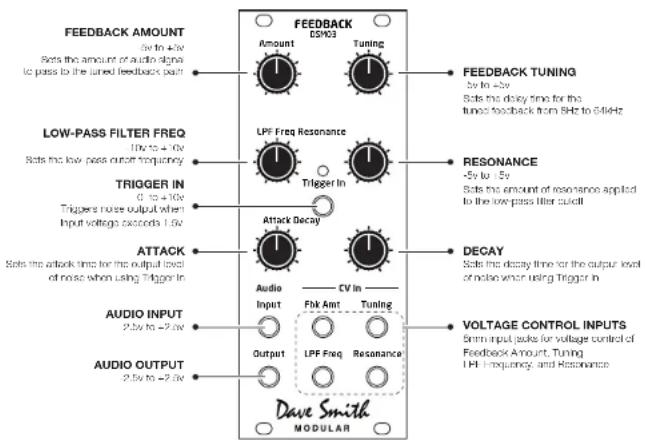
DSM03 Front Panel
![graph TD A["TRIGGER"] --> B["ENVELOPE"] B --> C["NOISE"] C --> D["FREQ RES LPF"] D --> E["FB DELAY"] E --> F["TUNING"] G["IN OUT"] --> H["+"] I["FB AMOUNT"] --> H H --> J["FREQ RES LPF"] J --> K["FB DELAY"] K --> L["TUNING"] M["DECAYATTACK"] --> N["-->"] style A fill:#f9f,stroke:#333 style B fill:#c…](/content/2026/05/1000235/images/b747ec77f65455c52254eea3b0d85b75c4215dc56865d498f722f3e5246ad7af.jpg)
DSM03 Circuit Diagram
About Tuned Feedback
The DSM03 Feedback Module's tuned feedback delay has a 9-octave range, which is most noticeable when it oscillates. The tuned feedback loop will track reasonably well at 1V/octave over a 3-4 octave range via control voltage (CV). Because the low-pass filter is in the feedback path, it is important to adjust the filter settings for best results. In other words, the filter settings will affect tracking accuracy. Setting the LPF FREQ knob to 12 o'clock is a good starting point. When an audio signal is passed through the input, the feedback tends to lock to frequencies of the input signal. So, a pitched audio input will result in closer feedback tracking, while non-pitched audio will give less predictable results.
Using the DSM03
The DSM03 has many uses, including as a signal processor and as a tone generator.
Signal Processing
You can create a broad variety of effects with the DSM03 by processing an audio signal though the tuned feedback path (and filtering it if desired). Experiment with the Tuning parameter to vary the effect in subtle and not-so-subtle ways.
To use the DSM03 as a signal processor:
- Connect an audio signal to the DSM03's AUDIO INPUT jack.
- Connect the DSM03's AUDIO OUTPUT to a mixer or other module that provides audio output.
- Adjust the TUNING parameter manually or connect a control voltage to its voltage control input to modulate it.
- Adjust the LPF EREQ and RESONANCE parameters manually or connect a control voltage to their voltage control inputs to apply additional processing to the sound.
Tone Generation
You can also use the DSM03 as a tone generator through its Karplus-Strong plucked string synthesis capabilities. In classic Karplus-Strong synthesis, a short excitation waveform (white noise) is generated. This excitation is output and fed back into a delay line. The output of the delay line is fed through a filter (the low-pass filter). The filter characteristics determine the harmonic structure of the decaying tone. The filtered output is mixed back into the output and fed back into the delay line.
To use the DSM03 as a tone generator:
- Connect a control voltage signal of 1.6V or greater to the DSM03's TRIGGER IN jack.
- Connect the DSM03's AUDIO OUTPUT to a mixer or other module that provides audio output.
- Adjust the ATTACK and DECAY parameters to shape the envelope of the generated sound.
- Adjust the TUNING parameter manually or connect a control voltage to its voltage control input to modulate it.
- Adjust the LPF FREQ and RESONANCE parameters manually or connect a control voltage to their voltage control inputs to shape the harmonic content of the generated sound.
DSM03 Specifications
IN/OUT
• Feedback Amount CV: -5V to +5V
- Tuning CV: -5V to +5V
• LPF Freq CV: -10V to +10V
• Resonance CV: -5V to +5V
• Audio In: -2.5V to +2.5V
• Audio Out: -2.5V to +2.5V
• Audio Trigger In: 0 to +10V
POWER
- Internal power connector (ribbon cable included)
CURRENT DRAW (5V or 12V operation set by jumper)
Using 5V power supply:
• +5V = 200 mA
• +12V = 10mA
-12V = 20mA
Using 12V supply only:
• +12V = 210mA
-12V - 20mA
PHYSICAL SPECS
- 1.99" W x 5.06" II (50.5 mm x 128.5 mm)
- Width: 10 IIP
- Depth (measured from back of panel with power cable installed): 1.54" (39 mm)
INCLUDED
- Mounting screws
- Ribbon cable for power connection
Product Support and Warranty
Contacting Technical Support
If you are having a problem with the DSM03, contact Technical Support at support@davesmithinstruments.com. Please include the purchase date.
Warranty Repair
Dave Smith Instruments warrants that the DSM03 will be free from defects in materials and/or workmanship for 1 year from the date of purchase. Please register your product online at www.davesmithinstruments.com to establish the date of purchase. (This is not a requirement for warranty service, but it will help expedite the process.)
Please contact support@davesmithinstruments.com to determine the best course of action for getting your DSM03 repaired. For your own protection, as well as ours, please do not return any product to Dave Smith Instruments without a return authorization (RA) number. To issue an RA number, Technical Support needs:
- Your name
- Your return address
- Your email address
• A phone number where you can be reached
• The date of purchase and where purchased
If you need to return your DSM03 for repair, you are responsible for getting it to DSI. We highly recommend insuring it and packing in the original packaging. Damage resulting from shipping a product with insufficient packaging is not covered by warranty.
- ABOUT TUNED FEEDBACK
- USING THE DSM03
- SIGNAL PROCESSING
- TO USE THE DSM03 AS A SIGNAL PROCESSOR
- TONE GENERATION
- TO USE THE DSM03 AS A TONE GENERATOR
- DSM03 SPECIFICATIONS
- IN/OUT
- POWER
- CURRENT DRAW (5V OR 12V OPERATION SET BY JUMPER)
- PHYSICAL SPECS
- INCLUDED
- PRODUCT SUPPORT AND WARRANTY
- CONTACTING TECHNICAL SUPPORT
- WARRANTY REPAIR
Brand : Dave Smith
Model : DSM03
Category : Sound synthesizer