
Multimixer 6 - Audio Mixer M-AUDIO - Free user manual and instructions
Find the device manual for free Multimixer 6 M-AUDIO in PDF.


| Product Type | Audio Mixer |
| Brand | M-Audio |
| Model | Multimixer 6 |
| Number of Channels | 6 |
| Input Connectors | 6 x XLR/TRS combo jacks, 2 x RCA stereo |
| Output Connectors | 2 x XLR main out, 2 x TRS monitor out, 1 x headphone out |
| Frequency Response | 20 Hz - 20 kHz |
| Equalizer | 3-band EQ per channel (high, mid, low) |
| Phantom Power | +48V, switchable |
| Power Supply | External 12V DC adapter (included) |
| Dimensions (W x D x H) | 260 x 200 x 60 mm |
| Weight | 1.5 kg |
| Construction Material | Metal chassis with plastic knobs |
| Cleaning Instructions | Wipe with dry cloth; do not use solvents |
| Safety Features | Ground lift switch, overload protection |
| Spare Parts Availability | Contact M-Audio support for replacement knobs, power supply, and connectors |
| Repairability | Serviceable by qualified technician; no user-serviceable parts inside |
| Included Accessories | Power adapter, user manual |
Frequently Asked Questions - Multimixer 6 M-AUDIO
User questions about Multimixer 6 M-AUDIO
0 question about this device. Answer the ones you know or ask your own.
Ask a new question about this device
Download the instructions for your Audio Mixer in PDF format for free! Find your manual Multimixer 6 - M-AUDIO and take your electronic device back in hand. On this page are published all the documents necessary for the use of your device. Multimixer 6 by M-AUDIO.
USER MANUAL Multimixer 6 M-AUDIO
MultiMixer6 is an extremely low noise, professional quality, 6 channel stereo line mixer. The 6 panable inputs enable you to place a sound source anywhere in the stereo field. MultiMixer6 is ideal for multimedia applications or for an onstage mix of multiple line-level sound sources.
MultiMixer6 comes with an external 9 volt, 300 milliamp ac power adaptor. This adaptor should be plugged into a standard wall socket and then into the MultiMixer6's back power jack. When this is done the MultiMixer6 power LED will light. MultiMixer6 will not work unless power is plugged in.
The MultiMixer6 design makes it very versatile. Here are a few typical examples of how you might use MultiMixer6:
Multimedia Mixing
Many multimedia applications use multiple sound sources. In a typical multimedia application, plug the MultiMixer6 in as follows:
- Connect the stereo output from your computer soundcard to MultiMixer6 Inputs 1 and 2.
- Connect outputs from your MIDI tone module to inputs 3 & 4.
- And connect the audio output from a CD-ROM to inputs 5 & 6. Now you can use the Multimixer6 pan pots to position the sounds wherever you want them, and the gain pots to adjust the levels so the overall sound is balanced.
Live Sound Mixing
Although the MultiMixer6 will not take a mic level signal, it has many uses in live performance. Here are a couple of examples:
- Mixing your separate tone modules to a single stereo signal.
- Combining your mic mixer out with the keyboards output and an guitar rack output for a quick onstage monitor mix.
Tips
If you set the MultiMixer6's gains too high for a given input, you may encounter distortion or signal clipping. This will surely happen if you plug in a synthesizer with its channel gain set to full volume and set MultiMixer6 left and right master level pots to full. If you hear any distortion, try reducing the keyboard output level. Your MultiMixer6 should always sound clean and noise free.
MultiMixer6 amplifies and inverts the phase of signals by 180 degrees. This will rarely effect operation unless somehow you manage to sum MultiMixer6's output with the same output shifted by some other phase amount, in which case you may notice phase cancellation. You may even find a use for MultiMixer6's phase inversion in correcting the phase inversion of another system.
MultiMixer™ Description
■ Front - Headphones. 1/4" stereo jack. Plug in your headphones here. If you are using Walkman type phones you'll need an adaptor. The MultiMixer6 is happiest with 600 Ohm phones, but should work with almost any headphones. You can also use the headphone jack as an auxiliary output.
■ Top - 1-6 Gain. Adjustable gain levels for each of the individual inputs. These are true gain controls, not volume pots. What this means is that the MultiMixer6 never amplifies the signal more than necessary so the noise level is always as low as possible (of course, if your sound source is noisy the output will be too). The center detent position is roughly unity gain.
■ Top - 1-6 Pan. Controls where in the stereo image the sound will appear. Adjustable from all the way left to all the way right. The center detent position is equal mix right and left.
■ Top - Master Levels (Left and Right). Control the overall left and right output levels. These pots also control the level of the headphone output.
■ Top - Power LED. Shows when MultiMixer6 is on.
■ Back - Inputs (1-6). 1/4" mono phone jacks. 6 of the individual line level inputs. Remember, if you want to use a microphone or guitar with MultiMixer6 you will need a separate mic or guitar pre-amplifier.
■ Back - Outputs (L & R). 1/4" phone jacks. These are the main MultiMixer6 left and right outputs. They should be plugged into either a power amplifier or powered speaker inputs.
■ Back - 9v AC power. The jack into which you plug a 9v AC 300 milliamp power adaptor. MultiMixer6 will not work unless it receives power at this jack.
Contact
If you have any questions, comments or suggestions about this or any M-Audio product, we invite you to contact us by using the following information:
M-AUDIO U.S.
5795 Martin Road, Irwindale, CA 91706-6211, U.S.A.
Sales Information: 626-633-9050
Sales Information (email): info@m-audio.com
Tech Support: 626-633-9055
Tech Support (email): techsupt@m-audio.com
Fax: 626-633-9060
Internet Home Page: http://www.m-audio.com
M-AUDIO U.K.
Floor 6, Gresham House, 53 Clarendon Road, Watford WD17 1LA
Tel: 01923 204010 • Fax:01923 204039
Sales Information (phone): 44 (0) 1442 416590
Sales Information (fax): 44 (0) 1442 246832
Sales Information (email): info@maudio.co.uk
Technical Support (PC): 44 (0) 1309 671301
Technical Support (Mac): 44 (0) 1765 650072
Technical Support (email): support@maudio.co.uk
Internet Home Page: http://www.maudio.co.uk
M-AUDIO France
Floor 6, Gresham House, 53 Clarendon Road, Watford WD17 1LA
Tel: 01923 204010 • Fax:01923 204039
Informations Commerciales:0810 001 105
Informations Commerciales (email): info@m-audio.fr
Assistance Technique: 0820 000 731 (PC)
support@m-audio.fr ou mac@m-audio.fr (email)
Fax: +44 (0) 1442 246 832
Site Internet: http://www.m-audio.fr
M-AUDIO Deutschland (Germany)
Kuhallmand 34, D-74613 Ohringen, Germany
Sales Information: 49 7941 98 7000
Sales Information (email): info@m-audio.de
Technical Support: 49 7941 98 70030
Technical Support (email): support@m-audio.de
Fax: 07941 98 70070
Internet Home Page: http://www.m-audio.de
M-AUDIO Canada
1400 St-Jean Baptiste Ave. #150, Quebec City, QC G2E 5B7, Canada
Tel: 418-872-0444
Fax: 418-872-0034
Email: midimancanada@m-audio.com
Internet Home Page: http://www.m-audio.ca
M-AUDIO Japan
Annex Buliding 6F, 2-18-10 Marunouchi
Naka-Ku, Nagoya 460-0002, Japan
Tel: 81 52 218 3375
Fax: 81 52 218 0875
Technical Support: 0820 00 731
Email: info@m-audio.co.jp
Internet Home Page: http://www.m-audio.co.jp

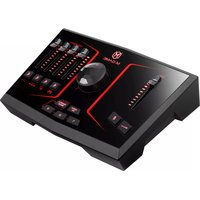
Brand : M-AUDIO
Model : Multimixer 6
Category : Audio Mixer