
SFP-LX-10-E - Network component ZYXEL - Free user manual and instructions
Find the device manual for free SFP-LX-10-E ZYXEL in PDF.


Pick your language and provide your email: we'll send you a specifically translated version.
| Product Type | SFP (Small Form-factor Pluggable) Transceiver |
| Data Rate | 1.25 Gbps |
| Wavelength | 1310 nm |
| Transmission Distance | Up to 10 km (6.2 miles) |
| Connector Type | Duplex LC Single-mode |
| Fiber Type | Single-mode (9/125 µm) |
| Output Power (min/max) | -8.2 dBm to -0.5 dBm |
| Receiver Sensitivity (max) | -20 dBm |
| Power Consumption | Less than 1 W |
| Operating Temperature | 0°C to 70°C (32°F to 158°F) |
| Storage Temperature | -40°C to 85°C (-40°F to 185°F) |
| Dimensions (W x H x D) | 13.4 x 8.5 x 56.5 mm (0.53 x 0.33 x 2.22 in) |
| Weight | Approx. 25 g (0.88 oz) |
| Compliance | IEEE 802.3z, SFF-8472, RoHS |
| Digital Diagnostics (DDMI) | Supported |
| Laser Safety | Class 1 (IEC 60825-1) |
| Maintenance | Clean optical connectors with lint-free wipes and isopropyl alcohol. |
| Cleaning | Use a fiber optic cleaning kit to avoid contamination. |
| Safety Precautions | Do not look directly into the laser beam. Avoid electrostatic discharge. |
| Spare Parts & Repairability | Not user-serviceable; replace as a unit. Spare parts not available individually. |
Frequently Asked Questions - SFP-LX-10-E ZYXEL
Is the ZyXEL SFP-LX-10-E compatible with any switch?
It is compatible with any switch that supports industry-standard SFP modules and operates at 1.25 Gbps. For optimal performance, use ZyXEL switches or check your switch's compatibility list.
What is the maximum distance supported?
The SFP-LX-10-E supports distances up to 10 km over single-mode fiber (9/125 µm). Attenuation and splices may reduce the actual reach.
What type of fiber optic cable should I use?
Use single-mode fiber (9/125 µm) with LC duplex connectors. Multi-mode fiber will not work for 10 km distances.
Does it support Digital Diagnostics (DDMI)?
Yes, the SFP-LX-10-E supports Digital Diagnostics Monitoring (DDMI) per SFF-8472, allowing you to monitor parameters like temperature, voltage, and optical power.
How do I clean the optical connectors?
Use a lint-free wipe moistened with isopropyl alcohol to gently clean the ferrule. Alternatively, use a dedicated fiber optic cleaning tool. Avoid touching the end face.
Can I use this module in a Gigabit Ethernet network?
Yes, it supports 1.25 Gbps data rate, suitable for 1000BASE-LX Gigabit Ethernet applications.
Is the module hot-swappable?
Yes, SFP modules are designed for hot-swapping. Ensure you follow proper ESD precautions and power down the port if possible.
What is the typical power consumption?
The module consumes less than 1 watt of power, making it energy-efficient.
How do I troubleshoot if the link is not working?
Check the following: 1) Verify the fiber cable is single-mode and in good condition. 2) Ensure the connectors are clean. 3) Confirm both ends are matched (same wavelength and distance rating). 4) Check switch configuration and port status.
What safety precautions should I take?
The module is Class 1 laser (eye-safe under normal operation). Do not stare into the optical port. Avoid electrostatic discharge by using a grounded wrist strap when handling.
User questions about SFP-LX-10-E ZYXEL
0 question about this device. Answer the ones you know or ask your own.
Ask a new question about this device
No questions yet. Be the first to ask one.
Download the instructions for your Network component in PDF format for free! Find your manual SFP-LX-10-E - ZYXEL and take your electronic device back in hand. On this page are published all the documents necessary for the use of your device. SFP-LX-10-E by ZYXEL.
USER MANUAL SFP-LX-10-E ZYXEL
| ZYXELSFP and SFP+ TransceiversUser's GuideSee the Zyxel website for a list of supported transceivers. | IntroductionUse a transceiver module for connection to a remote device, SFP and SFP+ transceiver modules are hot swappable. You can install and remove a module while your device is operating.SFP/SFP+ modules both use 3.3V power input and LC-type connectors.SFP/SFP+ modules support data rates of 10CM/16/103 bus and single mode/multi-mode connection based on its specification.Handling WarningAn modules are ototic sensitive. To prevent damage from electrostatic discharge (ESD), it is recommended you attach on ESD preventive wrist strap to your wrist and to a bare metal surface when you install or remove a module. | Installing a Module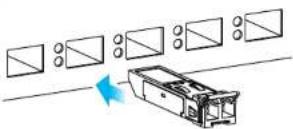 | Connecting a Fiber-optic Cable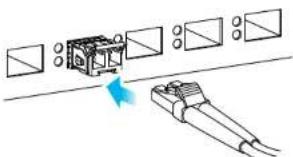 |
| Support InformationUSATHEU-1920 256 407https://support.yxcel.eusupport/cyxcel.comEU ImporterZyxel Communications A/SGrassover/J 398.2 th. 2950 Seccorg, DenmarkEditor: Zyxel communicationUS ImporterZyxel Communications Inc.ESD Not in Miller Street, Amsterdam, CA 30808-2001http://www.zyxel.compageCopyright © 2022 Zyxel Communications Corp. All Rights Reserved.EAC | All modules one dust sensitive. When not in use, always keep the dust plug on. Avoid getting dust and other contaminant into the optical boxes, as the optics do not work correctly when obstructed with dust.Safety WarningAll modules are equipped with a Class T laser, which emits invisible radiation. Keep the following safety warnings carefully.• To avoid possible eye injury, do not look into an operating fiber optic module's connectors.• Laser radiation is present when the device or system is powered up.• Only trained and qualified personnel should be allowed to install or replace these modules.Environmental Warnings• Dispose of your fiber optic module according to all national laws and regulations. | Attach on ESD preventive wrist strap to your wrist and to a bare metal surface.Remove the module from its protective packaging.Locate the transmit (TX) and the receive (Rx) markings on the module.Align the module in front of the slot opening on a device.Make sure the latch is in the lock position, then insert the module into the slot until the module snaps into place.Module the installation orientation varies depending on your device. Your module comes with a mechanism that prevents incorrect insertion. Do NOT force or twist the module into a slot. | Remove the dust plugs from the module and cables.Identify the signal transmission direction of the fiber-optic cable and the module. Insert one end of the fiber-optic cable into the module.Insert the other end of the fiber-optic cable into a remote device.Note: Refer to the user's guide that comes with your device for module slot status. |
| ZYXELYour Networking AllyWarranty CardThank you for purchasing Zyxel product, Zyxel has the great reputation in the market to provide best quality and performance on product and service for our customer. It is our pleasure to write you to visit our website and register your product for receiving the latest Firmware, drive and product related information if you still have further question or problems related to the product, please contact your vendor or our subsidiaries worldwide for further warranty information, kindly be noted the warranty terms may vary by regions, detail information is available on our website, please link to http://www.zyxel.com/support/warranty_information.htmlPurchase InformationZyxel Product Name.Hardware Serial Number.Date of Purchase(In certain countries, the warranty will be validated with seller's signature and stamp)Look on the product to ensure with the L.P.C. | Removing Fiber-optic Cable[IMAGE] | Unlocking a Module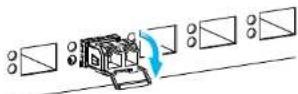 | Removing a Module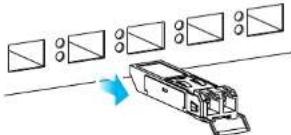 |
| Attach an ESD preventive wrist strap to your wrist and to a bare metal surface on the chassis.Disconnect all fiber-optic cables from the SFP/SFP+ module | Pull out the latch and down to unlock a module. Pullout | or use your thumb and index finger to grasp the tabs on both sides of the module, and carefully slide it out of the slot.Do NOT force or twist the module out of a slot. If the module will not slide out, grasp the tabs on both sides of the module with a slight up/down motion and carefully slide it out of the slot. If unsuccessful, contact Zyxel Support to prevent damage to your Zyxel Device and module.Insert the dust plug into the ports on a module. |
Manual assistant
Powered by Anthropic
Waiting for your message
Product information
Brand : ZYXEL
Model : SFP-LX-10-E
Category : Network component