EM-5031 - Kaffeemaschine Home Electric - Kostenlose Bedienungsanleitung
Finden Sie kostenlos die Bedienungsanleitung des Geräts EM-5031 Home Electric als PDF.


| Produkttyp | Vollautomatische Kaffeemaschine |
| Marke | Home Electric |
| Modell | EM-5031 |
| Spannung | AC 220-240 V, 50 Hz |
| Leistung | 1200–1450 W |
| Wassertankkapazität | 1800 ml |
| Bohnenbehälterkapazität | 200 g |
| Pumpentyp | ULKA Wasserpumpe, 19 Bar |
| Kaffeesorten | Espresso, Kaffee, Doppelter Espresso, Doppelter Kaffee |
| Zusatzfunktionen | Heißwasser, Dampf für Milchschaum, Gemahlener Kaffee |
| Einstellungen | Kaffeepulvermenge (7–12 g), Temperatur (75–95 °C), Kaffeevolumen (30–250 ml), Mahlgrad (einstellbar) |
| Brühgruppe | Herausnehmbar für Reinigung |
| Reinigung | Manuelle und automatische Entkalkung, Reinigungsprogramm |
| Warnanzeigen | Wassermangel, Brühgruppe fehlt, Abfallbehälter voll, Tür offen, Rohrverstopfung |
| Automatische Abschaltung | Einstellbar: Aus, 0,5 h, 4 h, 8 h |
| Werkseinstellung | Zurücksetzbar |
| Materialien | Edelstahl-Wasserrohr, Aluminiumlegierungskessel, Edelstahl-Mahlscheibe |
| Gewicht | 10 kg |
| Zubehör | Dampfstab, Abfallbehälter, Tropfschale |
Häufig gestellte Fragen - EM-5031 Home Electric
Benutzerfragen zu EM-5031 Home Electric
0 Frage zu diesem Gerät. Beantworten Sie die, die Sie kennen, oder stellen Sie Ihre eigene.
Eine neue Frage zu diesem Gerät stellen
Laden Sie die Anleitung für Ihr Kaffeemaschine kostenlos im PDF-Format! Finden Sie Ihr Handbuch EM-5031 - Home Electric und nehmen Sie Ihr elektronisches Gerät wieder in die Hand. Auf dieser Seite sind alle Dokumente veröffentlicht, die für die Verwendung Ihres Geräts notwendig sind. EM-5031 von der Marke Home Electric.
BEDIENUNGSANLEITUNG EM-5031 Home Electric
EM-5031
Instruction Manual

HomeElectric
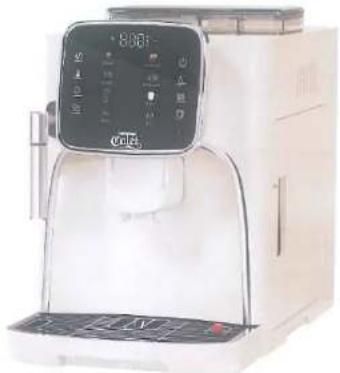
natural_image
White coffee maker with digital display and control panel (no visible text or symbols)Fully Automatic Coffee Machine
Model No. EM-5031
EM-5031
EM-5031
Content
- Safety Instruction 2
- Read before first use 3
- Function Introduction....4
3.1 Introduction of Control Panel....4
3.2 Power on Coffee Machine....4
3.3 Espresso/Coffee/Double Espresso/Double Coffee/Hot Water/Clean
function 5
3.4 Steam function for milk frother....5
3.5 Ground coffee function
3.0 Credit Function
- Setting functions....7
4.1 Coffee Setting....7
4.2 Manually Decalcification....8
4.3 Automatically Decalcification....9
4.4 Factory Reset 9
4.5 Power Off....10
4.6 Reset of Brewing Group Position....10
4.7 Automatic Shutdown Setting....10
4.8 Coffee Powder Fineness Adjustment Knob....10
- Warning Icons....12
- Cleaning and maintenance....12
6.1 Brewing unit maintenance....12
6.2 Daily Maintenance....13
6.3 Parameters, main functions and configuration table 15

1. Safety Instruction
(1) Read and preserve the instruction manual carefully.
(2) Keep the machine on a stable desktop, which is dry, ventilated and out of the reach of children.
(3) Understand the power specification before using the machine, and connect the power according to the requirement.
(4) Don't use the machine when it is under water shortage.
When filling the water tank, please remove it from the coffee machine, so that water cannot get into the coffee machine in any way.
Water that enters the interior of the coffee machine can lead to damages that are not covered by the warranty
(5) Dispose the plastic and bubble board in the package appropriately to avoid hurting children.
(6) Please keep the machine far from heat producer, avoid the damaging to the surface of machine.
(7) Normal environment temperature for use and storage is 0°C\~+45°C, frozen may damage the machine.
(8) Please add home temperature water in water container, hot water will damage the machine.
(9) Please use dry dishcloth to clean the machine.
(10) Don't change technical situation of the machine, which will cause serious harm, manufacturer will not bear the responsibility of such harm.
(11) Take out the brewing unit and wash each unit only when the machine is powered off.
(12) Please send the machine for professional repairing when it has problem, or the electrical is damaged.
(13)The machine is not applicable to the group deficiency in physical, feelings and mental, including children, except they are under the direction of guardian to operate the machine safely.
(14) Place to take care to avoid the entrance of water inside the machine and touch to the electrical parts, it will cause short circuit.
(15)If you will not use the machine for a long period, please power off and disconnect the plug.
(16)Should you have any questions on the machine. Please kindly contact us by service hotline.
EM-5031
2. Read before first use
(1) Please check and make sure the brewing unit is locked, dump container and drip tray in right position.
(2) Fill the water tank with clean water.
(3) Add more than 30g coffee beans into the bean container for first use. Remarks:
Only coffee beans can be placed in the bean container, please don't add water, coffee power, coffee beans mixed with stones and other hard objects, otherwise the grinder will be damaged.
| Voltage / Frequency | AC220-240V 50Hz | Rating Power | 1200-1450 W |
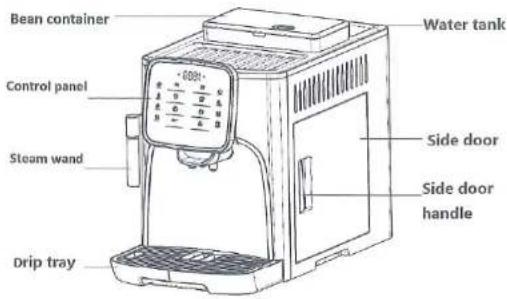
EM-5031
3. Function Introduction
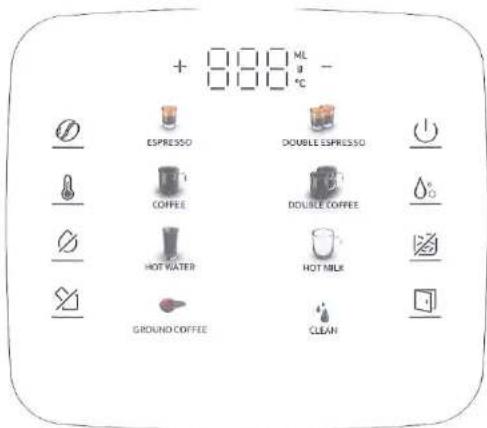
3.1 Introduction of Control Panel
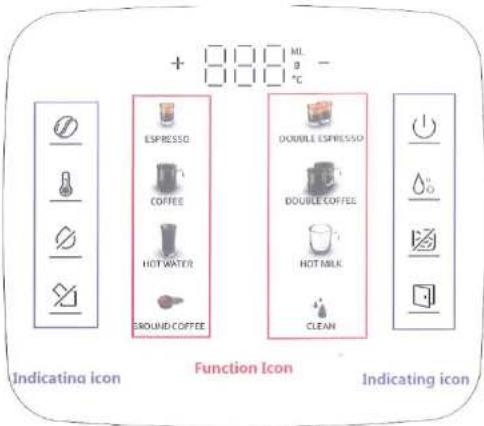
3.2 Power on Coffee Machine
(1) Please connect the power cord to the socket, the icon will be lighted, and the machine enters stand-by mode automatically.
(2) Press power icon ⏻, machine will start self-test. When all icons are lighted, the machines is ready for us.
EM-5031
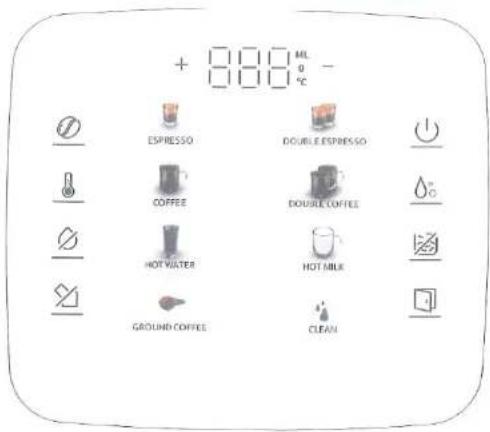
Remarks: Please don't operate the machine or open the side door during above processes.
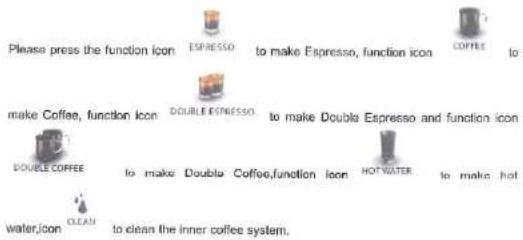
3.3 Espresso/Coffee/Double Espresso/Double Coffee/Hot Water/Clean function
EM-5031
During the process, users can also press the selected function icon again to stop the process any time.

Remarks:
After the coffee brewing process, the brewing group will return to its original position automatically, please operate the coffee machine after this process.
3.4 Steam function for milk frother
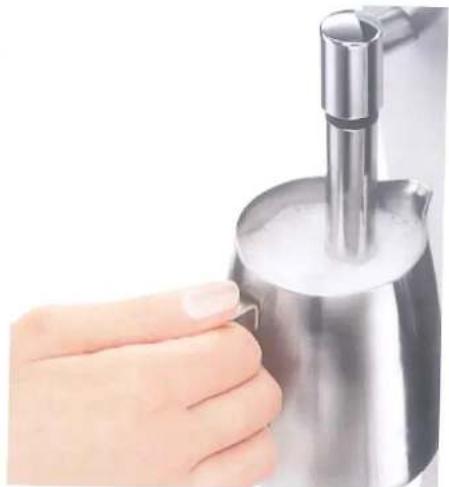
(1). Please press the Hot milk icon HOTMILK, the icon will flicker, the boiler is heating to the steam temperature. When the icon keeps fighting on, it means the steam is ready.
(2).Press the Hot milk icon "TOTMIL" again to make steam, please put the steam ward into milk to make milk foam, and press this icon again to stop the steaming process.



EM-5031
natural_image
Close-up of a hand pressing a metallic kettle with foam inside (no text or symbols visible)Remarks: After use of steam function, please don't touch the steam wand directly. We suggest users to make a short steaming again, in order to push out the remaining milk inside steam wand, then use cleaning cloth to scrub off the milk on the surface of steam wand.
(3). When finish steam function, please press the hot water icon HOT WATER , the machine will automatic cool down to the coffee making temperature. Eight function icons will flicker alternately during the cool down process, when they keep lighting on, the machine is ready to make coffee .
EM-5031
3.5 Ground Coffee function
(1) Press the ground coffee icon on the control panel, Espresso and coffee icons long bright, the machine goes into ground coffee mode, add one scope of ground coffee into the hole of bean container, meanwhile, choose the coffee icon you need (espresso, coffee) the machine will make coffee automatically.
(2) Press the coffee icon you just choose, stop the process.
Warning: the brewing unit will return to original position automatically after the cleaning, please do not operate any step until the brewing process completed.
3.6 Clean function
(1). Press the clean icon CLEAN on the control panel, the machine will start the cleaning.
(2). Press the clean icon CLEAN again, stop the cleaning process
Warning: the brewing unit will return to original position automatically after the cleaning, please do not operate any step until the brewing process completed.
4. Setting Functions
4.1 Coffee Setting
(1).Coffec Powder setting: Press the powder icon on the control panel, this + 888ML position will show the current powder volume press "for" to adjust the powder volume. The range is 7-12g, press powder icon to confirm the settings and back to main menu.
EM-5031
(2) Coffee Temperature setting: Press the temperature icon on the control panel, this
+ 000 mL - will the current temperature, press "+or-" to adjust the temperature. The range is 75-95°C, press temperature icon to confirm the settings and back to main menu.
(3) Coffee Volume setting: Press the volume icon on the control panel, this
position + 000 mL - will show the current volume press "+or-" to adjust the volume Press volume icon to confirm the settings and back to main menu.
4.2 Manually Decalcification
When the machine in stand by, please add descaling detergent into water container, long press
EM-5031
clean icon more than five seconds to start decalcification process: The
+ 0000 ^ML - icon and ① icon will be flickering, the machine will pump water for 30ml from steam wand and 30ml from brewer, stop for 2 minutes, and finish 9 rounds, all indicating lights flicker. After change fresh water to water container, please press the

espresso icon EPPRESSO, then the machine will pump clean water for 200ml from steam wand, 200ml from brewer, and finish the decalcification process automatically;
Remarks: The decalcification process will be stopped when press 🔊 icon.
4.3 Automatically Decalcification
The coffee machine will also automatically remind users to decalcification, long press. CLEAN icon and icon more than five seconds, go into the automatically decalcification volume settings, factory default setting is 20L-press "for-" to adjust, the range
is :OFF,20L,50L,100L,200L.Press ⏻ to back to the main menu. When the volume reached settings,eight function lights will flicker,press any function icons to start the decalcification process,which is same with the manually decalcification as 4.2.
4.4 Factory Reset
When the coffee machine is powered on, keep pressing the ground coffee icon and
clean icon CLEAN for 5 seconds, indicating lights will be flicker for 2 seconds and return back to main menu, the factory reset finish and machine ready for use.
EM-5031
4.5 Power off
Please press the power icon ⏻, the machine will be powered off and enter standby-by mode after a self-cleaning process.
4.6 Reset of brewing group position
When the brewing group is blocked in middle position and you can not disassemble it from
coffee machine, and the warning icons shows brewing group mission, which
pressing this icon for 3 seconds, then the brewing group will back to original position automatically. Remarks: Please don't operate the machine when the brewing group is backing to original position.
4.7 Automatic shutdown setting
When the machine is power on, long press hot water icon and hot milk icon together, and go into auto-turn off selling menu. Factory default setting is 0.5H, the adjustable
range: Turn off, 0.5H, 4H, 8H, press “+or-” to adjust, press power icon (1) to confirm and back to main menu.
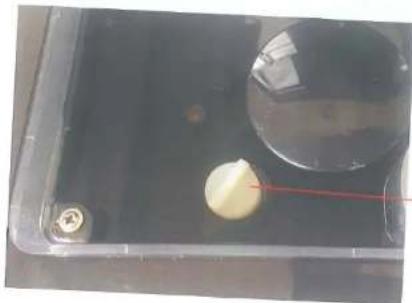
4.8 Coffee Powder Fineness Adjustment Knob
Please adjust the powder fineness when the grinder is working. If anti-clockwise adjusted, the powder size will be fine and coffee taste stronger; If clockwise adjusted, the powder size will be coarse and coffee taste weak.
EM-5031

Remarks:
After adjusting the powder fineness, adjusted coffee effect will exist from the third cup of coffee.
natural_image
Close-up of a transparent container with a small white spherical object and a red line, no visible text or symbols.Fineness adjustment knob
EM-5031
5. Warning Icons
| Icons | Issues | Handling Methods | |
| 1 | Water shortage | Adding water or reset the water tank | |
| 2 | Brewing unit missing | Make sure the brewing unit in right position and locked well | |
| 3 | Waste container is full | Please clean the waste container | |
| 4 | Door open | Close the door | |
| 5 | Tube Plugging | Make sure the water container is full, and press "ok" to recheck.For new coffee machine, it needs 2-3 times to restart.For the coffee machine has been used for a period, it needs to descale or check the machine. |
6. Cleaning and maintenance
6.1 Brewing unit maintenance
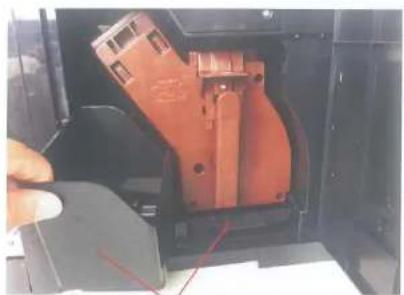
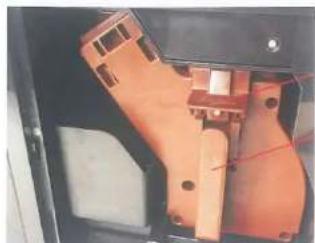
Method to take out the brewing unit
EM-5031
natural_image
Close-up of a red mechanical component being inserted into a black housing (no visible text or symbols)- Open the side door, take out the waste coffee cake container and waste coffee powder container;
natural_image
Close-up of an orange mechanical component with mounting holes and a red line indicating a measurement (no visible text or symbols)Ear of funnel
Handle
- Hold the handle of the brewing unit, press down the ear of funnel with your thumb, and then it can be drawed out. Method to put in the brewing unit:
The onset of the brewing unit takes place in reverse order.
When the sound "kala" is heard, it means put in the brewing unit successfully.
Next, put in the dump container and close the swing door.
6.2 Daily Maintenance
- Water tank:
It should be on daily cleaning, fill in fresh water before making coffee and better keep the water
EM-5031
temperature below 35° and use pure water.
- Brewing unit:
Wash and clean it when finishing daily household use. In the normal slate, just use fresh water to clean it every two weeks. If it is for restaurant use, then it should be on daily cleaning.
- Coffee machine cleaning:
If you would not use the machine for a long time, please clean the dump container, drip tray and each part of the machine to keep it clean.
▼1.16 Parameters, main functions and configuration table
| Main function parameters | |||
| Voltage | 220V/120V | Power | 1200W-14 50W |
| Water tank capacity | 1800ml | Bean container capacity | 200g |
| Coffee volume | 30-250ml | Net weight | 10kg |
| ULKA Water pump | 19 Bar | ||
| Pre immersion system | √ | Stainless steel water pipe | √ |
| Aluminum alloy integral boiler | √ | Powder amount adjustment | √ |
| Powder thickness adjustment | √ | Renovable water tank | √ |
| Coffee outlet adjustment | √ | Factory reset | √ |
| Stainless steel grinding disk | √ | ||
- Instruction Manual
- Content
- Safety Instruction
- Read before first use
- Function Introduction
- Power on Coffee Machine
- Steam function for milk frother
- Ground Coffee function
- Clean function
- Setting Functions
- Coffee Setting
- Manually Decalcification
- Automatically Decalcification
- Factory Reset
- Power off
- Reset of brewing group position
- Automatic shutdown setting
- Coffee Powder Fineness Adjustment Knob
- Warning Icons
- Cleaning and maintenance
- Brewing unit maintenance
- Daily Maintenance
Marke : Home Electric
Modell : EM-5031
Kategorie : Kaffeemaschine