
BU800ELCD - Wechselrichter CyberPower - Kostenlose Bedienungsanleitung
Finden Sie kostenlos die Bedienungsanleitung des Geräts BU800ELCD CyberPower als PDF.


| Produkttyp | USV (Unterbrechungsfreie Stromversorgung) |
| Modell | BU800ELCD |
| Marke | CyberPower |
| Scheinleistung | 800 VA |
| Wirkleistung | 480 W |
| Ausgangsspannung | 230 V ± 10 % |
| Wellenform | Simulierte Sinuswelle |
| Anzahl Ausgangssteckdosen | 8 (Schuko) |
| Eingangsspannung | 230 V |
| Batterietyp | Blei-Säure, wartungsfrei |
| Ladezeit | ca. 8 Stunden |
| Laufzeit bei halber Last | ca. 10 Minuten |
| Laufzeit bei voller Last | ca. 3 Minuten |
| Display | LCD |
| Abmessungen (B x H x T) | ca. 320 x 150 x 390 mm |
| Gewicht | ca. 12 kg |
| Geräuschpegel | < 40 dB |
| Betriebstemperatur | 0 °C bis 40 °C |
| Schutzfunktionen | Überspannung, Unterspannung, Kurzschluss, Überlast |
| Zertifizierungen | CE, TÜV |
| Garantie | 2 Jahre |
| Reinigung und Wartung | Mit einem trockenen Tuch reinigen; keine Flüssigkeiten verwenden. |
| Sicherheitshinweise | Gerät nicht öffnen; keine Feuchtigkeit; bei Beschädigung Netzstecker ziehen. |
| Reparatur und Ersatzteile | Nur durch autorisiertes Fachpersonal; Originalteile verwenden. |
Häufig gestellte Fragen - BU800ELCD CyberPower
Benutzerfragen zu BU800ELCD CyberPower
0 Frage zu diesem Gerät. Beantworten Sie die, die Sie kennen, oder stellen Sie Ihre eigene.
Eine neue Frage zu diesem Gerät stellen
Laden Sie die Anleitung für Ihr Wechselrichter kostenlos im PDF-Format! Finden Sie Ihr Handbuch BU800ELCD - CyberPower und nehmen Sie Ihr elektronisches Gerät wieder in die Hand. Auf dieser Seite sind alle Dokumente veröffentlicht, die für die Verwendung Ihres Geräts notwendig sind. BU800ELCD von der Marke CyberPower.
BEDIENUNGSANLEITUNG BU800ELCD CyberPower
CyberPower
User's Manual
BU800ELCD
BU1000ELCD

IMPORTANT SAFETY INSTRUCTIONS
(SAVE THESE INSTRUCTIONS)
This manual contains important safety instructions. Please read and follow all instructions carefully during installation and operation of the unit. Read this manual thoroughly before attempting to unpack, install, or operate your UPS.
CAUTION! To prevent the risk of fire or electric shock, install in a temperature and humidity controlled indoor area free of conductive contaminants. (See the specifications for the acceptable temperature and humidity range.)
CAUTION! To reduce the risk of overheating the UPS, do not cover the UPS' cooling vents and avoid exposing the unit to direct sunlight or installing the unit near heat emitting appliances such as space heaters or furnaces.
CAUTION! Do not attach non-computer-related items, such as medical equipment, life-support equipment, microwave ovens, or vacuum cleaners to UPS.
CAUTION! Do not plug the UPS input into its own output.
CAUTION! Do not allow liquids or any foreign object to enter the UPS. Do not place beverages or any other liquid-containing vessels on or near the unit.
CAUTION! In the event of an emergency, press the OFF button and disconnect the power cord from the AC power supply to properly disable the UPS.
CAUTION! Do not attach a power strip or surge suppressor to the UPS.
CAUTION! Unplug the UPS prior to cleaning and do not use liquid or spray detergent.
CAUTION! Servicing of batteries should be performed or supervised by personnel knowledgeable of batteries and the required precautions. Keep unauthorized personnel away from batteries.
CAUTION! The battery supply should be therefore disconnected in the plus and minus pole at the quick connectors of the battery when maintenance or service work inside the UPS is necessary.
CAUTION! Internal battery voltage is 12Vdc. Sealed, lead-acid, 6-cell battery.
CAUTION! When replacing the batteries, use the same number and type of batteries.
CAUTION! Do not dispose of batteries in a fire. The battery may explode. Do not open or mutilate the battery or batteries. Released electrolyte is harmful to the skin and eyes.
INSTALLING YOUR UPS SYSTEM
UNPACKING
The box should contain the following :(1) UPS Unitx1; (2) User Manualx1
OVERVIEW
The BU800/1000ELCD provides automatic voltage regulation for inconsistent utility power, and provides battery backup during power outages. The BU800/1000ELCD ensures consistent power to your computer system.
HARDWARE INSTALLATION GUIDE
-
Your new UPS may be used immediately upon receipt. However, recharging the battery for at least 8 hours is recommended to ensure that the battery's maximum charge capacity is achieved. Charge loss may occur during shipping and storage. To recharge the battery, simply leave the unit plugged into an AC outlet. The unit will charge in both the on and off position.
-
With the UPS unit off and unplugged, connect the computer, monitor, and any externally powered data storage device (Zip drive, Jazz drive, Tape drive, etc.) into the battery power supplied outlets. DO NOT plug a laser printer, copier, space heater, vacuum, paper shredder or other large electrical device into the battery power supplied outlets. The power demands of these devices will overload and possibly damage the unit.
-
Plug the UPS into a 2 pole, 3 wire grounded receptacle (wall outlet). Make sure the wall branch outlet is protected by a fuse or circuit breaker and does not service equipment with large electrical demands (e.g. air conditioner, refrigerator, copier, etc). Avoid using extension cords.
-
Press the power switch to turn the unit on. The power on indicator light will illuminate and the unit will "beep".
-
If an overload is detected, an audible alarm will sound and the unit will emit one long beep. To correct this, turn the UPS off and unplug at least one piece of equipment from the battery power supplied outlets. Wait 10 seconds. Make sure the circuit breaker / fuse is normal and then turns the UPS on.
-
To maintain optimal battery charge, leave the UPS plugged into an AC outlet at all times.
-
To store your UPS for an extended period, cover it and store with the battery fully charged. Recharge the battery every three months to ensure battery life.
BASIC OPERATION
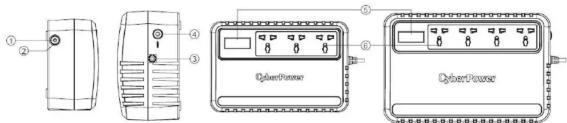
- Power Switch
Press the switch for 2 seconds to turn the UPS ON or OFF. Alarm setting: The audible alarm can be turned OFF or ON by quickly pressing the POWER button twice. The default setting is for the Alarm On. To turn the Alarm Off, quickly press the power button twice. You will hear two short beeps when the Alarm is turned off. To turn the Alarm back on, quickly press the power button twice. You will hear a single short beep when the Alarm is turned on.
- Led Indicators
LED is illuminated when the UPS is working.
-
Input Power Cord Connect to utility power
-
Input Circuit Breaker (BU1000ELCD only)
The circuit breaker provides optimal overload protection.
- LCD Display
High resolution and intelligent LCD display shows all the UPS information with icons and messages. For more information, please review the "Definitions for Illuminated LCD Indicators" section.
- AC outlet
The UPS provides outlets for connected equipment to insure temporary uninterrupted operation during a power failure and against surges and spikes.
DEFINITIONS FOR ILLUMINATED LED INDICATORS
| LED Alarm Condition | ||
| On Off Normal | ||
| Flash Beep | Twice Utility Failure | - The UPS is providing battery power to outlets. |
| Flash | Rapid Beeping | Utility Failure - The UPS is providing battery power. The rapid beeps indicate the battery will run out of power shortly. |
| On/Flash | Constant Tone | Overload - Occurs when connected equipment exceeds the rating of the unit. Turn the UPS off and unplug at least one piece of equipment from the UPS. |
DEFINITIONS FOR ILLUMINATED LCD INDICATORS
LCD Indication
The LCD display indicates a variety of UPS operational conditions. All descriptions apply when the UPS is plugged into an AC outlet and turned on or when the UPS is on battery.
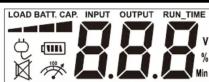
| Icon | Description |
| Load CapacityThe meter displays approximate load level of the UPS outlets. Each bar represents 25% of the load. | |
| Normal ModeWhen the icon is illuminated, the UPS works under normal condition.When the icon blinks, the UPS transfers to AVR mode. | |
| Battery ModeThe UPS is operating from its internal battery, supplying backup power to the connected equipment. | |
| MuteWhen the icon is illuminated, the audible alarm has been turned off. | |
| OverloadThe icon appears and an alarm sounds to indicate the battery supplied outlets are overloaded. | |
| OUTPUT | Output VoltageThe meter measures the AC voltage that the UPS is providing to the connected equipment in normal mode and battery mode. |
| INPUT | Input VoltageThe meter measures the input AC voltage of the UPS in normal mode. |
| % | PercentageEstimated backup time percentage of the UPS based on current battery capacity and load level. |
Operation Modes and Warning
There are several operation modes and overload warning of the UPS. The LCD will automatically cycle the UPS information. The LCD display will auto sleep after 5 minutes if no activity. If the LCD is off, press the button once and the LCD will be on again. The corresponding LCD displays are as shown below.
| LCD Display Figures Operation Mode | |
 | Line Mode: INPUT VoltageThe UPS is turned on and AC input power is normal. It supplies power to the connected equipment. This meter displays the input voltage of the UPS. |
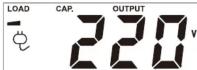 | Line Mode: OUTPUT VoltageThe UPS is turned on and AC input power is normal. It supplies power to the connected equipment. This meter displays the output voltage of the UPS. |
 | Line Mode: LOAD CAP.The UPS is operating in line mode. This meter displays the approximate load level of the UPS. |
 | Line Mode: BATT. CAP.The UPS is operating in line mode. This meter displays the approximate charge level of the UPS's internal battery. |
 | Battery ModeDuring a severe brownout or blackout, the Utility Power is absent and the UPS switches to Battery Mode. The battery will supply power to the connected equipment. |
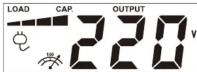 | Line Mode – OverloadThe UPS is operating on Line Mode. However the battery supplied outlets are overloaded. Unplug some of your equipment from the outlets until the Overload icon turns off and the alarm stops. |
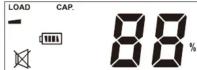 | Battery Mode – MuteQuickly press the power button twice to turn On or Off the audible alarm. |
TECHNICAL SPECIFICATIONS
| Model BU800ELCD BU1000ELCD | ||
| Capacity (VA/W) 800/480 1000/630 | ||
| Input | ||
| Voltage 220/230/240Vac | ||
| Nominal Frequency | 50/60Hz | |
| Output | ||
| On Battery Output Voltage | 230Vac +/-10% | |
| On Battery Output Frequency | 50/60Hz +/-1% | |
| Overload Protection | Breaker / Fuse | |
| Physical | ||
| Total UPS Receptacles | 3 | 4 |
| Dimensions (H x W x D)(mm) | 91.5 x 158 x 240 | 110.5 x 190 x 290 |
| Weight | 4.1 kg | 6.9 kg |
| Battery | ||
| Sealed Maintenance Free Lead Acid Battery | 12 V | 24 V |
| Typical Recharge Time | 8 Hours | |
| Warning Diagnostics | ||
| Indicators | Power On / Using Battery | |
| LCD Displays | Input / Output voltage, Load Capacity, Estimate BackupTime Percentage | |
| Audible Alarms | On Battery, Low Battery, Overload, Fault | |
| Environmental | ||
| Operating Temperature | 0°C to 40°C | |
| Operating Relative Humidity | 0 to 90% | |
| Management | ||
| Auto-Charger | Yes | |
| Auto-Restart | Yes | |
TROUBLESHOOTING
| Problem | Possible Cause | Solution |
| The UPS does not perform expected runtime. | Batteries are not fully charged. | Recharge the battery by leaving the UPS plugged in. |
| Battery is slightly worn out. | Contact CyberPower Systems Technical Support. | |
| The UPS will not turn on. | The unit is not connected to an AC outlet. | The unit must be connected to a 220-240Vac outlet. |
| The battery is worn out. | Contact CyberPower Systems Technical Support. | |
| Mechanical problem. | Contact CyberPower Systems Technical Support. | |
| Outlets do not provide power to equipment | Fuse is blown or breaker is tripped due to overload. | Turn the UPS off and unplug at least one piece connected equipment. Unplug the power cord of the UPS then contact CyberPower Systems technical support. or press the circuit breaker knob. Connect power cord then turn the UPS on. |
| Batteries are discharged | Allow the unit to recharge for at least 4 hours. | |
| Unit has been damaged by a surge or spike. | Contact CyberPower Systems Technical Support. |
PRODUCT REGISTRATION
Prompt product registration assures coverage under the Limited Warranty, and also allows the opportunity to be notified of product enhancements, upgrades, and other announcements.
the opportunity to be notified of product enhancements, upgrades, and other announcements. Registration is quick and easy.
Go to Product Registration page at www.cyberpower.com/product_registration
Cyber Power Systems, Inc.
www.cyberpower.com
For technical support, contact CyberPower at www.cyberpower.com/contact
Copyright©2022 Cyber Power Systems, Inc. All rights reserved
11F., No.26, Jinzhuang Rd., Nelhu Dist., Taipei City 114, Taiwan


Marke : CyberPower
Modell : BU800ELCD
Kategorie : Wechselrichter