GS2028PS4 - Schalter Cudy - Kostenlose Bedienungsanleitung
Finden Sie kostenlos die Bedienungsanleitung des Geräts GS2028PS4 Cudy als PDF.


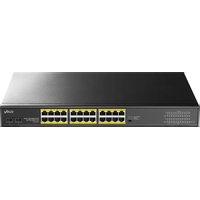
| Produkttyp | Managed Gigabit PoE+ Switch (L3) |
| Modell | GS2028PS4 |
| Marke | Cudy |
| PoE-Standard | IEEE 802.3af/at/bt |
| Anzahl PoE-Ports | 24 (PoE+) |
| Anzahl Gigabit SFP-Slots | 4 (1 Gbit/s) |
| Console-Port | Ja, 1x RJ45 |
| Schaltkapazität | 128 Gbit/s |
| PoE-Gesamtbudget | 300 W (max.) |
| Spannungsversorgung | AC 100-240 V, 50/60 Hz |
| Management | Web, CLI, Telnet, SSH, SNMP, RMON |
| VLAN-Unterstützung | MAC VLAN, Protocol VLAN, Private VLAN |
| Link-Aggregation | Statisch und LACP (bis zu 32 Gruppen) |
| Sicherheit | 802.1x, ACL, IP+MAC+Port-Bindung |
| Überspannungsschutz | Common Mode ≥ 6 kV, ESD ≥ 6 kV (Kontakt) |
| Betriebstemperatur | -20 °C bis 50 °C |
| Lagertemperatur | -40 °C bis 70 °C |
| Zertifizierungen | CE, FCC, RoHS |
| Garantie | 2 Jahre |
| Lieferumfang | Switch, Netzteil, Montagewinkel, Kurzanleitung |
Häufig gestellte Fragen - GS2028PS4 Cudy
Benutzerfragen zu GS2028PS4 Cudy
0 Frage zu diesem Gerät. Beantworten Sie die, die Sie kennen, oder stellen Sie Ihre eigene.
Eine neue Frage zu diesem Gerät stellen
Laden Sie die Anleitung für Ihr Schalter kostenlos im PDF-Format! Finden Sie Ihr Handbuch GS2028PS4 - Cudy und nehmen Sie Ihr elektronisches Gerät wieder in die Hand. Auf dieser Seite sind alle Dokumente veröffentlicht, die für die Verwendung Ihres Geräts notwendig sind. GS2028PS4 von der Marke Cudy.
BEDIENUNGSANLEITUNG GS2028PS4 Cudy
Warranty Regulations
■ When purchasing this product, users need to fill in the warranty card correctly and keep it properly for product warranty certificate
■ The product cannot be used normally due to performance failure within 6 months from the date of sale. The same product can be replaced
■ Product quality problems under normal use within 2 years from the date of sale re limited to 2 years warranty
■ The warranty service is only valid when the user follows the instructions and precautions
The following situations are not covered by the warranty: the product warranty card cannot be provided, the product warranty card is not filled in correctly, or the content of the warranty card is altered without authorization. The machine is artificially damaged, the machine is disassembled, the seal is torn, or is damaged
due to abnormal use, the product natural wear
For products that exceed the 2-year warranty or are not covered by the warranty, we provide paid repair services
Panel description
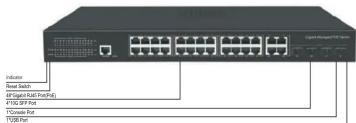
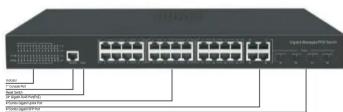
Package List
Ethernet switch: 1 Set, Instruction manual: 1 PCS, Certificate: 1 PCS, Power cord: 1 PCS Serial cable: 1PCS, Rack ear: 1 Pairs, Operation manual CD: 1 PCS
Parameters
| Power (PoE) | 10 Ports | 20 Ports | 32/36 Ports 28/52 Ports | |
| 120W 300W | 300/400W 400/800W | |||
| Bandwidth | 20Gbps | 40Gbps 56/128Gbps | 128/176Gbps | |
| Ports | 8*PoE2*1G SFP1*Console | 16*PoE2*RJ452*1G SFP1*Console | 24*PoE/SFP4*RJ454/8*1G SFP1*Console | 24/48*PoE4*10G SFP1*USB1*Console |
| Network Medium | 10BASE-T: Cat3, 4, 5 or above UTP(≤100 M)100BASE-TX: Cat5 or above UTP(≤100 M)1000BASE-TX: Cat5 or above UTP(≤100 M)Multi-mode Fiber: 50/125, 62.5/125, 100/140umSingle-mode Fiber: 8/125, 8.7/125, 9/125, 10/125um | |||
| Working Voltage | AC 100~240 V 50/60Hz | |||
| Working Environment | Working Temperature: -20~50°CStorage Temperature: -40~70°CWorking Humidity: v5%~95%,non-condensing | |||
| Certification CE,FCC,RoHS | ||||
| MTBF | 100,000 hour | |||

Quick Installation Guide
Model: GS2028PS4
Product Highlights
■ Support IEEE 802.1d, IEEE 802.1w, IEEE 802.1s, IEEE 802.1p, IEEE 802.3, IEEE 802.3u, IEEE 802.3x, IEEE 802.3z, IEEE 802.3ab, IEEE 802.3ae standards
■ L3 management, support DHCP Server, QoS, ACL, SNMP V1/V2/V3, IGMP Snoopingv1/v2
■ Support STP/RSTP/MSTP (ERPS), Support loop detection and self-healing, support remote loopback monitoring and control (802.3ah OAM)
■ Support multiple VLAN division, MAC VLAN, Protocol VLAN, Private VLAN; Support IPV4/IPV6, IPv6 Ping, IPv6 Tracert, IPv6 Telnet, IPv6 SSH, IPv6 SSL
■ Support IP address + MAC address + VLAN+Port binding, DHCP Snooping, support IP source and DAI protection
■ Support global information, statistical information, log information, port rate, duplex, flow control, maximum frame length configuration, port mirror, port speed limit, port energy saving, user management, alarm management and configuration management
■ Supports static aggregation and LACP dynamic aggregation. Based on IP, MAC and mixed load balancing mode, it supports up to 32 aggregation groups (8 ports for each aggregation group)
■ Support 802.1x port authentication, AAA Authentication, TACACS + authentication, support web, Telnet, CLI, SSH, SNMP, RMON management
Genius PoE, PoE power supply priority, PoE watchdog, PoE port power supply and power configuration, PoE time management, PoE supports IEEE 802.3 AF v/ at / BT Standard (POE enabled products only)
■ Surge : common mode ≥ 6kV, ESD: contact ≥ 6kV, air ≥ 8Kv
Mounting & Management
1.Fix the two L-shaped mounting brackets on both sides of the switch with the screws
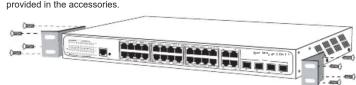
- The mounting brackets is fixed on the guide groove with screws to ensure that the switch is stably and horizontally installed on the rack
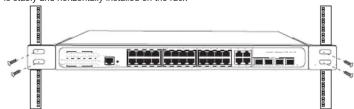
3.Log in to the web management interface
1). Use an Ethernet twisted pair cable (you need to prepare your own) to connect the PC to any Ethernet port on the switch
2). Configure any address in the 192.168.2.0/24 network segment (except 192.168.2.1/24) for the PC, such as 192.168.2.10.
3). Start the browser on the PC and use the address: http://192.168.2.1 to log in to the Web management interface of the switch (the default user name and password are both admin). Notice: The picture is for reference only, please subject to the actual product.
Indicator Description
| DefinitionIndicators Status Description | |||
| PWR | Power supply | Lighting | Powered |
| Light off | Power failed | ||
| SYS | System state | Lighting | system normal |
| Light off | system startup | ||
| SW /Mode | DIP indicator | Lighting | VLAN |
| Shining | Extend | ||
| Light off | Default | ||
| Link /1000M | Network Link | Lighting | Link normal |
| Light off | Link Disconnected | ||
| Link /ACT | Network Link&Data | Lighting | Link normal |
| Shining | Data Transmission | ||
| Light off | Link Disconnected | ||
| PoE | PoE Supply | Lighting | PoE ON |
| Light off | PoE OFF | ||
CE Mark Warning
This is a class B product. In a domestic environment, this product may cause radio interference, in which case the user may be required to take adequate measures.
EU declaration of conformity
Cudy hereby declares that the device is in compliance with the essential requirements and other relevant provisions of directives 2014/30/EU, 2014/35/EU, 2009/125/EC and 2011/65/EU. The original EU declaration of conformity may be found at http://www.cudy.com/en/ce
For support and warranty, please visit: http://www.cudy.com/. Specifications are subject to change without notice. Cudy is a registered trademark of Shenzhen Cudy Technologies Co., Ltd. Other brands and product names are trademarks or registered trademarks of their respective holders. Copyright©2022 Shenzhen Cudy Technology Co., Ltd. All rights reserved.
CE EAC ↓ FC i RoHS Made in China
Marke : Cudy
Modell : GS2028PS4
Kategorie : Schalter