
UT366A - Messung Uni-T - Kostenlose Bedienungsanleitung
Finden Sie kostenlos die Bedienungsanleitung des Geräts UT366A Uni-T als PDF.


| Produkttyp | Digitales Manometer (Differenz- und Relativdruckmessgerät) |
| Modell | UT366A |
| Marke | Uni-T |
| Messbereich Druck | 0,00 ~ ±15,00 kPa / 0,0 ~ ±150,0 mbar / 0,000 ~ ±0,150 bar / 0,000 ~ ±2,175 psi / 0,0 ~ ±112,5 mmHg / 0,00 ~ ±60,29 inH₂O / 0,000 ~ ±4,429 inHg / 0,00 ~ ±34,80 Ozin² / 0,000 ~ ±0,152 kgcm² / 0,000 ~ ±5,026 ftH₂O / 0,0 ~ ±1531 mmH₂O / 0,0 ~ ±150,0 hPa |
| Messbereich Windgeschwindigkeit | 0,0 ~ 19999,9 m/s / 0 ~ 199999 fpm (mit optionalem Pitotrohr) |
| Einheiten | kPa, mbar, bar, psi, mmHg, inH₂O, inHg, Ozin², kgcm², ftH₂O, mmH₂O, hPa, m/s, fpm |
| Genauigkeit | ±0,5 % FS @ 25 °C |
| Auflösung (Beispiel) | 0,01 kPa / 0,1 mbar / 0,001 bar / 0,001 psi / 0,1 mmHg / 0,01 inH₂O / 0,001 inHg / 0,01 Ozin² / 0,001 kgcm² / 0,001 ftH₂O / 1 mmH₂O / 0,1 hPa / 0,1 m/s / 1 fpm |
| Stromversorgung | 3 × AAA 1,5 V-Batterien |
| Batterielebensdauer (ohne Hintergrundbeleuchtung) | > 50 Stunden |
| Batterielebensdauer (mit Hintergrundbeleuchtung) | > 30 Stunden |
| Automatische Abschaltung | Nach 5 Minuten Inaktivität (einschaltbar) |
| Hintergrundbeleuchtung | Ein-/ausschaltbar |
| Anzeige | LCD |
| Datenhaltung | Ja (Taste HOLD) |
| Nullstellung | Ja (lange Taste drücken) |
| Max/Min/Avg-Funktion | Ja |
| Sondenanzeigeleuchten | Grün (positiver Druck), Rot (negativer Druck); ein-/ausschaltbar |
| Betriebstemperatur | 0 °C ~ 50 °C |
| Lagertemperatur | 10 °C ~ 60 °C |
| Luftfeuchtigkeit (Betrieb) | ≤ 85 % RH |
| Luftfeuchtigkeit (Lagerung) | ≤ 75 % RH |
| Zubehör | Schlauch, Tragetasche, Magnetaufhängung, Bedienungsanleitung |
| Wartung | Gehäuse mit feuchtem Tuch reinigen; Batterien bei längerer Nichtnutzung entfernen; keine aggressiven Reiniger verwenden |
Häufig gestellte Fragen - UT366A Uni-T
Benutzerfragen zu UT366A Uni-T
0 Frage zu diesem Gerät. Beantworten Sie die, die Sie kennen, oder stellen Sie Ihre eigene.
Eine neue Frage zu diesem Gerät stellen
Laden Sie die Anleitung für Ihr Messung kostenlos im PDF-Format! Finden Sie Ihr Handbuch UT366A - Uni-T und nehmen Sie Ihr elektronisches Gerät wieder in die Hand. Auf dieser Seite sind alle Dokumente veröffentlicht, die für die Verwendung Ihres Geräts notwendig sind. UT366A von der Marke Uni-T.
BEDIENUNGSANLEITUNG UT366A Uni-T
UT366A
Digital Manometer User Manual
Introduction
UT366A is an instrument for measuring gauge pressure and differential pressure. UT366A can measure P1/P2 pressure independently with LED indication. It can be widely used in industrial manufacturing, HVAC, plumbing and other industries. Combined with an optional pitot tube, UT366A can also measure wind speed.
Accessories
- Digital manometer 1pcs
- Hose----1pcs
- AAA batteries---- 3pcs
- User manual---- 1pcs
- Carrying bag----1pcs
- Magnetic hook---- 1pcs
Specifications
- Units:
kPa, mbar, bar, psi, mmHg, inH₂O, inHg, Ozin², kgcm², ftH₂O, mmH₂O, hPa, m/s, fpm - Pitot tube coefficient: 1
- Range:
0.00\~±15.00 kPa 0.00\~±34.80 Ozin²
0.0\~±150.0 mbar 0.000\~±0.152 kgcm²
0.000\~±0.150 bar 0.000\~±5.026 ftH₂O
0.000\~±2.175 psi 0.0\~±1531 mmH₂O
0.0\~±112.5 mmHg 0.0\~±150.0 hPa
0.00\~±60.29 inH₂O 0.0\~19999.9 m/s
0.000\~±4.429 inHg 0\~199999 fpm
- Resolution:
0.01 kPa 0.01 Ozin²
0.1 mbar 0.001 kgcm²
0.001 bar 0.001 ftH2O
0.001 psi 1mmH2O
0.1 mmHg 0.1 hPa
0.01 inH₂O 0.1 m/s
0.001 inHg 1 fpm
- Accuracy: ±0.5% FS@25°C
- Unit memory: When the product is turned on, its pressure unit defaults to the unit when it was turned off last time.
- Auto power off: When the meter enables this function, it will power off automatically if no button press occurs for 5 minutes.
- Low battery indication: When the battery power is less than 3.7V, a low battery indicator will appear.
- Batteries: AAA 1.5V * 3pcs
- Power consumption: Power off: < 10uA; Power on: < 10mA; Power on and backlight on: < 15mA; Power on and one indicator light on: < 15mA;
Power on and two indicator lights on: < 20mA;
Power on, backlight and one indicator light on: < 20mA;
Power on, backlight and two indicator lights on: < 25mA.
- Battery life:
Power on: > 50h;
Power on and backlight on: > 30h;
Power on and one indicator light on: > 30h;
Power on and two indicator lights on: > 25h;
Power on, backlight and one indicator light on: > 25h;
Power on, backlight and two indicator lights on: > 20h.
- Environmental requirements: Operating: 0\~50°C ≤85%RH; storage: 10\~60°C ≤75%RH.
Product Structure
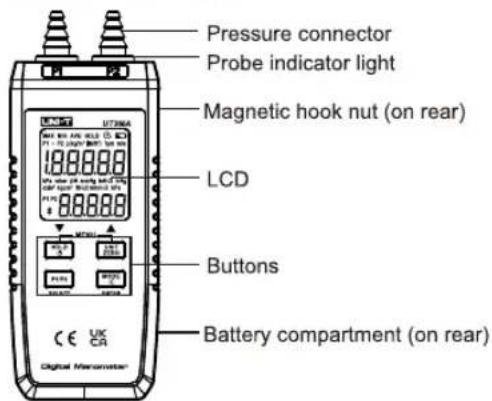
Buttons
- Function
| Long press | Short press | Short press in the menu | |
| Power on/off | Data hold | - | |
| Data zero | Unit conversion | + | |
| Turn on/off probe indicator lights | P1/P2 selection | Select | |
| Turn on/off backlight | Max/Min/Avg | Enter |
- Button combination
| Short press: enter/exit the setting menu | |
| Short press: view the version NO. |
Operation
Turn on/off the meter:
Long press
Data hold:
Short press
Unit conversion:
Short press UNIT ZHND to switch between selectable units: kPa, mbar, bar, psi, mmHg, inH₂O, inHg, Ozin², kgcm², ftH₂O, mmH₂O, hPa, m/s, fpm.
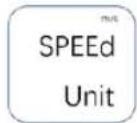
Among them, m/s and fpm are wind speed units. To switch between these two units, short press [HOLD] and [UNITED] to enter the setting menu, press [WIDE] to enter the wind speed unit setting mode
(as shown in the figure), and then short press [200] to switch between m/s and fpm. Press [200] and [200] again to exit the setting menu. Notes: Wind speed needs to be measured with a pitot tube. Please purchase it separately if necessary.
Data zero:
The meter can start to operate about 5 seconds after being turned on. Before the hose is connected, if the value displayed on the screen is not 0, users need to long press ☐ to zero the data. P1 and P2 will be zeroed at the same time.
Switch channel:
The default channel when turning on the meter is P1-P2 (the difference between P1 and P2 channels). Short press — to step through P1-P2 > P1-P2/P1 > P1-P2/P2 > P1/P2.
Turn on/off probe indicator lights:
Long press
Max/Min/Avg selection:
Short press
Turn on/off the backlight:
Long press
Turn on/off the auto power off function:
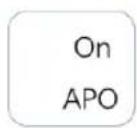
Short press 0.0 and 7.0 to enter the setting menu. Short press 7.0 to turn on/off the APO function. Short press 0.0 and 7.0 again to exit the setting menu. If the APO function is turned on, the icon ⬇ will show on the
screen. The meter will power off automatically if no button press occurs for 5 minutes.
Air density setting:
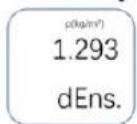
Air density setting is related to the wind speed measurement. In general, the air density is 1.293kg/m3. If users need to measure the flow rate of other gases, they can set the corresponding
density. Short press 📄 and 📄 to enter the setting menu. Press 📄 twice to set the air density. Short press 📄 or 📄 to add/subtract the selected digit. Short press 📄 to select the next digit.
Short press 📄 and 📋 and again or short press 📁 once to exit the setting menu.
Probe Indicator Lights
| P1+ | 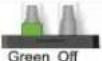 | P2+ | 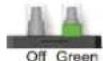 |
| P1- | 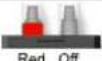 | P2- | 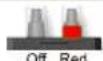 |
Note: P1+ means the air pressure value is positive (the indicator light is green). P1- means the air pressure value is negative (the indicator light is red). Long press the "P1/P2" button to turn on/off the indicator lights. In the P1-P2 channel, the indicator lights are off by default, and cannot be turned on.
Maintenance and Repair
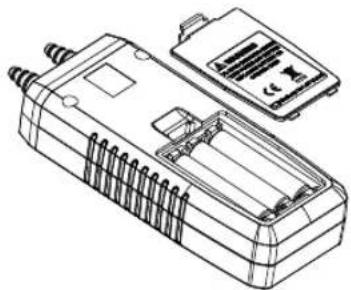
- Replace batteries:
When the icon ▶ is displayed on the screen, follow the steps below to replace the batteries.
- Remove the battery cover.
- Take out the old batteries and put in three new 1.5V AAA batteries. Pay attention to the battery polarity.
- Close the battery cover.
natural_image
Technical line drawing of a rectangular electronic device with internal components and a separate display panel (no text or symbols)- Clean the housing:
Clean the housing with a damp cloth. Please do not use corrosive detergents or solutions for cleaning in that they are corrosive to the housing, especially to the LCD.
- Please take out the batteries if the meter is not used for a long time to prevent battery leakage from seriously damaging the meter.
- Do not disassemble this meter or change the internal.
Troubleshooting
- "OL or -OL": The reading exceeds the measurement range. Please measure within the specified range
- "Lo": The wind speed reading is too low. Check whether the two ends of the pitot tube are connected reversely.
- “-” flashes when measuring wind speed: The data should be zeroed. Otherwise there will be measurement errors.
- Wind speed unit flashes when pressing the "P1/P2" button: The P1-P2 channel is used for wind speed measurement by default, and cannot be changed.
- "Err": Ambient temperature compensation NTC has errors.
UNI-T.
UNI-TREND TECHNOLOGY (CHINA) CO., LTD.
No. 6, Gong Ye Bei 1st Road,
Songshan Lake National High-Tech Industrial
Development Zone, Dongguan City,
Guangdong Province, China
- UT366A
- Digital Manometer User Manual
- Introduction
- Accessories
- Specifications
- Operation
- Turn on/off the meter:
- Data hold:
- Unit conversion:
- Data zero:
- Switch channel:
- Turn on/off probe indicator lights:
- Max/Min/Avg selection:
- Turn on/off the backlight:
- Turn on/off the auto power off function:
- Air density setting:
- Probe Indicator Lights
- Maintenance and Repair
- Troubleshooting
- UNI-T.
Marke : Uni-T
Modell : UT366A
Kategorie : Messung