
AR18CY4ZAPGNNA - Klimaanlage SAMSUNG - Kostenlose Bedienungsanleitung
Finden Sie kostenlos die Bedienungsanleitung des Geräts AR18CY4ZAPGNNA SAMSUNG als PDF.


| Produkttyp | Split-Klimaanlage (Innengerät) |
| Modell | AR18CY4ZAPGNNA |
| Marke | Samsung |
| Kältemittel | R-32 |
| Betriebsarten | Auto, Kühlen, Trocknen, Lüften, Schnell, Leise, 5-Stufen-Kühlung, good'sleep, Timer |
| Fernbedienung | Ja, mit LCD-Display |
| Display | LED-Temperaturanzeige und Funktionssymbole |
| Luftstromsteuerung | Vertikal automatisch, horizontal manuell |
| Auto Clean-Funktion | Ja, zur Geruchsvermeidung |
| Filterreinigung | Alle zwei Wochen oder bei Anzeige |
| Stromversorgung | 230 V ~ 50 Hz, 1 Ph |
| Sicherheitsmerkmale | Kindersicherung, Überhitzungsschutz, automatische Abschaltung |
| Geräuschpegel (Innengerät) | nicht angegeben |
| Abmessungen (B x H x T) | nicht angegeben |
| Gewicht | nicht angegeben |
| Reparierbarkeit | Qualifizierter Techniker erforderlich; Originalersatzteile beim Hersteller |
| Garantie | Siehe Garantiekarte |
Häufig gestellte Fragen - AR18CY4ZAPGNNA SAMSUNG
Benutzerfragen zu AR18CY4ZAPGNNA SAMSUNG
0 Frage zu diesem Gerät. Beantworten Sie die, die Sie kennen, oder stellen Sie Ihre eigene.
Eine neue Frage zu diesem Gerät stellen
Laden Sie die Anleitung für Ihr Klimaanlage kostenlos im PDF-Format! Finden Sie Ihr Handbuch AR18CY4ZAPGNNA - SAMSUNG und nehmen Sie Ihr elektronisches Gerät wieder in die Hand. Auf dieser Seite sind alle Dokumente veröffentlicht, die für die Verwendung Ihres Geräts notwendig sind. AR18CY4ZAPGNNA von der Marke SAMSUNG.
BEDIENUNGSANLEITUNG AR18CY4ZAPGNNA SAMSUNG

Safety Information
CAUTION
When the air conditioner does not operate properly for cooling or heating, there is a possibility of refrigerant leakage. If any leakage, stop operation, ventilate the room, and consult your dealer immediately for recharging refrigerant. The refrigerant is not harmful. However, if it comes in contact with fire, it may generate harmful gases and there is risk of fire.
During transportation of the indoor unit, the pipe lines shall be covered with brackets for protection. Do not move
the product with holding the pipe lines.
• It may cause gas leakage.
Do not cut or burn the refrigerant container of pipings. Do not point the air direction to the fireplace or heater
Preparation
Registering the product / Reading the manual / Connecting to Services

1 Launch a QR code reader app and scan the QR code image on the product.
2 Choose the desired menu from the Product Registration, Manual, Customer Support. If you choose
'Manual' you can read the manual of the product you purchased.

We provide online manuals that can be accessed via your smartphone or our website to contribute in reducing the usage of manuals in paper format, as part of efforts to save the Earth.
5 English
DB68-09629U-02JB_23Y AR9500T 8IEL GEO Wind 2way TL_EN_indd 1
Safety Information
WARNING: Read This Manual
Read and follow all safety information and instructions before installation, use, or maintenance of this
appliance. Incorrect installation, use, or maintenance of this appliance can result in death, serious injury, or property damage. Keep these instructions with this appliance. This manual is subject to change. For the latest version, visit www.samsung.com.
Because the instructions in this manual cover various models, the characteristics of your air conditioner may differ slightly from those described. If you have any questions, please contact your service provider or visit www.samsung.com.
Notices and notes
To make you aware of safety messages and highlighted information, we use the following notices and notes.
throughout this manual:
WARNING
Hazards or unsafe practices that may result in severe personal injury or death.
CAUTION
Hazards or unsafe practices that may result in minor personal injury or property damage
IMPORTANT
Information of special interest
NOTE
Supplementary information that may be useful

WARNING: Low burning velocity material
(This appliance is filled with R-32.)
The user and installer guides should be read carefully.
The user and installer guides should be read carefully.
The service guide should be read carefully.
2 English
Indoor Unit Overview
The appearance of the actual product may differ slightly from the image below.
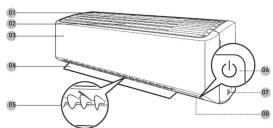
01 Air intake
02 Air filter
03 Front pan
64 Airflow blade (up and down, Automatically)
05 Airflow blade (left and right, Manually)
06 Power button/Remote control receiver
07 Room temperature sensor
08 Display
Display

01 Temperature indicator (numeric)
Filter reset indicator (CF)
Electricity consumption indicator (numenc) (For AR**CVN7****, AR**CV4****, AR**CV5****)
[FORUM C14, 1910] AR**CYMZ**** models]
Auto clean indicator [ ]
02 Timer indicator
good'sleep ind
03 5 Step Cooling Indicator
6 English
Failure to follow the instructions may result in electric shock.
injury, fire, breakdown or explosion.
FOR GENERAL
This appliance is not intended for use by persons (including children) with reduced physical, sensory or mental capabilities, or lack of experience and knowledge, unless they have been given supervision or instruction concerning use of the appliance by a person responsible for their safety. Children should be supervised to ensure that they do not play with the appliance.
FOR INSTALLATION
WARNING
Use a power cord with this product's power specifications or higher and use the power cord for this
appliance only. In addition, do not use an extension cord.
- Do not use it together with a power strip or other device.
Do not extend the power cord.
- Connect power matching to voltage / frequency / rated current conditions
The installation of this appliance must be performed by a qualified technician or service company. Do not attempt to install the air conditioner yourself.
Domestic attempt to install the air conditioner yourself. Install an ionization Switch next to the Air Conditioner
Instat on Doubtort Simcohmic to the Air Conditioner (but not on the games of the Air Conditioner) and circuit breaker dedicated to the air conditioner.
Do not install this appliance near a heater, or flammable material. Do not install this appliance in a humid, oily or
dusty location, in a location exposed to direct sunlight and water (or rain). Do not install this appliance in a location
where gas may leak.
This appliance must be properly grounded. Do not ground the appliance to a gas pipe, plastic, waterpipe, or telephone line
- Make sure to use a socket-outlet with ground.
CAUTION
When installing the outdoor unit, make sure to connect the drain hose so that draining is performed correctly.
- The water generated during heating by the outdoor unit may overflow and result in property damage. In particular, in winter, if a black of ice falls, it may result in injury, death or property damage.
In paroctal, in winter, if a block of ice falls, it may result in injury, death or property damage. Do not install the product in a place where thermo-hypoprat is needed (such as carous room
Do not install the product in a place where the mis-hydrobot is needed (such as server room, machinery room, computer room, etc.)
- Those places do not provide guaranteed operation condition of the product therefore performance
can be poor in these places.
FOR POWER SUPPLY
WARNING
Do not pull or excessively bend the power line. Do not twist or tie the power line. Do not book the power line over a
do not push on exclusively send the power line but must be of the power line but must have the power line over a metal object, place a heavy object on the power line, insert the power line between objects, or push the power line
into the space behind the appliance.
If the supply cord is damaged, it must be replaced by the manufacturer, its service agent or similarly qualified
persons in order to avoid a hazard.
3 English
Operating the Air Conditioner
Functions and Buttons

01 Display
02 Button
NOTE
NOTE
- Features may differ depending on models
depending on products
| Function Button and Selection Display | |||||
| Power On/Off | ◎ | ||||
| Auto | ◎ ▶ Select Auto. | Auto | |||
| Cool | ◎ ▶ Select Cool. | Cool | |||
| Dry | ◎ ▶ Select Dry. | Dry | |||
| Fan | ◎ ▶ Select Fan. | Fan | |||
| Fast | In Cool mode ▶ | Fast | |||
| 5 Step Cool | In Cool mode ▶ | 5step | |||
| Quiet | In Cool mode ▶▶▶▶▶▶▶▶▶▶▶▶▶▶▶▶▶▶▶▶▶▶▶▶▶▶▶▶▶▶▶▶▶▶▶▶▶▶▶▶▶▶▶▶▶▶▶▶▶▶▶▶▶▶▶▶▶▶▶▶▶▶▶▶▶▶▶▶▶▶▶▶▶▶▶▶▶▶▶▶▶▶▶▶▶▶▶▶▶▶▶▶▶▶▶▶▶▶▶▶▶> | Quiet | |||
| Electricity consumption clock | ▪ For AR*CV2****, AR*CV4****, AR*CV5****, AR*CV8**** models | Usage | |||
| In operation ▶▶▶▶▶▶▶▶▶▶▶▶▶▶▶▶▶▶▶▶▶▶▶▶▶▶▶▶▶▶▶▶▶▶▶▶▶▶▶▶▶▶▶▶▶▶▶▶▶▶▶▶▶▶▶▶▶▶▶▶▶▶▶▶▶▶▶▶▶▶▶▶▶▶▶▶▶▶▶▶▶▶▶▶▶▶▶▶▶▶▶▶▶▶▶▶▶▶> | Beep | ||||
| Beep | ◎ ▶ ▶ ▶ ▶ ▶ ▶ ▶ ▶ ▶ ▶ ▶ ▶ ▶ ▶ ▶ ▶ ▶ ▶ ▶ ▶ ▶ ▶ ▶ ▶ ▶ ▶ ▶ ▶ ▶ ▶ ▶ ▶ ▶ ▶ ▶ ▶ ▶ ▶ ▶ ▶ ▶ ▶ ▶ ▶ ▶ ▶ ▶ ▶ ▶ ▶ △ | Beep | |||
| Display lighting | ◎ ▶ ▶ ▶ ▶ ▶ ▶ ▶ ▶ ▶ ▶ ▶ ▶ ▶ ▶ ▶ ▶ ▶ ▶ ▶ ▶ ▶ ▶ ▶ ▶ ▶ ▶ ▶ ▶ ▶ ▶ ▶ ▶ ▶ ▶ ▶ ▶ ▶ ▶ ▶ ▶ ▶ ▶ ▶ ▶ ▶ ▶ ▶ ▶ △ | Display | |||
| Timed on/off | ◎ ▶ ▶ ▶ ▶ ▶ ▶ ▶ ▶ ▶ ▶ ▶ ▶ ▶ ▶ ▶ ▶ ▶ ▶ ▶ ▶ ▶ ▶ ▶ ▶ ▶ ▶ ▶ ▶ ▶ ▶ ▶ ▶ ▶ ▶ ▶ ▶ ▶ ▶ ▶ ▶ ▶ ▶ ▶ ▶ ▶ ▶ ▶ ▶ ▽ | ◎ □ □ □ □ □ □ □ □ □ □ □ □ □ □ □ □ □ □ □ □ □ □ □ □ □ □ □ □ □ □ □ □ □ □ □ □ □ □ □ □ □ □ □ □ □ □ □ □ □ □ ▢ □ □ □ □ □ □ □ □ □ □ □ □ □ □ □ □ □ □ □ □ □ □ □ □ □ □ □ □ □ □ □ □ □ □ □ □ □ □ □ □ □ □ □ □ □ □ □ □ □ △ | ◎ □ □ □ □ □ □ □ □ □ □ □ □ □ □ □ □ □ □ □ □ □ □ □ □ □ □ □ □ □ □ □ □ □ □ □ □ □ □ □ □ □ □ □ □ □ □ □ □ ▢ △ △ △ △ △ △ △ △ △ △ △ △ △ △ △ △ △ △ △ △ △ △ △ △ △ △ △ △ △ △ △ △ △ △ △ △ △ △ △ △ △ △ △ △ △ △ △ △ △ △ ▩ △ △ △ △ △ △ △ △ △ △ △ △ △ △ △ △ △ △ △ △ △ △ △ △ △ △ △ △ △ △ △ △ △ △ △ △ △ △ △ △ △ △ △ △ △ △ △ △ △ ▲ △ △ △ △ △ △ △ △ △ △ △ △ △ △ △ △ △ △ △ △ △ △ △ △ △ △ △ △ △ △ △ △ △ △ △ △ △ △ △ △ △ △ △ △ △ △ △ △ △ ▸ △ △ △ △ △ △ △ △ △ △ △ △ △ △ △ △ △ △ △ △ △ △ △ △ △ △ △ △ △ △ △ △ △ △ △ △ △ △ △ △ △ △ △ △ △ △ △ △ △ ▴ △ △ △ △ △ △ △ △ △ △ △ △ △ △ △ △ △ △ △ △ △ △ △ △ △ △ △ △ △ △ △ △ △ △ △ △ △ △ △ △ △ △ △ △ △ △ △ △ △ ▼ △ △ △ △ △ △ △ △ △ △ △ △ △ △ △ △ △ △ △ △ △ △ △ △ △ △ △ △ △ △ △ △ △ △ △ △ △ △ △ △ △ △ △ △ △ △ △ △ △ ▽ | ◎ □ □ □ □ □ □ □ □ □ □ □ □ □ □ □ □ □ □ □ □ □ □ □ □ □ □ □ □ □ □ □ □ □ □ □ □ □ □ □ □ □ □ □ □ □ □ □ ▢ △ ▲ ▲ ▲ ▲ ▲ ▲ ▲ ▲ ▲ ▲ ▲ ▲ ▲ ▲ ▲ ▲ ▲ ▲ ▲ ▲ ▲ ▲ ▲ ▲ ▲ ▲ ▲ ▲ ▲ ▲ ▲ ▲ ▲ ▲ ▲ ▲ ▲ ▲ ▲ ▲ ▲ ▲ ▲ ▲ ▲ ▲ ▲ ▲ ▲ ▲ ▼ △ ▲ ▲ ▲ ▲ ▲ ▲ ▲ ▲ ▲ ▲ ▲ ▲ ▲ ▲ ▲ ▲ ▲ ▲ ▲ ▲ ▲ ▲ ▲ ▲ ▲ ▲ ▲ ▲ ▲ ▲ ▲ ▲ ▲ ▲ ▲ ▲ ▲ ▲ ▲ ▲ ▲ ▲ ▲ ▲ ▲ ▲ ▲ ▲ ▼ ▲ ▲ ▲ ▲ ▲ ▲ ▲ ▲ ▲ ▲ ▲ ▲ ▲ ▲ ▲ ▲ ▲ ▲ ▲ ▲ ▲ ▲ ▲ ▲ ▲ ▲ ▲ ▲ ▲ ▲ ▲ ▲ ▲ ▲ ▲ ▲ ▲ ▲ ▲ ▲ ▲ ▲ ▲ ▲ ▲ ▲ ▲ ▲ ▲ △ ▲ ▲ ▲ ▲ ▲ ▲ ▲ ▲ ▲ ▲ ▲ ▲ ▲ ▲ ▲ ▲ ▲ ▲ ▲ ▲ ▲ ▲ ▲ ▲ ▲ ▲ ▲ ▲ ▲ ▲ ▲ ▲ ▲ ▲ ▲ ▲ ▲ ▲ ▲ ▲ ▲ ▲ ▲ ▲ ▲ ▲ ▲ ▲ ▅ ▲ ▲ ▲ ▲ ▲ ▲ ▲ ▲ ▲ ▲ ▲ ▲ ▲ ▲ ▲ ▲ ▲ ▲ ▲ ▲ ▲ ▲ ▲ ▲ ▲ ▲ ▲ ▲ ▲ ▲ ▲ ▲ ▲ ▲ ▲ ▲ ▲ ▲ ▲ ▲ ▲ ▲ ▲ ▲ ▲ ▲ ▲ ▲ ▲ ▅ ▼ ▲ ▲ ▲ ▲ ▲ ▲ ▲ ▲ ▲ ▲ ▲ ▲ ▲ ▲ ▲ ▲ ▲ ▲ ▲ ▲ ▲ ▲ ▲ ▲ ▲ ▲ ▲ ▲ ▲ ▲ ▲ ▲ ▲ ▲ ▲ ▲ ▲ ▲ ▲ ▲ ▲ ▲ ▲ ▲ ▲ ▲ ▲ ▲ ▅ ▱ ▲ ▲ ▲ ▲ ▲ ▲ ▲ ▲ ▲ ▲ ▲ ▲ ▲ ▲ ▲ ▲ ▲ ▲ ▲ ▲ ▲ ▲ ▲ ▲ ▲ ▲ ▲ ▲ ▲ ▲ ▲ ▲ ▲ ▲ ▲ ▲ ▲ ▲ ▲ ▲ ▲ ▲ ▲ ▲ ▲ ▲ ▲ ▲ ▲ ▵ ▲ ▲ ▲ ▲ ▲ ▲ ▲ ▲ ▲ ▲ ▲ ▲ ▲ ▲ ▲ ▲ ▲ ▲ ▲ ▲ ▲ ▲ ▲ ▲ ▲ ▲ ▲ ▲ ▲ ▲ ▲ ▲ ▲ ▲ ▲ ▲ ▲ ▲ ▲ ▲ ▲ ▲ ▲ ▲ ▲ ▲ ▲ ▲ ▲ ▹ ▲ ▲ ▲ ▲ ▲ ▲ ▲ ▲ ▲ ▲ ▲ ▲ ▲ ▲ ▲ ▲ ▲ ▲ ▲ ▲ ▲ ▲ ▲ ▲ ▲ ▲ ▲ ▲ ▲ ▲ ▲ ▲ ▲ ▲ ▲ ▲ ▲ ▲ ▲ ▲ ▲ ▲ ▲ ▲ ▲ ▲ ▲ ▲ ▲ ▾ ▼ ▲ ▲ ▲ ▲ ▲ ▲ ▲ ▲ ▲ ▲ ▲ ▲ ▲ ▲ ▲ ▲ ▲ ▲ ▲ ▲ ▲ ▲ ▲ ▲ ▲ ▲ ▲ ▲ ▲ ▲ ▲ ▲ ▲ ▲ ▲ ▲ ▲ ▲ ▲ ▲ ▲ ▲ ▲ ▲ ▲ ▲ ▲ ▲ ▼ ▼ ▲ ▲ ▲ ▲ ▲ ▲ ▲ ▲ ▲ ▲ ▲ ▲ ▲ ▲ ▲ ▲ ▲ ▲ ▲ ▲ ▲ ▲ ▲ ▲ ▲ ▲ ▲ ▲ ▲ ▲ ▲ ▲ ▲ ▲ ▲ ▲ ▲ ▲ ▲ ▲ ▲ ▲ ▲ ▲ ▲ ▲ ▲ ▲ △ ▼ ▲ ▲ ▲ ▲ ▲ ▲ ▲ ▲ ▲ ▲ ▲ ▲ ▲ ▲ ▲ ▲ ▲ ▲ ▲ ▲ ▲ ▲ ▲ ▲ ▲ ▲ ▲ ▲ ▲ ▲ ▲ ▲ ▲ ▲ ▲ ▲ ▲ ▲ ▲ ▲ ▲ ▲ ▲ ▲ ▲ ▲ ▲ ▲ ▵ ▼ ▲ ▲ ▲ ▲ ▲ ▲ ▲ ▲ ▲ ▲ ▲ ▲ ▲ ▲ ▲ ▲ ▲ ▲ ▲ ▲ ▲ ▲ ▲ ▲ ▲ ▲ ▲ ▲ ▲ ▲ ▲ ▲ ▲ ▲ ▲ ▲ ▲ ▲ ▲ ▲ ▲ ▲ ▲ ▲ ▲ ▲ ▲ ▲ ▹ ▼ ▲ ▲ ▲ ▲ ▲ ▲ ▲ ▲ ▲ ▲ ▲ ▲ ▲ ▲ ▲ ▲ ▲ ▲ ▲ ▲ ▲ ▲ ▲ ▲ ▲ ▲ ▲ ▲ ▲ ▲ ▲ ▲ ▲ ▲ ▲ ▲ ▲ ▲ ▲ ▲ ▲ ▲ ▲ ▲ ▲ ▲ ▲ ▲ ▩ ▼ ▲ ▲ ▲ ▲ ▲ ▲ ▲ ▲ ▲ ▲ ▲ ▲ ▲ ▲ ▲ ▲ ▲ ▲ ▲ ▲ ▲ ▲ ▲ ▲ ▲ ▲ ▲ ▲ ▲ ▲ ▲ ▲ ▲ ▲ ▲ ▲ ▲ ▲ ▲ ▲ ▲ ▲ ▲ ▲ ▲ ▲ ▲ ▼ ●□ ○ ○ ○ ○ ○ ○ ○ ○ ○ ○ ○ ○ ○ ○ ○ ○ ○ ○ ○ ○ ○ ○ ○ ○ ○ ○ ○ ○ ○ ○ ○ ○ ○ ○ ○ ○ ○ ○ ○ ○ ○ ○ ○ ○ ○ ○ ○ ○ ○ ○ ○ ○ ○ ○ ○ ○ ○ ○ ○ ○ ○ ○ ○ ○ ○ ○ ○ ○ ○ ○ ○ ○ ○ ○ ○ ○ ○ ○ ○ ○ ○ ○ ○ ○ ○ ○ ○ ○ ○ ○ ○ ○ ○ ○ ○ ○ ○ ○ ○ ○ ●○ ○ ○ ○ ○ ○ ○ ○ ○ ○ ○ ○ ○ ○ ○ ○ ○ ○ ○ ○ ○ ○ ○ ○ ○ ○ ○ ○ ○ ○ ○ ○ ○ ○ ○ ○ ○ ○ ○ ○ ○ ○ ○ ○ ○ ○ ○ ○ ○ ○ ○ ○ ○ ○ ○ ○ ○ ○ ○ ○ ○ ○ ○ ○ ○ ○ ○ ○ ○ ○ ○ ○ ○ ○ ○ ○ ○ ○ ○ ○ ○ ○ ○ ○ ○ ○ ○ ○ ○ ○ ○ ○ ○ ○ ○ ○ ○ ○ ○ ○ ∞ ○ ○ ○ ○ ○ ○ ○ ○ ○ ○ ○ ○ ○ ○ ○ ○ ○ ○ ○ ○ ○ ○ ○ ○ ○ ○ ○ ○ ○ ○ ○ ○ ○ ○ ○ ○ ○ ○ ○ ○ ○ ○ ○ ○ ○ ○ ○ ○ ○ ○ ○ ○ ○ ○ ○ ○ ○ ○ ○ ○ ○ ○ ○ ○ ○ ○ ○ ○ ○ ○ ○ ○ ○ ○ ○ ○ ○ ○ ○ ○ ○ ○ ○ ○ ○ ○ ○ ○ ○ ○ ○ ○ ○ ○ ○ ○ ○ ○ ○ ◎ ○ ○ ○ ○ ○ ○ ○ ○ ○ ○ ○ ○ ○ ○ ○ ○ ○ ○ ○ ○ ○ ○ ○ ○ ○ ○ ○ ○ ○ ○ ○ ○ ○ ○ ○ ○ ○ ○ ○ ○ ○ ○ ○ ○ ○ ○ ○ ○ ○ ○ ○ ○ ○ ○ ○ ○ ○ ○ ○ ○ ○ ○ ○ ○ ○ ○ ○ ○ ○ ○ ○ ○ ○ ○ ○ ○ ○ ○ ○ ○ ○ ○ ○ ○ ○ ○ ○ ○ ○ ○ ○ ○ ○ ○ ○ ○ ○ ○ ○ Orange LED | ◎ ○ ○ ○ ○ ○ ○ ○ ○ ○ ○ ○ ○ ○ ○ ○ ○ ○ ○ ○ ○ ○ ○ ○ ○ ○ ○ ○ ○ ○ ○ ○ ○ ○ ○ ○ ○ ○ ○ ○ ○ ○ ○ ○ ○ ○ ○ ○ ○ ○ ○ ○ ○ ○ ○ ○ ○ ○ ○ ○ ○ ○ ○ ○ ○ ○ ○ ○ ○ ○ ○ ○ ○ ○ ○ ○ ○ ○ ○ ○ ○ ○ ○ ○ ○ ○ ○ ○ ○ ○ ○ ○ ○ ○ ○ ○ ○ ○ ○ ○○○○○○○○○○○○○○○○○○○○○○○○○○○○○○○○○○○○○○○○○○○○○○○○○○○○○○○○○○○○○○○○○○○○○○○○○○○○○○○○○○○○○○○○○○○○○○○○○○○○○△○○○○○○○○○○○○○○○○○○○○○○○○○○○○○○○○○○○○○○○○○○○○○○○○○○○○○○○○○○○○○○○○○○○○○○○○○○○○○○○○○○○○○○○○○○○○○○○○○○○●○○○○○○○○○○○○○○○○○○○○○○○○○○○○○○○○○○○○○○○○○○○○○○○○○○○○○○○○○○○○○○○○○○○○○○○○○○○○○○○○○○○○○○○○○○○○○○○○○○○ |
7 English

FOR USING
WARNING
If the product has been immersed in water or shows any abnormal sign, please contact the Customer
Service Centre. Do NOT arbitrarily disassemble, repair or modify it.
In the event of a gas leak (such as propane gas, LP gas, etc.), ventilate immediately without touching
the power line. Do not touch the appliance or power line. • Do not use a ventilation fan
Do not touch the circuit breaker with wet hands.
After unpacking the air conditioner, keep all packaging materials well out of the reach of children, as
packaging materials can be dangerous to children.
- If a child places a bag over its head, it may result in suffocation.
Do not touch the air-flow blade with your hands or fingers during heating.
Do not insert your fingers or foreign substances into the air inlet/outlet of the air conditioner. Do not place an ghost near the outdoors unit that allows children to climb onto the machines.
Do not place an object near the outdoor unit that allows child. This may result in children seriously injuring themselves.
If any foreign substance such as water has entered the appliance, cut off the power supply and contact
the nearest service centre.
CAUTION
Check that the installation frame of the outdoor unit is not broken at least once a year
Do not install the product in a ship or a vehicle (such as a campervan). Do not stand on top of the appliance or place objects (such as laundry
- The stand on top of the appliance of place objects (such as machinery), lighting, lighting, cigarettes, dishes, chemicals, metal objects, etc.) on the appliance.
Do not spray volatile material such as insecticide onto the surface of the appliance.
When replacing the remote control batteries, keep them out of the reach of infants.
- If an infant eats batteries, contact a doctor immediately.
Do not use this air conditioner to preserve precision equipment, food, animals, plants or cosmetics, or
for any other unusual purposes.
FOR CLEANING
WARNING
Before cleaning, servicing, or performing maintenance, make sure to disconnect the product from its
power source and wait until the fan stops
CAUTION
Take care when cleaning the surface of the heat exchanger of the outdoor unit since it has sharp edges. This should be done by a qualified technician. Please contact your installation or service outlet.
This should be done by
FOR R-52 KEFF
WARNING
If the air conditioner malfunctions or requires repair, immediately stop its operation and disconnect the entire power return. Then result that the air conditioner required
system. Then consult the authorized service personnel.
Do not use means to accelerate the domestic operation or to clean, other than those recommended by Samsung.
Do not pierce or burn. Be aware that refriger
be aware that refrigerants may not contain amounts. The product shall be stored in a room with no ignition.
The product shall be stored in room limits ignition sources (e.g. open palms, gas appliance, electric heater, etc.).
4 English
Cleaning
Auto clean function
Use the Auto clean function if the indoor unit produces odors.
Activating Auto clean
To activate Auto clean, press the (Options) button for at least 3 seconds.
The indoor unit display shows:

Canceling Auto clean
To cancel Auto clean while it is running, follow the procedure below:

Press and hold for 3 or more seconds.


Deactivating Auto clean
To deactivate Auto clean, follow the procedure below while the air conditioner is in operation:

Options New Two ▶ Press and hold for 3 or more seconds.


8 English
2022-12-20 오전 8:01:307


Cleaning
Cleaning the filter
Clean the air filter every two weeks or when the (Her-cleaning reminder) appears on the indoor unit display. The time between cleanings may vary, depending on the usage and environmental conditions.

flowchart
graph TD
    A["Initial block"] --> B["Soft brush"]
    B --> C["Vacuum cleaner"]
    C --> D["Mid detergent"]
    D --> E["30 minutes"]
    style A fill:#f9f,stroke:#333
    style B fill:#ccf,stroke:#333
    style C fill:#cfc,stroke:#333
    style D fill:#fcc,stroke:#333
    style E fill:#cff,stroke:#333
1 Slide the filter off of the unit.
2 Use a soft brush or vacuum cleaner to remove any dust or debris on the filter
3 Soak the filter in a solution of water and mild detergent for 30 minutes
4 Rinse the filter and let it air dry in a well-ventilated area that is out of direct sunlight.
5 Reinstall the filter
6 Reset the filter-cleaning reminder
In operation ▶

▶

9 English

SAMSUNG
| 1. The warranty shall be null and void and in any of the following cases, and in each case Samsung may use its original material to be sold or sold for any purpose of sale or distribution. The above portion of this material shall be subject to the provisions of which applicable to the purchase or distribution is not permitted for any purpose of sale or distribution. This material shall not be reproduced or distributed by any person under any liability whatsoever arising from any circumstances. | ||
| 2. The warranty shall not be reproduced or distributed by any person under any liability whatsoever arising from any circumstances. | ||
| 3. The product(s) must not be reproduced or distributed by any person under any liability whatsoever arising from any circumstances. | ||
| 4. The product(s) must not be reproduced or distributed by any person under any liability whatsoever arising from any circumstances. | ||
| 5. The product(s) must not be reproduced or distributed by any person under any liability whatsoever arising from any circumstances. | ||
| 6. The product(s) must not be reproduced or distributed by any person under any liability whatsoever arising from any circumstances. | ||
| 7. The product(s) must not be reproduced or distributed by any person under any liability whatsoever arising from any circumstances. | ||
| 8. The product(s) must not be reproduced or distributed by any person under any liability whatsoever arising from any circumstances. | ||
| 9. The product(s) must not be reproduced or distributed by any person under any liability whatsoever arising from any circumstances. | ||
| 10. The product(s) must not be reproduced or distributed by any person under any liability whatsoever arising from any circumstances. | ||
| 11. The product(s) must not be reproduced or distributed by any person under any liability whatsoever arising from any circumstances. | ||
| 12. The product(s) must not be reproduced or distributed by any person under any liability whatsoever arising from any circumstances. | ||
| 13. The product(s) must not be reproduced or distributed by any person under any liability whatsoever arising from any circumstances. | ||
| 14. The product(s) must not be reproduced or distributed by any person under any liability whatsoever arising from any circumstances. | ||
| 15. The product(s) must not be reproduced or distributed by any person under any liability whatsoever arising from any circumstances. | ||
| 16. The product(s) must not be reproduced or distributed by any person under any liability whatsoever arising from any circumstances. | ||
| 17. The product(s) must not be reproduced or distributed by any person under any liability whatsoever arising from any circumstances. | ||
| 18. The product(s) must not be reproduced or distributed by any person under any liability whatsoever arising from any circumstances. | ||
| 19. The product(s) must not be reproduced or distributed by any person under any liability whatsoever arising from any circumstances. | ||
| 20. The product(s) must not be reproduced or distributed by any person under any liability whatsoever arising from any circumstances. | ||
| 21. The product(s) must not be reproduced or distributed by any person under any liability whatsoever arising from any circumstances. | ||
| 22. The product(s) must not be reproduced or distributed by any person under any liability whatsoever arising from any circumstances. | ||
| 23. The product(s) must not be reproduced or distributed by any person under any liability whatsoever arising from any circumstances. | ||
| 24. The product(s) must not be reproduced or distributed by any person under any liability whatsoever arising from any circumstances. | ||
| 25. The product(s) must not be reproduced or distributed by any person under any liability whatsoever arising from any circumstances. | ||
| 26. The product(s) must not be reproduced or distributed by any person under any liability whatsoever arising from any circumstances. | ||
| 27. The product(s) must not be reproduced or distributed by any person under any liability whatsoever arising from any circumstances. | ||
| 28. The product(s) must not be reproduced or distributed by any person under any liability whatsoever arising from any circumstances. | ||
| 29. The product(s) must not be reproduced or distributed by any person under any liability whatsoever arising from any circumstances. | ||
| 30. The product(s) must not be reproduced or distributed by any person under any liability whatsoever arising from any circumstances. | ||
| 31. The product(s) must not be reproduced or distributed by any person under any liability whatsoever arising from any circumstances. | ||
| 32. The product(s) must not be reproduced or distributed by any person under any liability whatsoever arising from any circumstances. | ||
| 33. The product(s) must not be reproduced or distributed by any person under any liability whatsoever arising from any circumstances. | ||
| 34. The product(s) must not be reproduced or distributed by any person under any liability whatsoever arising from any circumstances. | ||
| 35. The product(s) must not be reproduced or distributed by any person under any liability whatsoever arising from any circumstances. | ||
| 36. The product(s) must not be reproduced or distributed by any person under any liability whatsoever arising from any circumstances. | ||
| 37. The product(s) must not be reproduced or distributed by any person under any liability whatsoever arising from any circumstances. | ||
| 38. The product(s) must not be reproduced or distributed by any person under any liability whatsoever arising from any circumstances. | ||
| 39. The product(s) must not be reproduced or distributed by any person under any liability whatsoever arising from any circumstances. | ||
| 40. The product(s) must not be reproduced or distributed by any person under any liability whatsoever arising from any circumstances. | ||
| 41. The product(s) must not be reproduced or distributed by any person under any liability whatsoever arising from any circumstances. | ||
| 42. The product(s) must not be reproduced or distributed by any person under any liability whatsoever arising from any circumstances. | ||
| 43. The product(s) must not be reproduced or distributed by any person under any liability whatsoever arising from any circumstances. | ||
| 44. The product(s) must not be reproduced or distributed by any person under any liability whatsoever arising from any circumstances. | ||
| 45. The product(s) must not be reproduced or distributed by any person under any liability whatsoever arising from any circumstances. | ||
| 46. The product(s) must not be reproduced or distributed by any person under any liability whatsoever arising from any circumstances. | ||
| 47. The product(s) must not be reproduced or distributed by any person under any liability whatsoever arising from any circumstances. | ||
| 48. The product(s) must not be reproduced or distributed by any person under any liability whatsoever arising from any circumstances. | ||
| 49. The product(s) must not be reproduced or distributed by any person under any liability whatsoever arising from any circumstances. | ||
| 50. The product(s) must not be reproduced or distributed by any person under any liability whatsoever arising from any circumstances. | ||
| 51. The product(s) must not be reproduced or distributed by any person under any liability whatsoever arising from any circumstances. | ||
| 52. The product(s) must not be reproduced or distributed by any person under any liability whatsoever arising from any circumstances. | ||
| 53. The product(s) must not be reproduced or distributed by any person under any liability whatsoever arising from any circumstances. | ||
| 54. The product(s) must not be reproduced or distributed by any person under any liability whatsoever arising from any circumstances. | ||
| 55. The product(s) must not be reproduced or distributed by any person under any liability whatsoever arising from any circumstances. | ||
| 56. The product(s) must not be reproduced or distributed by any person under any liability whatsoever arising from any circumstances. | ||
| 57. The product(s) must not be reproduced or distributed by any person under any liability whatsoever arising from any circumstances. | ||
| 58. The product(s) must not be reproduced or distributed by any person under any liability whatsoever arising from any circumstances. | ||
| 59. The product(s) must not be reproduced or distributed by any person under any liability whatsoever arising from any circumstances. | ||
| 60. The product(s) must not be reproduced or distributed by any person under any liability whatsoever arising from any circumstances. | ||
| 61. The product(s) must not be reproduced or distributed by any person under any liability whatsoever arising from any circumstances. | ||
| 62. The product(s) must not be reproduced or distributed by any person under any liability whatsoever arising from any circumstances. | ||
| 63. The product(s) must not be reproduced or distributed by any person under any liability whatsoever arising from any circumstances. | ||
| 64. The product(s) must not be reproduced or distributed by any person under any liability whatsoever arising from any circumstances. | ||
| 65. The product(s) must not be reproduced or distributed by any person under any liability whatsoever arising from any circumstances. | ||
| 66. The product(s) must not be reproduced or distributed by any person under any liability whatsoever arising from any circumstances. | ||
| 67. The product(s) must not be reproduced or distributed by any person under any liability whatsoever arising from any circumstances. | ||
| 68. The product(s) must not be reproduced or distributed by any person under any liability whatsoever arising from any circumstances. | ||
| 69. The product(s) must not be reproduced or distributed by any person under any liability whatsoever arising from any circumstances. | ||
| 70. The product(s) must not be reproduced or distributed by any person under any liability whatsoever arising from any circumstances. | ||
| 71. The product(s) must not be reproduced or distributed by any person under any liability whatsoever arising from any circumstances. | ||
| 72. The product(s) must not be reproduced or distributed by any person under any liability whatsoever arising from any circumstances. | ||
| 73. The product(s) must not be reproduced or distributed by any person under any liability whatsoever arising from any circumstances. | ||
| 74. The product(s) must not be reproduced or distributed by any person under any liability whatsoever arising from any circumstances. | ||
| 75. The product(s) must not be reproduced or distributed by any person under any liability whatsoever arising from any circumstances. | ||
| 76. The product(s) must not be reproduced or distributed by any person under any liability whatsoever arising from any circumstances. | ||
| 77. The product(s) must not be reproduced or distributed by any person under any liability whatsoever arising from any circumstances. | ||
| 78. The product(s) must not be reproduced or distributed by any person under any liability whatsoever arising from any circumstances. | ||
| 79. The product(s) must not be reproduced or distributed by any person under any liability whatsoever arising from any circumstances. | ||
| 80. The product(s) must not be reproduced or distributed by any person under any liability whatsoever arising from any circumstances. | ||
| 81. The product(s) must not be reproduced or distributed by any person under any liability whatsoever arising from any circumstances. | ||
| 82. The product(s) must not be reproduced or distributed by any person under any liability whatsoever arising from any circumstances. | ||
| 83. The product(s) must not be reproduced or distributed by any person under any liability whatsoever arising from any circumstances. | ||
| 84. The product(s) must not be reproduced or distributed by any person under any liability whatsoever arising from any circumstances. | ||
| 85. The product(s) must not be reproduced or distributed by any person under any liability whatsoever arising from any circumstances. | ||
| 86. The product(s) must not be reproduced or distributed by any person under any liability whatsoever arising from any circumstances. | ||
| 87. The product(s) must not be reproduced or distributed by any person under any liability whatsoever arising from any circumstances. | ||
| 88. The product(s) must not be reproduced or distributed by any person under any liability whatsoever arising from any circumstances. | ||
| 89. The product(s) must not be reproduced or distributed by any person under any liability whatsoever arising from any circumstances. | ||
| 90. The product(s) must not be reproduced or distributed by any person under any liability whatsoever arising from any circumstances. | ||
| 91. The product(s) must not be reproduced or distributed by any person under any liability whatsoever arising from any circumstances. | ||
| 92. The product(s) must not be reproduced or distributed by any person under any liability whatsoever arising from any circumstances. | ||
| 93. The product(s) must not be reproduced or distributed by any person under any liability whatsoever arising from any circumstances. | ||
| 94. The product(s) must not be reproduced or distributed by any person under any liability whatsoever arising from any circumstances. | ||
| 95. The product(s) must not be reproduced or distributed by any person under any liability whatsoever arising from any circumstances. | ||
| 96. The product(s) must not be reproduced or distributed by any person under any liability whatsoever arising from any circumstances. | ||
| 97. The product(s) must not be reproduced or distributed by any person under any liability whatsoever arising from any circumstances. | ||
| 98. The product(s) must not be reproduced or distributed by any person under any liability whatsoever arising from any circumstances. | ||
| 99. The product(s) must not be reproduced or distributed by any person under any liability whatsoever arising from any circumstances. | ||
| 100. The product(s) must not be reproduced or distributed by any person under any liability whatsoever arising from any circumstances. | ||
| 101. The product(s) must not be reproduced or distributed by any person under any liability whatsoever arising from any circumstances. | ||
| 102. The product(s) must not be reproduced or distributed by any person under any liability whatsoever arising from any circumstances. | ||
| 103. The product(s) must not be reproduced or distributed by any person under any liability whatsoever arising from any circumstances. | ||
| 104. The product(s) must not be reproduced or distributed by any person under any liability whatsoever arising from any circumstances. | ||
| 105. The product(s) must not be reproduced or distributed by any person under any liability whatsoever arising from any circumstances. | ||
| 106. The product(s) must not be reproduced or distributed by any person under any liability whatsoever arising from any circumstances. | ||
| 107. The product(s) must not be reproduced or distributed by any person under any liability whatsoever arising from any circumstances. | ||
| 108. The product(s) must not be reproduced or distributed by any person under any liability whatsoever arising from any circumstances. | ||
| 109. The product(s) must not be reproduced or distributed by any person under any liability whatsoever arising from any circumstances. | ||
| 110. The product(s) must not be reproduced or distributed by any person under any liability whatsoever arising from any circumstances. | ||
| 111. The product(s) must not be reproduced or distributed by any person under any liability whatsoever arising from any circumstances. | ||
| 112. The product(s) must not be reproduced or distributed by any person under any liability whatsoever arising from any circumstances. | ||
| 113. The product(s) must not be reproduced or distributed by any person under any liability whatsoever arising from any circumstances. | ||
| 114. The product(s) must not be reproduced or distributed by any person under any liability whatsoever arising from any circumstances. | ||
| 115. The product(s) must not be reproduced or distributed by any person under any liability whatsoever arising from any circumstances. | ||
| 116. The product(s) must not be reproduced or distributed by any person under any liability whatsoever arising from any circumstances. | ||
| 117. The product(s) must not be reproduced or distributed by any person under any liability whatsoever arising from any circumstances. | ||
| 118. The product(s) must not be reproduced or distributed by any person under any liability whatsoever arising from any circumstances. | ||
| 119. The product(s) must not be reproduced or distributed by any person under any liability whatsoever arising from any circumstances. | ||
| 120. The product(s) must not be reproduced or distributed by any person under any liability whatsoever arising from any circumstances. | ||
| 121. The product(s) must not be reproduced or distributed by any person under any liability whatsoever arising from any circumstances. | ||
| 122. The product(s) must not be reproduced or distributed by any person under any liability whatsoever arising from any circumstances. | ||
| 123. The product(s) must not be reproduced or distributed by any person under any liability whatsoever arising from any circumstances. | ||
| 124. The product(s) must not be reproduced or distributed by any person under any liability whatsoever arising from any circumstances. | ||
| 125. The product(s) must not be reproduced or distributed by any person under any liability whatsoever arising from any circumstances. | ||
| 126. The product(s) must not be reproduced or distributed by any person under any liability whatsoever arising from any circumstances. | ||
| 127. The product(s) must not be reproduced or distributed by any person under any liability whatsoever arising from any circumstances. | ||
| 128. The product(s) must not be reproduced or distributed by any person under any liability whatsoever arising from any circumstances. | ||
| 129. The product(s) must not be reproduced or distributed by any person under any liability whatsoever arising from any circumstances. | ||
| 130. The product(s) must not be reproduced or distributed by any person under any liability whatsoever arising from any circumstances. | ||
| 131. The product(s) must not be reproduced or distributed by any person under any liability whatsoever arising from any circumstances. | ||
| 132. The product(s) must not be reproduced or distributed by any person under any liability whatsoever arising from any circumstances. | ||
| 133. The product(s) must not be reproduced or distributed by any person under any liability whatsoever arising from any circumstances. | ||
| 134. The product(s) must not be reproduced or distributed by any person under any liability whatsoever arising from any circumstances. | ||
| 135. The product(s) must not be reproduced or distributed by any person under any liability whatsoever arising from any circumstances. | ||
| 136. The product(s) must not be reproduced or distributed by any person under any liability whatsoever arising from any circumstances. | ||
| 137. The product(s) must not be reproduced or distributed by any person under any liability whatsoever arising from any circumstances. | ||
| 138. The product(s) must not be reproduced or distributed by any person under any liability whatsoever arising from any circumstances. | ||
| 139. The product(s) must not be reproduced or distributed by any person under any liability whatsoever arising from any circumstances. | ||
| 140. The product(s) must not be reproduced or distributed by any person under any liability whatsoever arising from any circumstances. | ||
| 141. The product(s) must not be reproduced or distributed by any person under any liability whatsoever arising from any circumstances. | ||
| 142. The product(s) must not be reproduced or distributed by any person under any liability whatsoever arising from any circumstances. | ||
| 143. The product(s) must not be reproduced or distributed by any person under any liability whatsoever arising from any circumstances. | ||
| 144. The product(s) must not be reproduced or distributed by any person under any liability whatsoever arising from any circumstances. | ||
| 145. The product(s) must not be reproduced or distributed by any person under any liability whatsoever arising from any circumstances. | ||
| 146. The product(s) must not be reproduced or distributed by any person under any liability whatsoever arising from any circumstances. | ||
| 147. The product(s) must not be reproduced or distributed by any person under any liability whatsoever arising from any circumstances. | ||
| 148. The product(s) must not be reproduced or distributed by any person under any liability whatsoever arising from any circumstances. | ||
| 149. The product(s) must not be reproduced or distributed by any person under any liability whatsoever arising from any circumstances. | ||
| 150. The product(s) must not be reproduced or distributed by any person under any liability whatsoever arising from any circumstances. | ||
| 151. The product(s) must not be reproduced or distributed by any person under any liability whatsoever arising from any circumstances. | ||
| 152. The product(s) must not be reproduced or distributed by any person under any liability whatsoever arising from any circumstances. | ||
| 153. The product(s) must not be reproduced or distributed by any person under any liability whatsoever arising from any circumstances. | ||
| 154. The product(s) must not be reproduced or distributed by any person under any liability whatsoever arising from any circumstances. | ||
| 155. The product(s) must not be reproduced or distributed by any person under any liability whatsoever arising from any circumstances. | ||
| 156. The product(s) must not be reproduced or distributed by any person under any liability whatsoever arising from any circumstances. | ||
| 157. The product(s) must not be reproduced or distributed by any person under any liability whatsoever arising from any circumstances. | ||
| 158. The product(s) must not be reproduced or distributed by any person under any liability whatsoever arising from any circumstances. | ||
| 159. The product(s) must not be reproduced or distributed by any person under any liability whatsoever arising from any circumstances. | ||
| 160. The product(s) must not be reproduced or distributed by any person under any liability whatsoever arising from any circumstances. | ||
| 161. The product(s) must not be reproduced or distributed by any person under any liability whatsoever arising from any circumstances. | ||
| 162. The product(s) must not be reproduced or distributed by any person under any liability whatsoever arising from any circumstances. | ||
| 163. The product(s) must not be reproduced or distributed by any person under any liability whatsoever arising from any circumstances. | ||
| 164. The product(s) must not be reproduced or distributed by any person under any liability whatsoever arising from any circumstances. | ||
| 165. The product(s) must not be reproduced or distributed by any person under any liability whatsoever arising from any circumstances. | ||
| 166. The product(s) must not be reproduced or distributed by any person under any liability whatsoever arising from any circumstances. | ||
| 167. The product(s) must not be reproduced or distributed by any person under any liability whatsoever arising from any circumstances. | ||
| 168. The product(s) must not be reproduced or distributed by any person under any liability whatsoever arising from any circumstances. | ||
| 169. The product(s) must not be reproduced or distributed by any person under any liability whatsoever arising from any circumstances. | ||
| 170. The product(s) must not be reproduced or distributed by any person under any liability whatsoever arising from any circumstances. | ||
| 171. The product(s) must not be reproduced or distributed by any person under any liability whatsoever arising from any circumstances. | ||
| 172. The product(s) must not be reproduced or distributed by any person under any liability whatsoever arising from any circumstances. | ||
| 173. The product(s) must not be reproduced or distributed by any person under any liability whatsoever arising from any circumstances. | ||
| 174. The product(s) must not be reproduced or distributed by any person under any liability whatsoever arising from any circumstances. | ||
| 175. The product(s) must not be reproduced or distributed by any person under any liability whatsoever arising from any circumstances. | ||
| 176. The product(s) must not be reproduced or distributed by any person under any liability whatsoever arising from any circumstances. | ||
| 177. The product(s) must not be reproduced or distributed by any person under any liability whatsoever arising from any circumstances. | ||
| 178. The product(s) must not be reproduced or distributed by any person under any liability whatsoever arising from any circumstances. | ||
| 179. The product(s) must not be reproduced or distributed by any person under any liability whatsoever arising from any circumstances. | ||
| 180. The product(s) must not be reproduced or distributed by any person under any liability whatsoever arising from any circumstances. | ||
| 181. The product(s) must not be reproduced or distributed by any person under any liability whatsoever arising from any circumstances. | ||
| 182. The product(s) must not be reproduced or distributed by any person under any liability whatsoever arising from any circumstances. | ||
| 183. The product(s) must not be reproduced or distributed by any person under any liability whatsoever arising from any circumstances. | ||
| 184. The product(s) must not be reproduced or distributed by any person under any liability whatsoever arising from any circumstances. | ||
| 185. The product(s) must not be reproduced or distributed by any person under any liability whatsoever arising from any circumstances. | ||
| 186. The product(s) must not be reproduced or distributed by any person under any liability whatsoever arising from any circumstances. | ||
| 187. The product(s) must not be reproduced or distributed by any person under any liability whatsoever arising from any circumstances. | ||
| 188. The product(s) must not be reproduced or distributed by any person under any liability whatsoever arising from any circumstances. | ||
| 189. The product(s) must not be reproduced or distributed by any person under any liability whatsoever arising from any circumstances. | ||
| 190. The product(s) must not be reproduced or distributed by any person under any liability whatsoever arising from any circumstances. | ||
| 191. The product(s) must not be reproduced or distributed by any person under any liability whatsoever arising from any circumstances. | ||
| 192. The product(s) must not be reproduced or distributed by any person under any liability whatsoever arising from any circumstances. | ||
| 193. The product(s) must not be reproduced or distributed by any person under any liability whatsoever arising from any circumstances. | ||
| 194. The product(s) must not be reproduced or distributed by any person under any liability whatsoever arising from any circumstances. | ||
| 195. The product(s) must not be reproduced or distributed by any person under any liability whatsoever arising from any circumstances. | ||
| 196. The product(s) must not be reproduced or distributed by any person under any liability whatsoever arising from any circumstances. | ||
| 197. The product(s) must not be reproduced or distributed by any person under any liability whatsoever arising from any circumstances. | ||
| 198. The product(s) must not be reproduced or distributed by any person under any liability whatsoever arising from any circumstances. | ||
| 199. The product(s) must not be reproduced or distributed by any person under any liability whatsoever arising from any circumstances. | ||
| 200. The product(s) must not be reproduced or distributed by any person under any liability whatsoever arising from any circumstances. | ||
| 201. The product(s) must not be reproduced or distributed by any person under any liability whatsoever arising from any circumstances. | ||
| 202. The product(s) must not be reproduced or distributed by any person under any liability whatsoever arising from any circumstances. | ||
| 203. The product(s) must not be reproduced or distributed by any person under any liability whatsoever arising from any circumstances. | ||
| 204. The product(s) must not be reproduced or distributed by any person under any liability whatsoever arising from any circumstances. | ||
| 205. The product(s) must not be reproduced or distributed by any person under any liability whatsoever arising from any circumstances. | ||
| 206. The product(s) must not be reproduced or distributed by any person under any liability whatsoever arising from any circumstances. | ||
| 207. The product(s) must not be reproduced or distributed by any person under any liability whatsoever arising from any circumstances. | ||
| 208. The product(s) must not be reproduced or distributed by any person under any liability whatsoever arising from any circumstances. | ||
| 209. The product(s) must not be reproduced or distributed by any person under any liability whatsoever arising from any circumstances. | ||
| 210. The product(s) must not be reproduced or distributed by any person under any liability whatsoever arising from any circumstances. | ||
| 211. The product(s) must not be reproduced or distributed by any person under any liability whatsoever arising from any circumstances. | ||
| 212. The product(s) must not be reproduced or distributed by any person under any liability whatsoever arising from any circumstances. | ||
| 213. The product(s) must not be reproduced or distributed by any person under any liability whatsoever arising from any circumstances. | ||
| 214. The product(s) must not be reproduced or distributed by any person under any liability whatsoever arising from any circumstances. | ||
| 215. The product(s) must not be reproduced or distributed by any person under any liability whatsoever arising from any circumstances. | ||
| 216. The product(s) must not be reproduced or distributed by any person under any liability whatsoever arising from any circumstances. | ||
| 217. The product(s) must not be reproduced or distributed by any person under any liability whatsoever arising from any circumstances. | ||
| 218. The product(s) must not be reproduced or distributed by any person under any liability whatsoever arising from any circumstances. | ||
| 219. The product(s) must not be reproduced or distributed by any person under any liability whatsoever arising from any circumstances. | ||
| 220. The product(s) must not be reproduced or distributed by any person under any liability whatsoever arising from any circumstances. | ||
| 221. The product(s) must not be reproduced or distributed by any person under any liability whatsoever arising from any circumstances. | ||
| 222. The product(s) must not be reproduced or distributed by any person under any liability whatsoever arising from any circumstances. | ||
| 223. The product(s) must not be reproduced or distributed by any person under any liability whatsoever arising from any circumstances. | ||
| 224. The product(s) must not be reproduced or distributed by any person under any liability whatsoever arising from any circumstances. | ||
| 225. The product(s) must not be reproduced or distributed by any person under any liability whatsoever arising from any circumstances. | ||
| 226. The product(s) must not be reproduced or distributed by any person under any liability whatsoever arising from any circumstances. | ||
| 227. The product(s) must not be reproduced or distributed by any person under any liability whatsoever arising from any circumstances. | ||
| 228. The product(s) must not be reproduced or distributed by any person under any liability whatsoever arising from any circumstances. | ||
| 229. The product(s) must not be reproduced or distributed by any person under any liability whatsoever arising from any circumstances. | ||
| 230. The product(s) must not be reproduced or distributed by any person under any liability whatsoever arising from any circumstances. | ||
| 231. The product(s) must not be reproduced or distributed by any person under any liability whatsoever arising from any circumstances. | ||
| 232. The product(s) must not be reproduced or distributed by any person under any liability whatsoever arising from any circumstances. | ||
| 233. The product(s) must not be reproduced or distributed by any person under any liability whatsoever arising from any circumstances. | ||
| 234. The product(s) must not be reproduced or distributed by any person under any liability whatsoever arising from any circumstances. | ||
| 235. The product(s) must not be reproduced or distributed by any person under any liability whatsoever arising from any circumstances. | ||
| 236. The product(s) must not be reproduced or distributed by any person under any liability whatsoever arising from any circumstances. | ||
| 237. The product(s) must not be reproduced or distributed by any person under any liability whatsoever arising from any circumstances. | ||
| 238. The product(s) must not be reproduced or distributed by any person under any liability whatsoever arising from any circumstances. | ||
| 239. The product(s) must not be reproduced or distributed by any person under any liability whatsoever arising from any circumstances. | ||
| 240. The product(s) must not be reproduced or distributed by any person under any liability whatsoever arising from any circumstances. | ||
| 241. The product(s) must not be reproduced or distributed by any person under any liability whatsoever arising from any circumstances. | ||
| 242. The product(s) must not be reproduced or distributed by any person under any liability whatsoever arising from any circumstances. | ||
| 243. The product(s) must not be reproduced or distributed by any person under any liability whatsoever arising from any circumstances. | ||
| 244. The product(s) must not be reproduced or distributed by any person under any liability whatsoever arising from any circumstances. | ||
| 245. The product(s) must not be reproduced or distributed by any person under any liability whatsoever arising from any circumstances. | ||
| 246. The product(s) must not be reproduced or distributed by any person under any liability whatsoever arising from any circumstances. | ||
| 247. The product(s) must not be reproduced or distributed by any person under any liability whatsoever arising from any circumstances. | ||
| 248. The product(s) must not be reproduced or distributed by any person under any liability whatsoever arising from any circumstances. | ||
| 249. The product(s) must not be reproduced or distributed by any person under any liability whatsoever arising from any circumstances. | ||
| 250. The product(s) must not be reproduced or distributed by any person under any liability whatsoever arising from any circumstances. | ||
| 251. The product(s) must not be reproduced or distributed by any person under any liability whatsoever arising from any circumstances. | ||
| 252. The product(s) must not be reproduced or distributed by any person under any liability whatsoever arising from any circumstances. | ||
| 253. The product(s) must not be reproduced or distributed by any person under any liability whatsoever arising from any circumstances. | ||
| 254. The product(s) must not be reproduced or distributed by any person under any liability whatsoever arising from any circumstances. | ||
| 255. The product(s) must not be reproduced or distributed by any person under any liability whatsoever arising from any circumstances. | ||
| 256. The product(s) must not be reproduced or distributed by any person under any liability whatsoever arising from any circumstances. | ||
| 257. The product(s) must not be reproduced or distributed by any person under any liability whatsoever arising from any circumstances. | ||
| 258. The product(s) must not be reproduced or distributed by any person under any liability whatsoever arising from any circumstances. | ||
| 259. The product(s) must not be reproduced or distributed by any person under any liability whatsoever arising from any circumstances. | ||
| 260. The product(s) must not be reproduced or distributed by any person under any liability whatsoever arising from any circumstances. | ||
| 261. The product(s) must | ||
| Correct Disposal of This Product(Waste Electrical & Electronic Equipment) |
| (Applicable in countries with separate collection systems) |
| This marking on the product, accessories or literature indicated that the product and its electronic device are used to promote the sustainable use of other household waste at the end of their working life. To prevent possible harm to the environment or human health from uncontrolled waste disposal, please separate these items from other types of waste and recycle them to promote the sustainable use of material resources. |
| Household users should contact either retailer and where they purchase this product, or their local government office, for details of where and how they can take these items for environmentally safe eating. |
| Business users should contact their supplier and check the terms and conditions of the purchase contract. This product and its electronic accessories should not be mixed with other commercial wasteis for disposal. |
| For more information on safe disposal and recycling, visit our website www.samsung.com/in/support or contact our Helpline numbers 1800-1805 (264)1800.5 SAM/ING (1800.5 750/864). |
| Correct disposal of batteries in this product |
| This marking on the battery, manual or packaging indicates that the batteries in this product should not be disposed of with other household waste at the end of their working life. Where marked, the chemical symbols Hg, Cd or Pb indicate that the battery contains mercury, cadmium or lead above the reference levels in EC Directive 2006/66. |
QUESTIONS OR COMMENTS?
| COUNTRY CALL | OR VISIT US ONLINE AT | |
| INDIA | 1800 40 SAMSUNG (1800 40 7267864) (Toll-Free)1800 5 SAMSUNG (1800 5 7267864) (Toll-Free) | www.samsung.com/in/support |
This product is RoHS compliant
DB88-06629U-02_JB_23Y AR9500T 8IEL GEO Wind 2way_TL_EN_indd 2
2022-12-20 오전 8:01:36

- Safety Information
- CAUTION
- Preparation
- Registering the product / Reading the manual / Connecting to Services
- WARNING: Read This Manual
- Notices and notes
- WARNING
- IMPORTANT
- NOTE
- Indoor Unit Overview
- Air intake
- Display
- FOR GENERAL
- FOR INSTALLATION
- FOR POWER SUPPLY
- Operating the Air Conditioner
- Functions and Buttons
- FOR USING
- the nearest service centre.
- FOR CLEANING
- This should be done by
- FOR R-52 KEFF
- Cleaning
- Auto clean function
- Activating Auto clean
- Canceling Auto clean
- Deactivating Auto clean
- Cleaning the filter
- SAMSUNG
Marke : SAMSUNG
Modell : AR18CY4ZAPGNNA
Kategorie : Klimaanlage