Pen - Kamera OLYMPUS - Kostenlose Bedienungsanleitung
Finden Sie kostenlos die Bedienungsanleitung des Geräts Pen OLYMPUS als PDF.


| Produkttyp | Digitale Systemkamera (MFT) |
| Marke | Olympus |
| Modell | Pen (Serie) |
| Sensor | Micro Four Thirds Live MOS |
| Bildstabilisator | 3-Achsen-Bildstabilisierung (gehäuseintegriert) |
| Objektivanschluss | Micro Four Thirds |
| Abmessungen (ca.) | 110 x 64 x 34 mm (nur Gehäuse) |
| Gewicht (ca.) | 270 g (nur Gehäuse, ohne Akku und Speicherkarte) |
| Stromversorgung | Lithium-Ionen-Akku 7,2V (ca. 1150 mAh) |
| Auflösung | 16 Megapixel |
| ISO-Empfindlichkeit | 200–25600 (erweiterbar) |
| Videoaufnahme | Full HD 1080p bis 30 B/s |
| Bildschirm | 7,6 cm (3 Zoll) TFT-LCD, neigbar |
| Speichermedien | SD, SDHC, SDXC |
| Anschlüsse | HDMI (Typ D), USB 2.0 (Micro-B), Mikrofonanschluss |
| Drahtlosverbindung | WLAN (802.11 b/g/n) |
| Reinigung und Pflege | Gehäuse mit weichem, trockenem Tuch reinigen; Objektiv vorsichtig mit Blasebalg oder Bürste reinigen |
| Sicherheitshinweise | Vor Feuchtigkeit schützen, keine Flüssigkeiten in die Kamera gelangen lassen, bei Nichtgebrauch Akku entnehmen |
| Ersatzteile und Reparatur | Original Olympus Ersatzteile, Reparatur nur durch autorisierte Servicezentren |
| Allgemeine Informationen | Kompatibel mit M.Zuiko Objektiven, Fernsteuerung über OI.Share App |
Häufig gestellte Fragen - Pen OLYMPUS
Benutzerfragen zu Pen OLYMPUS
0 Frage zu diesem Gerät. Beantworten Sie die, die Sie kennen, oder stellen Sie Ihre eigene.
Eine neue Frage zu diesem Gerät stellen
Laden Sie die Anleitung für Ihr Kamera kostenlos im PDF-Format! Finden Sie Ihr Handbuch Pen - OLYMPUS und nehmen Sie Ihr elektronisches Gerät wieder in die Hand. Auf dieser Seite sind alle Dokumente veröffentlicht, die für die Verwendung Ihres Geräts notwendig sind. Pen von der Marke OLYMPUS.
BEDIENUNGSANLEITUNG Pen OLYMPUS
Olympus Pen
ALTHOUGH THE OLYMPUS PEN IS AN INEXPENSIVE CAMERA, IT IS IDENTICAL IN MANUFACTURE TO OTHER OLYMPUS CAMERAS. OLYMPUS IS ONE OF THE WORLD'S MOST RESPECTED NAMES IN CAMERAS, MICROSCOPES, AND OTHER PHOTO/OPTIC INSTRUMENTS. You have a lifelong companion at your command. Take the PEN with you wherever you go. It will serve you well. Good Lock.


OLYMPUS OPTICAL CO., LTD., Tokyo, Japan
-
-
- 4 M.E. Printed in Japan
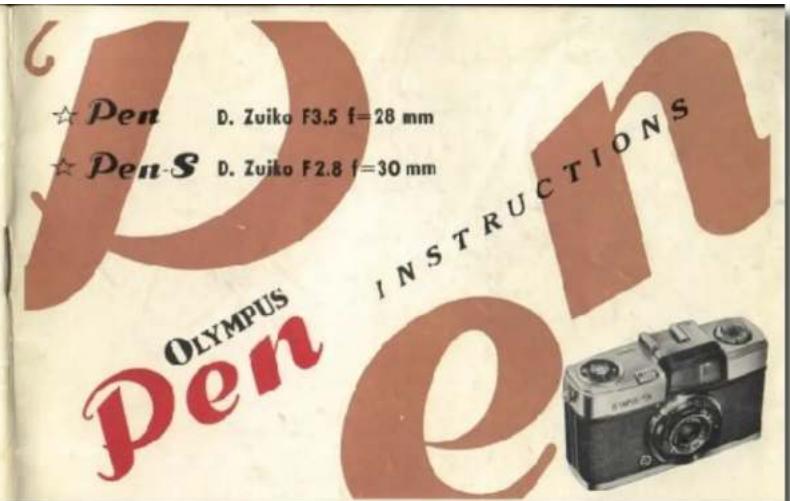

Make Pictures a Part of Your Personal Program—with this famed Olympus Fen
The ONE camera you can ALWAYS have with you. Shoot pictures indoors or out, available light or flash. 12" close-up or distant landscape. Use the PEN morning, noon, or night, at home, at the club or at business.
The Olympus PEN accepts regular 35mm film, takes regular 35mm processing, available everywhere. Use color or black and white, fast film or slow. The PEN is specifically designed to be the World's finest submiature: smallest in size, biggest in quality. The PEN fits comfortably in your hand, pocket or purse....the most convenient camera compassion ever.

natural_image
Vintage camera with visible lens and control panel (no text or symbols)
natural_image
Vintage camera with black body and circular lens (no visible text or symbols)SPECIFICATIONS
Lens: Pen F3.5 D. Zulko, 4 element 13.5, 28 mm fucal length. Pen-5 F1.8 D. Zulko 4 element 12.8, 20 mm fucal length.
Shutter: Pen F3.5 Copal with Bub, 1/25, 1/50, 1/100, 1/200 second. Pen F2.8 Copal with Bub, 1/8, 1/13, 1/20, 1/40, 1/25, 1/50
F:stop : Pan F3.51 3.51 4 4 5.6 8 8 11 16 22 Pan-S F3.8 F3.8 4 4 F5.4 F8 11 F 1x F 22
Finder: Luminous Bright frame Finder 0.5 magnification
Pocusing: Halzol forming with meetings at 2 feet, 2.25, 2.5-3, 4, 5, 7, 10, 15, 30 and infinity. Click stops at 7 and 15 feet. (Great range at 13 feet allows everything to be sharp from 6 feet to
Infinity.) By revolving the helical ring as far out or possible, you will be focused at about 1 foot.
Winding: Round roll wind at camera rear designed to roll quickly right along your thumb. One thumb motion winds film for next shot, cocks the shutter, counts the exposure, prevents double exposure. Remind: Roll down, can be quicked
Rough: Roll-downs crash type rewind level. Leading: Eddy bush cover unlock, slide down and out.
Dimension: Pen F3.5 2.7 inch high 4.2 inch wide, 1.6 inch deep overall outer dimensions. Pen S F2.8 2.7 inch high, 4.2 inch wide, 1.4 inch deep overall outer dimensions
Weight: Pen F3.1 260 gr. Pen-5 F2.8 400 gr.


natural_image
Film strip with black-and-white collage of various scenes including trees, buildings, and industrial structures (no visible text or symbols)
Film Size
Accepts any regular 35mm film, color or black and white, all ASA speeds. No special film is necessary. The PEN takes the identical film that any 35mm camera takes.
On a regular 36 exposure roll, the PEN gives you 72 exposures. On a regular 20 exposure roll, the PEN gives you 40 exposures.
The picture size is 18mm×24mm (about ^3/4'' ×1"). This is exactly ^1/2 the size of pictures taken with a regular 35mm camera.
6

F2.8 30 mm

F3.5 28 nm

iequivalent to a 43 nm lem on a full 35 mm frame)
(equivalent to a 40 mm lens on a full 35 mm frame)
7

Film Loading
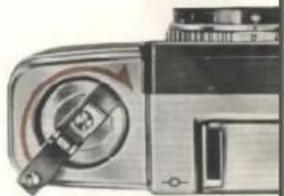
1) Flip up the lock at the camera base. Turn it in the direction of the arrow shown below. Then grasp the camera body with the left hand, the camera back with the right hand, and gently side the camera back DOWN is the direction of the arrow shown in center photo below.
2) Slip the end of the new film into the Winding Spool (see Page 5).
3) Place the film cartridge in the cartridge chamber, being sure that the cartridge holder fits snugly within the top of cartridge 'see Page 5). Be sure the sprockets on the sprocket spool engage the perforations in the film. Move the film slightly if necessary, or turn the rewind lever slightly to take up film slack. Replace the camera back and lock it securely.
Wind the film once and release the shutter button. During this last wind, the film is being engaged in the sprocket spool, and the rewind lever will move in the same direction the film is moving. This is normal, and shows proper loading. Wind and expose the film three more times. Whenever you wind the film, be sure you wind it all the way. Never wind it half way or part way, but all the way.
4) After the 3 trial shots, set the film counter. Place your thumb on the knurled round indicator, and turn until the triangle points to either 72 or 40. If you are using a 36 exposure roll, set the triangle to point to 72. If you are using a 20 exposure roll, set the triangle to point to 40. From that point on, the COUNTER SHOWS YOU HOW MANY PICTURES YOU CAN STILL TAKE BEFORE THE FILM IS ALL USED UP. If the pointer points to 27, for example, that means you can still take 27 more pictures on that roll of film.

natural_image
Close-up of a hand pressing down on a button (no visible text or symbols)
natural_image
Close-up of hands holding a cylindrical object with a small circular component, no visible text or symbols.
natural_image
Close-up of hands holding a small electronic device with a label (no visible text or symbols)
natural_image
Close-up of a black electronic device with visible ports and buttons (no text or symbols)
natural_image
Close-up of a vintage digital camera with a circular dial and control knob (no visible text or symbols)
natural_image
Close-up of a hand holding a small electronic device with a scroll wheel (no visible text or symbols)Pen
Self-Cocking Shutter
When the film is completely voused for next picture, two operations take place automatically. The film is moved to the next frame and the shutter is cocked, ready for release. You need only press the release button to make an exposure.
The Film Winding Roller should be rolled all the way until it stops. If not, the shutter will not operate. Do not wind the film immediately after you have taken a picture. Wait until you are ready for the next picture, and wind the film just before making the exposure. This enables the shutter springs to last and remain accurate indefinitely.

natural_image
Close-up of hands holding a small electronic device on a grid surface (no visible text or symbols)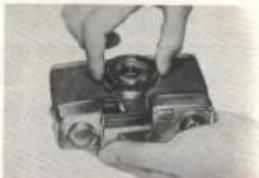
natural_image
Close-up of hands holding a vintage camera (no visible text or symbols)To Set the Lens Opening
Hold the Focusing Ring stationery with your left thumb and turn the f/stopdial with your other hand. There are 7 f/stops available: f/3.5, 4, 5.6, 8, '1, 16, 22. Turn the dial until the f/stop you select is opposite the white triangle. f/22 allows the film to receive HALF as much light as f/16. f/16 allows HALF as much as f/11, etc. f/22, however, gives MORE depth of field than f/16. f/16 gives MORE depth of field than f/11, etc.
To Set the Shutter Speed
Turn the outermost ring until the shutter speed you want is opposite the black dot. Each shutter speed clicks into place. B, for Bulb, allows the shutter to stay open as long as the shutter release button is held down. There are 5 shutter speeds: Bulb, 1/25 second, 1/50, 1/100, 1/200 th. When using 1/25, and especially Bulb, be sure camera is held steady.
Pen
To Set the Focusing Ring
The Focusing Ring is marked clearly with 10 readings, in feet. This lens has such a great depth of field that by clicking the Focusing Ring into the 15 feet marking, everything from 6 feet to infinity will be sharp.
For close-ups, set the Ring at 6 feet. For superaccurate work, the Focusing Ring may be set on the exact distance desired. Due to the great depth of field, a range-finder is unnecessary.
To be doubly sure of overall sharpness, set the f/stop to the highest possible number. Wherever possible use f/22. If you need more light, use f/16, and then f/11, etc. Try to use the highest numbered f/stop (f/22), for all your pictures.
As a guide to focusing remember that:

natural_image
Close-up of a camera lens with dual dials and a pointer (no visible text or symbols)—when your arm is stretched all the way out, it reaches out about 3 feet.
-a toll person is about 6 feet high. A child of 5 years age is about 3 feet high.
-a bed is about 6 feet long.
-a large American car is about 19 feet long. A small compact car about 13 feet long.
— the average living room is about 19 feet from end to end.
-a good-sized step, covers about 3 feet.
Pen
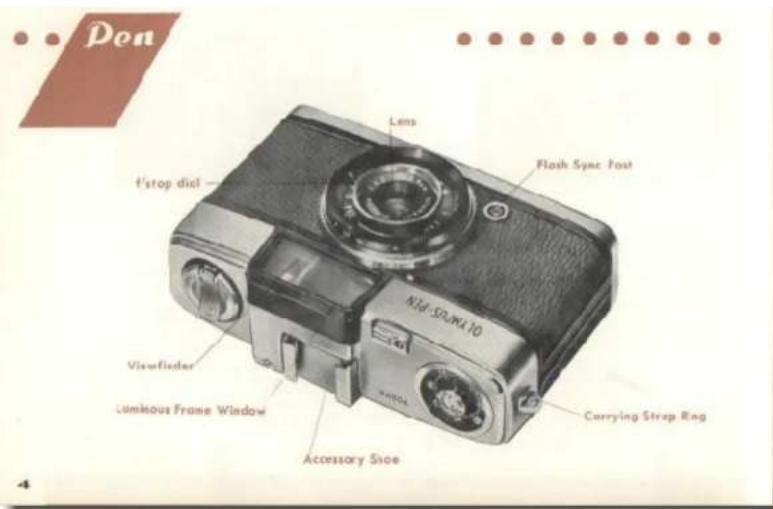
To Use the Viewfinder
The Olympus Pen embodies an Extra Bright Luminous Frame Finder. Perfect composition is easy. Simply place the subject in the center of the frame. The Pen Finder is so constructed that regardless of the position of your eye, the subject will be centered.
When making close ups (3 feet or closer), frame the subject in the shaded area. This automatically corrects for parallax.

natural_image
Close-up of a vintage computer monitor with visible screen and control buttons (no text or symbols)
Den
To Make a Perfect Picture
1) Hold the camera firmly against your face.
2) Spread your feet apart so you will not sway back and forth, or side to side.
3) Be sure your fingers do not cover the lens, the viewfinder, or the fromefinder. Be sure your fingers do not move the shutter ring after it is set.
4) Hold your breath as you press the shutter release button.
5) Use a lens shade when shooting into the sunlight.
6) Use a UV filter to shut out ultraviolet rays. (The filter can be used between pictures to protect the lens also.)
Pen
To Rewind the Film After the Last Exposure
Flip up the rewind lever. Press down and HOLD the rewind button at the base of the camera body. SLOWLY turn the rewind crank in the direction of the arrow. You will feel a tension, which shows that the film is being rewound into the cartridge. At the rate of about 1 complete turn per second, turn the rewind crank until you feel the tension suddenly disappears. Then turn the rewind crank a few more times, and the film can be removed from the camera. If you turn the rewind crank too quickly in the PEN or in any camera, the friction of the film against the pressure plate will cause tiny bits of dust to settle on the film.
natural_image
Close-up of a vintage camera with lens and screen (no visible text or symbols)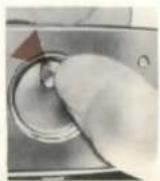
Pen
FLASH SYNCHRONIZATION
Selection of the shutter speed.
To use the Strobe light:
The electric flash synchronized at all speeds.
To use the Type F Bulb
Set the Shutter speed of 1/8 to 1/50.
To use the Type M 3ulb:
Set the shutter speed at 1/8 to 1/25.
Selection of the lens opening.
Divide the guide number by distance and this
is the lens opening figure.
EXAMPLE: Film Speed: ASA 100
Guide Number: 105
Distance to subject: 15 feet
105÷15-7
Set the lens opening at 8 close to 7.

natural_image
Vintage digital camera with open lid and external lens (no visible text or symbols)Pen
Advantages of the D. ZUIKO Wide Angle Lens
One of the major reasons for taking pictures is to record life as it exists. The canerc lers is like our eyes. We want to put on film what our eyes see. Our eyes can look at a newspaper, or a person across the table, or three miles away, and they will all be sharp to us. If something very close and very far is sharp to us at the same time—like our eyes see things—it is called great “depth of field”. Our eyes have a great depth of field.
The lenses found on most ordinary cameras do NOT have a great depth of field. But the D. ZUIKO lens on the Olympus PEN has one of the greatest depth of fields in existence. To prove this, make a photograph of a near object, a middle object and a far-away object in the same picture. The Olympus PEN will get them ALL sharp at the same time, JUST AS OUR EYES WOULD SEE IT.
(To be doubly sure, use the highest numbered f/stop whenever possible.)
Pen
The following table is a DEPTH OF FIELD CHART when the lens is set at 5.6 (D. Zuiko F3.5 f=28 mm)
| 2 | 2.25 | 3.5 | 3 | 4 | 5 | 7 | 10 | 15 | 30 | |
| 1.77 | 2.03 | 2.26 | 2.33 | 3.18 | 3.77 | 4.86 | 6.10 | 8.04 | 10.49 | 15.41 |
| 2.20 | 2.62 | 3.08 | 3.34 | 3.15 | 7.02 | 10.93 | 26.30 |
For example, if you are focused at 15 feet, everything from 8.04 feet to Infinity will be sharp. If you focus at 7 feet, everything from 4.86 feet to 10.93 feet will be sharp. Remember that this Depth of Field INCREASES as you use a higher f/stop. Remember also that objects do not suddenly become fuzzy if they are outside the depth of field. Objects gradually lose first a little, then more sharpness the farther they get outside the depth of field.
For simple operation, and for perfect pictures under normal conditions, set the focusing ring at 15 feet. Use f/22 wherever possible. Use f/16 if you cannot use f/22, then f/11, then f/8, etc.
Average Exposure Table
| Average Subject,10 AM to 2 PM | Open Scene | Outdoor Portrait | Portrait Shadow | Street Scene | Close UP | Beach Portrait | Ocean & Snow |
| Spring and Autumn | f/151/200 | f/111/103 | f/5.6-111/50 | f/111/200 | f/111/103 | f/111/100 | f/141/200 |
| Summer | f/221/200 | f/161/103 | f/8-111/100 | f/221/200 | f/161/103 | f/221/200 | f/221/200 |
| Winter | f/111/200 | f/81/103 | f/5.61/100 | f/81/200 | f/81/100 | f/111/200 | f/111/200 |
Above exposure suggestions are for film with ASA speed of 100. If using film with ASA speed of 50, give twice the exposure (instead of using 1/100 th second shutter spec, use 1/50th second). If film used has ASA speed of 200, give half the suggested exposure.
Den
DEPTH OF FIELD TABLE FOR OLYMPUS PEN S (LENS F2.8 30 mm)
[0]
| Treatment Site | 2 | 1.33 | 2.1 | 3 | 4 | 5 | 7 | 10 | 15 | 30 | ||||||||
| mmHg | Ta | mmHg | Ta | mmHg | Ta | mmHg | Ta | mmHg | Ta | mmHg | Ta | mmHg | Ta | mmHg | Ta | mmHg | Ta | |
| 2.8 | 1.91 | 2.10 | 2.11 | 2.39 | 2.33 | 2.67 | 2.79 | 3.27 | 3.82 | 4.41 | 4.41 | 3.78 | 8.84 | 7.83 | 13.94 | 10.60 | 23.88 | 15.31 |
| 4 | 1.87 | 2.15 | 2.08 | 2.43 | 2.30 | 2.75 | 2.79 | 3.37 | 3.48 | 4.71 | 4.20 | 6.15 | 1.51 | 9.61 | 7.19 | 16.37 | 9.42 | 37.67 |
| 5.6 | 1.82 | 2.33 | 2.07 | 2.54 | 2.22 | 2.86 | 2.60 | 3.51 | 3.31 | 5.08 | 3.95 | 6.84 | 5.08 | 11.49 | 6.67 | 22.62 | 8.31 | 97.00 |
| 8 | 1.76 | 2.33 | 1.94 | 2.68 | 3.13 | 3.06 | 3.27 | 3.85 | 5.09 | 5.74 | 9.45 | 8.18 | 4.56 | 15.67 | 9.63 | 50.37 | 6.89 | — |
| 11 | 1.68 | 2.49 | 1.82 | 2.90 | 2.01 | 3.24 | 2.31 | 4.34 | 2.83 | 6.94 | 3.30 | 10.85 | 4.04 | 29.81 | 4.83 | — | 3.15 | — |
| 16 | 1.57 | 2.81 | 1.71 | 3.35 | 1.83 | 3.97 | 2.10 | 5.53 | 2.32 | 10.58 | 2.87 | 23.74 | 3.40 | — | 3.96 | — | 4.13 | — |
| 22 | 1.46 | 3.33 | 1.59 | 4.15 | 1.79 | 3.16 | 1.90 | 8.31 | 2.23 | 29.71 | 2.49 | — | 2.49 | — | 2.87 | — | 3.61 | — |
The computation of this table is based on a circle of confusion of d/1000 (d: the diagonal length in the nominal image plane dimension of the camera) in diameter.
Pen
DEPTH OF FIELD TABLE FOR OLYMPUS PEN (LENS F3.5 28 mm)
(四)
| Dissociations (mm) | 1 | 2.23 | 1.3 | 5 | 4 | 3 | 7 | 10 | 13 | 30 | ||||||||||
| mm^3 | To mm^3 | To mm^3 | To mm^3 | To mm^3 | To mm^3 | To mm^3 | To mm^3 | To mm^3 /10 | To mm^3 | To mm^3 | To mm^3 | To mm^3 | To mm^3 | To mm^3 | To mm^3 | To m^3 | To mm^3 | To mm^3 | To mm^3 | |
| 3.5 | 1.87 | 2.16 | 2.26 | 2.45 | 2.29 | 2.70 | 2.70 | 3.39 | 3.47 | 4.74 | 4.18 | 6.23 | 5.48 | 9.74 | 7.14 | 16.81 | 9.31 | 29.00 | 13.69 | ∞ |
| 4 | 1.85 | 2.18 | 2.36 | 2.49 | 2.36 | 2.80 | 2.66 | 3.45 | 3.40 | 4.87 | 4.09 | 6.46 | 5.32 | 0.31 | 4.86 | 18.65 | 8.81 | 50.69 | 12.53 | ∞ |
| 5.6 | 1.80 | 1.28 | 1.29 | 2.01 | 2.18 | 2.94 | 2.24 | 3.67 | 3.21 | 5.33 | 3.82 | 7.33 | 4.86 | 2.77 | 4.11 | 28.81 | 7.61 | ∞ | 10.17 | ∞ |
| 8 | 1.72 | 1.40 | 1.30 | 2.71 | 2.07 | 3.18 | 2.39 | 4.07 | 2.97 | 6.24 | 3.47 | 9.19 | 4.76 | 3.56 | 5.24 | 160.61 | 6.31 | ∞ | 7.56 | ∞ |
| 11 | 1.64 | 1.60 | 1.80 | 3.08 | 1.95 | 3.56 | 2.26 | 4.72 | 2.71 | 7.97 | 3.12 | 3.54 | 3.77 | 48.29 | 4.47 | ∞ | 3.37 | ∞ | 6.27 | ∞ |
| 14 | 1.53 | 1.50 | 1.65 | 3.44 | 1.77 | 4.45 | 2.00 | 4.66 | 2.58 | 4.79 | 3.68 | 47.55 | 2.13 | ∞ | 3.59 | ∞ | 4.01 | ∞ | 4.15 | ∞ |
| 22 | 1.40 | 1.80 | 1.50 | 4.91 | 1.61 | 4.41 | 1.79 | 1.83 | 3.07 | ∞ | 3.30 | ∞ | 2.62 | ∞ | 2.92 | ∞ | 3.21 | ∞ | 3.57 | ∞ |
The computation of this table is based on a circle of confusion of d / 1000 (8: the diagonal length in the nominal image plane dimension of the center) in diameter.
Den
The Olympus PEN is a precision instrument. It will give you excellent trouble-free service for a lifetime, providing you respect a few simple rules:
- When not taking pictures, keep the lens covered with a lens cap or a UV filter.
- Don't allow dust, dirt, foreign objects or moisture to get into the camera works.
- Use a lens tissue or soft cloth to clean the lens. Do NOT clean it with your finger. Perspiration or natural body oils can damage any fine lens.
- If, by chance, the camera is dropped into sec water, clean it immediately in soft water and send it in for repair.
Den
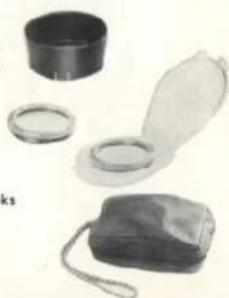
Special Accessories for Olympus Pen
Special extra accessories are available for Olympus Pen.
- Lens shade.
Very tiny lens shade is used by slipping on the lens opening barrel for protecting the direct light to the lens.
- Lens filter.
UV (Hcze), Y2 (Yellow) and Skylight are available.
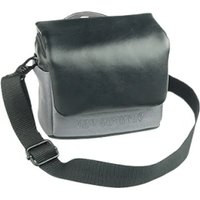
- Soft carrying case with leather grip.
Easy to carry, high quality material and looks very nice.
natural_image
Product photo of a medical or cosmetic device with a magnifying glass, a circular lens, and a strap (no visible text or symbols)

- Olympus Pen
- Film Size
- Film Loading
- Pen
- Self-Cocking Shutter
- To Set the Lens Opening
- To Set the Shutter Speed
- To Set the Focusing Ring
- To Use the Viewfinder
- Den
- To Make a Perfect Picture
- To Rewind the Film After the Last Exposure
- FLASH SYNCHRONIZATION
- Advantages of the D. ZUIKO Wide Angle Lens
- Special Accessories for Olympus Pen
Marke : OLYMPUS
Modell : Pen
Kategorie : Kamera