
Echo Connect - Nicht kategorisiert AMAZON - Kostenlose Bedienungsanleitung
Finden Sie kostenlos die Bedienungsanleitung des Geräts Echo Connect AMAZON als PDF.


| Produkttyp | Amazon Echo Connect – Telefonadapter für Alexa |
| Abmessungen | ca. 127 x 76 x 25 mm |
| Gewicht | ca. 100 g |
| Stromversorgung | Netzteil (5 V, 1 A) im Lieferumfang |
| Anschlüsse | Telefonanschluss (RJ11), Stromanschluss |
| Hauptfunktionen | Anrufe über Festnetz oder VoIP mit Alexa, Einrichtung über Alexa App |
| Kompatibilität | Erfordert ein unterstütztes Echo-Gerät für die Nutzung |
| Einrichtung | Verbindung mit dem Heimnetzwerk (WLAN) über Alexa App |
| Lieferumfang | Echo Connect, Telefonkabel, Netzteil, Kurzanleitung |
| Pflege und Reinigung | Mit einem trockenen, fusselfreien Tuch abwischen |
| Sicherheit | Nur für den Innenbereich, nicht wasserdicht |
| Ersatzteile und Reparierbarkeit | Vom Hersteller nicht vorgesehen, defekte Geräte ersetzen |
| Allgemeine Informationen | Erweiterung des Alexa-Ökosystems für Festnetzanrufe |
Häufig gestellte Fragen - Echo Connect AMAZON
Benutzerfragen zu Echo Connect AMAZON
0 Frage zu diesem Gerät. Beantworten Sie die, die Sie kennen, oder stellen Sie Ihre eigene.
Eine neue Frage zu diesem Gerät stellen
Laden Sie die Anleitung für Ihr Nicht kategorisiert kostenlos im PDF-Format! Finden Sie Ihr Handbuch Echo Connect - AMAZON und nehmen Sie Ihr elektronisches Gerät wieder in die Hand. Auf dieser Seite sind alle Dokumente veröffentlicht, die für die Verwendung Ihres Geräts notwendig sind. Echo Connect von der Marke AMAZON.
BEDIENUNGSANLEITUNG Echo Connect AMAZON
What's in the box 1. Connecting your device
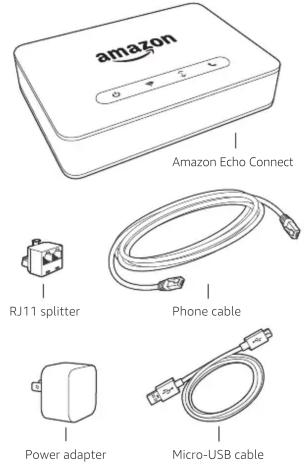
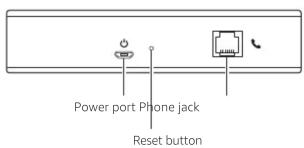
1 Plug the provided phone cable into the device phone jack, then plug the other end into your home phone jack or VoIP phone adapter.
2 Plug the power adapter into your device and then into a power outlet.
The power light should be solidly lit and the Wi-Fi light should be flashing orange, indicating your device is ready for set up.
Go to the Alexa App to complete set up.
2. Configure the Alexa App
To use your device, you must have a supported Echo device. If you have recently purchased one, please set it up prior to proceeding.
1 Set up Alexa calling and messaging in the Alexa App. If you have already done so, skip to the next step.
2 Go to the Alexa App on your mobile phone. Go to Settings > Set up a new device. During setup, you will need to connect your device to the Internet, so you will need your Wi-Fi password.
Getting started with your device
Calling with your device
The device uses the contacts on your mobile phone. To initiate a call just say, "Alexa, call Mom on her mobile" or "Alexa, call 206-555-1234."
Alexa App
The app helps you get more out of your Echo devices and accessories. It's also where you can change your device settings, including your dialing preferences.
Give us your feedback
We want to hear about your experiences. Use the Alexa App to send us feedback or go to http://amazon.com/devicesupport.

Marke : AMAZON
Modell : Echo Connect
Kategorie : Nicht kategorisiert