
Kindle 8.9 - Tablet AMAZON - Kostenlose Bedienungsanleitung
Finden Sie kostenlos die Bedienungsanleitung des Geräts Kindle 8.9 AMAZON als PDF.


| Produkttyp | Tablet |
| Marke | Amazon |
| Modell | Kindle 8.9 |
| Display | 8,9 Zoll (22,6 cm) HD Display |
| Betriebssystem | Fire OS |
| Speicher | 16 GB oder 32 GB |
| Arbeitsspeicher (RAM) | 1 GB |
| Prozessor | Dual-Core Prozessor |
| Abmessungen (ca.) | 240 x 164 x 8,8 mm |
| Gewicht (ca.) | 567 g |
| Akkulaufzeit | Bis zu 10 Stunden |
| Ladeanschluss | Micro-USB |
| WLAN | 802.11 b/g/n |
| Kameras | Rückseite: 5 MP, Vorderseite: 1,3 MP |
| Zubehör im Lieferumfang | USB-Ladekabel, Kurzanleitung |
| Pflege und Reinigung | Mit einem weichen, trockenen Tuch abwischen. Keine Flüssigkeiten oder Reinigungsmittel verwenden. |
| Sicherheitshinweise | Akku nicht überladen; nur mit zugelassenem Zubehör laden; bei Beschädigung nicht mehr verwenden. |
| Ersatzteile und Reparierbarkeit | Ersatzteile und Reparaturinformationen auf der Amazon-Website erhältlich. |
| Garantie | 1 Jahr eingeschränkte Garantie |
| Weitere Informationen | Einrichtung und Hilfe über die App „Hilfe & Feedback“ oder auf www.kindle.com/support. |
Häufig gestellte Fragen - Kindle 8.9 AMAZON
Benutzerfragen zu Kindle 8.9 AMAZON
0 Frage zu diesem Gerät. Beantworten Sie die, die Sie kennen, oder stellen Sie Ihre eigene.
Eine neue Frage zu diesem Gerät stellen
Laden Sie die Anleitung für Ihr Tablet kostenlos im PDF-Format! Finden Sie Ihr Handbuch Kindle 8.9 - AMAZON und nehmen Sie Ihr elektronisches Gerät wieder in die Hand. Auf dieser Seite sind alle Dokumente veröffentlicht, die für die Verwendung Ihres Geräts notwendig sind. Kindle 8.9 von der Marke AMAZON.
BEDIENUNGSANLEITUNG Kindle 8.9 AMAZON
getting to know your kindle
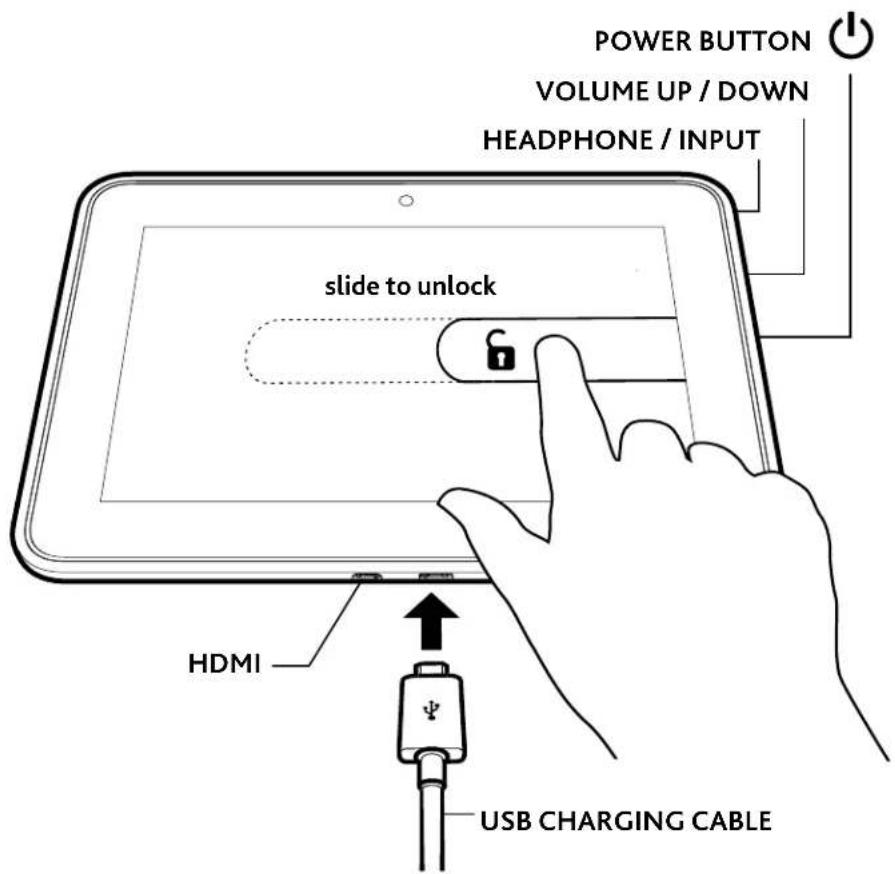
To charge your Kindle, connect it to the USB charging cable as shown. Connect the opposite end of the USB charging cable to a Kindle Power-Fast accelerated charging accessory (sold separately), or other USB power adapter. To learn more about charging accessories, visit www.kindle.com/support/charging.
To start your Kindle, press the power button. To unlock your Kindle, touch the lock icon and drag the shaded bar across the screen to the left. To learn more about your Kindle, open the Help & Feedback app.
For Kindle customer support, visit www.kindle.com/support.
important product information
Safety, compliance, recycling, and other important information regarding your Kindle, can be found in the Legal & Compliance section of the Settings menu on your Kindle. For additional help, please visit www.kindle.com/support.
Amazon terms & policies
Before using the Kindle device, please read the terms located at www.amazon.com/kindlefireterms and all rules and policies for the Kindle device and services related to the device (including, but not limited to, the Amazon privacy notice located at www.amazon.com/privacy and any rules or usage provisions specified on the www.amazon.com website or the Kindle Store) (collectively, the “Agreements”). By using the Kindle device you agree to be bound by the terms of the Agreements.
Your Kindle is covered by a One-Year Limited Warranty. Details are available at www.amazon.com/kindlewarranty.

Marke : AMAZON
Modell : Kindle 8.9
Kategorie : Tablet