
Tap - Nicht kategorisiert AMAZON - Kostenlose Bedienungsanleitung
Finden Sie kostenlos die Bedienungsanleitung des Geräts Tap AMAZON als PDF.


| Produkttyp | Tragbarer Bluetooth- und Wi-Fi-Lautsprecher mit Alexa |
| Marke | Amazon |
| Modell | Tap |
| Abmessungen (H x B x T) | 15,7 x 8,9 x 8,9 cm |
| Gewicht | ca. 0,6 kg |
| Stromversorgung | Netzteil (15 W) über mitgelieferte Ladestation oder Micro-USB-Anschluss |
| Akkulaufzeit | bis zu 9 Stunden Musikwiedergabe |
| Konnektivität | Wi-Fi 802.11 b/g/n; Bluetooth |
| Sprachassistent | Amazon Alexa (erfordert Alexa App) |
| Tasten | Talk-Taste, Wiedergabe/Pause, Lautstärke +/-, Vorheriger/Nächster Titel, Power, Wi-Fi/Bluetooth |
| Audioeingang | 3,5-mm-Klinkenstecker |
| Mikrofon | Integriertes Mikrofon für Sprachbefehle |
| Ladeanzeige | Blaue LED beim Einschalten, orangefarbene LED während des Ladevorgangs |
| Lieferumfang | Amazon Tap, Ladestation, Micro-USB-Kabel, Netzteil, Kurzanleitung |
| App | Amazon Alexa App (iOS/Android) |
| Garantie | Herstellergarantie gemäß den gesetzlichen Bestimmungen |
Häufig gestellte Fragen - Tap AMAZON
Benutzerfragen zu Tap AMAZON
0 Frage zu diesem Gerät. Beantworten Sie die, die Sie kennen, oder stellen Sie Ihre eigene.
Eine neue Frage zu diesem Gerät stellen
Laden Sie die Anleitung für Ihr Nicht kategorisiert kostenlos im PDF-Format! Finden Sie Ihr Handbuch Tap - AMAZON und nehmen Sie Ihr elektronisches Gerät wieder in die Hand. Auf dieser Seite sind alle Dokumente veröffentlicht, die für die Verwendung Ihres Geräts notwendig sind. Tap von der Marke AMAZON.
BEDIENUNGSANLEITUNG Tap AMAZON
Getting to know your Amazon Tap
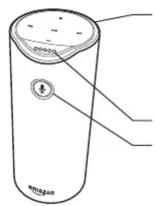
Playback controls:
Play/Pause
Previous/Next
Volume up
Volume down
Front light indicators
Talk button
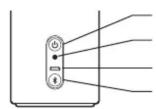
Back view
Power button
3.5mm audio input
Micro-USB port
WiFi/Bluetooth
button
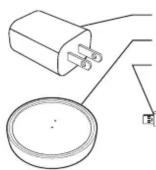
Power adapter
Charging cradle
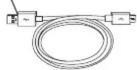
Micro-USB cable
1. Charging your Amazon Tap
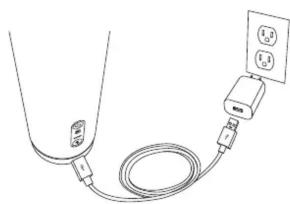
Plug the included charging cable and power adapter into the charging cradle, then into a power outlet.
natural_image
Line drawing of a cable with a plug inserted into a socket connected to an electrical outlet (no text or symbols)Place your Amazon Tap on the charging cradle. Power on the device. A blue light will illuminate at the top. The lights will change to orange and Alexa will greet you.
Alternatively, you can charge your Amazon Tap by plugging the cable directly into the port on the back.
2. Setting up your Amazon Tap
Download the free Amazon Alexa app to your phone or tablet.
The app helps you get more out of your Amazon Tap. It's where you see an overview of your requests and manage your lists, news, music, and settings. Start the download process in your mobile browser at:
http://alexa.amazon.com
If you already have the Amazon Alexa app installed, go to Settings > Set up a new device.
During setup, you will connect your Amazon Tap to the Internet so you can access Amazon services. Please make sure you have your Wi-Fi password available. To get started, press the Wi-Fi/Bluetooth button for 5 seconds.
3. Getting started with your Amazon Tap
Talking to your Amazon Tap
Press the Talk Button and wait for the tone. Then talk directly to your Amazon Tap. See the Things to Try card to help you get started.
Setting up Bluetooth
You can use your Amazon Tap as a portable Bluetooth speaker that you can connect to your smartphone or tablet, at home or on the go. To pair your mobile device using Bluetooth, quickly press the Wi-Fi/Bluetooth button.
Checking the battery level
Press the Volume Up and Volume Down buttons at the same time to get the current battery status.
Give us your feedback
Alexa will improve over time, with new features and ways to get things done. Use the Alexa App to send us feedback or email alexa-comments@amazon.com.

Marke : AMAZON
Modell : Tap
Kategorie : Nicht kategorisiert