
PS-1216U - Druckserver Edimax - Kostenlose Bedienungsanleitung
Finden Sie kostenlos die Bedienungsanleitung des Geräts PS-1216U Edimax als PDF.


| Produkttyp | Druckserver |
| Modell | PS-1216U |
| Marke | Edimax |
| Abmessungen (B x T x H) | 11.8 x 7.5 x 2.5 cm |
| Gewicht | ca. 200 g |
| Stromversorgung | 5 V DC über USB |
| Schnittstellen | 1x USB 2.0 Typ B, 1x RJ-45 10/100 Mbit/s |
| Unterstützte Drucker | USB-Drucker (PCL, PostScript, etc.) |
| Netzwerkprotokolle | TCP/IP, IPP, SMB, LPR, RAW |
| Unterstützte Betriebssysteme | Windows, macOS, Linux |
| Management | Webinterface, PS-Utility |
| LED-Anzeigen | Status, Netzwerk, USB |
| Maximale Anzahl Drucker | 1 Drucker |
| Kabellose Verbindung | Nein (nur kabelgebunden) |
| Sicherheit | Keine integrierte Verschlüsselung |
| Reinigung | Mit trockenem, fusselfreiem Tuch abwischen |
| Ersatzteile/Reparierbarkeit | Keine vom Hersteller vorgesehen – Gerät muss ausgetauscht werden |
| Lieferumfang | Druckserver, Kurzanleitung, CD mit Software, USB-Kabel |
| Garantie | 2 Jahre (je nach Land) |
Häufig gestellte Fragen - PS-1216U Edimax
Benutzerfragen zu PS-1216U Edimax
0 Frage zu diesem Gerät. Beantworten Sie die, die Sie kennen, oder stellen Sie Ihre eigene.
Eine neue Frage zu diesem Gerät stellen
Laden Sie die Anleitung für Ihr Druckserver kostenlos im PDF-Format! Finden Sie Ihr Handbuch PS-1216U - Edimax und nehmen Sie Ihr elektronisches Gerät wieder in die Hand. Auf dieser Seite sind alle Dokumente veröffentlicht, die für die Verwendung Ihres Geräts notwendig sind. PS-1216U von der Marke Edimax.
BEDIENUNGSANLEITUNG PS-1216U Edimax
natural_image
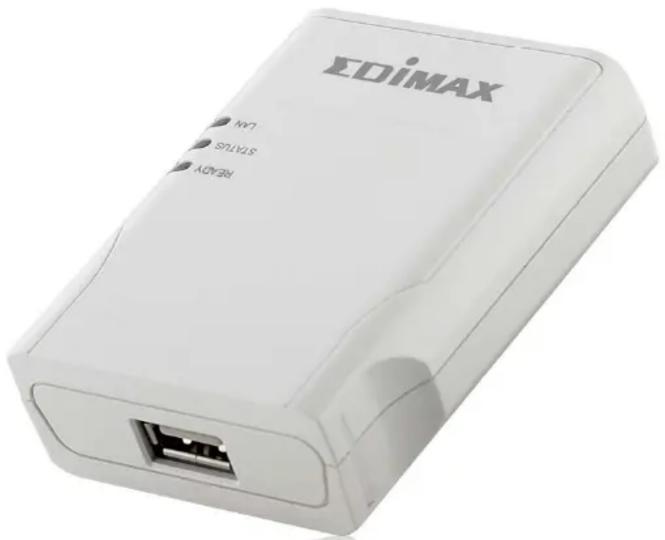
White EDiMAX device with USB port and ports (no visible text or symbols on body)PS-1216U
Fast Ethernet
USB GDI Print Server


Share your GDI/Host-based Printer
The PS-1216U is a GDI print server that lets you share a GDI or a normal printer to all connected PCs through your wired network. GDI printers have a built-in support for Windows Graphical Device Interface (GDI) that eliminates the conversion of the print output from Windows to another format such as PostScript or PCL language. GDI printers are sometimes called host-based printers because they rely on the host computer to rasterize pages. Because of such, almost none of the print servers in the market can support GDI printer network sharing. The PS-1216U GDI print server implements a special technology which allows it to communicate with the GDI printer as if it is connected directly to your computer. With this feature, the GDI printer is easily shared device and you don't need to worry about the compatibility with the GDI printers anymore.
Fault-Tolerant Firmware Upgrades
Now, users need not worry about errors occurring in the midst of an upgrade that may subsequently stop its operations. The PS-1216U GDI print server incorporates a fault-tolerant upgrade function that permits re-upgrading of the device should problems occur during the initial or previous upgrade session.
User-friendly Setup CD Wizard and Driver\*
To facilitate connection to your printer the PS-1216U includes a user-friendly EZmax setup wizard. Its easy-to-use windows installation wizard simplifies and enhances driver installation for immediate use of the device. An add-on feature allows you to conveniently configure the GDI print server from any network client that support web-browsing.

natural_image
Black background with white line art icons representing various digital devices and objects (no text or symbols)FEATURES AND TECHNICAL SPECIFICATIONS
- Complies with IEEE 802.3/802.3u standards
- Provides one USB 2.0 port to connect with GDI Printer*
- Enables all network users to share a GDI Printer* within the network
- Compatible with most popular printer brand*
● Supports Web-based management and windows configuratin utility
• Supports Auto MDI/MDI-X - Compatible with Windows 2000/XP/Vista OS
| STANDARDS & HARDWARE INTERFACE | CPU / MEMORY | POWER ADAPTER |
| IEEE802.3 / 802.3uOne USB portOne 10/100Mbps LAN portReset button | RISC CPU512KB NOR Flash2MB SDRAM | 7.5VDC / 0.5A |
| INSTALLATION & MANAGEMENT KITS LED Indicators | HUMIDITY & TEMPERATURE | |
| Setup WizardAdmin Utility includedWeb ManagementFirmware upgrade utility | READYSTATUSLAN | 10~90% (Non-condensing)0~55°C |
| SYSTEM REQUIREMENTS DIMENSION | CERTIFICATIONS | |
| CPU: Pentium III 1G above or similarMemory size: 256MB RAMOne CD-ROM driveHard Disk: Min. of 100MB disk spaceUSB GDI PrinterFast Ethernet network | 62 (W) x 22 (H) x 77 (D) mm CE, FCC | |
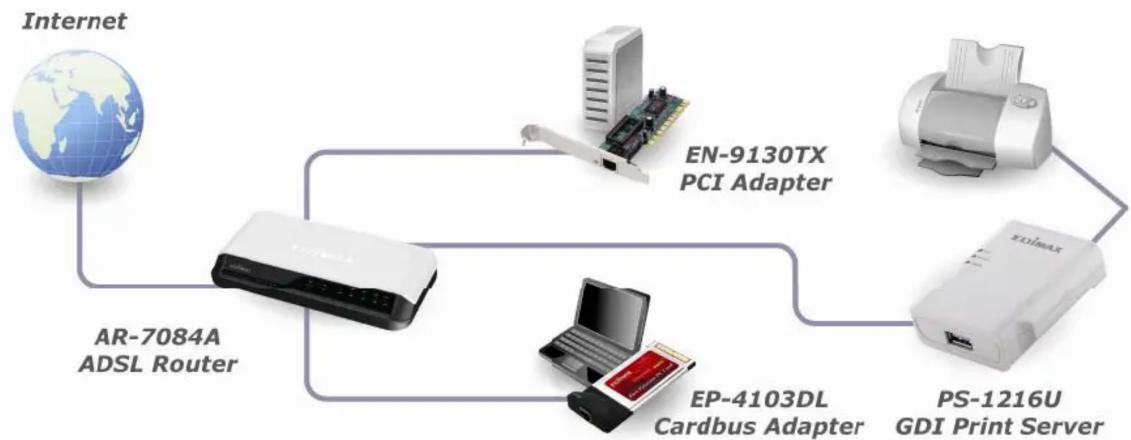
TYPICAL SETUP DIAGRAM AND RELATED PRODUCTS
flowchart
graph TD
    A["Internet"] --> B["AR-7084A ADSL Router"]
    B --> C["EN-9130TX PCI Adapter"]
    C --> D["PS-1216U GDI Print Server"]
    B --> E["EP-4103DL Cardbus Adapter"]


Marke : Edimax
Modell : PS-1216U
Kategorie : Druckserver