
Blade L8 - Smartphone ZTE - Kostenlose Bedienungsanleitung
Finden Sie kostenlos die Bedienungsanleitung des Geräts Blade L8 ZTE als PDF.


| Produkttyp | Smartphone |
| Marke | ZTE |
| Modell | Blade L8 |
| Displaygröße | 5 Zoll (ca. 12,7 cm) |
| Auflösung | 854 x 480 Pixel |
| Prozessor | Quad-Core 1,3 GHz |
| Arbeitsspeicher (RAM) | 1 GB |
| Interner Speicher | 8 GB (erweiterbar via microSD) |
| Betriebssystem | Android 8.1 (Go Edition) |
| Rückkamera | 5 MP mit Autofokus |
| Frontkamera | 2 MP |
| Akku-Kapazität | 2500 mAh (herausnehmbar) |
| Abmessungen (H x B x T) | 144 x 72 x 8,5 mm |
| Gewicht | 150 g |
| Konnektivität | Wi-Fi 802.11 b/g/n, Bluetooth 4.2, GPS |
| SIM-Karte | Dual-SIM (Micro-SIM) |
| Sensoren | Beschleunigungssensor, Näherungssensor |
| Farbe | Schwarz, Weiß |
| Lieferumfang | Smartphone, Akku, Ladegerät, USB-Kabel, Kurzanleitung |
Häufig gestellte Fragen - Blade L8 ZTE
Benutzerfragen zu Blade L8 ZTE
0 Frage zu diesem Gerät. Beantworten Sie die, die Sie kennen, oder stellen Sie Ihre eigene.
Eine neue Frage zu diesem Gerät stellen
Laden Sie die Anleitung für Ihr Smartphone kostenlos im PDF-Format! Finden Sie Ihr Handbuch Blade L8 - ZTE und nehmen Sie Ihr elektronisches Gerät wieder in die Hand. Auf dieser Seite sind alle Dokumente veröffentlicht, die für die Verwendung Ihres Geräts notwendig sind. Blade L8 von der Marke ZTE.
BEDIENUNGSANLEITUNG Blade L8 ZTE
ZTE Blade L8RU Upgrade Guide (Through an SD Card)
1. Cautions
The software version and pictures in this document are just for reference only. Please use ZTE handset support website provided version to download software.
1) Download the upgrade package.
- Open http://www.ztedevice.com.cn/support and download the upgrade package (update.zip) that matches your phone model. If the downloaded package is not update.zip, unzip the package to obtain update.zip.
- Ensure that your micro SD card is at least 2GB. Note: Please refer to our current version download size.
2) Remove the SIM card, then back up the data and APPs in your phone before the upgrade.
3) Perform data backup.
Note: You should not remove the SD card during the backup process. To avoid data lost, it is not recommended to cancel the backup process.
4) Verify that the update.zip file in the root directory of the SD card matches the model of the phone. Do not modify the file name and extension name of the files in the upgrade package.
5) Verify that your phone has enough (at least 40%) power. Charge the phone if required. To avoid data lost or upgrade failure, it is not recommended to upgrade your phone through an SD card when the phone is being charged.
6) You should not perform any other operation on the phone during the upgrade process.
7) A normal upgrade should be completed in 10 minutes. If the phone does not reboot or show any response in 10 minutes, you should perform the upgrade process again. If the phone cannot be started, perform a forced upgrade. If the forced upgrade does not work, you should contact an after-sale service agent for support
2. Upgrade Description
There are two upgrade methods: normal upgrade and forced upgrade. If the phone cannot be started properly, for example, the phone cannot be started, or the phone does not enter standby state, perform a forced upgrade. If the phone can be started properly and the Settings menu can be selected, perform a normal upgrade.
3. Upgrade Steps
A. Normal upgrade (the primary upgrade method)
1) Download the upgrade package that matches the phone model from ZTE official website (http://www.ztedevice.com.cn/support/), extract update.zip from the package, and copy update.zip to the root directory of the SD card (the file name must be update.zip).
2) Select File Manager>LOCAL>SD Card, verify that the update.zip file in the root directory of the SD card is proper, see Figure 3-1:

Figure 3-1
3) Tap and select Settings>System>Advanced>System updates,see Figure 3-2.
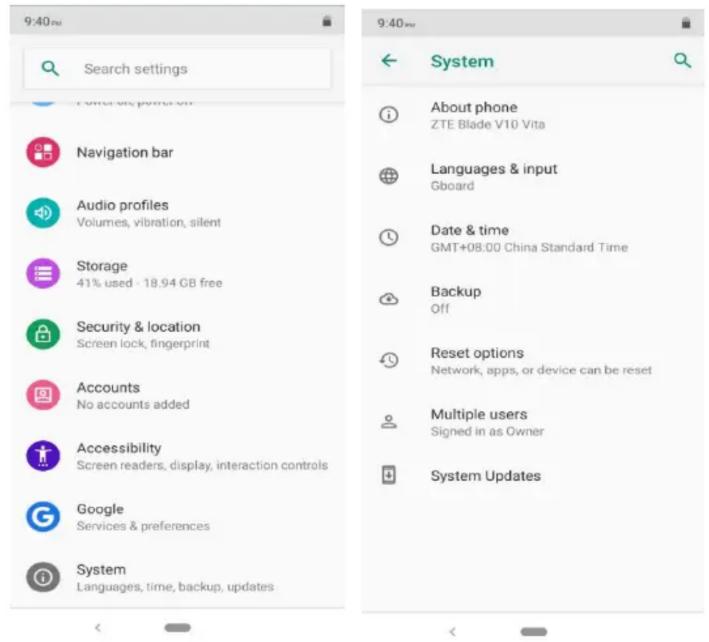
Figure 3-2
4) Select System updates, then touch INSTALL, the phone automatically to upgrade in 20 seconds, see Figure 3-3.
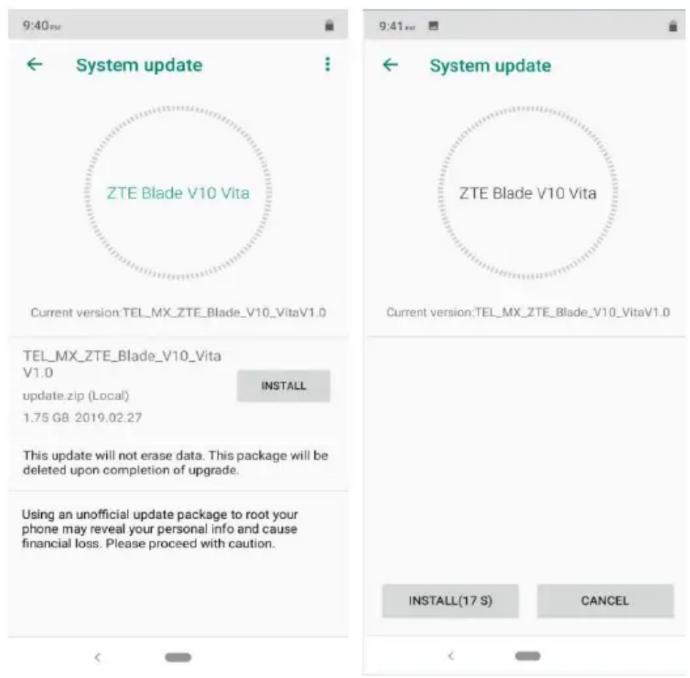
Figure 3-3
5) After upgrade finished, the phone will restart.

Marke : ZTE
Modell : Blade L8
Kategorie : Smartphone