
Smartcard Wired Keyboard II - Tastatur LENOVO - Kostenlose Bedienungsanleitung
Finden Sie kostenlos die Bedienungsanleitung des Geräts Smartcard Wired Keyboard II LENOVO als PDF.


| Produkttyp | Kabelgebundene Tastatur mit Smartcard-Leser |
| Marke | Lenovo |
| Modell | Smartcard Wired Keyboard II (KB319U) |
| Abmessungen (ca.) | 440 x 140 x 30 mm |
| Gewicht (ca.) | 600 g |
| Stromversorgung | USB (5 V, 500 mA) |
| Anschluss | USB-A Kabel (fest integriert) |
| Smartcard-Leser | Integriert, unterstützt Standard-Smartcards (ISO 7816) |
| Tastenanzahl | 104 Tasten (Standard-US-Layout) |
| Kompatible Betriebssysteme | Windows, Linux, macOS (Plug-and-Play) |
| Kabellänge | 1,8 m |
| Besondere Funktionen | Smartcard-Leser für Authentifizierung, robuste Bauweise |
| Reinigung | Mit weichem, leicht feuchtem Tuch reinigen; keine scharfen Reinigungsmittel |
| Sicherheitszertifikate | FCC (Class B), IC (ICES-003), CE |
| Entsorgung | Elektroschrott gemäß lokalen Vorschriften entsorgen |
| Garantie | Standard-Lenovo-Garantie (siehe Lenovo-Support) |
| Herstellungsland | China |
| Sprache der Software | Englisch, Mehrsprachig (über Treiber) |
| Verpackungsinhalt | Tastatur, Kurzanleitung, Garantiekarte |
Häufig gestellte Fragen - Smartcard Wired Keyboard II LENOVO
Benutzerfragen zu Smartcard Wired Keyboard II LENOVO
0 Frage zu diesem Gerät. Beantworten Sie die, die Sie kennen, oder stellen Sie Ihre eigene.
Eine neue Frage zu diesem Gerät stellen
Laden Sie die Anleitung für Ihr Tastatur kostenlos im PDF-Format! Finden Sie Ihr Handbuch Smartcard Wired Keyboard II - LENOVO und nehmen Sie Ihr elektronisches Gerät wieder in die Hand. Auf dieser Seite sind alle Dokumente veröffentlicht, die für die Verwendung Ihres Geräts notwendig sind. Smartcard Wired Keyboard II von der Marke LENOVO.
BEDIENUNGSANLEITUNG Smartcard Wired Keyboard II LENOVO
Lenovo Smartcard Wired Keyboard II
https://support.lenovo.com

(1P) PN: SP41B69467
Printed in China

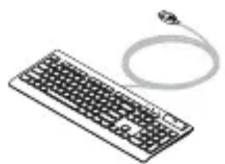
1
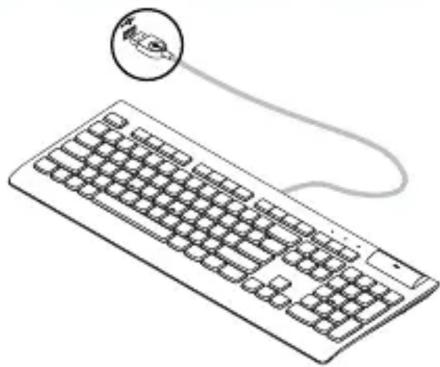
natural_image
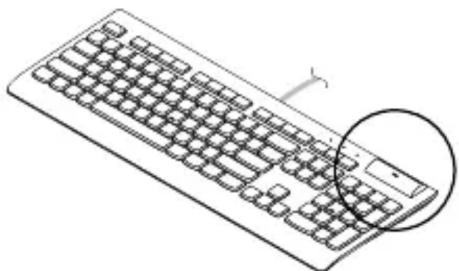
Line drawing of a computer keyboard with a cable and a circular icon showing a location (no text or symbols)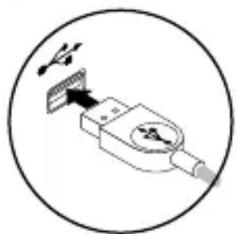
natural_image
Simple line drawing of a plug with a switch and cable, enclosed in a circle (no text or symbols)2
natural_image
Line drawing of a standard computer keyboard with a highlighted circular section (no text or symbols)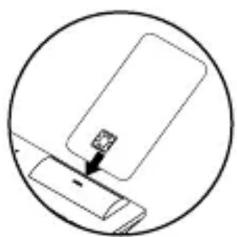
natural_image
Simple line drawing of a device with a small object inserted, enclosed in a circle (no text or symbols)3
https://support.lenovo.com/accessories/smartcard_keyboard

Software
natural_image
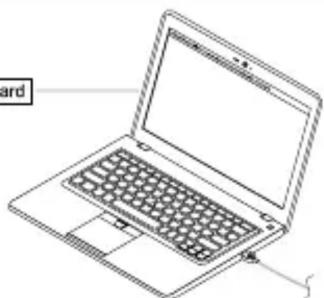
Line drawing of a laptop computer with visible keyboard and screen (no text or symbols)Compliance information
The latest compliance information is available at:
https://www.lenovo.com/us/en/compliance
Electromagnetic emission notices
Federal Communications Commission (FCC) Supplier's Declaration of Conformity
The following information refers to the Lenovo Smartcard Wired Keyboard II, model: KB319U.
This equipment has been tested and found to comply with the limits for a Class B digital device, pursuant to Part 15 of the FCC Rules. These limits are designed to provide reasonable protection against harmful interference in a residential installation. This equipment generates, uses, and can radiate radio frequency energy and, if not installed and used in accordance with the instructions, may cause harmful interference to radio communications. However, there is no guarantee that interference will not occur in a particular installation. If this equipment does cause harmful interference to radio or television reception, which can be determined by turning the equipment off and on, the user is encouraged to try to correct the interference by one or more of the following measures:
- Reorient or relocate the receiving antenna.
- Increase the separation between the equipment and receiver.
- Connect the equipment into an outlet on a circuit different from that to which the receiver is connected.
- Consult an authorized dealer or service representative for help.
Lenovo is not responsible for any radio or television interference caused by using other than recommended cables and connectors or by unauthorized changes or modifications to this equipment. Unauthorized changes or modifications could void the user's authority to operate the equipment.
This device complies with Part 15 of the FCC Rules. Operation is subject to the following two conditions: (1) this device may not cause harmful interference, and (2) this device must accept any interference received, including interference that may cause undesired operation.
Responsible Party:
Lenovo (United States) Incorporated
7001 Development Drive
Morrisville, NC 27560
Email: FCC@lenovo.com

Industry Canada Compliance Statement
CAN ICES-003(B) / NMB-003(B)
Export Classification Notice
This product is subject to the United States Export Administration regulations (EAR) and has an Export Classification Control Number (ECCN) of EAR99. It can be re-exported except to any of the embargoed countries in the EAR E1 country list.
Product information for mainland China
产品名称:联想 USB 智能卡键盘 二代
产品型号:KB319U
制造商信息,产品执行标准请参见产品外包装。
中国制造
First Edition (April 2021)
© Copyright Lenovo 2021.
LENOVO and the LENOVO logo are trademarks of Lenovo.
All other trademarks are the property of their respective owners. © 2021 Lenovo.
LIMITED AND RESTRICTED RIGHTS NOTICE: If data or software is delivered pursuant to a General Services Administration “GSA” contract, use, reproduction, or disclosure is subject to restrictions set forth in Contract No. GS-35F-05925.
Reduce | Reuse | Recycle



Marke : LENOVO
Modell : Smartcard Wired Keyboard II
Kategorie : Tastatur