
Versatol 72261 - Leinwand DA-LITE - Kostenlose Bedienungsanleitung
Finden Sie kostenlos die Bedienungsanleitung des Geräts Versatol 72261 DA-LITE als PDF.


| Produkttyp | Stativleinwand |
| Marke | DA-LITE |
| Modell | Versatol 72261 |
| Bildfläche | Matte weiße Projektionsfläche |
| Stativ | Verstellbar mit Teleskopstange und Gänsehals |
| Höhenverstellung | Teleskopstange mit Druckknopf und Fingertip-Spannschloss |
| Spannmechanismus | Fingertip-Spannschloss zur stufenlosen Spannung |
| Transport | Zusammenklappbar mit Tragegriff und Gänsehals |
| Zubehör | Optionale Reißverschluss-Tragetasche erhältlich |
| Garantie | 1 Jahr eingeschränkte Herstellergarantie |
| Hersteller | Milestone AV Technologies LLC, Warsaw, Indiana, USA |
| Pflege | Vor dem Einrollen Oberfläche auf Fremdkörper prüfen |
| Reparatur | Nur durch autorisiertes DA-LITE-Personal |
| Handbuch | Kostenloser PDF-Download auf notice-facile.com |
Häufig gestellte Fragen - Versatol 72261 DA-LITE
Benutzerfragen zu Versatol 72261 DA-LITE
0 Frage zu diesem Gerät. Beantworten Sie die, die Sie kennen, oder stellen Sie Ihre eigene.
Eine neue Frage zu diesem Gerät stellen
Laden Sie die Anleitung für Ihr Leinwand kostenlos im PDF-Format! Finden Sie Ihr Handbuch Versatol 72261 - DA-LITE und nehmen Sie Ihr elektronisches Gerät wieder in die Hand. Auf dieser Seite sind alle Dokumente veröffentlicht, die für die Verwendung Ihres Geräts notwendig sind. Versatol 72261 von der Marke DA-LITE.
BEDIENUNGSANLEITUNG Versatol 72261 DA-LITE
LIMITED ONE YEAR WARRANTY ON DA-LITE PRESENTATION PRODUCTS
Milestone AV Technologies LLC warrants certain Da-Lite branded products to the original purchaser only, to be free from defects in materials and workmanship for a period of one (1) year from the date of purchase by the original purchaser; provided they are properly operated according to Da-Lite's instructions and are not damaged due to improper handling or treatment after shipment from the factory.
This warranty does not apply to equipment showing evidence of misuse, abuse or accidental damage, or which has been tampered with or repaired by a person other than authorized Da-Lite personnel.
Da-Lite's sole obligation under this warranty shall be to repair or to replace (at Da-Lite's option) the defective part of the merchandise. Returns for service should be made to your Da-Lite dealer. If it is necessary for the dealer to return the screen or part to Da-Lite, transportation expenses to and from Da-Lite are payable by the purchaser and Da-Lite is not responsible for damage in shipment. To protect yourself against damage or loss in transit, insure the product and prepay all transportation expenses.
TO THE MAXIMUM EXTENT PERMITTED BY APPLICABLE LAW, THIS WARRANTY IS IN LIEU OF ALL OTHER WARRANTIES, EXPRESS OR IMPLIED, INCLUDING WARRANTIES AS TO FITNESS FOR USE AND MERCHANTABILITY. Any implied warranties of fitness for use, or merchantability, that may be mandated by statute or rule of law are limited to the one (1) year warranty period. This warranty gives you specific legal rights, and you may also have other rights, which vary from state-to-state. TO THE MAXIMUM EXTENT PERMITTED BY APPLICABLE LAW, NO LIABILITY IS ASSUMED FOR EXPENSES OR DAMAGES RESULTING FROM INTERRUPTION IN OPERATION OF EQUIPMENT, OR FOR INCIDENTAL, DIRECT, OR CONSEQUENTIAL DAMAGES OF ANY NATURE.
In the event that there is a defect in materials or workmanship of a Da-Lite product, you may contact our Sales Partners at PO Box 137, Warsaw, IN 46581-0137, (574) 267-8101, (800) 622-3737.
IMPORTANT: THIS WARRANTY SHALL NOT BE VALID AND DA-LITE BRANDED PRODUCTS SHALL NOT BE BOUND BY THIS WARRANTY IF THE PRODUCT IS NOT OPERATED IN ACCORDANCE WITH THE DA-LITE WRITTEN INSTRUCTIONS.
Keep your sales receipt to prove the date of purchase and your original ownership.

A Milestone AV Technologies Brand
3100 North Detroit Street
Warsaw, Indiana 46582
P: 574.267.8101 or 800.622.3737
F: 574.267.7804 or 877.325.4832
E: info@da-lite.com
www.da-lite.com
DL-0252 01.14
© 2013 Milestone AV Technologies LLC. Printed in U.S.A.
46424
natural_image
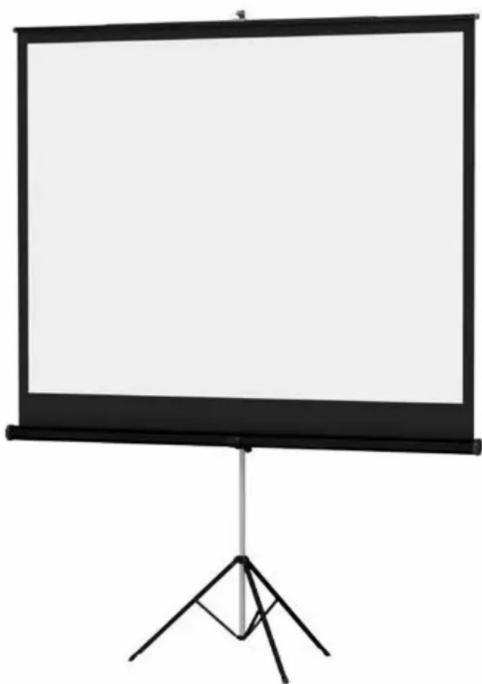
Empty projector screen mounted on a tripod stand (no text or symbols visible)INSTRUCTION BOOK FOR
Versatol®

Important Parts Of Your Da-Lite Screen
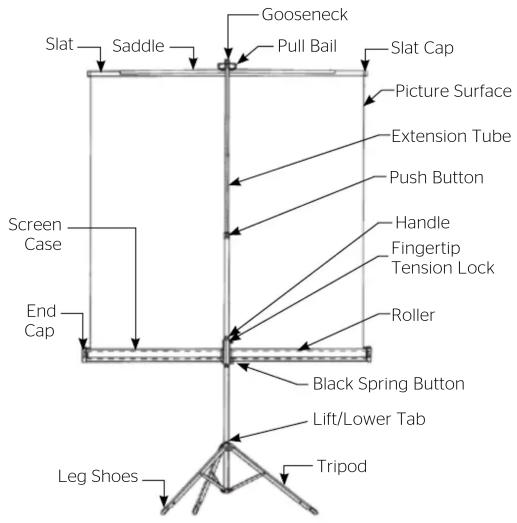
A. Pull out the black spring button and lower case.
B. Holding bottom tube, raise extension tube until it locks in desired position.
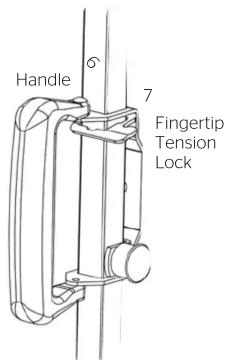
C. Press lightly down on handle until surface is taut and then lock by pressing down on the fingertip tension lock.
Figure 1 - Fingertip Tension Lock
Setting Up Your Screen
- Grasp screen handle with one hand. Hold in vertical position with tripod slightly above floor. Press tripod lift/lower tab to extend tripod legs. Set screen on floor.
- Swing case into horizontal position.
- Lift picture surface by pull bail and hook over gooseneck.
-
Release fingertip tension lock and raise case (Figure 1).
-
Grasp extension tube firmly with one hand. Press "Push" button while raising extension tube-extension tube will lock in first position. Repeat until extension tube is in desired position. Finger-tip tension lock must be released to permit extension tube to be raised to highest position.
- Press lightly down on handle until surface is taut. Lock into position by pressing down on fingertip tension lock.
Closing The Screen
- Lift fingertip tension lock to release tension (Figure 1).
- Grasp extension tube with one hand. Grasp bottom tube with other hand. Lift extension tube slightly to release tension. Press "Push" button with your thumb. Lower extension tube slowly with your hand allowing surface to reroll partially into case.
- Lift pull bail from gooseneck and slowly complete re-rolling picture surface into case.
- Raise or lower case until the black
spring button engages into hole in bottom tube.
5. Swing case into vertical position.
6. Push gooseneck into opening on case end cap until it locks.
7. Hold bottom tube with one hand and place index finger of other hand under lift tab on leg bracket. Giving a slight lift to screen with one hand, raise lift tab quickly with other hand. Note that gooseneck and extension tube are locked for safe and comfortable carrying and storage.
Protect Your Screen
Before re-rolling surface into case, examine both front and back of surface to be sure they are free of foreign matter. A Zippered Carrying Case is also available as an accessory through Da-Lite if needed.


- LIMITED ONE YEAR WARRANTY ON DA-LITE PRESENTATION PRODUCTS
- TO THE MAXIMUM EXTENT PERMITTED BY APPLICABLE LAW, THIS WARRANTY IS IN LIEU OF ALL OTHER WARRANTIES, EXPRESS OR IMPLIED, INCLUDING WARRANTIES AS TO FITNESS FOR USE AND MERCHANTABILITY. Any implied warranties of fitness for use, or merchantability, that may be mandated by statute or rule of law are limited to the one (1) year warranty period. This warranty gives you specific legal rights, and you may also have other rights, which vary from state-to-state. TO THE MAXIMUM EXTENT PERMITTED BY APPLICABLE LAW, NO LIABILITY IS ASSUMED FOR EXPENSES OR DAMAGES RESULTING FROM INTERRUPTION IN OPERATION OF EQUIPMENT, OR FOR INCIDENTAL, DIRECT, OR CONSEQUENTIAL DAMAGES OF ANY NATURE.
- IMPORTANT: THIS WARRANTY SHALL NOT BE VALID AND DA-LITE BRANDED PRODUCTS SHALL NOT BE BOUND BY THIS WARRANTY IF THE PRODUCT IS NOT OPERATED IN ACCORDANCE WITH THE DA-LITE WRITTEN INSTRUCTIONS.
- A Milestone AV Technologies Brand
- Important Parts Of Your Da-Lite Screen
- Setting Up Your Screen
- Closing The Screen
- Protect Your Screen
Marke : DA-LITE
Modell : Versatol 72261
Kategorie : Leinwand