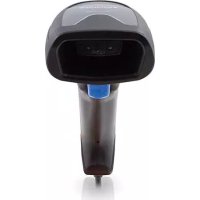
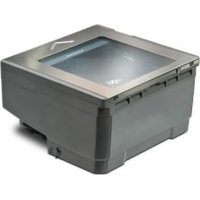
QuickScan QS1000 - Barcode-Scanner DATALOGIC - Kostenlose Bedienungsanleitung
Finden Sie kostenlos die Bedienungsanleitung des Geräts QuickScan QS1000 DATALOGIC als PDF.


Benutzerfragen zu QuickScan QS1000 DATALOGIC
0 Frage zu diesem Gerät. Beantworten Sie die, die Sie kennen, oder stellen Sie Ihre eigene.
Eine neue Frage zu diesem Gerät stellen
Laden Sie die Anleitung für Ihr Barcode-Scanner kostenlos im PDF-Format! Finden Sie Ihr Handbuch QuickScan QS1000 - DATALOGIC und nehmen Sie Ihr elektronisches Gerät wieder in die Hand. Auf dieser Seite sind alle Dokumente veröffentlicht, die für die Verwendung Ihres Geräts notwendig sind. QuickScan QS1000 von der Marke DATALOGIC.
BEDIENUNGSANLEITUNG QuickScan QS1000 DATALOGIC
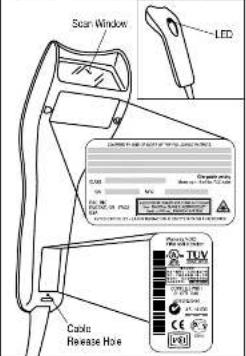
Nomenclature/Labeling
This illustration shows label placement ONLY. For actual regulatory, patent and other application information, view the labels on the products itself, or call your nearest sales or service office.
text_image
Scan Window LED Cable Release Hole TUV CE 100% 100% 100% 100% 100% 100% 100% 100% 100% 100% 100% 100% 100% 100% 100% 100% 100% 100% 100% 100% 100% 100% 100% 100% 100% 100%Figure 6
Class II
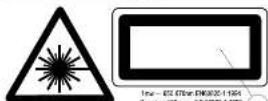
1984-052 678m. ENK020-1194
Director: 300 m. 05 6820-1193
-
LASER RADIATION — DO NOT STARE INTO DEM CLASS 2 LASER PRODUCT
-
LASERSTRAHLING — NOHT IN DEN STRAH, BLOCKER LASER KLASSE 2
-
VAROI LASERSATELYA ALA TULOTA SATEESEEN LUOKAN 2 LASERLAITE
-
RAYONNEMENT LASER — NE PAS REGARDER DANS LE FNISCENU APPAREL A' LASER DE CLASSE 2
-
LUZ LASER — [NO MIRE HACIA EL RAYO] CATEGORIA 2 PRODUCTO LASER
-
LUZ DE LASER NAO OCHE NO BAID CATEGORIA 2 PRODUTO LASER
-
RADIOZIONE LASER — NON FSSARE IL FASCIO APPARECHIO LASER DI GLASSE 2
-
VIEWING LABERETEN LING
STERRA W IN I STRALEN — KLASS 2 LASER APPARAT
1 ADVARSEL — LASERSTRIALING IKKE STIRR IKN 1 STRÄLEN — LASER KLASSE 2 PRODUKT
- ADVARSEL — LASERSTRALING — SE IKKE IND 1 STRALLEN — KCLASS 2 LASER PRODUCT
Laser Cautions
QuickScan 1000 is certified in the U.S. to confirm to the requirements of DHNSCORI 21CHR Subchapter J for Class II laser products. QuickScan 1000 covers are also certified as Class 2 laser products to the requirements of IEC 876-11938. Class 2 and Class I products are not considered to be hazardous. The QuickScan 1000 contains normally a visible Laser Cycle (MLY) at a wavelength of 650-670 micrometers. The scanner is designed so that there can be no human access to harmful levels of laser light during normal order, user maintenance, or during prescribed served operators.
Do not attempt to open or otherwise service any components in the optics cavity. Opening or servicing any part of the optics cavity by unauthorized personnel may violate laser safety regulations. The optics system is a factory only repair item.
FCC
This device complies with Part 15 of the FCC Rules. Operation is subject to the following two conditions: (1) this device may not cause harmful interference and (2) this device must accept any interference received, including interference that may cause undesired operation.
Power Supply Unit requires either a Listed Class 2 or Listed LPS power source which supplies power directly to the scanner.
Asia Pacific
PSC Hong Kong
Telephone: (502)-2-534-5210 Fax: (052)-2-521-0291
Australia
PSC Asia Pacific Plc Ltd.
North Hyde, Australia Telephone: [61] 0 (2) 9578 9998 Fax: [01] 0 (2) 9878 8285
France
PSD SAH.L LES ULS Deser, France Telephone: [33].01.84.96.71.50 Fax: 33).01.84 48.72.44
Germany
PSC GmbH Daimstadt, Germany Telephone: 49 (0) 61 51/93 55-0 Fax: 49 (0) 61 51/93 55 58
Italy
PSC Sp.N. Vincereste (M), Italy Telephone: [36] 10) 3867908.1 Fax: [36] 10) 38656245
Japan
PSC Japan K.K. Shinagawa-ku, Tokyo, Japan Telephone: 81 (0)3 3/91 6761 Fax: 81 (0)3 3/91 7656
Latin America PSC S.A. INC. Miami, Florida, USA Telephone: (305) 539-0111 Fax: (305) 539-0208
United Kingdom PSC Bar Code Ltd. Wallers, England Telephone: 44 109 1925 809610 Fax: 44 109 1925 809 506

www.pscnet.com
PSC Inc. 956 Terry Street Eugene, OR Telephone: (541) 053-5700 Fax: (541) 345-7140


QUICKSCAN
18007
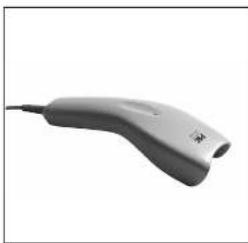
Handheld Barcode Scanner
natural_image
White handheld electronic device with a curved handle and cable, isolated on white background (no text or symbols visible)User's Guide
Installation
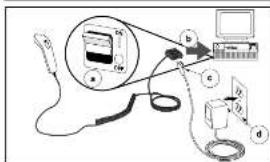
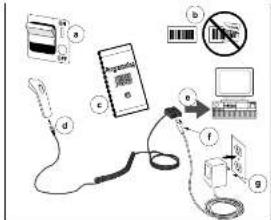
Refer to Figures 1 and 2, and follow these steps to install the science
- Train the best power off to consult the transformer your host
Terminal power cell procedure, See Figure 21. 2. Connect the electrocell, I can be to the proper portion the left terminal II figure 2b.
If your status will arrive from Off the Terminal, they are easy to
-
Connect the power cord from the AC/DC adapter at the I/T
-
Current the AC/DC drive
-
Dielectricity, DC & paper (dewallion), right side.
- Two best power on it permit the manual for your boat.
terminal for power-up procedures
- Verify operation—point the laser space at a sample barrier to solve that laser output is expected to determine the
A. The following table provides the following table: - Starting table for the best level,
- If your installation includes a QS100/ ^20 s orner shared and you
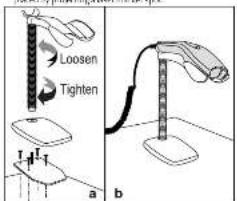
with a small number of objects, unless the objects are combined from each case as shown in Figure 1a. See the summary case to the counter with four times, then no possible the stand in place. The scans rests on the crack as shown in Figure 1b.
When the scanner is controlled in LaserSense feature automatically detects when you move a bar code label into range and clearly shows you will have the bar codes should be placed by printing a laser mechanism.
text_image
Loosen Tighten a bFigure 1
Installation - cont.
text_image
Diagram showing a device connected to a computer monitor, with labeled components including a screen, cable, and a battery.Figure 2
How to Scan
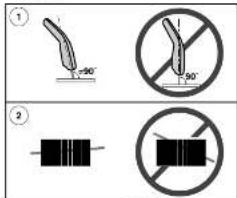
Reference Figure 3 and follow these tips to get the best scanning results:
- The carmer must be pointed at a slight angle in relatum to the
The language must go to the attreher's code.
cannot correctly record a bar code if the entire bar code is set
scanned.)
text_image
Diagram showing two types of electrical symbols: one with a 50-degree angle and another with a no-terminal symbol.Figure 3
Troubleshooting
-
We cannot set operating property, the following checks should be performed: Reference figures and 5.
-
Since the scanner can receive its power on the host computer (Power Off the Terminal - P.O.U.) or an external power supply, it will not operate without the system power on Figure 4.0 or if the external power supply has failed.
-
Cross that the bar code takes further within the quality three recognition by the scanner (Figure4). We find, especially custom bar codes can cause the scanner to not read at all. If you support the labelality is difficult, scan a known good bar code to check the scanner sound operation. Is the scanner programmed to read the bar code synonyming desired? Consult the QuickScan ICOS Summer Programming Guide (P.N.R4-2018) for many information (Figure 3).
-
Ensure that the screen is before-type bioparticles, with the best
terminal by a resulting year (One-dermarual only for the
A. Signify that the above-ful of which becomes all natural fuels:
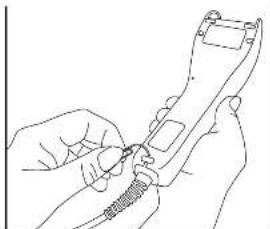
scarm handle (Figures). If your needle is written, I'm sure the 1/P cable does the scanner, insert the hp of a paper clip into the cable release hole shown in image 2. Push the clip to depress the scanner for left hand release the cable. To connect the cable, extent the cable with the connector inside the scanner blade and press it in firmly to seal and lasts assembly in place.
- Verify that the interface/cable is easily attached to a branch. (Figure 1a). Consult your technical support managers or refer to your host system manual to verify the prop: remeandum for the scanner.
b. Homesternal power supply used, exchange the power supply with a known good power supply (Figure 6). If the current available power from the bus (P.O.T.), connected to a known good host.
- The customer still does not purchase properly, contact your local supplier or FSC Customer Support Services.
1 (500) 347-2307 (US only) or
(54) 683-5700 (outside 125)
* This Programming Guide available on the
molecular energy solution

TROUBLESHOOTING - CONT.
text_image
Diagram illustrating a medical or laboratory procedure with labeled components including a syringe, test tube, and monitor setup.Figure 4
natural_image
Line drawing of hands holding a handheld device with a coiled cable (no text or symbols)Figure 5
CE Declaration of Conformity

PsCterey closures that the equipment specified below has been
Listed and found exemplant the following Directives and Standards:
Directives: EMC 99/326/EEC
Low Voltage 75/25/LEC
Standards: EN55022-1 EN60825
EN50082-1 EN60950
Equipments! Typellar code Scanning Equipment
Products: Model QuickScan 1000 ^TM
Brad West
912: President
[Unreadable]
ESC, Inc.
369 Terry Street
Eugene, CN 97102
U.S.A.

Peter Lomax
Vor Preset
L10.0.2024 Last 769 Rx Cars Ltd
48.3.1025
Watford
Heddonshire NDM 4TH