
NSG-MR7U - Fernbedienung SONY - Kostenlose Bedienungsanleitung
Finden Sie kostenlos die Bedienungsanleitung des Geräts NSG-MR7U SONY als PDF.


| Produkttyp | Fernbedienung |
| Modell | NSG-MR7U |
| Kompatibles Gerät | Netzwerk-Media-Player NSZ-GS7 |
| Abmessungen (ca.) | 152 mm × 63 mm × 22 mm |
| Gewicht (ca.) | 103 g |
| Stromversorgung | 2 × AA-Alkalibatterien (im Lieferumfang enthalten) |
| Kommunikation | Bluetooth® |
| Reichweite | ca. 10 m |
| Tasten | TV-Guide, DVR, Sprachsuche, Funktionstaste (Fn), Tastatur |
| LED-Anzeige | Blinkt während der Verbindung mit dem Player |
| Kopplung | Erforderlich; drücken Sie die CONNECT-Taste am Player |
| Gehäusematerial | Kunststoff |
| Betriebstemperatur | 0 °C bis 40 °C |
| Lagerungstemperatur | -20 °C bis 60 °C |
| Reinigung | Mit einem trockenen, weichen Tuch reinigen |
| Sicherheitshinweise | Vor Hitze, Feuchtigkeit und direkter Sonneneinstrahlung schützen. Nicht öffnen. Nur qualifiziertes Personal repariert. |
| Entsorgung | Batterien getrennt entsorgen; Elektrogeräte nicht im Hausmüll |
| Marken | Bluetooth® ist eine eingetragene Marke der Bluetooth SIG, Inc. |
| Hersteller | Sony Corporation |
| Garantie | Siehe beiliegende Garantiekarte |
Häufig gestellte Fragen - NSG-MR7U SONY
Benutzerfragen zu NSG-MR7U SONY
0 Frage zu diesem Gerät. Beantworten Sie die, die Sie kennen, oder stellen Sie Ihre eigene.
Eine neue Frage zu diesem Gerät stellen
Laden Sie die Anleitung für Ihr Fernbedienung kostenlos im PDF-Format! Finden Sie Ihr Handbuch NSG-MR7U - SONY und nehmen Sie Ihr elektronisches Gerät wieder in die Hand. Auf dieser Seite sind alle Dokumente veröffentlicht, die für die Verwendung Ihres Geräts notwendig sind. NSG-MR7U von der Marke SONY.
BEDIENUNGSANLEITUNG NSG-MR7U SONY
RemoteControl
for NSZ-GS7
Operating Instructions
NOTICE:
Network Media Player (NSZ-GS7) can only be paired with ONE remote. If you pair the player with this remote, the previously paired remote cannot be used.
Sony Customer Support
http://esupport.sony.com/ | 1-800-222-SONY Please Call Before Returning the Product to the Store
NSG-MR7U
Owner's Record
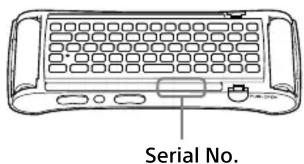
The model and serial numbers are inside the battery cover. Record the serial number in the space provided below.
Refer to them whenever you call upon your Sony dealer regarding this product.
Model No. NSG-MR7U
Serial No.
WARNING
Batteries or batteries installed apparatus shall not be exposed to excessive heat such as sunshine, fire or the like.
FCC WARNING
You are cautioned that any changes or modifications not expressly approved in this manual could void your authority to operate this equipment.
This transmitter must not be co-located or operated in conjunction with any other antenna or transmitter.
NOTE
This equipment has been tested and found to comply with the limits for a Class B digital device, pursuant to Part 15 of the FCC Rules. These limits are designed to provide reasonable protection against harmful interference in a residential installation. This equipment generates, uses, and can radiate radio frequency energy and, if not installed and used in accordance with the instructions, may cause harmful interference to radio communications.
However, there is no guarantee that interference will not occur in a particular installation. If this equipment does cause harmful interference to radio or television reception, which can be determined by turning the equipment off and on, the user is encouraged to try to correct the interference by one or more of the following measures:
• Reorient or relocate the receiving antenna.
- Increase the separation between the equipment and receiver.
- Connect the equipment into an outlet on a circuit different from that to which the receiver is connected.
- Consult the dealer or an experienced radio/TV technician for help.
FCC/IC Radiation Exposure Statement:
This equipment complies with FCC/IC radiation exposure limits set forth for an uncontrolled environment and meets the FCC radio frequency (RF) Exposure Guidelines in Supplement C to OET65 and RSS-102 of the IC radio frequency (RF) Exposure rules. This equipment has very low levels of RF energy that are deemed to comply without testing of specific absorption ratio (SAR).
This device complies with Industry Canada licence-exempt RSS standard(s).
Operation is subject to the following two conditions:
(1) this device may not cause interference, and
(2) this device must accept any interference, including interference that may cause undesired operation of the device.
This Class B digital apparatus complies with Canadian ICES-003.
Precautions
On placement
- Do not place the remote in a location near heat sources, or in a place subject to direct sunlight, excessive dust, or mechanical shock.
- Do not place the remote outdoors, in vehicles, on ships, or on other vessels.
- If the remote is brought directly from a cold to a warm location, or is placed in a very damp room, moisture may form on the outer surface and on interior of the remote.
Should this occur, the remote may not operate properly. In this case, leave the remote for about half an hour until the moisture evaporates. - Do not place the remote in a place where medical equipment is in use. It may cause a malfunction of medical instruments.
- If you use a pacemaker or other medical device, consult your physician or the manufacturer of your medical device before using the remote.
- Do not place heavy or unstable objects on the remote.
- Do not expose this apparatus to rain or moisture. Do not open the cabinet. Refer servicing to qualified personnel only. Do not place objects filled with liquids, such as vases, on the apparatus. They cause a malfunction.
- The nameplate is located inside the battery cover.
Trademark Information
- The Bluetooth® word mark and logos are registered trademarks owned by Bluetooth SIG, Inc. and any use of such marks by Sony Corporation is under license.
- Other system and product names are generally trademarks or registered trademarks of the manufacturers. ^™ and ^® marks are not indicated in this document.

Bluetooth®
Getting Started
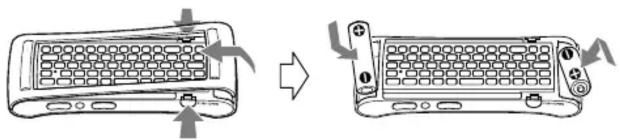
Inserting the batteries
natural_image
Diagram showing two views of a computer keyboard with scrollbars and buttons, no text or symbols presentPress PUSH OPEN. Hold the right side of the battery cover and slide it to the left. Then, insert the batteries in the correct polarity, replace the battery cover and press the right side down until it clicks.
Pairing the remote
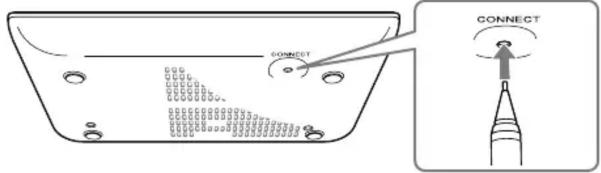
Press the CONNECT button located on the bottom of the player, with a thin, sharp object such as the point of a pen, etc., and release it within 3 seconds.
The instructions will appear on the screen. Then, follow the instructions to pair the remote.
Network Media Player
NSZ-GS7
Notes
- You need to pair this remote with the Network Media Player (NSZ-GS7) to operate the player using this remote. This remote is not paired by default. Follow the instructions above to pair this remote with the player.
- After finishing this operation, the supplied remote cannot be used with the player. Follow the instructions above to re-pair the supplied remote if you want to use it again.
- The LED on the remote continues to flash after pairing is complete because the remote is connecting with the player. This is not a malfunction. The LED on the remote flashes faster when it starts connecting with the player.
Newly added buttons

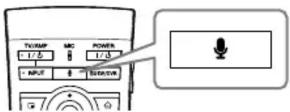
Launches the voice search function.
When speaking into the microphone, keep a distance of about 10 cm (4 inches) away from it.

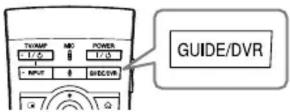
Displays the TV Program Guide or the DVR (Digital Video Recorder) screen* of the connected Set Top Box.
* Press Fn (Function) and then press this button to display the DVR (Digital Video Recorder) screen.
Troubleshooting
The remote does not work.
- Network Media Player (NSZ-GS7) can only be paired with one remote. To operate the player using another remote, pair that remote with the player. See above for instructions on how to pair a remote.
- Update the Network Media Player (NSZ-GS7) software to the latest version.
Press ⚙ (HOME) and select [All Apps] - [Settings] - [About] - [System updates] - [Check now].

- This button may not work in some applications.
- The remote with microphone needs to be paired with the player.
- Update the Network Media Player (NSZ-GS7) software to the latest version.
Press ⚙️ (HOME) and select [All Apps] - [Settings] - [About] - [System updates] - [Check now].
Cannot find on the remote.
- You can findv on the rear side (keyboard) of the remote.
- To switch to the TV program screen of the connected Set Top Box, press ⏻(HOME) and select [All Apps] - [Live TV]
Specifications
Compatible model: NSZ-GS7
Dimensions (approx.): 152 mm × 63 mm × 22 mm (6 in. × 2 1/2 in. × 7/8 in.)
Mass (approx.): 103 g (3.7 oz)
Supplied accessories: Size AA batteries* (2)
* Alkaline batteries. Do not use manganese or lithium batteries when replacing old batteries.
To launch the online "Help Guide"
The Help Guide gives you detailed information on how to use this remote and the player.
From your player
Press (HOME) and select [All Apps] - [Help Guide]

From your PC or smartphone
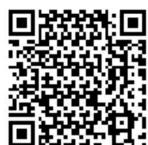
You can also access the Help Guide from a PC or smartphone. http://www.sony.net/helpguide/r/networkplayer/
- RemoteControl
- Operating Instructions
- NOTICE:
- Sony Customer Support
- Owner's Record
- WARNING
- FCC WARNING
- NOTE
- FCC/IC Radiation Exposure Statement:
- Precautions
- On placement
- Trademark Information
- Getting Started
- Inserting the batteries
- Pairing the remote
- Notes
- Newly added buttons
- Launches the voice search function.
- Troubleshooting
- The remote does not work.
- Cannot find on the remote.
- Specifications
- To launch the online "Help Guide"
- From your player
- From your PC or smartphone
Marke : SONY
Modell : NSG-MR7U
Kategorie : Fernbedienung