
CX-CD1112 - CD-Player COBY - Kostenlose Bedienungsanleitung
Finden Sie kostenlos die Bedienungsanleitung des Geräts CX-CD1112 COBY als PDF.


| Produkttyp | Tragbarer CD-Player |
| Marke | Coby |
| Modell | CX-CD1112 |
| Gewicht (nur Hauptgerät) | ca. 0,3 kg (0,66 lbs) |
| Abmessungen (ca.) | ca. 140 x 130 x 30 mm |
| Stromversorgung | 2x AA-Batterien (Alkali oder NiMH-Akku) oder Netzadapter (DC 5V) |
| Ladefunktion | Ladefunktion für NiMH-Akkus über Netzadapter (Ladezeit: ca. 15 Stunden) |
| CD-Typ | Kompatible CDs mit dem Kennzeichen Compact Disc Digital Audio |
| Wiedergabemodi | Wiederholung (Einzelfach/Alle), Zufallswiedergabe, Intro-Wiedergabe, Programmwiedergabe |
| Fernbedienung | Keine (direkte Bedienung am Gerät) |
| Anschlüsse | Kopfhöreranschluss (3,5 mm Klinke), DC-Eingang |
| Equalizer | DBBS (Dynamic Bass Boost System) – schaltbar |
| Hold-Funktion | Ja (verhindert versehentliche Bedienung) |
| Display | LCD-Anzeige (Track-Nummer, Betriebsmodus, Fehlermeldungen) |
| Kopfhörerausgang | 3,5 mm Klinkenbuchse (Stereo) |
| Laser-Schutzklasse | Klasse 1 (unsichtbare Laserstrahlung – direkte Exposition vermeiden) |
| Reinigung | Weiches, trockenes Tuch; keine chemischen Reinigungsmittel |
| Umgebungsbedingungen | Nicht hohen Temperaturen oder Feuchtigkeit aussetzen |
| Zubehör (nicht enthalten) | Netzadapter (optional), AA-Batterien (2x) / Akkus (2x) |
| Garantie | Siehe Herstellerangaben |
Häufig gestellte Fragen - CX-CD1112 COBY
Benutzerfragen zu CX-CD1112 COBY
0 Frage zu diesem Gerät. Beantworten Sie die, die Sie kennen, oder stellen Sie Ihre eigene.
Eine neue Frage zu diesem Gerät stellen
Laden Sie die Anleitung für Ihr CD-Player kostenlos im PDF-Format! Finden Sie Ihr Handbuch CX-CD1112 - COBY und nehmen Sie Ihr elektronisches Gerät wieder in die Hand. Auf dieser Seite sind alle Dokumente veröffentlicht, die für die Verwendung Ihres Geräts notwendig sind. CX-CD1112 von der Marke COBY.
BEDIENUNGSANLEITUNG CX-CD1112 COBY
COBY®
PORTABLE CD PLAYER
CX-CD1112
USER GUIDE

NAME OF PARTS
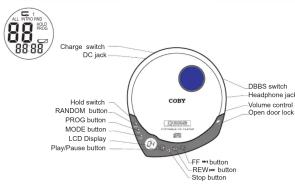
IMPORTANT
The CD mechanism and the sensitive circulatory may cause interference to a radio-tuner nearby. Do not operate this unit while operating other radio devices.
Danger This product utilizes invisible laser
radiation. Avoid direct exposure to the hours
Caution Use of controls, adjustments or procedures not listed in
this manual may result in hazardous radiation exposure.
CONCERNING COMPACT DISCS
Only compact discs identified with this mark can be used with this player.
OPERATION MANUAL
POWER ON — AUTO PLAY
(1)Press PLA)脱硫65Eb1种
on the power.
(2)LCD shows"..."and then total number of all
the tracks.
(3)LCD shows NO D18C when CD is not in the unit.
(4)LCD screen shows "Er" if the unit can not
read CD track data
Ec
(5)When CD track data has been read
Unit will start pl
n!
(1) 2017.
[Non-Text]
- Box
(1)
PAUSE
18
- Press Rall/WRMS/PEI(###)
on/off alternately.
Timer will flash on pause mode. Press PLAY/TW/PSI button again, then the
the unit displays continually and plays the
current track .
02
[Non-Text]
[Non-Text]
[Non-Text]
PLAYING MODES
LISTEN TO DESIRED TRACK
(1) Press FF 📄W button to select the
desired track#: Press PLAY/PALUSE ➤—buting to play P'para FF 🎨️ 🎩️
button to change the track # during the play
made.
[Non-Text]
20.1.1. 2017. 3.1.1
(2) During play, prints REV spiked to play previous track.
The Ground Truth image displays a single, solid horizontal line. According to Rule 2 (UNDERSCORE & LINE RULES), this is a stylistic or background line, not a placeholder underscore. Therefore, the OCR result must ignore it. The provided OCR content is "____", which consists of four underscores. This is an incorrect interpretation of the line as a placeholder, violating the rule that stylistic lines must be ignored. The OCR has hallucinated text (underscores) where none should exist based on the GT's visual context. Hence, the OCR result is inconsistent with the Ground Truth.
[Non-Text]
(1) 2014年1月1日
(3) In pause mode, press FP-### button to play the next track (or previous tr
sp in pause mode.
MOVE TO THE DESIRED SPOT
• During play, press and hold FF _→1 (or
REVIEW button to fast forward (or fast reserve) in the current track
REPEAT PLAY
(1) Press MODE button once
(2) Press MODE button twice to repeat
all tracks. INTRO SP A)
INTRO PLAY To listen to the fi
(1) Press MODE button three times and
INTRO will fl (2) Press PLAY
(2) Preload FLAT Dator No.1.
RANDOM PLAY
(1) Fiss RAND button to play Texas in random order. RND will flash.
(2) Press R, A) [R#M#E] play
(3) Press FF → button to play
(6) 全球:BANOM-1
(4) During RANDOM mode, p time can repeat one track
flash. (4) During RANDOM mode, press MODE b
times can repeat all tracks. RND and ep flash.
(5) To cancel RANDOMI made, press RAN
00
38
08
50
00
38
[Non-Text]
[Non-Text]
(1)
08
O
01
○ ●
02
(1)
02
1.
[Non-Text]
ATTERY OPERATION (BATTERIES NOT INCLUDED)
our unit operates on two(2)AA size alkaline batteries. Open the
battery compartment cover and insert the batteries in the battery compartment. Following the safety holes located inside
E QUADRÉABLE BATTERY CREPITATION
E-CHARGEABLE BATTERY OPERATION BATTERIES NOT INCLUDED)
you can operate this unit with two "AA" rechargeable batteries.
or new or exhausted rechargeable batteries, we recommend that turbines are recovered for 15 hours before use.
watches are recharged for 15 hours before date. refer to battery manufacturer's guide)
often operating the unit with AC adapter and non-rechargeable
listifies in the compartment, please make sure to set the charge" switch to "off" position to avoid damaging the unit.
Open the battery compartment cover and insert the rechargeable
batteries (2 x "AA") in the battery compartment following the polar
diagram located inside BOTH BATTERIES MUST BE RECHARGABLE NICOLETIES O
BATTERIES MAY EXPLODE OR LEAK.
Plug in AG adapter and slide the "CHARGE SWITCH" to "ON"
position to start charging USE ONLY THE AC ADAPTER SUPPLIED WITH THE UNIT FOR
CHARGING.
[Non-Text]
- Unplug the AC adapter after charging.
DO NOT CHARGE THE BATTERIES MORE THAN 24 HOURS OR MORE THAN RECOMMENDED TIME OVERCHARGING
MAY DETERIORATE THE PERFORMANCE OF THE
RECHARGEABLE BATTERIES
- If the operating time decreases drastically after the batteries
have been recharged properly, purchase new rechargeable NiCo batteries.
Do not attempt to choose attention batteries. This may cause leakage.
DO NOT attempt to recharge alkaliic dechloros. This may cause leakage and damage to the unit.
Do not mix alkaline batteries with rechargeable batteries. Do not leave the batteries on recharge for long periods of time. This can
damage the performance of the cells.
MONEY SAVING TIPS
Due to the nature of CD technology, the unit uses power even when the unit is off. To extend the battery's life, we the adopter for industrial systems
will is on. To extend the batteries file, use the adapter for motor operation or where power is supplied. Use the battery operation only when the
unit is in mobile.
HOLD FUNCTION
This HOLD function prevents any unwanted function changes during PLAY or STOP mode. Slide HOLD switch to the arrow direction (or opposite) to
turn the function ON (OFF). No other function buttons operate on HOLD mode, except DBRS function button.
Tranche, Brouge, Wacka & Tao Shun, Kua
DBBS FUNCTION The Dynamic Wave Wave
THE Dynamic Basic Tool System(Logic) will choose the low frequency(pain) response of the output. Set the Volume to low listening level and press D885 painh is the direction of the array to try this Amino CN.
Switch in the direction of the arrow to turn this direction ON.
Note: Some CD's with DBBS may exceed the bass response capacity and can cause distortion. To avoid this, do not run DBBS in high volume
Playing DIBIS in high volume may cause damage to the headphone and
more importantly, to your hearing.
CAUTION Heading rate
Having experts to serve against the service of persons that have stayed at high volume. Constant high volume use can load to hearing loss. If you
experience ringing in the ears or hearing loss, discontinue use and seek medical advice.
- 本次发行前公司股票上市地点:香港
HANDLING DISCS
To remove the disc from its storage case, press down on the center of the case and lift the disc put. Hold it carefully by the edges as shown
below.


- Insert the disc
=Gently wipe the disc using a soft cloth from the center to the outer
[Non-Text]
direction to remove dust, fingerprints or any other particles on the disc surface. Never use chemicals, such as percent sprays, anti-static
and the lab. Never use chemicals, then add more sprays, and add sprays, benzene or thinners to clean the CD. These chemicals can
damage the disc surface permanently. To multi-surface switches on O_2 have them in the same way and
• To avoid serious scratches on CO, keep them in the cases after school use. Scratches can cause the lesser pick-up skip in the future play.
+Do not place stickers or write anything on the disc.
- 作
X
(2)
m : x = 1 或 3x + 4y + 1 = 0
MAINTENANCE AND CARE
- Read the instruction manual before operating this unit
- Do not expose the unit to high temperature or humidity
Use dashed soft cloth to clean the unit. Do not use strong
- Ensure that all electrical connections
extension leads and interconnections between pieces of equipment)
are properly made and in accordance with the manufacture's instructions.
- Consult your dealer if you are ever in doubt about the installation.
operation or safety of your equipment
LOW BATTERY DETECTION
(1) is displayed when the battery voltage
reaches low.
(2) When the voltage is too low, the unit will
SOPHASCARY TEMOR
SPECIFICATIONS
CD Play Section
Frequency Response 20 – 20,000Hz Wow and Flutter Below Measure
Sampling Rate 8 times over sampling
D/A Converta
General
Maximum Output (Stereo Headphone, 15mm+15mW), (20min) Single Output 0.6V, 47kohm
Power Supply
Power Supply AC Adapter 120
DC 4.5V with DC Adapter
3V with 2 size AA-Bill Dimension
Dimension Weight
30 Seeds (Main Unit Only)
I wash, a chemical known to the state in California to Belize. (with defects) and other reproductive farms. Wash hands after use.
[Non-Text]
PRIOR 60 WARNING: Handling the molded air
[Non-Text]
[Non-Text]
[Non-Text]
[Non-Text]
[Non-Text]
[Non-Text]
[Non-Text]
[Non-Text]
[Non-Text]
[Non-Text]
[Non-Text]
[Non-Text]
[Non-Text]
[Non-Text]
[Non-Text]
[Non-Text]

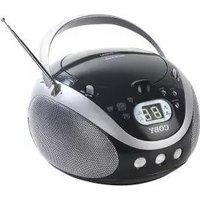
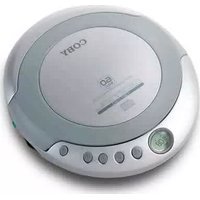


Marke : COBY
Modell : CX-CD1112
Kategorie : CD-Player